VincentHermes opened a new issue #6131:
URL: https://github.com/apache/cloudstack/issues/6131
##### ISSUE TYPE
* Bug Report
##### COMPONENT NAME
* UI / API
##### CLOUDSTACK VERSION
* 4.16.1
##### CONFIGURATION
* Advanced Zone
* SMP Primary
* NFS Secondary
* Custom Constrained Offering
** 1-32 CPU
** 1 - 512GB RAM
** 3000MHz CPU
##### OS / ENVIRONMENT
* Everything Ubuntu 20
##### SUMMARY
Starting with Version 4.16.1 I can no longer change the VM Settings of a VM
with a "custom constrained" service offering because it tries to change a fixed
cpu speed it is not supposed to change. "Fixed" offering and "custom
unconstrained" is alright. With 4.16.0 it was alright as well.
##### STEPS TO REPRODUCE
* Everything is done as admin user, not domain admin or anything
* Create Service/Compute Offering
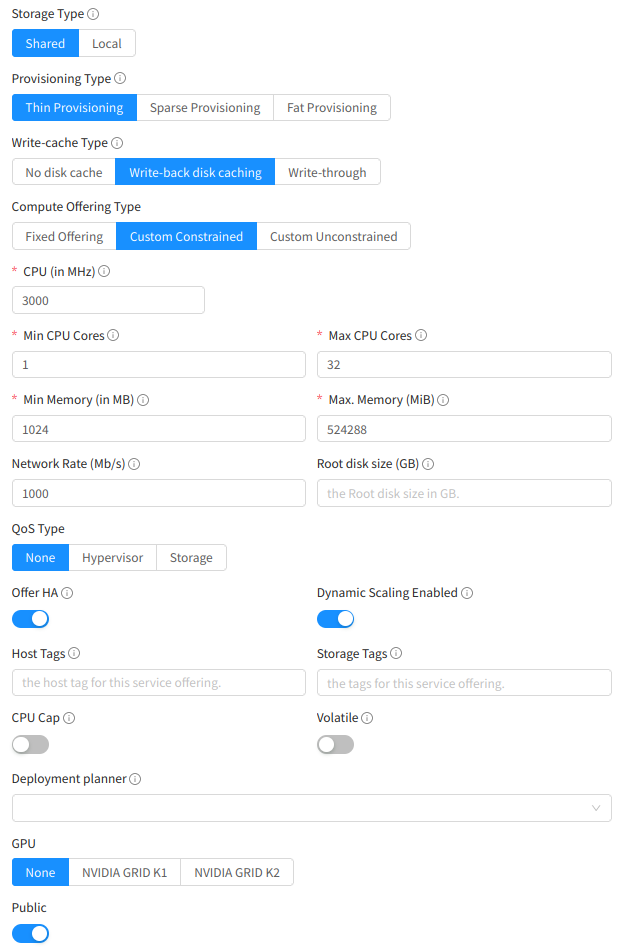
* Settings that DO NOT affect the outcome in any way:
* -- Storage Type
* -- Provisioning Type
* -- Write Cache Type
* -- CPU Constraints or frequency
* -- RAM Constraints
* -- QoS Type
* -- HA Ability
* -- Dynamic Scalability
* -- Tags
* -- CPU Cap
* -- Volatility
* -- Deployment Planner
* -- GPU
* -- Publicity
* -- Zone Setting
-----
* Create Any VM out of Any Template or with an ISO using this Service
Offering
* Try to change ANY Setting in the Settings tab (I tried to add
rootDiskController = virtio and many other things)
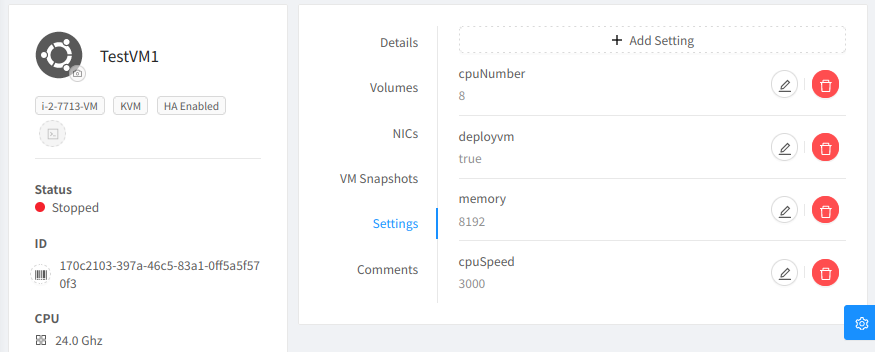
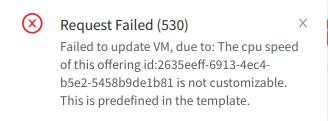
* You just cant change anything because it says
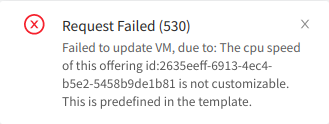
* And youre just stuck with the settings.
If you now try to "scale" to an offering which is unconstrained, it does not
ask for the cpu speed
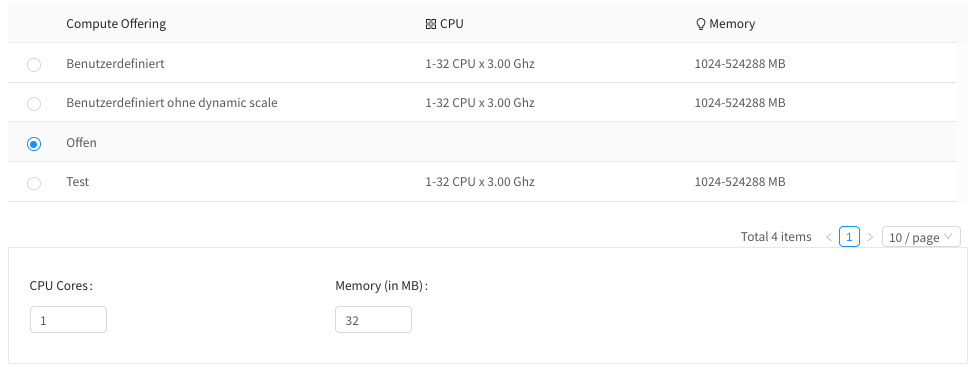
* But then it complains about it anyway

* So youre stuck with this type of offering as well. **It does not matter if
the "cpuspeed" setting is present or not.** The "cpuspeed" setting cannot be
deleted, because, as you already guessed:
* I can tell you that exactly these lines in com.cloud.vm.UserVmManagerImpl
are causing this error (line 1096)

* But my Management Server log says different:
~~~
2022-03-17 09:02:47,122 DEBUG [c.c.a.ApiServlet]
(qtp1007412025-14:ctx-373bc03f) (logid:1bde5956) ===START=== 10.5.0.1 -- GET
id=170c2103-397a-46c5-83a1-0ff5a5f570f3&details[0].cpuNumber=8&details[0].deployvm=true&details[0].memory=8192&details[0].rootDiskController=virtio&command=updateVirtualMachine&response=json
2022-03-17 09:02:47,130 DEBUG [c.c.a.ApiServer]
(qtp1007412025-14:ctx-373bc03f ctx-5fdc0bfb) (logid:1bde5956) CIDRs from which
account 'Acct[70d016f8-9bb5-11ec-a275-9a45132e31ec-admin] -- Account {"id": 2,
"name": "admin", "uuid": "70d016f8-9bb5-11ec-a275-9a45132e31ec"}' is allowed to
perform API calls: 0.0.0.0/0,::/0
2022-03-17 09:02:47,170 ERROR [c.c.a.ApiServer]
(qtp1007412025-14:ctx-373bc03f ctx-5fdc0bfb) (logid:1bde5956) unhandled
exception executing api command: [Ljava.lang.String;@7b909fb3
com.cloud.utils.exception.CloudRuntimeException: Failed to update VM, due
to: The cpu speed of this offering id:2575d1f6-fbbb-4841-bf0e-a2764b888689 is
not customizable. This is predefined in the template.
at
org.apache.cloudstack.api.command.user.vm.UpdateVMCmd.execute(UpdateVMCmd.java:271)
at com.cloud.api.ApiDispatcher.dispatch(ApiDispatcher.java:156)
at com.cloud.api.ApiServer.queueCommand(ApiServer.java:772)
at com.cloud.api.ApiServer.handleRequest(ApiServer.java:596)
at com.cloud.api.ApiServlet.processRequestInContext(ApiServlet.java:321)
at com.cloud.api.ApiServlet$1.run(ApiServlet.java:134)
at
org.apache.cloudstack.managed.context.impl.DefaultManagedContext$1.call(DefaultManagedContext.java:55)
at
org.apache.cloudstack.managed.context.impl.DefaultManagedContext.callWithContext(DefaultManagedContext.java:102)
at
org.apache.cloudstack.managed.context.impl.DefaultManagedContext.runWithContext(DefaultManagedContext.java:52)
at com.cloud.api.ApiServlet.processRequest(ApiServlet.java:131)
at com.cloud.api.ApiServlet.doGet(ApiServlet.java:93)
at javax.servlet.http.HttpServlet.service(HttpServlet.java:645)
at javax.servlet.http.HttpServlet.service(HttpServlet.java:750)
at
org.eclipse.jetty.servlet.ServletHolder$NotAsync.service(ServletHolder.java:1450)
at
org.eclipse.jetty.servlet.ServletHolder.handle(ServletHolder.java:799)
at
org.eclipse.jetty.servlet.ServletHandler.doHandle(ServletHandler.java:550)
at
org.eclipse.jetty.server.handler.ScopedHandler.handle(ScopedHandler.java:143)
at
org.eclipse.jetty.security.SecurityHandler.handle(SecurityHandler.java:600)
at
org.eclipse.jetty.server.handler.HandlerWrapper.handle(HandlerWrapper.java:127)
at
org.eclipse.jetty.server.handler.ScopedHandler.nextHandle(ScopedHandler.java:235)
at
org.eclipse.jetty.server.session.SessionHandler.doHandle(SessionHandler.java:1624)
at
org.eclipse.jetty.server.handler.ScopedHandler.nextHandle(ScopedHandler.java:233)
at
org.eclipse.jetty.server.handler.ContextHandler.doHandle(ContextHandler.java:1434)
at
org.eclipse.jetty.server.handler.ScopedHandler.nextScope(ScopedHandler.java:188)
at
org.eclipse.jetty.servlet.ServletHandler.doScope(ServletHandler.java:501)
at
org.eclipse.jetty.server.session.SessionHandler.doScope(SessionHandler.java:1594)
at
org.eclipse.jetty.server.handler.ScopedHandler.nextScope(ScopedHandler.java:186)
at
org.eclipse.jetty.server.handler.ContextHandler.doScope(ContextHandler.java:1349)
at
org.eclipse.jetty.server.handler.ScopedHandler.handle(ScopedHandler.java:141)
at
org.eclipse.jetty.server.handler.gzip.GzipHandler.handle(GzipHandler.java:763)
at
org.eclipse.jetty.server.handler.HandlerCollection.handle(HandlerCollection.java:146)
at
org.eclipse.jetty.server.handler.HandlerWrapper.handle(HandlerWrapper.java:127)
at org.eclipse.jetty.server.Server.handle(Server.java:516)
at
org.eclipse.jetty.server.HttpChannel.lambda$handle$1(HttpChannel.java:400)
at org.eclipse.jetty.server.HttpChannel.dispatch(HttpChannel.java:645)
at org.eclipse.jetty.server.HttpChannel.handle(HttpChannel.java:392)
at
org.eclipse.jetty.server.HttpConnection.onFillable(HttpConnection.java:277)
at
org.eclipse.jetty.io.AbstractConnection$ReadCallback.succeeded(AbstractConnection.java:311)
at org.eclipse.jetty.io.FillInterest.fillable(FillInterest.java:105)
at org.eclipse.jetty.io.ChannelEndPoint$1.run(ChannelEndPoint.java:104)
at
org.eclipse.jetty.util.thread.strategy.EatWhatYouKill.runTask(EatWhatYouKill.java:338)
at
org.eclipse.jetty.util.thread.strategy.EatWhatYouKill.doProduce(EatWhatYouKill.java:315)
at
org.eclipse.jetty.util.thread.strategy.EatWhatYouKill.tryProduce(EatWhatYouKill.java:173)
at
org.eclipse.jetty.util.thread.strategy.EatWhatYouKill.run(EatWhatYouKill.java:131)
at
org.eclipse.jetty.util.thread.ReservedThreadExecutor$ReservedThread.run(ReservedThreadExecutor.java:409)
at
org.eclipse.jetty.util.thread.QueuedThreadPool.runJob(QueuedThreadPool.java:883)
at
org.eclipse.jetty.util.thread.QueuedThreadPool$Runner.run(QueuedThreadPool.java:1034)
at java.base/java.lang.Thread.run(Thread.java:829)
Caused by: com.cloud.exception.InvalidParameterValueException: The cpu speed
of this offering id:2575d1f6-fbbb-4841-bf0e-a2764b888689 is not customizable.
This is predefined in the template.
at
com.cloud.vm.UserVmManagerImpl.validateCustomParameters(UserVmManagerImpl.java:1208)
at
com.cloud.vm.UserVmManagerImpl.verifyVmLimits(UserVmManagerImpl.java:2654)
at
com.cloud.vm.UserVmManagerImpl.updateVirtualMachine(UserVmManagerImpl.java:2760)
... 63 more
2022-03-17 09:02:47,175 DEBUG [c.c.a.ApiServlet]
(qtp1007412025-14:ctx-373bc03f ctx-5fdc0bfb) (logid:1bde5956) ===END===
10.5.0.1 -- GET
id=170c2103-397a-46c5-83a1-0ff5a5f570f3&details[0].cpuNumber=8&details[0].deployvm=true&details[0].memory=8192&details[0].rootDiskController=virtio&command=updateVirtualMachine&response=json
~~~
* He says hes complaining at
"com.cloud.vm.UserVmManagerImpl.updateVirtualMachine(UserVmManagerImpl.java:2760)"
which has nothing to do with cpu speed.
##### EXPECTED RESULTS
* Change the settings.
* If there is a fixed cpu speed (which is always the case with custom
constrained offerings) then just leave it or only update what is MEANT to be
updated.
##### ACTUAL RESULTS
* Settings are stuck as you can not change anything because of the "you
cannot change cpu speed" error.
--
This is an automated message from the Apache Git Service.
To respond to the message, please log on to GitHub and use the
URL above to go to the specific comment.
To unsubscribe, e-mail: [email protected]
For queries about this service, please contact Infrastructure at:
[email protected]







