gioporta opened a new issue, #10473:
URL: https://github.com/apache/cloudstack/issues/10473
### problem When attempting to use the "Create and Add Volume" function in the GUI on a newly created instance that has not yet been started, the list of disk offerings returns "No Data". The list refuses to populate until the instance has been started. 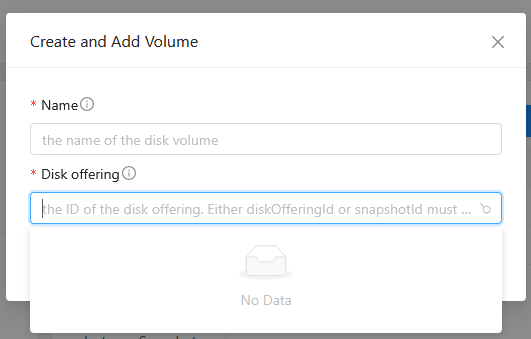 I checked the API traffic and observed that when the browser sends the API request for listDiskOfferings, the API response returns with status code 530. It appears that the server is unable to determine suitable disk offerings since the instance is not assigned to any cluster yet. Management server logs show the following error: ``` 2025-02-26 10:25:14,140 DEBUG [c.c.v.ClusteredVirtualMachineManagerImpl] (qtp765242091-3745:[ctx-5a2e6448, ctx-7473445a]) (logid:d7af02c4) host id is null, using last host id null 2025-02-26 10:25:14,141 ERROR [c.c.a.ApiServer] (qtp765242091-3745:[ctx-5a2e6448, ctx-7473445a]) (logid:d7af02c4) unhandled exception executing api command: [Ljava.lang.String;@4c73bab7 java.lang.NullPointerException: Cannot invoke "com.cloud.org.Cluster.getPodId()" because "cluster" is null at com.cloud.vm.VirtualMachineManagerImpl.getDiskOfferingSuitabilityForVm(VirtualMachineManagerImpl.java:6083) at com.cloud.api.ApiDBUtils.newDiskOfferingResponses(ApiDBUtils.java:2135) at com.cloud.api.query.ViewResponseHelper.createDiskOfferingResponses(ViewResponseHelper.java:558) at com.cloud.api.query.QueryManagerImpl.searchForDiskOfferings(QueryManagerImpl.java:3396) at org.apache.cloudstack.api.command.user.offering.ListDiskOfferingsCmd.execute(ListDiskOfferingsCmd.java:134) at com.cloud.api.ApiDispatcher.dispatch(ApiDispatcher.java:173) at com.cloud.api.ApiServer.queueCommand(ApiServer.java:831) at com.cloud.api.ApiServer.handleRequest(ApiServer.java:652) at com.cloud.api.ApiServlet.processRequestInContext(ApiServlet.java:354) at com.cloud.api.ApiServlet$1.run(ApiServlet.java:157) at org.apache.cloudstack.managed.context.impl.DefaultManagedContext$1.call(DefaultManagedContext.java:56) at org.apache.cloudstack.managed.context.impl.DefaultManagedContext.callWithContext(DefaultManagedContext.java:103) at org.apache.cloudstack.managed.context.impl.DefaultManagedContext.runWithContext(DefaultManagedContext.java:53) at com.cloud.api.ApiServlet.processRequest(ApiServlet.java:154) at com.cloud.api.ApiServlet.doGet(ApiServlet.java:108) at javax.servlet.http.HttpServlet.service(HttpServlet.java:645) at javax.servlet.http.HttpServlet.service(HttpServlet.java:750) at org.eclipse.jetty.servlet.ServletHolder$NotAsync.service(ServletHolder.java:1450) at org.eclipse.jetty.servlet.ServletHolder.handle(ServletHolder.java:799) at org.eclipse.jetty.servlet.ServletHandler.doHandle(ServletHandler.java:554) at org.eclipse.jetty.server.handler.ScopedHandler.handle(ScopedHandler.java:143) at org.eclipse.jetty.security.SecurityHandler.handle(SecurityHandler.java:600) at org.eclipse.jetty.server.handler.HandlerWrapper.handle(HandlerWrapper.java:127) at org.eclipse.jetty.server.handler.ScopedHandler.nextHandle(ScopedHandler.java:235) at org.eclipse.jetty.server.session.SessionHandler.doHandle(SessionHandler.java:1624) at org.eclipse.jetty.server.handler.ScopedHandler.nextHandle(ScopedHandler.java:233) at org.eclipse.jetty.server.handler.ContextHandler.doHandle(ContextHandler.java:1440) at org.eclipse.jetty.server.handler.ScopedHandler.nextScope(ScopedHandler.java:188) at org.eclipse.jetty.servlet.ServletHandler.doScope(ServletHandler.java:505) at org.eclipse.jetty.server.session.SessionHandler.doScope(SessionHandler.java:1594) at org.eclipse.jetty.server.handler.ScopedHandler.nextScope(ScopedHandler.java:186) at org.eclipse.jetty.server.handler.ContextHandler.doScope(ContextHandler.java:1355) at org.eclipse.jetty.server.handler.ScopedHandler.handle(ScopedHandler.java:141) at org.eclipse.jetty.server.handler.gzip.GzipHandler.handle(GzipHandler.java:772) at org.eclipse.jetty.server.handler.HandlerCollection.handle(HandlerCollection.java:146) at org.eclipse.jetty.server.handler.HandlerWrapper.handle(HandlerWrapper.java:127) at org.eclipse.jetty.server.Server.handle(Server.java:516) at org.eclipse.jetty.server.HttpChannel.lambda$handle$1(HttpChannel.java:487) at org.eclipse.jetty.server.HttpChannel.dispatch(HttpChannel.java:732) at org.eclipse.jetty.server.HttpChannel.handle(HttpChannel.java:479) at org.eclipse.jetty.server.HttpConnection.onFillable(HttpConnection.java:277) at org.eclipse.jetty.io.AbstractConnection$ReadCallback.succeeded(AbstractConnection.java:311) at org.eclipse.jetty.io.FillInterest.fillable(FillInterest.java:105) at org.eclipse.jetty.io.ChannelEndPoint$1.run(ChannelEndPoint.java:104) at org.eclipse.jetty.util.thread.strategy.EatWhatYouKill.runTask(EatWhatYouKill.java:338) at org.eclipse.jetty.util.thread.strategy.EatWhatYouKill.doProduce(EatWhatYouKill.java:315) at org.eclipse.jetty.util.thread.strategy.EatWhatYouKill.tryProduce(EatWhatYouKill.java:173) at org.eclipse.jetty.util.thread.strategy.EatWhatYouKill.run(EatWhatYouKill.java:131) at org.eclipse.jetty.util.thread.ReservedThreadExecutor$ReservedThread.run(ReservedThreadExecutor.java:409) at org.eclipse.jetty.util.thread.QueuedThreadPool.runJob(QueuedThreadPool.java:883) at org.eclipse.jetty.util.thread.QueuedThreadPool$Runner.run(QueuedThreadPool.java:1034) at java.base/java.lang.Thread.run(Thread.java:840) 2025-02-26 10:25:14,142 INFO [c.c.a.ApiServlet] (qtp765242091-3745:[ctx-5a2e6448, ctx-7473445a]) (logid:d7af02c4) (userId=7 accountId=6 sessionId=node0y93j5u8t26iw1ctmp5juhn0em11) 0:0:0:0:0:0:0:1 -- GET zoneid=0b80eced-123e-4c3a-9b11-e37228729f38&listall=true&virtualmachineid=35291f22-eefb-48bb-9422-ecfa475ceb49&projectid=6c4bb34f-5e0b-4a8a-996e-6ef7b8921fff&command=listDiskOfferings&response=json&sessionkey=1UpayEKp48brmQDI30nQfch7jVg 530 Internal error executing command, please contact your system administrator ``` ### versions CloudStack Management Server 4.20.0.0-1 ### The steps to reproduce the bug 1. Create a new instance, ensuring that the "Start instance" option is unchecked 2. Edit the instance, go to the Volumes tab, and click "Create and Add Volume" 3. Observe that the list of disk offerings shows "No Data" ### What to do about it? We should be able to create/add volumes on a newly created instance. The suitability check in the listDiskOfferings API needs to be fixed for this to happen. -- This is an automated message from the Apache Git Service. To respond to the message, please log on to GitHub and use the URL above to go to the specific comment. To unsubscribe, e-mail: [email protected] For queries about this service, please contact Infrastructure at: [email protected]
