DagSonsteboSB opened a new issue #3032: Impossible to edit domain specific LDAP settings in GUI URL: https://github.com/apache/cloudstack/issues/3032 ##### ISSUE TYPE * Bug Report ##### COMPONENT NAME * CloudStack GUI ##### CLOUDSTACK VERSION * 4.11.x ##### CONFIGURATION * LDAP configuration on subdomain ##### OS / ENVIRONMENT * OS independent * Browser independent (tried in Safari and Chrome) ##### SUMMARY 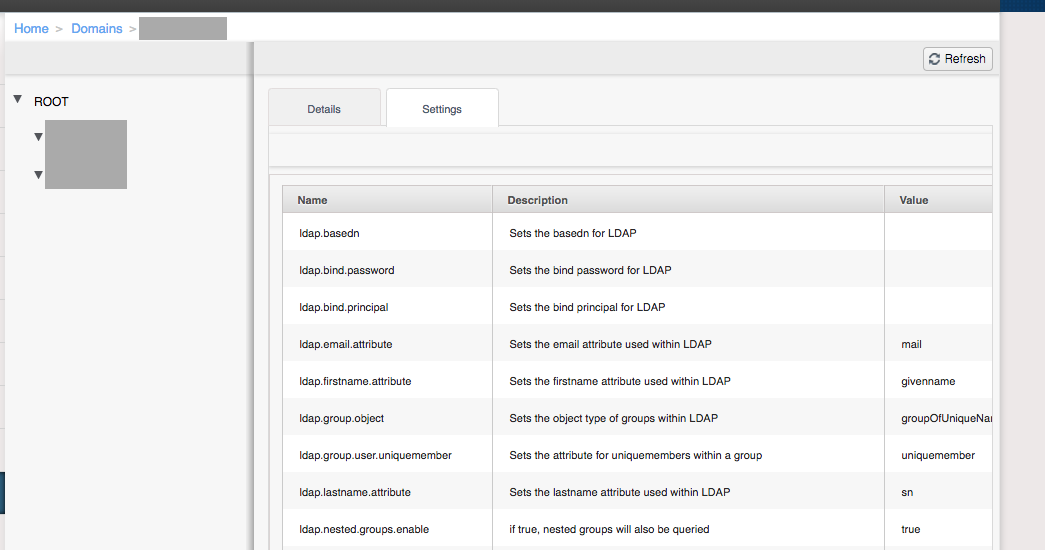 * On the domain specific settings screen it is impossible to get to the rightmost actions column with edit button. You can not scroll to it, you can not resize the screen to get to it, you can not use arrow keys to scroll to it. * Page source shows the column being there. * In addition resizing columns does not work at all. You can grab the column anchor and try to drag them out but you have no control over the resize. Even after releasing the mouse button the columns will randomly resize back and forth. Please note at no point will the random resize show the actions column. ##### STEPS TO REPRODUCE * Create domain * Click the settings column and try to access the actions column. <!-- You can also paste gist.github.com links for larger files --> ##### EXPECTED RESULTS * Ability to edit domain settings. ##### ACTUAL RESULTS * Domain settings have to be updated through the API * Impossible to edit the settings through GUI
----------------------------------------------------------------
This is an automated message from the Apache Git Service.
To respond to the message, please log on GitHub and use the
URL above to go to the specific comment.

For queries about this service, please contact Infrastructure at:
[email protected]


With regards,
Apache Git Services