nvazquez opened a new pull request #3271: [WIP: DO NOT MERGE] [Vmware] Allow configuring appliances on the VM instance wizard when OVF properties are available URL: https://github.com/apache/cloudstack/pull/3271 ## Description Problem: In Vmware, appliances that have options that are required to be answered before deployments are configurable through vSphere vCenter user interface but it is not possible from the CloudStack user interface. Root cause: CloudStack does not handle vApp configuration options during deployments if the appliance contains configurable options. These configurations are mandatory for VM deployment from the appliance on Vmware vSphere vCenter. As shown in the image below, Vmware detects there are mandatory configurations that the administrator must set before deploy the VM from the appliance (in red on the image below):  Solution: - On template registration, after it is downloaded to secondary storage, the OVF file is examined and OVF properties are extracted from the file when available. - OVF properties extracted from templates after being downloaded to secondary storage are stored on the new table 'template_ovf_properties'. - A new optional section is added to the VM deployment wizard in the UI: - If the selected template does not contain OVF properties, then the optional section is not displayed on the wizard. - If the selected template contains OVF properties, then the optional new section is displayed. Each OVF property is displayed and the user must complete every property before proceeding to the next section. - If any configuration property is empty, then a dialog is displayed indicating that there are empty properties which must be set before proceeding 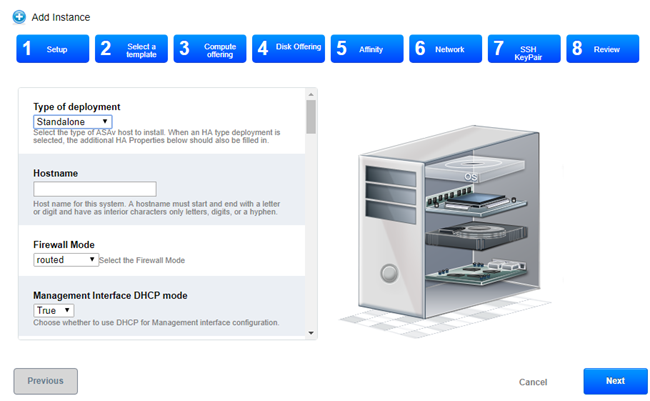 - The specific OVF properties set on deployment are stored on the 'user_vm_details' table with the prefix: 'ovfproperties-'. - The VM is configured with the vApp configuration section containing the values that the user provided on the wizard. ## Types of changes <!--- What types of changes does your code introduce? Put an `x` in all the boxes that apply: --> - [ ] Breaking change (fix or feature that would cause existing functionality to change) - [x] New feature (non-breaking change which adds functionality) - [ ] Bug fix (non-breaking change which fixes an issue) - [ ] Enhancement (improves an existing feature and functionality) - [ ] Cleanup (Code refactoring and cleanup, that may add test cases) ## Screenshots (if appropriate): 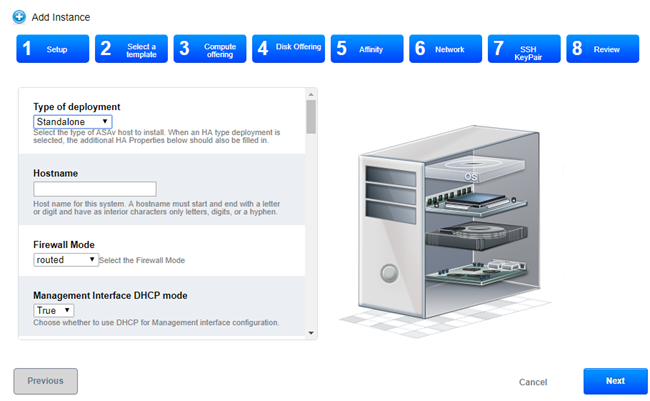 A new tab is displayed when a template contains OVF properties, displaying each properties' label, description and value 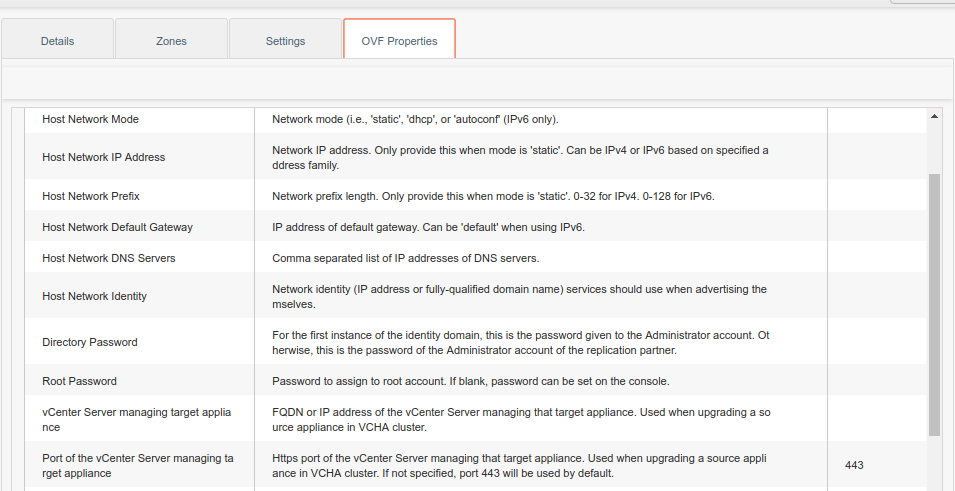 ## How Has This Been Tested? - Register OVF/OVA template of an appliance containing OVF properties - Deploy VM from this template - Answer the configuration questions - Deploy VM - Observe that vApp configuration section is populated with the values passed
----------------------------------------------------------------
This is an automated message from the Apache Git Service.
To respond to the message, please log on to GitHub and use the
URL above to go to the specific comment.

For queries about this service, please contact Infrastructure at:
[email protected]


With regards,
Apache Git Services




