Added: cordova/site/www/_posts/2014-11-18-cordova-perf.md
URL:
http://svn.apache.org/viewvc/cordova/site/www/_posts/2014-11-18-cordova-perf.md?rev=1640422&view=auto
==============================================================================
--- cordova/site/www/_posts/2014-11-18-cordova-perf.md (added)
+++ cordova/site/www/_posts/2014-11-18-cordova-perf.md Tue Nov 18 20:42:35 2014
@@ -0,0 +1,81 @@
+---
+layout: post
+author:
+ name: Parashuram
+ url: https://twitter.com/nparashuram
+title: "Automating Performance Audits for Cordova apps"
+categories: blog
+tags: tools
+---
+
+While developing mobile apps with Cordova, performance is a common concern
many developers have. Though recent WebView improvements have made smooth
experiences easy to achieve, it is always important to watch out for code in
our apps that may make the app [janky](http://jankfree.org).
+
+# Measuring Performance
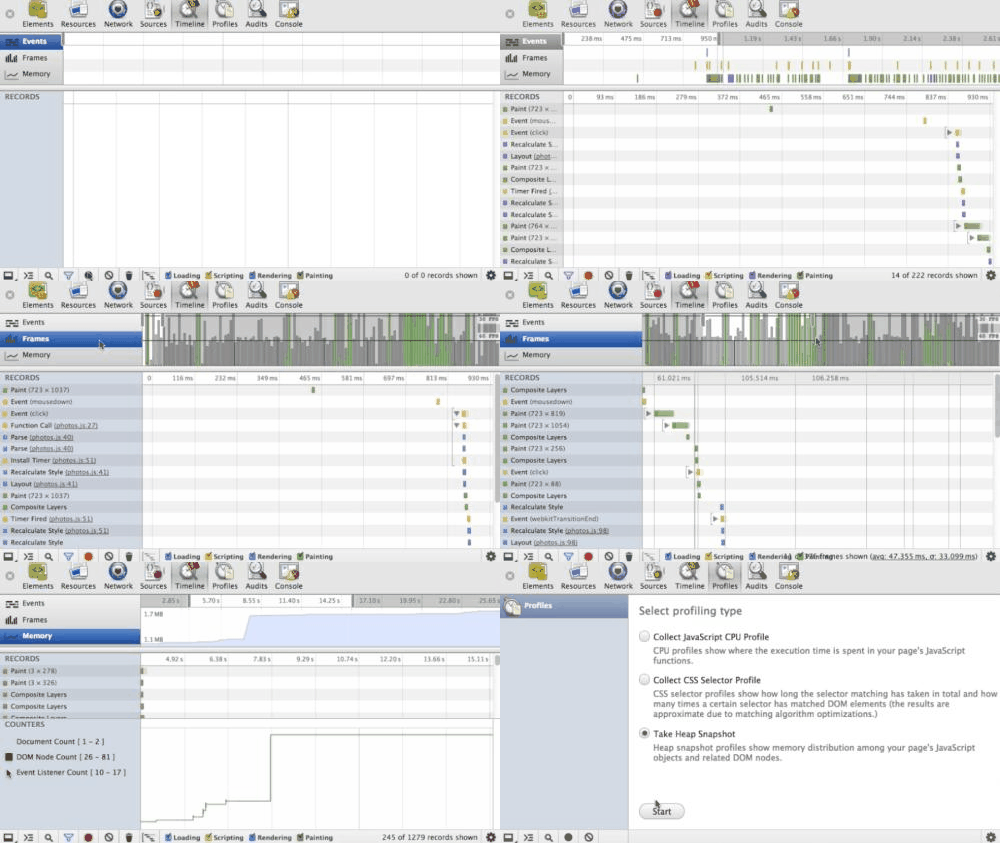
+The latest versions of Android and iOS WebViews can connect to and leverage
developer tools in browsers for profiling rendering performance of apps.
Developer tools provide insights into details like frames rates, repaints,
layouts, etc.
+
+
+
+Articles (like
[this](http://aerotwist.com/blog/my-performance-audit-workflow/) and
[this](http://calendar.perfplanet.com/2013/the-runtime-performance-checklist/))
articulate the typical workflow for auditing performance of webpages. Similar
principles can be applied to apps too.
+<!--more-->
+# Automating Performance measurements
+With rapid development and release cycles of apps, it becomes hard to do
regular performance audits. Automating the process with tools would ensure that
we have a handle on the performance of the app.
+
+[browser-perf](http://npmjs.org/package/browser-perf) is a NodeJS based tool
picks up data from browser developer tools and converts them to key performance
indicators. It is based on Chromium's performance test suite called
[telemetry](http://www.chromium.org/developers/telemetry) and supports iOS and
Android based Cordova apps. All metrics are recorded while mimicking typical
user interactions.
+
+## Testing iOS Apps
+To start testing your Cordova app for iOS, you would need to `npm install`
[Appium](http://appium.io/) and [set it
up](http://appium.io/getting-started.html?lang=en). Appium is a tool to
automate your app and emulate user interactions like clicking buttons or typing
in the app. Ensure that the app is built at least once and the emulator is
running.
+
+You can then use the following NodeJS snippet to run a simple test. In the
example, a value is typed entered into a text box, and a button is clicked.
+
+ var browserPerf = require('browser-perf');
+ browserPerf(undefined, function(err, res) {
+ if (err) {
+ console.log('An error occured');
+ } else {
+ console.log('Result is ', res);
+ }
+ }, {
+ selenium: "http://localhost:4723/wd/hub";,
+ browsers: [{
+ platformName: "iOS",
+ platformVersion: "8.0",
+ deviceName: "iPhone Simulator",
+ app: "~/cordovaapp/platforms/ios/build/emulator/HelloCordova.app",
+ bundleId: "io.cordova.hellocordova",
+ autoWebview: true
+ }],
+ log: console.log.bind(console),
+ actions: [
+ function(browser) {
+ return browser.elementById('count').then(function(el) {
+ el.type(1000);
+ }).then(function() {
+ return browser.elementById('checkout');
+ }).then(function(el) {
+ return el.click();
+ });
+ }
+ ]
+ });
+
+Additional user interactions can be used instead of typing and clicking by
following the guide on [this
page](https://github.com/axemclion/browser-perf/wiki/Node-Module---API#actions).
+
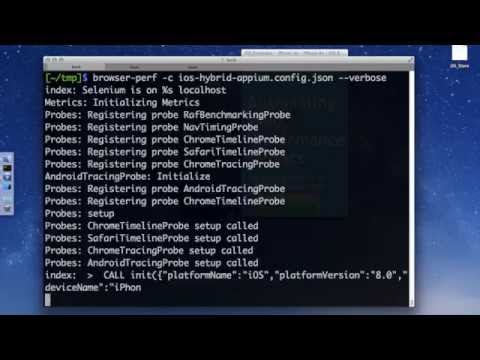
+The [video below](https://www.youtube.com/watch?v=TG_eTe_H-s4) illustrates the
steps. Note that in the video, the config file does not specify any action.
Hence, the default action scrolls the page and records the metrics.
+
+[](https://www.youtube.com/watch?v=TG_eTe_H-s4)
+
+## Testing Android Apps
+Testing Android apps is very similar to testing iOS Apps. The only difference
would be the use of
[ChromeDriver](https://sites.google.com/a/chromium.org/chromedriver/) instead
of Appium. Consequently, the configuration would look something like
[this](https://github.com/axemclion/browser-perf/blob/master/test/res/android-hybrid.config.json).
+
+Additional details about setting up the test environment can be found
[here](https://github.com/axemclion/browser-perf/wiki/Setup-Instructions#testing-mobile-cordova-webviewhybrid-applications),
with reference for browser-perf in the [wiki
pages](https://github.com/axemclion/browser-perf/wiki/Node-Module---API).
+
+# Finishing touches
+browser-perf can record a plethora of metrics ranging from frame rates, to
count of expensive paints or expensive events that could cause jank. Each of
these metrics indicates how a CSS transform or an onscroll handler may have
changed the performance of the app.
+Recording this data over time can give better insight into how each code
change affects the smooth experience.
+The `res` object in browser-perf callback from the example snippet above can
be saved to a database and graphed. For example,
[Perfjankie](http://npmjs.org/package/perfjankie) works on top of browser-perf,
stores the results in a CouchDB database, and displays the results
+
+# Summary
+In this article, we saw how to measure the rendering performance of Cordova
apps. With the tools described, you can ensure that your apps are just as good
as native apps are supposed to be.
+
+> If you would like to run this for your Cordova app, please [contact
me](http://twitter.com/nparashuram), and I would be glad to help you to get
started or check out this [related blog
post](http://blog.nparashuram.com/2014/10/measuring-rendering-performance-metrics.html).
+
Propchange: cordova/site/www/_posts/2014-11-18-cordova-perf.md
------------------------------------------------------------------------------
    svn:executable = *


---------------------------------------------------------------------
To unsubscribe, e-mail: [email protected]
For additional commands, e-mail: [email protected]


