This is an automated email from the ASF dual-hosted git repository.

hez pushed a commit to branch update-webhook-plugin-doc
in repository https://gitbox.apache.org/repos/asf/incubator-devlake-website.git
commit 2d247e8383bb804aa53e468fe3112ea92a0fa15c Author: Hezheng Yin <[email protected]> AuthorDate: Mon Oct 10 18:36:57 2022 -0700 docs: simplify summary section and rename CircleCi to CircleCI --- docs/Plugins/webhook.md | 23 +++++++++-------------- 1 file changed, 9 insertions(+), 14 deletions(-) diff --git a/docs/Plugins/webhook.md b/docs/Plugins/webhook.md index 2a07e8d84..17627796e 100644 --- a/docs/Plugins/webhook.md +++ b/docs/Plugins/webhook.md @@ -4,21 +4,16 @@ description: > Webhook Plugin --- -## Summary +## Overview -[Webhooks](https://en.wikipedia.org/wiki/Webhook) are user-defined HTTP callbacks that can be used for causing an event on one site that will trigger certain behavior on another site. They can be triggered in your deployment and bug recording systems, such as build shells in Jenkins or Jira. +An Incoming Webhook allows users to actively push data to DevLake. It's particularly useful when DevLake is missing the plugin that pulls data from your DevOps tool. -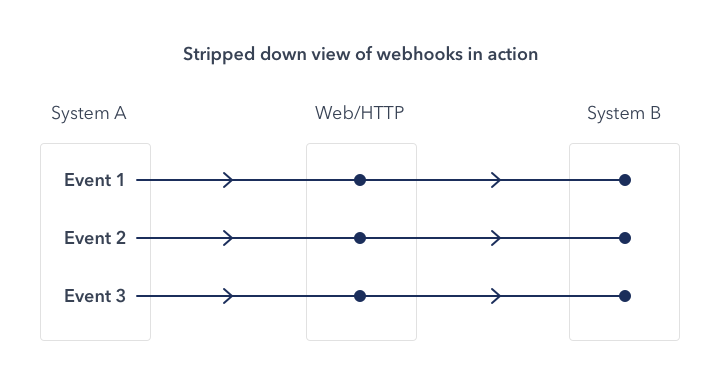 -(Image from the Internet) +When you create an Incoming Webhook within DevLake, DevLake generates a unique URL. You can post JSON payloads to this URL to push data to DevLake. -While using webhooks in DevLake, your systems play the roles of system A as shown in the above image, and Apache DevLake as system B. You can use webhooks to: +As of v0.14.0, users can push incidents and deployments data required by DORA metrics to DevLake via Incoming Webhook. -* record bugs or incidents when DevLake cannot collect data from issue applications directly. -* detect code deployments by using custom deploy-time measurement +## Creating webhooks in DevLake -DevLake does not limit the number of webhook requests. **But be aware** that your Database or other servers may not handle unlimited requests. - -## Configuration Configuring webhooks via the Config UI. First, you can create a webhook connection from the Integration page. @@ -172,10 +167,10 @@ curl http://127.0.0.1:4000/api/plugins/webhook/1/cicd_pipeline/A123/finish -X 'P Read more in Swagger: http://localhost:4000/api/swagger/index.html#/plugins%2Fwebhook/post_plugins_webhook__connectionId_issues. -### Sample Config in CircleCi +### Sample Config in CircleCI -First, we need to know that CircleCi has three entities: pipeline, workflow, and job, and the entity workflow is the entity task in DevLake. -Second, we must get pipelines and task data from the build machine. In CircleCi, the data define in env, and we can get it by $CIRCLE_WORKFLOW_JOB_ID and so on. So we can write config to send task data in each workflow and send the close pipeline request in the last workflow. +First, we need to know that CircleCI has three entities: pipeline, workflow, and job, and the entity workflow is the entity task in DevLake. +Second, we must get pipelines and task data from the build machine. In CircleCI, the data define in env, and we can get it by $CIRCLE_WORKFLOW_JOB_ID and so on. So we can write config to send task data in each workflow and send the close pipeline request in the last workflow. ```yaml version: 2.1 @@ -220,7 +215,7 @@ workflows: -Actually, we finish the webhook in prev step. If we want to do more, the config in CircleCi is as fellow. It will call webhook before tasks start and after tasks fail. +Actually, we finish the webhook in prev step. If we want to do more, the config in CircleCI is as fellow. It will call webhook before tasks start and after tasks fail. ```yaml # Use the latest 2.1 version of CircleCI pipeline process engine. # See: https://circleci.com/docs/2.0/configuration-reference

