This is an automated email from the ASF dual-hosted git repository.

zky pushed a commit to branch main
in repository https://gitbox.apache.org/repos/asf/incubator-devlake-website.git
commit 4dae3ef0e18b41b03d45548e13b869ac62b7fed7 Author: linyh <[email protected]> AuthorDate: Wed Oct 12 11:15:38 2022 +0800 doc: fix for review --- docs/Plugins/webhook.md | 115 ++++++++++++++++++++++++------------------------ 1 file changed, 58 insertions(+), 57 deletions(-) diff --git a/docs/Plugins/webhook.md b/docs/Plugins/webhook.md index b74679d71..7fde167c6 100644 --- a/docs/Plugins/webhook.md +++ b/docs/Plugins/webhook.md @@ -10,17 +10,17 @@ An Incoming Webhook allows users to actively push data to DevLake. It's particul When you create an Incoming Webhook within DevLake, DevLake generates a unique URL. You can post JSON payloads to this URL to push data to DevLake. -As of v0.14.0, users can push incidents and deployments data required by DORA metrics to DevLake via Incoming Webhook. +As of v0.14.0, users can push incidents and deployments data required by DORA metrics to DevLake via Incoming Webhooks. ## Creating webhooks in DevLake ### Add a new webhook -To add a new webhook, go to "Data Connections" page in config-ui and select "Issue/Deployment Incoming/Webhook". +To add a new webhook, go to the "Data Connections" page in config-ui and select "Issue/Deployment Incoming/Webhook".  We recommand that you give your webhook connection a unique name so that you can identify and manage where you have used it later. -After clicking on "Generate POST URL", you will find four webhook URLs. Copy the ones that suits your usage into your CI or issue tracking systems. You can always come back to the webhook page to copy the URLs later on. +After clicking on the "Generate POST URL" button, you will find four webhook URLs. Copy the ones that suit your usage into your CI or issue tracking systems. You can always come back to the webhook page to copy the URLs later on.  @@ -36,35 +36,35 @@ If you want to collect issue or incident data from your system, you can use the needs to be called when an issue or incident is created. The body should be a JSON and include columns as follows: -| Keyname | Require | Notes | -| :-----------------------: | :-----: | ------------------------------------------------------------ | -| board_key | Require | issue belongs to which board/project | -| url | | issue's URL | -| issue_key | Require | issue's key, needs to be unique in a connection | -| title | Require | | -| description | | | -| epic_key | | in which epic. | -| type | | type, such as bug/incident/epic/... | -| status | Require | issue's status. Must be one of `TODO` `DONE` `IN_PROGRESS` | -| original_status | Require | status in your system, such as created/open/closed/... | -| story_point | | | -| resolution_date | | date, Format should be 2020-01-01T12:00:00+00:00 | -| created_date | Require | date, Format should be 2020-01-01T12:00:00+00:00 | -| updated_date | | date, Format should be 2020-01-01T12:00:00+00:00 | -| lead_time_minutes | | how long from this issue accepted to develop | -| parent_issue_key | | | -| priority | | | -| original_estimate_minutes | | | -| time_spent_minutes | | | -| time_remaining_minutes | | | -| creator_id | | the user id of the creator | -| creator_name | | the user name of the creator, it will just be used to display | -| assignee_id | | | -| assignee_name | | | -| severity | | | -| component | | which component is this issue in. | - -More information about these column at [DomainLayerIssueTracking](https://devlake.apache.org/docs/DataModels/DevLakeDomainLayerSchema#domain-1---issue-tracking). +| Keyname | Required | Notes | +| :-----------------------: | :------: | ------------------------------------------------------------ | +| board_key | ✔️ Yes | issue belongs to which board/project | +| url | ✖️ No | issue's URL | +| issue_key | ✔️ Yes | issue's key, needs to be unique in a connection | +| title | ✔️ Yes | | +| description | ✖️ No | | +| epic_key | ✖️ No | in which epic. | +| type | ✖️ No | type, such as bug/incident/epic/... | +| status | ✔️ Yes | issue's status. Must be one of `TODO` `DONE` `IN_PROGRESS` | +| original_status | ✔️ Yes | status in your system, such as created/open/closed/... | +| story_point | ✖️ No | | +| resolution_date | ✖️ No | date, Format should be 2020-01-01T12:00:00+00:00 | +| created_date | ✔️ Yes | date, Format should be 2020-01-01T12:00:00+00:00 | +| updated_date | ✖️ No | date, Format should be 2020-01-01T12:00:00+00:00 | +| lead_time_minutes | ✖️ No | how long from this issue accepted to develop | +| parent_issue_key | ✖️ No | | +| priority | ✖️ No | | +| original_estimate_minutes | ✖️ No | | +| time_spent_minutes | ✖️ No | | +| time_remaining_minutes | ✖️ No | | +| creator_id | ✖️ No | the user id of the creator | +| creator_name | ✖️ No | the user name of the creator, it will just be used to display | +| assignee_id | ✖️ No | | +| assignee_name | ✖️ No | | +| severity | ✖️ No | | +| component | ✖️ No | which component is this issue in. | + +More information about these columns at [DomainLayerIssueTracking](https://devlake.apache.org/docs/DataModels/DevLakeDomainLayerSchema#domain-1---issue-tracking). @@ -96,33 +96,33 @@ Read more in Swagger: http://localhost:4000/api/swagger/index.html#/plugins%2Fwe If your CI/CD tool isn't already supported by DevLake, you can insert curl commands in your CI/CD script to post deployment data to DevLake. -DevLake models CI/CD domain with two entities: Pipelines and Tasks. A pipeline has many tasks. +DevLake CI/CD domain-models contain two entities: Pipelines and Tasks. A pipeline can have one or more tasks. #### Example 1 -Take GitHub Actions as an example, the screenshot below shows a GitHub Actions workflow, which consists of 6 jobs including `golangci-lint`, `unit-test`, and etc. When DevLake normalizes data from GitHub Actions, it creates the following records in the domain layer: +Take GitHub Actions as an example: the screenshot below shows a GitHub Actions workflow, which consists of 6 jobs including `golangci-lint`, `unit-test`, and etc. When DevLake normalizes data from GitHub Actions, it creates the following records in the domain layer: -- 1 entry in cicd_pipelines table, corresponds to the GitHub workflow +- 1 entry in cicd_pipelines table, corresponding to the GitHub workflow - 6 entries in cicd_tasks table, one for each job in the GitHub workflow 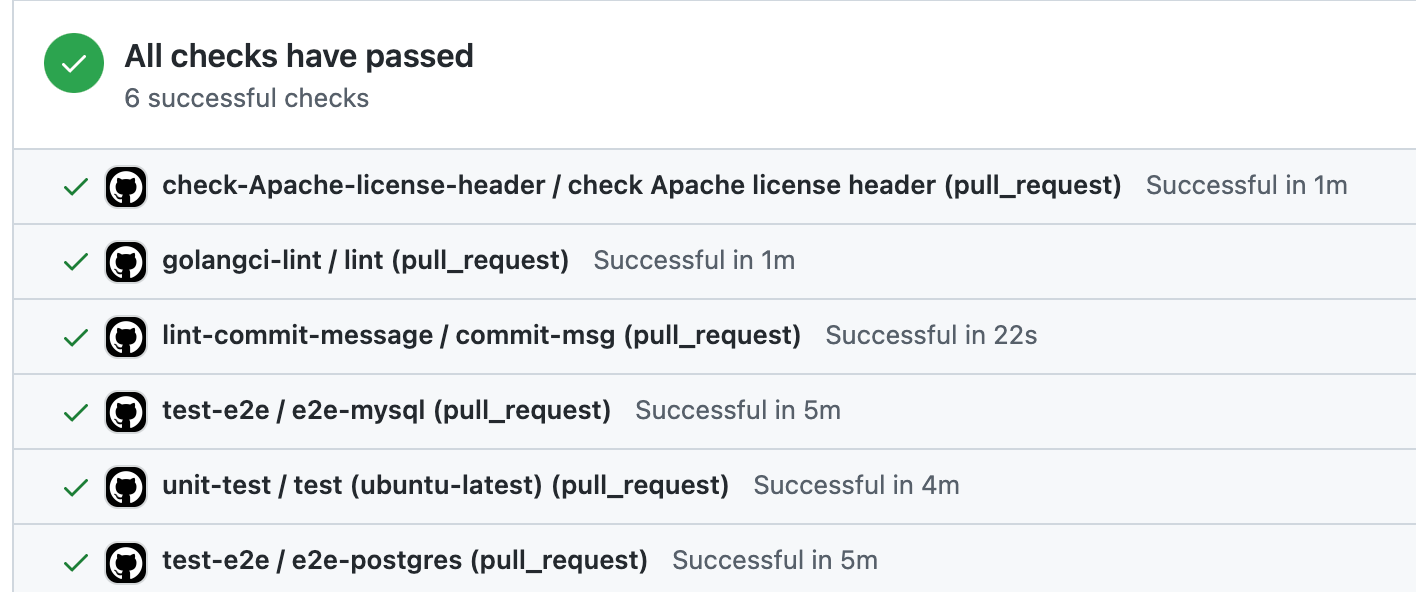 #### Example 2 -Then look at Jenkins build history, the screenshot below shows 12 Jenkins builds, and no Jenkins stages appeared. When DevLake normalizes data from Jenkins build history, it creates the following records in the domain layer: +Now look at the Jenkins build history, as another example: the screenshot below shows 12 Jenkins builds, with no Jenkins stages. When DevLake normalizes data from Jenkins build history, it creates the following records in the domain layer: -- 12 entry in cicd_pipelines table, corresponds to the Jenkins builds +- 12 entries in cicd_pipelines table, corresponding to the Jenkins builds 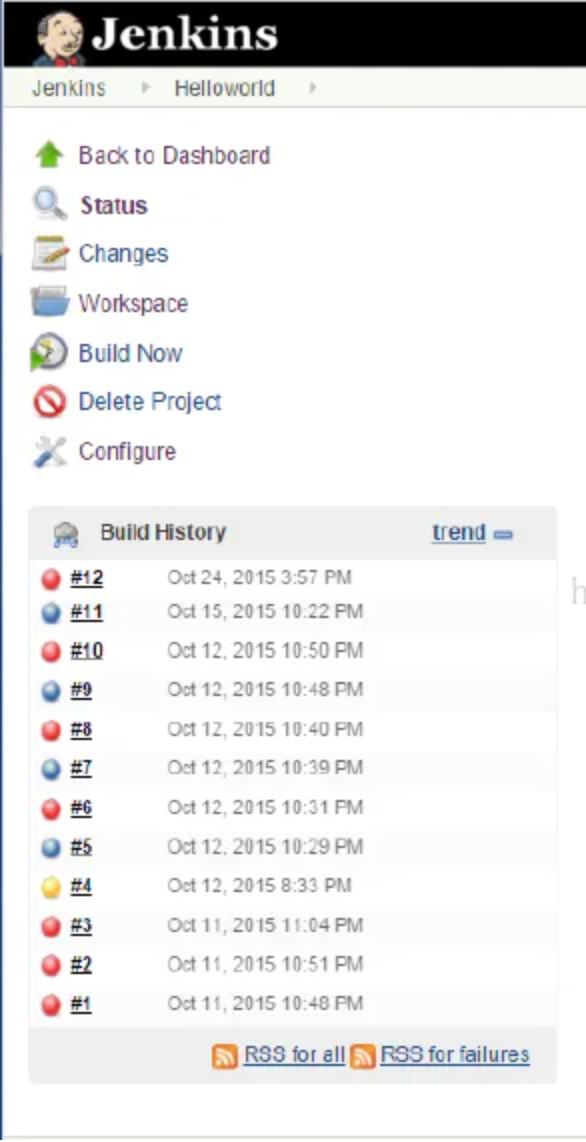 (Image from the Internet) #### Example 3 -Jenkins build may contain some stage. This screenshot shows 5 Jenkins builds, which consists of 1~4 stages including `Build the sudo images for installation`, `Basic Test: running from repo with preinstalled libs`, and etc. When DevLake normalizes data from Jenkins, it creates the following records in the domain layer: +Jenkins builds may contain stages. This screenshot shows 5 Jenkins builds, which consist of 1~4 stages, including `Build the sudo images for installation`, `Basic Test: running from repo with preinstalled libs`, etc. When DevLake gets and normalizes data from Jenkins, it creates the following records in the domain layer: -* 5 entry in cicd_pipelines table, corresponds to the Jenkins builds +* 5 entries in cicd_pipelines table, corresponding to the Jenkins builds -* 13 entry in cicd_tasks table, corresponds to the Jenkins stages +* 13 entries in cicd_tasks table, corresponding to the Jenkins stages 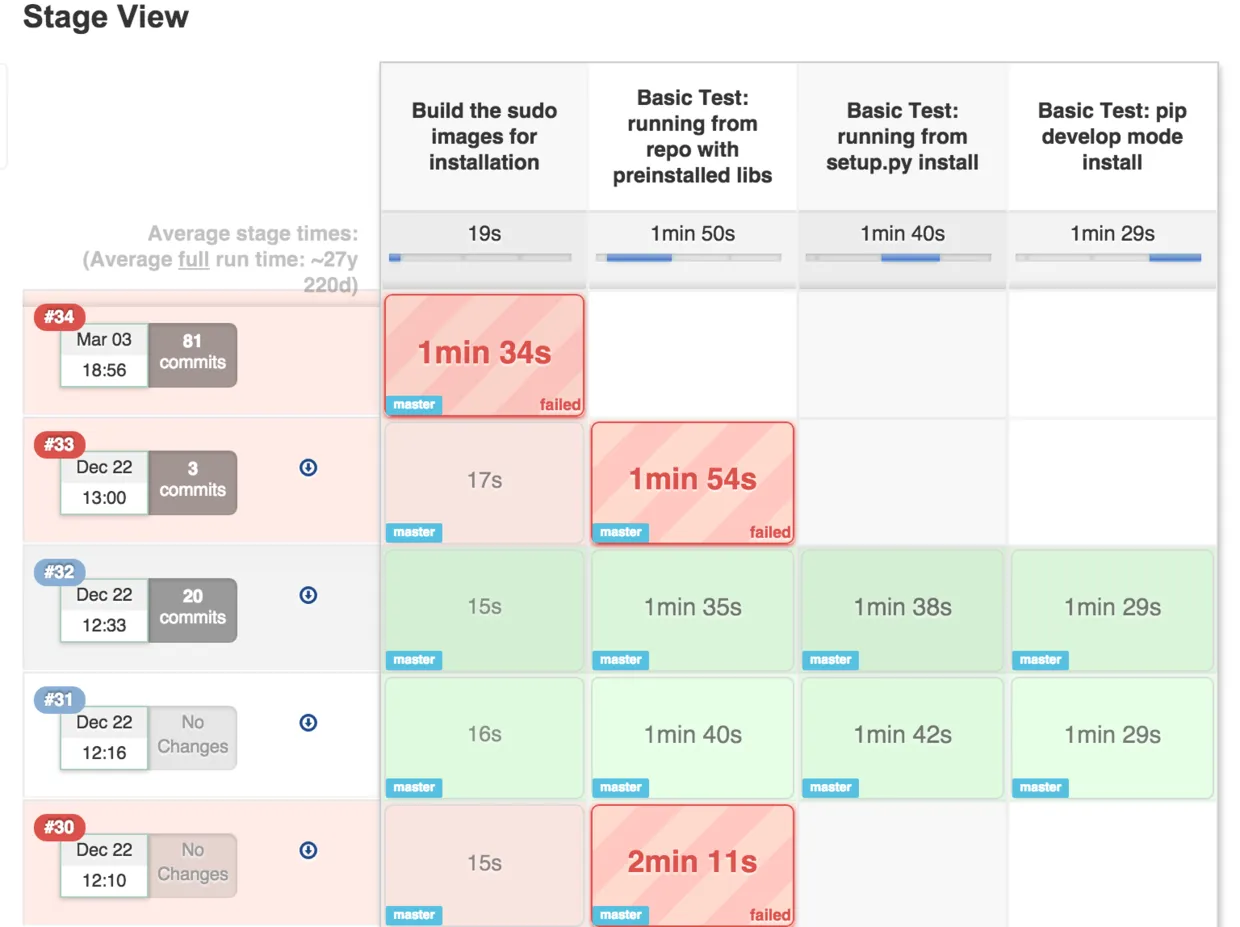 @@ -140,21 +140,21 @@ This hook should be added when the task starts and finishes. So in Example 3, we The body should be a JSON and include columns as follows: -| Keyname | Require | Notes | -| ------------- | ------- | ------------------------------------------------------------ | -| pipeline_name | Require | pipeline's name can be filled by any string **unique** in a connection | -| name | Require | task's name should be **unique** in one pipeline | -| result | Require | one of `SUCCESS` `FAILURE` `ABORT` `IN_PROGRESS` | -| status | Require | one of `IN_PROGRESS` `DONE` | -| type | Require | one of `TEST` `LINT` `BUILD` `DEPLOYMENT` | -| environment | Require | which type of machine did this task run in. one of `PRODUCTION` `STAGING` `TESTING` | -| started_date | Require | date, Format should be 2020-01-01T12:00:00+00:00 | -| finished_date | | date, Format should be 2020-01-01T12:00:00+00:00 | -| repo_id | Require | build for which repo/project. It can be a **unique** string that you can distinguish | -| branch | | | -| commit_sha | | | +| Keyname | Required | Notes | +| :-----------: | :------: | ------------------------------------------------------------ | +| pipeline_name | ✔️ Yes | pipeline's name can be filled by any string **unique** in a connection | +| name | ✔️ Yes | task's name should be **unique** in one pipeline | +| result | ✔️ Yes | one of `SUCCESS` `FAILURE` `ABORT` `IN_PROGRESS` | +| status | ✔️ Yes | one of `IN_PROGRESS` `DONE` | +| type | ✔️ Yes | one of `TEST` `LINT` `BUILD` `DEPLOYMENT` | +| environment | ✔️ Yes | which type of machine did this task run in. one of `PRODUCTION` `STAGING` `TESTING` | +| started_date | ✔️ Yes | date, Format should be 2020-01-01T12:00:00+00:00 | +| finished_date | ✖️ No | date, Format should be 2020-01-01T12:00:00+00:00 | +| repo_id | ✔️ Yes | build for which repo/project. It can be a **unique** string that you can distinguish | +| branch | ✖️ No | | +| commit_sha | ✖️ No | | -More information about these column at [DomainLayerCicdTask](https://devlake.apache.org/docs/DataModels/DevLakeDomainLayerSchema#cicd_tasks). +More information about these columns at [DomainLayerCicdTask](https://devlake.apache.org/docs/DataModels/DevLakeDomainLayerSchema#cicd_tasks). @@ -182,8 +182,9 @@ Read more in Swagger: http://localhost:4000/api/swagger/index.html#/plugins%2Fwe ### Sample Config in CircleCI -CircleCI pipelines are the highest-level unit of work. Pipelines include your workflows, which coordinate your jobs. The following demo regard CircleCI workflow as the entity task in DevLake. -In CircleCI, the data defined in env describe build machine, pipelines and tasks , sucs as `$CIRCLE_WORKFLOW_JOB_ID`, etc. So Write config to send task data read from env in each workflow and send the close pipeline request in the last workflow. +CircleCI pipelines are the highest-level unit of work. Pipelines include your workflows, which coordinate your jobs. The following demo is regarding a CircleCI workflow running as an entity task in DevLake. + +In CircleCI, the data defined in *env* describe the build machine, pipelines and tasks (e.g. `$CIRCLE_WORKFLOW_JOB_ID`), etc. You will need to add config to send task data, read from the *env*, for each workflow, and to send the *close pipeline* request in the last workflow. ```yaml version: 2.1 @@ -228,7 +229,7 @@ workflows: -Actually, the incoming webhook works in prev step. If you want to do more, the config in CircleCI is as fellow. It will call webhook before tasks start and after tasks fail. +Actually, we finish the incoming webhook in prev step. If you want to customize more, a sample CircleCI config is provided below. This sample calls the webhook before the tasks start and after tasks fail. ```yaml # Use the latest 2.1 version of CircleCI pipeline process engine. # See: https://circleci.com/docs/2.0/configuration-reference





