This is an automated email from the ASF dual-hosted git repository.

yumeng pushed a commit to branch main
in repository https://gitbox.apache.org/repos/asf/incubator-devlake-website.git
The following commit(s) were added to refs/heads/main by this push:
new 7af8cff16 docs: update dora manuals
7af8cff16 is described below
commit 7af8cff16afa5345bfd21c6c0013873307231cf8
Author: Startrekzky <[email protected]>
AuthorDate: Wed Oct 12 22:27:20 2022 +0800
docs: update dora manuals
---
docs/UserManuals/DORA.md | 69 +++++++++++++++++++++++++++++++++++++++++-------
1 file changed, 59 insertions(+), 10 deletions(-)
diff --git a/docs/UserManuals/DORA.md b/docs/UserManuals/DORA.md
index b701c37ae..cbbdb5213 100644
--- a/docs/UserManuals/DORA.md
+++ b/docs/UserManuals/DORA.md
@@ -58,8 +58,8 @@ Let's walk through the DORA implementation process for a team
with the following
Calculating DORA metrics requires three key entities: **changes**,
**deployments**, and **incidents**. Their exact definition depends on a team's
DevOps practice and varies team by team. For the team in this example, let's
assume the following definition:
- Changes: all pull requests in GitHub
-- Deployments: GitHub action jobs that have "deploy" in their names and select
CircleCI pipelines
-- Incidents: issues of type `Incident` in Jira
+- Deployments: GitHub action jobs that have "deploy" in their names and
CircleCI's deployment jobs
+- Incidents: Jira issues whose types are `Crash` or `Incident`
In the next section, we'll demonstrate how to configure DevLake to implement
DORA metrics for the example team.
@@ -67,17 +67,24 @@ In the next section, we'll demonstrate how to configure
DevLake to implement DOR
1. Visit the config-ui at `http://localhost:4000`
2. Create a `blueprint`, let's name it "Blueprint for DORA", add a Jira and a
GitHub connection. Click `Next Step`

+
3. Select Jira boards and GitHub repos to collect, click `Next Step`

-4. Click `Add Transformations` to configure for DORA metrics
+
+4. Click `Add Transformation` to configure for DORA metrics

-5. To make it simple, fields with a  label
are DORA-related configurations for every data source. Via these fields, you
can define what are "incidents" and "deployments" for each data source (see
image below). After all the data connections have been configured, click `Next
Step`
-.
+
+5. To make it simple, fields with a  label
are DORA-related configurations for every data source. Via these fields, you
can define what are "incidents" and "deployments" for each data source.
+ - This team uses Jira issue types `Crash` and `Incident` as "incident", so
choose the two types in field "incident". Jira issues in these two types will
be transformed to "incidents" in DevLake.
+ - This team uses the GitHub action jobs named `deploy` and
`build-and-deploy` to deploy, so type in `(?i)deploy` to match these jobs.
These jobs will be transformed to "deployments" in DevLake.
+ 
+
+ After all the data connections have been configured, click `Next Step`
6. Choose sync frequency, click 'Save and Run Now' to start data collection.
The duration varies by data source and depends on the volume of data.

-For more details, please refer to our [blueprint manuals](
https://devlake.apache.org/docs/UserManuals/ConfigUI/Tutorial).
+For more details, please refer to our [blueprint
manuals](https://devlake.apache.org/docs/UserManuals/ConfigUI/Tutorial).
### Collect CircleCI data via `webhook`
@@ -85,15 +92,57 @@ Using CircleCI as an example, we demonstrate how to
actively push data to DevLak
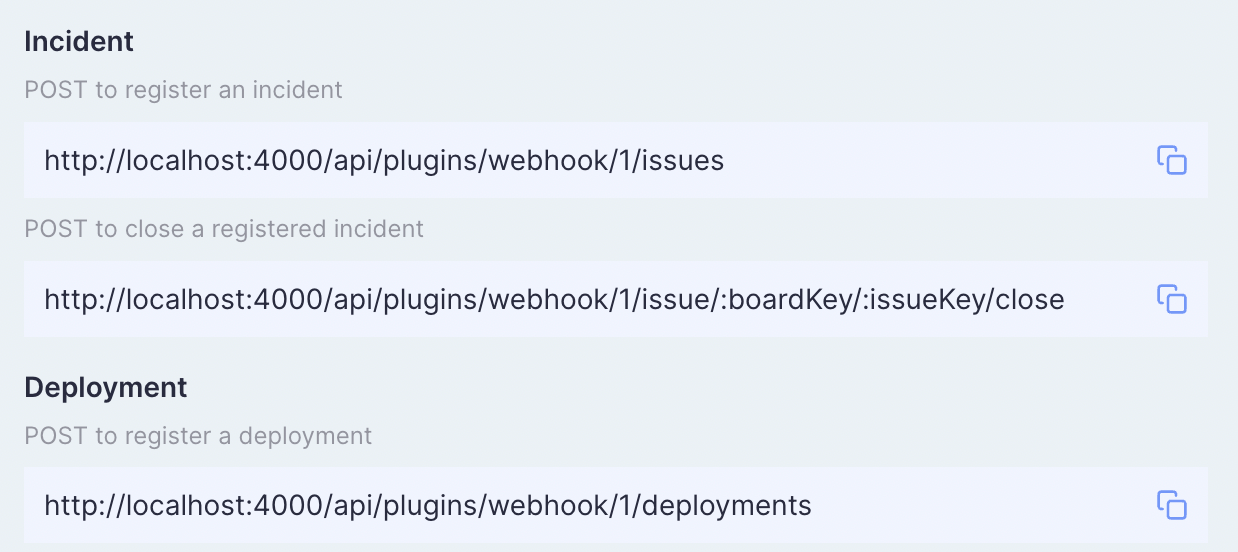
7. Visit "Data Connections" page in config-ui and select "Issue/Deployment
Incoming Webhook".
-8. Click "Add Incoming Webhook", give it a name, and click "Generate POST
URL". DevLake will generate URLs that you can send JSON payloads to push
`deployments` and `incidents` data to Devlake.
+8. Click "Add Incoming Webhook", give it a name, and click "Generate POST
URL". DevLake will generate URLs that you can send JSON payloads to push
`deployments` and `incidents` data to Devlake. Copy the `Deployment` curl
command.

-
+
9. Now head to your CircleCI's pipelines page in a new tab. Find your
deployment pipeline and click `Configuration File`

-10. Insert curl commands to post data to the URLs generated in Step 8 to your
config.yml.
-
+10. Paste the curl command copied in step 8 to post `Deployments` to DevLake.
Below is an example of how it's configured in the CircleCI `config.yml`.
+ ```
+ version: 2.1
+
+ jobs:
+ build:
+ docker:
+ - image: cimg/base:stable
+ steps:
+ - checkout
+ - run:
+ name: "build"
+ command: |
+ echo Hello, World!
+
+ deploy:
+ docker:
+ - image: cimg/base:stable
+ steps:
+ - checkout
+ - run:
+ name: "deploy"
+ command: |
+ # record start before deploy
+ start_time=`date '+%Y-%m-%dT%H:%M:%S%z'`
+
+ # some deploy here ...
+ echo Hello, World!
+
+ # send request after deploy. Only repo_url and commit_sha are
required fields.
+ curl https://sample-url.com/api/plugins/webhook/1/cicd_tasks -X
'POST' -d "{
+ \"repo_url\":\"$CIRCLE_REPOSITORY_URL\",
+ \"commit_sha\":\"$CIRCLE_SHA1\",
+ \"environment\":\"PRODUCTION\",
+ \"start_time\":\"$start_time\"
+ }"
+
+ workflows:
+ build_and_deploy_workflow:
+ jobs:
+ - build
+ - deploy
+ ```
+ You can find more about Deployment webhook's payload schema in this
[doc](https://devlake.apache.org/docs/Plugins/webhook/#deployments).
11. Run the modified CircleCI pipeline and you will find corresponding
`deployments` data in table.cicd_tasks in DevLake's database.







