This is an automated email from the ASF dual-hosted git repository.

hez pushed a commit to branch main
in repository https://gitbox.apache.org/repos/asf/incubator-devlake-website.git
The following commit(s) were added to refs/heads/main by this push:
new c2caf0b31 docs: update dora and webhook manuals (#252)
c2caf0b31 is described below
commit c2caf0b317911be54b599d723917edea6f7b4020
Author: Louis.z <[email protected]>
AuthorDate: Fri Oct 14 02:20:31 2022 +0800
docs: update dora and webhook manuals (#252)
Co-authored-by: Startrekzky <[email protected]>
---
docs/Plugins/webhook.md | 71 +++++++++++++++++++++++++++---------------------
docs/UserManuals/DORA.md | 47 ++++++++++++++++++--------------
2 files changed, 66 insertions(+), 52 deletions(-)
diff --git a/docs/Plugins/webhook.md b/docs/Plugins/webhook.md
index efdd27cf2..0af51e209 100644
--- a/docs/Plugins/webhook.md
+++ b/docs/Plugins/webhook.md
@@ -10,56 +10,65 @@ An Incoming Webhook allows users to actively push data to
DevLake. It's particul
When you create an Incoming Webhook within DevLake, DevLake generates a unique
URL. You can post JSON payloads to this URL to push data to DevLake.
-As of v0.14.0, users can push incidents and deployments data required by DORA
metrics to DevLake via Incoming Webhooks.
+As of v0.14.0, users can push incidents and deployments required by DORA
metrics to DevLake via Incoming Webhooks.
## Creating webhooks in DevLake
### Add a new webhook
To add a new webhook, go to the "Data Connections" page in config-ui and
select "Issue/Deployment Incoming/Webhook".
-
+
We recommend that you give your webhook connection a unique name so that you
can identify and manage where you have used it later.
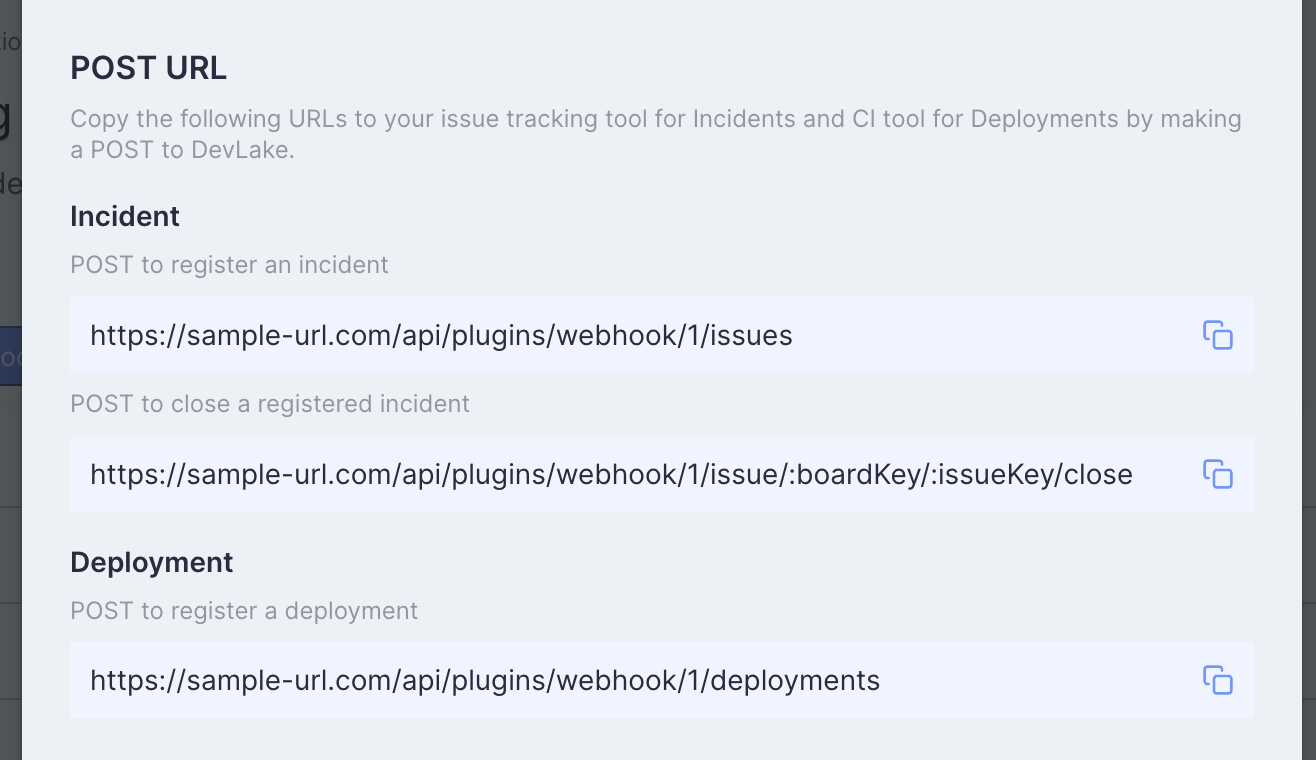
After clicking on the "Generate POST URL" button, you will find four webhook
URLs. Copy the ones that suit your usage into your CI or issue tracking
systems. You can always come back to the webhook page to copy the URLs later on.
-
+
-## Deployments
+## Register a deployment
-If your CI/CD tool isn't already supported by DevLake, you can insert curl
commands as [Sample API
Calls](https://devlake.apache.org/docs/Plugins/webhook#deployments-sample-api-calls)
in your CI/CD script to post deployment data to DevLake.
+You can copy the generated deployment curl commands to your CI/CD script to
post deployments to Apache DevLake. Below is the detailed payload schema:
-**Notice**: The URL shown in the screenshot and the following samples,
`https://sample-url.com/...`, is just an example and should be replaced with
the actual URL copied from your Config UI.
-
-#### Register a deployment
-
-`POST https://sample-url.com/api/plugins/webhook/1/cicd_tasks`
-
-The body should be a JSON and include columns as follows:
-
-| Keyname | Required | Notes
|
+| Key | Required | Notes
|
| :---------: | :------: |
------------------------------------------------------------ |
-| repo_url | ✔️ Yes | Repository url or other **unique** string
|
-| commit_sha | ✔️ Yes | commit sha
|
-| environment | ✖️ No | which type of machine did this task run in. one of
`PRODUCTION` `STAGING` `TESTING` `DEVELOPMENT`. <br />Default is `PRODUCTION` |
-| start_time | ✖️ No | Time, Format should be
2020-01-01T12:00:00+00:00<br />If absent, it is when DevLake receives the POST
request. |
-| end_time | ✖️ No | Time, Format should be
2020-01-01T12:00:00+00:00<br />`start_time` becomes required if end_time is
provided. If absent, this column is null. |
+| commit_sha | ✔️ Yes | the sha of the deployment commit
|
+| repo_url | ✔️ Yes | the repo URL of the deployment commit
|
+| environment | ✖️ No | the environment this deployment happens. For
example, `PRODUCTION` `STAGING` `TESTING` `DEVELOPMENT`. <br/>The default value
is `PRODUCTION` |
+| start_time | ✖️ No | Time. Eg. 2020-01-01T12:00:00+00:00<br/> No
default value.|
+| end_time | ✖️ No | Time. Eg. 2020-01-01T12:00:00+00:00<br/>The
default value is the time when DevLake receives the POST request.|
-### Deployments Sample API Calls
+### Deployment - Sample API Calls
-Sample CURL for the tasks starting and finishing in deploy pipelines:
+Sample CURL to post deployments to DevLake. The URL
`https://sample-url.com/api/plugins/webhook/1/deployments` should be replaced
with the actual URL copied from your Config UI:
```
-curl https://sample-url.com/api/plugins/webhook/1/deployments -X 'POST' -d
'{"repo_url":"devlake","commit_sha":"015e3d3b480e417aede5a1293bd61de9b0fd051d","start_time":"2020-01-01T12:00:00+00:00","end_time":"2020-01-01T12:59:59+00:00","environment":"PRODUCTION"}'
+curl https://sample-url.com/api/plugins/webhook/1/deployments -X 'POST' -d '{
+ "commit_sha":"015e3d3b480e417aede5a1293bd61de9b0fd051d",
+ "repo_url":"https://github.com/apache/incubator-devlake/";,
+ "environment":"PRODUCTION",
+ "start_time":"2020-01-01T12:00:00+00:00",
+ "end_time":"2020-01-02T12:00:00+00:00"
+ }'
```
-Read more in Swagger:
https://sample-url.com/api/swagger/index.html#/plugins%2Fwebhook/post_plugins_webhook__connectionId_deployments.
+If you have set a username/password for Config UI, you need to add the
username and password to the following curl to register a `deployment`:
+```
+curl https://sample-url.com/api/plugins/webhook/1/deployments -X 'POST' -u
'username:password' -d '{
+ "commit_sha":"015e3d3b480e417aede5a1293bd61de9b0fd051d",
+ "repo_url":"https://github.com/apache/incubator-devlake/";,
+ "environment":"PRODUCTION",
+ "start_time":"2020-01-01T12:00:00+00:00",
+ "end_time":"2020-01-02T12:00:00+00:00"
+ }'
+```
+
+Read more in
[Swagger](https://sample-url.com/api/swagger/index.html#/plugins%2Fwebhook/post_plugins_webhook__connectionId_deployments).
-### Sample Config in CircleCI
+#### Deployment - A real-world example in CircleCI
-The following demo shows how to post "deployments" to DevLake from CircleCI.
In this example, CircleCI job 'deploy' is used to do deployments.
+The following demo shows how to post "deployments" to DevLake from CircleCI.
In this example, the CircleCI job 'deploy' is used to do deployments.
```
@@ -84,17 +93,17 @@ The following demo shows how to post "deployments" to
DevLake from CircleCI. In
- run:
name: "deploy"
command: |
- # record start before deploy
+ # The time a deploy started
start_time=`date '+%Y-%m-%dT%H:%M:%S%z'`
- # some deploy here ...
+ # Some deployment tasks here ...
echo Hello, World!
- # send request after deploy. Only repo_url and commit_sha are
required fields.
- curl https://sample-url.com/api/plugins/webhook/1/cicd_tasks -X
'POST' -d "{
- \"repo_url\":\"$CIRCLE_REPOSITORY_URL\",
+ # Send the request to DevLake after deploy
+ # The values start with a '$CIRCLE_' are CircleCI's built-in
variables
+ curl https://sample-url.com/api/plugins/webhook/1/deployments -X
'POST' -d "{
\"commit_sha\":\"$CIRCLE_SHA1\",
- \"environment\":\"PRODUCTION\",
+ \"repo_url\":\"$CIRCLE_REPOSITORY_URL\",
\"start_time\":\"$start_time\"
}"
diff --git a/docs/UserManuals/DORA.md b/docs/UserManuals/DORA.md
index cbbdb5213..4ddbd7a24 100644
--- a/docs/UserManuals/DORA.md
+++ b/docs/UserManuals/DORA.md
@@ -74,12 +74,14 @@ In the next section, we'll demonstrate how to configure
DevLake to implement DOR
4. Click `Add Transformation` to configure for DORA metrics

-5. To make it simple, fields with a  label
are DORA-related configurations for every data source. Via these fields, you
can define what are "incidents" and "deployments" for each data source.
+5. To make it simple, fields with a  label
are DORA-related configurations for every data source. Via these fields, you
can define what are "incidents" and "deployments" for each data source. After
all data connections have been configured, click `Next Step`
- This team uses Jira issue types `Crash` and `Incident` as "incident", so
choose the two types in field "incident". Jira issues in these two types will
be transformed to "incidents" in DevLake.
- This team uses the GitHub action jobs named `deploy` and
`build-and-deploy` to deploy, so type in `(?i)deploy` to match these jobs.
These jobs will be transformed to "deployments" in DevLake.
- 
-
- After all the data connections have been configured, click `Next Step`
+ 
+
+ Note: The following example shows where to find GitHub action jobs. It's
easy to mix them up with GitHub workflows.
+ 
+
6. Choose sync frequency, click 'Save and Run Now' to start data collection.
The duration varies by data source and depends on the volume of data.

@@ -92,14 +94,14 @@ Using CircleCI as an example, we demonstrate how to
actively push data to DevLak
7. Visit "Data Connections" page in config-ui and select "Issue/Deployment
Incoming Webhook".
-8. Click "Add Incoming Webhook", give it a name, and click "Generate POST
URL". DevLake will generate URLs that you can send JSON payloads to push
`deployments` and `incidents` data to Devlake. Copy the `Deployment` curl
command.
-
-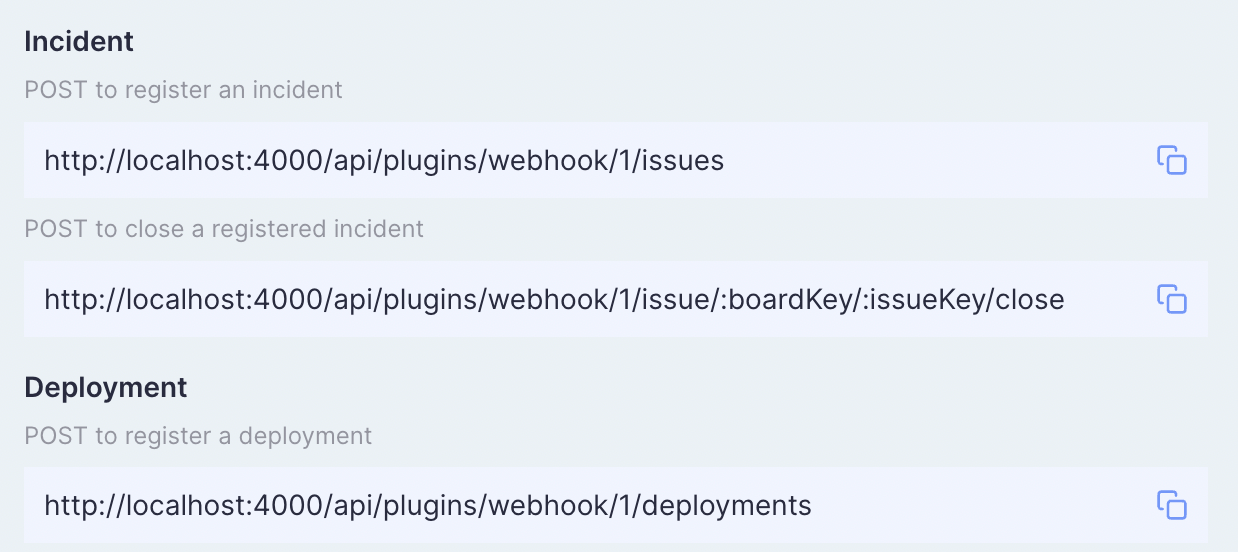
+8. Click "Add Incoming Webhook", give it a name, and click "Generate POST
URL". DevLake will generate URLs that you can send JSON payloads to push
`deployments` and `incidents` to Devlake. Copy the `Deployment` curl command.
+
+
9. Now head to your CircleCI's pipelines page in a new tab. Find your
deployment pipeline and click `Configuration File`

-10. Paste the curl command copied in step 8 to post `Deployments` to DevLake.
Below is an example of how it's configured in the CircleCI `config.yml`.
+10. Paste the curl command copied in step 8 to the `config.yml`.
```
version: 2.1
@@ -122,17 +124,17 @@ Using CircleCI as an example, we demonstrate how to
actively push data to DevLak
- run:
name: "deploy"
command: |
- # record start before deploy
+ # The time a deploy started
start_time=`date '+%Y-%m-%dT%H:%M:%S%z'`
- # some deploy here ...
+ # Some deployment tasks here ...
echo Hello, World!
- # send request after deploy. Only repo_url and commit_sha are
required fields.
- curl https://sample-url.com/api/plugins/webhook/1/cicd_tasks -X
'POST' -d "{
- \"repo_url\":\"$CIRCLE_REPOSITORY_URL\",
+ # Send the request to DevLake after deploy
+ # The values start with a '$CIRCLE_' are CircleCI's built-in
variables
+ curl https://sample-url.com/api/plugins/webhook/1/deployments -X
'POST' -d "{
\"commit_sha\":\"$CIRCLE_SHA1\",
- \"environment\":\"PRODUCTION\",
+ \"repo_url\":\"$CIRCLE_REPOSITORY_URL\",
\"start_time\":\"$start_time\"
}"
@@ -142,10 +144,13 @@ Using CircleCI as an example, we demonstrate how to
actively push data to DevLak
- build
- deploy
```
- You can find more about Deployment webhook's payload schema in this
[doc](https://devlake.apache.org/docs/Plugins/webhook/#deployments).
+ You can find more about webhook's payload schema in this
[doc](https://devlake.apache.org/docs/Plugins/webhook/#deployments).
+
+11. Run the modified CircleCI pipeline. Check if the request has been
successfully sent.
+
-11. Run the modified CircleCI pipeline and you will find corresponding
`deployments` data in table.cicd_tasks in DevLake's database.
-
+12. You will find the corresponding `deployments` in table.cicd_tasks in
DevLake's database.
+
### View and customize DevLake's DORA dashboard
@@ -154,10 +159,10 @@ With all the data collected, DevLake's DORA dashboard is
ready to deliver your D
You can customize the DORA dashboard by editing the underlying SQL query of
each panel.
For a breakdown of each metric's SQL query, please refer to metric docs:
- - [Deployment
Frequency](https://devlake.apache.org/docs/Metrics/DeploymentFrequency)
- - [Lead Time for
Changes](https://devlake.apache.org/docs/Metrics/LeadTimeForChanges)
- - [Median Time to Restore
Service](https://devlake.apache.org/docs/Metrics/MTTR)
- - [Change Failure Rate](https://devlake.apache.org/docs/Metrics/CFR)
+ - [Deployment
Frequency](https://devlake.apache.org/docs/Metrics/DeploymentFrequency)
+ - [Lead Time for
Changes](https://devlake.apache.org/docs/Metrics/LeadTimeForChanges)
+ - [Median Time to Restore
Service](https://devlake.apache.org/docs/Metrics/MTTR)
+ - [Change Failure Rate](https://devlake.apache.org/docs/Metrics/CFR)
If you aren't familiar with Grafana, please refer to our [Grafana
doc](./Dashboards/GrafanaUserGuide.md)










