This is an automated email from the ASF dual-hosted git repository.

likyh pushed a commit to branch likyh/jenkins-scope
in repository https://gitbox.apache.org/repos/asf/incubator-devlake-website.git
commit e4a6e32b19642022777204daf917bb4fa0e82640 Author: linyh <[email protected]> AuthorDate: Wed Nov 2 23:49:24 2022 +0800 docs: add scope for jenkins; fix some other some question --- docs/Plugins/jenkins.md | 3 ++- docs/UserManuals/ConfigUI/GitHub.md | 3 ++- docs/UserManuals/ConfigUI/GitLab.md | 12 +++++------- docs/UserManuals/ConfigUI/Jenkins.md | 13 ++++++++++++- 4 files changed, 21 insertions(+), 10 deletions(-) diff --git a/docs/Plugins/jenkins.md b/docs/Plugins/jenkins.md index 9bb0177d0..28c12b042 100644 --- a/docs/Plugins/jenkins.md +++ b/docs/Plugins/jenkins.md @@ -35,7 +35,8 @@ To collect data, select `Advanced Mode` on the `Create Pipeline Run` page and pa { "plugin": "jenkins", "options": { - "connectionId": 1 + "connectionId": 1, + "jobName": "unit_test" } } ] diff --git a/docs/UserManuals/ConfigUI/GitHub.md b/docs/UserManuals/ConfigUI/GitHub.md index dc9a2e948..fa1574497 100644 --- a/docs/UserManuals/ConfigUI/GitHub.md +++ b/docs/UserManuals/ConfigUI/GitHub.md @@ -42,11 +42,12 @@ Usually, you don't have to modify this part. However, if you don't want to colle - Source Code Management: GitHub repos, refs, commits, etc. - Code Review: GitHub PRs, PR comments and reviews, etc. - Cross Domain: GitHub accounts, etc. +- CI/CD: GitHub Workflow runs, GitHub Workflow jobs, etc. ### Step 3 - Adding Transformation Rules (Optional)   - + Without adding transformation rules, you can still view the "[GitHub Metrics](/livedemo/DataSources/GitHub)" dashboard. However, if you want to view "[Weekly Bug Retro](/livedemo/QAEngineers/WeeklyBugRetro)", "[Weekly Community Retro](/livedemo/OSSMaintainers/WeeklyCommunityRetro)" or other pre-built dashboards, the following transformation rules, especially "Type/Bug", should be added.<br/> Each GitHub repo has at most ONE set of transformation rules. diff --git a/docs/UserManuals/ConfigUI/GitLab.md b/docs/UserManuals/ConfigUI/GitLab.md index 74c9e41f1..0b85daa3b 100644 --- a/docs/UserManuals/ConfigUI/GitLab.md +++ b/docs/UserManuals/ConfigUI/GitLab.md @@ -27,17 +27,14 @@ If you are behind a corporate firewall or VPN you may need to utilize a proxy se #### Test and Save Connection Click `Test Connection`, if the connection is successful, click `Save Connection` to add the connection. - ### Step 2 - Setting Data Scope -#### Projects -Enter the GitLab repos to collect. How to get `GitLab` repos? -- Visit the repository page on GitLab -- Find the project id below the title +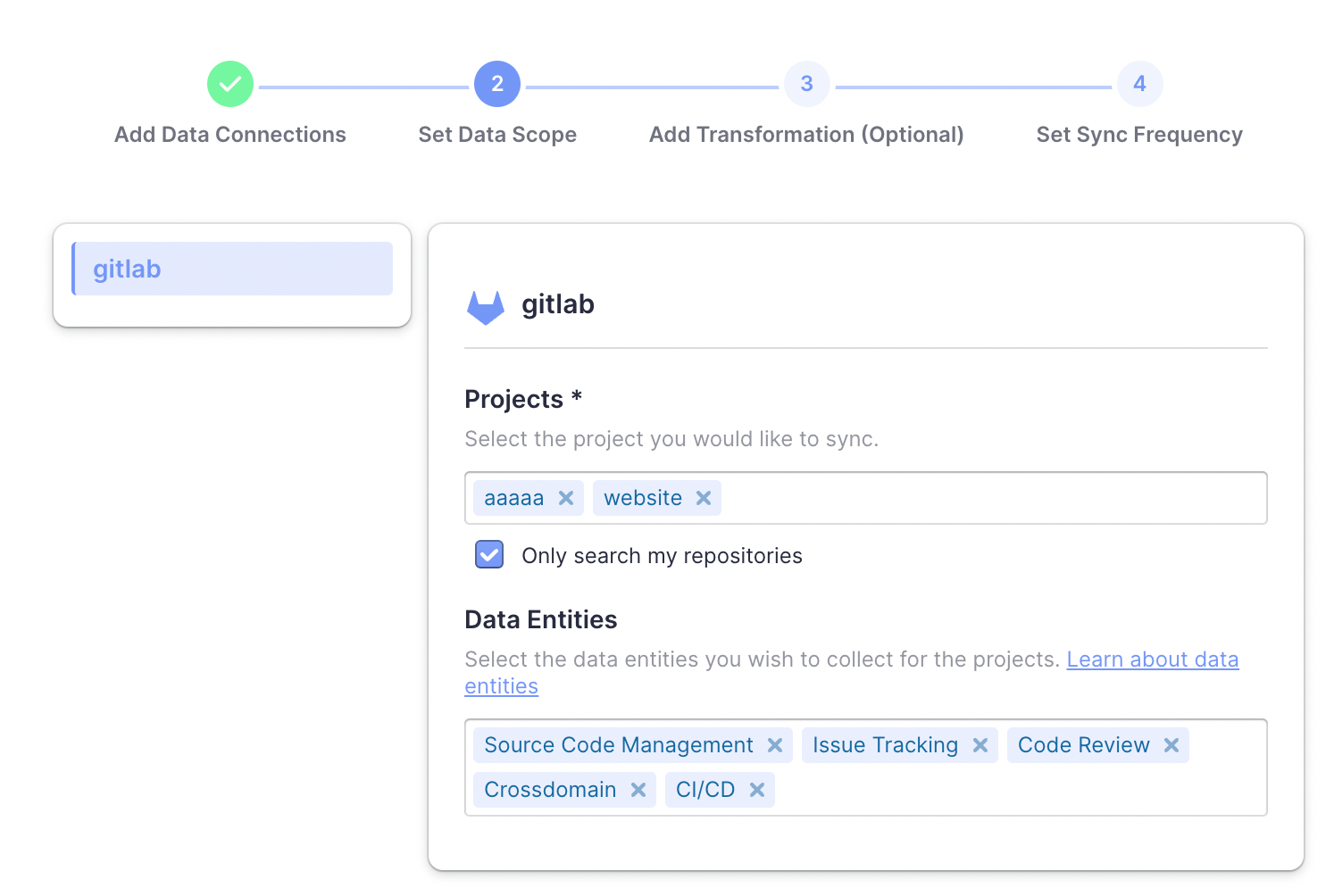 - +#### Projects +Choose the Gitlab projects to collect. Limited by GitLab API, You need to type more than 2 characters to search. -If you want to collect more than 1 repo, please separate repos with comma. For example, "apache/incubator-devlake,apache/incubator-devlake-website". +* If you want to collect public repo in GitLab, please uncheck "Only search my repositories" to find all projects. #### Data Entities Usually, you don't have to modify this part. However, if you don't want to collect certain GitLab entities, you can unselect some entities to accerlerate the collection speed. @@ -45,6 +42,7 @@ Usually, you don't have to modify this part. However, if you don't want to colle - Source Code Management: GitLab repos, refs, commits, etc. - Code Review: GitLab MRs, MR comments and reviews, etc. - Cross Domain: GitLab accounts, etc. +- CI/CD: GitLab pipelines, etc. ### Step 3 - Adding Transformation Rules (Optional) There are no transformation rules for GitLab repos. diff --git a/docs/UserManuals/ConfigUI/Jenkins.md b/docs/UserManuals/ConfigUI/Jenkins.md index 07d1ed295..e736227b5 100644 --- a/docs/UserManuals/ConfigUI/Jenkins.md +++ b/docs/UserManuals/ConfigUI/Jenkins.md @@ -24,7 +24,18 @@ For help on Username and Password, please see Jenkins docs on [using credentials Click `Test Connection`, if the connection is successful, click `Save Connection` to add the connection. ### Step 2 - Setting Data Scope -There is no data cope setting for Jenkins. + +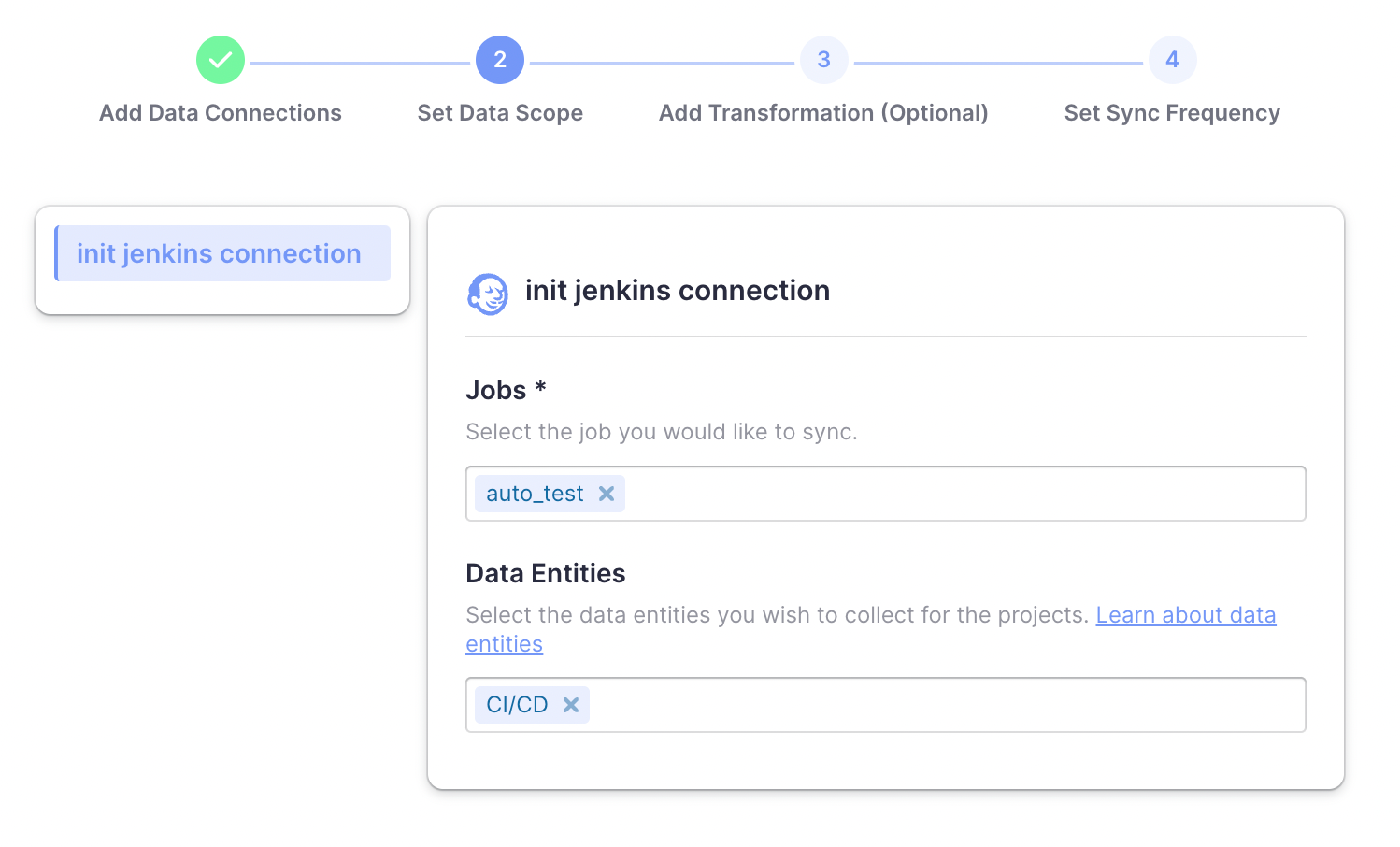 + +#### Jobs + +Choose the Jenkins jobs to collect. + +#### Data Entities + +Jenkins only support only one entity `CI/CD`. + +- CI/CD: Jenkins builds, stages, etc. ### Step 3 - Adding Transformation Rules (Optional) There are no transformation rules for Jenkins.



