This is an automated email from the ASF dual-hosted git repository.

yumeng pushed a commit to branch main
in repository https://gitbox.apache.org/repos/asf/incubator-devlake-website.git
The following commit(s) were added to refs/heads/main by this push:
new 98107a18f docs: add missing configuration to user manuals (#350)
98107a18f is described below
commit 98107a18fcbb90eea4eb1942680afad3fc39a098
Author: Louis.z <[email protected]>
AuthorDate: Thu Dec 22 17:41:54 2022 +0800
docs: add missing configuration to user manuals (#350)
Co-authored-by: Startrekzky <[email protected]>
---
docs/UserManuals/ConfigUI/GitHub.md | 13 +++++++++++++
docs/UserManuals/ConfigUI/GitLab.md | 14 ++++++++++++--
docs/UserManuals/ConfigUI/Jenkins.md | 12 ++++++++++--
docs/UserManuals/ConfigUI/Tapd.md | 4 ++--
.../version-v0.14/UserManuals/ConfigUI/GitHub.md | 21 ++++++++++++++++++---
.../version-v0.14/UserManuals/ConfigUI/GitLab.md | 22 +++++++++++++++-------
.../version-v0.14/UserManuals/ConfigUI/Jenkins.md | 10 +++++++++-
.../version-v0.14/UserManuals/ConfigUI/Tapd.md | 2 +-
8 files changed, 80 insertions(+), 18 deletions(-)
diff --git a/docs/UserManuals/ConfigUI/GitHub.md
b/docs/UserManuals/ConfigUI/GitHub.md
index 2a7039a63..44d67e4a2 100644
--- a/docs/UserManuals/ConfigUI/GitHub.md
+++ b/docs/UserManuals/ConfigUI/GitHub.md
@@ -82,6 +82,19 @@ Each GitHub repo has at most ONE set of transformation rules.
- Type/Incident: Same as "Type/Requirement", with `type` setting to "INCIDENT".
+#### CI/CD
+
+
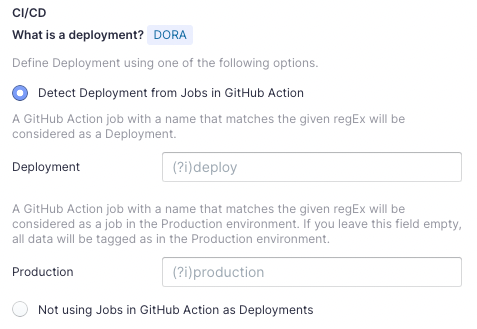
+This set of configurations is used for calculating [DORA metrics](../DORA.md).
+
+If you're using GitHub Action to conduct `deployments`, please select "Detect
Deployment from Jobs in GitHub Action", and input the RegEx in the following
fields:
+- Deployment: A GitHub Action job with a name that matches the given regEx
will be considered as a deployment.
+- Production: A GitHub Action job with a name that matches the given regEx
will be considered a job in the production environment.
+
+By the above two fields, DevLake can identify a production deployment among
massive CI jobs.
+
+You can also select "Not using Jobs in GitHub Action as Deployments" if you're
not using GitHub action to conduct deployments.
+
#### Code Review
- Type: The `type` of pull requests will be parsed from PR labels by given
regular expression. For example:
diff --git a/docs/UserManuals/ConfigUI/GitLab.md
b/docs/UserManuals/ConfigUI/GitLab.md
index f5c109433..75918f51e 100644
--- a/docs/UserManuals/ConfigUI/GitLab.md
+++ b/docs/UserManuals/ConfigUI/GitLab.md
@@ -34,7 +34,7 @@ Click `Test Connection`, if the connection is successful,
click `Save Connection
#### Projects
Choose the Gitlab projects to collect. Limited by GitLab API, You need to type
more than 2 characters to search.
-* If you want to collect public repos in GitLab, please uncheck "Only search
my repositories" to find all repos.
+* If you want to collect public repositories in GitLab, please uncheck "Only
search my repositories" to search all repositories.
#### Data Entities
Usually, you don't have to modify this part. However, if you don't want to
collect certain GitLab entities, you can unselect some entities to accerlerate
the collection speed.
@@ -45,7 +45,17 @@ Usually, you don't have to modify this part. However, if you
don't want to colle
- Cross Domain: GitLab accounts, etc.
### Step 3 - Adding Transformation Rules (Optional)
-There are no transformation rules for GitLab repos.
+
+#### CI/CD
+This set of configurations is used for calculating [DORA metrics](../DORA.md).
+
+If you're using GitLab CI to conduct `deployments`, please select "Detect
Deployment from Jobs in GitLab CI", and input the RegEx in the following fields:
+- Deployment: A GitLab CI job with a name that matches the given regEx will be
considered as a deployment.
+- Production: A GitLab CI job with a name that matches the given regEx will be
considered a job in the production environment.
+
+By the above two fields, DevLake can identify a production deployment among
massive CI jobs.
+
+You can also select "Not using Jobs in GitLab CI as Deployments" if you're not
using GitLab CI to conduct deployments.
### Step 4 - Setting Sync Frequency
You can choose how often you would like to sync your data in this step by
selecting a sync frequency option or enter a cron code to specify your prefered
schedule.
diff --git a/docs/UserManuals/ConfigUI/Jenkins.md
b/docs/UserManuals/ConfigUI/Jenkins.md
index 195217737..446294f99 100644
--- a/docs/UserManuals/ConfigUI/Jenkins.md
+++ b/docs/UserManuals/ConfigUI/Jenkins.md
@@ -29,7 +29,7 @@ Click `Test Connection`, if the connection is successful,
click `Save Connection
#### Jobs
-Choose the Jenkins jobs to collect.
+Choose the Jenkins jobs. All `Jenkins builds` under these jobs will be
collected.
#### Data Entities
@@ -38,7 +38,15 @@ Jenkins only supports `CI/CD` domain entities, transformed
from Jenkins builds a
- CI/CD: Jenkins builds, stages, etc.
### Step 3 - Adding Transformation Rules (Optional)
-There are no transformation rules for Jenkins.
+This set of configurations is used for calculating [DORA metrics](../DORA.md).
+
+If you're using Jenkins builds to conduct `deployments`, please select "Detect
Deployment from Jenkins Builds", and input the RegEx in the following fields:
+- Deployment: A Jenkins build with a name that matches the given regEx will be
considered as a deployment.
+- Production: A Jenkins build with a name that matches the given regEx will be
considered a build in the production environment.
+
+By the above two fields, DevLake can identify a production deployment among
massive CI jobs.
+
+You can also select "Not using Jenkins builds as Deployments" if you're not
using Jenkins to conduct deployments.
### Step 4 - Setting Sync Frequency
You can choose how often you would like to sync your data in this step by
selecting a sync frequency option or enter a cron code to specify your prefered
schedule.
diff --git a/docs/UserManuals/ConfigUI/Tapd.md
b/docs/UserManuals/ConfigUI/Tapd.md
index 24064ac9e..33942a92b 100644
--- a/docs/UserManuals/ConfigUI/Tapd.md
+++ b/docs/UserManuals/ConfigUI/Tapd.md
@@ -1,5 +1,5 @@
---
-title: "Configuring Tapd"
+title: "Configuring Tapd(WIP)"
sidebar_position: 6
description: Config UI instruction for Tapd
---
@@ -24,7 +24,7 @@ Input the username and password of your Tapd account, you can
follow the steps a
If you are behind a corporate firewall or VPN you may need to utilize a proxy
server. Enter a valid proxy server address on your network, e.g.
`http://your-proxy-server.com:1080`
#### Ralte Limit (Optional)
-For tapd, we suggest you to set rate limit to 3500
+For TAPD, we suggest you setting the rate limit to 3500
#### Test and Save Connection
Click `Test Connection`, if the connection is successful, click `Save
Connection` to add the connection.
diff --git a/versioned_docs/version-v0.14/UserManuals/ConfigUI/GitHub.md
b/versioned_docs/version-v0.14/UserManuals/ConfigUI/GitHub.md
index 2aac2afbc..35eafaf5f 100644
--- a/versioned_docs/version-v0.14/UserManuals/ConfigUI/GitHub.md
+++ b/versioned_docs/version-v0.14/UserManuals/ConfigUI/GitHub.md
@@ -69,11 +69,25 @@ Each GitHub repo has at most ONE set of transformation
rules.
- Priority: Same as "Severity".
-- Type/Requirement: The `type` of issues with labels that match given regular
expression will be set to "REQUIREMENT". Unlike "PR.type", submatch does
nothing, because for issue management analysis, users tend to focus on 3 kinds
of types (Requirement/Bug/Incident), however, the concrete naming varies from
repo to repo, time to time, so we decided to standardize them to help analysts
metrics.
+- Type/Requirement: The `type` of issues with labels that match the given
regular expression will be set to "REQUIREMENT". Unlike "PR.type", submatch
does nothing, because for issue management analysis, users tend to focus on 3
kinds of types (Requirement/Bug/Incident), however, the concrete naming varies
from repo to repo, from time to time, so we decided to standardize them to help
analysts metrics.
-- Type/Bug: Same as "Type/Requirement", with `type` setting to "BUG".
+- Type/Bug: Same as "Type/Requirement", with `type` set to "BUG".
+
+- Type/Incident: Same as "Type/Requirement", with `type` set to "INCIDENT".
+
+#### CI/CD
+
+
+This set of configurations is used for calculating [DORA metrics](../DORA.md).
+
+If you're using GitHub Action to conduct `deployments`, please select "Detect
Deployment from Jobs in GitHub Action", and input the RegEx in the following
fields:
+- Deployment: A GitHub Action job with a name that matches the given regEx
will be considered as a deployment.
+- Production: A GitHub Action job with a name that matches the given regEx
will be considered a job in the production environment.
+
+By the above two fields, DevLake can identify a production deployment among
massive CI jobs.
+
+You can also select "Not using Jobs in GitHub Action as Deployments" if you're
not using GitHub action for deployments.
-- Type/Incident: Same as "Type/Requirement", with `type` setting to "INCIDENT".
#### Code Review
@@ -83,6 +97,7 @@ Each GitHub repo has at most ONE set of transformation rules.
- Component: The `component` of pull requests will be parsed from PR labels by
given regular expression.
+
#### Additional Settings (Optional)
- Tags Limit: It'll compare the last N pairs of tags to get the "commit diff',
"issue diff" between tags. N defaults to 10.
diff --git a/versioned_docs/version-v0.14/UserManuals/ConfigUI/GitLab.md
b/versioned_docs/version-v0.14/UserManuals/ConfigUI/GitLab.md
index 74c9e41f1..6fb8ff09a 100644
--- a/versioned_docs/version-v0.14/UserManuals/ConfigUI/GitLab.md
+++ b/versioned_docs/version-v0.14/UserManuals/ConfigUI/GitLab.md
@@ -30,14 +30,12 @@ Click `Test Connection`, if the connection is successful,
click `Save Connection
### Step 2 - Setting Data Scope
-#### Projects
-Enter the GitLab repos to collect. How to get `GitLab` repos?
-- Visit the repository page on GitLab
-- Find the project id below the title
+
-
+#### Projects
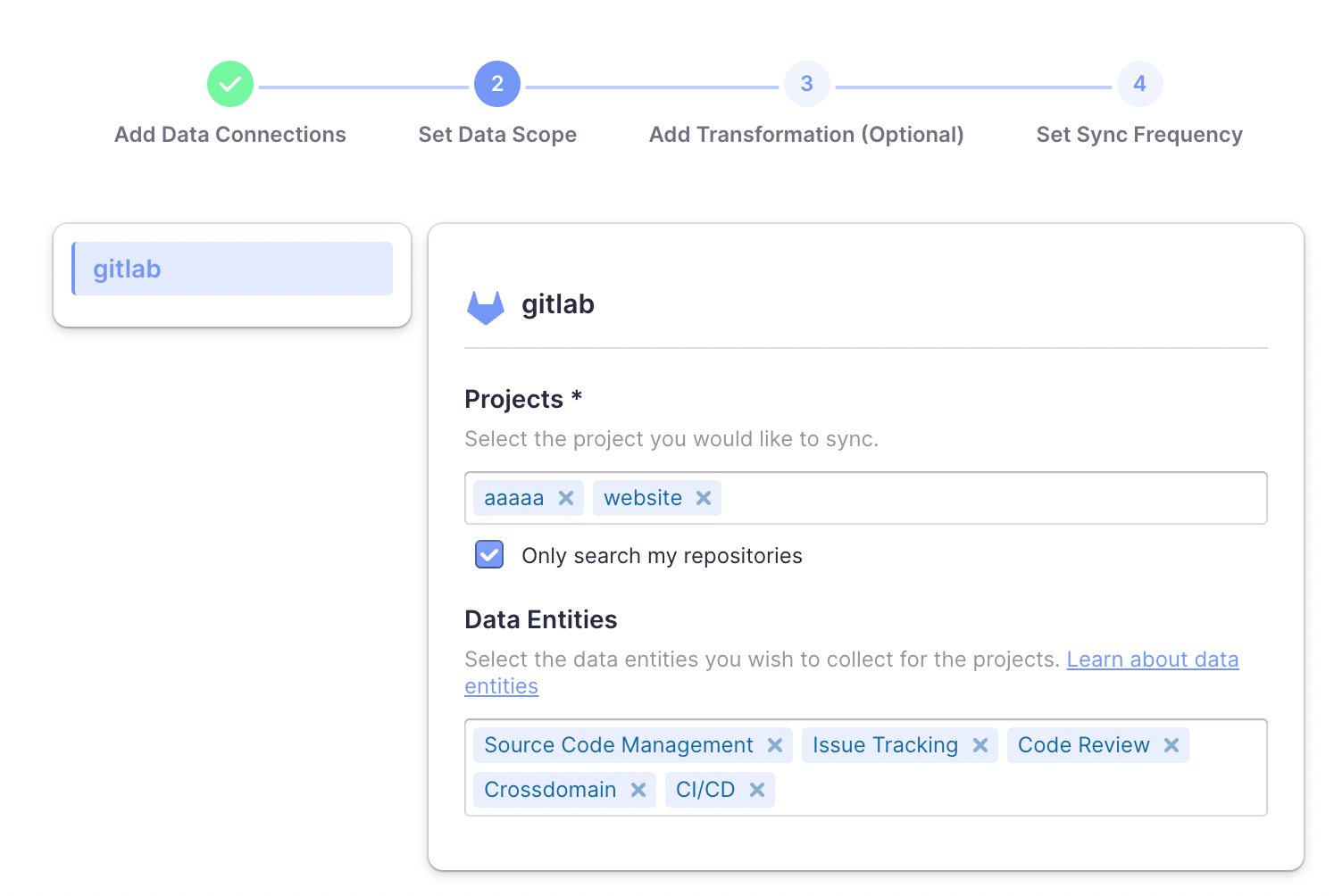
+Choose the Gitlab projects to collect. Limited by GitLab API, You need to type
more than 2 characters to search.
-If you want to collect more than 1 repo, please separate repos with comma. For
example, "apache/incubator-devlake,apache/incubator-devlake-website".
+* If you want to collect public repositories in GitLab, please uncheck "Only
search my repositories" to search all repositories.
#### Data Entities
Usually, you don't have to modify this part. However, if you don't want to
collect certain GitLab entities, you can unselect some entities to accerlerate
the collection speed.
@@ -47,7 +45,17 @@ Usually, you don't have to modify this part. However, if you
don't want to colle
- Cross Domain: GitLab accounts, etc.
### Step 3 - Adding Transformation Rules (Optional)
-There are no transformation rules for GitLab repos.
+
+#### CI/CD
+This set of configurations is used for calculating [DORA metrics](../DORA.md).
+
+If you're using GitLab CI to conduct `deployments`, please select "Detect
Deployment from Jobs in GitLab CI", and input the RegEx in the following fields:
+- Deployment: A GitLab CI job with a name that matches the given regEx will be
considered as a deployment.
+- Production: A GitLab CI job with a name that matches the given regEx will be
considered a job in the production environment.
+
+By the above two fields, DevLake can identify a production deployment among
massive CI jobs.
+
+You can also select "Not using Jobs in GitLab CI as Deployments" if you're not
using GitLab CI to conduct deployments.
### Step 4 - Setting Sync Frequency
You can choose how often you would like to sync your data in this step by
selecting a sync frequency option or enter a cron code to specify your prefered
schedule.
diff --git a/versioned_docs/version-v0.14/UserManuals/ConfigUI/Jenkins.md
b/versioned_docs/version-v0.14/UserManuals/ConfigUI/Jenkins.md
index 07d1ed295..cedf832b6 100644
--- a/versioned_docs/version-v0.14/UserManuals/ConfigUI/Jenkins.md
+++ b/versioned_docs/version-v0.14/UserManuals/ConfigUI/Jenkins.md
@@ -27,7 +27,15 @@ Click `Test Connection`, if the connection is successful,
click `Save Connection
There is no data cope setting for Jenkins.
### Step 3 - Adding Transformation Rules (Optional)
-There are no transformation rules for Jenkins.
+This set of configurations is used for calculating [DORA metrics](../DORA.md).
+
+If you're using Jenkins builds to conduct `deployments`, please select "Detect
Deployment from Jenkins Builds", and input the RegEx in the following fields:
+- Deployment: A Jenkins build with a name that matches the given regEx will be
considered as a deployment.
+- Production: A Jenkins build with a name that matches the given regEx will be
considered a build in the production environment.
+
+By the above two fields, DevLake can identify a production deployment among
massive CI jobs.
+
+You can also select "Not using Jenkins builds as Deployments" if you're not
using Jenkins to conduct deployments.
### Step 4 - Setting Sync Frequency
You can choose how often you would like to sync your data in this step by
selecting a sync frequency option or enter a cron code to specify your prefered
schedule.
diff --git a/versioned_docs/version-v0.14/UserManuals/ConfigUI/Tapd.md
b/versioned_docs/version-v0.14/UserManuals/ConfigUI/Tapd.md
index df233cb84..ed11cf181 100644
--- a/versioned_docs/version-v0.14/UserManuals/ConfigUI/Tapd.md
+++ b/versioned_docs/version-v0.14/UserManuals/ConfigUI/Tapd.md
@@ -1,5 +1,5 @@
---
-title: "Configuring Tapd"
+title: "Configuring Tapd(WIP)"
sidebar_position: 6
description: Config UI instruction for Tapd
---



