This is an automated email from the ASF dual-hosted git repository.

zky pushed a commit to branch main
in repository https://gitbox.apache.org/repos/asf/incubator-devlake-website.git
The following commit(s) were added to refs/heads/main by this push:
new f1fe8f815 docs: update config ui v0.15.0 images (#362)
f1fe8f815 is described below
commit f1fe8f815e09fe630d3a68df671cdc029bc1ac93
Author: abeizn <[email protected]>
AuthorDate: Mon Dec 26 20:22:55 2022 +0800
docs: update config ui v0.15.0 images (#362)
---
docs/UserManuals/ConfigUI/AdvancedMode.md | 13 +++---
docs/UserManuals/ConfigUI/GitHub.md | 45 ++++++++++++++-------
docs/UserManuals/ConfigUI/GitLab.md | 28 +++++++++----
docs/UserManuals/ConfigUI/Jenkins.md | 13 +++++-
static/img/AdvancedMode/AdvancedMode3.png | Bin 155243 -> 89028 bytes
.../ConfigUI/BlueprintEditing/blueprint-edit2.png | Bin 148851 -> 42634 bytes
.../img/ConfigUI/github-add-data-connections.png | Bin 326031 -> 90759 bytes
.../github-add-transformation-rules-list.png | Bin 187342 -> 42980 bytes
.../ConfigUI/github-add-transformation-rules.png | Bin 375574 -> 216428 bytes
static/img/ConfigUI/github-set-data-scope.png | Bin 274886 -> 71696 bytes
.../img/ConfigUI/gitlab-add-data-connections.png | Bin 233722 -> 62028 bytes
static/img/ConfigUI/gitlab-set-data-scope.png | Bin 0 -> 76342 bytes
.../img/ConfigUI/jenkins-add-data-connections.png | Bin 208576 -> 64593 bytes
static/img/ConfigUI/jenkins-set-data-scope.png | Bin 0 -> 81592 bytes
static/img/ConfigUI/jira-add-data-connections.png | Bin 243145 -> 64423 bytes
.../jira-add-transformation-rules-list.png | Bin 192375 -> 40604 bytes
.../img/ConfigUI/jira-add-transformation-rules.png | Bin 141564 -> 100607 bytes
static/img/ConfigUI/jira-set-data-scope.png | Bin 211665 -> 73773 bytes
18 files changed, 67 insertions(+), 32 deletions(-)
diff --git a/docs/UserManuals/ConfigUI/AdvancedMode.md
b/docs/UserManuals/ConfigUI/AdvancedMode.md
index 805659218..ef3354729 100644
--- a/docs/UserManuals/ConfigUI/AdvancedMode.md
+++ b/docs/UserManuals/ConfigUI/AdvancedMode.md
@@ -5,7 +5,6 @@ description: >
Using the advanced mode of Config-UI
---
-
## Why advanced mode?
Advanced mode allows users to create any pipeline by writing JSON. This is
useful for users who want to:
@@ -36,13 +35,11 @@ Advanced mode gives utmost flexibility to users by exposing
the JSON API.
1. Collect multiple GitLab repos sequentially.
->When there're multiple collection tasks against a single data source, we
recommend running these tasks sequentially since the collection speed is mostly
limited by the API rate limit of the data source.
->Running multiple tasks against the same data source is unlikely to speed up
the process and may overwhelm the data source.
-
+> When there're multiple collection tasks against a single data source, we
recommend running these tasks sequentially since the collection speed is mostly
limited by the API rate limit of the data source.
+> Running multiple tasks against the same data source is unlikely to speed up
the process and may overwhelm the data source.
Below is an example for collecting 2 GitLab repos sequentially. It has 2
stages, each contains a GitLab task.
-
```
[
[
@@ -64,7 +61,6 @@ Below is an example for collecting 2 GitLab repos
sequentially. It has 2 stages,
]
```
-
2. Collect a GitHub repo and a Jira board in parallel
Below is an example for collecting a GitHub repo and a Jira board in parallel.
It has a single stage with a GitHub task and a Jira task. Since users can
configure multiple Jira connection, it's required to pass in a `connectionId`
for Jira task to specify which connection to use.
@@ -89,14 +85,15 @@ Below is an example for collecting a GitHub repo and a Jira
board in parallel. I
]
]
```
+
## Editing a Blueprint (Advanced Mode)
+
This section is for editing a Blueprint in the Advanced Mode. To edit in the
Normal mode, please refer to [this
guide](Tutorial.md#editing-a-blueprint-normal-mode).
-To edit a Blueprint created in the Advanced mode, you can simply go the
Settings page of that Blueprint and click on Edit JSON to edit its
configuration.
+To edit a Blueprint created in the Advanced mode, you can simply go the
Configuration page of that Blueprint and edit its configuration.

-
## Troubleshooting
If you run into any problem, please check the
[Troubleshooting](/Troubleshooting/Configuration.md) or [create an
issue](https://github.com/apache/incubator-devlake/issues)
diff --git a/docs/UserManuals/ConfigUI/GitHub.md
b/docs/UserManuals/ConfigUI/GitHub.md
index 16b525caf..e06516baa 100644
--- a/docs/UserManuals/ConfigUI/GitHub.md
+++ b/docs/UserManuals/ConfigUI/GitHub.md
@@ -5,26 +5,34 @@ description: Config UI instruction for GitHub
---
Visit config-ui: `http://localhost:4000`.
+
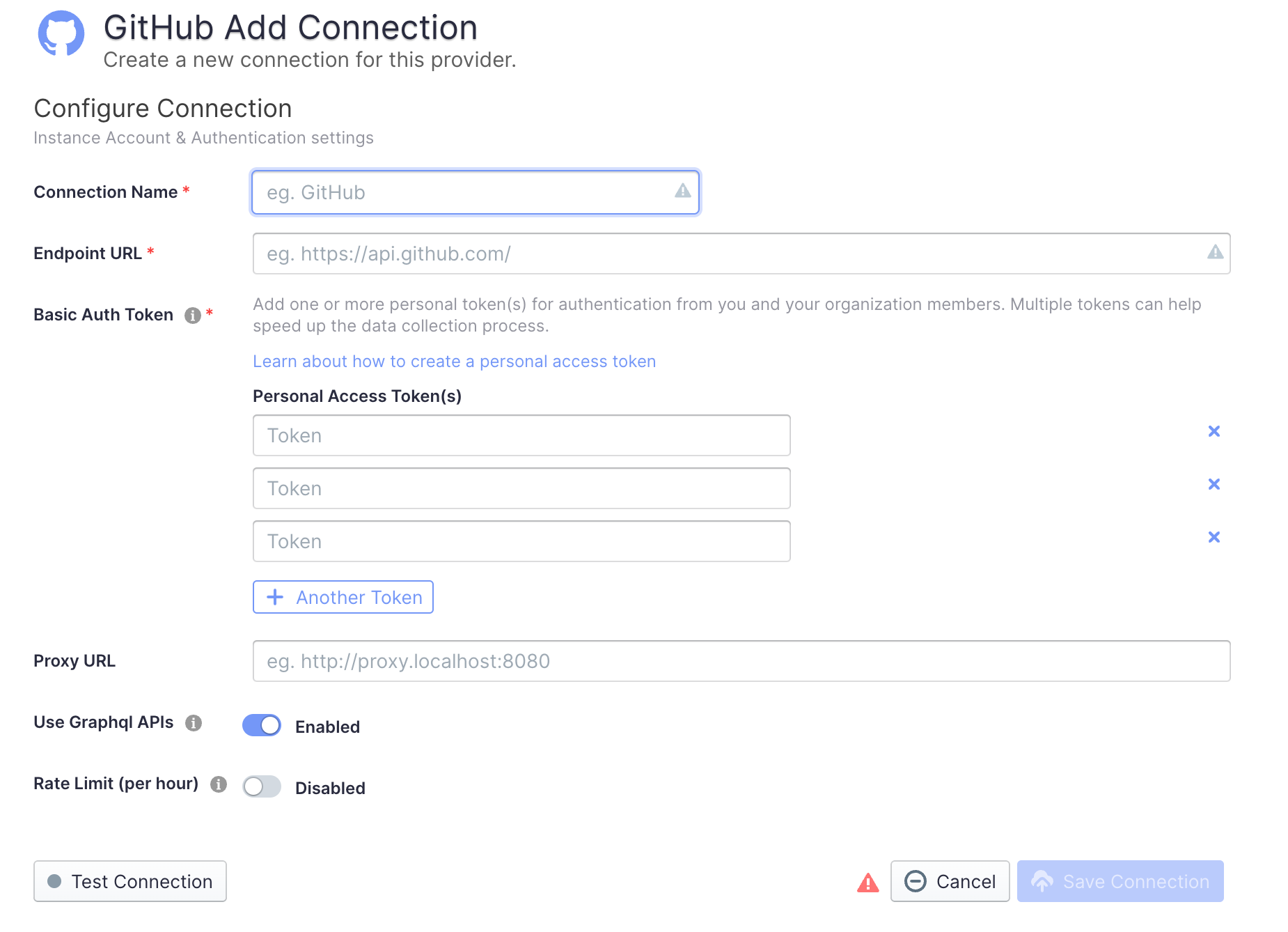
### Step 1 - Add Data Connections
-
+
+
#### Connection Name
+
Name your connection.
#### Endpoint URL
+
This should be a valid REST API endpoint, eg. `https://api.github.com/`. The
URL should end with `/`.
#### Auth Token(s)
+
You can use one of the following GitHub tokens: personal access tokens(PATs)
or fine-grained personal access tokens.
###### GitHub personal access tokens(PATs)
+
Learn about [how to create a GitHub personal access
token](https://docs.github.com/en/authentication/keeping-your-account-and-data-secure/creating-a-personal-access-token).
The following permissions are required to collect data from repositories:
- - `repo:status`
- - `repo_deployment`
- - `read:user`
- - `read:org`
+
+- `repo:status`
+- `repo_deployment`
+- `read:user`
+- `read:org`
###### Fine-grained personal access tokens(Fine-grained PATs)
+
If you're concerned with giving classic PATs full unrestricted access to your
repositories, you can use fine-grained PATs announced by GitHub recently. With
fine-grained PATs, GitHub users can create read-only PATs that only have access
to repositories under certain GitHub orgs. But in order to do that, org admin
needs to enroll that org with fine-grained PATs beta feature first. Please
check [this
doc](https://docs.github.com/en/authentication/keeping-your-account-and-data-secure/creati
[...]
The token should be granted the read-only permission for the following
entities.
- `Actions`
@@ -45,20 +53,25 @@ If you are using `github.com` or your on-premise GitHub
version supports GraphQL
- Instead of using multiple tokens to collect data, you can use ONLY ONE token
because GraphQL APIs are quick enough.
#### Proxy URL (Optional)
+
If you are behind a corporate firewall or VPN you may need to utilize a proxy
server. Enter a valid proxy server address on your network, e.g.
`http://your-proxy-server.com:1080`
#### Test and Save Connection
-Click `Test Connection`, if the connection is successful, click `Save
Connection` to add the connection.
+Click `Test Connection`, if the connection is successful, click `Save
Connection` to add the connection.
### Step 2 - Setting Data Scope
+

#### Projects
+
Enter the GitHub repos to collect. If you want to collect more than 1 repo,
please separate repos with comma. For example,
"apache/incubator-devlake,apache/incubator-devlake-website".
#### Data Entities
+
Usually, you don't have to modify this part. However, if you don't want to
collect certain GitHub entities, you can unselect some entities to accelerate
the collection speed.
+
- Issue Tracking: GitHub issues, issue comments, issue labels, etc.
- Source Code Management: GitHub repos, refs, commits, etc.
- Code Review: GitHub PRs, PR comments and reviews, etc.
@@ -66,6 +79,7 @@ Usually, you don't have to modify this part. However, if you
don't want to colle
- Cross Domain: GitHub accounts, etc.
### Step 3 - Adding Transformation Rules (Optional)
+


@@ -76,8 +90,9 @@ Each GitHub repo has at most ONE set of transformation rules.
#### Issue Tracking
- Severity: Parse the value of `severity` from issue labels.
- - when your issue labels for severity level are like 'severity/p0',
'severity/p1', 'severity/p2', then input 'severity/(.*)$'
- - when your issue labels for severity level are like 'p0', 'p1', 'p2', then
input '(p0|p1|p2)$'
+
+ - when your issue labels for severity level are like 'severity/p0',
'severity/p1', 'severity/p2', then input 'severity/(.\*)$'
+ - when your issue labels for severity level are like 'p0', 'p1', 'p2', then
input '(p0|p1|p2)$'
- Component: Same as "Severity".
@@ -90,11 +105,11 @@ Each GitHub repo has at most ONE set of transformation
rules.
- Type/Incident: Same as "Type/Requirement", with `type` setting to "INCIDENT".
#### CI/CD
-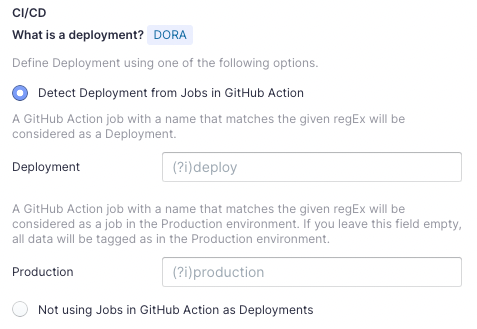
This set of configurations is used for calculating [DORA metrics](../DORA.md).
If you're using GitHub Action to conduct `deployments`, please select "Detect
Deployment from Jobs in GitHub Action", and input the RegEx in the following
fields:
+
- Deployment: A GitHub Action job with a name that matches the given regEx
will be considered as a deployment.
- Production: A GitHub Action job with a name that matches the given regEx
will be considered a job in the production environment.
@@ -105,16 +120,18 @@ You can also select "Not using Jobs in GitHub Action as
Deployments" if you're n
#### Code Review
- Type: The `type` of pull requests will be parsed from PR labels by given
regular expression. For example:
- - when your labels for PR types are like 'type/feature-development',
'type/bug-fixing' and 'type/docs', please input 'type/(.*)$'
- - when your labels for PR types are like 'feature-development',
'bug-fixing' and 'docs', please input '(feature-development|bug-fixing|docs)$'
+
+ - when your labels for PR types are like 'type/feature-development',
'type/bug-fixing' and 'type/docs', please input 'type/(.\*)$'
+ - when your labels for PR types are like 'feature-development', 'bug-fixing'
and 'docs', please input '(feature-development|bug-fixing|docs)$'
- Component: The `component` of pull requests will be parsed from PR labels by
given regular expression.
#### Additional Settings (Optional)
- Tags Limit: It'll compare the last N pairs of tags to get the "commit diff',
"issue diff" between tags. N defaults to 10.
- - commit diff: new commits for a tag relative to the previous one
- - issue diff: issues solved by the new commits for a tag relative to the
previous one
+
+ - commit diff: new commits for a tag relative to the previous one
+ - issue diff: issues solved by the new commits for a tag relative to the
previous one
- Tags Pattern: Only tags that meet given regular expression will be counted.
@@ -123,8 +140,8 @@ You can also select "Not using Jobs in GitHub Action as
Deployments" if you're n
Please click `Save` to save the transformation rules for the repo. In the data
scope list, click `Next Step` to continue configuring.
### Step 4 - Setting Sync Frequency
-You can choose how often you would like to sync your data in this step by
selecting a sync frequency option or enter a cron code to specify your prefered
schedule.
+You can choose how often you would like to sync your data in this step by
selecting a sync frequency option or enter a cron code to specify your prefered
schedule.
## Troubleshooting
diff --git a/docs/UserManuals/ConfigUI/GitLab.md
b/docs/UserManuals/ConfigUI/GitLab.md
index 75918f51e..18b2d8795 100644
--- a/docs/UserManuals/ConfigUI/GitLab.md
+++ b/docs/UserManuals/ConfigUI/GitLab.md
@@ -5,39 +5,49 @@ description: Config UI instruction for GitLab
---
Visit config-ui: `http://localhost:4000`.
+
### Step 1 - Add Data Connections
+

#### Connection Name
+
Name your connection.
#### Endpoint URL
-This should be a valid REST API endpoint.
- - If you are using gitlab.com, the endpoint will be
`https://gitlab.com/api/v4/`
- - If you are self-hosting GitLab, the endpoint will look like
`https://gitlab.example.com/api/v4/`
-The endpoint url should end with `/`.
+
+This should be a valid REST API endpoint.
+
+- If you are using gitlab.com, the endpoint will be
`https://gitlab.com/api/v4/`
+- If you are self-hosting GitLab, the endpoint will look like
`https://gitlab.example.com/api/v4/`
+ The endpoint url should end with `/`.
#### Auth Token(s)
-GitLab personal access tokens are required to add a connection. Learn about
[how to create a GitLab personal access
token](https://docs.gitlab.com/ee/user/profile/personal_access_tokens.html).
+GitLab personal access tokens are required to add a connection. Learn about
[how to create a GitLab personal access
token](https://docs.gitlab.com/ee/user/profile/personal_access_tokens.html).
#### Proxy URL (Optional)
+
If you are behind a corporate firewall or VPN you may need to utilize a proxy
server. Enter a valid proxy server address on your network, e.g.
`http://your-proxy-server.com:1080`
#### Test and Save Connection
+
Click `Test Connection`, if the connection is successful, click `Save
Connection` to add the connection.
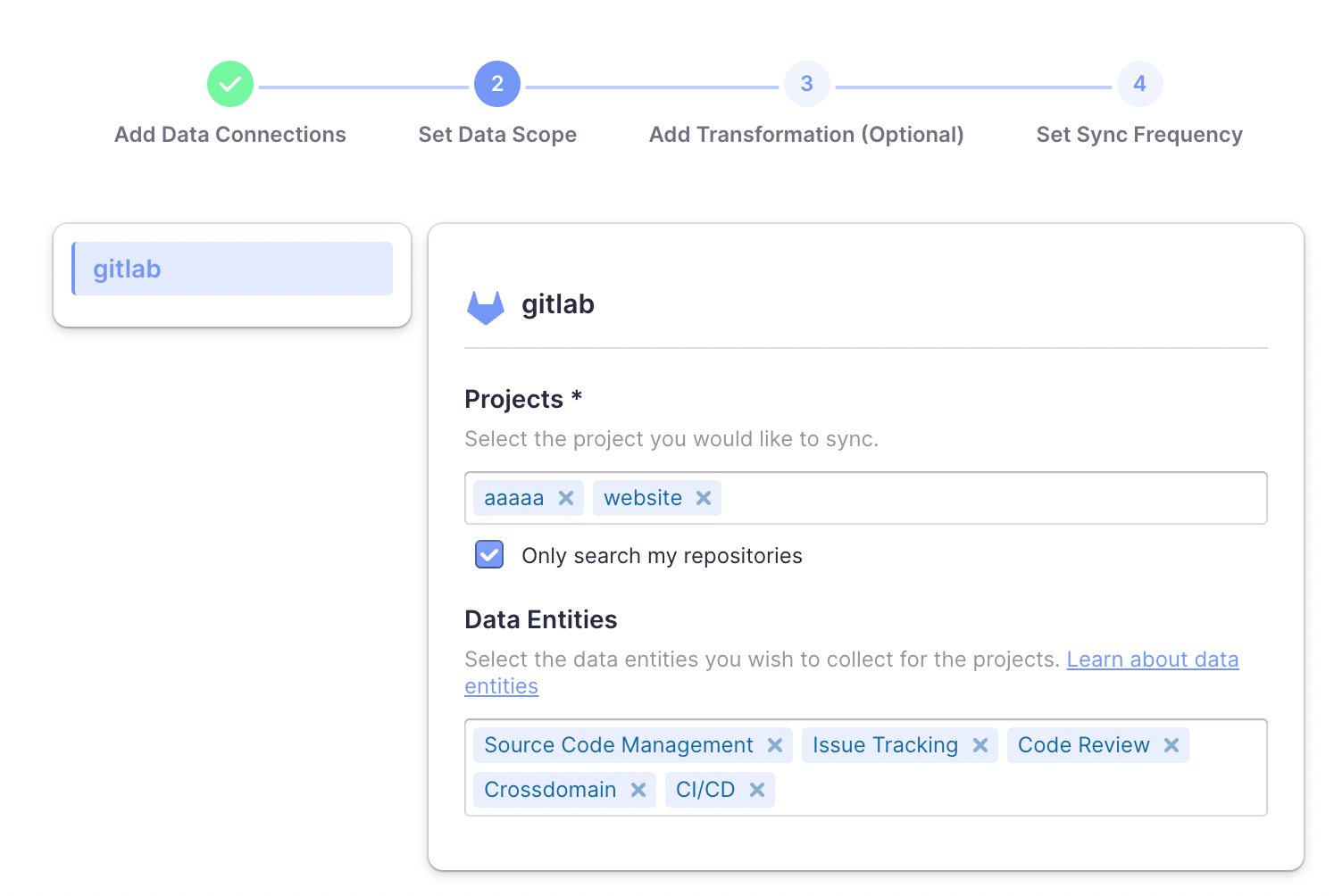
### Step 2 - Setting Data Scope
-
+
#### Projects
+
Choose the Gitlab projects to collect. Limited by GitLab API, You need to type
more than 2 characters to search.
-* If you want to collect public repositories in GitLab, please uncheck "Only
search my repositories" to search all repositories.
+- If you want to collect public repositories in GitLab, please uncheck "Only
search my repositories" to search all repositories.
#### Data Entities
+
Usually, you don't have to modify this part. However, if you don't want to
collect certain GitLab entities, you can unselect some entities to accerlerate
the collection speed.
+
- Issue Tracking: GitLab issues, issue comments, issue labels, etc.
- Source Code Management: GitLab repos, refs, commits, etc.
- Code Review: GitLab MRs, MR comments and reviews, etc.
@@ -47,9 +57,11 @@ Usually, you don't have to modify this part. However, if you
don't want to colle
### Step 3 - Adding Transformation Rules (Optional)
#### CI/CD
+
This set of configurations is used for calculating [DORA metrics](../DORA.md).
If you're using GitLab CI to conduct `deployments`, please select "Detect
Deployment from Jobs in GitLab CI", and input the RegEx in the following fields:
+
- Deployment: A GitLab CI job with a name that matches the given regEx will be
considered as a deployment.
- Production: A GitLab CI job with a name that matches the given regEx will be
considered a job in the production environment.
@@ -58,8 +70,8 @@ By the above two fields, DevLake can identify a production
deployment among mass
You can also select "Not using Jobs in GitLab CI as Deployments" if you're not
using GitLab CI to conduct deployments.
### Step 4 - Setting Sync Frequency
-You can choose how often you would like to sync your data in this step by
selecting a sync frequency option or enter a cron code to specify your prefered
schedule.
+You can choose how often you would like to sync your data in this step by
selecting a sync frequency option or enter a cron code to specify your prefered
schedule.
## Troubleshooting
diff --git a/docs/UserManuals/ConfigUI/Jenkins.md
b/docs/UserManuals/ConfigUI/Jenkins.md
index 446294f99..579451aa3 100644
--- a/docs/UserManuals/ConfigUI/Jenkins.md
+++ b/docs/UserManuals/ConfigUI/Jenkins.md
@@ -5,27 +5,34 @@ description: Config UI instruction for Jenkins
---
Visit config-ui: `http://localhost:4000`.
+
### Step 1 - Add Data Connections
+

#### Connection Name
+
Name your connection.
#### Endpoint URL
+
This should be a valid REST API endpoint. Eg. `https://ci.jenkins.io/`. The
endpoint url should end with `/`.
#### Username (E-mail)
+
Your User ID for the Jenkins Instance.
#### Password
+
For help on Username and Password, please see Jenkins docs on [using
credentials](https://www.jenkins.io/doc/book/using/using-credentials/). You can
also use "API Access Token" for this field, which can be generated at `User` ->
`Configure` -> `API Token` section on Jenkins.
#### Test and Save Connection
+
Click `Test Connection`, if the connection is successful, click `Save
Connection` to add the connection.
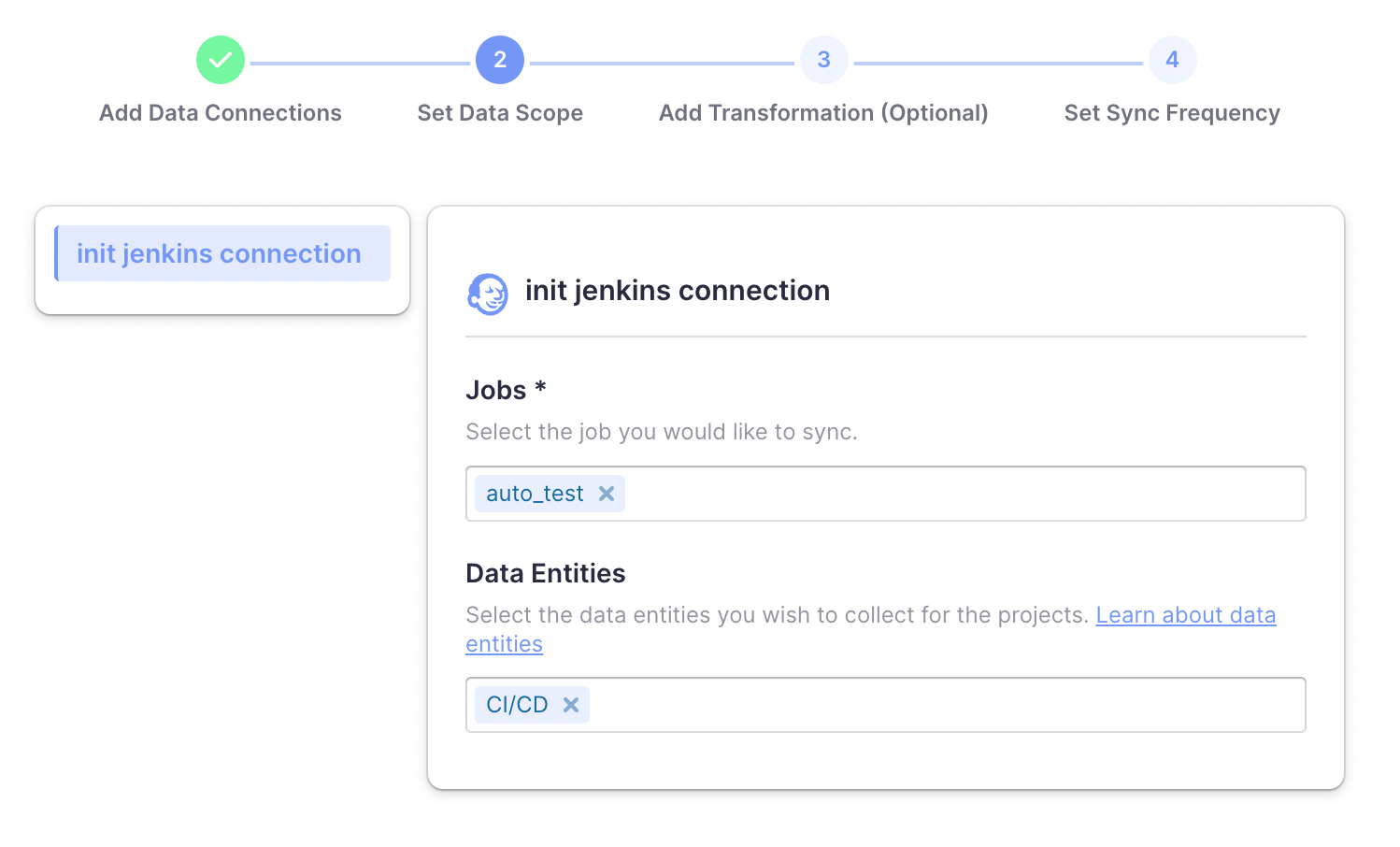
### Step 2 - Setting Data Scope
-
+
#### Jobs
@@ -38,9 +45,11 @@ Jenkins only supports `CI/CD` domain entities, transformed
from Jenkins builds a
- CI/CD: Jenkins builds, stages, etc.
### Step 3 - Adding Transformation Rules (Optional)
+
This set of configurations is used for calculating [DORA metrics](../DORA.md).
If you're using Jenkins builds to conduct `deployments`, please select "Detect
Deployment from Jenkins Builds", and input the RegEx in the following fields:
+
- Deployment: A Jenkins build with a name that matches the given regEx will be
considered as a deployment.
- Production: A Jenkins build with a name that matches the given regEx will be
considered a build in the production environment.
@@ -49,8 +58,8 @@ By the above two fields, DevLake can identify a production
deployment among mass
You can also select "Not using Jenkins builds as Deployments" if you're not
using Jenkins to conduct deployments.
### Step 4 - Setting Sync Frequency
-You can choose how often you would like to sync your data in this step by
selecting a sync frequency option or enter a cron code to specify your prefered
schedule.
+You can choose how often you would like to sync your data in this step by
selecting a sync frequency option or enter a cron code to specify your prefered
schedule.
## Troubleshooting
diff --git a/static/img/AdvancedMode/AdvancedMode3.png
b/static/img/AdvancedMode/AdvancedMode3.png
index 57f67b9bc..f34ee8093 100644
Binary files a/static/img/AdvancedMode/AdvancedMode3.png and
b/static/img/AdvancedMode/AdvancedMode3.png differ
diff --git a/static/img/ConfigUI/BlueprintEditing/blueprint-edit2.png
b/static/img/ConfigUI/BlueprintEditing/blueprint-edit2.png
index 126bf7b99..6a48329ba 100644
Binary files a/static/img/ConfigUI/BlueprintEditing/blueprint-edit2.png and
b/static/img/ConfigUI/BlueprintEditing/blueprint-edit2.png differ
diff --git a/static/img/ConfigUI/github-add-data-connections.png
b/static/img/ConfigUI/github-add-data-connections.png
index 88a38596f..74e1300f4 100644
Binary files a/static/img/ConfigUI/github-add-data-connections.png and
b/static/img/ConfigUI/github-add-data-connections.png differ
diff --git a/static/img/ConfigUI/github-add-transformation-rules-list.png
b/static/img/ConfigUI/github-add-transformation-rules-list.png
index cae08c6e6..5c125e97a 100644
Binary files a/static/img/ConfigUI/github-add-transformation-rules-list.png and
b/static/img/ConfigUI/github-add-transformation-rules-list.png differ
diff --git a/static/img/ConfigUI/github-add-transformation-rules.png
b/static/img/ConfigUI/github-add-transformation-rules.png
index 1d8afc8dc..86597f1ff 100644
Binary files a/static/img/ConfigUI/github-add-transformation-rules.png and
b/static/img/ConfigUI/github-add-transformation-rules.png differ
diff --git a/static/img/ConfigUI/github-set-data-scope.png
b/static/img/ConfigUI/github-set-data-scope.png
index 7f3599845..02398e808 100644
Binary files a/static/img/ConfigUI/github-set-data-scope.png and
b/static/img/ConfigUI/github-set-data-scope.png differ
diff --git a/static/img/ConfigUI/gitlab-add-data-connections.png
b/static/img/ConfigUI/gitlab-add-data-connections.png
index d1c7caeca..c2e20dfed 100644
Binary files a/static/img/ConfigUI/gitlab-add-data-connections.png and
b/static/img/ConfigUI/gitlab-add-data-connections.png differ
diff --git a/static/img/ConfigUI/gitlab-set-data-scope.png
b/static/img/ConfigUI/gitlab-set-data-scope.png
new file mode 100644
index 000000000..2e976b208
Binary files /dev/null and b/static/img/ConfigUI/gitlab-set-data-scope.png
differ
diff --git a/static/img/ConfigUI/jenkins-add-data-connections.png
b/static/img/ConfigUI/jenkins-add-data-connections.png
index 529f30bcf..b4e8fb73f 100644
Binary files a/static/img/ConfigUI/jenkins-add-data-connections.png and
b/static/img/ConfigUI/jenkins-add-data-connections.png differ
diff --git a/static/img/ConfigUI/jenkins-set-data-scope.png
b/static/img/ConfigUI/jenkins-set-data-scope.png
new file mode 100644
index 000000000..f74a52db8
Binary files /dev/null and b/static/img/ConfigUI/jenkins-set-data-scope.png
differ
diff --git a/static/img/ConfigUI/jira-add-data-connections.png
b/static/img/ConfigUI/jira-add-data-connections.png
index e1b844705..eb7340b1d 100644
Binary files a/static/img/ConfigUI/jira-add-data-connections.png and
b/static/img/ConfigUI/jira-add-data-connections.png differ
diff --git a/static/img/ConfigUI/jira-add-transformation-rules-list.png
b/static/img/ConfigUI/jira-add-transformation-rules-list.png
index 984e43cad..1620ed802 100644
Binary files a/static/img/ConfigUI/jira-add-transformation-rules-list.png and
b/static/img/ConfigUI/jira-add-transformation-rules-list.png differ
diff --git a/static/img/ConfigUI/jira-add-transformation-rules.png
b/static/img/ConfigUI/jira-add-transformation-rules.png
index dab19ac0f..3c6cfd6c8 100644
Binary files a/static/img/ConfigUI/jira-add-transformation-rules.png and
b/static/img/ConfigUI/jira-add-transformation-rules.png differ
diff --git a/static/img/ConfigUI/jira-set-data-scope.png
b/static/img/ConfigUI/jira-set-data-scope.png
index c2db77aad..1ff88ac4d 100644
Binary files a/static/img/ConfigUI/jira-set-data-scope.png and
b/static/img/ConfigUI/jira-set-data-scope.png differ




