This is an automated email from the ASF dual-hosted git repository.

likyh pushed a commit to branch likyh/bitbucket-cloud
in repository https://gitbox.apache.org/repos/asf/incubator-devlake-website.git
commit 8eb9f1eea0e385f68057fe565636137ac36c4788 Author: linyh <[email protected]> AuthorDate: Tue Feb 21 19:56:27 2023 +0800 feat: update doc for bitbucket cloud --- docs/Configuration/BitBucket.md | 79 ++++++++++++++++++++++++++++++++++++---- docs/Plugins/bitbucket.md | 80 ++++++++++++++--------------------------- 2 files changed, 99 insertions(+), 60 deletions(-) diff --git a/docs/Configuration/BitBucket.md b/docs/Configuration/BitBucket.md index 871b2e9c86..d384488d47 100644 --- a/docs/Configuration/BitBucket.md +++ b/docs/Configuration/BitBucket.md @@ -1,5 +1,5 @@ --- -title: "BitBucket(Beta)" +title: "BitBucket(Cloud)" sidebar_position: 2 description: Config UI instruction for BitBucket(Cloud) --- @@ -8,7 +8,7 @@ Visit config-ui: `http://localhost:4000` and go to `Connections` page. ### Step 1 - Add Data Connections - + #### Connection Name @@ -16,7 +16,7 @@ Name your connection. #### Endpoint URL -This should be a valid REST API endpoint for BitBucket: `https://api.bitbucket.org/2.0/`. The endpoint URL should end with `/`. +This should be a valid REST API endpoint for BitBucket Cloud: `https://api.bitbucket.org/2.0/`. The endpoint URL should end with `/`. DevLake will support BitBucket Server in the future. @@ -47,20 +47,87 @@ If you are behind a corporate firewall or VPN you may need to utilize a proxy se DevLake uses a dynamic rate limit to collect BitBucket data. You can adjust the rate limit if you want to increase or lower the speed. -The maximum rate limit for different entities in BitBucket(Cloud) is [60,000 or 1,000 requests/hour](https://support.atlassian.com/bitbucket-cloud/docs/api-request-limits/). Please do not use a rate that exceeds this number. +The maximum rate limit for different entities in BitBucket(Cloud) is [1,000 requests/hour](https://support.atlassian.com/bitbucket-cloud/docs/api-request-limits/). But we find it can run when we try rate limit more than 1000/h. So you can try the bigger maximum if you repo is big enough. + +<!--  --> #### Test and Save Connection Click `Test Connection`, if the connection is successful, click `Save Connection` to add the connection. - ### Step 2 - Configure Blueprint -Similar to other beta plugins, BitBucket does not support `project`, which means, you can only collect BitBucket data via blueprint's advanced mode. +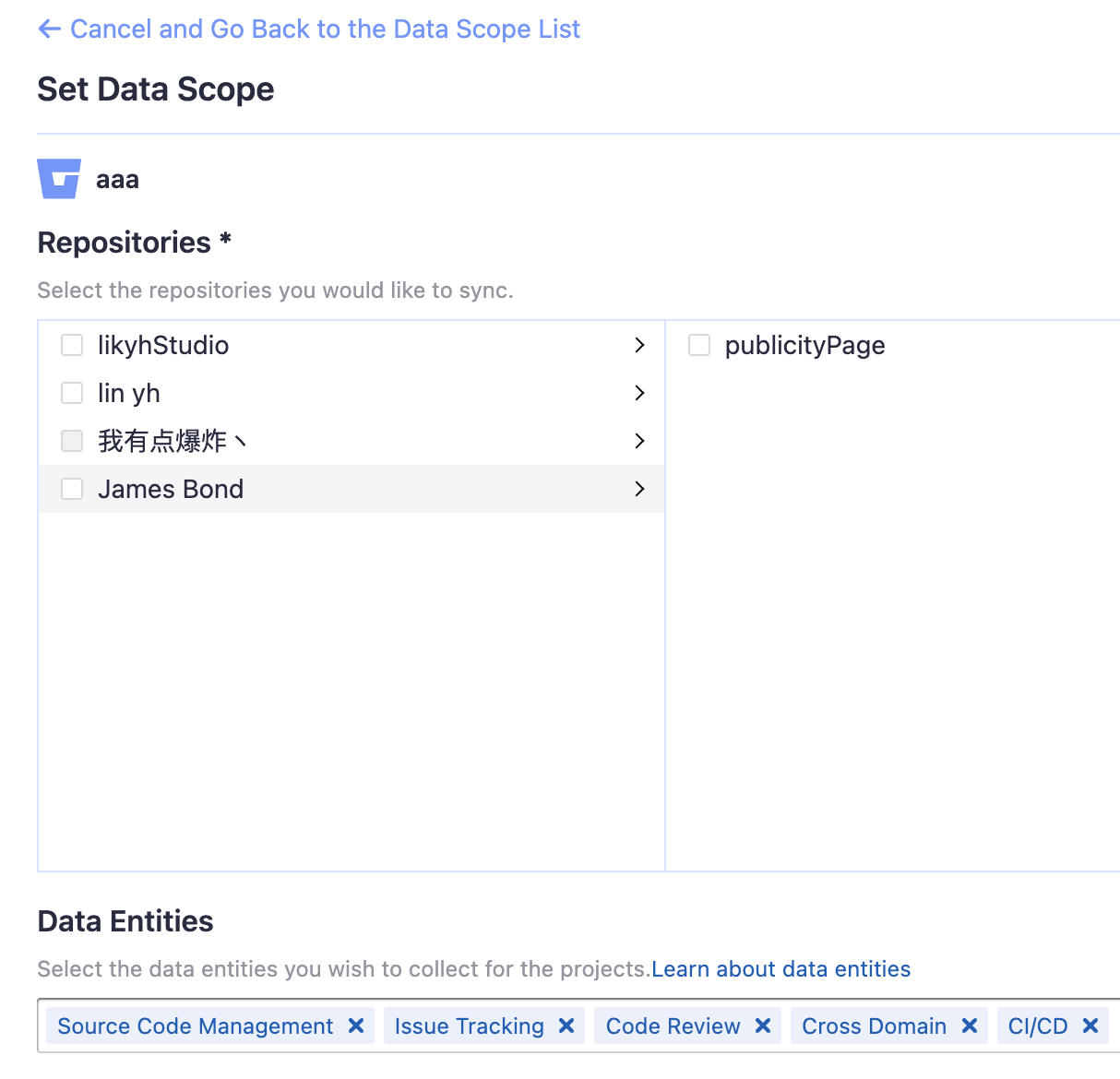 + +#### Repositories + +Select the Bitbucket repos to collect. + +#### Data Entities + +Usually, you don't have to modify this part. However, if you don't want to collect certain Bitbucket entities, you can unselect some entities to accelerate the collection speed. + +- Issue Tracking: Bitbucket issues, issue comments, etc. +- Source Code Management: Bitbucket repos, refs, commits, etc. +- Code Review: Bitbucket PRs, PR comments, etc. +- CI/CD: Bitbucket Pipelines, Bitbucket Deployments, etc. +- Cross Domain: Bitbucket accounts, etc. Please go to the `Blueprints` page and switch to advanced mode. See how to use advanced mode and JSON [examples](AdvancedMode.md). +### Step 3 - Adding Transformation Rules (Optional) + +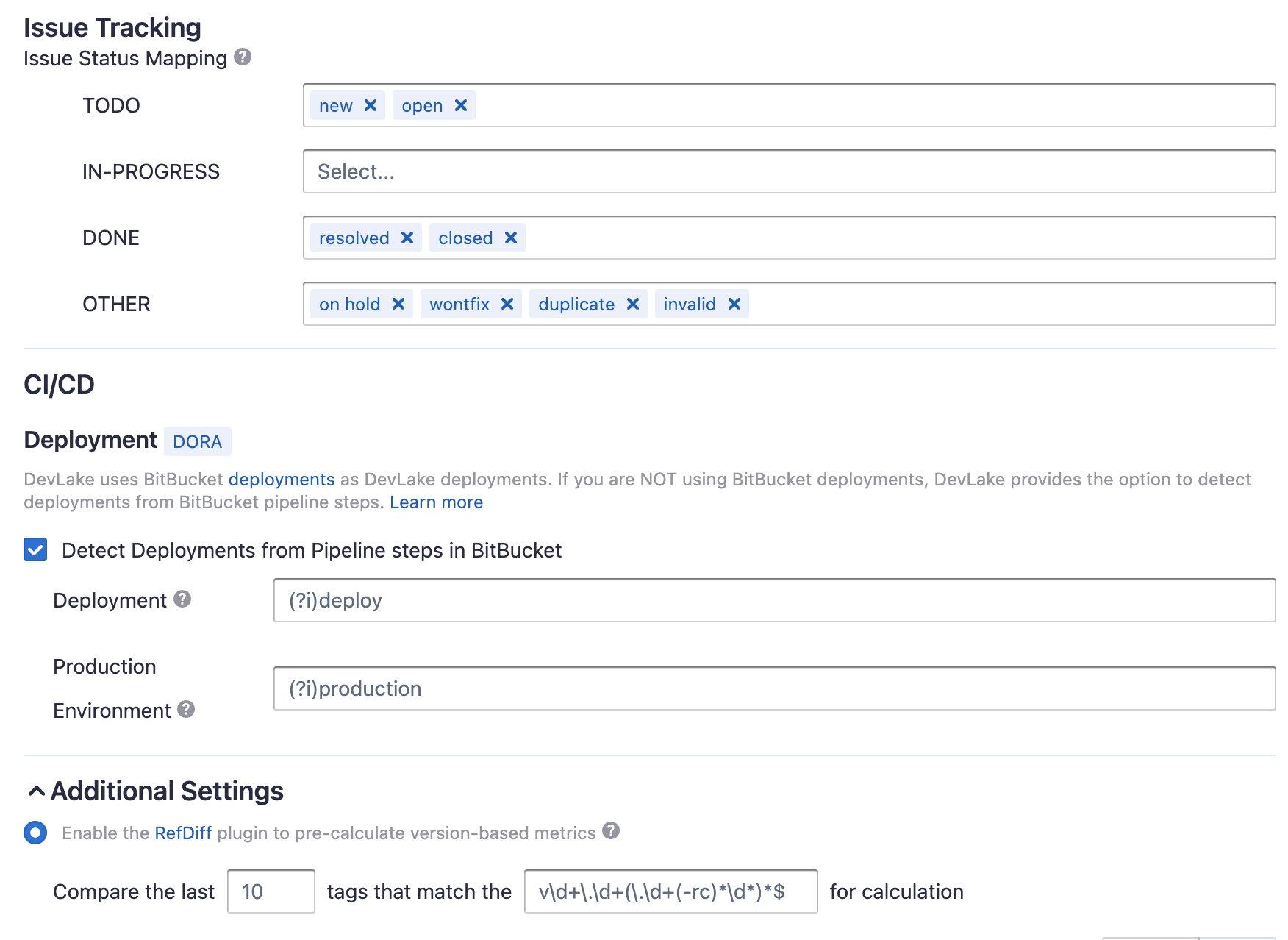 + +Without change default transformation rules, you can still view the Metrics dashboard. However, if you want to view pre-built dashboards, the following transformation rules, especially "Type/Bug", should be added.<br/> + +Each Bitbucket repo has at most ONE set of transformation rules. + +#### Issue Tracking + +- TODO: the issues with selected states can be recognized not start issues. + +- IN-PROGRESS: Same as "TODO". +- DONE: Same as "TODO". +- OTHER: Same as "TODO". + +#### CI/CD + +This set of configurations is used for calculating [DORA metrics](../DORA.md). + +A Bitbucket pipelines has many steps. Each Bitbucket pipeline is converted to a +cicd_pipeline in the domain layer and each Bitbucket pipeline step is converted to a cicd_task in the domain layer. + + +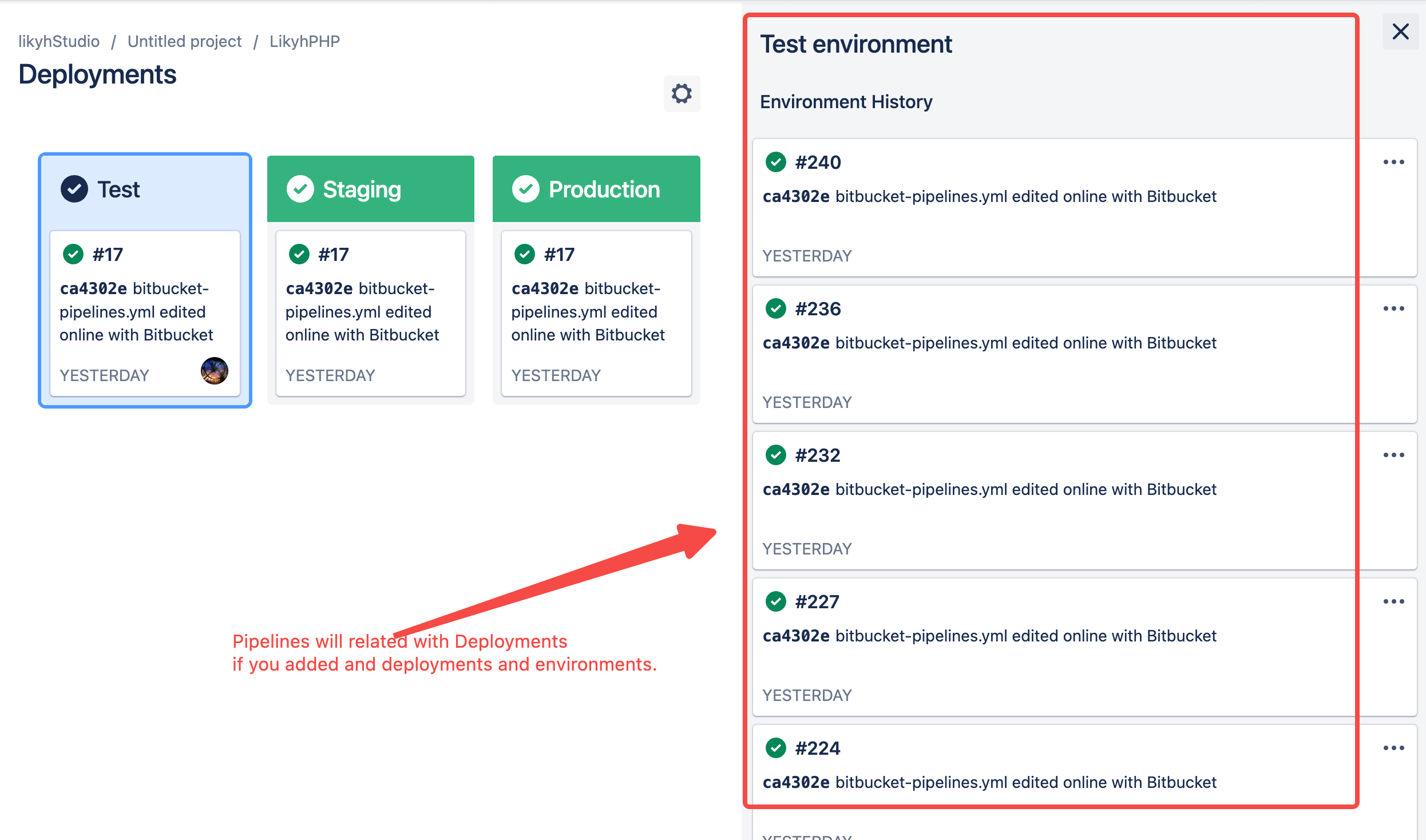 + +If you are using Bitbucket Deployments and Environments , please select "Detect Deployment from Environment in BitBucket". DevLake will consider the pipeline steps with deployment as a deployment and use the environment type of deployment in cicd_task. + +Or if you're using Bitbucket pipelines to conduct `deployments`, please select "Detect Deployment from Pipeline Step Names in BitBucket", and input the RegEx in the following fields: + +- Deployment: A Bitbucket pipeline steps with a name that matches the given regEx will be considered as a deployment. +- Production: A Bitbucket pipeline steps with a name that matches the given regEx will be considered a job in the production environment. + +The deployment and production regex is only applied to the records in the cicd_tasks table when Bitbucket Deployments not exists. + +#### Additional Settings (Optional) + +- Tags Limit: It'll compare the last N pairs of tags to get the "commit diff', "issue diff" between tags. N defaults to 10. + + - commit diff: new commits for a tag relative to the previous one + - issue diff: issues solved by the new commits for a tag relative to the previous one + +- Tags Pattern: Only tags that meet given regular expression will be counted. + +- Tags Order: Only "reverse semver" order is supported for now. + +Please click `Save` to save the transformation rules for the repo. In the data scope list, click `Next Step` to continue configuring. + +### Step 4 - Setting Sync Frequency + +You can choose how often you would like to sync your data in this step by selecting a sync frequency option or enter a cron code to specify your prefered schedule. + ### Troubleshooting If you run into any problem, please check the [Troubleshooting](/Troubleshooting/Configuration.md) or [create an issue](https://github.com/apache/incubator-devlake/issues) diff --git a/docs/Plugins/bitbucket.md b/docs/Plugins/bitbucket.md index d010fbb624..bdb087b3d5 100644 --- a/docs/Plugins/bitbucket.md +++ b/docs/Plugins/bitbucket.md @@ -40,62 +40,34 @@ Metrics that can be calculated based on the data collected from bitbucket: ## API Sample Request > Note: Please replace the `http://localhost:8080` in the sample requests with > your actual DevLake API endpoint. For how to view DevLake API's swagger > documentation, please refer to the "Using DevLake API" section of [Developer > Setup](../DeveloperManuals/DeveloperSetup.md). -1. Create a Bitbucket data connection: `POST /plugins/bitbucket/connections`. Please see a sample request below: - -```shell -curl --location --request POST 'http://localhost:8080/plugins/bitbucket/connections' \ ---header 'Content-Type: application/json' \ ---data-raw '{ - "endpoint": "https://api.bitbucket.org/2.0/";, - "username": "<your username>", - "password": "<your app password>", - "name": "Bitbucket Cloud" -}' -``` - -2. Create a blueprint to collect data from Bitbucket: `POST /blueprints`. Please see a sample request below: - +You can trigger data collection by making a POST request to `/pipelines`. ```shell -curl --location --request POST 'http://localhost:8080/blueprints' \ +curl 'http://localhost:8080/pipelines' \ --header 'Content-Type: application/json' \ ---data-raw '{ - "enable": true, - "mode": "NORMAL", - "name": "My Bitbucket Blueprint", - "cronConfig": "<cron string of your choice>", - "isManual": false, - "plan": [[]], - "settings": { - "connections": [ - { - "plugin": "bitbucket", - "connectionId": 1, - "scope": [ - { - "entities": [ - "CODE", - "TICKET", - "CODEREVIEW", - "CROSS" - ], - "options": { - "owner": "<owner of your repo>", - "repo": "<your repo name>" - } - } - ] - } - ], - "version": "1.0.0" - } -}' -``` - -3. [Optional] Trigger the blueprint manually: `POST /blueprints/{blueprintId}/trigger`. Run this step if you want to trigger the newly created blueprint right away. See an example request below: - -```shell -curl --location --request POST 'http://localhost:8080/blueprints/<blueprintId>/trigger' \ ---header 'Content-Type: application/json' +--data-raw ' +{ + "name": "project1", + "plan": [ + [ + { + "plugin": "bitbucket", + "options": { + "connectionId": 1, + "fullName": "likyh/likyhphp", + "transformationRules":{ + "deploymentPattern":"", + "productionPattern":"", + "issueStatusTodo":"new,open", + "issueStatusInProgress":"", + "issueStatusDone":"resolved,closed", + "issueStatusOther":"on hold,wontfix,duplicate,invalid" + } + } + } + ] + ] +} +' ``` ## References






