Startrekzky commented on code in PR #458:
URL:
https://github.com/apache/incubator-devlake-website/pull/458#discussion_r1127757874
########## docs/GettingStarted/DockerComposeSetup.md: ########## @@ -33,8 +33,87 @@ sidebar_position: 1 Support for database schema migration was introduced to DevLake in v0.10.0. From v0.10.0 onwards, users can upgrade their instance smoothly to a newer version. However, versions prior to v0.10.0 do not support upgrading to a newer version with a different database schema. -<br/> +<br/> +## FAQ +### 1. Can I use an external Database service instead of running Database in Docker? + + Yes, you can simply comment out mysql/grafana part in docker-compose.yml and update some configurations in .env befor you run `docker compose up -d`, here are the steps: + +1. Comment out mysql part: Review Comment: Can you remove the point number before the question? It's quite confusing now. 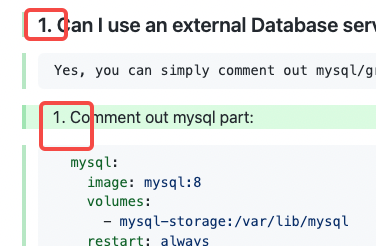 ########## docs/GettingStarted/DockerComposeSetup.md: ########## @@ -33,8 +33,87 @@ sidebar_position: 1 Support for database schema migration was introduced to DevLake in v0.10.0. From v0.10.0 onwards, users can upgrade their instance smoothly to a newer version. However, versions prior to v0.10.0 do not support upgrading to a newer version with a different database schema. -<br/> +<br/> +## FAQ +### 1. Can I use an external Database service instead of running Database in Docker? + + Yes, you can simply comment out mysql/grafana part in docker-compose.yml and update some configurations in .env befor you run `docker compose up -d`, here are the steps: + +1. Comment out mysql part: +```yaml + mysql: + image: mysql:8 + volumes: + - mysql-storage:/var/lib/mysql + restart: always + ports: + - "127.0.0.1:3306:3306" + environment: + MYSQL_ROOT_PASSWORD: admin + MYSQL_DATABASE: lake + MYSQL_USER: merico + MYSQL_PASSWORD: merico + command: + --character-set-server=utf8mb4 + --collation-server=utf8mb4_bin +``` + +2. Comment out mysql volume: Review Comment: Text change: Comment out the 'mysql' volume: ########## docs/GettingStarted/DockerComposeSetup.md: ########## @@ -33,8 +33,87 @@ sidebar_position: 1 Support for database schema migration was introduced to DevLake in v0.10.0. From v0.10.0 onwards, users can upgrade their instance smoothly to a newer version. However, versions prior to v0.10.0 do not support upgrading to a newer version with a different database schema. -<br/> +<br/> +## FAQ +### 1. Can I use an external Database service instead of running Database in Docker? + + Yes, you can simply comment out mysql/grafana part in docker-compose.yml and update some configurations in .env befor you run `docker compose up -d`, here are the steps: + +1. Comment out mysql part: +```yaml + mysql: + image: mysql:8 + volumes: + - mysql-storage:/var/lib/mysql + restart: always + ports: + - "127.0.0.1:3306:3306" + environment: + MYSQL_ROOT_PASSWORD: admin + MYSQL_DATABASE: lake + MYSQL_USER: merico + MYSQL_PASSWORD: merico + command: + --character-set-server=utf8mb4 + --collation-server=utf8mb4_bin +``` + +2. Comment out mysql volume: + +```yaml +volumes: + mysql-storage: +``` + +3. Comment out depends_on mysql: + +```yaml + depends_on: + - mysql +``` + +4. Set DB_URL to your own db url in .env Review Comment: How? Can you give an example? ########## docs/GettingStarted/DockerComposeSetup.md: ########## @@ -33,8 +33,87 @@ sidebar_position: 1 Support for database schema migration was introduced to DevLake in v0.10.0. From v0.10.0 onwards, users can upgrade their instance smoothly to a newer version. However, versions prior to v0.10.0 do not support upgrading to a newer version with a different database schema. -<br/> +<br/> +## FAQ +### 1. Can I use an external Database service instead of running Database in Docker? + + Yes, you can simply comment out mysql/grafana part in docker-compose.yml and update some configurations in .env befor you run `docker compose up -d`, here are the steps: + +1. Comment out mysql part: +```yaml + mysql: + image: mysql:8 + volumes: + - mysql-storage:/var/lib/mysql + restart: always + ports: + - "127.0.0.1:3306:3306" + environment: + MYSQL_ROOT_PASSWORD: admin + MYSQL_DATABASE: lake + MYSQL_USER: merico + MYSQL_PASSWORD: merico + command: + --character-set-server=utf8mb4 + --collation-server=utf8mb4_bin +``` + +2. Comment out mysql volume: + +```yaml +volumes: + mysql-storage: +``` + +3. Comment out depends_on mysql: Review Comment: Text change: Comment out the 'depends_on mysql' part: ########## docs/GettingStarted/DockerComposeSetup.md: ########## @@ -33,8 +33,87 @@ sidebar_position: 1 Support for database schema migration was introduced to DevLake in v0.10.0. From v0.10.0 onwards, users can upgrade their instance smoothly to a newer version. However, versions prior to v0.10.0 do not support upgrading to a newer version with a different database schema. -<br/> +<br/> +## FAQ +### 1. Can I use an external Database service instead of running Database in Docker? + + Yes, you can simply comment out mysql/grafana part in docker-compose.yml and update some configurations in .env befor you run `docker compose up -d`, here are the steps: Review Comment: Text change: Yes, you can simply comment out the 'mysql' part in 'docker-compose.yml' and update some configurations in '.env' before you run `docker compose up -d`, here are the steps: ########## docs/GettingStarted/DockerComposeSetup.md: ########## @@ -33,8 +33,87 @@ sidebar_position: 1 Support for database schema migration was introduced to DevLake in v0.10.0. From v0.10.0 onwards, users can upgrade their instance smoothly to a newer version. However, versions prior to v0.10.0 do not support upgrading to a newer version with a different database schema. -<br/> +<br/> +## FAQ +### 1. Can I use an external Database service instead of running Database in Docker? + + Yes, you can simply comment out mysql/grafana part in docker-compose.yml and update some configurations in .env befor you run `docker compose up -d`, here are the steps: + +1. Comment out mysql part: +```yaml + mysql: + image: mysql:8 + volumes: + - mysql-storage:/var/lib/mysql + restart: always + ports: + - "127.0.0.1:3306:3306" + environment: + MYSQL_ROOT_PASSWORD: admin + MYSQL_DATABASE: lake + MYSQL_USER: merico + MYSQL_PASSWORD: merico + command: + --character-set-server=utf8mb4 + --collation-server=utf8mb4_bin +``` + +2. Comment out mysql volume: + +```yaml +volumes: + mysql-storage: +``` + +3. Comment out depends_on mysql: + +```yaml + depends_on: + - mysql +``` + +4. Set DB_URL to your own db url in .env + +5. Final step: `docker compose up -d` + +### 2. Can I use an external Grafana instead of running Grafana in Docker? + + Yes, you can simply comment out mysql/grafana part in docker-compose.yml and update some configurations in .env befor you run `docker compose up -d`, here are the steps: Review Comment: Text change: Yes, you can simply comment out the 'grafana' part in docker-compose.yml and update some configurations in '.env' before you run `docker compose up -d`, here are the steps: -- This is an automated message from the Apache Git Service. To respond to the message, please log on to GitHub and use the URL above to go to the specific comment. To unsubscribe, e-mail: [email protected] For queries about this service, please contact Infrastructure at: [email protected]

