This is an automated email from the ASF dual-hosted git repository.

zky pushed a commit to branch main
in repository https://gitbox.apache.org/repos/asf/incubator-devlake-website.git
The following commit(s) were added to refs/heads/main by this push:
new 5d90c55c83 docs: update BitBucket transformations part (#464)
5d90c55c83 is described below
commit 5d90c55c83241085c24ccf9933cc76d9b5d60cc9
Author: Louis.z <[email protected]>
AuthorDate: Fri Mar 10 20:47:31 2023 +0800
docs: update BitBucket transformations part (#464)
Co-authored-by: Startrekzky <[email protected]>
---
docs/Configuration/BitBucket.md | 50 ++++++++++++++++++++++++-----------------
1 file changed, 30 insertions(+), 20 deletions(-)
diff --git a/docs/Configuration/BitBucket.md b/docs/Configuration/BitBucket.md
index 48c084e6a5..47a8769891 100644
--- a/docs/Configuration/BitBucket.md
+++ b/docs/Configuration/BitBucket.md
@@ -1,5 +1,5 @@
---
-title: "BitBucket(Cloud)"
+title: "BitBucket Cloud"
sidebar_position: 2
description: Config UI instruction for BitBucket(Cloud)
---
@@ -58,7 +58,7 @@ Click `Test Connection`, if the connection is successful,
click `Save Connection
### Step 2 - Configure Blueprint
-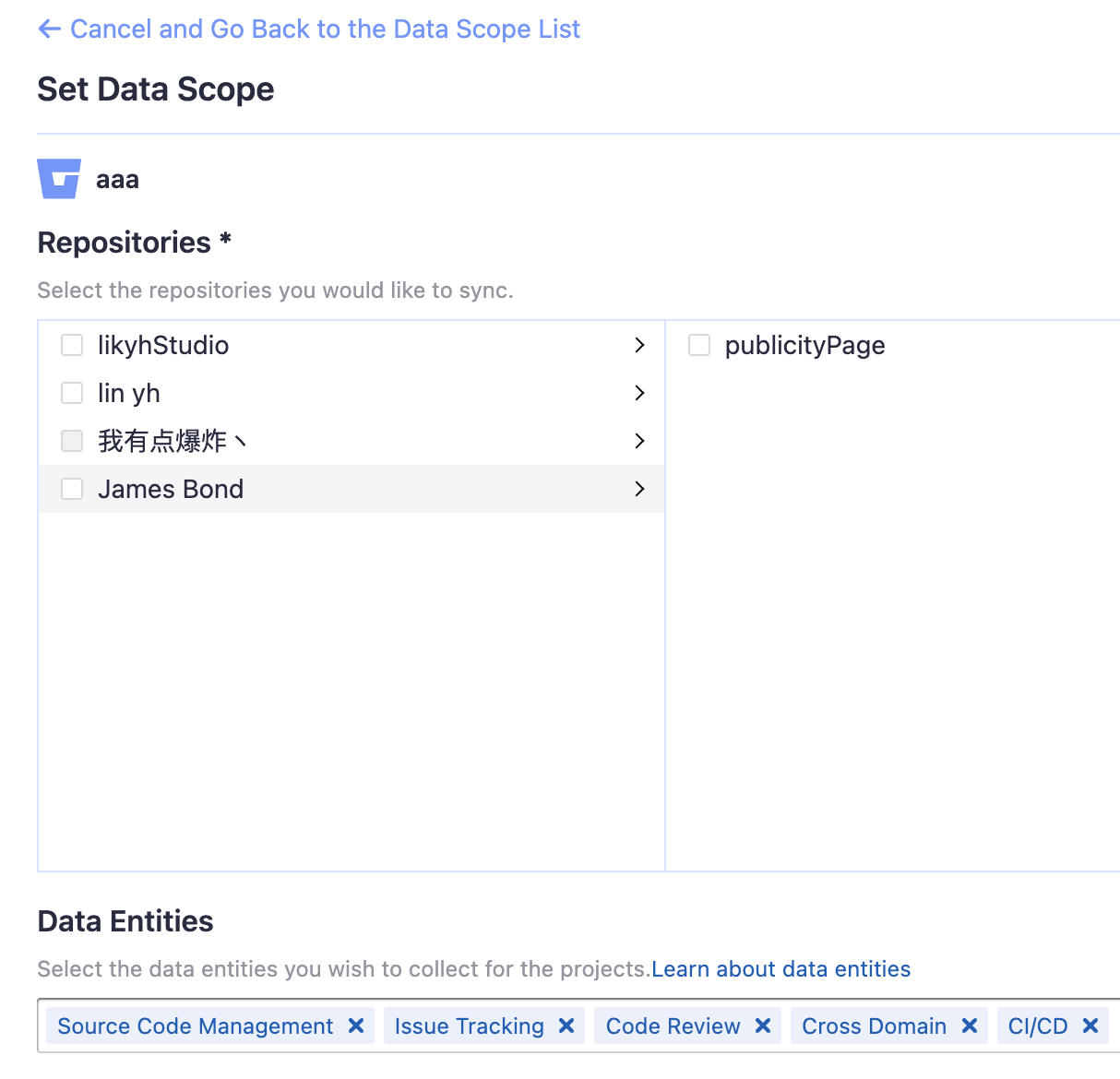
+
#### Repositories
@@ -75,46 +75,56 @@ Usually, you don't have to modify this part. However, if
you don't want to colle
- Cross Domain: BitBucket accounts, etc.
-### Step 3 - Adding Transformation Rules (Optional)
+### Step 3 - Add Transformation (Optional)
+You can add a `transformation` to standardize the data. A `transformation`
acts on the BitBucket data in the [tool
layer](/docs/DataModels/ToolLayerSchema.md), transforming it to the [domain
layer](/docs/DataModels/DevLakeDomainLayerSchema.md).
-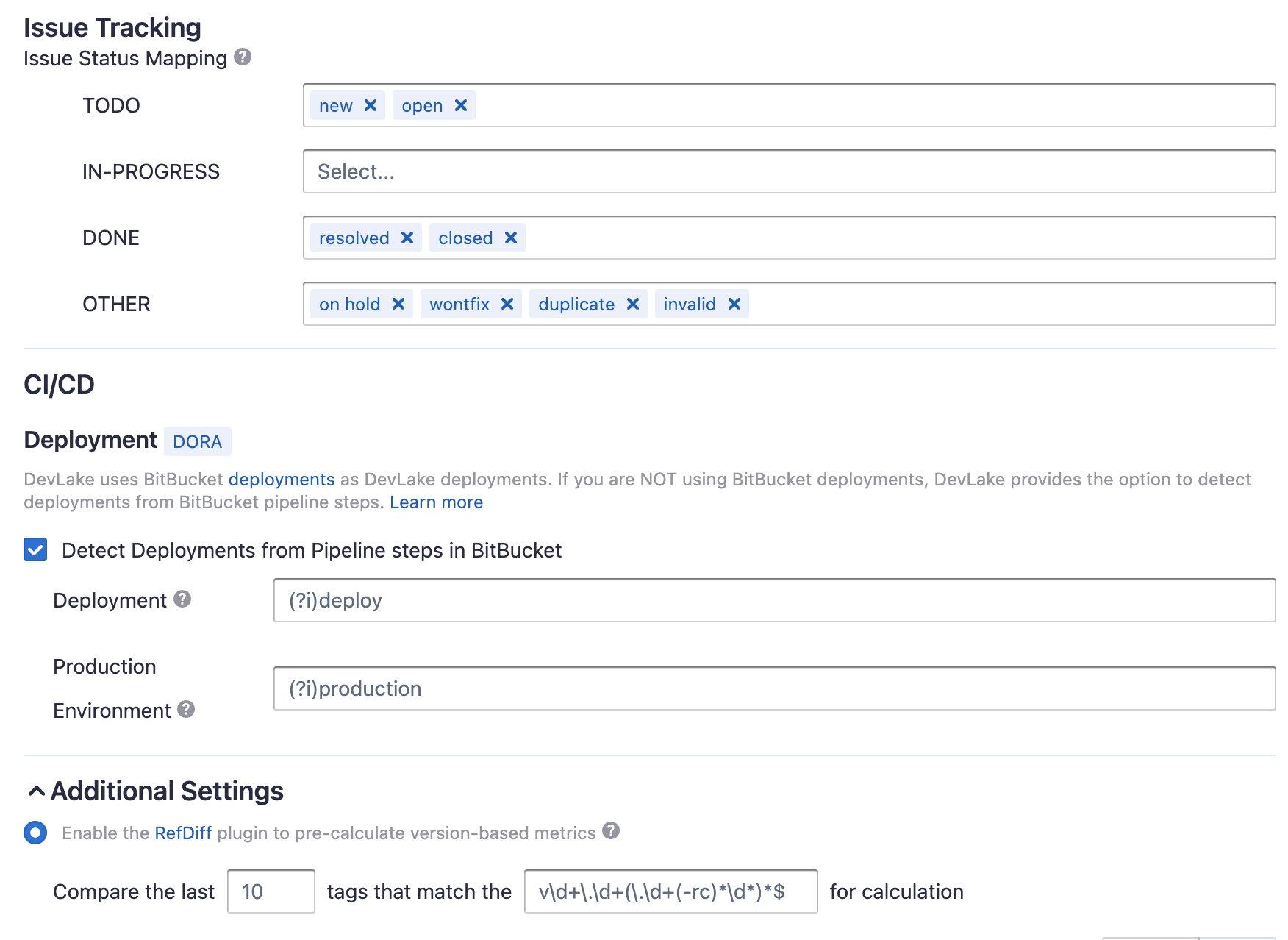
+#### Issue Tracking
-Transforamtion for BitBucket is needed if you want to view metrics such as
`Requirement Delivery Rate` in the pre-built dashboards.
+**Issue Status Mapping**<br/>
+
-#### Issue Tracking
+The given settings transformed the BitBucket issue statuses to the issue
statuses used by DevLake, enabling you to measure metrics like the Issue
Delivery Rate on the pre-built dashboards, as DevLake understands your
definition of when an issue is considered as completed (status = 'DONE').
- TODO: The issues that are planned but have not been worked on yet
- IN-PROGRESS: The issues that are work-in-progress
-- DONE: The issue have have been completed
+- DONE: The issues that are completed
- OTHER: Other issues statuses that do not belong to the three statuses above
-#### CI/CD
+The original status will be saved in the column `original_status` of the table
'issues', and the new status will be saved in the column `status` of the same
table.
+
+**Issue Type Mapping**<br/>
+DevLake will convert the issue types of 'enhancement', 'proposal', and 'task'
from BitBucket into the new issue type 'REQUIREMENT' for DevLake. In contrast,
any issues classified as 'bug' in BitBucket will be converted into the new
issue type 'BUG' for DevLake. The original type will be saved in the column
`original_type` of the table 'issues', and the new type will be saved in the
column `type` of the same table.
+#### CI/CD
The CI/CD configuration for BitBucket is used for calculating [DORA
metrics](../DORA.md).
-BitBucket has several key CI entities: `pipelines`, `pipeline steps`, and
`deployments`. A Bitbucket pipeline contains several pipeline steps. Each
pipeline step defined with a deployment key can be mapped to a BitBucket
deployment.
+By default, DevLake will identify the deployment and environment settings that
are defined in the BitBucket CI .yml file.
-Each Bitbucket pipeline is converted to a cicd_pipeline in DevLake's domain
layer schema and each Bitbucket pipeline step is converted to a cicd_task in
DevLake's domain layer.
-
+
+However, to ensure this works properly, you must specify the deployment
settings in the .yml file.
+
-If a pipeline step defines `deployment` with a value (usually indicating the
envrionment), this pipeline step is also a BitBucket deployment.
+The pipeline steps with the `deployment` key will be recognized as DevLake
deployments. The value of the `deployment` key will be recognized as the
environment of DevLake deployments.
-
+All BitBucket pipeline steps will be saved in table 'cicd_tasks', but DevLake
deployments will be set as `type` = 'deployment' and `environment` =
'{BitBucket-pipeline-step.deployment.value}'.
-
+If you have not defined these settings in the .yml file, please select 'Detect
Deployments from Pipeline steps in BitBucket', and input the RegEx in the
following fields:
+
-How does DevLake tell if a BitBucket pipeline step is a deployment? The
pipeline steps (defined in the .yaml) with the `deployment` key are considered
as `DevLake deployments`. The value of the `deployment` key will be considered
as the environment of DevLake deployments.
+- Deployment: A pipeline step with a name that matches the given RegEx will be
recognized as a DevLake deployment.
+- Production: A pipeline step with a name that matches the given RegEx will be
recognized as a DevLake cicd_task in the production environment.
-These DevLake deployments will be recorded in table.cicd_tasks in DevLake's
domain layer, with `type` = 'deployment' and `environment` =
'{BitBucket-pipeline-step.deployment.value}', differentiating from other CI
tasks.
+**Introduction to BitBucket CI entities**<br/>
+BitBucket has several key CI entities: `pipelines`, `pipeline steps`, and
`deployments`. A Bitbucket pipeline contains several pipeline steps. Each
pipeline step defined with a deployment key can be mapped to a BitBucket
deployment.
-Or if you are using BitBucket pipelines to conduct `deployments`, please
select "Detect Deployments from Pipeline steps in BitBucket", and input the
RegEx in the following fields:
+Each Bitbucket pipeline is converted to a cicd_pipeline in DevLake's domain
layer schema and each Bitbucket pipeline step is converted to a cicd_task in
DevLake's domain layer.
+
-- Deployment: A BitBucket pipeline steps with a name that matches the given
RegEx will be considered as a deployment.
-- Production: A BitBucket pipeline steps with a name that matches the given
RegEx will be considered a job in the production environment.
+If a pipeline step defines `deployment` with a value (usually indicating the
environment), this pipeline step is also a BitBucket deployment.
-The deployment and production RegExes are only applied to the records in the
cicd_tasks table when BitBucket Deployments do not exist.
+
#### Additional Settings (Optional)






