yangyichao-mango opened a new issue #2919:
URL: https://github.com/apache/incubator-dolphinscheduler/issues/2919
**Describe the bug**
When I set `System.setProperty("spring.profiles.active", "worker")` and
`System.setProperty("spring.profiles.active", "master")` configuration and
start master and worker in MacOS, the spring container can not load
logback-master.xml or logback-worker.xml automatically.
I've to set `System.setProperty("logging.config",
"classpath:logback-worker.xml")` to load the logback-worker.xml.
**To Reproduce**
Steps to reproduce the behavior, for example:
1. Go to 'org.apache.dolphinscheduler.server.worker.WorkerServer' and set
`System.setProperty("spring.profiles.active", "worker")` in `main()` function ,
run the `main()` function.
1. Go to 'org.apache.dolphinscheduler.server.master.MasterServer' and set
`System.setProperty("spring.profiles.active", "master")` in `main()` function,
run the `main()` function.
2. Submit a Shell task and run it manually.
3. There is a `NPE`.
**Expected behavior**
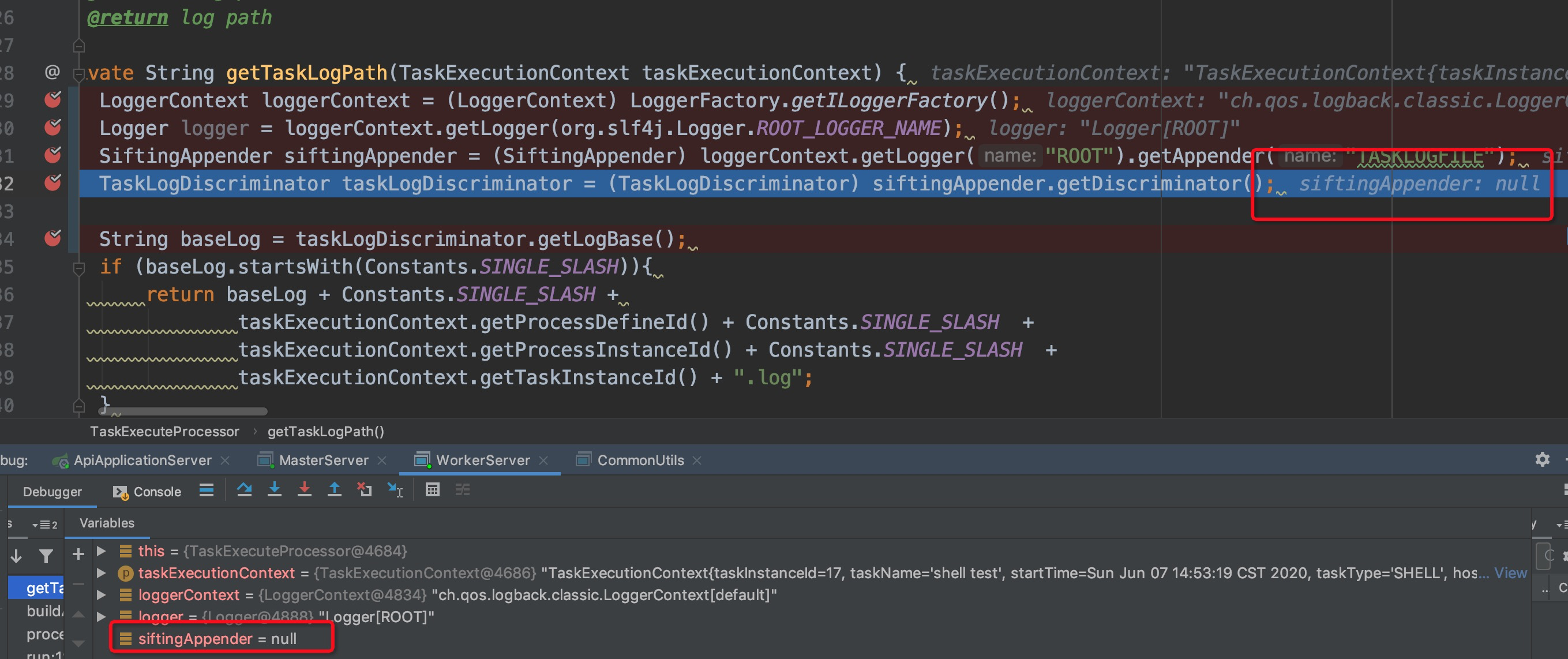
There is a `NPE` when the
`org.apache.dolphinscheduler.server.worker.processor.TaskExecuteProcessor.getTaskLogPath()`
try to get `TASKLOGFILE`, but it can not get `TASKLOGFILE` defined in
`logback-worker.xml` in this function, because the Spring container does not
load the `logback-worker.xml`.
**Screenshots**
**Which version of Dolphin Scheduler:**
-[1.3.0]
**Requirement or improvement
- We need to set System.setProperty("logging.config",
"classpath:logback-worker.xml") in worker main function and set
System.setProperty("logging.config", "classpath:logback-master.xml") in master
main function.
----------------------------------------------------------------
This is an automated message from the Apache Git Service.
To respond to the message, please log on to GitHub and use the
URL above to go to the specific comment.
For queries about this service, please contact Infrastructure at:
[email protected]

