yangyichao-mango commented on a change in pull request #167:
URL:
https://github.com/apache/incubator-dolphinscheduler-website/pull/167#discussion_r474366451
##########
File path: docs/zh-cn/1.3.0/user_doc/cluster-deployment.md
##########
@@ -294,7 +293,58 @@ mysql -uroot -p
*特别注意:*
- 如果需要用资源上传到Hadoop集群功能, 并且Hadoop集群的NameNode 配置了 HA的话 ,需要开启
HDFS类型的资源上传,同时需要将Hadoop集群下的core-site.xml和hdfs-site.xml复制到/opt/dolphinscheduler/conf,非NameNode
HA跳过次步骤
+
+ - 如果需要使用企业微信告警完,在安装完成后,修改alert.propertiesw文件,重启alert服务:
Review comment:
```suggestion
- 如果需要使用企业微信告警完,在安装完成后,修改 alert.properties 文件,重启 alert 服务:
```
##########
File path: docs/zh-cn/1.3.0/user_doc/cluster-deployment.md
##########
@@ -294,7 +293,58 @@ mysql -uroot -p
*特别注意:*
- 如果需要用资源上传到Hadoop集群功能, 并且Hadoop集群的NameNode 配置了 HA的话 ,需要开启
HDFS类型的资源上传,同时需要将Hadoop集群下的core-site.xml和hdfs-site.xml复制到/opt/dolphinscheduler/conf,非NameNode
HA跳过次步骤
+
+ - 如果需要使用企业微信告警完,在安装完成后,修改alert.propertiesw文件,重启alert服务:
+
+ ```
+ # 设置企业微信告警功能是否开启:开启为true,否则为false。
Review comment:
```suggestion
# 设置企业微信告警功能是否开启:开启为 true,否则为 false。
```
这是中文文档建设,所以我就直接使用中文进行评论了~
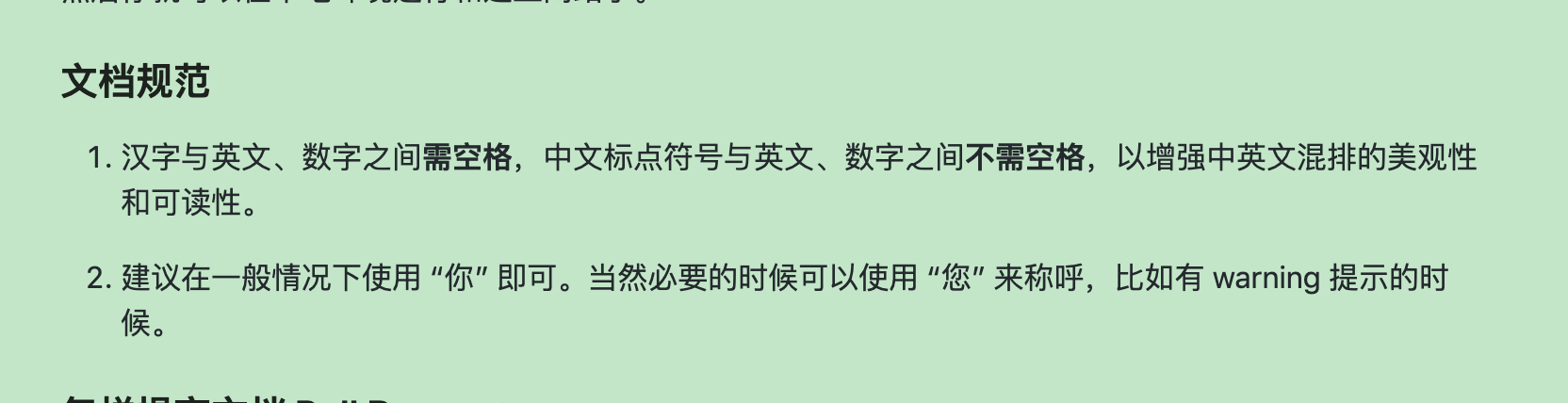
注意中文文档编写过程中,标点符号需要使用中文标点。并且中文和英文之间需要空格分隔,来加强可读性。其他地方做相同的修改~
中文文档建设规范[1]
[1] https://dolphinscheduler.apache.org/zh-cn/docs/development/document.html
##########
File path: docs/zh-cn/1.3.0/user_doc/cluster-deployment.md
##########
@@ -294,7 +293,58 @@ mysql -uroot -p
*特别注意:*
- 如果需要用资源上传到Hadoop集群功能, 并且Hadoop集群的NameNode 配置了 HA的话 ,需要开启
HDFS类型的资源上传,同时需要将Hadoop集群下的core-site.xml和hdfs-site.xml复制到/opt/dolphinscheduler/conf,非NameNode
HA跳过次步骤
+
+ - 如果需要使用企业微信告警完,在安装完成后,修改alert.propertiesw文件,重启alert服务:
+
+ ```
+ # 设置企业微信告警功能是否开启:开启为true,否则为false。
+ enterprise.wechat.enable="true"
+ ```
+
+ ```
+ # 设置corpid,每个企业都拥有唯一的corpid,获取此信息可在管理后台“我的企业”-“企业信息”下查看“企业ID”(需要有管理员权限)
Review comment:
```suggestion
# 设置 corpid,每个企业都拥有唯一的 corpid,获取此信息可在管理后台“我的企业”-“企业信息”下查看“企业
ID”(需要有管理员权限)
```
##########
File path: docs/zh-cn/1.3.0/user_doc/cluster-deployment.md
##########
@@ -294,7 +293,58 @@ mysql -uroot -p
*特别注意:*
- 如果需要用资源上传到Hadoop集群功能, 并且Hadoop集群的NameNode 配置了 HA的话 ,需要开启
HDFS类型的资源上传,同时需要将Hadoop集群下的core-site.xml和hdfs-site.xml复制到/opt/dolphinscheduler/conf,非NameNode
HA跳过次步骤
+
+ - 如果需要使用企业微信告警完,在安装完成后,修改alert.propertiesw文件,重启alert服务:
+
+ ```
+ # 设置企业微信告警功能是否开启:开启为true,否则为false。
+ enterprise.wechat.enable="true"
+ ```
+
+ ```
+ # 设置corpid,每个企业都拥有唯一的corpid,获取此信息可在管理后台“我的企业”-“企业信息”下查看“企业ID”(需要有管理员权限)
+ enterprise.wechat.corp.id="xxx"
+ ```
+ <p align="center">
+ <img src="/img/alert/corpid.png" width="60%" />
+ </p>
+
+ ```
+ # 设置secret,secret是企业应用里面用于保障数据安全的“钥匙”,每一个应用都有一个独立的访问密钥。
+ enterprise.wechat.secret="xxx"
+ ```
+ <p align="center">
+ <img src="/img/alert/secret.png" width="60%" />
+ </p>
+
+ ```
+ # 设置agentid,每个应用都有唯一的agentid。在管理后台->“应用与小程序”->“应用”,点进某个应用,即可看到agentid。
+ enterprise.wechat.agent.id="xxxx"
+ ```
+ <p align="center">
+ <img src="/img/alert/agentid.png" width="60%" />
+ </p>
+
+ ```
+ # 设置userid,多个用逗号分隔。每个成员都有唯一的userid,即所谓“帐号”。在管理后台->“通讯录”->点进某个成员的详情页,可以看到。
+ enterprise.wechat.users=zhangsan,lisi
+ ```
+ <p align="center">
+ <img src="/img/alert/userid.png" width="60%" />
+ </p>
+
+ ```
+ # 获取access_token的地址,使用如下例子无需修改。
+
enterprise.wechat.token.url=https://qyapi.weixin.qq.com/cgi-bin/gettoken?corpid={corpId}&corpsecret={secret}
+
+ # 发送应用消息地址,使用如下例子无需改动。
+
enterprise.wechat.push.url=https://qyapi.weixin.qq.com/cgi-bin/message/send?access_token={token}
+
+ #发送消息格式,无需改动
Review comment:
```suggestion
#发送消息格式,无需改动
```
##########
File path: docs/zh-cn/1.3.0/user_doc/cluster-deployment.md
##########
@@ -294,7 +293,58 @@ mysql -uroot -p
*特别注意:*
- 如果需要用资源上传到Hadoop集群功能, 并且Hadoop集群的NameNode 配置了 HA的话 ,需要开启
HDFS类型的资源上传,同时需要将Hadoop集群下的core-site.xml和hdfs-site.xml复制到/opt/dolphinscheduler/conf,非NameNode
HA跳过次步骤
+
+ - 如果需要使用企业微信告警完,在安装完成后,修改alert.propertiesw文件,重启alert服务:
+
+ ```
+ # 设置企业微信告警功能是否开启:开启为true,否则为false。
+ enterprise.wechat.enable="true"
+ ```
+
+ ```
+ # 设置corpid,每个企业都拥有唯一的corpid,获取此信息可在管理后台“我的企业”-“企业信息”下查看“企业ID”(需要有管理员权限)
+ enterprise.wechat.corp.id="xxx"
+ ```
+ <p align="center">
+ <img src="/img/alert/corpid.png" width="60%" />
+ </p>
+
+ ```
+ # 设置secret,secret是企业应用里面用于保障数据安全的“钥匙”,每一个应用都有一个独立的访问密钥。
+ enterprise.wechat.secret="xxx"
+ ```
+ <p align="center">
+ <img src="/img/alert/secret.png" width="60%" />
+ </p>
+
+ ```
+ # 设置agentid,每个应用都有唯一的agentid。在管理后台->“应用与小程序”->“应用”,点进某个应用,即可看到agentid。
Review comment:
```suggestion
# 设置 agentid,每个应用都有唯一的 agentid。在管理后台->“应用与小程序”->“应用”,点进某个应用,即可看到 agentid。
```
##########
File path: docs/zh-cn/1.3.0/user_doc/cluster-deployment.md
##########
@@ -294,7 +293,58 @@ mysql -uroot -p
*特别注意:*
- 如果需要用资源上传到Hadoop集群功能, 并且Hadoop集群的NameNode 配置了 HA的话 ,需要开启
HDFS类型的资源上传,同时需要将Hadoop集群下的core-site.xml和hdfs-site.xml复制到/opt/dolphinscheduler/conf,非NameNode
HA跳过次步骤
+
+ - 如果需要使用企业微信告警完,在安装完成后,修改alert.propertiesw文件,重启alert服务:
+
+ ```
+ # 设置企业微信告警功能是否开启:开启为true,否则为false。
+ enterprise.wechat.enable="true"
+ ```
+
+ ```
+ # 设置corpid,每个企业都拥有唯一的corpid,获取此信息可在管理后台“我的企业”-“企业信息”下查看“企业ID”(需要有管理员权限)
+ enterprise.wechat.corp.id="xxx"
+ ```
+ <p align="center">
+ <img src="/img/alert/corpid.png" width="60%" />
+ </p>
+
+ ```
+ # 设置secret,secret是企业应用里面用于保障数据安全的“钥匙”,每一个应用都有一个独立的访问密钥。
+ enterprise.wechat.secret="xxx"
+ ```
+ <p align="center">
+ <img src="/img/alert/secret.png" width="60%" />
+ </p>
+
+ ```
+ # 设置agentid,每个应用都有唯一的agentid。在管理后台->“应用与小程序”->“应用”,点进某个应用,即可看到agentid。
+ enterprise.wechat.agent.id="xxxx"
+ ```
+ <p align="center">
+ <img src="/img/alert/agentid.png" width="60%" />
+ </p>
+
+ ```
+ # 设置userid,多个用逗号分隔。每个成员都有唯一的userid,即所谓“帐号”。在管理后台->“通讯录”->点进某个成员的详情页,可以看到。
+ enterprise.wechat.users=zhangsan,lisi
+ ```
+ <p align="center">
+ <img src="/img/alert/userid.png" width="60%" />
+ </p>
+
+ ```
+ # 获取access_token的地址,使用如下例子无需修改。
Review comment:
```suggestion
# 获取 access_token 的地址,使用如下例子无需修改。
```
##########
File path: docs/zh-cn/1.3.0/user_doc/cluster-deployment.md
##########
@@ -294,7 +293,58 @@ mysql -uroot -p
*特别注意:*
- 如果需要用资源上传到Hadoop集群功能, 并且Hadoop集群的NameNode 配置了 HA的话 ,需要开启
HDFS类型的资源上传,同时需要将Hadoop集群下的core-site.xml和hdfs-site.xml复制到/opt/dolphinscheduler/conf,非NameNode
HA跳过次步骤
+
+ - 如果需要使用企业微信告警完,在安装完成后,修改alert.propertiesw文件,重启alert服务:
+
+ ```
+ # 设置企业微信告警功能是否开启:开启为true,否则为false。
+ enterprise.wechat.enable="true"
+ ```
+
+ ```
+ # 设置corpid,每个企业都拥有唯一的corpid,获取此信息可在管理后台“我的企业”-“企业信息”下查看“企业ID”(需要有管理员权限)
+ enterprise.wechat.corp.id="xxx"
+ ```
+ <p align="center">
+ <img src="/img/alert/corpid.png" width="60%" />
+ </p>
+
+ ```
+ # 设置secret,secret是企业应用里面用于保障数据安全的“钥匙”,每一个应用都有一个独立的访问密钥。
Review comment:
```suggestion
# 设置 secret,secret 是企业应用里面用于保障数据安全的“钥匙”,每一个应用都有一个独立的访问密钥。
```
##########
File path: docs/zh-cn/1.3.0/user_doc/cluster-deployment.md
##########
@@ -294,7 +293,58 @@ mysql -uroot -p
*特别注意:*
- 如果需要用资源上传到Hadoop集群功能, 并且Hadoop集群的NameNode 配置了 HA的话 ,需要开启
HDFS类型的资源上传,同时需要将Hadoop集群下的core-site.xml和hdfs-site.xml复制到/opt/dolphinscheduler/conf,非NameNode
HA跳过次步骤
+
+ - 如果需要使用企业微信告警完,在安装完成后,修改alert.propertiesw文件,重启alert服务:
+
+ ```
+ # 设置企业微信告警功能是否开启:开启为true,否则为false。
+ enterprise.wechat.enable="true"
+ ```
+
+ ```
+ # 设置corpid,每个企业都拥有唯一的corpid,获取此信息可在管理后台“我的企业”-“企业信息”下查看“企业ID”(需要有管理员权限)
+ enterprise.wechat.corp.id="xxx"
+ ```
+ <p align="center">
+ <img src="/img/alert/corpid.png" width="60%" />
+ </p>
+
+ ```
+ # 设置secret,secret是企业应用里面用于保障数据安全的“钥匙”,每一个应用都有一个独立的访问密钥。
+ enterprise.wechat.secret="xxx"
+ ```
+ <p align="center">
+ <img src="/img/alert/secret.png" width="60%" />
+ </p>
+
+ ```
+ # 设置agentid,每个应用都有唯一的agentid。在管理后台->“应用与小程序”->“应用”,点进某个应用,即可看到agentid。
+ enterprise.wechat.agent.id="xxxx"
+ ```
+ <p align="center">
+ <img src="/img/alert/agentid.png" width="60%" />
+ </p>
+
+ ```
+ # 设置userid,多个用逗号分隔。每个成员都有唯一的userid,即所谓“帐号”。在管理后台->“通讯录”->点进某个成员的详情页,可以看到。
Review comment:
```suggestion
# 设置 userid,多个用逗号分隔。每个成员都有唯一的
userid,即所谓“帐号”。在管理后台->“通讯录”->点进某个成员的详情页,可以看到。
```
----------------------------------------------------------------
This is an automated message from the Apache Git Service.
To respond to the message, please log on to GitHub and use the
URL above to go to the specific comment.
For queries about this service, please contact Infrastructure at:
[email protected]

