wangmingzhiJohn opened a new issue #5607:
URL: https://github.com/apache/dolphinscheduler/issues/5607
**Describe the question**
I cannot start the DS system by following the Developer Guide/Development
Environment Setup. Particularly I got stuck when I tried setting up the
backend. I didn't import the project to IDEA but just use cmd. When I finally
made it run (i mean the main method of CreateDolphinScheduler), it told me that
some files do not exist like dolphinscheduler_dml.sql or
dolphinscheduler_ddl.sql. So I manually created these empty files. And then
another error.
**Which version of DolphinScheduler:**
-[1.3.6]
**Additional context**
Pictures of these errors:
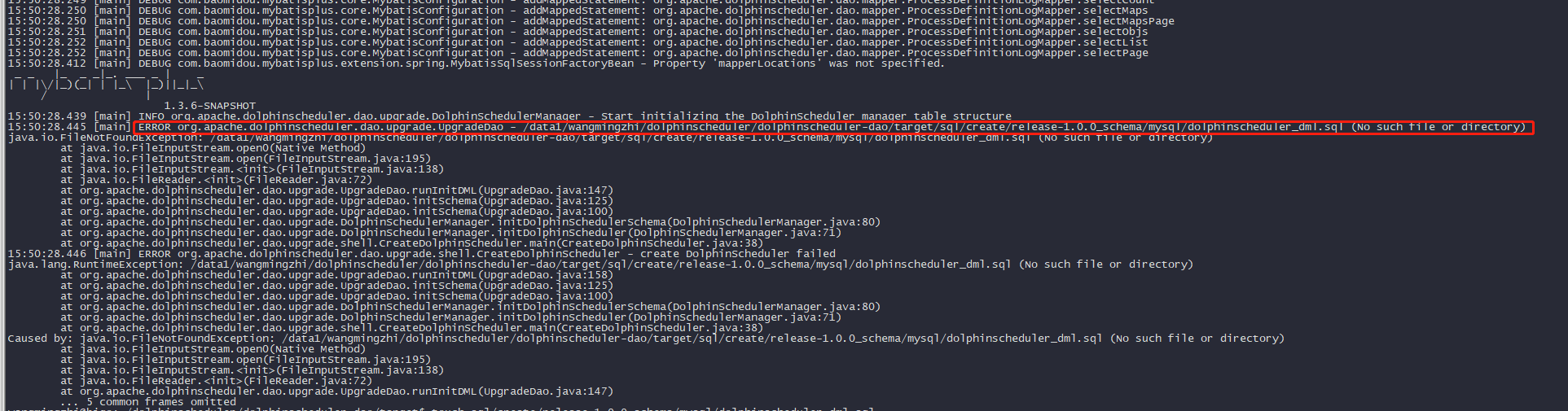

And I am not sure if i follow the right way to run the main method of
CreateDolphinScheduler. My way is modify the pom.xml under
dolphinscheduler-dao, generate the apache-dolphinscheduler-1.3.6-SNAPSHOT.jar
which has main-class, use "java -jar
apache-dolphinscheduler-1.3.6-SNAPSHOT.jar" cmd to run. Is that right?
--
This is an automated message from the Apache Git Service.
To respond to the message, please log on to GitHub and use the
URL above to go to the specific comment.
For queries about this service, please contact Infrastructure at:
[email protected]


