QuakeWang commented on a change in pull request #389:
URL:
https://github.com/apache/dolphinscheduler-website/pull/389#discussion_r660247980
##########
File path: docs/en-us/1.3.6/user_doc/ambari-integration.md
##########
@@ -0,0 +1,132 @@
+### Instructions for using the Dolphin Scheduler's Ambari plug-in
+
+#### Note
+
+1. This document is intended for users with a basic understanding of Ambari
+2. This document is a description of adding the Dolphin Scheduler service to
the installed Ambari service
+3. This document is based on version 2.5.2 of Ambari
+
+#### Installation preparation
+
+1. Prepare the RPM packages
+
+ - It is generated by executing the command ```mvn -U clean install
-Prpmbuild -Dmaven.test.skip=true -X``` in the project root directory (In the
directory: dolphinscheduler-dist/target/rpm/apache-dolphinscheduler/RPMS/noarch
)
+
+2. Create an installation for DS,who have read and write access to the
installation directory (/opt/soft)
+
+3. Install with rpm package
+
+ - Manual installation (recommended):
+ - Copy the prepared RPM packages to each node of the cluster.
+ - Execute with DS installation user: ```rpm -ivh
apache-dolphinscheduler-xxx.noarch.rpm```
+ - Mysql-connector-java packaged using the default POM file will not be
included.
+ - The RPM package was packaged in the project with the installation path
of /opt/soft.
+ If you use mysql as the database, you need add it manually.
+
+ - Automatic installation with ambari
+ - Each node of the cluster needs to configure the local yum source
Review comment:
```suggestion
- Each node of the cluster needs to be configured the local yum source
```
The passive voice is recommended
##########
File path: docs/en-us/1.3.6/user_doc/ambari-integration.md
##########
@@ -0,0 +1,132 @@
+### Instructions for using the Dolphin Scheduler's Ambari plug-in
+
+#### Note
+
+1. This document is intended for users with a basic understanding of Ambari
+2. This document is a description of adding the Dolphin Scheduler service to
the installed Ambari service
+3. This document is based on version 2.5.2 of Ambari
+
+#### Installation preparation
+
+1. Prepare the RPM packages
+
+ - It is generated by executing the command ```mvn -U clean install
-Prpmbuild -Dmaven.test.skip=true -X``` in the project root directory (In the
directory: dolphinscheduler-dist/target/rpm/apache-dolphinscheduler/RPMS/noarch
)
+
+2. Create an installation for DS,who have read and write access to the
installation directory (/opt/soft)
+
+3. Install with rpm package
+
+ - Manual installation (recommended):
+ - Copy the prepared RPM packages to each node of the cluster.
+ - Execute with DS installation user: ```rpm -ivh
apache-dolphinscheduler-xxx.noarch.rpm```
+ - Mysql-connector-java packaged using the default POM file will not be
included.
+ - The RPM package was packaged in the project with the installation path
of /opt/soft.
+ If you use mysql as the database, you need add it manually.
+
+ - Automatic installation with ambari
+ - Each node of the cluster needs to configure the local yum source
+ - Copy the prepared RPM packages to each node local yum source
+
+4. Copy plug-in directory
+
+ - copy directory ambari_plugin/common-services/DOLPHIN to
ambari-server/resources/common-services/
+ - copy directory ambari_plugin/statcks/DOLPHIN to
ambari-server/resources/stacks/HDP/2.6/services/--stack version is selected
based on the actual situation
+
+5. Initializes the database information
+
+ ```
+ -- Create the database for the Dolphin Scheduler:dolphinscheduler
+ CREATE DATABASE dolphinscheduler DEFAULT CHARACTER SET utf8 DEFAULT COLLATE
+ utf8_general_ci;
+
+ -- Initialize the user and password for the dolphinscheduler database and
assign permissions
+ -- Replace the {user} in the SQL statement below with the user of the
dolphinscheduler database
+ GRANT ALL PRIVILEGES ON dolphinscheduler.* TO '{user}'@'%' IDENTIFIED BY
'{password}';
+ GRANT ALL PRIVILEGES ON dolphinscheduler.* TO '{user}'@'localhost'
IDENTIFIED BY
+ '{password}';
+ flush privileges;
+ ```
+
+
+
+#### Ambari Install Dolphin Scheduler
+- **NOTE: You have to install zookeeper first**
+
+1. Install Dolphin Scheduler on ambari web interface
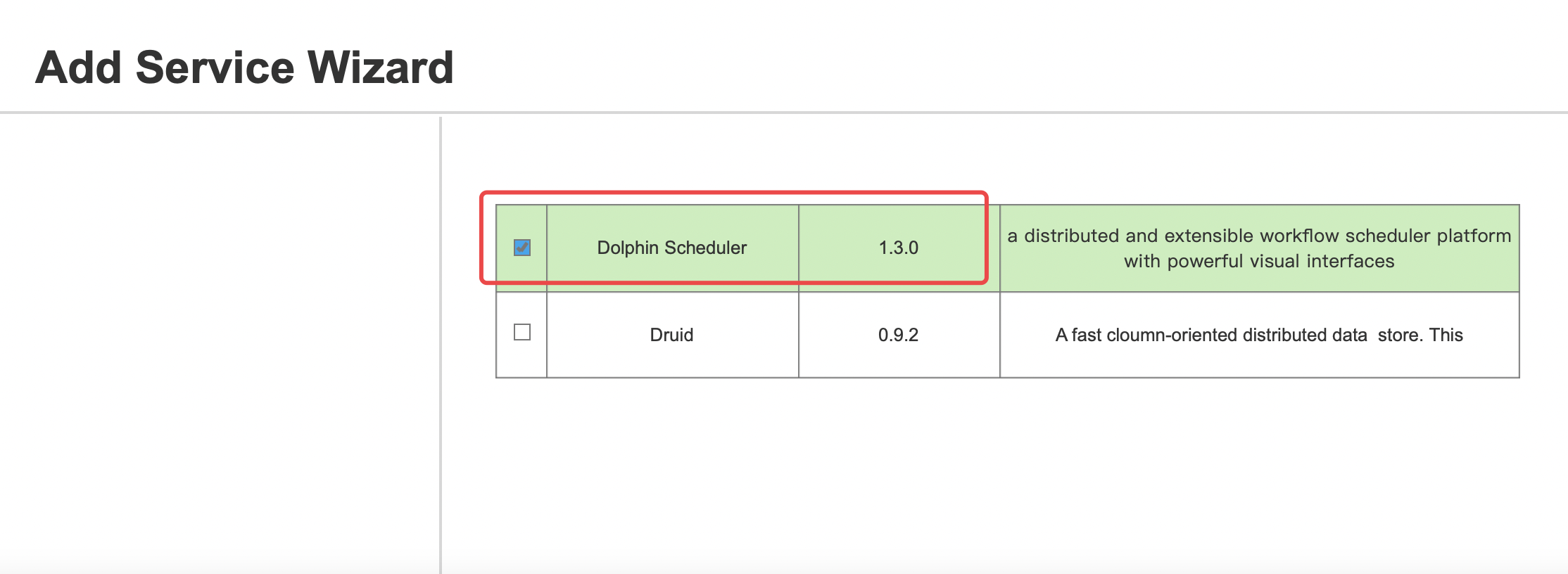
Review comment:
As above, delete the extra spaces.
##########
File path: docs/en-us/1.3.6/user_doc/ambari-integration.md
##########
@@ -0,0 +1,132 @@
+### Instructions for using the Dolphin Scheduler's Ambari plug-in
+
+#### Note
+
+1. This document is intended for users with a basic understanding of Ambari
+2. This document is a description of adding the Dolphin Scheduler service to
the installed Ambari service
+3. This document is based on version 2.5.2 of Ambari
+
+#### Installation preparation
+
+1. Prepare the RPM packages
+
+ - It is generated by executing the command ```mvn -U clean install
-Prpmbuild -Dmaven.test.skip=true -X``` in the project root directory (In the
directory: dolphinscheduler-dist/target/rpm/apache-dolphinscheduler/RPMS/noarch
)
+
+2. Create an installation for DS,who have read and write access to the
installation directory (/opt/soft)
+
+3. Install with rpm package
+
+ - Manual installation (recommended):
+ - Copy the prepared RPM packages to each node of the cluster.
+ - Execute with DS installation user: ```rpm -ivh
apache-dolphinscheduler-xxx.noarch.rpm```
+ - Mysql-connector-java packaged using the default POM file will not be
included.
+ - The RPM package was packaged in the project with the installation path
of /opt/soft.
+ If you use mysql as the database, you need add it manually.
+
+ - Automatic installation with ambari
+ - Each node of the cluster needs to configure the local yum source
+ - Copy the prepared RPM packages to each node local yum source
+
+4. Copy plug-in directory
+
+ - copy directory ambari_plugin/common-services/DOLPHIN to
ambari-server/resources/common-services/
+ - copy directory ambari_plugin/statcks/DOLPHIN to
ambari-server/resources/stacks/HDP/2.6/services/--stack version is selected
based on the actual situation
+
+5. Initializes the database information
+
+ ```
+ -- Create the database for the Dolphin Scheduler:dolphinscheduler
+ CREATE DATABASE dolphinscheduler DEFAULT CHARACTER SET utf8 DEFAULT COLLATE
+ utf8_general_ci;
+
+ -- Initialize the user and password for the dolphinscheduler database and
assign permissions
+ -- Replace the {user} in the SQL statement below with the user of the
dolphinscheduler database
+ GRANT ALL PRIVILEGES ON dolphinscheduler.* TO '{user}'@'%' IDENTIFIED BY
'{password}';
+ GRANT ALL PRIVILEGES ON dolphinscheduler.* TO '{user}'@'localhost'
IDENTIFIED BY
+ '{password}';
+ flush privileges;
+ ```
+
+
+
+#### Ambari Install Dolphin Scheduler
+- **NOTE: You have to install zookeeper first**
+
+1. Install Dolphin Scheduler on ambari web interface
+
+
+
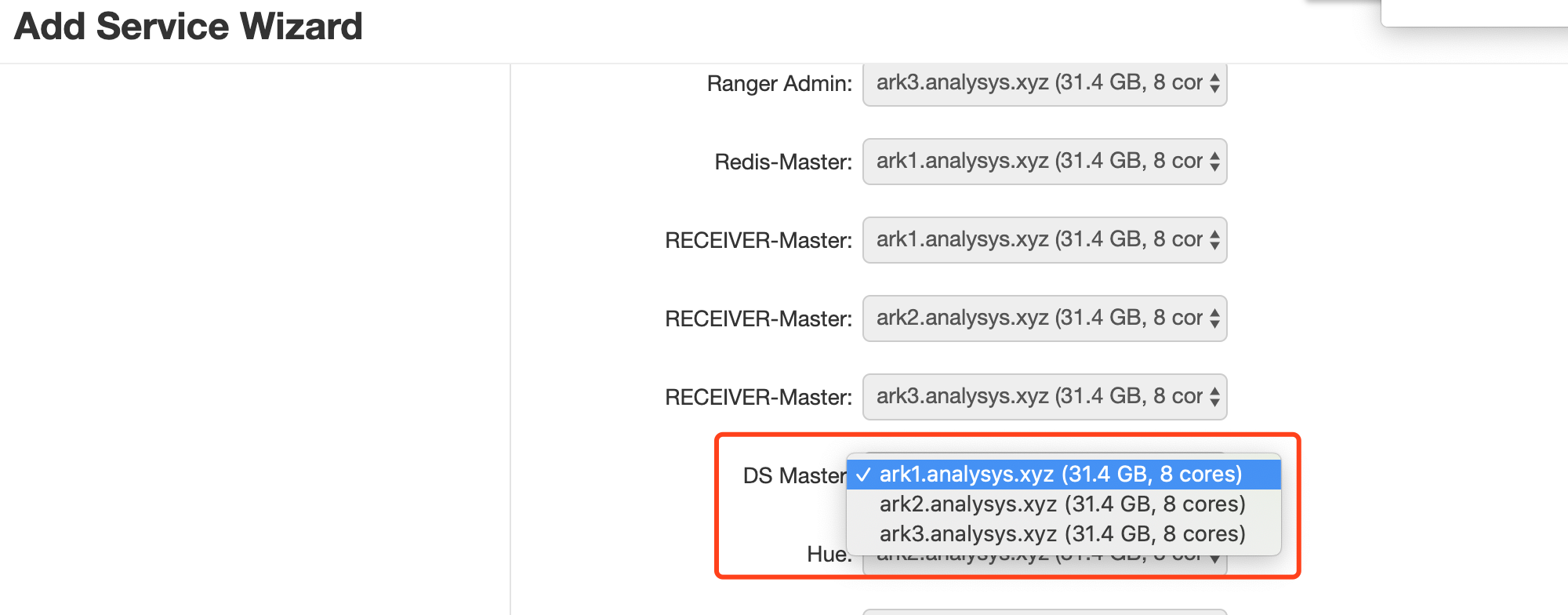
+2. Select the nodes for the Dolphin Scheduler's Master installation
+
+
+
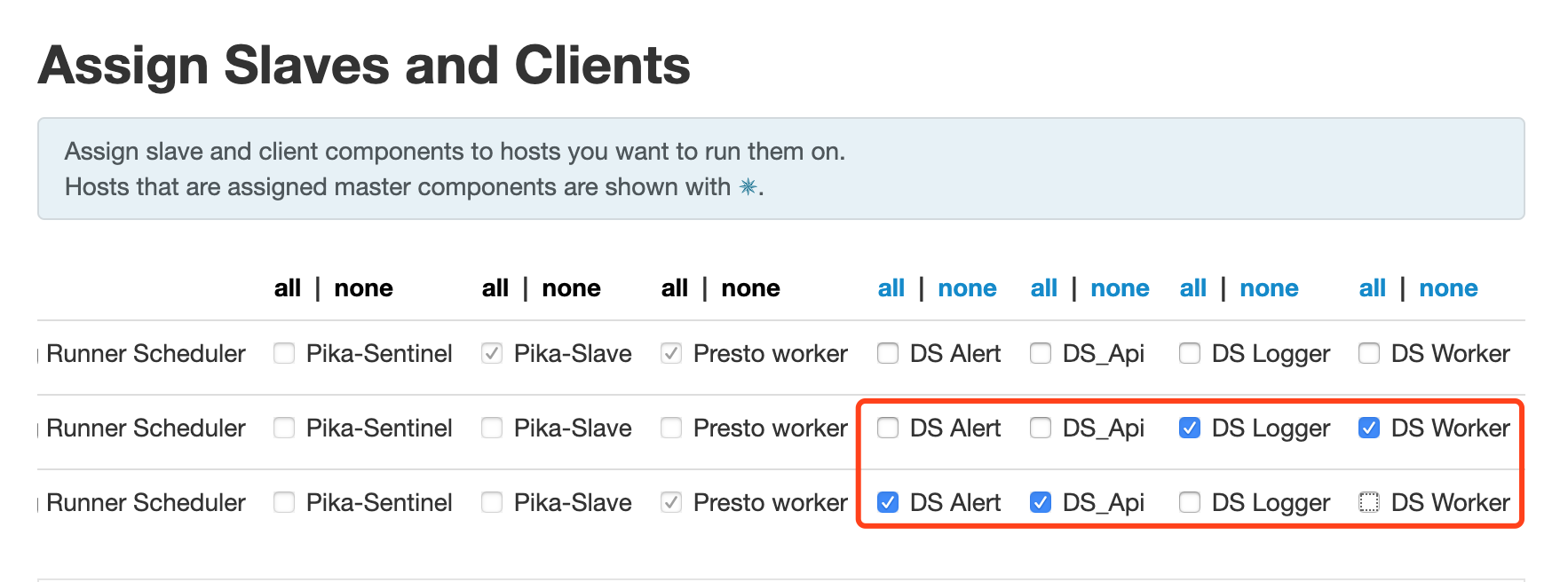
+3. Configure the Dolphin Scheduler's nodes for Worker, Api, Logger, Alert
installation
+
+
+
+4. Set the installation users of the Dolphin Scheduler service (created in
step 1) and the user groups they belong to
Review comment:
As above, delete the extra spaces.
##########
File path: docs/en-us/1.3.6/user_doc/ambari-integration.md
##########
@@ -0,0 +1,132 @@
+### Instructions for using the Dolphin Scheduler's Ambari plug-in
+
+#### Note
+
+1. This document is intended for users with a basic understanding of Ambari
+2. This document is a description of adding the Dolphin Scheduler service to
the installed Ambari service
Review comment:
```suggestion
2. This document is a description of adding the DolphinScheduler service to
the installed Ambari service
```
Please delete the extra space.
##########
File path: docs/en-us/1.3.6/user_doc/ambari-integration.md
##########
@@ -0,0 +1,132 @@
+### Instructions for using the Dolphin Scheduler's Ambari plug-in
+
+#### Note
+
+1. This document is intended for users with a basic understanding of Ambari
+2. This document is a description of adding the Dolphin Scheduler service to
the installed Ambari service
+3. This document is based on version 2.5.2 of Ambari
+
+#### Installation preparation
+
+1. Prepare the RPM packages
+
+ - It is generated by executing the command ```mvn -U clean install
-Prpmbuild -Dmaven.test.skip=true -X``` in the project root directory (In the
directory: dolphinscheduler-dist/target/rpm/apache-dolphinscheduler/RPMS/noarch
)
+
+2. Create an installation for DS,who have read and write access to the
installation directory (/opt/soft)
+
+3. Install with rpm package
+
+ - Manual installation (recommended):
+ - Copy the prepared RPM packages to each node of the cluster.
+ - Execute with DS installation user: ```rpm -ivh
apache-dolphinscheduler-xxx.noarch.rpm```
+ - Mysql-connector-java packaged using the default POM file will not be
included.
+ - The RPM package was packaged in the project with the installation path
of /opt/soft.
+ If you use mysql as the database, you need add it manually.
+
+ - Automatic installation with ambari
+ - Each node of the cluster needs to configure the local yum source
+ - Copy the prepared RPM packages to each node local yum source
+
+4. Copy plug-in directory
+
+ - copy directory ambari_plugin/common-services/DOLPHIN to
ambari-server/resources/common-services/
+ - copy directory ambari_plugin/statcks/DOLPHIN to
ambari-server/resources/stacks/HDP/2.6/services/--stack version is selected
based on the actual situation
+
+5. Initializes the database information
+
+ ```
+ -- Create the database for the Dolphin Scheduler:dolphinscheduler
Review comment:
```suggestion
-- Create the database for the DolphinScheduler:dolphinscheduler
```
As above, delete the extra spaces.
##########
File path: docs/en-us/1.3.6/user_doc/ambari-integration.md
##########
@@ -0,0 +1,132 @@
+### Instructions for using the Dolphin Scheduler's Ambari plug-in
+
+#### Note
+
+1. This document is intended for users with a basic understanding of Ambari
+2. This document is a description of adding the Dolphin Scheduler service to
the installed Ambari service
+3. This document is based on version 2.5.2 of Ambari
+
+#### Installation preparation
+
+1. Prepare the RPM packages
+
+ - It is generated by executing the command ```mvn -U clean install
-Prpmbuild -Dmaven.test.skip=true -X``` in the project root directory (In the
directory: dolphinscheduler-dist/target/rpm/apache-dolphinscheduler/RPMS/noarch
)
+
+2. Create an installation for DS,who have read and write access to the
installation directory (/opt/soft)
+
+3. Install with rpm package
+
+ - Manual installation (recommended):
+ - Copy the prepared RPM packages to each node of the cluster.
+ - Execute with DS installation user: ```rpm -ivh
apache-dolphinscheduler-xxx.noarch.rpm```
+ - Mysql-connector-java packaged using the default POM file will not be
included.
+ - The RPM package was packaged in the project with the installation path
of /opt/soft.
+ If you use mysql as the database, you need add it manually.
+
+ - Automatic installation with ambari
+ - Each node of the cluster needs to configure the local yum source
+ - Copy the prepared RPM packages to each node local yum source
+
+4. Copy plug-in directory
+
+ - copy directory ambari_plugin/common-services/DOLPHIN to
ambari-server/resources/common-services/
+ - copy directory ambari_plugin/statcks/DOLPHIN to
ambari-server/resources/stacks/HDP/2.6/services/--stack version is selected
based on the actual situation
+
+5. Initializes the database information
+
+ ```
+ -- Create the database for the Dolphin Scheduler:dolphinscheduler
+ CREATE DATABASE dolphinscheduler DEFAULT CHARACTER SET utf8 DEFAULT COLLATE
+ utf8_general_ci;
+
+ -- Initialize the user and password for the dolphinscheduler database and
assign permissions
+ -- Replace the {user} in the SQL statement below with the user of the
dolphinscheduler database
+ GRANT ALL PRIVILEGES ON dolphinscheduler.* TO '{user}'@'%' IDENTIFIED BY
'{password}';
+ GRANT ALL PRIVILEGES ON dolphinscheduler.* TO '{user}'@'localhost'
IDENTIFIED BY
+ '{password}';
+ flush privileges;
+ ```
+
+
+
+#### Ambari Install Dolphin Scheduler
+- **NOTE: You have to install zookeeper first**
+
+1. Install Dolphin Scheduler on ambari web interface
+
+

+
+2. Select the nodes for the Dolphin Scheduler's Master installation
Review comment:
As above, delete the extra spaces.
##########
File path: docs/en-us/1.3.6/user_doc/ambari-integration.md
##########
@@ -0,0 +1,132 @@
+### Instructions for using the Dolphin Scheduler's Ambari plug-in
+
+#### Note
+
+1. This document is intended for users with a basic understanding of Ambari
+2. This document is a description of adding the Dolphin Scheduler service to
the installed Ambari service
+3. This document is based on version 2.5.2 of Ambari
+
+#### Installation preparation
+
+1. Prepare the RPM packages
+
+ - It is generated by executing the command ```mvn -U clean install
-Prpmbuild -Dmaven.test.skip=true -X``` in the project root directory (In the
directory: dolphinscheduler-dist/target/rpm/apache-dolphinscheduler/RPMS/noarch
)
+
+2. Create an installation for DS,who have read and write access to the
installation directory (/opt/soft)
+
+3. Install with rpm package
+
+ - Manual installation (recommended):
+ - Copy the prepared RPM packages to each node of the cluster.
+ - Execute with DS installation user: ```rpm -ivh
apache-dolphinscheduler-xxx.noarch.rpm```
+ - Mysql-connector-java packaged using the default POM file will not be
included.
+ - The RPM package was packaged in the project with the installation path
of /opt/soft.
+ If you use mysql as the database, you need add it manually.
+
+ - Automatic installation with ambari
+ - Each node of the cluster needs to configure the local yum source
+ - Copy the prepared RPM packages to each node local yum source
+
+4. Copy plug-in directory
+
+ - copy directory ambari_plugin/common-services/DOLPHIN to
ambari-server/resources/common-services/
+ - copy directory ambari_plugin/statcks/DOLPHIN to
ambari-server/resources/stacks/HDP/2.6/services/--stack version is selected
based on the actual situation
+
+5. Initializes the database information
+
+ ```
+ -- Create the database for the Dolphin Scheduler:dolphinscheduler
+ CREATE DATABASE dolphinscheduler DEFAULT CHARACTER SET utf8 DEFAULT COLLATE
+ utf8_general_ci;
+
+ -- Initialize the user and password for the dolphinscheduler database and
assign permissions
+ -- Replace the {user} in the SQL statement below with the user of the
dolphinscheduler database
+ GRANT ALL PRIVILEGES ON dolphinscheduler.* TO '{user}'@'%' IDENTIFIED BY
'{password}';
+ GRANT ALL PRIVILEGES ON dolphinscheduler.* TO '{user}'@'localhost'
IDENTIFIED BY
+ '{password}';
+ flush privileges;
+ ```
+
+
+
+#### Ambari Install Dolphin Scheduler
+- **NOTE: You have to install zookeeper first**
+
+1. Install Dolphin Scheduler on ambari web interface
+
+

+
+2. Select the nodes for the Dolphin Scheduler's Master installation
+
+

+
+3. Configure the Dolphin Scheduler's nodes for Worker, Api, Logger, Alert
installation
Review comment:
As above, delete the extra spaces.
--
This is an automated message from the Apache Git Service.
To respond to the message, please log on to GitHub and use the
URL above to go to the specific comment.
To unsubscribe, e-mail: [email protected]
For queries about this service, please contact Infrastructure at:
[email protected]



