ptyp commented on a change in pull request #413:
URL:
https://github.com/apache/dolphinscheduler-website/pull/413#discussion_r680539144
##########
File path: docs/en-us/dev/user_doc/globalParams.md
##########
@@ -0,0 +1,168 @@
+### DolphinScheduler Global Parameters
+
+DolphinScheduler contains the following three types of parameters:
+
+① Parameters defined when the workflow saves page definitions
+
+② Parameters passed by upstream nodes
+
+③ The node's own parameters. The parameters defined by the user in [Custom
Parameters] and the user can define the value of this part of the parameters at
the time of workflow definition.
+
+The global parameters described in this article refer to the parameters passed
by the ② upstream nodes.
+
+#### User Manual
+
+##### The use of parameters:
+
+When you are defining a node, that node may use all three of these parameters,
such as ${parameter name}. The priority of three parameters is ①>②>③, that is,
when three parameter names are repeated, prioritize the value of ①, followed by
②, and the last is ③. The parameters currently can apply to all nodes.
+
+It should be noted that the partial parameter may exist the same name when
using the upstream node to pass the parameters. If this happens, the program
will use the non-null value of it. If more than one non-null value exists, the
value passed by the upstream node that ends first is selected. Users need this
in advance when defining the process.
Review comment:
I think under this context. the "parameter" in "the partial parameter"
should be "parameters". And based on that, the "it" in the next sentence should
be "them".
Users need this in advance when defining the process. =》 The user needs to
know this in advance when defining the process.
##########
File path: docs/en-us/dev/user_doc/globalParams.md
##########
@@ -0,0 +1,168 @@
+### DolphinScheduler Global Parameters
+
+DolphinScheduler contains the following three types of parameters:
+
+① Parameters defined when the workflow saves page definitions
+
+② Parameters passed by upstream nodes
+
+③ The node's own parameters. The parameters defined by the user in [Custom
Parameters] and the user can define the value of this part of the parameters at
the time of workflow definition.
+
+The global parameters described in this article refer to the parameters passed
by the ② upstream nodes.
+
+#### User Manual
+
+##### The use of parameters:
+
+When you are defining a node, that node may use all three of these parameters,
such as ${parameter name}. The priority of three parameters is ①>②>③, that is,
when three parameter names are repeated, prioritize the value of ①, followed by
②, and the last is ③. The parameters currently can apply to all nodes.
Review comment:
that node => the node (in the first sentence)
prioritize the value of ① => the value of ① is preferred
##########
File path: docs/en-us/dev/user_doc/globalParams.md
##########
@@ -0,0 +1,168 @@
+### DolphinScheduler Global Parameters
+
+DolphinScheduler contains the following three types of parameters:
+
+① Parameters defined when the workflow saves page definitions
+
+② Parameters passed by upstream nodes
+
+③ The node's own parameters. The parameters defined by the user in [Custom
Parameters] and the user can define the value of this part of the parameters at
the time of workflow definition.
+
+The global parameters described in this article refer to the parameters passed
by the ② upstream nodes.
+
+#### User Manual
+
+##### The use of parameters:
+
+When you are defining a node, that node may use all three of these parameters,
such as ${parameter name}. The priority of three parameters is ①>②>③, that is,
when three parameter names are repeated, prioritize the value of ①, followed by
②, and the last is ③. The parameters currently can apply to all nodes.
+
+It should be noted that the partial parameter may exist the same name when
using the upstream node to pass the parameters. If this happens, the program
will use the non-null value of it. If more than one non-null value exists, the
value passed by the upstream node that ends first is selected. Users need this
in advance when defining the process.
+
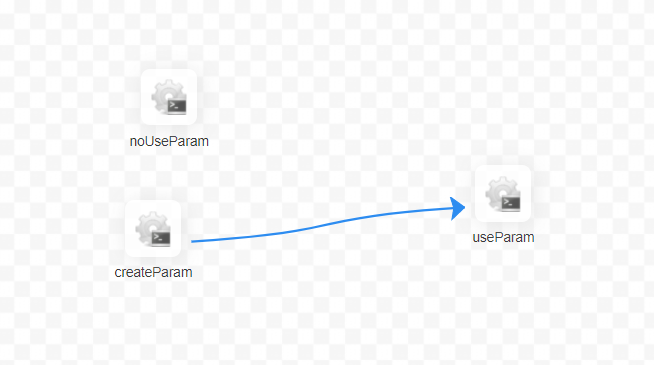
+For example, the relationship in the figure below:
+
+1: The first case is explained by shell node first
+
+
+
+The [useParam] node can use the parameters which is set in the [createParam]
node. The [useParam] node does not have a dependency on the [noUseParam] node,
so it does not get the parameters of the [noUseParam] node. The above picture
is just an example of a shell node, other types of nodes have the same usage
rules.
+
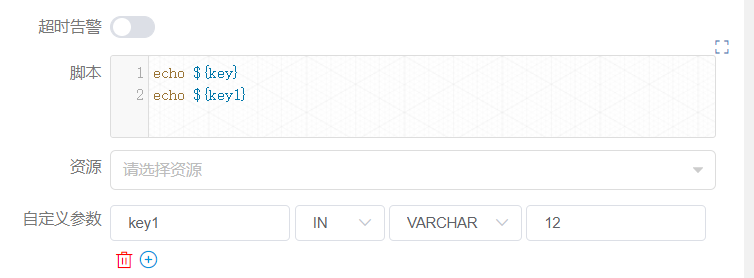
+
+
+Among all, the [createParam] node can use parameters directly. In addition,
the node sets two parameters "key" and "key1". Here the user defines a
parameter key1 with the same name as the one passed by the upstream node and
copies the value "12". However, due to the priority we set, the value "12" here
is discarded and the parameter value set by the upstream node is finally used.
+
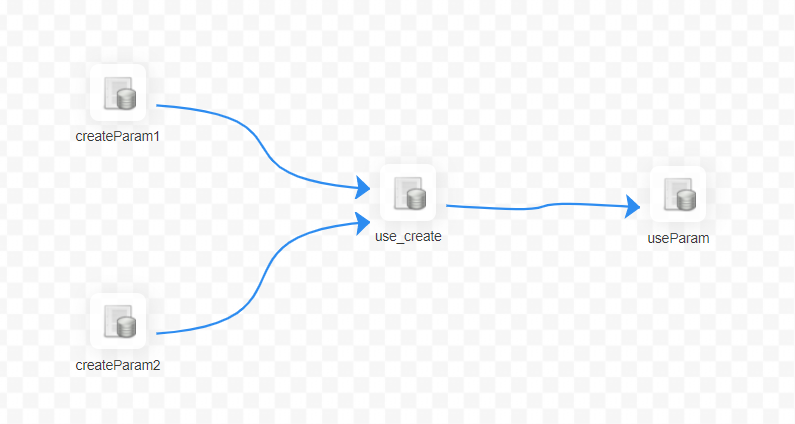
+2: Let's explain another situation in SQL nodes.
+
+
+
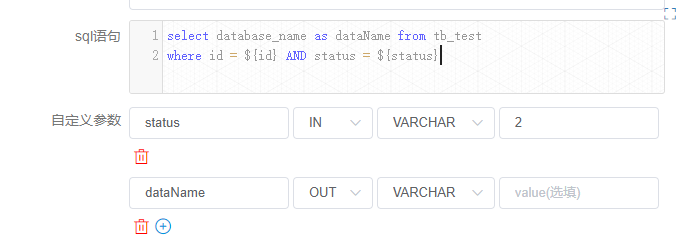
+The definition of the [use_create] node is as follows:
+
+
+
+"status" is the own parameters of the node set by the current node. However,
the user also sets the "status" parameter when saving, and assigns a value of
-1. Then the value of status will be -1 with higher priority when the SQL is
executed. The value of the node's own variable is discarded.
+
+The "ID" here is the parameter set by the upstream node, the user sets the
parameters of the same parameter name "ID" in the [createparam1] node,
[createparam2] node. And the [use_create] node uses the value of [createParam1]
which is finished first.
+
+##### Parameter setting:
+
+When defining an upstream node, if there is a need to transmit the result of
that node to a downstream node that has a dependency. You need to set a
parameter whose direction is OUT in [Custom Parameters] of [Current Node
Settings]. At present, we mainly do it for SQL and SHELL nodes to pass
parameters downward.
Review comment:
=> At present, we mainly focus on the function of SQL and SHELL nodes
that can input parameters.
##########
File path: docs/en-us/dev/user_doc/globalParams.md
##########
@@ -0,0 +1,168 @@
+### DolphinScheduler Global Parameters
+
+DolphinScheduler contains the following three types of parameters:
+
+① Parameters defined when the workflow saves page definitions
+
+② Parameters passed by upstream nodes
+
+③ The node's own parameters. The parameters defined by the user in [Custom
Parameters] and the user can define the value of this part of the parameters at
the time of workflow definition.
+
+The global parameters described in this article refer to the parameters passed
by the ② upstream nodes.
+
+#### User Manual
+
+##### The use of parameters:
+
+When you are defining a node, that node may use all three of these parameters,
such as ${parameter name}. The priority of three parameters is ①>②>③, that is,
when three parameter names are repeated, prioritize the value of ①, followed by
②, and the last is ③. The parameters currently can apply to all nodes.
+
+It should be noted that the partial parameter may exist the same name when
using the upstream node to pass the parameters. If this happens, the program
will use the non-null value of it. If more than one non-null value exists, the
value passed by the upstream node that ends first is selected. Users need this
in advance when defining the process.
+
+For example, the relationship in the figure below:
+
+1: The first case is explained by shell node first
+
+
+
+The [useParam] node can use the parameters which is set in the [createParam]
node. The [useParam] node does not have a dependency on the [noUseParam] node,
so it does not get the parameters of the [noUseParam] node. The above picture
is just an example of a shell node, other types of nodes have the same usage
rules.
+
+
+
+Among all, the [createParam] node can use parameters directly. In addition,
the node sets two parameters "key" and "key1". Here the user defines a
parameter key1 with the same name as the one passed by the upstream node and
copies the value "12". However, due to the priority we set, the value "12" here
is discarded and the parameter value set by the upstream node is finally used.
+
+2: Let's explain another situation in SQL nodes.
+
+
+
+The definition of the [use_create] node is as follows:
+
+
+
+"status" is the own parameters of the node set by the current node. However,
the user also sets the "status" parameter when saving, and assigns a value of
-1. Then the value of status will be -1 with higher priority when the SQL is
executed. The value of the node's own variable is discarded.
Review comment:
assigns a value of -1=> assigning its value to -1
##########
File path: docs/en-us/dev/user_doc/globalParams.md
##########
@@ -0,0 +1,168 @@
+### DolphinScheduler Global Parameters
+
+DolphinScheduler contains the following three types of parameters:
+
+① Parameters defined when the workflow saves page definitions
+
+② Parameters passed by upstream nodes
+
+③ The node's own parameters. The parameters defined by the user in [Custom
Parameters] and the user can define the value of this part of the parameters at
the time of workflow definition.
Review comment:
=> , which is the parameters defined by the user in [Custom Parameters].
The user can define the value of ...
##########
File path: docs/en-us/dev/user_doc/globalParams.md
##########
@@ -0,0 +1,168 @@
+### DolphinScheduler Global Parameters
+
+DolphinScheduler contains the following three types of parameters:
+
+① Parameters defined when the workflow saves page definitions
+
+② Parameters passed by upstream nodes
+
+③ The node's own parameters. The parameters defined by the user in [Custom
Parameters] and the user can define the value of this part of the parameters at
the time of workflow definition.
+
+The global parameters described in this article refer to the parameters passed
by the ② upstream nodes.
+
+#### User Manual
+
+##### The use of parameters:
+
+When you are defining a node, that node may use all three of these parameters,
such as ${parameter name}. The priority of three parameters is ①>②>③, that is,
when three parameter names are repeated, prioritize the value of ①, followed by
②, and the last is ③. The parameters currently can apply to all nodes.
+
+It should be noted that the partial parameter may exist the same name when
using the upstream node to pass the parameters. If this happens, the program
will use the non-null value of it. If more than one non-null value exists, the
value passed by the upstream node that ends first is selected. Users need this
in advance when defining the process.
+
+For example, the relationship in the figure below:
+
+1: The first case is explained by shell node first
+
+
+
+The [useParam] node can use the parameters which is set in the [createParam]
node. The [useParam] node does not have a dependency on the [noUseParam] node,
so it does not get the parameters of the [noUseParam] node. The above picture
is just an example of a shell node, other types of nodes have the same usage
rules.
+
+
+
+Among all, the [createParam] node can use parameters directly. In addition,
the node sets two parameters "key" and "key1". Here the user defines a
parameter key1 with the same name as the one passed by the upstream node and
copies the value "12". However, due to the priority we set, the value "12" here
is discarded and the parameter value set by the upstream node is finally used.
+
+2: Let's explain another situation in SQL nodes.
+
+
+
+The definition of the [use_create] node is as follows:
+
+
+
+"status" is the own parameters of the node set by the current node. However,
the user also sets the "status" parameter when saving, and assigns a value of
-1. Then the value of status will be -1 with higher priority when the SQL is
executed. The value of the node's own variable is discarded.
+
+The "ID" here is the parameter set by the upstream node, the user sets the
parameters of the same parameter name "ID" in the [createparam1] node,
[createparam2] node. And the [use_create] node uses the value of [createParam1]
which is finished first.
+
+##### Parameter setting:
+
+When defining an upstream node, if there is a need to transmit the result of
that node to a downstream node that has a dependency. You need to set a
parameter whose direction is OUT in [Custom Parameters] of [Current Node
Settings]. At present, we mainly do it for SQL and SHELL nodes to pass
parameters downward.
+
+###### SQL node
+
+prop is user-specified; the direction is selected as OUT, and will be defined
as parameter output only when the direction is OUT. The data type can be chosen
from different data structures as needed; the value part is not required.
+
+If the result of the SQL node has only one row, one or more fields, the name
of the prop needs to be the same as the field name. The data type can be chosen
to be something other than LIST. The parameter will select the value
corresponding to the column with the same name as this parameter in the column
name in the SQL query result.
+
+If the result of the SQL node is multiple rows, one or more fields, the name
of the prop needs to be the same as the name of the field. The data type is
selected as LIST, and the SQL query result will be converted to LIST, and the
result will be converted to JSON as the value of the corresponding parameter.
+
+Let's take another example of the process that contains the SQL node in the
above picture:
+
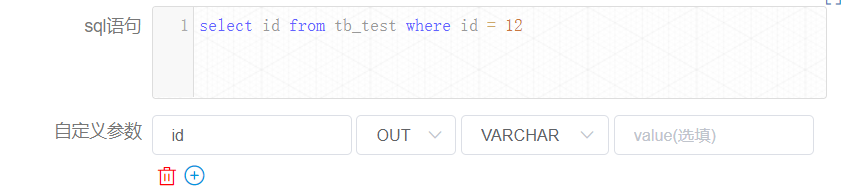
+The [createParam1] node in the above figure is defined as follows:
+
+
+
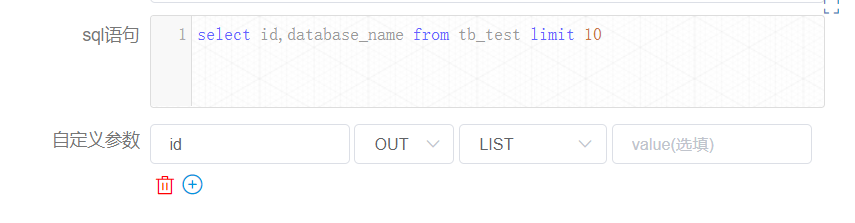
+ [createParam2] node is defined as follows:
+
+
+
+You can find the value of the variable in the [Workflow Instance] page to find
the corresponding node instance.
+
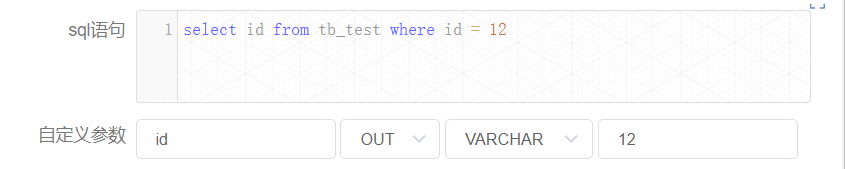
+Node instance [createparam1] is as follows:
+
+
+
+Here, the value of "id" is equal to 12.
+
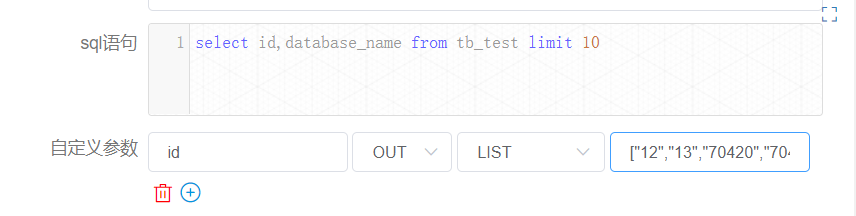
+Let's see the case of the node instance [createparam2].
+
+
+
+There is only the value of "id". Although the user-defined sql looks up the
fields "id" and "database_name", only one parameter is set because only one
parameter "id" is defined for out. For display reasons, the length of the list
is already checked for you here as 10.
+
+###### SHELL node
+
+prop is user-specified. The direction is selected as OUT. The output is
defined as a parameter only when the direction is OUT. Data type can choose
different data structure as needed; the value part is not required to be
filled. The user needs to pass the parameter, and when defining the shell
script, the output format of $setValue(key=value) statement is required, key is
the prop of the corresponding parameter, and value is the value of the
parameter.
+
+For example, in the figure below:
+
+
+
+When the log detects the ${setValue(key=value1)} format in the shell node
definition, it will assign value1 to key, and the downstream node can use the
value of the variable key directly. Similarly, you can find the corresponding
node instance on the [Workflow Instance] page to see the value of the variable.
+
+
+
+#### Development documentation
+
+After the user defines the parameter with the direction OUT, it is saved in
the localParam of the task.
+
+##### The use of parameters:
+
+Getting the direct predecessor node preTasks of the current taskInstance to be
created from the DAG, get the varPool of preTasks, merge this varPool (List)
into one varPool, and in the merging process, if parameters with the same
parameter name are found, handle them according to the following logic:
+
+1. If all the values are null, the merged value is null
+2. If one and only one value is non-null, then the merged value is the
non-null value
+3. If all the values are not null, according to the earliest of the endtime
of taskInstance taken by VarPool
Review comment:
according to the earliest of the endtime of taskInstance taken by
VarPool => it would be the earliest value of the endtime of taskInstance taken
by VarPool.
##########
File path: docs/en-us/dev/user_doc/globalParams.md
##########
@@ -0,0 +1,168 @@
+### DolphinScheduler Global Parameters
+
+DolphinScheduler contains the following three types of parameters:
+
+① Parameters defined when the workflow saves page definitions
+
+② Parameters passed by upstream nodes
+
+③ The node's own parameters. The parameters defined by the user in [Custom
Parameters] and the user can define the value of this part of the parameters at
the time of workflow definition.
+
+The global parameters described in this article refer to the parameters passed
by the ② upstream nodes.
+
+#### User Manual
+
+##### The use of parameters:
+
+When you are defining a node, that node may use all three of these parameters,
such as ${parameter name}. The priority of three parameters is ①>②>③, that is,
when three parameter names are repeated, prioritize the value of ①, followed by
②, and the last is ③. The parameters currently can apply to all nodes.
+
+It should be noted that the partial parameter may exist the same name when
using the upstream node to pass the parameters. If this happens, the program
will use the non-null value of it. If more than one non-null value exists, the
value passed by the upstream node that ends first is selected. Users need this
in advance when defining the process.
+
+For example, the relationship in the figure below:
+
+1: The first case is explained by shell node first
+
+
+
+The [useParam] node can use the parameters which is set in the [createParam]
node. The [useParam] node does not have a dependency on the [noUseParam] node,
so it does not get the parameters of the [noUseParam] node. The above picture
is just an example of a shell node, other types of nodes have the same usage
rules.
+
+
+
+Among all, the [createParam] node can use parameters directly. In addition,
the node sets two parameters "key" and "key1". Here the user defines a
parameter key1 with the same name as the one passed by the upstream node and
copies the value "12". However, due to the priority we set, the value "12" here
is discarded and the parameter value set by the upstream node is finally used.
+
+2: Let's explain another situation in SQL nodes.
+
+
+
+The definition of the [use_create] node is as follows:
+
+
+
+"status" is the own parameters of the node set by the current node. However,
the user also sets the "status" parameter when saving, and assigns a value of
-1. Then the value of status will be -1 with higher priority when the SQL is
executed. The value of the node's own variable is discarded.
+
+The "ID" here is the parameter set by the upstream node, the user sets the
parameters of the same parameter name "ID" in the [createparam1] node,
[createparam2] node. And the [use_create] node uses the value of [createParam1]
which is finished first.
Review comment:
, the user => . The user
in the [createparam1] node, [createparam2] node => for the [createparam1]
node and [createparam2] node
##########
File path: docs/en-us/dev/user_doc/globalParams.md
##########
@@ -0,0 +1,168 @@
+### DolphinScheduler Global Parameters
+
+DolphinScheduler contains the following three types of parameters:
+
+① Parameters defined when the workflow saves page definitions
+
+② Parameters passed by upstream nodes
+
+③ The node's own parameters. The parameters defined by the user in [Custom
Parameters] and the user can define the value of this part of the parameters at
the time of workflow definition.
+
+The global parameters described in this article refer to the parameters passed
by the ② upstream nodes.
+
+#### User Manual
+
+##### The use of parameters:
+
+When you are defining a node, that node may use all three of these parameters,
such as ${parameter name}. The priority of three parameters is ①>②>③, that is,
when three parameter names are repeated, prioritize the value of ①, followed by
②, and the last is ③. The parameters currently can apply to all nodes.
+
+It should be noted that the partial parameter may exist the same name when
using the upstream node to pass the parameters. If this happens, the program
will use the non-null value of it. If more than one non-null value exists, the
value passed by the upstream node that ends first is selected. Users need this
in advance when defining the process.
+
+For example, the relationship in the figure below:
+
+1: The first case is explained by shell node first
+
+
+
+The [useParam] node can use the parameters which is set in the [createParam]
node. The [useParam] node does not have a dependency on the [noUseParam] node,
so it does not get the parameters of the [noUseParam] node. The above picture
is just an example of a shell node, other types of nodes have the same usage
rules.
+
+
+
+Among all, the [createParam] node can use parameters directly. In addition,
the node sets two parameters "key" and "key1". Here the user defines a
parameter key1 with the same name as the one passed by the upstream node and
copies the value "12". However, due to the priority we set, the value "12" here
is discarded and the parameter value set by the upstream node is finally used.
Review comment:
two parameters "key" and "key1" => two parameters named "key" and "key1"
a parameter key1 => a parameter named "key1"
the value "12" here is discarded and the parameter value set by the upstream
node is finally used. => the value "12" here would be discarded and the
parameter value set by the upstream node would be finally used.
##########
File path: docs/en-us/dev/user_doc/globalParams.md
##########
@@ -0,0 +1,168 @@
+### DolphinScheduler Global Parameters
+
+DolphinScheduler contains the following three types of parameters:
+
+① Parameters defined when the workflow saves page definitions
+
+② Parameters passed by upstream nodes
+
+③ The node's own parameters. The parameters defined by the user in [Custom
Parameters] and the user can define the value of this part of the parameters at
the time of workflow definition.
+
+The global parameters described in this article refer to the parameters passed
by the ② upstream nodes.
+
+#### User Manual
+
+##### The use of parameters:
+
+When you are defining a node, that node may use all three of these parameters,
such as ${parameter name}. The priority of three parameters is ①>②>③, that is,
when three parameter names are repeated, prioritize the value of ①, followed by
②, and the last is ③. The parameters currently can apply to all nodes.
+
+It should be noted that the partial parameter may exist the same name when
using the upstream node to pass the parameters. If this happens, the program
will use the non-null value of it. If more than one non-null value exists, the
value passed by the upstream node that ends first is selected. Users need this
in advance when defining the process.
+
+For example, the relationship in the figure below:
+
+1: The first case is explained by shell node first
Review comment:
The first case is explained by shell node first => The first case is
explained by the shell nodes.
##########
File path: docs/en-us/dev/user_doc/globalParams.md
##########
@@ -0,0 +1,168 @@
+### DolphinScheduler Global Parameters
+
+DolphinScheduler contains the following three types of parameters:
+
+① Parameters defined when the workflow saves page definitions
+
+② Parameters passed by upstream nodes
+
+③ The node's own parameters. The parameters defined by the user in [Custom
Parameters] and the user can define the value of this part of the parameters at
the time of workflow definition.
+
+The global parameters described in this article refer to the parameters passed
by the ② upstream nodes.
+
+#### User Manual
+
+##### The use of parameters:
+
+When you are defining a node, that node may use all three of these parameters,
such as ${parameter name}. The priority of three parameters is ①>②>③, that is,
when three parameter names are repeated, prioritize the value of ①, followed by
②, and the last is ③. The parameters currently can apply to all nodes.
+
+It should be noted that the partial parameter may exist the same name when
using the upstream node to pass the parameters. If this happens, the program
will use the non-null value of it. If more than one non-null value exists, the
value passed by the upstream node that ends first is selected. Users need this
in advance when defining the process.
+
+For example, the relationship in the figure below:
Review comment:
the relationships are shown in the figures below:
This will be a sentence.
##########
File path: docs/en-us/dev/user_doc/globalParams.md
##########
@@ -0,0 +1,168 @@
+### DolphinScheduler Global Parameters
+
+DolphinScheduler contains the following three types of parameters:
+
+① Parameters defined when the workflow saves page definitions
+
+② Parameters passed by upstream nodes
+
+③ The node's own parameters. The parameters defined by the user in [Custom
Parameters] and the user can define the value of this part of the parameters at
the time of workflow definition.
+
+The global parameters described in this article refer to the parameters passed
by the ② upstream nodes.
+
+#### User Manual
+
+##### The use of parameters:
+
+When you are defining a node, that node may use all three of these parameters,
such as ${parameter name}. The priority of three parameters is ①>②>③, that is,
when three parameter names are repeated, prioritize the value of ①, followed by
②, and the last is ③. The parameters currently can apply to all nodes.
+
+It should be noted that the partial parameter may exist the same name when
using the upstream node to pass the parameters. If this happens, the program
will use the non-null value of it. If more than one non-null value exists, the
value passed by the upstream node that ends first is selected. Users need this
in advance when defining the process.
+
+For example, the relationship in the figure below:
+
+1: The first case is explained by shell node first
+
+
+
+The [useParam] node can use the parameters which is set in the [createParam]
node. The [useParam] node does not have a dependency on the [noUseParam] node,
so it does not get the parameters of the [noUseParam] node. The above picture
is just an example of a shell node, other types of nodes have the same usage
rules.
+
+
+
+Among all, the [createParam] node can use parameters directly. In addition,
the node sets two parameters "key" and "key1". Here the user defines a
parameter key1 with the same name as the one passed by the upstream node and
copies the value "12". However, due to the priority we set, the value "12" here
is discarded and the parameter value set by the upstream node is finally used.
+
+2: Let's explain another situation in SQL nodes.
+
+
+
+The definition of the [use_create] node is as follows:
+
+
+
+"status" is the own parameters of the node set by the current node. However,
the user also sets the "status" parameter when saving, and assigns a value of
-1. Then the value of status will be -1 with higher priority when the SQL is
executed. The value of the node's own variable is discarded.
+
+The "ID" here is the parameter set by the upstream node, the user sets the
parameters of the same parameter name "ID" in the [createparam1] node,
[createparam2] node. And the [use_create] node uses the value of [createParam1]
which is finished first.
+
+##### Parameter setting:
+
+When defining an upstream node, if there is a need to transmit the result of
that node to a downstream node that has a dependency. You need to set a
parameter whose direction is OUT in [Custom Parameters] of [Current Node
Settings]. At present, we mainly do it for SQL and SHELL nodes to pass
parameters downward.
+
+###### SQL node
+
+prop is user-specified; the direction is selected as OUT, and will be defined
as parameter output only when the direction is OUT. The data type can be chosen
from different data structures as needed; the value part is not required.
+
+If the result of the SQL node has only one row, one or more fields, the name
of the prop needs to be the same as the field name. The data type can be chosen
to be something other than LIST. The parameter will select the value
corresponding to the column with the same name as this parameter in the column
name in the SQL query result.
+
+If the result of the SQL node is multiple rows, one or more fields, the name
of the prop needs to be the same as the name of the field. The data type is
selected as LIST, and the SQL query result will be converted to LIST, and the
result will be converted to JSON as the value of the corresponding parameter.
+
+Let's take another example of the process that contains the SQL node in the
above picture:
+
+The [createParam1] node in the above figure is defined as follows:
+
+
+
+ [createParam2] node is defined as follows:
+
+
+
+You can find the value of the variable in the [Workflow Instance] page to find
the corresponding node instance.
+
+Node instance [createparam1] is as follows:
+
+
+
+Here, the value of "id" is equal to 12.
+
+Let's see the case of the node instance [createparam2].
+
+
+
+There is only the value of "id". Although the user-defined sql looks up the
fields "id" and "database_name", only one parameter is set because only one
parameter "id" is defined for out. For display reasons, the length of the list
is already checked for you here as 10.
+
+###### SHELL node
+
+prop is user-specified. The direction is selected as OUT. The output is
defined as a parameter only when the direction is OUT. Data type can choose
different data structure as needed; the value part is not required to be
filled. The user needs to pass the parameter, and when defining the shell
script, the output format of $setValue(key=value) statement is required, key is
the prop of the corresponding parameter, and value is the value of the
parameter.
Review comment:
structure => structures
##########
File path: docs/en-us/dev/user_doc/globalParams.md
##########
@@ -0,0 +1,168 @@
+### DolphinScheduler Global Parameters
+
+DolphinScheduler contains the following three types of parameters:
+
+① Parameters defined when the workflow saves page definitions
+
+② Parameters passed by upstream nodes
+
+③ The node's own parameters. The parameters defined by the user in [Custom
Parameters] and the user can define the value of this part of the parameters at
the time of workflow definition.
+
+The global parameters described in this article refer to the parameters passed
by the ② upstream nodes.
+
+#### User Manual
+
+##### The use of parameters:
+
+When you are defining a node, that node may use all three of these parameters,
such as ${parameter name}. The priority of three parameters is ①>②>③, that is,
when three parameter names are repeated, prioritize the value of ①, followed by
②, and the last is ③. The parameters currently can apply to all nodes.
+
+It should be noted that the partial parameter may exist the same name when
using the upstream node to pass the parameters. If this happens, the program
will use the non-null value of it. If more than one non-null value exists, the
value passed by the upstream node that ends first is selected. Users need this
in advance when defining the process.
+
+For example, the relationship in the figure below:
+
+1: The first case is explained by shell node first
+
+
+
+The [useParam] node can use the parameters which is set in the [createParam]
node. The [useParam] node does not have a dependency on the [noUseParam] node,
so it does not get the parameters of the [noUseParam] node. The above picture
is just an example of a shell node, other types of nodes have the same usage
rules.
+
+
+
+Among all, the [createParam] node can use parameters directly. In addition,
the node sets two parameters "key" and "key1". Here the user defines a
parameter key1 with the same name as the one passed by the upstream node and
copies the value "12". However, due to the priority we set, the value "12" here
is discarded and the parameter value set by the upstream node is finally used.
+
+2: Let's explain another situation in SQL nodes.
+
+
+
+The definition of the [use_create] node is as follows:
+
+
+
+"status" is the own parameters of the node set by the current node. However,
the user also sets the "status" parameter when saving, and assigns a value of
-1. Then the value of status will be -1 with higher priority when the SQL is
executed. The value of the node's own variable is discarded.
+
+The "ID" here is the parameter set by the upstream node, the user sets the
parameters of the same parameter name "ID" in the [createparam1] node,
[createparam2] node. And the [use_create] node uses the value of [createParam1]
which is finished first.
+
+##### Parameter setting:
+
+When defining an upstream node, if there is a need to transmit the result of
that node to a downstream node that has a dependency. You need to set a
parameter whose direction is OUT in [Custom Parameters] of [Current Node
Settings]. At present, we mainly do it for SQL and SHELL nodes to pass
parameters downward.
+
+###### SQL node
+
+prop is user-specified; the direction is selected as OUT, and will be defined
as parameter output only when the direction is OUT. The data type can be chosen
from different data structures as needed; the value part is not required.
+
+If the result of the SQL node has only one row, one or more fields, the name
of the prop needs to be the same as the field name. The data type can be chosen
to be something other than LIST. The parameter will select the value
corresponding to the column with the same name as this parameter in the column
name in the SQL query result.
+
+If the result of the SQL node is multiple rows, one or more fields, the name
of the prop needs to be the same as the name of the field. The data type is
selected as LIST, and the SQL query result will be converted to LIST, and the
result will be converted to JSON as the value of the corresponding parameter.
+
+Let's take another example of the process that contains the SQL node in the
above picture:
+
+The [createParam1] node in the above figure is defined as follows:
+
+
+
+ [createParam2] node is defined as follows:
+
+
+
+You can find the value of the variable in the [Workflow Instance] page to find
the corresponding node instance.
+
+Node instance [createparam1] is as follows:
+
+
+
+Here, the value of "id" is equal to 12.
+
+Let's see the case of the node instance [createparam2].
+
+
+
+There is only the value of "id". Although the user-defined sql looks up the
fields "id" and "database_name", only one parameter is set because only one
parameter "id" is defined for out. For display reasons, the length of the list
is already checked for you here as 10.
+
+###### SHELL node
+
+prop is user-specified. The direction is selected as OUT. The output is
defined as a parameter only when the direction is OUT. Data type can choose
different data structure as needed; the value part is not required to be
filled. The user needs to pass the parameter, and when defining the shell
script, the output format of $setValue(key=value) statement is required, key is
the prop of the corresponding parameter, and value is the value of the
parameter.
+
+For example, in the figure below:
+
+
+
+When the log detects the ${setValue(key=value1)} format in the shell node
definition, it will assign value1 to key, and the downstream node can use the
value of the variable key directly. Similarly, you can find the corresponding
node instance on the [Workflow Instance] page to see the value of the variable.
+
+
+
+#### Development documentation
+
+After the user defines the parameter with the direction OUT, it is saved in
the localParam of the task.
+
+##### The use of parameters:
+
+Getting the direct predecessor node preTasks of the current taskInstance to be
created from the DAG, get the varPool of preTasks, merge this varPool (List)
into one varPool, and in the merging process, if parameters with the same
parameter name are found, handle them according to the following logic:
+
+1. If all the values are null, the merged value is null
+2. If one and only one value is non-null, then the merged value is the
non-null value
+3. If all the values are not null, according to the earliest of the endtime
of taskInstance taken by VarPool
+
+The direction of all the merged properties is updated to IN during the merge
process.
+
+The result of the merge is saved in taskInstance.varPool.
+
+The worker receives and parses the varPool into the format of
Map<String,Property>, where the key of the map is property.prop, which is the
parameter name.
+
+When the processor processes the parameters, it will merge the varPool and
localParam and globalParam parameters, and if there are parameters with
duplicate names during the merging process, they will be replaced according to
the following priorities, with the higher priority being retained and the lower
priority being replaced:
+
+- globalParam: high
+- varPool: middle
+- localParam: low
+
+The parameters are replaced with the corresponding values using regular
expressions compared to ${parameter name} before the node content is executed.
+
+##### Parameter setting:
+
+Currently, only SQL and SHELL nodes are supported to get parameters.
+
+- Get the parameter with direction OUT from localParam, and do the
following way according to the type of different nodes.
+
+###### SQL node:
+
+The structure returned by the parameter is List<Map<String,String>>.
+
+Where the elements of List are each row of data, the key of Map is the column
name, and the value is the value corresponding to the column.
Review comment:
. Where => , where
##########
File path: docs/en-us/dev/user_doc/globalParams.md
##########
@@ -0,0 +1,168 @@
+### DolphinScheduler Global Parameters
+
+DolphinScheduler contains the following three types of parameters:
+
+① Parameters defined when the workflow saves page definitions
+
+② Parameters passed by upstream nodes
+
+③ The node's own parameters. The parameters defined by the user in [Custom
Parameters] and the user can define the value of this part of the parameters at
the time of workflow definition.
+
+The global parameters described in this article refer to the parameters passed
by the ② upstream nodes.
+
+#### User Manual
+
+##### The use of parameters:
+
+When you are defining a node, that node may use all three of these parameters,
such as ${parameter name}. The priority of three parameters is ①>②>③, that is,
when three parameter names are repeated, prioritize the value of ①, followed by
②, and the last is ③. The parameters currently can apply to all nodes.
+
+It should be noted that the partial parameter may exist the same name when
using the upstream node to pass the parameters. If this happens, the program
will use the non-null value of it. If more than one non-null value exists, the
value passed by the upstream node that ends first is selected. Users need this
in advance when defining the process.
+
+For example, the relationship in the figure below:
+
+1: The first case is explained by shell node first
+
+
+
+The [useParam] node can use the parameters which is set in the [createParam]
node. The [useParam] node does not have a dependency on the [noUseParam] node,
so it does not get the parameters of the [noUseParam] node. The above picture
is just an example of a shell node, other types of nodes have the same usage
rules.
+
+
+
+Among all, the [createParam] node can use parameters directly. In addition,
the node sets two parameters "key" and "key1". Here the user defines a
parameter key1 with the same name as the one passed by the upstream node and
copies the value "12". However, due to the priority we set, the value "12" here
is discarded and the parameter value set by the upstream node is finally used.
+
+2: Let's explain another situation in SQL nodes.
+
+
+
+The definition of the [use_create] node is as follows:
+
+
+
+"status" is the own parameters of the node set by the current node. However,
the user also sets the "status" parameter when saving, and assigns a value of
-1. Then the value of status will be -1 with higher priority when the SQL is
executed. The value of the node's own variable is discarded.
+
+The "ID" here is the parameter set by the upstream node, the user sets the
parameters of the same parameter name "ID" in the [createparam1] node,
[createparam2] node. And the [use_create] node uses the value of [createParam1]
which is finished first.
+
+##### Parameter setting:
+
+When defining an upstream node, if there is a need to transmit the result of
that node to a downstream node that has a dependency. You need to set a
parameter whose direction is OUT in [Custom Parameters] of [Current Node
Settings]. At present, we mainly do it for SQL and SHELL nodes to pass
parameters downward.
+
+###### SQL node
+
+prop is user-specified; the direction is selected as OUT, and will be defined
as parameter output only when the direction is OUT. The data type can be chosen
from different data structures as needed; the value part is not required.
+
+If the result of the SQL node has only one row, one or more fields, the name
of the prop needs to be the same as the field name. The data type can be chosen
to be something other than LIST. The parameter will select the value
corresponding to the column with the same name as this parameter in the column
name in the SQL query result.
+
+If the result of the SQL node is multiple rows, one or more fields, the name
of the prop needs to be the same as the name of the field. The data type is
selected as LIST, and the SQL query result will be converted to LIST, and the
result will be converted to JSON as the value of the corresponding parameter.
+
+Let's take another example of the process that contains the SQL node in the
above picture:
+
+The [createParam1] node in the above figure is defined as follows:
+
+
+
+ [createParam2] node is defined as follows:
+
+
+
+You can find the value of the variable in the [Workflow Instance] page to find
the corresponding node instance.
+
+Node instance [createparam1] is as follows:
+
+
+
+Here, the value of "id" is equal to 12.
+
+Let's see the case of the node instance [createparam2].
+
+
+
+There is only the value of "id". Although the user-defined sql looks up the
fields "id" and "database_name", only one parameter is set because only one
parameter "id" is defined for out. For display reasons, the length of the list
is already checked for you here as 10.
+
+###### SHELL node
+
+prop is user-specified. The direction is selected as OUT. The output is
defined as a parameter only when the direction is OUT. Data type can choose
different data structure as needed; the value part is not required to be
filled. The user needs to pass the parameter, and when defining the shell
script, the output format of $setValue(key=value) statement is required, key is
the prop of the corresponding parameter, and value is the value of the
parameter.
+
+For example, in the figure below:
+
+
+
+When the log detects the ${setValue(key=value1)} format in the shell node
definition, it will assign value1 to key, and the downstream node can use the
value of the variable key directly. Similarly, you can find the corresponding
node instance on the [Workflow Instance] page to see the value of the variable.
+
+
+
+#### Development documentation
+
+After the user defines the parameter with the direction OUT, it is saved in
the localParam of the task.
+
+##### The use of parameters:
+
+Getting the direct predecessor node preTasks of the current taskInstance to be
created from the DAG, get the varPool of preTasks, merge this varPool (List)
into one varPool, and in the merging process, if parameters with the same
parameter name are found, handle them according to the following logic:
Review comment:
handle them => they will be handled
logic => logics
##########
File path: docs/en-us/dev/user_doc/globalParams.md
##########
@@ -0,0 +1,168 @@
+### DolphinScheduler Global Parameters
+
+DolphinScheduler contains the following three types of parameters:
+
+① Parameters defined when the workflow saves page definitions
+
+② Parameters passed by upstream nodes
+
+③ The node's own parameters. The parameters defined by the user in [Custom
Parameters] and the user can define the value of this part of the parameters at
the time of workflow definition.
+
+The global parameters described in this article refer to the parameters passed
by the ② upstream nodes.
+
+#### User Manual
+
+##### The use of parameters:
+
+When you are defining a node, that node may use all three of these parameters,
such as ${parameter name}. The priority of three parameters is ①>②>③, that is,
when three parameter names are repeated, prioritize the value of ①, followed by
②, and the last is ③. The parameters currently can apply to all nodes.
+
+It should be noted that the partial parameter may exist the same name when
using the upstream node to pass the parameters. If this happens, the program
will use the non-null value of it. If more than one non-null value exists, the
value passed by the upstream node that ends first is selected. Users need this
in advance when defining the process.
+
+For example, the relationship in the figure below:
+
+1: The first case is explained by shell node first
+
+
+
+The [useParam] node can use the parameters which is set in the [createParam]
node. The [useParam] node does not have a dependency on the [noUseParam] node,
so it does not get the parameters of the [noUseParam] node. The above picture
is just an example of a shell node, other types of nodes have the same usage
rules.
+
+
+
+Among all, the [createParam] node can use parameters directly. In addition,
the node sets two parameters "key" and "key1". Here the user defines a
parameter key1 with the same name as the one passed by the upstream node and
copies the value "12". However, due to the priority we set, the value "12" here
is discarded and the parameter value set by the upstream node is finally used.
+
+2: Let's explain another situation in SQL nodes.
+
+
+
+The definition of the [use_create] node is as follows:
+
+
+
+"status" is the own parameters of the node set by the current node. However,
the user also sets the "status" parameter when saving, and assigns a value of
-1. Then the value of status will be -1 with higher priority when the SQL is
executed. The value of the node's own variable is discarded.
+
+The "ID" here is the parameter set by the upstream node, the user sets the
parameters of the same parameter name "ID" in the [createparam1] node,
[createparam2] node. And the [use_create] node uses the value of [createParam1]
which is finished first.
+
+##### Parameter setting:
+
+When defining an upstream node, if there is a need to transmit the result of
that node to a downstream node that has a dependency. You need to set a
parameter whose direction is OUT in [Custom Parameters] of [Current Node
Settings]. At present, we mainly do it for SQL and SHELL nodes to pass
parameters downward.
+
+###### SQL node
+
+prop is user-specified; the direction is selected as OUT, and will be defined
as parameter output only when the direction is OUT. The data type can be chosen
from different data structures as needed; the value part is not required.
+
+If the result of the SQL node has only one row, one or more fields, the name
of the prop needs to be the same as the field name. The data type can be chosen
to be something other than LIST. The parameter will select the value
corresponding to the column with the same name as this parameter in the column
name in the SQL query result.
+
+If the result of the SQL node is multiple rows, one or more fields, the name
of the prop needs to be the same as the name of the field. The data type is
selected as LIST, and the SQL query result will be converted to LIST, and the
result will be converted to JSON as the value of the corresponding parameter.
+
+Let's take another example of the process that contains the SQL node in the
above picture:
+
+The [createParam1] node in the above figure is defined as follows:
+
+
+
+ [createParam2] node is defined as follows:
+
+
+
+You can find the value of the variable in the [Workflow Instance] page to find
the corresponding node instance.
+
+Node instance [createparam1] is as follows:
+
+
+
+Here, the value of "id" is equal to 12.
+
+Let's see the case of the node instance [createparam2].
+
+
+
+There is only the value of "id". Although the user-defined sql looks up the
fields "id" and "database_name", only one parameter is set because only one
parameter "id" is defined for out. For display reasons, the length of the list
is already checked for you here as 10.
+
+###### SHELL node
+
+prop is user-specified. The direction is selected as OUT. The output is
defined as a parameter only when the direction is OUT. Data type can choose
different data structure as needed; the value part is not required to be
filled. The user needs to pass the parameter, and when defining the shell
script, the output format of $setValue(key=value) statement is required, key is
the prop of the corresponding parameter, and value is the value of the
parameter.
+
+For example, in the figure below:
+
+
+
+When the log detects the ${setValue(key=value1)} format in the shell node
definition, it will assign value1 to key, and the downstream node can use the
value of the variable key directly. Similarly, you can find the corresponding
node instance on the [Workflow Instance] page to see the value of the variable.
+
+
+
+#### Development documentation
+
+After the user defines the parameter with the direction OUT, it is saved in
the localParam of the task.
+
+##### The use of parameters:
+
+Getting the direct predecessor node preTasks of the current taskInstance to be
created from the DAG, get the varPool of preTasks, merge this varPool (List)
into one varPool, and in the merging process, if parameters with the same
parameter name are found, handle them according to the following logic:
+
+1. If all the values are null, the merged value is null
+2. If one and only one value is non-null, then the merged value is the
non-null value
+3. If all the values are not null, according to the earliest of the endtime
of taskInstance taken by VarPool
+
+The direction of all the merged properties is updated to IN during the merge
process.
+
+The result of the merge is saved in taskInstance.varPool.
+
+The worker receives and parses the varPool into the format of
Map<String,Property>, where the key of the map is property.prop, which is the
parameter name.
+
+When the processor processes the parameters, it will merge the varPool and
localParam and globalParam parameters, and if there are parameters with
duplicate names during the merging process, they will be replaced according to
the following priorities, with the higher priority being retained and the lower
priority being replaced:
+
+- globalParam: high
+- varPool: middle
+- localParam: low
+
+The parameters are replaced with the corresponding values using regular
expressions compared to ${parameter name} before the node content is executed.
+
+##### Parameter setting:
+
+Currently, only SQL and SHELL nodes are supported to get parameters.
+
+- Get the parameter with direction OUT from localParam, and do the
following way according to the type of different nodes.
+
+###### SQL node:
+
+The structure returned by the parameter is List<Map<String,String>>.
+
+Where the elements of List are each row of data, the key of Map is the column
name, and the value is the value corresponding to the column.
+
+ (1) If the SQL statement returns one row of data, match the OUT parameter
name based on the OUT parameter name defined by the user when defining the
task, or discard it if it does not match.
+
+ (2) If the SQL statement returns multiple rows of data, the column names
are matched based on the OUT parameter names defined by the user when defining
the task of type LIST. All rows of the corresponding column are converted to
List<String> as the value of this parameter. If there is no match, it is
discarded.
+
+###### SHELL node
+
+The result of the processor execution is returned as Map<String,String>.
+
+The user needs to define $setValue(key=value) in the output when defining the
shell script.
+
+Remove $setValue() when processing parameters, split by "=", with the 0th
being the key and the 1st being the value.
+
+Similarly match the OUT parameter name and key defined by the user when
defining the task, and use value as the value of that parameter.
+
+- Return parameter processing
+
+The result of acquired Processor is String.
+
+Determine whether the processor is empty or not, and exit if it is empty.
+
+Determine whether the localParam is empty or not, and exit if it is empty.
+
+Get the parameter of localParam which is OUT, and exit if it is empty.
+
+Format String as per appeal format (List<Map<String,String>> for SQL,
Map<String,String>> for shell).
+
+Assign the parameters with matching values to varPool (List, which contains
the original IN's parameters)
+
+- Format the varPool as json and pass it to master.
+
+- The master receives the varPool and writes back the parameters that are
OUT to the localParam.
Review comment:
The parameters that are OUT would be written into the localParam after
the master has received the varPool.
--
This is an automated message from the Apache Git Service.
To respond to the message, please log on to GitHub and use the
URL above to go to the specific comment.
To unsubscribe, e-mail: [email protected]
For queries about this service, please contact Infrastructure at:
[email protected]










