This is an automated email from the ASF dual-hosted git repository.

lidongdai pushed a commit to branch master
in repository https://gitbox.apache.org/repos/asf/dolphinscheduler-website.git
The following commit(s) were added to refs/heads/master by this push:
new 308e2c9 fix en 1.3.8 docs (#446)
308e2c9 is described below
commit 308e2c95ee7af5b3e9e5699656455867d7374b74
Author: Tq <[email protected]>
AuthorDate: Sat Oct 2 11:59:06 2021 +0800
fix en 1.3.8 docs (#446)
---
docs/en-us/1.3.8/user_doc/ambari-integration.md | 6 +-
docs/en-us/1.3.8/user_doc/architecture-design.md | 30 +++---
docs/en-us/1.3.8/user_doc/cluster-deployment.md | 16 ++--
docs/en-us/1.3.8/user_doc/configuration-file.md | 12 +--
docs/en-us/1.3.8/user_doc/docker-deployment.md | 104 ++++++++++-----------
docs/en-us/1.3.8/user_doc/expansion-reduction.md | 4 +-
docs/en-us/1.3.8/user_doc/flink-call.md | 10 +-
docs/en-us/1.3.8/user_doc/kubernetes-deployment.md | 14 +--
docs/en-us/1.3.8/user_doc/metadata-1.3.md | 6 +-
docs/en-us/1.3.8/user_doc/open-api.md | 2 +-
docs/en-us/1.3.8/user_doc/quick-start.md | 8 +-
.../1.3.8/user_doc/skywalking-agent-deployment.md | 28 +++---
docs/en-us/1.3.8/user_doc/standalone-deployment.md | 50 +++++-----
docs/en-us/1.3.8/user_doc/system-manual.md | 8 +-
docs/en-us/1.3.8/user_doc/task-structure.md | 2 +-
docs/en-us/1.3.8/user_doc/upgrade.md | 30 +++---
16 files changed, 165 insertions(+), 165 deletions(-)
diff --git a/docs/en-us/1.3.8/user_doc/ambari-integration.md
b/docs/en-us/1.3.8/user_doc/ambari-integration.md
index 4ac00e1..18e560c 100644
--- a/docs/en-us/1.3.8/user_doc/ambari-integration.md
+++ b/docs/en-us/1.3.8/user_doc/ambari-integration.md
@@ -12,7 +12,7 @@
- It is generated by executing the command `mvn -U clean install -Prpmbuild
-Dmaven.test.skip=true -X` in the project root directory (In the directory:
dolphinscheduler-dist/target/rpm/apache-dolphinscheduler/RPMS/noarch)
-2. Create an installation for DolphinScheduler with the user have read and
write access to the installation directory (/opt/soft)
+2. Create an installation for DolphinScheduler with the user has read and
write access to the installation directory (/opt/soft)
3. Install with rpm package
@@ -21,7 +21,7 @@
- Execute with DolphinScheduler installation user: `rpm -ivh
apache-dolphinscheduler-xxx.noarch.rpm`
- Mysql-connector-java packaged using the default POM file will not be
included.
- The RPM package was packaged in the project with the installation path
of /opt/soft.
- If you use mysql as the database, you need add it manually.
+ If you use MySQL as the database, you need to add it manually.
- Automatic installation with Ambari
- Each node of the cluster needs to be configured the local yum source
@@ -64,7 +64,7 @@
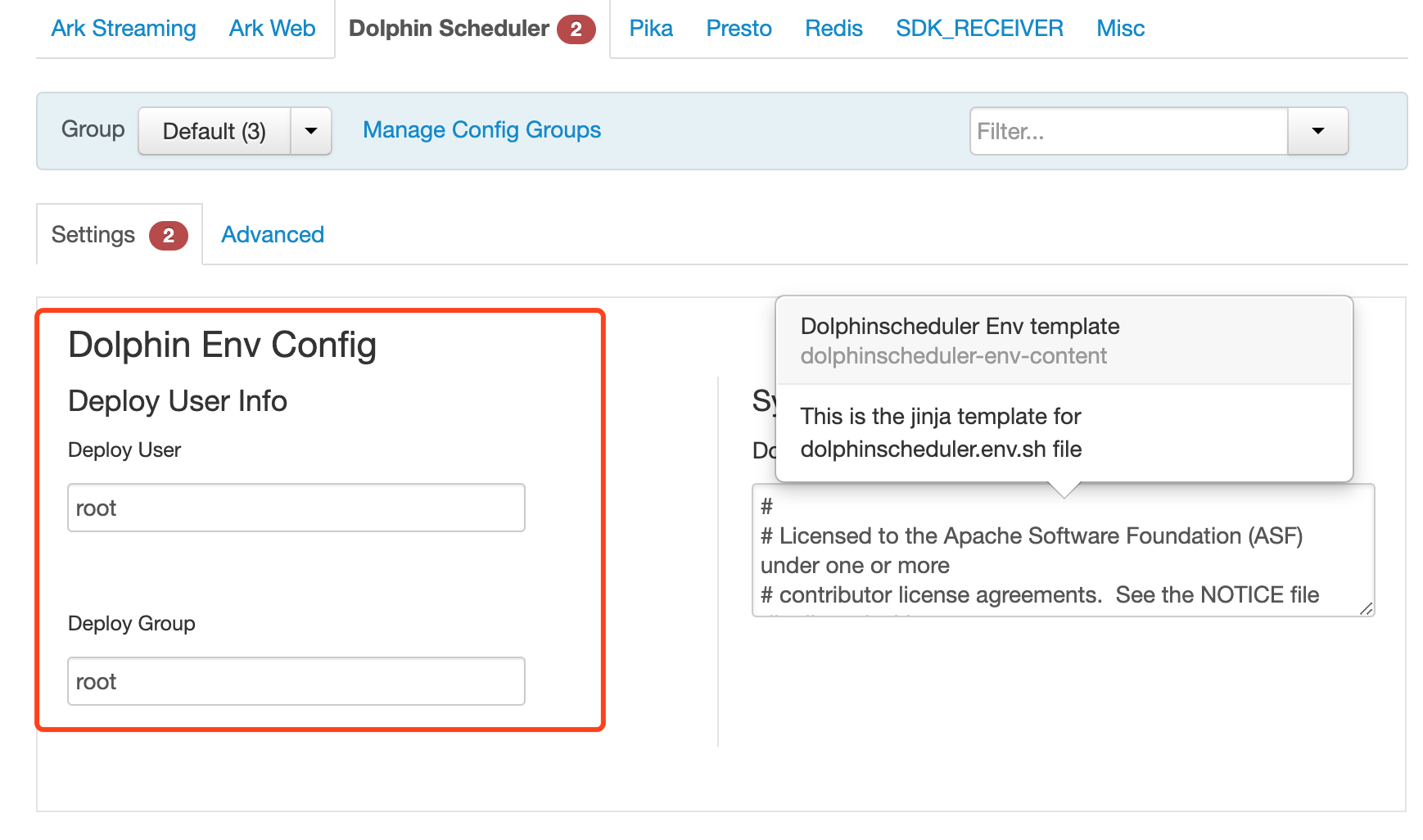
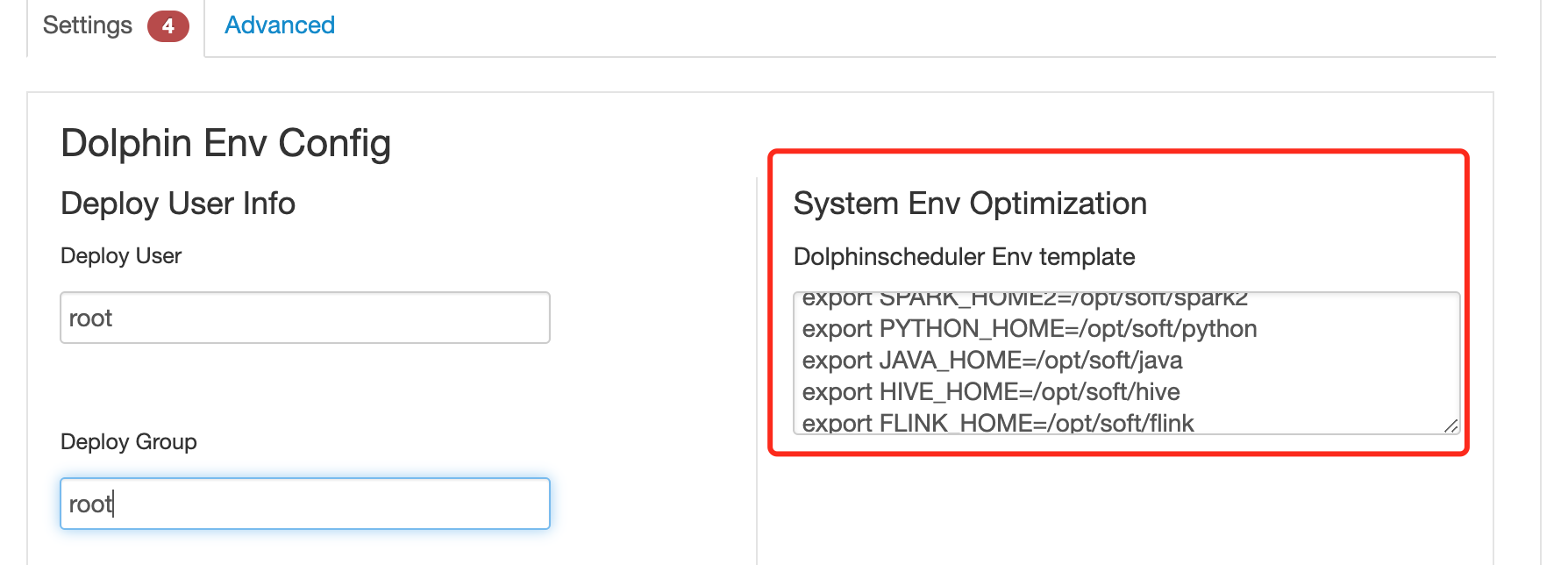
-5. System Env Optimization will export some system environment config. Modify
according to actual situation
+5. System Env Optimization will export some system environment config. Modify
according to the actual situation
diff --git a/docs/en-us/1.3.8/user_doc/architecture-design.md
b/docs/en-us/1.3.8/user_doc/architecture-design.md
index 1e88814..594fd40 100644
--- a/docs/en-us/1.3.8/user_doc/architecture-design.md
+++ b/docs/en-us/1.3.8/user_doc/architecture-design.md
@@ -11,27 +11,27 @@ Before explaining the architecture of the scheduling
system, let's first underst
</p>
</p>
-**Process definition**:Visualization formed by dragging task nodes and
establishing task node associations**DAG**
+**Process definition**: Visualization formed by dragging task nodes and
establishing task node associations**DAG**
-**Process instance**:The process instance is the instantiation of the process
definition, which can be generated by manual start or scheduled scheduling.
Each time the process definition runs, a process instance is generated
+**Process instance**: The process instance is the instantiation of the process
definition, which can be generated by manual start or scheduled scheduling.
Each time the process definition runs, a process instance is generated
-**Task instance**:The task instance is the instantiation of the task node in
the process definition, which identifies the specific task execution status
+**Task instance**: The task instance is the instantiation of the task node in
the process definition, which identifies the specific task execution status
-**Task type**: Currently supports SHELL, SQL, SUB_PROCESS (sub-process),
PROCEDURE, MR, SPARK, PYTHON, DEPENDENT (depends), and plans to support dynamic
plug-in expansion, note: **SUB_PROCESS** It is also a separate process
definition that can be started and executed separately
+**Task type**: Currently supports SHELL, SQL, SUB_PROCESS (sub-process),
PROCEDURE, MR, SPARK, PYTHON, DEPENDENT (depends), and plans to support dynamic
plug-in expansion, note: **SUB_PROCESS** It is also a separate process
definition that can be started and executed separately
-**Scheduling method:** The system supports scheduled scheduling and manual
scheduling based on cron expressions. Command type support: start workflow,
start execution from current node, resume fault-tolerant workflow, resume pause
process, start execution from failed node, complement, timing, rerun, pause,
stop, resume waiting thread。Among them **Resume fault-tolerant workflow** 和
**Resume waiting thread** The two command types are used by the internal
control of scheduling, and cannot b [...]
+**Scheduling method**: The system supports scheduled scheduling and manual
scheduling based on cron expressions. Command type support: start workflow,
start execution from current node, resume fault-tolerant workflow, resume pause
process, start execution from failed node, complement, timing, rerun, pause,
stop, resume waiting thread. Among them **Resume fault-tolerant workflow** and
**Resume waiting thread** The two command types are used by the internal
control of scheduling, and canno [...]
-**Scheduled**:System adopts **quartz** distributed scheduler, and supports the
visual generation of cron expressions
+**Scheduled**: System adopts **quartz** distributed scheduler, and supports
the visual generation of cron expressions
-**Rely**:The system not only supports **DAG** simple dependencies between the
predecessor and successor nodes, but also provides **task dependent** nodes,
supporting **between processes**
+**Rely**: The system not only supports **DAG** simple dependencies between the
predecessor and successor nodes, but also provides **task dependent** nodes,
supporting **between processes**
-**Priority** :Support the priority of process instances and task instances, if
the priority of process instances and task instances is not set, the default is
first-in first-out
+**Priority**: Support the priority of process instances and task instances, if
the priority of process instances and task instances is not set, the default is
first-in-first-out
-**Email alert**:Support **SQL task** Query result email sending, process
instance running result email alert and fault tolerance alert notification
+**Email alert**: Support **SQL task** Query result email sending, process
instance running result email alert and fault tolerance alert notification
-**Failure strategy**:For tasks running in parallel, if a task fails, two
failure strategy processing methods are provided. **Continue** refers to
regardless of the status of the task running in parallel until the end of the
process failure. **End** means that once a failed task is found, Kill will also
run the parallel task at the same time, and the process fails and ends
+**Failure strategy**: For tasks running in parallel, if a task fails, two
failure strategy processing methods are provided. **Continue** refers to
regardless of the status of the task running in parallel until the end of the
process failure. **End** means that once a failed task is found, Kill will also
run the parallel task at the same time, and the process fails and ends
-**Complement**:Supplement historical data,Supports **interval parallel and
serial** two complement methods
+**Complement**: Supplement historical data,Supports **interval parallel and
serial** two complement methods
### 2.System Structure
@@ -168,7 +168,7 @@ It seems a bit unsatisfactory to start a new Master to
break the deadlock, so we
2. Judge the single-master thread pool. If the thread pool is full, let the
thread fail directly.
3. Add a Command type with insufficient resources. If the thread pool is
insufficient, suspend the main process. In this way, there are new threads in
the thread pool, which can make the process suspended by insufficient resources
wake up to execute again.
-note:The Master Scheduler thread is executed by FIFO when acquiring the
Command.
+note: The Master Scheduler thread is executed by FIFO when acquiring the
Command.
So we chose the third way to solve the problem of insufficient threads.
@@ -202,7 +202,7 @@ After the fault tolerance of ZooKeeper Master is completed,
it is re-scheduled b
<img
src="https://analysys.github.io/easyscheduler_docs_cn/images/fault-tolerant_worker.png";
alt="Worker fault tolerance flow chart" width="40%" />
</p>
-Once the Master Scheduler thread finds that the task instance is in the "fault
tolerant" state, it takes over the task and resubmits it.
+Once the Master Scheduler thread finds that the task instance is in the
"fault-tolerant" state, it takes over the task and resubmits it.
Note: Due to "network jitter", the node may lose its heartbeat with ZooKeeper
in a short period of time, and the node's remove event may occur. For this
situation, we use the simplest way, that is, once the node and ZooKeeper
timeout connection occurs, then directly stop the Master or Worker service.
@@ -232,7 +232,7 @@ If there is a task failure in the workflow that reaches the
maximum number of re
In the early scheduling design, if there is no priority design and the fair
scheduling design is used, the task submitted first may be completed at the
same time as the task submitted later, and the process or task priority cannot
be set, so We have redesigned this, and our current design is as follows:
- According to **priority of different process instances** priority over
**priority of the same process instance** priority over **priority of tasks
within the same process**priority over **tasks within the same
process**submission order from high to Low task processing.
- - The specific implementation is to parse the priority according to the
json of the task instance, and then save the **process instance
priority_process instance id_task priority_task id** information in the
ZooKeeper task queue, when obtained from the task queue, pass String comparison
can get the tasks that need to be executed first
+ - The specific implementation is to parse the priority according to the
JSON of the task instance, and then save the **process instance
priority_process instance id_task priority_task id** information in the
ZooKeeper task queue, when obtained from the task queue, pass String comparison
can get the tasks that need to be executed first
- The priority of the process definition is to consider that some
processes need to be processed before other processes. This can be configured
when the process is started or scheduled to start. There are 5 levels in total,
which are HIGHEST, HIGH, MEDIUM, LOW, and LOWEST. As shown below
<p align="center">
@@ -248,7 +248,7 @@ In the early scheduling design, if there is no priority
design and the fair sche
##### Six、Logback and netty implement log access
- Since Web (UI) and Worker are not necessarily on the same machine, viewing
the log cannot be like querying a local file. There are two options:
- - Put logs on ES search engine
+ - Put logs on the ES search engine
- Obtain remote log information through netty communication
- In consideration of the lightness of DolphinScheduler as much as possible,
so I chose gRPC to achieve remote access to log information.
diff --git a/docs/en-us/1.3.8/user_doc/cluster-deployment.md
b/docs/en-us/1.3.8/user_doc/cluster-deployment.md
index 9b4a55d..4a5a6b6 100644
--- a/docs/en-us/1.3.8/user_doc/cluster-deployment.md
+++ b/docs/en-us/1.3.8/user_doc/cluster-deployment.md
@@ -45,7 +45,7 @@ sed -i 's/Defaults requirett/#Defaults requirett/g'
/etc/sudoers
```
Notes:
- - Because the task execution service is based on 'sudo -u {linux-user}' to
switch between different Linux users to implement multi-tenant running jobs,
the deployment user needs to have sudo permissions and is passwordless. The
first-time learners who can ignore it if they don't understand.
+ - Because the task execution service is based on 'sudo -u {linux-user}' to
switch between different Linux users to implement multi-tenant running jobs,
the deployment user needs to have sudo permissions and is passwordless. The
first-time learners can ignore it if they don't understand.
- If find the "Default requiretty" in the "/etc/sudoers" file, also comment
out.
- If you need to use resource upload, you need to assign the user of
permission to operate the local file system, HDFS or MinIO.
```
@@ -220,7 +220,7 @@ mysql -h192.168.xx.xx -P3306 -uroot -p
installPath="/opt/soft/dolphinscheduler"
# deployment user
- # Note: the deployment user needs to have sudo privileges and permissions
to operate hdfs. If hdfs is enabled, the root directory needs to be created by
itself
+ # Note: the deployment user needs to have sudo privileges and permissions
to operate HDFS. If HDFS is enabled, the root directory needs to be created by
itself
deployUser="dolphinscheduler"
# alert config,take QQ email for example
@@ -244,10 +244,10 @@ mysql -h192.168.xx.xx -P3306 -uroot -p
# note: The mail.passwd is email service authorization code, not the email
login password.
mailPassword="xxx"
- # Whether TLS mail protocol is supported,true is supported and false is
not supported
+ # Whether TLS mail protocol is supported, true is supported and false is
not supported
starttlsEnable="true"
- # Whether TLS mail protocol is supported,true is supported and false is
not supported。
+ # Whether TLS mail protocol is supported, true is supported and false is
not supported.
# note: only one of TLS and SSL can be in the true state.
sslEnable="false"
@@ -259,18 +259,18 @@ mysql -h192.168.xx.xx -P3306 -uroot -p
resourceStorageType="HDFS"
# If resourceStorageType = HDFS, and your Hadoop Cluster NameNode has HA
enabled, you need to put core-site.xml and hdfs-site.xml in the
installPath/conf directory. In this example, it is placed under
/opt/soft/dolphinscheduler/conf, and configure the namenode cluster name; if
the NameNode is not HA, modify it to a specific IP or host name.
- # if S3,write S3 address,HA,for example :s3a://dolphinscheduler,
+ # if S3,write S3 address,HA,for example: s3a://dolphinscheduler,
# Note,s3 be sure to create the root directory /dolphinscheduler
defaultFS="hdfs://mycluster:8020"
- # if not use hadoop resourcemanager, please keep default value; if
resourcemanager HA enable, please type the HA ips ; if resourcemanager is
single, make this value empty
+ # if not use Hadoop resourcemanager, please keep default value; if
resourcemanager HA enable, please type the HA ips ; if resourcemanager is
single, make this value empty
yarnHaIps="192.168.xx.xx,192.168.xx.xx"
- # if resourcemanager HA enable or not use resourcemanager, please skip
this value setting; If resourcemanager is single, you only need to replace
yarnIp1 to actual resourcemanager hostname.
+ # if resourcemanager HA enable or not use resourcemanager, please skip
this value setting; If resourcemanager is single, you only need to replace
yarnIp1 with actual resourcemanager hostname.
singleYarnIp="yarnIp1"
- # resource store on HDFS/S3 path, resource file will store to this hadoop
hdfs path, self configuration, please make sure the directory exists on hdfs
and have read write permissions。/dolphinscheduler is recommended
+ # resource store on HDFS/S3 path, resource file will store to this Hadoop
HDFS path, self configuration, please make sure the directory exists on HDFS
and have read-write permissions. /dolphinscheduler is recommended
resourceUploadPath="/dolphinscheduler"
# who have permissions to create directory under HDFS/S3 root path
diff --git a/docs/en-us/1.3.8/user_doc/configuration-file.md
b/docs/en-us/1.3.8/user_doc/configuration-file.md
index 8bd55c8..157cfb7 100644
--- a/docs/en-us/1.3.8/user_doc/configuration-file.md
+++ b/docs/en-us/1.3.8/user_doc/configuration-file.md
@@ -11,7 +11,7 @@ Currently, all the configuration files are under [conf ]
directory. Please check
├─bin DS application commands directory
│ ├─dolphinscheduler-daemon.sh startup/shutdown DS application
-│ ├─start-all.sh startup all DS services with
configurations
+│ ├─start-all.sh A startup all DS services with
configurations
│ ├─stop-all.sh shutdown all DS services with
configurations
├─conf configurations directory
│ ├─application-api.properties API-service config properties
@@ -180,7 +180,7 @@ master.host.selector|LowerWeight|master host selector to
select a suitable worke
master.heartbeat.interval|10|master heartbeat interval, the unit is second
master.task.commit.retryTimes|5|master commit task retry times
master.task.commit.interval|1000|master commit task interval, the unit is
millisecond
-master.max.cpuload.avg|-1|master max cpuload avg, only higher than the system
cpu load average, master server can schedule. default value -1: the number of
cpu cores * 2
+master.max.cpuload.avg|-1|master max CPU load avg, only higher than the system
CPU load average, master server can schedule. default value -1: the number of
CPU cores * 2
master.reserved.memory|0.3|master reserved memory, only lower than system
available memory, master server can schedule. default value 0.3, the unit is G
@@ -190,7 +190,7 @@ master.reserved.memory|0.3|master reserved memory, only
lower than system availa
worker.listen.port|1234|worker listen port
worker.exec.threads|100|worker execute thread number to limit task instances
in parallel
worker.heartbeat.interval|10|worker heartbeat interval, the unit is second
-worker.max.cpuload.avg|-1|worker max cpuload avg, only higher than the system
cpu load average, worker server can be dispatched tasks. default value -1: the
number of cpu cores * 2
+worker.max.cpuload.avg|-1|worker max CPU load avg, only higher than the system
CPU load average, worker server can be dispatched tasks. default value -1: the
number of CPU cores * 2
worker.reserved.memory|0.3|worker reserved memory, only lower than system
available memory, worker server can be dispatched tasks. default value 0.3, the
unit is G
worker.groups|default|worker groups separated by comma, like
'worker.groups=default,test' <br> worker will join corresponding group
according to this config when startup
@@ -263,7 +263,7 @@ File content as follows:
# Note: please escape the character if the file contains special characters
such as `.*[]^${}\+?|()@#&`.
# eg: `[` escape to `\[`
-# Database type (DS currently only supports postgresql and mysql)
+# Database type (DS currently only supports PostgreSQL and MySQL)
dbtype="mysql"
# Database url & port
@@ -342,9 +342,9 @@ resourceUploadPath="/dolphinscheduler"
# HDFS/S3 root user
hdfsRootUser="hdfs"
-# Followings are kerberos configs
+# Followings are Kerberos configs
-# Spicify kerberos enable or not
+# Spicify Kerberos enable or not
kerberosStartUp="false"
# Kdc krb5 config file path
diff --git a/docs/en-us/1.3.8/user_doc/docker-deployment.md
b/docs/en-us/1.3.8/user_doc/docker-deployment.md
index ac4d2f4..83fa9d2 100644
--- a/docs/en-us/1.3.8/user_doc/docker-deployment.md
+++ b/docs/en-us/1.3.8/user_doc/docker-deployment.md
@@ -391,11 +391,11 @@ docker build -t apache/dolphinscheduler:mysql-driver .
4. Modify all `image` fields to `apache/dolphinscheduler:mysql-driver` in
`docker-compose.yml`
-> If you want to deploy dolphinscheduler on Docker Swarm, you need modify
`docker-stack.yml`
+> If you want to deploy dolphinscheduler on Docker Swarm, you need to modify
`docker-stack.yml`
5. Comment the `dolphinscheduler-postgresql` block in `docker-compose.yml`
-6. Add `dolphinscheduler-mysql` service in `docker-compose.yml` (**Optional**,
you can directly use a external MySQL database)
+6. Add `dolphinscheduler-mysql` service in `docker-compose.yml` (**Optional**,
you can directly use an external MySQL database)
7. Modify DATABASE environment variables in `config.env.sh`
@@ -437,7 +437,7 @@ docker build -t apache/dolphinscheduler:mysql-driver .
4. Modify all `image` fields to `apache/dolphinscheduler:mysql-driver` in
`docker-compose.yml`
-> If you want to deploy dolphinscheduler on Docker Swarm, you need modify
`docker-stack.yml`
+> If you want to deploy dolphinscheduler on Docker Swarm, you need to modify
`docker-stack.yml`
5. Run a dolphinscheduler (See **How to use this docker image**)
@@ -466,11 +466,11 @@ docker build -t apache/dolphinscheduler:oracle-driver .
4. Modify all `image` fields to `apache/dolphinscheduler:oracle-driver` in
`docker-compose.yml`
-> If you want to deploy dolphinscheduler on Docker Swarm, you need modify
`docker-stack.yml`
+> If you want to deploy dolphinscheduler on Docker Swarm, you need to modify
`docker-stack.yml`
5. Run a dolphinscheduler (See **How to use this docker image**)
-6. Add a Oracle datasource in `Datasource manage`
+6. Add an Oracle datasource in `Datasource manage`
### How to support Python 2 pip and custom requirements.txt?
@@ -499,7 +499,7 @@ docker build -t apache/dolphinscheduler:pip .
3. Modify all `image` fields to `apache/dolphinscheduler:pip` in
`docker-compose.yml`
-> If you want to deploy dolphinscheduler on Docker Swarm, you need modify
`docker-stack.yml`
+> If you want to deploy dolphinscheduler on Docker Swarm, you need to modify
`docker-stack.yml`
4. Run a dolphinscheduler (See **How to use this docker image**)
@@ -530,7 +530,7 @@ docker build -t apache/dolphinscheduler:python3 .
3. Modify all `image` fields to `apache/dolphinscheduler:python3` in
`docker-compose.yml`
-> If you want to deploy dolphinscheduler on Docker Swarm, you need modify
`docker-stack.yml`
+> If you want to deploy dolphinscheduler on Docker Swarm, you need to modify
`docker-stack.yml`
4. Modify `PYTHON_HOME` to `/usr/bin/python3` in `config.env.sh`
@@ -565,7 +565,7 @@ ln -s spark-2.4.7-bin-hadoop2.7 spark2 # or just mv
$SPARK_HOME2/bin/spark-submit --version
```
-The last command will print Spark version if everything goes well
+The last command will print the Spark version if everything goes well
5. Verify Spark under a Shell task
@@ -619,7 +619,7 @@ ln -s spark-3.1.1-bin-hadoop2.7 spark2 # or just mv
$SPARK_HOME2/bin/spark-submit --version
```
-The last command will print Spark version if everything goes well
+The last command will print the Spark version if everything goes well
5. Verify Spark under a Shell task
@@ -635,9 +635,9 @@ Check whether the task log contains the output like `Pi is
roughly 3.146015`
For example, Master, Worker and Api server may use Hadoop at the same time
-1. Modify the volume `dolphinscheduler-shared-local` to support nfs in
`docker-compose.yml`
+1. Modify the volume `dolphinscheduler-shared-local` to support NFS in
`docker-compose.yml`
-> If you want to deploy dolphinscheduler on Docker Swarm, you need modify
`docker-stack.yml`
+> If you want to deploy dolphinscheduler on Docker Swarm, you need to modify
`docker-stack.yml`
```yaml
volumes:
@@ -648,7 +648,7 @@ volumes:
device: ":/path/to/shared/dir"
```
-2. Put the Hadoop into the nfs
+2. Put the Hadoop into the NFS
3. Ensure that `$HADOOP_HOME` and `$HADOOP_CONF_DIR` are correct
@@ -663,9 +663,9 @@ RESOURCE_STORAGE_TYPE=HDFS
FS_DEFAULT_FS=file:///
```
-2. Modify the volume `dolphinscheduler-resource-local` to support nfs in
`docker-compose.yml`
+2. Modify the volume `dolphinscheduler-resource-local` to support NFS in
`docker-compose.yml`
-> If you want to deploy dolphinscheduler on Docker Swarm, you need modify
`docker-stack.yml`
+> If you want to deploy dolphinscheduler on Docker Swarm, you need to modify
`docker-stack.yml`
```yaml
volumes:
@@ -691,11 +691,11 @@ FS_S3A_SECRET_KEY=MINIO_SECRET_KEY
`BUCKET_NAME`, `MINIO_IP`, `MINIO_ACCESS_KEY` and `MINIO_SECRET_KEY` need to
be modified to actual values
-> **Note**: `MINIO_IP` can only use IP instead of domain name, because
DolphinScheduler currently doesn't support S3 path style access
+> **Note**: `MINIO_IP` can only use IP instead of the domain name, because
DolphinScheduler currently doesn't support S3 path style access
### How to configure SkyWalking?
-Modify SKYWALKING environment variables in `config.env.sh`:
+Modify SkyWalking environment variables in `config.env.sh`:
```
SKYWALKING_ENABLE=true
@@ -710,51 +710,51 @@ SW_GRPC_LOG_SERVER_PORT=11800
**`DATABASE_TYPE`**
-This environment variable sets the type for database. The default value is
`postgresql`.
+This environment variable sets the type for the database. The default value is
`postgresql`.
**Note**: You must be specify it when start a standalone dolphinscheduler
server. Like `master-server`, `worker-server`, `api-server`, `alert-server`.
**`DATABASE_DRIVER`**
-This environment variable sets the type for database. The default value is
`org.postgresql.Driver`.
+This environment variable sets the type for the database. The default value is
`org.postgresql.Driver`.
-**Note**: You must be specify it when start a standalone dolphinscheduler
server. Like `master-server`, `worker-server`, `api-server`, `alert-server`.
+**Note**: You must specify it when starting a standalone dolphinscheduler
server. Like `master-server`, `worker-server`, `api-server`, `alert-server`.
**`DATABASE_HOST`**
-This environment variable sets the host for database. The default value is
`127.0.0.1`.
+This environment variable sets the host for the database. The default value is
`127.0.0.1`.
-**Note**: You must be specify it when start a standalone dolphinscheduler
server. Like `master-server`, `worker-server`, `api-server`, `alert-server`.
+**Note**: You must specify it when start a standalone dolphinscheduler server.
Like `master-server`, `worker-server`, `api-server`, `alert-server`.
**`DATABASE_PORT`**
-This environment variable sets the port for database. The default value is
`5432`.
+This environment variable sets the port for the database. The default value is
`5432`.
-**Note**: You must be specify it when start a standalone dolphinscheduler
server. Like `master-server`, `worker-server`, `api-server`, `alert-server`.
+**Note**: You must specify it when start a standalone dolphinscheduler server.
Like `master-server`, `worker-server`, `api-server`, `alert-server`.
**`DATABASE_USERNAME`**
-This environment variable sets the username for database. The default value is
`root`.
+This environment variable sets the username for the database. The default
value is `root`.
-**Note**: You must be specify it when start a standalone dolphinscheduler
server. Like `master-server`, `worker-server`, `api-server`, `alert-server`.
+**Note**: You must specify it when start a standalone dolphinscheduler server.
Like `master-server`, `worker-server`, `api-server`, `alert-server`.
**`DATABASE_PASSWORD`**
-This environment variable sets the password for database. The default value is
`root`.
+This environment variable sets the password for the database. The default
value is `root`.
-**Note**: You must be specify it when start a standalone dolphinscheduler
server. Like `master-server`, `worker-server`, `api-server`, `alert-server`.
+**Note**: You must specify it when start a standalone dolphinscheduler server.
Like `master-server`, `worker-server`, `api-server`, `alert-server`.
**`DATABASE_DATABASE`**
-This environment variable sets the database for database. The default value is
`dolphinscheduler`.
+This environment variable sets the database for the database. The default
value is `dolphinscheduler`.
-**Note**: You must be specify it when start a standalone dolphinscheduler
server. Like `master-server`, `worker-server`, `api-server`, `alert-server`.
+**Note**: You must specify it when start a standalone dolphinscheduler server.
Like `master-server`, `worker-server`, `api-server`, `alert-server`.
**`DATABASE_PARAMS`**
-This environment variable sets the database for database. The default value is
`characterEncoding=utf8`.
+This environment variable sets the database for the database. The default
value is `characterEncoding=utf8`.
-**Note**: You must be specify it when start a standalone dolphinscheduler
server. Like `master-server`, `worker-server`, `api-server`, `alert-server`.
+**Note**: You must specify it when starting a standalone dolphinscheduler
server. Like `master-server`, `worker-server`, `api-server`, `alert-server`.
### ZooKeeper
@@ -762,7 +762,7 @@ This environment variable sets the database for database.
The default value is `
This environment variable sets zookeeper quorum. The default value is
`127.0.0.1:2181`.
-**Note**: You must be specify it when start a standalone dolphinscheduler
server. Like `master-server`, `worker-server`, `api-server`.
+**Note**: You must specify it when starting a standalone dolphinscheduler
server. Like `master-server`, `worker-server`, `api-server`.
**`ZOOKEEPER_ROOT`**
@@ -772,15 +772,15 @@ This environment variable sets zookeeper root directory
for dolphinscheduler. Th
**`DOLPHINSCHEDULER_OPTS`**
-This environment variable sets jvm options for dolphinscheduler, suitable for
`master-server`, `worker-server`, `api-server`, `alert-server`,
`logger-server`. The default value is empty.
+This environment variable sets JVM options for dolphinscheduler, suitable for
`master-server`, `worker-server`, `api-server`, `alert-server`,
`logger-server`. The default value is empty.
**`DATA_BASEDIR_PATH`**
-User data directory path, self configuration, please make sure the directory
exists and have read write permissions. The default value is
`/tmp/dolphinscheduler`
+User data directory path, self configuration, please make sure the directory
exists and have read-write permissions. The default value is
`/tmp/dolphinscheduler`
**`RESOURCE_STORAGE_TYPE`**
-This environment variable sets resource storage type for dolphinscheduler like
`HDFS`, `S3`, `NONE`. The default value is `HDFS`.
+This environment variable sets resource storage types for dolphinscheduler
like `HDFS`, `S3`, `NONE`. The default value is `HDFS`.
**`RESOURCE_UPLOAD_PATH`**
@@ -804,7 +804,7 @@ This environment variable sets s3 secret key for resource
storage. The default v
**`HADOOP_SECURITY_AUTHENTICATION_STARTUP_STATE`**
-This environment variable sets whether to startup kerberos. The default value
is `false`.
+This environment variable sets whether to startup Kerberos. The default value
is `false`.
**`JAVA_SECURITY_KRB5_CONF_PATH`**
@@ -812,23 +812,23 @@ This environment variable sets java.security.krb5.conf
path. The default value i
**`LOGIN_USER_KEYTAB_USERNAME`**
-This environment variable sets login user from keytab username. The default
value is `[email protected]`.
+This environment variable sets login user from the keytab username. The
default value is `[email protected]`.
**`LOGIN_USER_KEYTAB_PATH`**
-This environment variable sets login user from keytab path. The default value
is `/opt/hdfs.keytab`.
+This environment variable sets login user from the keytab path. The default
value is `/opt/hdfs.keytab`.
**`KERBEROS_EXPIRE_TIME`**
-This environment variable sets kerberos expire time, the unit is hour. The
default value is `2`.
+This environment variable sets Kerberos expire time, the unit is hour. The
default value is `2`.
**`HDFS_ROOT_USER`**
-This environment variable sets hdfs root user when resource.storage.type=HDFS.
The default value is `hdfs`.
+This environment variable sets HDFS root user when resource.storage.type=HDFS.
The default value is `hdfs`.
**`RESOURCE_MANAGER_HTTPADDRESS_PORT`**
-This environment variable sets resource manager httpaddress port. The default
value is `8088`.
+This environment variable sets resource manager HTTP address port. The default
value is `8088`.
**`YARN_RESOURCEMANAGER_HA_RM_IDS`**
@@ -840,19 +840,19 @@ This environment variable sets yarn application status
address. The default valu
**`SKYWALKING_ENABLE`**
-This environment variable sets whether to enable skywalking. The default value
is `false`.
+This environment variable sets whether to enable SkyWalking. The default value
is `false`.
**`SW_AGENT_COLLECTOR_BACKEND_SERVICES`**
-This environment variable sets agent collector backend services for
skywalking. The default value is `127.0.0.1:11800`.
+This environment variable sets agent collector backend services for
SkyWalking. The default value is `127.0.0.1:11800`.
**`SW_GRPC_LOG_SERVER_HOST`**
-This environment variable sets grpc log server host for skywalking. The
default value is `127.0.0.1`.
+This environment variable sets gRPC log server host for SkyWalking. The
default value is `127.0.0.1`.
**`SW_GRPC_LOG_SERVER_PORT`**
-This environment variable sets grpc log server port for skywalking. The
default value is `11800`.
+This environment variable sets gRPC log server port for SkyWalking. The
default value is `11800`.
**`HADOOP_HOME`**
@@ -894,7 +894,7 @@ This environment variable sets `DATAX_HOME`. The default
value is `/opt/soft/dat
**`MASTER_SERVER_OPTS`**
-This environment variable sets jvm options for `master-server`. The default
value is `-Xms1g -Xmx1g -Xmn512m`.
+This environment variable sets JVM options for `master-server`. The default
value is `-Xms1g -Xmx1g -Xmn512m`.
**`MASTER_EXEC_THREADS`**
@@ -926,7 +926,7 @@ This environment variable sets task commit interval for
`master-server`. The def
**`MASTER_MAX_CPULOAD_AVG`**
-This environment variable sets max cpu load avg for `master-server`. The
default value is `-1`.
+This environment variable sets max CPU load avg for `master-server`. The
default value is `-1`.
**`MASTER_RESERVED_MEMORY`**
@@ -936,7 +936,7 @@ This environment variable sets reserved memory for
`master-server`, the unit is
**`WORKER_SERVER_OPTS`**
-This environment variable sets jvm options for `worker-server`. The default
value is `-Xms1g -Xmx1g -Xmn512m`.
+This environment variable sets JVM options for `worker-server`. The default
value is `-Xms1g -Xmx1g -Xmn512m`.
**`WORKER_EXEC_THREADS`**
@@ -948,7 +948,7 @@ This environment variable sets heartbeat interval for
`worker-server`. The defau
**`WORKER_MAX_CPULOAD_AVG`**
-This environment variable sets max cpu load avg for `worker-server`. The
default value is `-1`.
+This environment variable sets max CPU load avg for `worker-server`. The
default value is `-1`.
**`WORKER_RESERVED_MEMORY`**
@@ -962,7 +962,7 @@ This environment variable sets groups for `worker-server`.
The default value is
**`ALERT_SERVER_OPTS`**
-This environment variable sets jvm options for `alert-server`. The default
value is `-Xms512m -Xmx512m -Xmn256m`.
+This environment variable sets JVM options for `alert-server`. The default
value is `-Xms512m -Xmx512m -Xmn256m`.
**`XLS_FILE_PATH`**
@@ -1024,10 +1024,10 @@ This environment variable sets enterprise wechat users
for `alert-server`. The d
**`API_SERVER_OPTS`**
-This environment variable sets jvm options for `api-server`. The default value
is `-Xms512m -Xmx512m -Xmn256m`.
+This environment variable sets JVM options for `api-server`. The default value
is `-Xms512m -Xmx512m -Xmn256m`.
### Logger Server
**`LOGGER_SERVER_OPTS`**
-This environment variable sets jvm options for `logger-server`. The default
value is `-Xms512m -Xmx512m -Xmn256m`.
+This environment variable sets JVM options for `logger-server`. The default
value is `-Xms512m -Xmx512m -Xmn256m`.
diff --git a/docs/en-us/1.3.8/user_doc/expansion-reduction.md
b/docs/en-us/1.3.8/user_doc/expansion-reduction.md
index a6c0c6d..365d496 100644
--- a/docs/en-us/1.3.8/user_doc/expansion-reduction.md
+++ b/docs/en-us/1.3.8/user_doc/expansion-reduction.md
@@ -21,7 +21,7 @@ This article describes how to add a new master service or
worker service to an e
- Check which version of DolphinScheduler is used in your existing
environment, and get the installation package of the corresponding version, if
the versions are different, there may be compatibility problems.
- Confirm the unified installation directory of other nodes, this article
assumes that DolphinScheduler is installed in /opt/ directory, and the full
path is /opt/dolphinscheduler.
- Please download the corresponding version of the installation package to the
server installation directory, uncompress it and rename it to dolphinscheduler
and store it in the /opt directory.
-- Add database dependency package, this article use Mysql database, add
mysql-connector-java driver package to /opt/dolphinscheduler/lib directory.
+- Add database dependency package, this article uses Mysql database, add
mysql-connector-java driver package to /opt/dolphinscheduler/lib directory.
```shell
# create the installation directory, please do not create the installation
directory in /root, /home and other high privilege directories
mkdir -p /opt
@@ -55,7 +55,7 @@ sed -i 's/Defaults requirett/#Defaults requirett/g'
/etc/sudoers
```markdown
Attention:
- - Since it is sudo -u {linux-user} to switch between different linux users to
run multi-tenant jobs, the deploying user needs to have sudo privileges and be
password free.
+ - Since it is sudo -u {linux-user} to switch between different Linux users to
run multi-tenant jobs, the deploying user needs to have sudo privileges and be
password free.
- If you find the line "Default requiretty" in the /etc/sudoers file, please
also comment it out.
- If resource uploads are used, you also need to assign read and write
permissions to the deployment user on `HDFS or MinIO`.
```
diff --git a/docs/en-us/1.3.8/user_doc/flink-call.md
b/docs/en-us/1.3.8/user_doc/flink-call.md
index 86e304d..2b86d7c 100644
--- a/docs/en-us/1.3.8/user_doc/flink-call.md
+++ b/docs/en-us/1.3.8/user_doc/flink-call.md
@@ -3,7 +3,7 @@
### Create a queue
1. Log in to the scheduling system, click "Security", then click "Queue
manage" on the left, and click "Create queue" to create a queue.
-2. Fill in the name and value of queue, and click "Submit"
+2. Fill in the name and value of the queue, and click "Submit"
<p align="center">
<img src="/img/api/create_queue.png" width="80%" />
@@ -15,9 +15,9 @@
### Create a tenant
```
-1.The tenant corresponds to a Linux user, which the user worker uses to submit
jobs. If Linux OS environment does not have this user, the worker will create
this user when executing the script.
-2.Both the tenant and the tenant code are unique and cannot be repeated, just
like a person has a name and id number.
-3.After creating a tenant, there will be a folder in the HDFS relevant
directory.
+1. The tenant corresponds to a Linux user, which the user worker uses to
submit jobs. If Linux OS environment does not have this user, the worker will
create this user when executing the script.
+2. Both the tenant and the tenant code are unique and cannot be repeated, just
like a person has a name and id number.
+3. After creating a tenant, there will be a folder in the HDFS relevant
directory.
```
<p align="center">
@@ -71,7 +71,7 @@
3. Open Postman, fill in the API address, and enter the Token in Headers, and
then send the request to view the result
```
- token:The Token just generated
+ token: The Token just generated
```
<p align="center">
diff --git a/docs/en-us/1.3.8/user_doc/kubernetes-deployment.md
b/docs/en-us/1.3.8/user_doc/kubernetes-deployment.md
index ec8f8ce..575637f 100644
--- a/docs/en-us/1.3.8/user_doc/kubernetes-deployment.md
+++ b/docs/en-us/1.3.8/user_doc/kubernetes-deployment.md
@@ -157,7 +157,7 @@ kubectl scale --replicas=3 deploy dolphinscheduler-api
kubectl scale --replicas=3 deploy dolphinscheduler-api -n test # with test
namespace
```
-List all statefulsets (aka `sts`):
+List all stateful sets (aka `sts`):
```
kubectl get sts
@@ -277,7 +277,7 @@ docker build -t apache/dolphinscheduler:oracle-driver .
6. Run a DolphinScheduler release in Kubernetes (See **Installing the Chart**)
-7. Add a Oracle datasource in `Datasource manage`
+7. Add an Oracle datasource in `Datasource manage`
### How to support Python 2 pip and custom requirements.txt?
@@ -355,7 +355,7 @@ Take Spark 2.4.7 as an example:
3. Run a DolphinScheduler release in Kubernetes (See **Installing the Chart**)
-4. Copy the Spark 2.4.7 release binary into Docker container
+4. Copy the Spark 2.4.7 release binary into the Docker container
```bash
kubectl cp spark-2.4.7-bin-hadoop2.7.tgz dolphinscheduler-worker-0:/opt/soft
@@ -376,7 +376,7 @@ ln -s spark-2.4.7-bin-hadoop2.7 spark2 # or just mv
$SPARK_HOME2/bin/spark-submit --version
```
-The last command will print Spark version if everything goes well
+The last command will print the Spark version if everything goes well
6. Verify Spark under a Shell task
@@ -415,7 +415,7 @@ Take Spark 3.1.1 as an example:
3. Run a DolphinScheduler release in Kubernetes (See **Installing the Chart**)
-4. Copy the Spark 3.1.1 release binary into Docker container
+4. Copy the Spark 3.1.1 release binary into the Docker container
```bash
kubectl cp spark-3.1.1-bin-hadoop2.7.tgz dolphinscheduler-worker-0:/opt/soft
@@ -434,7 +434,7 @@ ln -s spark-3.1.1-bin-hadoop2.7 spark2 # or just mv
$SPARK_HOME2/bin/spark-submit --version
```
-The last command will print Spark version if everything goes well
+The last command will print the Spark version if everything goes well
6. Verify Spark under a Shell task
@@ -446,7 +446,7 @@ Check whether the task log contains the output like `Pi is
roughly 3.146015`
### How to support shared storage between Master, Worker and Api server?
-For example, Master, Worker and Api server may use Hadoop at the same time
+For example, Master, Worker and API server may use Hadoop at the same time
1. Modify the following configurations in `values.yaml`
diff --git a/docs/en-us/1.3.8/user_doc/metadata-1.3.md
b/docs/en-us/1.3.8/user_doc/metadata-1.3.md
index 5de8b3d..50f115e 100644
--- a/docs/en-us/1.3.8/user_doc/metadata-1.3.md
+++ b/docs/en-us/1.3.8/user_doc/metadata-1.3.md
@@ -39,7 +39,7 @@

- Multiple users can belong to one tenant
-- The queue field in t_ds_user table stores the queue_name information in
t_ds_queue table, but t_ds_tenant stores queue information using queue_id.
During the execution of the process definition, the user queue has the highest
priority. If the user queue is empty, the tenant queue is used.
+- The queue field in the t_ds_user table stores the queue_name information in
the t_ds_queue table, but t_ds_tenant stores queue information using queue_id.
During the execution of the process definition, the user queue has the highest
priority. If the user queue is empty, the tenant queue is used.
- The user_id field in the t_ds_datasource table indicates the user who
created the data source. The user_id in t_ds_relation_datasource_user indicates
the user who has permission to the data source.
<a name="7euSN"></a>
#### Project Resource Alert
@@ -108,10 +108,10 @@
| schedule_time | datetime | schedule time |
| command_start_time | datetime | command start time |
| global_params | text | global parameters |
-| process_instance_json | longtext | process instance json(copy的process
definition 的json) |
+| process_instance_json | longtext | process instance json |
| flag | tinyint | process instance is available: 0 not available, 1 available
|
| update_time | timestamp | update time |
-| is_sub_process | int | whether the process is sub process: 1 sub-process,0
not sub-process |
+| is_sub_process | int | whether the process is sub process: 1 sub-process, 0
not sub-process |
| executor_id | int | executor id |
| locations | text | Node location information |
| connects | text | Node connection information |
diff --git a/docs/en-us/1.3.8/user_doc/open-api.md
b/docs/en-us/1.3.8/user_doc/open-api.md
index 72dde32..e93737a 100644
--- a/docs/en-us/1.3.8/user_doc/open-api.md
+++ b/docs/en-us/1.3.8/user_doc/open-api.md
@@ -30,7 +30,7 @@ Generally, projects and processes are created through pages,
but integration wit
>
3. Open Postman, fill in the API address, and enter the Token in Headers, and
then send the request to view the result
```
- token:The Token just generated
+ token: The Token just generated
```
<p align="center">
<img src="/img/test-api.png" width="80%" />
diff --git a/docs/en-us/1.3.8/user_doc/quick-start.md
b/docs/en-us/1.3.8/user_doc/quick-start.md
index bf01b04..24fb1f7 100644
--- a/docs/en-us/1.3.8/user_doc/quick-start.md
+++ b/docs/en-us/1.3.8/user_doc/quick-start.md
@@ -2,7 +2,7 @@
* Administrator user login
- > Address:http://192.168.xx.xx:12345/dolphinscheduler Username and
password:admin/dolphinscheduler123
+ > Address:http://192.168.xx.xx:12345/dolphinscheduler Username and
password: admin/dolphinscheduler123
<p align="center">
<img src="/img/login_en.png" width="60%" />
@@ -31,20 +31,20 @@
</p>
- * Create an worker group
+ * Create a worker group
<p align="center">
<img src="/img/worker-group-en.png" width="60%" />
</p>
- * Create an token
+ * Create a token
<p align="center">
<img src="/img/token-en.png" width="60%" />
</p>
- * Log in with regular users
+ * Login with regular users
> Click on the user name in the upper right corner to "exit" and re-use the
normal user login.
* Project Management - > Create Project - > Click on Project Name
diff --git a/docs/en-us/1.3.8/user_doc/skywalking-agent-deployment.md
b/docs/en-us/1.3.8/user_doc/skywalking-agent-deployment.md
index e8b66d5..a3c776b 100644
--- a/docs/en-us/1.3.8/user_doc/skywalking-agent-deployment.md
+++ b/docs/en-us/1.3.8/user_doc/skywalking-agent-deployment.md
@@ -1,17 +1,17 @@
SkyWalking Agent Deployment
=============================
-The dolphinscheduler-skywalking module provides
[Skywalking](https://skywalking.apache.org/) monitor agent for the
Dolphinscheduler project.
+The dolphinscheduler-skywalking module provides
[SkyWalking](https://skywalking.apache.org/) monitor agent for the
Dolphinscheduler project.
-This document describes how to enable Skywalking 8.4+ support with this module
(recommended to use SkyWalking 8.5.0).
+This document describes how to enable SkyWalking 8.4+ support with this module
(recommended to use SkyWalking 8.5.0).
# Installation
-The following configuration is used to enable Skywalking agent.
+The following configuration is used to enable SkyWalking agent.
### Through environment variable configuration (for Docker Compose)
-Modify SKYWALKING environment variables in `docker/docker-swarm/config.env.sh`:
+Modify SkyWalking environment variables in `docker/docker-swarm/config.env.sh`:
```
SKYWALKING_ENABLE=true
@@ -47,28 +47,28 @@ Add the following configurations to
`${workDir}/conf/config/install_config.conf`
```properties
-# skywalking config
-# note: enable skywalking tracking plugin
+# SkyWalking config
+# note: enable SkyWalking tracking plugin
enableSkywalking="true"
-# note: configure skywalking backend service address
+# note: configure SkyWalking backend service address
skywalkingServers="your.skywalking-oap-server.com:11800"
-# note: configure skywalking log reporter host
+# note: configure SkyWalking log reporter host
skywalkingLogReporterHost="your.skywalking-log-reporter.com"
-# note: configure skywalking log reporter port
+# note: configure SkyWalking log reporter port
skywalkingLogReporterPort="11800"
```
# Usage
-### Import dashboard
+### Import Dashboard
-#### Import dolphinscheduler dashboard to skywalking sever
+#### Import DolphinScheduler Dashboard to SkyWalking Sever
-Copy the
`${dolphinscheduler.home}/ext/skywalking-agent/dashboard/dolphinscheduler.yml`
file into `${skywalking-oap-server.home}/config/ui-initialized-templates/`
directory, and restart Skywalking oap-server.
+Copy the
`${dolphinscheduler.home}/ext/skywalking-agent/dashboard/dolphinscheduler.yml`
file into `${skywalking-oap-server.home}/config/ui-initialized-templates/`
directory, and restart SkyWalking oap-server.
-#### View dolphinscheduler dashboard
+#### View DolphinScheduler Dashboard
-If you have opened Skywalking dashboard with a browser before, you need to
clear browser cache.
+If you have opened SkyWalking dashboard with a browser before, you need to
clear the browser cache.

diff --git a/docs/en-us/1.3.8/user_doc/standalone-deployment.md
b/docs/en-us/1.3.8/user_doc/standalone-deployment.md
index 072b16f..811af13 100644
--- a/docs/en-us/1.3.8/user_doc/standalone-deployment.md
+++ b/docs/en-us/1.3.8/user_doc/standalone-deployment.md
@@ -1,18 +1,18 @@
# Standalone Deployment
-# 1、Install basic softwares (please install required softwares by yourself)
+# 1、Install Basic Software (please install required software by yourself)
* PostgreSQL (8.2.15+) or MySQL (5.7) : Choose One, JDBC Driver 5.1.47+ is
required if MySQL is used
* [JDK](https://www.oracle.com/technetwork/java/javase/downloads/index.html)
(1.8+) : Required. Double-check configure JAVA_HOME and PATH environment
variables in /etc/profile
* ZooKeeper (3.4.6+) : Required
* pstree or psmisc : "pstree" is required for Mac OS and "psmisc" is required
for Fedora/Red/Hat/CentOS/Ubuntu/Debian
- * Hadoop (2.6+) or MinIO : Optional. If you need resource function, for
Standalone Deployment you can choose a local directory as the upload
destination (this does not need Hadoop deployed). Of course, you can also
choose to upload to Hadoop or MinIO.
+ * Hadoop (2.6+) or MinIO : Optional. If you need the resource function, for
Standalone Deployment you can choose a local directory as the upload
destination (this does not need Hadoop deployed). Of course, you can also
choose to upload to Hadoop or MinIO.
```markdown
- Tips: DolphinScheduler itself does not rely on Hadoop, Hive, Spark, only use
their clients to run corresponding task.
+ Tips: DolphinScheduler itself does not rely on Hadoop, Hive, Spark, only use
their clients to run the corresponding task.
```
-# 2、Download the binary tar.gz package.
+# 2、Download the Binary tar.gz Package
- Please download the latest version installation package to the server
deployment directory. For example, use /opt/dolphinscheduler as the
installation and deployment directory. Download address:
[Download](/en-us/download/download.html), download package, move to deployment
directory and uncompress it.
@@ -28,9 +28,9 @@ tar -zxvf apache-dolphinscheduler-1.3.8-bin.tar.gz -C
/opt/dolphinscheduler;
mv apache-dolphinscheduler-1.3.8-bin dolphinscheduler-bin
```
-# 3、Create deployment user and assign directory operation permissions
+# 3、Create Deployment User and Assign Directory Operation Permissions
-- Create a deployment user, and be sure to configure sudo secret-free. Here
take the creation of a dolphinscheduler user as example.
+- Create a deployment user, and be sure to configure sudo secret-free. Here
take the creation of a dolphinscheduler user as an example.
```shell
# To create a user, you need to log in as root and set the deployment user
name.
@@ -50,11 +50,11 @@ chown -R dolphinscheduler:dolphinscheduler
dolphinscheduler-bin
```
Notes:
- Because the task execution is based on 'sudo -u {linux-user}' to switch
among different Linux users to implement multi-tenant job running, so the
deployment user must have sudo permissions and is secret-free. If beginner
learners don’t understand, you can ignore this point for now.
- - Please comment out line "Defaults requirett", if it present in
"/etc/sudoers" file.
- - If you need to use resource upload, you need to assign user the permission
to operate the local file system, HDFS or MinIO.
+ - Please comment out line "Defaults requirett", if it is present in
"/etc/sudoers" file.
+ - If you need to use resource upload, you need to assign the user the
permission to operate the local file system, HDFS or MinIO.
```
-# 4、SSH secret-free configuration
+# 4、SSH Secret-Free Configuration
- Switch to the deployment user and configure SSH local secret-free login
@@ -66,9 +66,9 @@ chown -R dolphinscheduler:dolphinscheduler
dolphinscheduler-bin
chmod 600 ~/.ssh/authorized_keys
```
- Note: *If configure successed, the dolphinscheduler user does not need to
enter a password when executing the command `ssh localhost`.*
+ Note: *If the configuration is successful, the dolphinscheduler user does
not need to enter a password when executing the command `ssh localhost`.*
-# 5、Database initialization
+# 5、Database Initialization
- Log in to the database, the default database type is PostgreSQL. If you
choose MySQL, you need to add the mysql-connector-java driver package to the
lib directory of DolphinScheduler.
```
@@ -115,7 +115,7 @@ mysql -uroot -p
*Note: If you execute the above script and report "/bin/java: No such
file or directory" error, please configure JAVA_HOME and PATH variables in
/etc/profile.*
-# 6、Modify runtime parameters.
+# 6、Modify Runtime Parameters.
- Modify the environment variable in `dolphinscheduler_env.sh` file under
'conf/env' directory (take the relevant software installed under '/opt/soft' as
example)
@@ -167,7 +167,7 @@ mysql -uroot -p
installPath="/opt/soft/dolphinscheduler"
# deployment user
- # Note: the deployment user needs to have sudo privileges and permissions
to operate hdfs. If hdfs is enabled, the root directory needs to be created by
itself
+ # Note: the deployment user needs to have sudo privileges and permissions
to operate HDFS. If HDFS is enabled, the root directory needs to be created by
itself
deployUser="dolphinscheduler"
# alert config,take QQ email for example
@@ -178,7 +178,7 @@ mysql -uroot -p
mailServerHost="smtp.qq.com"
# mail server port
- # note: Different protocols and encryption methods correspond to different
ports, when SSL/TLS is enabled, port may be different, make sure the port is
correct.
+ # note: Different protocols and encryption methods correspond to different
ports, when SSL/TLS is enabled, the port may be different, make sure the port
is correct.
mailServerPort="25"
# mail sender
@@ -188,13 +188,13 @@ mysql -uroot -p
mailUser="[email protected]"
# mail sender password
- # note: The mail.passwd is email service authorization code, not the email
login password.
+ # note: The mail.passwd is the email service authorization code, not the
email login password.
mailPassword="xxx"
- # Whether TLS mail protocol is supported,true is supported and false is
not supported
+ # Whether TLS mail protocol is supported, true is supported and false is
not supported
starttlsEnable="true"
- # Whether TLS mail protocol is supported,true is supported and false is
not supported。
+ # Whether TLS mail protocol is supported, true is supported and false is
not supported。
# note: only one of TLS and SSL can be in the true state.
sslEnable="false"
@@ -205,17 +205,17 @@ mysql -uroot -p
resourceStorageType="HDFS"
# here is an example of saving to a local file system
- # Note: If you want to upload resource file(jar file and so on)to HDFS and
the NameNode has HA enabled, you need to put core-site.xml and hdfs-site.xml of
hadoop cluster in the installPath/conf directory. In this example, it is placed
under /opt/soft/dolphinscheduler/conf, and Configure the namenode cluster name;
if the NameNode is not HA, modify it to a specific IP or host name.
+ # Note: If you want to upload resource file(jar file and so on)to HDFS and
the NameNode has HA enabled, you need to put core-site.xml and hdfs-site.xml of
Hadoop cluster in the installPath/conf directory. In this example, it is placed
under /opt/soft/dolphinscheduler/conf, and Configure the namenode cluster name;
if the NameNode is not HA, modify it to a specific IP or host name.
defaultFS="file:///data/dolphinscheduler"
- # if not use hadoop resourcemanager, please keep default value; if
resourcemanager HA enable, please type the HA ips ; if resourcemanager is
single, make this value empty
+ # if not use Hadoop resourcemanager, please keep default value; if
resourcemanager HA enable, please type the HA ips ; if resourcemanager is
single, make this value empty
# Note: For tasks that depend on YARN to execute, you need to ensure that
YARN information is configured correctly in order to ensure successful
execution results.
yarnHaIps="192.168.xx.xx,192.168.xx.xx"
# if resourcemanager HA enable or not use resourcemanager, please skip
this value setting; If resourcemanager is single, you only need to replace
yarnIp1 to actual resourcemanager hostname.
singleYarnIp="yarnIp1"
- # resource store on HDFS/S3 path, resource file will store to this hadoop
hdfs path, self configuration, please make sure the directory exists on hdfs
and have read write permissions。/dolphinscheduler is recommended
+ # resource store on HDFS/S3 path, resource file will store to this Hadoop
hdfs path, self configuration, please make sure the directory exists on hdfs
and have read write permissions。/dolphinscheduler is recommended
resourceUploadPath="/data/dolphinscheduler"
# specify the user who have permissions to create directory under HDFS/S3
root path
@@ -245,7 +245,7 @@ mysql -uroot -p
```
- *Attention:* if you need upload resource function, please execute below
command:
+ *Attention:* if you need upload resource function, please execute the
below command:
```
@@ -266,7 +266,7 @@ mysql -uroot -p
sh: bin/dolphinscheduler-daemon.sh: No such file or directory
```
-- After script completed, the following 5 services will be started. Use `jps`
command to check whether the services started (` jps` comes with `java JDK`)
+- After the script is completed, the following 5 services will be started. Use
`jps` command to check whether the services started (` jps` comes with `java
JDK`)
```aidl
MasterServer ----- master service
@@ -277,7 +277,7 @@ mysql -uroot -p
```
If the above services started normally, the automatic deployment is successful.
-After the deployment is success, you can view logs. Logs stored in the logs
folder.
+After the deployment is done, you can view logs which stored in the logs
folder.
```log path
logs/
@@ -288,7 +288,7 @@ After the deployment is success, you can view logs. Logs
stored in the logs fold
|—— dolphinscheduler-logger-server.log
```
-# 8、login
+# 8、Login
- Access the front page address, interface IP (self-modified)
http://192.168.xx.xx:12345/dolphinscheduler
@@ -297,7 +297,7 @@ http://192.168.xx.xx:12345/dolphinscheduler
<img src="/img/login.png" width="60%" />
</p>
-# 9、Start and stop service
+# 9、Start and Stop Service
* Stop all services
diff --git a/docs/en-us/1.3.8/user_doc/system-manual.md
b/docs/en-us/1.3.8/user_doc/system-manual.md
index b9c0a6a..3601e47 100644
--- a/docs/en-us/1.3.8/user_doc/system-manual.md
+++ b/docs/en-us/1.3.8/user_doc/system-manual.md
@@ -57,7 +57,7 @@ The home page contains task status statistics, process status
statistics, and wo
6. Custom parameters (optional), refer to [Custom
Parameters](#UserDefinedParameters);
7. Click the "Confirm Add" button to save the task settings.
-- **Increase the order of task execution:** Click the icon in the upper right
corner <img src="/img/line.png" width="35"/> to connect the task; as shown in
the figure below, task 2 and task 3 are executed in parallel, When task 1
finished execute, tasks 2 and 3 will be executed simultaneously.
+- **Increase the order of task execution:** Click the icon in the upper right
corner <img src="/img/line.png" width="35"/> to connect the task; as shown in
the figure below, task 2 and task 3 are executed in parallel, When task 1
finished executing, tasks 2 and 3 will be executed simultaneously.
<p align="center">
<img src="/img/dag6.png" width="80%" />
@@ -581,9 +581,9 @@ worker.groups=default,test
#### 6.1.3 Zookeeper monitoring
-- Mainly related configuration information of each worker and master in
zookpeeper.
+- Mainly related configuration information of each worker and master in
ZooKeeper.
-<p align="center">
+<p alignlinux ="center">
<img src="/img/zookeeper-monitor-en.png" width="80%" />
</p>
@@ -610,7 +610,7 @@ worker.groups=default,test
#### 7.1 Shell node
-> Shell node, when the worker is executed, a temporary shell script is
generated, and the linux user with the same name as the tenant executes the
script.
+> Shell node, when the worker is executed, a temporary shell script is
generated, and the Linux user with the same name as the tenant executes the
script.
- Click Project Management-Project Name-Workflow Definition, and click the
"Create Workflow" button to enter the DAG editing page.
- Drag <img src="/img/shell.png" width="35"/> from the toolbar to the drawing
board, as shown in the figure below:
diff --git a/docs/en-us/1.3.8/user_doc/task-structure.md
b/docs/en-us/1.3.8/user_doc/task-structure.md
index 2c380fd..a62f58d 100644
--- a/docs/en-us/1.3.8/user_doc/task-structure.md
+++ b/docs/en-us/1.3.8/user_doc/task-structure.md
@@ -1,6 +1,6 @@
# Overall Tasks Storage Structure
-All tasks created in Dolphinscheduler are saved in the t_ds_process_definition
table.
+All tasks created in DolphinScheduler are saved in the t_ds_process_definition
table.
The following shows the 't_ds_process_definition' table structure:
diff --git a/docs/en-us/1.3.8/user_doc/upgrade.md
b/docs/en-us/1.3.8/user_doc/upgrade.md
index 2b3cdc9..6d53d2e 100644
--- a/docs/en-us/1.3.8/user_doc/upgrade.md
+++ b/docs/en-us/1.3.8/user_doc/upgrade.md
@@ -1,21 +1,21 @@
# DolphinScheduler upgrade documentation
-## 1. Back up previous version's files and database.
+## 1. Back Up Previous Version's Files and Database.
-## 2. Stop all services of DolphinScheduler.
+## 2. Stop All Services of DolphinScheduler.
`sh ./script/stop-all.sh`
-## 3. Download the new version's installation package.
+## 3. Download the New Version's Installation Package.
- [Download](/en-us/download/download.html) the latest version of the
installation packages.
- The following upgrade operations need to be performed in the new version's
directory.
-## 4. Database upgrade
+## 4. Database Upgrade
- Modify the following properties in conf/datasource.properties.
-- If you use MySQL as database to run DolphinScheduler, please comment out
PostgreSQL releated configurations, and add mysql connector jar into lib dir,
here we download mysql-connector-java-5.1.47.jar, and then correctly config
database connect infoformation. You can download mysql connector jar
[here](https://downloads.MySQL.com/archives/c-j/). Alternatively if you use
Postgres as database, you just need to comment out Mysql related
configurations, and correctly config database connect [...]
+- If you use MySQL as the database to run DolphinScheduler, please comment out
PostgreSQL related configurations, and add mysql connector jar into lib dir,
here we download mysql-connector-java-5.1.47.jar, and then correctly config
database connect information. You can download mysql connector jar
[here](https://downloads.MySQL.com/archives/c-j/). Alternatively, if you use
Postgres as database, you just need to comment out Mysql related
configurations, and correctly config database conne [...]
```properties
# postgre
@@ -32,21 +32,21 @@
`sh ./script/upgrade-dolphinscheduler.sh`
-## 5. Backend service upgrade.
+## 5. Backend Service Upgrade.
-### 5.1 Modify the content in `conf/config/install_config.conf` file.
+### 5.1 Modify the Content in `conf/config/install_config.conf` File.
- Standalone Deployment please refer the [6, Modify running arguments] in
[Standalone-Deployment](/en-us/docs/1.3.8/user_doc/standalone-deployment.html).
- Cluster Deployment please refer the [6, Modify running arguments] in
[Cluster-Deployment](/en-us/docs/1.3.8/user_doc/cluster-deployment.html).
-#### Masters need attentions
+#### Masters Need Attentions
Create worker group in 1.3.1 version has different design:
-- Brfore version 1.3.1 worker group can be created through UI interface.
+- Before version 1.3.1 worker group can be created through UI interface.
- Since version 1.3.1 worker group can be created by modify the worker
configuration.
-#### When upgrade from version before 1.3.1 to 1.3.2, below operations are
what we need to do to keep worker group config consist with previous.
+#### When Upgrade from Version Before 1.3.1 to 1.3.2, Below Operations are
What We Need to Do to Keep Worker Group Config Consist with Previous.
-1, Go to the backup database, search records in t_ds_worker_group table,
mainly focus id, name and ip these three columns.
+1, Go to the backup database, search records in t_ds_worker_group table,
mainly focus id, name and IP three columns.
| id | name | ip_list |
| :--- | :---: | ---: |
@@ -62,17 +62,17 @@ Imaging bellow are the machine worker service to be
deployed:
| ds2 | 192.168.xx.11 |
| ds3 | 192.168.xx.12 |
-To keep worker group config consistent with previous version, we need to
modify workers config item as below:
+To keep worker group config consistent with the previous version, we need to
modify workers config item as below:
```shell
-#worker service is deployed on which machine, and also specify which worker
group this worker belong to.
+#worker service is deployed on which machine, and also specify which worker
group this worker belongs to.
workers="ds1:service1,ds2:service2,ds3:service2"
```
-#### The worker group has been enhanced in version 1.3.2.
+#### The Worker Group has Been Enhanced in Version 1.3.2.
Worker in 1.3.1 can't belong to more than one worker group, in 1.3.2 it's
supported. So in 1.3.1 it's not supported when
workers="ds1:service1,ds1:service2", and in 1.3.2 it's supported.
-### 5.2 Execute deploy script.
+### 5.2 Execute Deploy Script.
```shell
`sh install.sh`
```



