calvinjiang opened a new issue #6529:
URL: https://github.com/apache/dolphinscheduler/issues/6529
### Search before asking - [X] I had searched in the [issues](https://github.com/apache/dolphinscheduler/issues?q=is%3Aissue) and found no similar issues. ### What happened I didn't get environment variables that is set in the file 'dolphinscheduler_env.sh" when I was running a python task. The Python script is as follows: 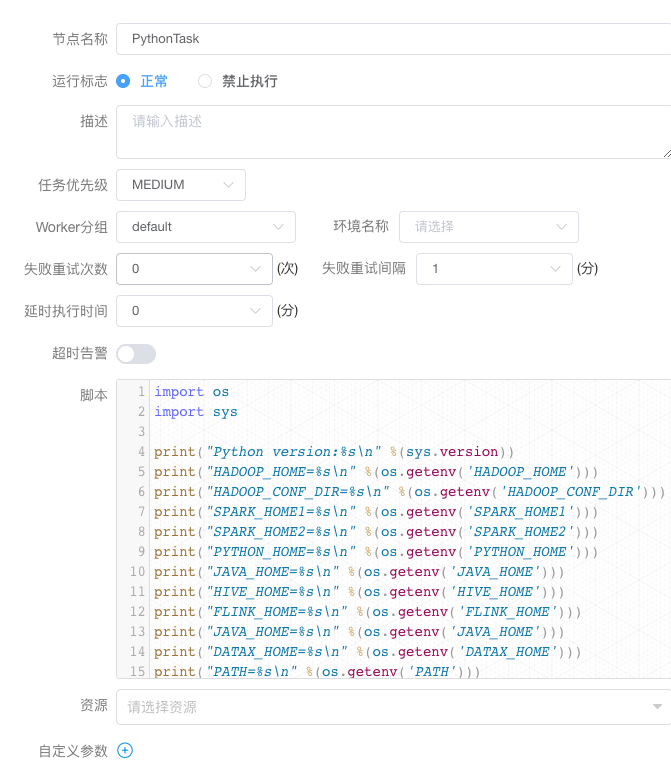 But the result was not what I want. The detail information is as follows: ``` 2021-10-14 14:43:15.919 INFO 86302 --- [-Execute-Thread] o.a.d.p.t.python.PythonCommandExecutor : tenantCode :calvin, task dir:/tmp/dolphinscheduler/exec/process/723800319311872/806053553881088_2/36/50 2021-10-14 14:43:15.919 INFO 86302 --- [-Execute-Thread] o.a.d.p.t.python.PythonCommandExecutor : generate command file:/tmp/dolphinscheduler/exec/process/723800319311872/806053553881088_2/36/50/py_36_50.command 2021-10-14 14:43:15.919 INFO 86302 --- [-Execute-Thread] o.a.d.p.t.python.PythonCommandExecutor : #-*- encoding=utf8 -*- import os import sys print("Python version:%s\n" %(sys.version)) print("HADOOP_HOME=%s\n" %(os.getenv('HADOOP_HOME'))) print("HADOOP_CONF_DIR=%s\n" %(os.getenv('HADOOP_CONF_DIR'))) print("SPARK_HOME1=%s\n" %(os.getenv('SPARK_HOME1'))) print("SPARK_HOME2=%s\n" %(os.getenv('SPARK_HOME2'))) print("PYTHON_HOME=%s\n" %(os.getenv('PYTHON_HOME'))) print("JAVA_HOME=%s\n" %(os.getenv('JAVA_HOME'))) print("HIVE_HOME=%s\n" %(os.getenv('HIVE_HOME'))) print("FLINK_HOME=%s\n" %(os.getenv('FLINK_HOME'))) print("JAVA_HOME=%s\n" %(os.getenv('JAVA_HOME'))) print("DATAX_HOME=%s\n" %(os.getenv('DATAX_HOME'))) print("PATH=%s\n" %(os.getenv('PATH'))) 2021-10-14 14:43:15.926 INFO 86302 --- [-Execute-Thread] [taskAppId=TASK-806053553881088_2-36-50] : task run command: sudo -u calvin python /tmp/dolphinscheduler/exec/process/723800319311872/806053553881088_2/36/50/py_36_50.command 2021-10-14 14:43:15.930 INFO 86302 --- [-Execute-Thread] [taskAppId=TASK-806053553881088_2-36-50] : process start, process id is: 86802 2021-10-14 14:43:16.297 INFO 86302 --- [-Execute-Thread] [taskAppId=TASK-806053553881088_2-36-50] : process has exited, execute path:/tmp/dolphinscheduler/exec/process/723800319311872/806053553881088_2/36/50, processId:86802 ,exitStatusCode:0 ,processWaitForStatus:true ,processExitValue:0 2021-10-14 14:43:16.298 INFO 86302 --- [-Execute-Thread] o.a.d.s.worker.runner.TaskExecuteThread : task instance id : 50,task final status : SUCCESS 2021-10-14 14:43:16.298 INFO 86302 --- [-Execute-Thread] o.a.d.s.worker.runner.TaskExecuteThread : develop mode is: false 2021-10-14 14:43:16.301 INFO 86302 --- [-Execute-Thread] o.a.d.s.worker.runner.TaskExecuteThread : exec local path: /tmp/dolphinscheduler/exec/process/723800319311872/806053553881088_2/36/50 cleared. 2021-10-14 14:43:16.931 INFO 86302 --- [skLogInfo-36_50] [taskAppId=TASK-806053553881088_2-36-50] : -> welcome to use bigdata scheduling system... Python version:2.7.16 (default, Jun 18 2021, 03:23:53) [GCC Apple LLVM 12.0.5 (clang-1205.0.19.59.6) [+internal-os, ptrauth-isa=deploy HADOOP_HOME=None HADOOP_CONF_DIR=None SPARK_HOME1=None SPARK_HOME2=None PYTHON_HOME=None JAVA_HOME=None HIVE_HOME=None FLINK_HOME=None JAVA_HOME=None DATAX_HOME=None PATH=/usr/local/Cellar/pyenv/1.2.16/libexec:/usr/local/Cellar/pyenv/1.2.16/libexec:/usr/local/opt/nvm/versions/node/v12.4.0/bin:/usr/local/Cellar/pyenv-virtualenv/1.1.3/shims:/Users/calvin/.pyenv/shims:/usr/local/bin:/usr/local/cuda/bin:/Users/calvin/opt/hadoop-2.6.5/bin:/Users/calvin/redis-4.0.8/src:/Users/calvin/btrace/bin:/Library/java/JavaVirtualMachines/jdk1.8.0_191.jdk/Contents/Home/bin:/usr/local/opt/maven3/bin:/Users/calvin/phantomjs-2.1.1/bin:/Users/calvin/sysdir/apache-flume-1.7.0/bin:/usr/local/bin:/usr/bin:/bin:/usr/sbin:/sbin:/Library/Apple/usr/bin:/Library/Frameworks/Mono.framework/Versions/Current/Commands:/Applications/Wireshark.app/Contents/MacOS:/opt/apache-tinkerpop-gremlin-console-3.4.3/bin:/usr/local/Cellar/postgresql@10/10.11/bin:/usr/local/sbin:/opt/gradle/gradle-7.2/bin:/opt/javacc-javacc-7.0.10/scripts 2021-10-14 14:43:16.931 INFO 86302 --- [skLogInfo-36_50] [taskAppId=TASK-806053553881088_2-36-50] : FINALIZE_SESSION ``` ### What you expected to happen I expect that I can get environment variables in the python script. ### How to reproduce 1. First you can create a python task and set the script content as follows: ``` import os import sys print("Python version:%s\n" %(sys.version)) print("HADOOP_HOME=%s\n" %(os.getenv('HADOOP_HOME'))) print("HADOOP_CONF_DIR=%s\n" %(os.getenv('HADOOP_CONF_DIR'))) print("SPARK_HOME1=%s\n" %(os.getenv('SPARK_HOME1'))) print("SPARK_HOME2=%s\n" %(os.getenv('SPARK_HOME2'))) print("PYTHON_HOME=%s\n" %(os.getenv('PYTHON_HOME'))) print("JAVA_HOME=%s\n" %(os.getenv('JAVA_HOME'))) print("HIVE_HOME=%s\n" %(os.getenv('HIVE_HOME'))) print("FLINK_HOME=%s\n" %(os.getenv('FLINK_HOME'))) print("JAVA_HOME=%s\n" %(os.getenv('JAVA_HOME'))) print("DATAX_HOME=%s\n" %(os.getenv('DATAX_HOME'))) print("PATH=%s\n" %(os.getenv('PATH'))) ``` 2. And then You save it and run this task manually. 3. Finally you will see the result without environment variables in the 'dolphinscheduler_env.sh'; ### Anything else _No response_ ### Are you willing to submit PR? - [X] Yes I am willing to submit a PR! ### Code of Conduct - [X] I agree to follow this project's [Code of Conduct](https://www.apache.org/foundation/policies/conduct) -- This is an automated message from the Apache Git Service. To respond to the message, please log on to GitHub and use the URL above to go to the specific comment. To unsubscribe, e-mail: [email protected] For queries about this service, please contact Infrastructure at: [email protected]

