berg-xu opened a new issue #7881:
URL: https://github.com/apache/dolphinscheduler/issues/7881
### Search before asking - [X] I had searched in the [issues](https://github.com/apache/dolphinscheduler/issues?q=is%3Aissue) and found no similar issues. ### What happened 按照[官方开发者文档](https://dolphinscheduler.apache.org/zh-cn/development/development-environment-setup.html)描述,IDEA本地启动DS,并创建简单的工作流SHELL任务,最终任务执行状态为失败。查看日志的时候,明确指出日志文件所在路径,但是IDEA 控制台提示该日志文件不存在,导致页面查询不到日志信息。 请教该如何处理???   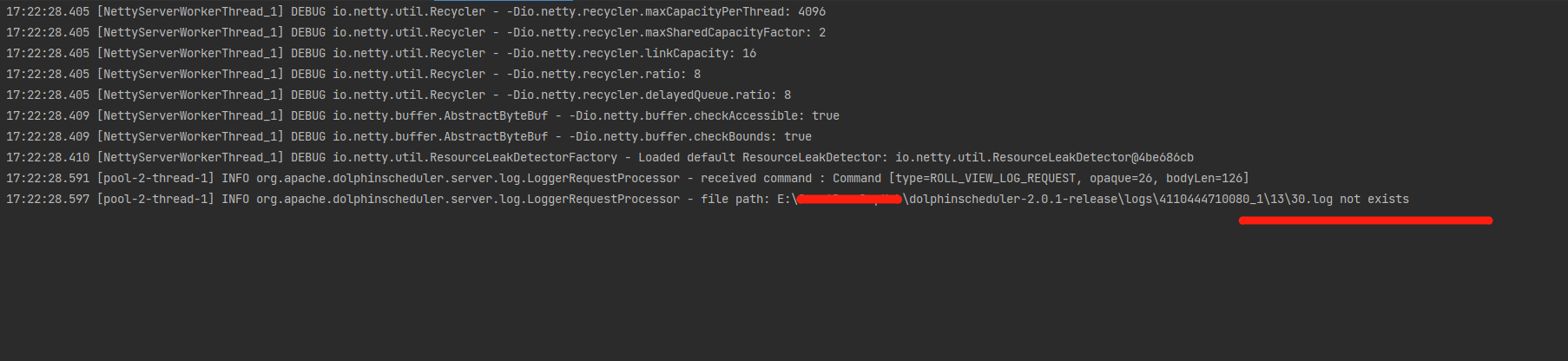 该如何解决这个问题? ### What you expected to happen 按照[官方开发者文档](https://dolphinscheduler.apache.org/zh-cn/development/development-environment-setup.html)描述,IDEA本地启动DS,并创建简单的工作流SHELL任务,最终任务执行状态为失败。查看日志的时候,明确指出日志文件所在路径,但是IDEA 控制台提示该日志文件不存在,导致页面查询不到日志信息。 请教该如何处理??? ### How to reproduce 按照[官方开发者文档](https://dolphinscheduler.apache.org/zh-cn/development/development-environment-setup.html)描述,IDEA本地启动DS,并创建简单的工作流SHELL任务,最终任务执行状态为失败。查看日志的时候,明确指出日志文件所在路径,但是IDEA 控制台提示该日志文件不存在,导致页面查询不到日志信息。 请教该如何处理??? ### Anything else _No response_ ### Version 2.0.1 ### Are you willing to submit PR? - [X] Yes I am willing to submit a PR! ### Code of Conduct - [X] I agree to follow this project's [Code of Conduct](https://www.apache.org/foundation/policies/conduct) -- This is an automated message from the Apache Git Service. To respond to the message, please log on to GitHub and use the URL above to go to the specific comment. To unsubscribe, e-mail: [email protected] For queries about this service, please contact Infrastructure at: [email protected]



