czeming commented on issue #9282:
URL:
https://github.com/apache/dolphinscheduler/issues/9282#issuecomment-1086571684
> ### Search before asking > * [x] I had searched in the [issues](https://github.com/apache/dolphinscheduler/issues?q=is%3Aissue) and found no similar issues. > > ### What happened > Dev branch, the navigation bar of the front page is not fully displayed > > 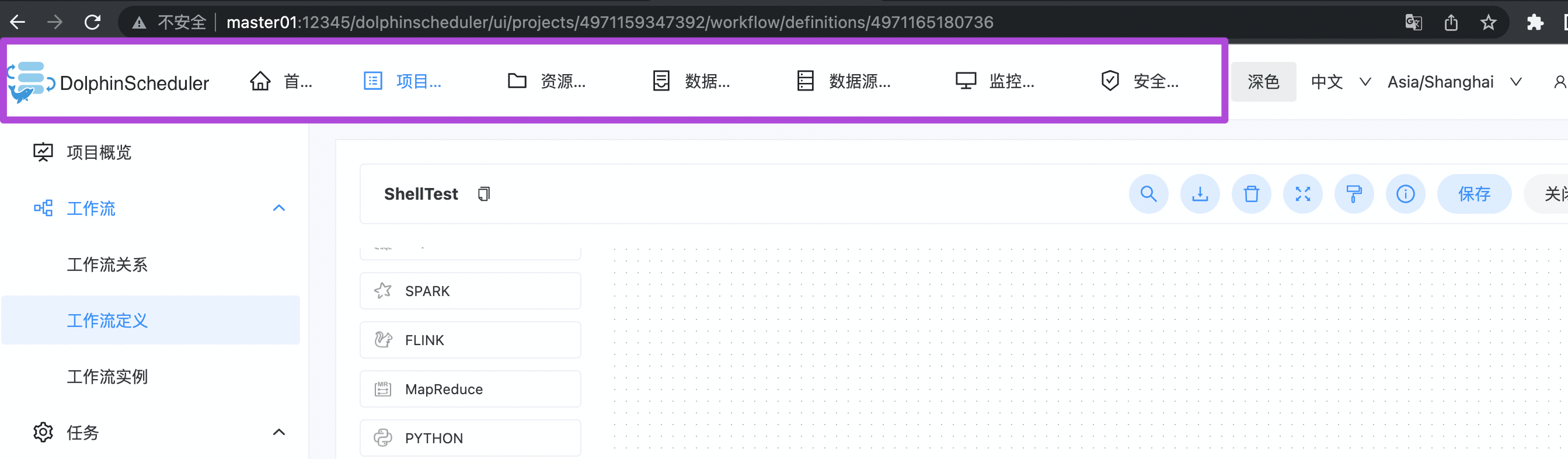 > > ### What you expected to happen > The navigation bar is displayed normally > > ### How to reproduce > Change the display mode, and some functions support hiding > > ### Anything else > nothing > > ### Version > dev > > ### Are you willing to submit PR? > * [ ] Yes I am willing to submit a PR! > > ### Code of Conduct > * [x] I agree to follow this project's [Code of Conduct](https://www.apache.org/foundation/policies/conduct) I hope I can help you solve this problem, but I think it should be caused by the difference of display screen. The pixel critical point that triggers the problem is `1476px / 1477px`. `body.width<=1476px`  `body.width>=1477px`  or you want a responsive layout, where the extra navigation bar is hidden into more buttons when the screen width is not enough (it may involve the design style of dolphin scheduler). Here are three possible approaches: 1. Maintain the status quo 2. Agreed minimum compatible resolution value 3. Responsive layout, that is, more buttons mentioned above. When the mouse moves to more, the hidden navigation menu will be displayed, but it needs to be discussed clearly how to display the above navigation bar when jumping to the corresponding interface of the hidden navigation. If it is still hidden, the page will look disconnected from the navigation. (not recommended) @songjianet -- This is an automated message from the Apache Git Service. To respond to the message, please log on to GitHub and use the URL above to go to the specific comment. To unsubscribe, e-mail: [email protected] For queries about this service, please contact Infrastructure at: [email protected]



