This is an automated email from the ASF dual-hosted git repository.

zhongjiajie pushed a commit to branch master
in repository https://gitbox.apache.org/repos/asf/dolphinscheduler-website.git
The following commit(s) were added to refs/heads/master by this push:
new d9f99ffb1 add nesw (#795)
d9f99ffb1 is described below
commit d9f99ffb153f06571824e19625fb87a1fb496844
Author: lifeng <[email protected]>
AuthorDate: Tue Jun 7 20:59:39 2022 +0800
add nesw (#795)
---
...ive_introductory_tutorial_written_in_a_month.md | 192 ++++++++++++++++++
...ive_introductory_tutorial_written_in_a_month.md | 168 ++++++++++++++++
...China_Unicom_revamps_Apache_DolphinScheduler.md | 193 ++++++++++++++++++
...ive_introductory_tutorial_written_in_a_month.md | 58 ++++++
...ive_introductory_tutorial_written_in_a_month.md | 190 ++++++++++++++++++
...ive_introductory_tutorial_written_in_a_month.md | 215 +++++++++++++++++++++
...China_Unicom_revamps_Apache_DolphinScheduler.md | 191 ++++++++++++++++++
...ive_introductory_tutorial_written_in_a_month.md | 66 +++++++
img/2022-05-07/ch/0-1.png | Bin 0 -> 625611 bytes
img/2022-05-07/ch/0.png | Bin 0 -> 209693 bytes
img/2022-05-07/ch/1.jpg | Bin 0 -> 254868 bytes
img/2022-05-07/ch/10.jpg | Bin 0 -> 169569 bytes
img/2022-05-07/ch/2.jpg | Bin 0 -> 320537 bytes
img/2022-05-07/ch/3.jpg | Bin 0 -> 295541 bytes
img/2022-05-07/ch/4.jpg | Bin 0 -> 302823 bytes
img/2022-05-07/ch/5.jpg | Bin 0 -> 270808 bytes
img/2022-05-07/ch/6.jpg | Bin 0 -> 290379 bytes
img/2022-05-07/ch/7.jpg | Bin 0 -> 291960 bytes
img/2022-05-07/ch/8.jpg | Bin 0 -> 254291 bytes
img/2022-05-07/ch/9.jpg | Bin 0 -> 388482 bytes
img/2022-05-07/en/1.png | Bin 0 -> 160007 bytes
img/2022-05-07/en/10.png | Bin 0 -> 206519 bytes
img/2022-05-07/en/11.png | Bin 0 -> 259678 bytes
img/2022-05-07/en/2.png | Bin 0 -> 716187 bytes
img/2022-05-07/en/3.jpg | Bin 0 -> 85627 bytes
img/2022-05-07/en/4.png | Bin 0 -> 267893 bytes
img/2022-05-07/en/5.png | Bin 0 -> 196887 bytes
img/2022-05-07/en/6.png | Bin 0 -> 293612 bytes
img/2022-05-07/en/7.png | Bin 0 -> 270457 bytes
img/2022-05-07/en/8.png | Bin 0 -> 141184 bytes
img/2022-05-07/en/9.png | Bin 0 -> 233107 bytes
img/2022-05-23/ch/1.png | Bin 0 -> 1913864 bytes
img/2022-05-23/ch/2.png | Bin 0 -> 20625 bytes
img/2022-05-23/ch/3.png | Bin 0 -> 78823 bytes
img/2022-05-23/en/1.png | Bin 0 -> 1913864 bytes
img/2022-05-23/en/2.png | Bin 0 -> 20625 bytes
img/2022-05-23/en/3.png | Bin 0 -> 78823 bytes
img/2022-05-24/ch/1.png | Bin 0 -> 1913864 bytes
img/2022-05-24/ch/2.png | Bin 0 -> 16217 bytes
img/2022-05-24/ch/3.png | Bin 0 -> 14197 bytes
img/2022-05-24/ch/4.png | Bin 0 -> 25798 bytes
img/2022-05-24/ch/5.png | Bin 0 -> 27949 bytes
img/2022-05-24/ch/6.png | Bin 0 -> 40308 bytes
img/2022-05-24/en/1.png | Bin 0 -> 1913864 bytes
img/2022-05-24/en/2.png | Bin 0 -> 84349 bytes
img/2022-05-24/en/3.png | Bin 0 -> 14197 bytes
img/2022-05-24/en/4.png | Bin 0 -> 25798 bytes
img/2022-05-24/en/5.png | Bin 0 -> 27949 bytes
img/2022-05-24/en/6.png | Bin 0 -> 40308 bytes
img/2022-05-25/ch/1.jpg | Bin 0 -> 58582 bytes
img/2022-05-25/ch/2.png | Bin 0 -> 1123591 bytes
img/2022-05-25/ch/3.jpg | Bin 0 -> 99251 bytes
img/2022-05-25/ch/4.png | Bin 0 -> 570119 bytes
img/2022-05-25/en/1.jpg | Bin 0 -> 58582 bytes
img/2022-05-25/en/2.png | Bin 0 -> 1123591 bytes
img/2022-05-25/en/3.png | Bin 0 -> 35556 bytes
site_config/blog.js | 44 ++++-
site_config/home.jsx | 14 +-
58 files changed, 1323 insertions(+), 8 deletions(-)
diff --git
a/blog/en-us/2_The_most_comprehensive_introductory_tutorial_written_in_a_month.md
b/blog/en-us/2_The_most_comprehensive_introductory_tutorial_written_in_a_month.md
new file mode 100644
index 000000000..38b7c870b
--- /dev/null
+++
b/blog/en-us/2_The_most_comprehensive_introductory_tutorial_written_in_a_month.md
@@ -0,0 +1,192 @@
+---
+title:# Community Star Series | 2 Don’t know how to use Apache
DolphinScheduler? A community talent writes the usage tutorial of it in one
month!
+keywords: Apache,DolphinScheduler,scheduler,big
data,ETL,airflow,hadoop,orchestration,dataops,Meetup
+description: Apache DolphinScheduler (hereinafter referred to as DS) is a
distributed and easily scalable visual DAG workflow task scheduling system
+---
+# Community Star Series | 2 Apache DolphinScheduler MasterServer start-up
tutorial
+
+<div align=center>
+<img src="/img/2022-05-24/en/1.png"/>
+</div>
+
+Author | Ouyang Tao, Big Data Development Engineer
+
+<div align=center>
+<img src="/img/2022-05-24/en/2.png"/>
+</div>
+
+##02 Master start-up process
+
+###2.1 Starting up the MasterServer
+
+Before we start, I want to give you some confidence. We know that starting the
Master is starting the MasterServer, which is essentially similar to other
SpringBoot projects, i.e. starting the main function inside. But before you
start to use it, the beginners will find that there are more than a dozen
autowired injected by beasns.
+
+Not a few people are confused by the injection of multiple beans. But I would
like to point out that these paper tigers, do not be afraid, I will lead you to
dissect and categorize these beans. Let's begin!
+
+The first category: MasterConfig, MasterRegistryClient,
MasterSchedulerService, and Scheduler. Literally, MasterConfig is related to
the Master configuration, MasterRegistryClient is responsible for
registration-related, and MasterSchedulerService is related to Master
scheduling, which is, frankly speaking, something internal to the Master.
+
+The second category is the beans with the suffix name of Processors, such as
taskExecuteRunningProcessor. The beans with the same suffix handle the same
task, which must be loaded together by something later on.
+
+The third category: EventExecuteService and FailoverExecuteThread, these can
be guessed based on their names to be something related to event execution and
disaster recovery conversion, these also are something internal to the Master
and in theory, should be classified as the first category.
+The fourth category: the LoggerRequestProcessor is related to printing logs,
and the specific details of this category will be explained later.
+
+After the main method is executed, the run method is executed based on the
spring feature. In the run method, the nettyRemotingServer object is created
(this object is not managed by spring, but newly created directly). Then a
bunch of Processors of the second class is put inside the netty's Processor. We
can infer by this point that the communication between the Master and the
Worker must be connected by netty.
+Look at the code below, which executes the initial and start methods of the
first class beans.
+
+In conclusion, the Master is like a commander-in-chief who calls the start
method of the beans, and these beans start to perform their functions, as to
what kind of functions these beans perform, the MasterServer is too lazy to
care, and there is no need to care.
+
+**Summary of this section.**
+
+MasterServer execution process is over here. In the next section, we will talk
about the use and functionality of each bean one by one.
+
+<div align=center>
+<img src="/img/2022-05-24/en/3.png"/>
+</div>
+
+### 2.2 Information about MasterConfig and registration of MasterRegistry
Client
+
+MasterConfig gets the configuration information from application.yml and loads
it into the MasterConfig class. The specific configuration information obtained
is as follows.
+
+<div align=center>
+<img src="/img/2022-05-24/en/4.png"/>
+</div>
+
+In the MasterServer, MasterRegisterConfig executes the init() and start()
methods.
+
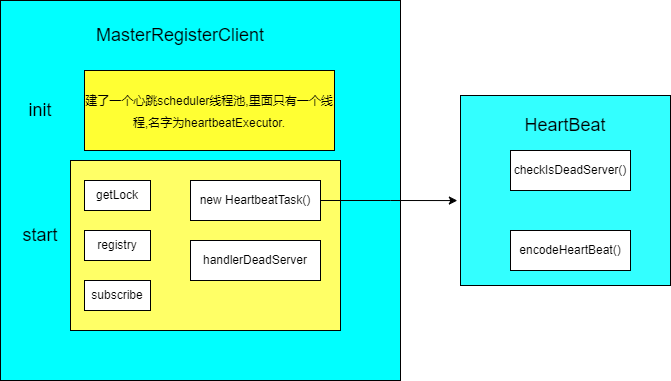
+The init() method creates a new heartbeat thread pool. Note that at this
point, only a pool of threads is created without heartbeat tasks in it yet.
+
+The start() method gets a lock from zk (getLock), registration information
(registry), and a message to listen to the registration (subscribe).
+
+By information registration, two things have been done.
+First: constructs the heartbeat message and drops it into the thread pool to
run the heartbeat task.
+
+Second: register the Master message temporarily with zk and remove the useless
Master messages.
+
+The heartbeat task checks for dead nodes and registers the latest machine
information, including machine CPU, memory, PID, etc., to zk every 10s
(heartbeatInterval).
+
+Listens for subscriptions and immediately senses any changes to the registered
information and prints a log if a machine has been added. If a machine is
reduced, it is removed and the log is printed at the same time. This section is
shown in the image below:
+
+
+
+
+### 2.3 Running of ServerNodeManger
+
+The first two sections are about the start-up process of the MasterServer and
the registration process of the MasterRegisterConfig. After all these
procedures, how do Master and Worker be managed and synchronically saved to the
database?
+
+The ServerNodeManager is set for this task.
+
+ServerNodeManager implements the InitializingBean interface, and executes the
AfterPropertiesSet() method after building this object based on the
characteristics of Spring, Three goals are achieved by now.
+
+- load(). Loading node information from zk to MasterPriorityQueue via
UpdateMasterNodes().
+- A new thread synchronizes data from zk's node information to the database
every ten seconds.
+- Listening to zk nodes and updating the latest data to the
MasterPriorityQueue in real-time via the UpdateMasterNodes() method.
+
+Almost all update operations are implemented via reentrant locks, which
ensures that the system is safe under multiple threads. There is also a detail
that should be noted that a warning message is sent if a node is removed.
+
+The MasterProrityQueue has a HashMap inside, with each machine corresponding
to an index, and slots are constructed in this way. The index is used to find
the Master information later on.
+As for the content of the MasterBlockingQueue, how to synchronize to the
database, how to put data into the queue and remove data from the queue, etc.,
these are all pure crud content, you can read on your own.
+
+### 2.4 Starting the MasterSchedulerService
+
+2.1 to 2.3 are all about the node information managed by zk. Why do we talk
about node information after the Master is started?
+The reason is simple: both Masters and Workers are ultimately machines. If DS
doesn't know about the machine's crash or addition, it will cause waste. Only
when the machines are running properly, configured properly and all managed
well, can the DS operation run smoothly. Other big data components are similar
to the situation.
+
+After the MasterRegisterClient in the MasterServer executes the init() and
start() methods, the MasterSchedulerService executes the init() and start()
methods immediately afterwards. This is where the Master gets to work.
+
+The init() method creates a Master-Pre-Exec-Thread thread pool and a netty
client.
+
+The Pre-Exec-Thread thread pool contains a fixed number of 10 threads (in 2.1
this corresponds to the pre-exec-threads in the MasterConfig configuration).
These threads handle the process of building the ProcessInstance process from
the command.
+The start method is the thread that starts the StateWheelExecutorThread, which
is dedicated to checking task, process, workflow timeouts, and task status and
removing all that meet the criteria.
+
+The MasterSchedulerService itself inherits from the thread class and executes
the run method immediately after the start method. After ensuring that the
machine has enough CPU and memory in the run method, the ScheduleProcess method
is executed. What ScheduleProcess does will be explained in 2.5.
+
+### 2.5 Execution of the MasterSchedulerService
+
+- The ScheduleProcess method
+
+1. ScheduleProcess is inside a while dead loop in the MasterSchedulerService,
so it will loop through the following 4 methods to execute them.
+
+2. The FindCommands method. This method retrieves 10 data from the
t_ds_command table at a time, which are found by the slot, and will be
configured in MasterConfig.FetchCommandNum once the search is complete.
+
+3. CommandProcessInstance converts these command tables into a
ProcessInstance, where a CountdownLatch is used so that the subsequent methods
are not executed until all conversions are complete.
+
+4. The converted processInstance is built into workFlowExecuteThread objects,
executed through threads in the workFlowExecuteThreadPool thread pool one by
one, and the task instances and workflows executed in the
processInstanceExecCacheManager are cached.
+
+5. After running the StartWorkFlow method in this thread pool, the
StartProcess method of the WorkFlowExecuteThread is executed, and what the
StartProcess does will be described in 2.6.
+
+This background thread pool is managed by Spring, of which the maximum number
and the core number of threads in the pool are 100
(MasterConfig.getExecThreads). The details are shown below:
+
+
+<div align=center>
+<img src="/img/2022-05-24/en/5.png"/>
+</div>
+
+There are two details to clarify here.
+
+First: WorkflowExecuteThread does not inherit from the Thread class but a
normal class with a Thread after the class name, so don't look for start or run
methods in this class when reading.
+
+Second: If the ProcessInstance found in the SchedulerProcess method is a
timeout, it will be handed over to the state polling
thread(stateWheelExecuteThread) to be executed as described in 2.4, and the
ProcessInstance will be removed.
+
+### 2.6 The StartProcess method is executed in the WorkflowExecutorThread
+
+The StartProcess method is shown in the picture below.
+
+
+<div align=center>
+<img src="/img/2022-05-24/en/6.png"/>
+</div>
+
+StartProcess does three things, buildFlowDag() builds the DAG, initTaskQueue()
initializes the task queue and submitPostNode() submits the node.
+
+How the DAG is built? What is done in the initialization queue? And what is
done after the node is submitted? All the questions will be answered in
sections 2.7 to 2.9.
+
+### 2.7 Executing the buildFlowDag method in the WorkflowExecutorThread
+
+Based on the code inside buildFlowDag, I have sorted out the execution
process, which consists of the following 9 steps:
+
+- FindProcessDefinition to get the process definition, which is the DAG of the
process to be built.
+- GetStartTaskInstanceList to get what task instances are under the process,
in general, a process must have more than one task.
+- FindRelationByCode gets the data in the task relationship table
(ProcessTaskRelation).
+- GetTaskDefineLogListByRelation determines the task definition log from the
task relationship data obtained in step 3.
+- TransformTask transforms the Relation and Log gaining in steps 3 and 4 into
a TaskNode.
+- GetRecoveryNodeCodeList gets the nodeCode of the task.
+- ParseStartNodeName gets the parameters of the command.
+- The DAG (ProcessDag) of the process is constructed based on the data
obtained in 5, 6, and 7.
+- The constructed ProcessDag data is converted into DAG data.
+
+The basic logic is shown above. Of course, there is some more logic at each
step, but these are essentially data structures that change from one to
another. You will get my point if only you have coding about service, so I
won't go deeper into this topic here.
+
+For those who may be interested in what a DAG is, here is a link to a brief
introduction to DAGs, which should not be too difficult to read and understand.
+
+https://dolphinscheduler.apache.org/zh-cn/blog/DAG.html
+
+This is a theoretical introduction to DAG, if you want to have a deeper
understanding of DAG in practice, search for the DagHelperTest class in the
test folder of the dao module, there are 5 test operations in it, and you can
run them all (in Debug form) to get a deeper understanding of DAG.
+
+There are also two links about the modification of task relationships in the
DAG. Before version 1.3, the relationships between tasks were only stored as
fields, but after it was found to be unfeasible with the amount of data, the
fields were split into multiple tables. You can refer to the articles below
about it.
+
+https://dolphinscheduler.apache.org/zh-cn/blog/dolphinscheduler_json.html
+https://dolphinscheduler.apache.org/zh-cn/blog/json_split.html
+
+The purpose of the DAG (directed acyclic graph) is to drag and drop tasks on
the front end to tell the Master the order of execution of the tasks, i.e. to
tell the Master which tasks are executed first and which ones are executed
later.
+
+### 2.8 Executing InitTaskQueue method in WorkflowExexutorThread
+Three key aims are reached in The InitTaskQueue.
+
+- Initialize four maps, ValidTaskMap, ErrorTaskMap, ActiveTaskProcessorMaps,
and CompleteTaskMap, during which the tasks and processes are saved to
different maps (these maps take taskCode as the key) by categories of valid
(valid), complete (complete), error (failed), and active (running). These maps
will be used in the later methods.
+- If the task is retrievable, it is placed in the readyToSubmitTaskQueue queue
by addTaskToStandByList.
+- If the complementary state is enabled, then set the specific complementary
time and global parameters to update it to the process instance.
+
+(I don't think the name of the InitTaskQueue method is very good, and I prefer
InitTask or InitTaskMap instead. That's because Queue can easily be mistaken
for a queue, while it only builds 4 maps. And the queue is only for tasks that
can be retried, which will play a bigger role, I will explain it in the
following sections).
+
+### 2.9 Executing the SubmitPostNode method in the WorkFlowExecutorThread
+
+SubmitPostNode plays six roles.
+
+1.DagHelper.ParsePostNodes(dag) parses the DAG generated in 2.8 into a
TaskNodeList.
+2.Generate a TaskInstance collection from the TaskNodeList.
+3.If only one task is running, pass the TaskInstance parameter configuration
to ProcessInstance.
+4.Place the TaskInstance in the ReadyToSubmitTaskQueue queue via the
AddTaskToStandByList method.
+5.SubmitStandByTask submits these tasks.
+6.UpdateProcessInstanceState is destined to update the state of the process
instance.
+
+The last but not least, putting the TaskInstance into the queue and updating
the process instance is the key. Updating process instances is purely a data
structure change, which is not difficult. What happens to the task that has
been placed in the queue and what happens next? What role does
SubmitStandByTask play? All these questions will be explained in the next
sections, stay tuned to my series work!
diff --git
a/blog/en-us/3_The_most_comprehensive_introductory_tutorial_written_in_a_month.md
b/blog/en-us/3_The_most_comprehensive_introductory_tutorial_written_in_a_month.md
new file mode 100644
index 000000000..efbabef0c
--- /dev/null
+++
b/blog/en-us/3_The_most_comprehensive_introductory_tutorial_written_in_a_month.md
@@ -0,0 +1,168 @@
+---
+title:# Community Star Series | 3 Don’t know how to use Apache
DolphinScheduler? A community talent writes the usage tutorial of it in one
month!
+keywords: Apache,DolphinScheduler,scheduler,big
data,ETL,airflow,hadoop,orchestration,dataops,Meetup
+description: Apache DolphinScheduler (hereinafter referred to as DS) is a
distributed and easily scalable visual DAG workflow task scheduling system
+---
+# Three scenarios and five optimizations of Apache DolphinScheduler in XWBank
for processing of task instances
+
+<div align=center>
+<img src="/img/2022-05-25/en/1.jpg"/>
+</div>
+
+At XWBank, a large number of task instances are generated every day, with
real-time tasks making up the majority. To better handle the task instances,
XWBank chose Apache DolphinScheduler to solve this challenge after a
comprehensive consideration. Today, several XWBank projects have applied
real-time and quasi-real-time batch processing and offline batch processing for
metrics management systems in three types of scenarios, i.e. offline data
development and task scheduling, quasi-real-t [...]
+
+How did XWBank adapt the Apache DolphinScheduler to better suit its business
needs? At the Apache DolphinScheduler Meetup in April, Chen Wei, Senior Big
Data Engineer from the Big Data Center of XWBank, presented their practical
Application of Apache DolphinScheduler in the company.
+
+The sharing was divided into four sessions.
+
+- 1. Background of the introduction of Apache DolphinScheduler in XWBank
+- 2. Application scenarios of Apache DolphinScheduler
+- 3. Optimization and transformation of XWBank
+- 4. The follow-up plan for XWBank to use Apache DolphinScheduler
+
+<div align=center>
+<img src="/img/2022-05-25/en/2.png"/>
+</div>
+
+Chen Wei
+
+Senior Big Data Engineer, Big Data Center of XWBank
+
+He has 11 years of working experience, earlier engaged in data warehouse
construction, then focus on the construction of big data infrastructure
platforms, scheduling system, etc. He has experience in the traditional
financial industry, internet data warehouse, data mart construction, and many
years of experience in scheduling system construction, such as MIGU analysis
cloud scheduling system design, and report platform design, now mainly
responsible for the construction of DataOps syste [...]
+
+## 01 Background
+We chose Apache DolphinScheduler based on three main requirements: unification
of R&D scenarios, optimization of testing scenarios, and optimization of
production deployment scenarios.
+
+### 01 R&D scenarios
+In the past, we did not have a unified development tool in the data
development process, so we needed to switch back and forth between multiple
tools, resulting in excessive development costs.
+
+On the other hand, we were unable to replace parameters during development,
could not perform on-the-fly debugging, and had no off-the-shelf tools to
support offline tasks in both development and production states.
+
+### 02 Test scenarios
+During the deployment of test scenarios, when our developers provide scripts
to the tests, the documentation returned is rather unfriendly. Especially when
multiple scenarios are deployed across multiple versions, the testers’ tasks
increase dramatically and the visual deployment is relatively weak, making it
impossible to automate tests in a more friendly way.
+
+### 03 Deployment
+Complex configuration and poor visualization of the current scheduling system.
+The development and production environment networks are physically isolated,
so the process of deploying code from the development environment to the
production environment is long and error-prone. The test environment does not
fully reflect the configuration of the production environment, and manual
configuration files are prone to errors and omissions.
+Insufficient operation and maintenance monitoring capabilities, poor
visualization, inability to view logs online, and complex process of logging
into the physical machine to access the monitoring room for troubleshooting.
+
+## 02 Usage scenarios
+We use Apache DolphinScheduler in the following scenarios: offline data
development and task scheduling, quasi real-time data development and task
scheduling, and other non-ETL user-defined data batch processing.
+
+### 01 Offline Data Development and Task Scheduling
+
+In offline data development and task scheduling.
+we mainly use it for our banking data warehouse, data mart, etc. The data
includes some offline data, offline processed data by day and month, etc.
+
+### 02 Quasi-real-time data development and task scheduling
+
+The quasi-real-time data in XWBank is fused and calculated by Flink from the
logs of the upstream message queue database, completing the relevant
dimensional information and then pushing the data to Clickhouse for processing.
However, there are special requirements for batch calculations on a
minute-by-minute basis, as opposed to daily batch scheduling.
+
+### 03 Other non-ETL user-defined data batch processing
+
+This application is functionally deployed through some internal low-code
platform where we open up the application to a servicer who can self-analyze
the use data without the need for developers’ help. After defining, they can
run this part of the data in batches on their own.
+
+### 1. Offline data mining and task scheduling
+We use Apache DolphinScheduler in the offline data mining and task scheduling
scenario, which mainly involves five sections: task development modulation,
historical task integration, workflow and task separation, project environment
variables, and data source finding.
+
+1.Task development modulation (SQL, SHELL, PYTHON, XSQL, etc.), online
development modulation (under view logs, online log . online SQL query return
results view). WEBIDE can automatically replace pop-up variables, and
dynamically replace variables according to the user’s settings and default
processing.
+
+2.Historical tasks integration
+
+Most of the warehouses in the banking industry have been established for four
or five years and have a lot of historical tasks. Therefore, we do not want our
users to need to change the code independently when our new system goes online,
which costs relatively high.
+
+3.Workflow and task separation
+
+Allows for direct tasks development, debugging, and testing and the workflow
directly references the developed tasks, thus separate task development and
task scheduling.
+
+4.Project environment variables
+
+New project environment variables are added, and project environment variables
are adapted to all jobs within the project by default, saving us from
configuring them within each workflow, and each project can refer to them
directly.
+
+5.Data sources
+
+We look for data sources by name, and it supports data sources such as
phoenix. Later we want it to be able to import and export tasks, but in the
process of importing and exporting, the definition of parameters and data
sources in our tasks cannot be changed, so that they can be directed from
testing to production, which is simpler in terms of production.
+
+### 2. Quasi-real-time tasks
+
+1. Task development modulation (SQL), online development modulation (online
view of logs, online view of SQL query return results), pop-up windows in
WEBIDE to replace script variables.
+
+2. Clickhouse data source HA configuration integration support. However, there
is a small problem in batch processing offline, i.e. if the current port is not
available, an error may be reported directly. This is a problem that needs a
fix.
+
+3. For quasi-real-time workflow single instance running, if there is already
an initialized instance, or there is an ongoing workflow instance, the workflow
will not be triggered to run even if the next batch is triggered.
+
+### 3. Other non-ETL user-defined data batch processing
+1. We currently have model data calculation tasks pushed from the metrics
management platform. The simple user-defined reports will generate SQL
dynamically by the platform and subsequently pushed directly to offline
scheduling. This process will not involve any developer in the future.
+
+2. In the tag management system, we mainly adapt it to scenario needs by
generating special plug-in tasks.
+
+## 03 Optimisation
+### 1.The status
+In XWBank, there are about 9000+ task instances generated every day, with
real-time tasks making up the majority. Today, we have used Apache
DolphinScheduler to run batches in real-time and quasi-real-time tasks for many
projects, offline batches for the metrics management system, including batches
for the integrated internal SQL tools that support XSQL.
+
+<div align=center>
+<img src="/img/2022-05-25/en/3.jfif"/>
+</div>
+
+In the picture above on the right, we can see that we have made tasks
independent, replacing parameters. Also, in terms of task lineage, especially
for SQL-type tasks, we can do automatic parsing and also add them manually.
This is mainly used for the automatic orchestration of our workflows, such as
the internal task maps of the company.
+
+To meet the above business requirements, we have made the following five major
optimizations to Apache DolphinScheduler and also listed the corresponding
modifications that must be noted during the transformation process.
+
+1. Environment variables are isolated from projects, and environments, but the
names of environment variables are kept consistent across environments.
+2. Data sources are isolated through the project, and the environment, but the
names of the data sources remain consistent across the different environments.
+3. New non-JDBC data sources are added, like ES, Livy, etc. In internal
transparent applications, Livy is needed as a data service framework to
interface with Spark jobs for data desensitization.
+
+### 2. Standalone jobs
+
+- Develop standalone task development, debugging, configuration pages, able to
support project environment variables
+- JDBC, XSQL tasks can refer to data sources by data source name
+- Implement interactive WEBIDE debugging and development
+- Parameter optimization, support for user ${parameter} and referencing of
system built-in time functions
+- Completion of independent SQL, XQSL automatic lineage parsing
+- Complete automatic SQL parameter parsing
+
+### 3. Optimization of workflow startup logic
+
+- Quasi-real-time workflow single instance run, if there is already a running
workflow instance, this run will be ignored.
+- Adding environment control policies, where workflows refer to different
environment variables, and data source access connections, depending on the
environment. For example, if the disaster recovery environment and the
production environment are configured in advance, once an error occurs in the
production environment, it can be switched to the disaster recovery environment
with one click.
+- Solve scheduling problems caused by workflow and task separation, mainly
including the detection of exceptions
+
+### 4. Import and export optimization
+
+- New import and export of tasks, task configurations, and their resource
files, etc.
+- In the banking and financial industries where the develope&test and
production networks are not always the same, there is a need to export a
relatively friendly resource script workflow and resource file information when
processing data in multiple environments.
+- New workflow import and export logic to deal with data conflicts due to
self-incrementing IDs of different database instances
+- Navigated import and export, versioning, mainly for emergencies, partial
code rollback, etc.
+
+### 5. Alerting system improvement and optimization
+
+- Docking to the internal alert system of XWBank, default alerting of task
creators subscribing to the alerting group users
+- Add policy alerts (start-up delay, completion delay) to alert key tasks for
start-up and completion delay
+
+6. Interfacing with internal systems
+
+- Model-type task operation and monitoring
+- Report push-tasks operation and monitoring
+- Interfacing with internal IAM SSO unified login authentication system
+- Restrict specific functions (code editing, workflow running, task running,
etc.) by the network
+
+There is a special phenomenon in the financial industry that the production
needs to be done in a specific server room, i.e. we have to restrict certain
operations to be done in the server room while reducing the cost of one change.
+
+We create reports automatically based primarily on this dimensional model
theory. Once configured, we perform a code merge calculation of multiple tables
based on the configuration report logic. The aggregation calculation is
completed and pushed to the report server. This allows business users to
perform data aggregation without the need to write SQL following some of the
basic functionality we provide, thus avoiding the business end-user being upset
and giving us ad hoc requests.
+
+## 04 Future Plans
+
+- Promote the offline data development platform to more project teams
+- Gradually replace the existing scheduling system in the bank to achieve
smooth migration of all offline tasks
+- Scheduling system will be sunk to connect to the bank’s data R&D management
system
+
+### Technical objectives
+
+1. A more intelligent and automated task scheduling system, lowering the
threshold for the user
+2. Operation monitoring and prediction, providing more friendly operation and
maintenance monitoring and task completion time prediction functions for the
operation and maintenance staff
+3. Global view functionality, providing a global view of offline tasks for
development, operations, and maintenance staff, providing data lineage and
impact analysis functionality
+4. Further integration with in-line custom configuration modularity to reduce
development costs for developers
+5. Integration with data quality management platforms
+6. User-defined template support
+
+Thank you all, that's all I have to share today.
\ No newline at end of file
diff --git a/blog/en-us/China_Unicom_revamps_Apache_DolphinScheduler.md
b/blog/en-us/China_Unicom_revamps_Apache_DolphinScheduler.md
new file mode 100644
index 000000000..5fc49a3b8
--- /dev/null
+++ b/blog/en-us/China_Unicom_revamps_Apache_DolphinScheduler.md
@@ -0,0 +1,193 @@
+---
+title:China Unicom revamps Apache DolphinScheduler Resource Center for
cross-cluster calls in billing environments and one-stop access to data scripts
+keywords: Apache,DolphinScheduler,scheduler,big
data,ETL,airflow,hadoop,orchestration,dataops,Meetup
+description:By 2022, China Unicom's subscriber base reaches 460 million
+---
+# China Unicom revamps Apache DolphinScheduler Resource Center for
cross-cluster calls in billing environments and one-stop access to data scripts
+
+<div align=center>
+<img src="/img/2022-05-07/en/1.png"/>
+</div>
+
+
+By 2022, China Unicom's subscriber base reaches 460 million, accounting for
30% of China's population. With the spread of 5G, operators' IT systems are
generally facing the impact of a series of changes such as massive subscribers,
massive call orders, diverse services, and network organization models.
+
+Currently, China Unicom handles more than 40 billion voice orders per day.
Facing the huge data volume, it has become the ultimate goal of China Unicom to
improve service levels and provide more targeted services to customers. China
Unicom has already emerged as a leader in technologies and applications for
massive data aggregation, processing, desensitization, and encryption, which
help it grows into an enabler of the development of a digital economy.
+
+At the Apache DolphinScheduler April Meetup, we invited Xuesong Bai from China
Unicom Software, who shared with us the application of Apache DolphinScheduler
in China Unicom's billing environment.
+
+**The presentation consisted of three parts.**
+
+- General usage of Apache DolphinScheduler in China Unicom
+- Sharing on the topic of China Unicom's billing business
+- The next step in planning
+
+
+<div align=center>
+<img src="/img/2022-05-07/en/2.png"/>
+</div>
+
+Xuesong Bai | Big Data Engineer, China Unicom Software, Graduated from China
Agricultural University, working on big data platform building and AI platform
building, contributing Apache SeaTunnel(Incubating) plug-in for Apache
DolphinScheduler and sharing Alluxio plug-in for Apache SeaTunnel(Incubating)
+
+## 01 General usage of Apache DolphinScheduler in China Unicom
+
+Let me start by giving you an overview of China Unicom's overall usage of
Apache DolphinScheduler.
+
+- Right now we are running our business mainly in 4 clusters at 3 locations
+- The overall number of task flows is around 300
+- Average daily task runs are around 5,000
+
+The Apache DolphinScheduler components we use include Spark, Flink, SeaTunnel
(formerly Waterdrop), as well as Presto, and some shell scripts for stored
procedures, covering auditing, revenue sharing, billing, and other operations
that need to be automated.
+
+
+<div align=center>
+<img src="/img/2022-05-07/en/3.jpg"/>
+</div>
+
+
+## 02 Business introduction
+
+### 01 Cross-cluster dual-active service calls
+
+As mentioned above, our service runs on 4 clusters at 3 locations, which
inevitably leads to mutual data exchange and business calls between clusters.
How should we unify the management and scheduling of these cross-cluster data
transfer tasks is important. Our data is in the production cluster, which is
very sensitive to the cluster network bandwidth and must be managed in an
organized manner.
+
+On the other hand, we have some operations that need to be invoked across
clusters, for example, cluster B has to start statistical tasks after data is
available in cluster A. We chose Apache DolphinScheduler as the scheduling and
control system to solve both problems.
+
+We use HDFS for the underlying data storage. In the cross-cluster HDFS data
exchange, we divide the data used into small and large batches, structure
tables, configuration tables, etc. according to the size and usage of the data.
+
+For small batches, we put them directly onto the same Alluxio for data
sharing, so that version issues caused by untimely data synchronization do not
occur.
+
+- For things like schedules and other large files, we use a mix of Distcp and
Spark.
+- For structured table data, the SeaTunnel on Spark is used.
+- Setting speed limits by way of Yarn queues.
+- Unstructured data is transferred by Distcp, with speed limits by way of the
self-contained parameter Bandwidth.
+
+These transfer tasks are all run on top of Apache DolphinScheduler, and the
overall data flow is mainly data availability detection for cluster A, data
integrity verification for cluster A, data transfer between clusters A and B,
and data auditing and availability notification for cluster B.
+
+We mainly used Apache DolphinScheduler's complementary re-runs to fix failed
tasks or incomplete data.
+
+
+<div align=center>
+<img src="/img/2022-05-07/en/4.png"/>
+</div>
+
+
+Once we have finished synchronizing and accessing data across clusters, we
also use Apache DolphinScheduler to make task calls across geographies and
clusters.
+
+We have two clusters in location A, i.e. test A1 and production A2, and a
production B1 cluster in location B. We will take out two machines with
intranet IPs as interface machines on each cluster and build a virtual cluster
by building Apache DolphinScheduler on the six interface machines so that the
content of the three clusters can be manipulated on a unified page.
+
+Q: How do I go live from test to production?
+
+A: Develop tasks on A1 test, after passing the test, change the worker nodes
directly to A2 production.
+
+Q: What if I encounter a problem with A2 production, eg. data is not available?
+
+A: We can switch directly to B1 production to do a manual dual-live disaster
recovery switchover.
+
+
+<div align=center>
+<img src="/img/2022-05-07/en/5.png"/>
+</div>
+
+Finally, we also have some tasks that are relatively large and need to be
calculated simultaneously using two clusters to meet the task timelines, we
will split the data into two parts and put them on A2 and B1 respectively,
after which we will run the tasks simultaneously and finally pass the results
back to the same cluster for merging. These task processes are invoked through
Apache DolphinScheduler.
+
+Please note that in this process, we use Apache DolphinScheduler to solve
several problems.
+
+- Task dependency checks for projects across clusters.
+- Control of task environment variables at the node level.
+
+### 02 AI development synchronization of task runs
+
+#### 1. Unifying data access methods
+
+We now have a simple AI development platform that mainly provides some
TensorFlow and Spark ML computing environments for users. With the business
requirement to bridge the user-trained local file model and the clustered file
system, and to be able to provide a unified approach to access and deployment,
we use the tools Alluxio-fuse and Apache DolphinScheduler.
+
+- Alluxio-fuse bridges local and cluster storage
+
+- Apache DolphinScheduler shares local and cluster storage
+
+As the AI platform cluster and the data cluster we built are two data
clusters, so we store data on the data cluster, use Spark SQL or Hive to do
some data pre-processing, after that we transfer the processed data on Alluxio,
and finally mapped to local files through Alluxio fuse across level clusters,
so that our development environment based on Conda's development environment
allows us to access this data directly, thus to unify the way we access the
data of clusters by access the local data.
+
+
+<div align=center>
+<img src="/img/2022-05-07/en/6.png"/>
+</div>
+
+
+#### 2. One-stop access to data scripts
+
+After separating the resources, by pre-processing the big data content through
the data cluster, we go through our AI cluster to process the training and
prediction models. Here, we use Alluxio-fuse to make changes to Apache
DolphinScheduler's resource centre. We connect Apache DolphinScheduler resource
centre to Alluxio and mount both the local and cluster files via Alluxio-fuse,
so that Apache DolphinSchedule can access both the local training inference
scripts and the training inferen [...]
+
+
+<div align=center>
+<img src="/img/2022-05-07/en/7.png"/>
+</div>
+
+
+### 03 Service query logic persistence
+
+The third application scenario is that we use Presto and Hue to provide a
front-end instant query interface for users that need to run some processing
logic and stored procedures regularly after writing SQL through the front-end
when testing is completed, so we open up the flow from the front-end SQL to the
back-end regular running tasks.
+
+
+
+<div align=center>
+<img src="/img/2022-05-07/en/8.png"/>
+</div>
+
+
+Another issue is that Presto does not have resource isolation between tenants.
We did a comparison of several solutions before finally choosing the Presto on
Spark solution in conjunction with the actual situation.
+
+On this multi-tenant platform, the initial solution we offered to users was to
use the Hue interface on the front end and run the back end directly on the
physical cluster using Presto, which led to a problem of contention for the
user resources. When there were certain large queries or large processing
logic, it would cause other tenant operations to be on hold for long periods.
+
+For this reason, we have had a comprehensive performance comparison between
Presto on Yarn and Presto on Spark, and we found that Presto on Spark is more
efficient in terms of resource usage, and you can choose the solution that
suits your needs.
+
+
+
+<div align=center>
+<img src="/img/2022-05-07/en/9.png"/>
+</div>
+
+
+On the other hand, we make the native Presto and Presto on spark coexist, for
SQL with small data volume and simple processing logic, we run them directly on
native Presto, while for SQL with more complex processing logic and longer
running time, we run them on Presto on Spark, so that users can use one set of
SQL to switch to different underlying engines.
+
+In addition, we have also bridged the Hue to Apache DolphinScheduler timed
task scheduling process. After we modulate SQL development on Hue, we connect
it to Git for version control by storing it in a local Serve file.
+
+We transfer the local file to Alluxio fuse as a synchronous mount for SQL, and
finally, we use Hue to create tasks and timed tasks through Apache
DolphinScheduler's API to control the process from SQL development to timed
runs.
+
+
+<div align=center>
+<img src="/img/2022-05-07/en/10.png"/>
+</div>
+
+
+### 04 Unified governance of data lakes data
+
+The last scenario is the unified governance of the data in data lakes. On our
self-developed data integration platform, we use a hierarchical governance
approach to unify the management and access of the data in data lakes, in which
Apache DolphinScheduler is used as the inbound scheduling and monitoring engine.
+
+In the data integration platform, we use Apache DolphinScheduler for batch and
real-time tasks such as data integration, data entry, and data distribution.
+
+The bottom layer runs on Spark and Flink. For data query and data exploration,
which require immediate feedback, we use the embedded Hue to Spark and Presto
to explore and query the data; for data asset registration and data audit, we
directly query the data source file information and directly synchronize the
underlying data information.
+
+
+
+<div align=center>
+<img src="/img/2022-05-07/en/11.png"/>
+</div>
+
+
+Currently, we run the quality management of 460 data tables on the integration
platform, providing unified management of data accuracy and punctuality.
+
+## 03 Next steps and development needs
+
+### 01 Resource Centre
+
+At the resource centre, to facilitate file sharing between users, we plan to
provide resource authorization for all users, as well as assign shared files at
the tenant level depending on the tenant it belongs to, making it more friendly
for a multi-tenant platform.
+
+### 02 User Management
+
+The second plan is around user management, we only provide tenant-level
administrator accounts, with subsequent user accounts created by tenant
administrator accounts.
+
+### 03 Task Nodes
+
+Finally, there are plans for our task nodes, which are now in progress: on the
one hand, to complete the optimization of the SQL node so that users can select
a resource centre SQL file without having to copy the SQL manually; on the
other hand, enable the HTTP node to extract field judgments for custom parsing
of the returned JSON, and to provide more friendly handling of complex return
values.
+
diff --git
a/blog/en-us/The_most_comprehensive_introductory_tutorial_written_in_a_month.md
b/blog/en-us/The_most_comprehensive_introductory_tutorial_written_in_a_month.md
new file mode 100644
index 000000000..65181c75b
--- /dev/null
+++
b/blog/en-us/The_most_comprehensive_introductory_tutorial_written_in_a_month.md
@@ -0,0 +1,58 @@
+---
+title:# Community Star Series | 1 Don’t know how to use Apache
DolphinScheduler? A community talent writes the usage tutorial of it in one
month!
+keywords: Apache,DolphinScheduler,scheduler,big
data,ETL,airflow,hadoop,orchestration,dataops,Meetup
+description: Apache DolphinScheduler (hereinafter referred to as DS) is a
distributed and easily scalable visual DAG workflow task scheduling system
+---
+# Community Star Series | 1 Don’t know how to use Apache DolphinScheduler? A
community talent writes the usage tutorial of it in one month!
+
+<div align=center>
+<img src="/img/2022-05-23/en/1.png"/>
+</div>
+
+Author | Ouyang Tao, Big Data Development Engineer
+
+Apache DolphinScheduler (hereinafter referred to as DS) is a distributed and
easily scalable visual DAG workflow task scheduling system, dedicated to
solving the intricate dependencies in the data processing, thus making it be
used out of the box in the data processing. The top open source project,
similar to other open-source projects, runs and installs from a script.
+
+The scripts are all located in the script folder in the root directory and are
executed in the following order:
+
+- Check the start script start-all.sh, you can find the start of the four most
important startup services, respectively dolphinscheduler-daemon.sh start
master-server/worker-server/alert-server/api-server
+- The dolphinscheduler-daemon.sh script will first execute the
dolphinscheduler-env.sh script, which serves to introduce the environment,
including the Hadoop, Spark, Flink, Hive environments, etc. As DS needs to
schedule these tasks, if these environments are not introduced, the execution
will not succeed even if the scheduling is completed.
+- Immediately afterward, the dolphinscheduler-daemon.sh script loops through
bin/start.sh under the four modules mentioned above, as shown in the following
image.
+
+
+<div align=center>
+<img src="/img/2022-05-23/en/2.png"/>
+</div>
+
+As shown in the picture below: the execution of dolphinscheduler-daemon.sh
start master-server will go to the master module’s src/main/bin and execute
start.sh. After opening start.sh, you can find that a MasterServer is started.
And the other Worker, Alert and API modules are started as the same.
+
+
+<div align=center>
+<img src="/img/2022-05-23/en/3.png"/>
+</div>
+
+
+This is the end of the scripting process, and we will now describe the main
purpose of the four modules: Master is responsible for DAG task slicing, task
submission monitoring, and listening to the health status of other Masters and
Workers; Worker is responsible for task execution; Alert aims to the alert
service; API works for the business logic of DS, i.e. project management,
resource management, security management, etc. as seen on the web.
+
+If you are familiar with other big data projects, such as Flink, Hdfs, Hbase,
etc., you will find that these architectures are similar, such as hdfs is
architected as the NameNode and WorkNode; Hbase is architected as the
HMasterServer and HRegionServer; Flink adopts the architecture as JobManager
and TaskManager, etc., if you can master these frameworks, I think the mastery
of DS will be easier.
+
+Master and Worker are started through SpringBoot, and the objects created are
also hosted by Spring, if you use Spring regularly, I think you will understand
DS much easier than other open-source projects.
+
+## **Notes**:
+
+- There is a python-gateway-server module in the run script, which is written
in python code workflow and is not in the scope of this article, so I ignore it
this time, if you understand this module in detail, you’d better turn to the
community.
+
+- Start Alert script executes the Alert module under the alert-server script,
because Alert is also a parent module, I do not intend to talk about
alert-server much here. I believe that after going through the implementation
process of Master and Worker, Alert module should not be difficult to
understand.
+
+- In addition, if you know about DS for the first time, you will find an
alert-api in the Alert module, I want to specify that this alert-api and the
aforementioned api-server are totally unrelated, api-server is the
ApiApplicationServer script to start the api module, and responsible for the
server logic of the entire DS. The api-server is the ApiApplicationServer
script that starts the api module and is work for the business logic of the
whole DS, while alert-api is the plug-in interfa [...]
+
+- DS is all managed by SpringBoot, so if you have never worked with SpringBoot
or Spring, you can refer to the following URLs and other relevant information
on the web. https://spring.io/quickstart
+
+
+Know more about the warning module, please refer to the link below or consult
other community members.
+
+https://dolphinscheduler.apache.org/zh-cn/blog/Hangzhou_cisco.html
+
+The official website of the Apache DolphinScheduler project can be found at:
https://github.com/apache/dolphinscheduler
+
+In the next chapter, I will introduce the two most important modules of DS,
Master, and Worker, and how they communicate with each other, stay tuned!
diff --git
a/blog/zh-cn/2_The_most_comprehensive_introductory_tutorial_written_in_a_month.md
b/blog/zh-cn/2_The_most_comprehensive_introductory_tutorial_written_in_a_month.md
new file mode 100644
index 000000000..cbe21a110
--- /dev/null
+++
b/blog/zh-cn/2_The_most_comprehensive_introductory_tutorial_written_in_a_month.md
@@ -0,0 +1,190 @@
+# 【达人专栏】还不会用Apache Dolphinscheduler吗,大佬用时一个月写出的最全入门教学【二】
+
+<div align=center>
+<img src="/img/2022-05-24/ch/1.png"/>
+</div>
+
+作者 | 欧阳涛 招联金融大数据开发工程师
+
+## 02 Master启动流程
+
+### **2.1 MasterServer的启动**
+
+在正式开始前,笔者想先鼓励一下大家。我们知道启动Master其实就是启动MasterServer,本质上与其他SpringBoot项目相似,即启动里面的main函数。但想要开始实操前,肯定有不少的人,尤其是初学者会突然发现这里面有十多个由bean注入的autowired。
+
+被多个bean的注入搞到一头雾水,甚至感觉一脸懵逼的不是少数。但笔者就想说是,这些其实都是吓唬你们的,不用害怕,接下来将带领你们把这些bean分别解剖并归类,那么我们就正式开始。
+
+**第一类**:MasterConfig、MasterRegistryClient、MasterSchedulerService、Scheduler这些bean。从字面意思来说,MasterConfig就是跟Master配置相关的,MasterRegistryClient就是负责注册相关的内容,MasterSchedulerService肯定跟Master调度有关的,说白了就是Master内部的东西。
+
+**第二类**:是那些后缀名为一堆Processor的,例如taskExecuteRunningProcessor等。相同后缀一定处理同样的task,在以后肯定被某个东西一起加载的。
+
+**第三类**:是EventExecuteService以及FailoverExecuteThread,这些根据名字可以大胆猜一下是与事件执行相关以及灾备转换相关的东西,这些肯定也是Master内部的东西,理论上应该归到第一类。
+
+**第四类**:至于LoggerRequestProcessor就是与打印日志相关的了,至于这类具体干的内容,后面会有详细的介绍。
+
+main方法执行完成后,基于spring特性,执行run方法。在run方法中,创建nettyRemotingServer对象(这个对象不是spring管理的,而是直接new创建的)。然后将第二类的一堆Processor放到netty的Processor里面去。从这里就可以推断,Master和Worker的通信一定是通过netty的。
+
+我们可以看看下面的代码,其实就是将第一类的那些bean执行init以及start方法。
+
+总结其实Master这就像一个总司令,这个总司令就调用这里面的bean的start方法,这些bean开始执行自己的功能,至于这些bean里面执行啥样的功能,MasterServer是懒得管,也没必要管了。
+
+**本节总结:**
+
+<div align=center>
+<img src="/img/2022-05-24/ch/2.png"/>
+</div>
+
+至此MasterServer就运行完了,下一节我们将逐个分析各个bean的用途以及功能的了。
+
+### **2.2 MasterConfig的信息以及MasterRegistry Client的注册**
+
+MasterConfig从application.yml中获取配置信息加载到MasterConfig类中,获取到的具体配置信息如下。
+
+<div align=center>
+<img src="/img/2022-05-24/ch/3.png"/>
+</div>
+
+
+在MasterServer里,MasterRegisterConfig会执行init()以及start()方法。
+
+init()方法新建了一个心跳线程池。注意,此时只是建了一个线程池,里面还没有心跳任务。
+
+start()方法从zk获取了锁(getLock),注册信息(registry)以及监听注册的信息(subscribe)。
+
+**注册信息做了两件事情:**
+
+**第一**:构建心跳信息,并丢到线程池中运行心跳任务的。
+
+**第二**:在zk临时注册该Master信息,并移除没用的Master信息。
+
+心跳任务就是检查是否有死亡节点以及每隔10s(heartbeatInterval)将最新的机器信息,包括机器CPU,内存,PID等等信息注册到zk上去的。
+
+监听订阅的信息,只要注册的信息有变化,就会立马感知,如果是增加了机器,则会打印日志。减少了机器,移除并同时打印日志。本节如下图所示:
+
+<div align=center>
+<img src="/img/2022-05-24/ch/4.png"/>
+</div>
+
+### **2.3 ServerNodeManger的运行**
+
+前面两节是从MasterServer启动过程以及MasterRegisterConfig的注册过程的。注册完成之后Master,Worker如何管理呢,如何同步保存到数据库的呢。ServerNodeManager的作用就是负责这一部分的内容。
+
+ServerNodeManager实现了InitializingBean接口的。基于spring的特性,构建此对象后,会执行AfterPropertiesSet()方法。**做了三件事情:**
+
+1. load()。从zk加载节点信息通过UpdateMasterNodes()到MasterPriorityQueue。
+2. 新建线程每十秒钟将zk的节点信息同步数据到数据库中。
+3. 监听zk节点,实时把最新数据通过UpdateMasterNodes()方法更新到MasterPriorityQueue队列中去。
+
+几乎所有的更新操作都是通过重入锁来实现的,这样就能确保多线程下系统是安全的。此外,还有一个细节是如果是移除节点会发送警告信息。
+
+MasterProrityQueue里面有个HashMap,每台机器对应一个index,以这样的方式构建了槽位。后面去找Master信息的时候就是通过这index去找的。
+
+至于MasterBlockingQueue队列的内容,如何同步到数据库的,如何将数据放到队列和队列中移除数据等,这些都是纯crud的内容,读者可以自行阅读的。
+
+### **2.4 MasterSchedulerService的启动**
+
+2.1到2.3讲述都是由zk管理的节点信息的事情。为什么我们要在Master启动之后会先讲节点信息的?
+
+理由其实很简单,因为不管是Master还是Worker归根结底都是机器。如果这些机器崩了或者增加了,DS不知道的话,那这机器岂不是浪费了。只有机器运行正常,配置正常,都管理好了,那DS运行才能够顺畅地运行。同样,其他大数据组件也是类似的道理。
+
+前面MasterServer里MasterRegisterClient执行完init()以及start()方法之后,紧接着MasterSchedulerService执行了init()和start()方法。从这里开始就真正的进入了Master干活的阶段了。
+
+**init()方法**是创建了一个Master-Pre-Exec-Thread线程池以及netty客户端的。
+
+Pre-exec-Thread线程池里面有固定的10个线程(在2.1中对应的是MasterConfig配置里面的pre-exec-threads)。这些线程处理就是从command里构建ProcessInstance(流程实例)过程的。
+
+**start方法**就是启动了状态轮询执行(StateWheelExecutorThread)的线程,这线程专门就干的是检查task,process,workflow超时以及task状态的过程,符合条件的都被移除了。
+
+其中,MasterSchedulerService本身继承了thread类,在start方法过后,就立马执行了run方法。在run方法中确保机器有了足够的CPU和内存之后,就会执行ScheduleProcess方法。至于ScheduleProcess做的事情,将在2.5说明。
+
+### **2.5 MasterSchedulerService的执行**
+
+#### **ScheduleProcess方法**
+
+ScheduleProcess是在MasterSchedulerService中的while死循环里面的,所以它会依次循环执行下面4个方法。
+
+1.
FindCommands方法。从t\_ds\_command表中每次取出10条数据,并且这10条数据都是根据slot查找出来的,查找完成后,可以在MasterConfig.FetchCommandNum中进行配置。
+2.
CommandProcessInstance将这些command表中转换成ProcessInstance。这里用到了CountdownLatch,目的是全部转换完成才执行以后的方法。
+3.
将转换好的processInstance一个一个的构建成workFlowExecuteThread对象,将这些对象通过workFlowExecuteThreadPool线程池中的线程一个一个执行的,并且将任务实例和工作流在processInstanceExecCacheManager缓存起来。
+4.
在这个线程池中运行StartWorkFlow方法后,执行WorkFlowExecuteThread的StartProcess方法的,StartProcess做了哪些事情将在2.6说明的。
+
+这个线程池交给了spring管理,而且属于后台线程。它的最大数量以及核心数量的线程池都是100个(MasterConfig.getExecThreads)。详细如下图:
+
+<div align=center>
+<img src="/img/2022-05-24/ch/5.png"/>
+</div>
+
+这里有两个细节要说明一下,
+
+**第一**:WorkflowExecuteThread它并不是继承了Thread类,而是一个普通类。只是类名字后面有个Thread,所以阅读的时候不要在此类找start或者run方法了。
+
+**第二**:SchedulerProcess方法里面如果找到的ProcessInstance是超时的话,
+
+就会交给2.4说的状态轮询线程(stateWheelExecuteThread)去执行的,将这个ProcessInstance进行移除。
+
+### **2.6 WorkflowExecutorThread里执行StartProcess方法**
+
+StartProcess这个方法就直接先看图的了。
+
+<div align=center>
+<img src="/img/2022-05-24/ch/6.png"/>
+</div>
+
+StartProcess就干了三件事请,buildFlowDag()构建了DAG,initTaskQueue()初始化task队列以及submitPostNode()提交节点的。
+
+构建DAG如何干的,初始化队列中又干了什么事情,提交节点后又干了什么事情的,将在2.7到2.9章节说明。
+
+### **2.7 WorkflowExecutorThread里执行buildFlowDag方法**
+
+根据buildFlowDag里面的代码,梳理了一下执行过程,分别为下面9步:
+
+- FindProcessDefinition获取流程定义,就是要构建哪个流程的DAG的。
+- GetStartTaskInstanceList获取流程下有哪些任务实例,一般情况下,一个流程肯定有不止一个任务。
+- FindRelationByCode获取任务关系表(ProcessTaskRelation)中的数据。
+-
GetTaskDefineLogListByRelation通过第3步获取的任务关系数据确定任务定义日志(TaskDefinitionLog)的数据的。
+- TransformTask就是通过第3步和第4步获取到Relation和Log转换成任务节点TaskNode。
+- GetRecoveryNodeCodeList获取到的是task里的nodeCode。
+- ParseStartNodeName获取到的是命令的参数。
+- 根据第5、第6、第7获取到数据,构建了流程的DAG(ProcessDag)。
+- 将构建好的ProcessDag数据转换成DAG数据。
+
+基本逻辑就是上面的步骤的。当然,每一步都会有些更多的逻辑,但这些本质上都是数据结构变来变去的。如果读者写过业务方面的代码,这点肯定不陌生的。所以就不详细的说明了。
+
+可能有读者对于DAG是什么,下面是DAG的简介链接,阅读之后理解起来应该并不难。
+
+[https://dolphinscheduler.apache.org/zh-cn/blog/DAG.html](https://link.zhihu.com/?target=https%3A//dolphinscheduler.apache.org/zh-cn/blog/DAG.html)
+
+这个链接是在理论上介绍DAG,如果对DAG想要在实践上更深入的认识,在dao模块的test文件夹下搜索DagHelperTest类,这里面有5个test的操作的,大家可以都运行一下(Debug形式),就会对DAG有着更深入的认识的。
+
+还有两个链接跟本节有关的。这两个链接是关于dag中任务关系的改造的。就是1.3版本以前保存任务之间的关系只是以字段的形式进行保存,后来发现数据量很大不可行之后,就把这个字段拆成多个表了。读者可以阅读一下的。
+
+[https://dolphinscheduler.apache.org/zh-cn/blog/dolphinscheduler_json.html](https://link.zhihu.com/?target=https%3A//dolphinscheduler.apache.org/zh-cn/blog/dolphinscheduler_json.html)
+
+[https://dolphinscheduler.apache.org/zh-cn/blog/json_split.html](https://link.zhihu.com/?target=https%3A//dolphinscheduler.apache.org/zh-cn/blog/json_split.html)
+
+这构建DAG(有向无环图)目的就是在前端拖拉拽的任务告诉Master任务的执行顺序,也就是告诉Master哪些任务先执行,哪些任务后执行。
+
+### **2.8 WorkflowExexutorThread里执行InitTaskQueue方法**
+
+#### **InitTaskQueue里面干了3件重要事情:**
+
+1.
初始化4个map,分别是ValidTaskMap,ErrorTaskMap,ActiveTaskProcessorMaps,CompleteTaskMap。就是将找到的task和process按valid(有效),complete(完成),error(失败),active(运行)为根据,保存到不同的map中(这些map都是以taskCode作为key),这些map将在后面的方法中用到的。
+2. 如果task是可以重试的,就是通过addTaskToStandByList将其放到readyToSubmitTaskQueue队列中。
+3. 如果开启了补数状态的话,那就设置具体的补数时间以及全局参数,将其更新到流程实例中。
+
+(笔者觉得这个InitTaskQueue方法名字并不是很好,可能觉得InitTask或者InitTaskMap会更好的。因为Queue的话很容易误认为是队列的,这个方法只是构建了4个map的。而且队列也只是放了可以重试的任务的,这个队列在下面章节中还有更大的用处的。)
+
+### **2.9 WorkFlowExecutorThread里执行SubmitPostNode方法**
+
+#### **SubmitPostNode干了6件事情:**
+
+1. DagHelper.ParsePostNodes(dag)把2.8最后生成的DAG解析出来TaskNodeList。
+2. 根据TaskNodeList生成TaskInstance集合。
+3. 如果只有一个任务运行的话,将TaskInstance参数配置传递给ProcessInstance。
+4. 将TaskInstance通过AddTaskToStandByList方法放到ReadyToSubmitTaskQueue队列去。
+5. SubmitStandByTask提交这些task。
+6. UpdateProcessInstanceState是更新流程实例状态的。
+
+最重要的就是最后两件事情,就是将TaskInstance放到队列里和更新流程实例。更新流程实例纯属数据结构的变化的,这点并不难的。放到队列中的task如何处理,接下来将怎么做,
+
+也就是SubmitStandByTask干了哪些事情将在后续章节中说明。
diff --git
a/blog/zh-cn/3_The_most_comprehensive_introductory_tutorial_written_in_a_month.md
b/blog/zh-cn/3_The_most_comprehensive_introductory_tutorial_written_in_a_month.md
new file mode 100644
index 000000000..db201b347
--- /dev/null
+++
b/blog/zh-cn/3_The_most_comprehensive_introductory_tutorial_written_in_a_month.md
@@ -0,0 +1,215 @@
+# 金融任务实例实时、离线跑批Apache DolphinScheduler在新网银行的三大场景与五大优化
+
+<div align=center>
+<img src="/img/2022-05-25/ch/1.jpg"/>
+</div>
+
+在新网银行,每天都有大量的任务实例产生,其中实时任务占据多数。为了更好地处理任务实例,新网银行在综合考虑之后,选择使用 Apache
DolphinScheduler
来完成这项挑战。如今,新网银行多个项目已经完成了实时与准实时的跑批,指标管理系统的离线跑批,应用于离线数据开发和任务调度、准实时数据开发和任务调度,以及其他非
ETL 用户定义数据跑批三类场景中。
+
+为了更好地适应业务需求,新网银行是如何基于Apache DolphinScheduler 做改造的呢?在 Apache DolphinScheduler 4
月Meetup上,来自新网银行大数据中心的高级大数据工程师 陈卫,为我们带来了《 Apache DolphinScheduler 在新网银行的实践应用》。
+
+本次分享分为四个环节:
+
+1. 新网银行引入 Apache DolphinScheduler 的背景介绍
+
+2. Apache DolphinScheduler 的应用场景
+
+3. 对新网银行的优化与改造
+
+4. 新网银行使用 Apache DolphinScheduler 的后续计划
+
+<div align=center>
+<img src="/img/2022-05-25/ch/2.png"/>
+</div>
+
+陈卫
+
+新网银行 大数据中心 高级大数据工程师
+
+11
年工作经验,早期从事数据仓库建设,后转向大数据基础平台、调度系统等建设,有传统金融行业、互联网数据仓库、数据集市建设经验,多年的调度系统建设经验,咪咕文化分析云调度系统设计,报表平台设计,目前主要负责新网银行
DataOps 体系相关系统建设(离线开发,指标系统,标签系统)。
+
+# 01背景介绍
+
+我们选择使用 Apache DolphinScheduler 主要基于三大需求:研发场景的统一、测试场景的优化,以及投产部署场景优化。
+
+## 01研发场景
+
+过去,我们在数据开发过程中无统一的开发工具,因此新网银行在开发工作过程中,需要在多个工具间来回切换,导致过高的开发成本;
+
+另一方面,我们在开发过程中的参数替换需求无法满足,无法进行即席调试,无现成工具支持开发态与生产态离线任务。
+
+## 02测试场景
+
+在测试场景的部署的过程中,当我们的开发人员将脚本提供给测试,返回的文档却相当不友好。尤其是需要在多个版本多个场景中部署的时候,测试人员的任务量骤增,可视化的部署也相对较弱,无法进行较友好的自动化测试。
+
+## 03投产部署
+
+- 当前调度系统配置复杂,可视化效果差;
+
+- 开发与生产环境网络物理隔离,因此开发环境代码部署至生产环境流程长,易出错。测试环境无法充分体现生产环境配置,手动配置文件易出错,易漏配;
+
+- 运维监控能力不足,可视化效果差,无法在线查看日志,故障排除进入监控机房须登录物理机器,流程复杂。
+
+
+# **02应用场景**
+
+我们应用 Apache DolphinScheduler 的场景主要有以下离线数据开发以及任务调度、准实时数据开发以及任务调度以及其他非 ETL
用户定义数据跑批三类。
+
+**01离线数据开发以及任务调度**
+
+在离线数据开发以及任务调度中,主要应用于我们的银行业的数据仓库、数据集市等,数据包括一些离线数据,按日按月的离线加工的数据等。
+
+**02准实时数据开发以及任务调度**
+
+在新网银行中准实时的数据是通过 Flink 从上游的消息队列数据库的日志里面进行融合计算,补全相关维度信息后,把数据推送到 Clickhouse
内进行处理。但按分钟级进行跑批计算,但相对于日常的按日跑批的调度,会有一些特殊的需求。
+
+**03其他非ETL用户定义数据跑批**
+
+我们有这部分的应用是通过一些内部的低代码平台来实现功能,我们将应用系统开放给业务人员,他们可以自助分析应用数据,不需要开发人员处理。业务人员定义好后,可以自助对这部分数据进行跑批。
+
+## **1、离线数据开发以及任务调度**
+
+其中,我们在离线数据开发和任务调度场景中应用 Apache DolphinScheduler
,主要涉及任务开发调式、历史的任务集成、工作流与任务分离、项目环境变量、数据源查找五个板块。
+
+1、任务开发调式(SQL,SHELL,PYTHON,XSQL等),在线开发调式(在下查看日志,在线查看 SQL 查询返回结果)。WEBIDE
可以自动对弹窗变量替换,会根据用户的设置以及默认的处理进行动态替换。
+
+2、历史的任务集成
+
+银行业大部分数仓已经建立了四五年,有很多的历史任务,因此,我们不希望我们新的系统上线的时候,用户需要自主改造代码,因为这样会导致用户的使用成本相对过高。
+
+3、工作流与任务分离
+
+开发直接开发任务并调式、测试,工作流直接引用已开发任务,这样我们的任务开发与我们的任务编排就进行了相应的切割。
+
+4、项目环境变量
+
+新增项目环境变量,项目环境变量默认适配项目内的所有作业,这样我们不需要在每一个工作流内配置,每个项目可以直接引用。
+
+5、数据源
+
+我们按数据源名称查找数据源,支持 phoenix
等数据源。后续我们希望任务可以导入导出,但在导入导出的过程中,我们任务中的参数定义,数据源等不能进行改变,这样从测试就可以直接导向直接投产,在生产方面就会较为简单。
+
+## **2、准实时的任务**
+
+1. 任务开发调式(SQL),在线开发调式(在线查看日志,在线查看 SQL 查询返回结果),WEBIDE 中弹窗替换脚本变量。
+
+2. Clickhouse 数据源 HA 配置集成支持。但在离线跑批中会出现一个小问题,即如果当前端口不可用,可能直接报错,在这一块,需要进行额外的处理。
+
+3. 准实时工作流单实例运行,如已有初始化实例,或存在正在进行的工作流实例,即使触发了下一批次,也不会触发工作流的运行。
+
+
+## **3、其他非ETL用户定义数据跑批**
+
+1、我们目前有来自指标管理平台推送的模型数据计算任务,这些用户自定的简单报表,平台会动态生成 SQL
,随后直接推送到离线调度中。未来这一过程将不会有开发人员参与。
+
+2、在标签管理系统中,我们主要通过生成特殊的插件任务来配适。
+
+# 03优化改造
+
+## 1、新网银行现状
+
+在新网银行,每天都有大约 9000+ 的任务实例产生,其中实时任务占据多数。如今,我们已经使用 Apache DolphinScheduler
,在很多项目中完成实时与准实时的跑批,指标管理系统的离线跑批等,包括对集成的支持 XSQL 内部 SQL 工具进行跑批。
+
+<div align=center>
+<img src="/img/2022-05-25/ch/3.jpg"/>
+</div>
+
+在右侧的截图中我们可以看到,我们其实完成了任务独立,将参数进行二次替换。另外,在任务血缘方面,尤其是 SQL
类的任务,我们可以做到自动解析,也可以手动增加。这主要用于我们工作流的自动编排,如公司内部的任务地图等。
+
+为了满足以上的业务需求,我们对 Apache DolphinScheduler 进行了如下五大优化,同时也列出了相应的在改造过程中必须要注意的修改。
+
+1. 项目通过环境进行认为在不同场景下的各类(开发、测试);
+
+2. 环境变量与项目、环境进行隔离,但不同环境环境变量名称保持一致;
+
+3. 数据源通过项目、环境进行隔离,但不同环境数据源名称保持一致;
+
+4. 新增非 JDBC 数据源,ES,Livy等。因为在内部透明的应用中,需要 Livy 作为数据服务框架,对接 Spark job 进行数据脱敏。
+
+
+## 2、独立任务
+
+- 开发独立的任务开发,调试,配置页面,能够支持项目环境变量
+
+- JDBC,XSQL 的任务能够通过数据源名称引用数据源
+
+- 开发交互式 WEBIDE 调试开发
+
+- 完成参数优化,支持用户${参数}并引用系统内置时间函数
+
+- 完成独立 SQL、XQSL 自动血缘解析
+
+- 完成 SQL 自动参数解析
+
+
+## 3、工作流启动逻辑优化
+
+- 准实时工作流单实例运行,如已存在正在运行的工作流实例,则忽略本次运行
+
+-
增加环境控制策略,工作流根据不同的环境引用不同的环境变量、数据源访问连接,比如如果提前配置了灾备环境和生产环境,一旦生产环境出现问题,可以一键切换到灾备环境中。
+
+- 优化由于工作流、任务分离带来的调度问题,主要包括异常的检测
+
+
+## 4、导入导出优化
+
+- 新增导入导出任务、任务配置及其资源文件等
+
+- 由于银行业和金融业有许多开发测试环境网络和生产网络是不一致的,所以需要在多个环境中处理数据时,导出一个相对友好的资源脚本工作流以及资源文件信息。
+
+- 新增工作流导入导出逻辑,处理由于不同数据库实例自增ID存在的数据冲突问题
+
+- 导航式导入导出,版本管理,主要应对紧急情况时,部分代码的回退等等
+
+
+## 5、告警体系改进与优化
+
+- 对接新网银行内部告警系统,默认对任务创建人员订阅告警组用户进行告警
+
+- 增加策略告警(启动延迟、完成延迟),对重点任务进行启动、完成延迟告警
+
+
+## 6、对接内部系统
+
+- 模型类任务运行以及监控
+
+- 报表推送类任务运行以及监控
+
+- 对接内部 IAM SSO 统一登录认证系统
+
+- 按网络不同,限定特定功能(代码编辑,工作流运行,任务运行等)
+
+
+金融行业有一个特殊的现象,就是我们的投产需要在特定的机房去做,我们必须限定某些操作只能在机房中完成,但我们也需要减少修改一次的成本,我们希望开发在看到日志以后,直接在办公网络中进行修复,修复完成后再去机房进行投产。
+
+<div align=center>
+<img src="/img/2022-05-25/ch/4.png"/>
+</div>
+
+如上图所示,我们主要基于这种维度模型理论自动创建报表。配置后,我们根据配置报表逻辑,进行多个表的代码合并计算。聚合计算完成后推送到报表服务器。这样业务用户可以按照我们提供的一些基础功能。直接进行数据聚合,不需要去写
SQL ,也避免了业务端用户不安给我们提出临时的需求。
+
+# 04后续计划
+
+1. 向更多的项目组推广离线数据研发平台
+
+2. 逐步替换行内已有调度系统,实现所有离线任务平稳迁移
+
+3. 调度系统下沉,对接行数据研发管理系统
+
+
+## 技术目标
+
+1. 更加智能化、自动化的任务调度、编排系统,降低调度系统在用户侧的使用门槛
+
+2. 运行监控、预测,面相与运维人员提供更加友好的运维监控,任务完成时间预测等功能
+
+3. 全局视图功能,面向开发、运维人员提供离线任务的全局视图,提供数据血缘、影响分析功能
+
+4. 进一步集成行内定制的配置模块化,降低开发人员的开发成本
+
+5. 与数据质量管理平台进行整合集成
+
+6. 用户定义木板任务支持
+
+
+谢谢大家,我今天的分享就到这里。
\ No newline at end of file
diff --git a/blog/zh-cn/China_Unicom_revamps_Apache_DolphinScheduler.md
b/blog/zh-cn/China_Unicom_revamps_Apache_DolphinScheduler.md
new file mode 100644
index 000000000..602eb8d9a
--- /dev/null
+++ b/blog/zh-cn/China_Unicom_revamps_Apache_DolphinScheduler.md
@@ -0,0 +1,191 @@
+# 中国联通改造 Apache DolphinScheduler 资源中心,实现计费环境跨集群调用与数据脚本一站式访问
+
+<div align=center>
+<img src="/img/2022-05-07/ch/0.png"/>
+</div>
+
+截止2022年,中国联通用户规模达到4.6亿,占据了全中国人口的30%,随着5G的推广普及,运营商IT系统普遍面临着海量用户、海量话单、多样化业务、组网模式等一系列变革的冲击。
+
+当前,联通每天处理话单量超过400亿条。在这样的体量基础上,提高服务水平,为客户提供更有针对性的服务,也成为了联通品牌追求的终极目标。而中国联通在海量数据汇集、加工、脱敏、加密等技术与应用方面已崭露头角,在行业中具有一定的先发优势,未来势必成为大数据赋能数字经济发展的重要推动者。
+
+在 Apache DolphinScheduler 4月 Meetup
上,我们邀请到了联通软件研究院的柏雪松,他为我们分享了《DolphinScheduler在联通计费环境中的应用》。
+
+本次演讲主要包括三个部分:
+
+- DolphinScheduler在联通的总体使用情况
+
+- 联通计费业务专题分享
+
+- 下一步的规划
+
+
+<div align=center>
+<img src="/img/2022-05-07/ch/0-1.png"/>
+</div>
+
+柏雪松 联通软研院 大数据工程师
+
+毕业于中国农业大学,从事于大数据平台构建和 AI 平台构建,为 Apache DolphinScheduler 贡献 Apache
SeaTunnel(Incubating) 插件,并为 Apache SeaTunnel(Incubating) 共享 alluxio 插件
+
+## 01 总体使用情况
+
+首先给大家说明一下联通在DolphinScheduler的总体使用情况:
+
+- 现在我们的业务主要运行在3地4集群
+
+- 总体任务流数量大概在300左右
+
+- 日均任务运行差不多5000左右
+
+
+我们使用到的DolphinScheduler组件包括Spark、Flink、SeaTunnel(原Waterdrop),以及存储过程中的Presto和一些Shell脚本,涵盖的业务则包含稽核,收入分摊,计费业务,还有其他一些需要自动化的业务等。
+
+<div align=center>
+<img src="/img/2022-05-07/ch/1.jpg"/>
+</div>
+
+## 02 业务专题分享
+
+### **01 跨集群双活业务调用**
+
+上文说过,我们的业务运行在3地4集群上,这样就免不了集群之间的互相的数据交换和业务调用。如何统一管理和调度这些跨集群的数据传输任务是一个重要的问题,我们数据在生产集群,对于集群网络带宽十分敏感,必须有组织地对数据传输进行管理。
+
+另一方面,我们有一些业务需要跨集群去调用,例如A集群数据到位后B集群要启动统计任务等,我们选择 Apache
DolphinScheduler作为调度和控制,来解决这两个问题。
+
+首先说明下我们跨集群数据传输的流程在AB两个集群上进行,我们均使用HDFS进行底层的数据存储,在跨集群的HDFS数据交换上,根据数据量大小和用途,我们将使用的数据分为小批量和大批量数据,向结构表,配置表等。
+
+对于小批量数据,我们直接将其挂载到同一个Alluxio上进行数据共享,这样不会发生数据同步不及时导致的版本问题。
+
+- 像明细表和其他大文件,我们使用Distcp和Spark混合进行处理;
+
+- 对于结构表数据,使用SeaTunnel on Spark的方式;
+
+- 通过Yarn队列的方式进行限速设置;
+
+- 非结构数据使用Distcp传输,通过自带的参数Bandwidth进行速度限制;
+
+
+这些传输任务都是运行在DolphinScheduler平台上面,我们整体的数据流程主要是A集群的数据到位检测,A集群的数据完整性校验,AB集群之间的数据传输,B集群的数据稽核和到位通知。
+
+强调一点:其中我们重点用到了DolphinScheduler自带的补数重跑,对失败的任务或者不完整的数据进行修复。
+
+<div align=center>
+<img src="/img/2022-05-07/ch/2.jpg"/>
+</div>
+
+在完成了跨集群的数据同步和访问,我们还会使用DolphinScheduler进行跨地域和集群的任务调用。
+
+我们在A地有两个集群,分别是测试A1和生产A2,在B地有生产B1集群,我们会在每个集群上拿出两台具有内网IP的机器作为接口机,通过在6台接口机上搭建DolphinScheduler建立一个虚拟集群,从而可以在统一页面上操作三个集群的内容;
+
+Q:如何实现由测试到生产上线?
+
+A:在A1测试上进行任务开发,并且通过测试之后,直接将worker节点改动到A2生产上;
+
+Q:遇到A2生产出了问题,数据未到位等情况怎么办?
+
+A:我们可以直接切换到B1生产上,实现手动的双活容灾切换;
+
+<div align=center>
+<img src="/img/2022-05-07/ch/3.jpg"/>
+</div>
+
+最后我们还有些任务比较大,为满足任务时效性,需要利用两个集群同时计算,我们会将数据拆分两份分别放到A2和B1上面,之后同时运行任务,最后将运行结果传回同一集群进行合并,这些任务流程基本都是通过DolphinScheduler来进行调用的。
+
+请大家注意,在这个过程中,我们使用DolphinScheduler解决了几个问题:
+
+- 项目跨集群的任务依赖校验;
+
+- 控制节点级别的任务环境变量;
+
+
+### **02 AI开发同步任务运行**
+
+#### **1、统一数据访问方式**
+
+我们现在已经有一个简易的AI开发平台,主要为用户提供一些Tensorflow和Spark
ML的计算环境。在业务需求下,我们需要将用户训练的本地文件模型和集群文件系统打通,并且能够提供统一的访问方式和部署方法,为解决这个问题,我们使用了Alluxio-fuse和DolphinScheduler这两个工具。
+
+- Alluxio-fuse打通本地和集群存储
+
+- DolphinScheduler共享本地和集群存储
+
+
+由于我们搭建的AI平台集群和数据集群是两个数据集群,所以在数据集群上我们进行一个数据的存储,利用Spark
SQL或者Hive进行一些数据的预加工处理,之后我们将处理完的数据挂载到Alluxio上,最后通过Alluxio
fuse跨级群映射到本地文件,这样我们基于Conda的开发环境,就可以直接访问这些数据,这样就可以做到统一数据的访问方式,以访问本地数据的方法访问集群的数据。
+
+<div align=center>
+<img src="/img/2022-05-07/ch/4.jpg"/>
+</div>
+
+#### **2、数据脚本一站式访问**
+
+分离资源之后,通过预处理大数据内容通过数据集群,通过我们的AI集群去处理训练模型和预测模型,在这里,我们使用Alluxio-fuse对DolphinScheduler的资源中心进行了二次改动,我们将DolphinScheduler资源中心连接到Alluxio上,再通过Alluxio-fuse同时挂载本地文件和集群文件,这样在DolphinSchedule上面就可以同时访问在本地的训练推理脚本,又可以访问到存储在hdfs上的训练推理数据,实现数据脚本一站式访问。
+
+<div align=center>
+<img src="/img/2022-05-07/ch/5.jpg"/>
+</div>
+
+### **03 业务查询逻辑持久化**
+
+第三个场景是我们用Presto和Hue为用户提供了一个前台的即时查询界面,因为有些用户通过前台写完SQL,并且测试完成之后,需要定时运行一些加工逻辑和存储过程,所以这就需要打通从前台SQL到后台定时运行任务的流程。
+
+<div align=center>
+<img src="/img/2022-05-07/ch/6.jpg"/>
+</div>
+
+另一个问题是Presto原生没有租户间的资源隔离问题。我们也是对比了几个方案之后,最后结合实际情况选择了Presto on Spark方案。
+
+因为我们是一个多租户平台,最开始给用户提供的方案是前端用Hue界面,后端直接使用原生的Presto跑在物理集群上,这导致了用户资源争抢占的问题。当有某些大查询或者大的加工逻辑存在时,会导致其他租户业务长时间处于等待状态。
+
+为此,我们对比了Presto on Yarn和Presto on Spark,综合对比性能之后发现Presto on
Spark资源使用效率会更高一些,这里大家也可以根据自己的需求选择对应的方案。
+
+<div align=center>
+<img src="/img/2022-05-07/ch/7.jpg"/>
+</div>
+
+另一方面,我们使用了原生Presto和Presto on
spark共存的方式,对于一些数据量较小,加工逻辑较为简单的SQL,我们直接将其在原生Presto上运行,而对于一些加工逻辑比较复杂,运行时间比较长的SQL,则在Presto
on spark上运行,这样用户用一套SQL就可以切换到不同的底层引擎上。
+
+此外,我们还打通了Hue到DolphinScheduler定时任务调度流程。我们在Hue上进行SQL开发调制后,通过存储到本地Serve文件,连接到Git进行版本控制。
+
+我们将本地文件挂载到Alluxio
fuse上,作为SQL的同步挂载,最后我们使用Hue,通过DolphinScheduler的API创建任务和定时任务,实现从SQL开发到定时运行的流程控制。
+
+<div align=center>
+<img src="/img/2022-05-07/ch/8.jpg"/>
+</div>
+
+### **04 数据湖数据统一治理**
+
+最后一个场景是数据湖数据统一管理,在我们自研的数据集成平台上,使用分层治理的方式对数据湖数据进行统一的管理和访问,其中使用了DolphinScheduler作为入湖调度和监控引擎。
+
+在数据集成平台上,对于数据集成、数据入湖、数据分发这些批量的和实时的任务的,我们使用DolphinScheduler进行调度。
+
+底层运行在Spark和Flink上,对于数据查询和数据探索这些需要即时反馈的业务需求,我们使用嵌入Hue接入Spark和Presto的方法,对数据进行探索查询;对于数据资产登记同步和数据稽核等,直接对数据源文件信息进行查询,直接同步底层数据信息。
+
+最后一个场景是数据湖数据统一管理,在我们自研的数据集成平台上,使用分层治理的方式对数据湖数据进行统一的管理和访问,其中使用了DolphinScheduler作为入湖调度和监控引擎。
+
+在数据集成平台上,对于数据集成、数据入湖、数据分发这些批量的和实时的任务的,我们使用DolphinScheduler进行调度。
+
+底层运行在Spark和Flink上,对于数据查询和数据探索这些需要即时反馈的业务需求,我们使用嵌入Hue接入Spark和Presto的方法,对数据进行探索查询;对于数据资产登记同步和数据稽核等,直接对数据源文件信息进行查询,直接同步底层数据信息。
+
+<div align=center>
+<img src="/img/2022-05-07/ch/9.jpg"/>
+</div>
+
+目前我们集成平台基本上管理着460张数据表的质量管理,对数据准确性和准时性提供统一的管理。
+
+## 03 下一步计划与需求
+
+<div align=center>
+<img src="/img/2022-05-07/ch/10.jpg"/>
+</div>
+
+### **01 资源中心**
+
+在资源中心层面,为了方便用户之间的文件共享,我们计划为全用户提供资源授权,同时根据它的归属租户,分配租户级别的共享文件,使得对于一个多租户的平台更为友善。
+
+### **02 用户管理**
+
+其次与用户传权限相关,我们只提供租户级别的管理员账账户,后续的用户账户由租户管理员账户创建,同时租户组内的用户管理也是由租户管理员去控制,以方便租户内部的管理。
+
+### **03 任务节点**
+
+最后是我们的任务节点相关的计划,现在已在进行之中:一方面是完成SQL节点的优化,让用户能够选择一个资源中心的SQL文件,而不需要手动复制SQL;另一方面是HTTP节点对返回的json自定义解析提取字段判断,对复杂返回值进行更为友好的处理。
+
diff --git
a/blog/zh-cn/The_most_comprehensive_introductory_tutorial_written_in_a_month.md
b/blog/zh-cn/The_most_comprehensive_introductory_tutorial_written_in_a_month.md
new file mode 100644
index 000000000..fdf79ede9
--- /dev/null
+++
b/blog/zh-cn/The_most_comprehensive_introductory_tutorial_written_in_a_month.md
@@ -0,0 +1,66 @@
+# 达人专栏 | 还不会用 Apache Dolphinscheduler?大佬用时一个月写出的最全入门教程
+
+<div align=center>
+<img src="/img/2022-05-23/ch/1.png"/>
+</div>
+
+作者 | 欧阳涛 招联金融大数据开发工程师
+
+海豚调度(Apache
DolphinScheduler,下文简称DS)是分布式易扩展的可视化DAG工作流任务调度系统,致力于解决数据处理流程中错综复杂的依赖关系,使调度系统在数据处理流程中开箱即用。Apache
DolphinScheduler作为Apache的顶级开源项目,与其他开源项目相似的地方在于,其运行以及安装都是从脚本开始的。
+
+
+脚本的位置都是根目录的script文件夹下的,脚本执行顺序如下:
+
+
+1、查看启动的脚本start-all.sh,可以发现启动4个最重要的启动服务,分别是dolphinscheduler-daemon.sh start
master-server/worker-server/alert-server/api-server
+
+
+2、在dolphinscheduler-daemon.sh脚本中会首先执行dolphinscheduler-env.sh脚本,这个脚本作用是引入环境,包括Hadoop、Spark、Flink、Hive环境等。由于DS需要调度这些任务,如果不引入这些环境,即使调度成功,执行也无法成功。
+
+
+3、紧接着在dolphinscheduler-daemon.sh脚本中循环执行上述4个模块下的bin/start.sh.如下图所示:
+
+<div align=center>
+<img src="/img/2022-05-23/ch/2.png"/>
+</div>
+
+如下图所示:执行dolphinscheduler-daemon.sh start master-server 时会去 master
模块的src/main/bin
执行start.sh,打开start.sh后,可以发现启动了一个MasterServer,其他Worker,Alert以及API模块等同理。
+
+<div align=center>
+<img src="/img/2022-05-23/ch/3.png"/>
+</div>
+
+
+至此,从脚本如何运行代码这块就已经结束了,接下来我们将详细介绍一下这4个模块的主要用途。Master主要负责 DAG
任务切分、任务提交监控,并同时监听其它Master和Worker的健康状态等;Worker主要负责任务的执行;Alert是负责警告服务;API负责DS的增删改查业务逻辑,即网页端看到的项目管理、资源管理、安全管理等等。
+
+
+其实,如果大家接触过其他大数据项目,例如Flink、Hdfs、Hbase等,就会发现这些架构都是类似的,像hdfs是NameNode和WorkNode的架构;Hbase是HMasterServer和HRegionServer的架构;Flink是JobManager和TaskManager的架构等,如果你能够熟练掌握这些框架,想必对于DS的掌握也会更容易的了。
+
+
+Master,Worker这些都是通过SpringBoot的启动,创建的对象也都是由Spring托管,如果大家平常接触Spring较多的话,那么笔者认为您理解DS一定会比其他的开源项目更容易。
+
+
+## 备注:
+
+
+1、运行脚本中还有一个python-gateway-server模块,这个模块是用python代码编写工作流的,并不在本文考虑范围之内,所以就暂时忽略,如果详细了解此模块的话,在社区请教其他同学的了。
+
+2、启动Alert脚本是执行Alert模块下的alert-server的脚本,因为Alert也是个父模块的,笔者不打算讲alert-server。相信在看完Master和Worker的执行流程之后,Alert模块应该不难理解。
+
+3、另外,初次接触DS的同学会发现Alert模块有个alert-api模块,笔者想说的是这alert-api和前面所说的api-server没有一丁点关系,api-server是启动api模块的ApiApplicationServer脚本,负责整个DS的业务逻辑的,而alert-api则是负责告警的spi的插件接口,打开alert-api模块可以发这里面的代码全是接口和定义,没有处理任何逻辑的,所以还是很好区分的了。同理task模块下的task-api与alert-api只是职责相同,处理的是不同功能而已。
+
+4、DS的全都是SpringBoot管理的,如果有同学没搞过SpringBoot或者Spring的话,可以参考下列网址以及网上的其他相关资料等。
+
+https://spring.io/quickstart
+
+
+如果想详细了解警告模块,请参考下方链接以及咨询其他同学。
+
+https://dolphinscheduler.apache.org/zh-cn/blog/Hangzhou_cisco.html
+
+
+Apache DolphinScheduler项目官网的地址为:https://github.com/apache/dolphinscheduler
+
+
+下一章,笔者将介绍DS最重要的两个模块Master和Worker,以及它们如何进行通信的,敬请期待。
+
diff --git a/img/2022-05-07/ch/0-1.png b/img/2022-05-07/ch/0-1.png
new file mode 100644
index 000000000..ec1825eee
Binary files /dev/null and b/img/2022-05-07/ch/0-1.png differ
diff --git a/img/2022-05-07/ch/0.png b/img/2022-05-07/ch/0.png
new file mode 100644
index 000000000..ff852b830
Binary files /dev/null and b/img/2022-05-07/ch/0.png differ
diff --git a/img/2022-05-07/ch/1.jpg b/img/2022-05-07/ch/1.jpg
new file mode 100644
index 000000000..3ad67fc67
Binary files /dev/null and b/img/2022-05-07/ch/1.jpg differ
diff --git a/img/2022-05-07/ch/10.jpg b/img/2022-05-07/ch/10.jpg
new file mode 100644
index 000000000..5917813a0
Binary files /dev/null and b/img/2022-05-07/ch/10.jpg differ
diff --git a/img/2022-05-07/ch/2.jpg b/img/2022-05-07/ch/2.jpg
new file mode 100644
index 000000000..11225c3d8
Binary files /dev/null and b/img/2022-05-07/ch/2.jpg differ
diff --git a/img/2022-05-07/ch/3.jpg b/img/2022-05-07/ch/3.jpg
new file mode 100644
index 000000000..36683df57
Binary files /dev/null and b/img/2022-05-07/ch/3.jpg differ
diff --git a/img/2022-05-07/ch/4.jpg b/img/2022-05-07/ch/4.jpg
new file mode 100644
index 000000000..85eaebc4d
Binary files /dev/null and b/img/2022-05-07/ch/4.jpg differ
diff --git a/img/2022-05-07/ch/5.jpg b/img/2022-05-07/ch/5.jpg
new file mode 100644
index 000000000..d7d810426
Binary files /dev/null and b/img/2022-05-07/ch/5.jpg differ
diff --git a/img/2022-05-07/ch/6.jpg b/img/2022-05-07/ch/6.jpg
new file mode 100644
index 000000000..0ce01d66c
Binary files /dev/null and b/img/2022-05-07/ch/6.jpg differ
diff --git a/img/2022-05-07/ch/7.jpg b/img/2022-05-07/ch/7.jpg
new file mode 100644
index 000000000..24202a872
Binary files /dev/null and b/img/2022-05-07/ch/7.jpg differ
diff --git a/img/2022-05-07/ch/8.jpg b/img/2022-05-07/ch/8.jpg
new file mode 100644
index 000000000..2c95ca72b
Binary files /dev/null and b/img/2022-05-07/ch/8.jpg differ
diff --git a/img/2022-05-07/ch/9.jpg b/img/2022-05-07/ch/9.jpg
new file mode 100644
index 000000000..040b61654
Binary files /dev/null and b/img/2022-05-07/ch/9.jpg differ
diff --git a/img/2022-05-07/en/1.png b/img/2022-05-07/en/1.png
new file mode 100644
index 000000000..2d53cb2e5
Binary files /dev/null and b/img/2022-05-07/en/1.png differ
diff --git a/img/2022-05-07/en/10.png b/img/2022-05-07/en/10.png
new file mode 100644
index 000000000..18f9e874c
Binary files /dev/null and b/img/2022-05-07/en/10.png differ
diff --git a/img/2022-05-07/en/11.png b/img/2022-05-07/en/11.png
new file mode 100644
index 000000000..80926726b
Binary files /dev/null and b/img/2022-05-07/en/11.png differ
diff --git a/img/2022-05-07/en/2.png b/img/2022-05-07/en/2.png
new file mode 100644
index 000000000..3a45e978f
Binary files /dev/null and b/img/2022-05-07/en/2.png differ
diff --git a/img/2022-05-07/en/3.jpg b/img/2022-05-07/en/3.jpg
new file mode 100644
index 000000000..f1b16436d
Binary files /dev/null and b/img/2022-05-07/en/3.jpg differ
diff --git a/img/2022-05-07/en/4.png b/img/2022-05-07/en/4.png
new file mode 100644
index 000000000..919b1a687
Binary files /dev/null and b/img/2022-05-07/en/4.png differ
diff --git a/img/2022-05-07/en/5.png b/img/2022-05-07/en/5.png
new file mode 100644
index 000000000..2c157db2a
Binary files /dev/null and b/img/2022-05-07/en/5.png differ
diff --git a/img/2022-05-07/en/6.png b/img/2022-05-07/en/6.png
new file mode 100644
index 000000000..11ebf44d8
Binary files /dev/null and b/img/2022-05-07/en/6.png differ
diff --git a/img/2022-05-07/en/7.png b/img/2022-05-07/en/7.png
new file mode 100644
index 000000000..f4ccdae7e
Binary files /dev/null and b/img/2022-05-07/en/7.png differ
diff --git a/img/2022-05-07/en/8.png b/img/2022-05-07/en/8.png
new file mode 100644
index 000000000..59cca4ec4
Binary files /dev/null and b/img/2022-05-07/en/8.png differ
diff --git a/img/2022-05-07/en/9.png b/img/2022-05-07/en/9.png
new file mode 100644
index 000000000..bcec10d18
Binary files /dev/null and b/img/2022-05-07/en/9.png differ
diff --git a/img/2022-05-23/ch/1.png b/img/2022-05-23/ch/1.png
new file mode 100644
index 000000000..c64f9c050
Binary files /dev/null and b/img/2022-05-23/ch/1.png differ
diff --git a/img/2022-05-23/ch/2.png b/img/2022-05-23/ch/2.png
new file mode 100644
index 000000000..09993eb81
Binary files /dev/null and b/img/2022-05-23/ch/2.png differ
diff --git a/img/2022-05-23/ch/3.png b/img/2022-05-23/ch/3.png
new file mode 100644
index 000000000..3ff7c88c5
Binary files /dev/null and b/img/2022-05-23/ch/3.png differ
diff --git a/img/2022-05-23/en/1.png b/img/2022-05-23/en/1.png
new file mode 100644
index 000000000..c64f9c050
Binary files /dev/null and b/img/2022-05-23/en/1.png differ
diff --git a/img/2022-05-23/en/2.png b/img/2022-05-23/en/2.png
new file mode 100644
index 000000000..09993eb81
Binary files /dev/null and b/img/2022-05-23/en/2.png differ
diff --git a/img/2022-05-23/en/3.png b/img/2022-05-23/en/3.png
new file mode 100644
index 000000000..3ff7c88c5
Binary files /dev/null and b/img/2022-05-23/en/3.png differ
diff --git a/img/2022-05-24/ch/1.png b/img/2022-05-24/ch/1.png
new file mode 100644
index 000000000..c64f9c050
Binary files /dev/null and b/img/2022-05-24/ch/1.png differ
diff --git a/img/2022-05-24/ch/2.png b/img/2022-05-24/ch/2.png
new file mode 100644
index 000000000..501147715
Binary files /dev/null and b/img/2022-05-24/ch/2.png differ
diff --git a/img/2022-05-24/ch/3.png b/img/2022-05-24/ch/3.png
new file mode 100644
index 000000000..7e30a2401
Binary files /dev/null and b/img/2022-05-24/ch/3.png differ
diff --git a/img/2022-05-24/ch/4.png b/img/2022-05-24/ch/4.png
new file mode 100644
index 000000000..3cfa5f9e7
Binary files /dev/null and b/img/2022-05-24/ch/4.png differ
diff --git a/img/2022-05-24/ch/5.png b/img/2022-05-24/ch/5.png
new file mode 100644
index 000000000..cd337b33f
Binary files /dev/null and b/img/2022-05-24/ch/5.png differ
diff --git a/img/2022-05-24/ch/6.png b/img/2022-05-24/ch/6.png
new file mode 100644
index 000000000..5da9f9046
Binary files /dev/null and b/img/2022-05-24/ch/6.png differ
diff --git a/img/2022-05-24/en/1.png b/img/2022-05-24/en/1.png
new file mode 100644
index 000000000..c64f9c050
Binary files /dev/null and b/img/2022-05-24/en/1.png differ
diff --git a/img/2022-05-24/en/2.png b/img/2022-05-24/en/2.png
new file mode 100644
index 000000000..9bb361d20
Binary files /dev/null and b/img/2022-05-24/en/2.png differ
diff --git a/img/2022-05-24/en/3.png b/img/2022-05-24/en/3.png
new file mode 100644
index 000000000..7e30a2401
Binary files /dev/null and b/img/2022-05-24/en/3.png differ
diff --git a/img/2022-05-24/en/4.png b/img/2022-05-24/en/4.png
new file mode 100644
index 000000000..3cfa5f9e7
Binary files /dev/null and b/img/2022-05-24/en/4.png differ
diff --git a/img/2022-05-24/en/5.png b/img/2022-05-24/en/5.png
new file mode 100644
index 000000000..cd337b33f
Binary files /dev/null and b/img/2022-05-24/en/5.png differ
diff --git a/img/2022-05-24/en/6.png b/img/2022-05-24/en/6.png
new file mode 100644
index 000000000..5da9f9046
Binary files /dev/null and b/img/2022-05-24/en/6.png differ
diff --git a/img/2022-05-25/ch/1.jpg b/img/2022-05-25/ch/1.jpg
new file mode 100644
index 000000000..0d58f66ec
Binary files /dev/null and b/img/2022-05-25/ch/1.jpg differ
diff --git a/img/2022-05-25/ch/2.png b/img/2022-05-25/ch/2.png
new file mode 100644
index 000000000..f3beb2b3c
Binary files /dev/null and b/img/2022-05-25/ch/2.png differ
diff --git a/img/2022-05-25/ch/3.jpg b/img/2022-05-25/ch/3.jpg
new file mode 100644
index 000000000..95228fdd0
Binary files /dev/null and b/img/2022-05-25/ch/3.jpg differ
diff --git a/img/2022-05-25/ch/4.png b/img/2022-05-25/ch/4.png
new file mode 100644
index 000000000..3bb0723fb
Binary files /dev/null and b/img/2022-05-25/ch/4.png differ
diff --git a/img/2022-05-25/en/1.jpg b/img/2022-05-25/en/1.jpg
new file mode 100644
index 000000000..0d58f66ec
Binary files /dev/null and b/img/2022-05-25/en/1.jpg differ
diff --git a/img/2022-05-25/en/2.png b/img/2022-05-25/en/2.png
new file mode 100644
index 000000000..f3beb2b3c
Binary files /dev/null and b/img/2022-05-25/en/2.png differ
diff --git a/img/2022-05-25/en/3.png b/img/2022-05-25/en/3.png
new file mode 100644
index 000000000..5c8d40213
Binary files /dev/null and b/img/2022-05-25/en/3.png differ
diff --git a/site_config/blog.js b/site_config/blog.js
index 269042710..fed0960e9 100644
--- a/site_config/blog.js
+++ b/site_config/blog.js
@@ -4,7 +4,35 @@ export default {
postsTitle: 'All posts',
list: [
{
- title: '3.0.0 Alpha Release! Nine New Features and A Brand New
UI Unlock New Capabilities For the Scheduling System\n',
+ title: 'Don’t know how to use Apache DolphinScheduler? A
community talent writes the usage tutorial of it in one month!(3)',
+ author: 'Debra Chen',
+ dateStr: '2022-5-25',
+ desc: 'Apache DolphinScheduler (hereinafter referred to as DS)
is a distributed and easily scalable visual DAG workflow task scheduling
system... ',
+ link:
'/en-us/blog/3_The_most_comprehensive_introductory_tutorial_written_in_a_month.html',
+ },
+ {
+ title: 'Don’t know how to use Apache DolphinScheduler? A
community talent writes the usage tutorial of it in one month!(2)',
+ author: 'Debra Chen',
+ dateStr: '2022-5-24',
+ desc: 'Apache DolphinScheduler (hereinafter referred to as DS)
is a distributed and easily scalable visual DAG workflow task scheduling
system... ',
+ link:
'/en-us/blog/2_The_most_comprehensive_introductory_tutorial_written_in_a_month.html',
+ },
+ {
+ title: 'Don’t know how to use Apache DolphinScheduler? A
community talent writes the usage tutorial of it in one month!(1)',
+ author: 'Debra Chen',
+ dateStr: '2022-5-23',
+ desc: 'Apache DolphinScheduler (hereinafter referred to as DS)
is a distributed and easily scalable visual DAG workflow task scheduling
system... ',
+ link:
'/en-us/blog/The_most_comprehensive_introductory_tutorial_written_in_a_month.html',
+ },
+ {
+ title: 'China Unicom revamps Apache DolphinScheduler Resource
Center for cross-cluster calls in billing environments and one-stop access to
data scripts',
+ author: 'Debra Chen',
+ dateStr: '2022-5-07',
+ desc: 'Today, Apache DolphinScheduler announced the official
release of version 2.0.5 ... ',
+ link:
'/en-us/blog/China_Unicom_revamps_Apache_DolphinScheduler.html',
+ },
+ {
+ title: '3.0.0 Alpha Release! Nine New Features and A Brand New
UI Unlock New Capabilities For the Scheduling System',
author: 'Debra Chen',
dateStr: '2022-4-16',
desc: 'n April 22, 2022, Apache DolphinScheduler officially
announced the release of alpha version 3.0.0! ... ',
@@ -213,6 +241,20 @@ export default {
barText: '博客',
postsTitle: '所有文章',
list: [
+ {
+ title: '还不会用 Apache Dolphinscheduler?大佬用时一个月写出的最全入门教程',
+ author: 'Debra Chen',
+ dateStr: '2022-5-23',
+ desc: '海豚调度(Apache
DolphinScheduler,下文简称DS)是分布式易扩展的可视化DAG工作流任务调度系统,...',
+ link:
'/zh-cn/blog/The_most_comprehensive_introductory_tutorial_written_in_a_month.html',
+ },
+ {
+ title: '中国联通改造 Apache DolphinScheduler
资源中心,实现计费环境跨集群调用与数据脚本一站式访问',
+ author: 'Debra Chen',
+ dateStr: '2022-5-07',
+ desc: '截止2022年,中国联通用户规模达到4.6亿,占据了全中国人口的30%,...',
+ link:
'/zh-cn/blog/China_Unicom_revamps_Apache_DolphinScheduler.html',
+ },
{
title: '3.0.0 alpha 重磅发布!九大新功能、全新 UI 解锁调度系统新能力',
author: 'Debra Chen',
diff --git a/site_config/home.jsx b/site_config/home.jsx
index 431a18fa7..0b54a1bfa 100644
--- a/site_config/home.jsx
+++ b/site_config/home.jsx
@@ -546,6 +546,13 @@ export default {
events: {
title: 'Events & News',
list: [
+ {
+ img: '/img/2022-05-25/ch/1.jpg',
+ title: 'Don’t know how to use Apache DolphinScheduler? A community
talent writes the usage tutorial of it in one month!(3)',
+ content: 'Apache DolphinScheduler (hereinafter referred to as DS) is
a distributed and easily scalable visual DAG workflow task scheduling
system...',
+ dateStr: '2022-5-25',
+ link:
'/en-us/blog/3_The_most_comprehensive_introductory_tutorial_written_in_a_month.html',
+ },
{
img: '/img/2020-04-25/en/1.png',
title: '3.0.0 Alpha Release! Nine New Features and A Brand New UI
Unlock New Capabilities For the Scheduling System\n',
@@ -560,13 +567,6 @@ export default {
dateStr: '2022-4-14',
link:
'/en-us/blog/Fast_Task_Type_Expanding_On_Apache_DolphinScheduler_Tutorial.html',
},
- {
- img: '/img/2022-4-14/3.png',
- title: 'First Anniversary Celebration of Apache DolphinScheduler\'s
Graduation From ASF Incubator! Here Comes the Project Status Report!\n',
- content: 'Before you know it, Apache DolphinScheduler has graduated
from the Apache Software Foundation ...',
- dateStr: '2022-4-14',
- link:
'/en-us/blog/Apache_DolphinScheduler_s_Graduation_From_ASF_Incubator.html',
- },
],
},
userreview: {

