DarkAssassinator commented on issue #11652:
URL:
https://github.com/apache/dolphinscheduler/issues/11652#issuecomment-1235565446
**What is the purpose of this feature?** DS can support the task instance running on the remote servers (task server), not just worker nodes. Users can manage these task servers on the page, such as create, edit, delete and test connect. Each task node in DAG can specify the task server that needs to be executed. The task server property belongs only to task instances, not workflow instances. **MOP** 1. Add TaskServer Entity in dolphinscheduler-dao model, and create a table named t_ds_task_server in DB. Add TaskServer API. 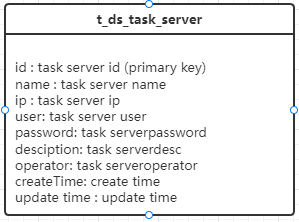 2. Add a task server manage page in Secerity menu, such as create, delete, edit and test connect. 3. Add a task server select input (field: taskServerCode) in Shell and Python task form. 4. Add taskServerCode column in t_ds_task_instance、t_ds_task_definition、t_ds_task_definition_log tables. And change these APIs. 5. Add taskServerCode field in TaskInstance, TaskDefintion, TaskDefinitionLog, TaskNode, and add taskServerInfo field in TaskInstance (not a table field). 6. Add taskServerInfo (just contain ip, user, password, name) entity in dolphinscheduler-task-plugin model. And add taskServerInfo field in TaskExecutionContext. 7. Shell and Python task will check TaskExecutionContext.getTaskServerInfo(), if not null, it will scp the command files and resource files to the task server, and send the start command to remote to exec it. If other task plugin need this feture, can also check this task server field. 8. The task will ssh and scp to the task server as the DS running user, not tenant. Look forward to your comments. -- This is an automated message from the Apache Git Service. To respond to the message, please log on to GitHub and use the URL above to go to the specific comment. To unsubscribe, e-mail: [email protected] For queries about this service, please contact Infrastructure at: [email protected]

