ziqiang-wang opened a new issue, #13797:
URL: https://github.com/apache/dolphinscheduler/issues/13797
### Search before asking - [X] I had searched in the [issues](https://github.com/apache/dolphinscheduler/issues?q=is%3Aissue) and found no similar issues. ### What happened The workflow definition contains a task of a dependency type. Set Retry Times to 3 and Retry Interval to 1 minute. Enable Timeout Alarm, enable Wait for Dependency Completion, set Timeout to 1 minute, and select Timeout Policy to Timeout Failure, as shown in the following figure: 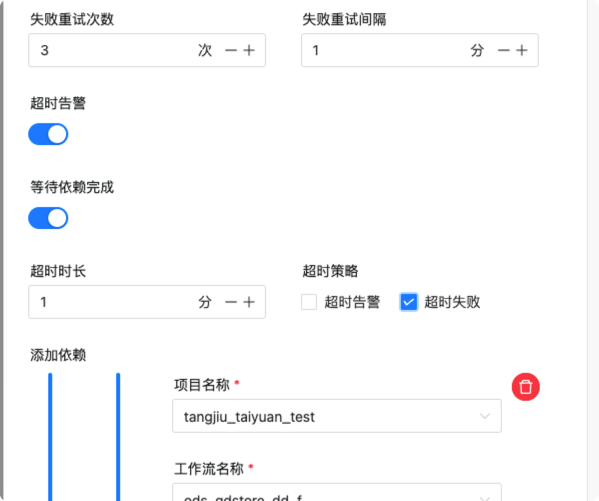 I then manually execute the workflow and select "Failure Policy" as "Continue" and execute the workflow as shown below: 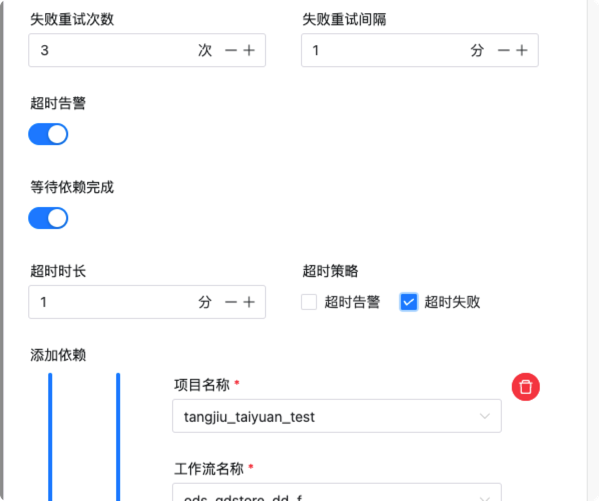 During execution, it was found that the dependent task did fail after a 1 minute timeout, but after another 1 minute, it was not retried (3 failed retries have been set up above), and the workflow instance was always running. After manually stopping a workflow instance, the workflow instance remains in the ready to stop state. ### What you expected to happen 1. A workflow has a dependency task. If the dependency task fails to time out during workflow execution, you can retry the workflow based on the set retry times and interval. 2. If a dependent task fails to run eventually, the entire workflow can continue to run subsequent tasks or stop running directly according to the set running policy. ### How to reproduce Create a workflow definition where the first task type is a dependent task, which is dependent on any task that is not executed today, so that when the dependent task runs, it can time out and fail. Then enable the timeout alarm for the dependent task and wait for the dependency to complete, and set the timeout failure to the timeout policy. Followed by any other type of task, such as a shell. After saving the work definition and executing the workflow manually, you should see that the dependency failed to time out, but was not retried, and the corresponding workflow instance was always running. Manually stopping a workflow instance does not stop the workflow completely, but is always in a state of ready to stop. ### Anything else _No response_ ### Version 3.1.x ### Are you willing to submit PR? - [ ] Yes I am willing to submit a PR! ### Code of Conduct - [X] I agree to follow this project's [Code of Conduct](https://www.apache.org/foundation/policies/conduct) -- This is an automated message from the Apache Git Service. To respond to the message, please log on to GitHub and use the URL above to go to the specific comment. To unsubscribe, e-mail: [email protected] For queries about this service, please contact Infrastructure at: [email protected]


