ziqiang-wang opened a new issue, #13799:
URL: https://github.com/apache/dolphinscheduler/issues/13799
### Search before asking - [X] I had searched in the [issues](https://github.com/apache/dolphinscheduler/issues?q=is%3Aissue) and found no similar issues. ### What happened I define a task and do not select an environment, as shown in the following figure: 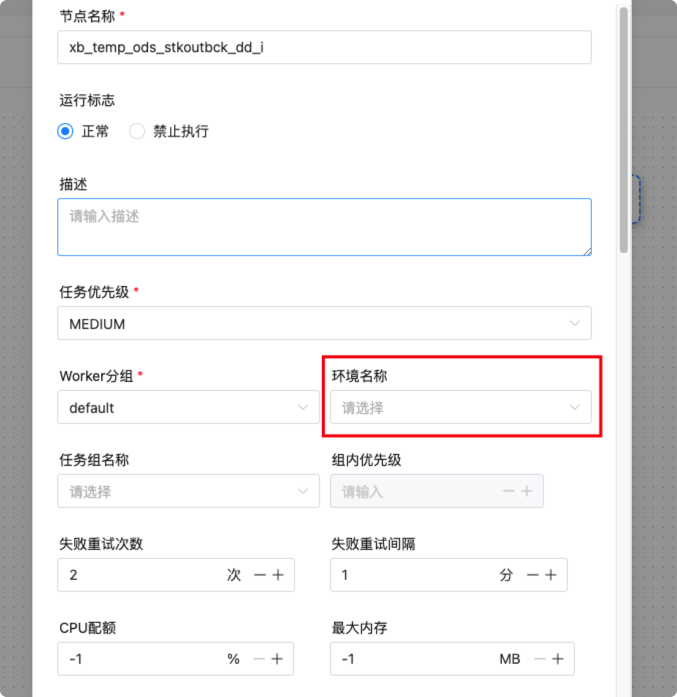 Then save the entire workflow definition, and look at the value of the task's environment field in the t_ds_task_definition table, which is -1, as shown below:  I then re-edited the workflow and opened the previously defined task to find python displayed below the environment name, as shown below: 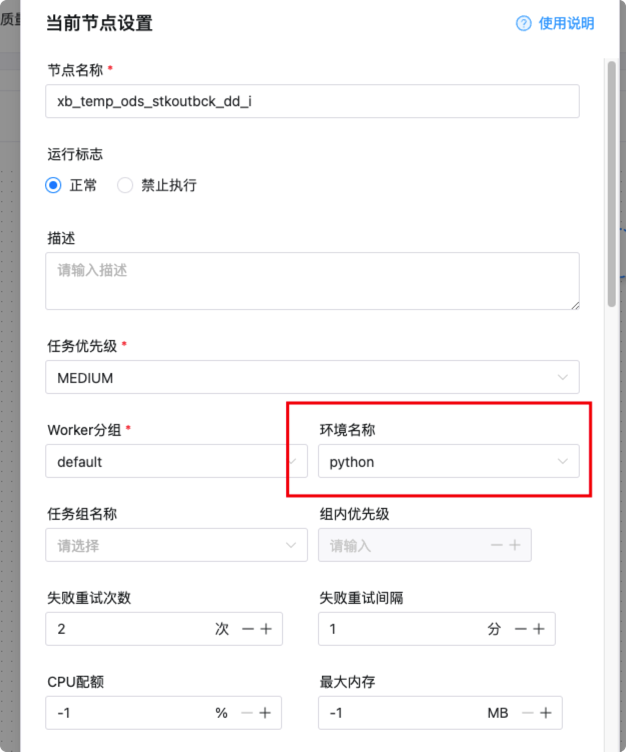 But the task's environment in the t_ds_task_definition table is still -1。 If I save the workflow definition by not removing python from the environment name and leaving it empty, the task's environment field in the t_ds_task_definition table will change to -1, as shown below:  ### What you expected to happen Whatever environment I defined in the task, save it, and edit it again, and the page should display the same environment I defined before. ### How to reproduce 1. Have a defined environment on your own dolphin scheduler. 2. Define a task without selecting an environment and save the workflow. 3. Locate the task from the t_ds_task_definition table and check to see if the environment field value is the environment used in the definition. 4. Re-edit the workflow definition to see if the environment shown in the task is the one defined at the beginning. If it is not the one defined at the beginning, it is a bug. 5. In 4, if the environment displayed is different from the one originally defined, but the value of the environment field in the t_ds_task_definition table is still defined, do not modify the environment displayed on the page and save the workflow definition. You can see that the environment field value for the task in the t_ds_task_definition table changes to the environment displayed on the page. ### Anything else _No response_ ### Version 3.1.x ### Are you willing to submit PR? - [ ] Yes I am willing to submit a PR! ### Code of Conduct - [X] I agree to follow this project's [Code of Conduct](https://www.apache.org/foundation/policies/conduct) -- This is an automated message from the Apache Git Service. To respond to the message, please log on to GitHub and use the URL above to go to the specific comment. To unsubscribe, e-mail: [email protected] For queries about this service, please contact Infrastructure at: [email protected]




