This is an automated email from the ASF dual-hosted git repository.

zhongjiajie pushed a commit to branch dev
in repository https://gitbox.apache.org/repos/asf/dolphinscheduler.git
The following commit(s) were added to refs/heads/dev by this push:
new 8c43e71adf doc: Change readme and standalone docker quick start
(#14002)
8c43e71adf is described below
commit 8c43e71adf3d98ad1e63711abfdf1d125e262c76
Author: Jay Chung <[email protected]>
AuthorDate: Tue Apr 25 09:35:49 2023 +0800
doc: Change readme and standalone docker quick start (#14002)
---
.asf.yaml | 2 +-
CONTRIBUTING.md | 23 +++++
README.md | 118 +++++++++-----------------
README_zh_CN.md | 118 ++++++++++----------------
docs/docs/en/guide/installation/standalone.md | 6 +-
docs/docs/en/guide/start/docker.md | 30 +++----
docs/docs/zh/guide/installation/standalone.md | 12 ++-
docs/docs/zh/guide/start/docker.md | 32 +++----
images/{en_US => }/data-source.png | Bin
images/en_US/dag.png | Bin 83114 -> 0 bytes
images/{en_US => }/home.png | Bin
images/{en_US/master.png => monitor.png} | Bin
images/workflow-definition.png | Bin 0 -> 188111 bytes
images/{en_US => }/workflow-tree.png | Bin
images/zh_CN/dag.png | Bin 81763 -> 0 bytes
images/zh_CN/data-source.png | Bin 80379 -> 0 bytes
images/zh_CN/home.png | Bin 105634 -> 0 bytes
images/zh_CN/master.png | Bin 75011 -> 0 bytes
images/zh_CN/workflow-tree.png | Bin 64917 -> 0 bytes
19 files changed, 150 insertions(+), 191 deletions(-)
diff --git a/.asf.yaml b/.asf.yaml
index 9043e652a7..d403bc7d46 100644
--- a/.asf.yaml
+++ b/.asf.yaml
@@ -16,7 +16,7 @@
#
github:
- description: Apache DolphinScheduler is the modern data workflow
orchestration platform with powerful user interface, dedicated to solving
complex task dependencies in the data pipeline and providing various types of
jobs available `out of the box`
+ description: Apache DolphinScheduler is the modern data orchestration
platform. Agile to create high performance workflow with low-code
homepage: https://dolphinscheduler.apache.org/
labels:
- cloud-native
diff --git a/CONTRIBUTING.md b/CONTRIBUTING.md
index 382b213152..1857921d9f 100644
--- a/CONTRIBUTING.md
+++ b/CONTRIBUTING.md
@@ -1 +1,24 @@
Please refer to the contribution document [How to
contribute](docs/docs/en/contribute/join/contribute.md)
+
+## How to Build
+
+```bash
+./mvnw clean install -Prelease
+```
+
+### Build with different Zookeeper versions
+
+The default Zookeeper Server version supported is 3.8.0.
+```bash
+# Default Zookeeper 3.8.0
+./mvnw clean install -Prelease
+# Support to Zookeeper 3.4.6+
+./mvnw clean install -Prelease -Dzk-3.4
+```
+
+Artifact:
+
+```
+dolphinscheduler-dist/target/apache-dolphinscheduler-${latest.release.version}-bin.tar.gz:
Binary package of DolphinScheduler
+dolphinscheduler-dist/target/apache-dolphinscheduler-${latest.release.version}-src.tar.gz:
Source code package of DolphinScheduler
+```
\ No newline at end of file
diff --git a/README.md b/README.md
index 2a3cb726aa..6eaab81773 100644
--- a/README.md
+++ b/README.md
@@ -1,105 +1,70 @@
-Dolphin Scheduler Official Website
-[dolphinscheduler.apache.org](https://dolphinscheduler.apache.org)
-==================================================================
+# Apache Dolphinscheduler
[](https://www.apache.org/licenses/LICENSE-2.0.html)
-[]()
+
[](https://sonarcloud.io/dashboard?id=apache-dolphinscheduler)
[](https://twitter.com/dolphinschedule)
[](https://s.apache.org/dolphinscheduler-slack)
+[](README_zh_CN.md)
-## Features
+## About
-Apache DolphinScheduler is the modern data workflow orchestration platform
with powerful user interface, dedicated to solving complex task dependencies in
the data pipeline and providing various types of jobs available `out of the box`
+Apache DolphinScheduler is the modern data orchestration platform. Agile to
create high performance workflow with low-code. It is also provided powerful
user interface,
+dedicated to solving complex task dependencies in the data pipeline and
providing various types of jobs available **out of the box**
The key features for DolphinScheduler are as follows:
-- Easy to deploy, we provide 4 ways to deploy, such as Standalone
deployment,Cluster deployment,Docker / Kubernetes deployment and Rainbond
deployment
-- Easy to use, there are four ways to create workflows:
-
- - Visually, create tasks by dragging and dropping tasks
- -
[PyDolphinScheduler](https://dolphinscheduler.apache.org/python/main/index.html),
Creating workflows via Python API, aka workflow-as-code
- - Yaml definition, mapping yaml into workflow(have to install
PyDolphinScheduler currently)
- - Open API, Creating workflows
-
-- Highly Reliable,
- DolphinScheduler uses a decentralized multi-master and multi-worker
architecture, which naturally supports horizontal scaling and high availability
+- Easy to deploy, provide four ways to deploy which including Standalone,
Cluster, Docker and Kubernetes.
+- Easy to use, workflow can be created and managed by four ways, which
including Web UI, [Python
SDK](https://dolphinscheduler.apache.org/python/main/index.html), Yaml file and
Open API
+- Highly reliable and high availability, decentralized architecture with
multi-master and multi-worker, native supports horizontal scaling.
- High performance, its performance is N times faster than other orchestration
platform and it can support tens of millions of tasks per day
-- Supports multi-tenancy
-- Supports various task types: Shell, MR, Spark, SQL (MySQL, OceanBase,
PostgreSQL, Hive, Spark SQL), Python, Procedure, Sub_Workflow,
- Http, K8s, Jupyter, MLflow, SageMaker, DVC, Pytorch, Amazon EMR, etc
-- Orchestrating workflows and dependencies, you can pause/stop/recover task
any time, failed tasks can be set to automatically retry
-- Visualizing the running state of the task in real-time and seeing the task
runtime log
-- What you see is what you get when you edit the task on the UI
-- Backfill can be operated on the UI directly
-- Perfect project, resource, data source-level permission control
-- Displaying workflow history in tree/Gantt chart, as well as statistical
analysis on the task status & process status in each workflow
-- Supports internationalization
-- Cloud Native, DolphinScheduler supports orchestrating multi-cloud/data
center workflow, and
- supports custom task type
-- More features waiting for partners to explore
-
-## User Interface Screenshots
-
-
-<img width="1100"
src="https://user-images.githubusercontent.com/15833811/197348110-1653ea32-ce07-436c-a0b8-6ac1af80aea5.png";>
-
-
-
-
+- Cloud Native, DolphinScheduler supports orchestrating multi-cloud/data
center workflow, and supports custom task type
+- Versioning both workflow and workflow instance(including tasks)
+- Various state control of workflow and task, support pause/stop/recover them
in any time
+- Multi-tenancy support
+- Others like backfill support(Web UI native), permission control including
project, resource and data source
-## QuickStart in Docker
+## QuickStart
-Please refer the official website document: [QuickStart in
Docker](https://dolphinscheduler.apache.org/en-us/docs/3.1.2/guide/start/docker)
+- For quick experience
+ - Want to [start with
standalone](https://dolphinscheduler.apache.org/en-us/docs/3.1.5/guide/installation/standalone)
+ - Want to [start with
Docker](https://dolphinscheduler.apache.org/en-us/docs/3.1.5/guide/start/docker)
+- For Kubernetes
+ - [Start with
Kubernetes](https://dolphinscheduler.apache.org/en-us/docs/3.1.5/guide/installation/kubernetes)
-## QuickStart in Kubernetes
+## User Interface Screenshots
-Please refer to the official website document: [QuickStart in
Kubernetes](https://dolphinscheduler.apache.org/en-us/docs/3.1.2/guide/installation/kubernetes)
+* **Homepage:** Project and workflow overview, including the latest workflow
instance and task instance status statistics.
+
-## How to Build
+* **Workflow Definition:** Create and manage workflow by drag and drop, easy
to build and maintain complex workflow, support [bulk of
tasks](https://dolphinscheduler.apache.org/en-us/docs/3.1.5/introduction-to-functions_menu/task_menu)
out of box.
+
-```bash
-./mvnw clean install -Prelease
-```
+* **Workflow Tree View:** Abstract tree structure could clearer understanding
of the relationship between tasks
+
-### Build with different Zookeeper versions
+* **Data source:** Manage support multiple external data sources, provide
unified data access capabilities for such as MySQL, PostgreSQL, Hive, Trino,
etc.
+
-The default Zookeeper Server version supported is 3.8.0.
-```bash
-# Default Zookeeper 3.8.0
-./mvnw clean install -Prelease
-# Support to Zookeeper 3.4.6+
-./mvnw clean install -Prelease -Dzk-3.4
-```
+* **Monitor:** View the status of the master, worker and database in real
time, including server resource usage and load, do quick health check without
logging in to the server.
+
-Artifact:
+## Suggestions & Bug Reports
-```
-dolphinscheduler-dist/target/apache-dolphinscheduler-${latest.release.version}-bin.tar.gz:
Binary package of DolphinScheduler
-dolphinscheduler-dist/target/apache-dolphinscheduler-${latest.release.version}-src.tar.gz:
Source code package of DolphinScheduler
-```
+Follow [this
guide](https://github.com/apache/dolphinscheduler/issues/new/choose) to report
your suggestions or bugs.
-## Get Help
+## Contributing
-1. Submit an
[issue](https://github.com/apache/dolphinscheduler/issues/new/choose)
-2. [Join our slack](https://s.apache.org/dolphinscheduler-slack) and send your
question to channel `#general`
-3. Send email to [email protected] or
[email protected]
+The community welcomes everyone to contribute, please refer to this page to
find out more: [How to contribute](docs/docs/en/contribute/join/contribute.md),
+find the good first issue in
[here](https://github.com/apache/dolphinscheduler/contribute) if you are new to
DolphinScheduler.
## Community
-You are very welcome to communicate with the developers and users of Dolphin
Scheduler. There are two ways to find them:
+Welcome to join the Apache DolphinScheduler community by:
-1. Join the Slack channel [Slack](https://asf-dolphinscheduler.slack.com/)
-2. Follow the [Twitter account of
DolphinScheduler](https://twitter.com/dolphinschedule) and get the latest news
on time
-
-## How to Contribute
-
-The community welcomes everyone to contribute, please refer to this page to
find out more: [How to contribute](docs/docs/en/contribute/join/contribute.md).
-
-## Thanks
-
-DolphinScheduler is based on a lot of excellent open-source projects, such as
Google guava, grpc, netty, quartz, and many open-source projects of Apache and
so on.
-We would like to express our deep gratitude to all the open-source projects
used in DolphinScheduler. We hope that we are not only the beneficiaries of
open-source, but also give back to the community. Besides, we hope everyone who
have the same enthusiasm and passion for open source could join in and
contribute to the open-source community
+- Join the [DolphinScheduler
Slack](https://s.apache.org/dolphinscheduler-slack) to keep in touch with the
community
+- Follow the [DolphinScheduler Twitter](https://twitter.com/dolphinschedule)
and get the latest news
+- Subscribe DolphinScheduler mail list, [email protected] for
user and [email protected] for developer
# Landscapes
@@ -111,6 +76,3 @@ DolphinScheduler enriches the <a
href="https://landscape.cncf.io/?landscape=obse
</p >
-## License
-
-Please refer to the
[LICENSE](https://github.com/apache/dolphinscheduler/blob/dev/LICENSE) file
diff --git a/README_zh_CN.md b/README_zh_CN.md
index e67cf5b94b..2f94f560f1 100644
--- a/README_zh_CN.md
+++ b/README_zh_CN.md
@@ -1,102 +1,76 @@
-Dolphin Scheduler Official Website
-[dolphinscheduler.apache.org](https://dolphinscheduler.apache.org)
-==================================================================
+# Apache Dolphinscheduler
[](https://www.apache.org/licenses/LICENSE-2.0.html)
[]()
[](https://sonarcloud.io/dashboard?id=apache-dolphinscheduler)
[](https://twitter.com/dolphinschedule)
[](https://s.apache.org/dolphinscheduler-slack)
-
-[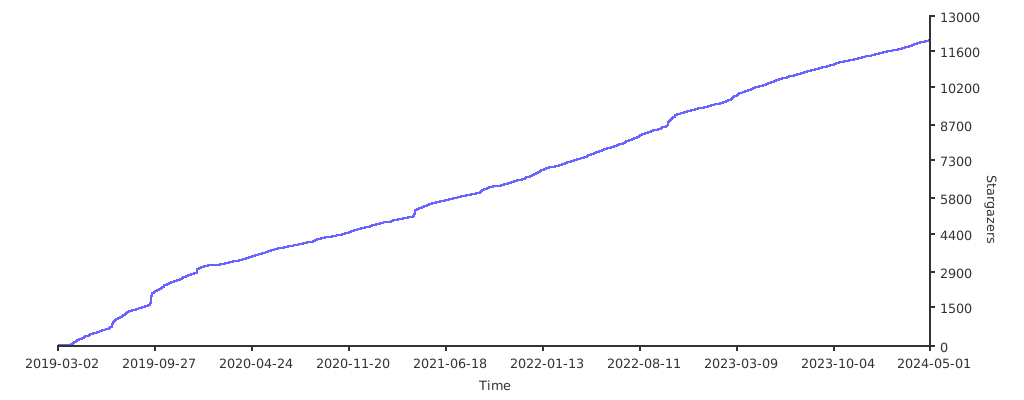](https://starchart.cc/apache/dolphinscheduler)
-
-[](README_zh_CN.md)
[](README.md)
-## 设计特点
+## 关于
一个分布式易扩展的可视化 DAG 工作流任务调度系统。致力于解决数据处理流程中错综复杂的依赖关系,使调度系统在数据处理流程中`开箱即用`。
-其主要目标如下:
-
-- 以 DAG 图的方式将 Task 按照任务的依赖关系关联起来,可实时可视化监控任务的运行状态
--
支持丰富的任务类型:Shell、MR、Spark、SQL(mysql、oceanbase、postgresql、hive、sparksql)、Python、Sub_Process、Procedure
等
-- 支持工作流定时调度、依赖调度、手动调度、手动暂停/停止/恢复,同时支持失败重试/告警、从指定节点恢复失败、Kill 任务等操作
-- 支持工作流优先级、任务优先级及任务的故障转移及任务超时告警/失败
-- 支持工作流全局参数及节点自定义参数设置
-- 支持资源文件的在线上传/下载,管理等,支持在线文件创建、编辑
-- 支持任务日志在线查看及滚动、在线下载日志等
-- 实现集群 HA,通过 Zookeeper 实现 Master 集群和 Worker 集群去中心化
-- 支持对`Master/Worker` cpu load,memory,cpu 在线查看
-- 支持工作流运行历史树形/甘特图展示、支持任务状态统计、流程状态统计
-- 支持补数
-- 支持多租户
-- 支持国际化
-- 还有更多等待伙伴们探索
-
-## 系统部分截图
+DolphinScheduler 的主要特性如下:
-
-
-
-
-
+- 易于部署,提供四种部署方式,包括Standalone、Cluster、Docker和Kubernetes。
+- 易于使用,可以通过四种方式创建和管理工作流,包括Web UI、[Python
SDK](https://dolphinscheduler.apache.org/python/main/index.html)、Yaml文件和Open API
+- 高可靠高可用,多主多从的去中心化架构,原生支持横向扩展。
+- 高性能,性能比其他编排平台快N倍,每天可支持千万级任务
+- Cloud Native,DolphinScheduler支持编排多云/数据中心工作流,支持自定义任务类型
+- 对工作流和工作流实例(包括任务)进行版本控制
+- 工作流和任务的多种状态控制,支持随时暂停/停止/恢复它们
+- 多租户支持
+- 其他如回填支持(Web UI 原生),包括项目、资源和数据源的权限控制
-## 近期研发计划
-
-DolphinScheduler 的工作计划:<a
href="https://github.com/apache/dolphinscheduler/projects/1";
target="_blank">研发计划</a> ,其中 In Develop 卡片下是正在研发的功能,TODO 卡片是待做事项(包括 feature
ideas)
-
-## 参与贡献
+## 快速开始
-非常欢迎大家来参与贡献,贡献流程请参考:
-[[参与贡献](docs/docs/zh/contribute/join/contribute.md)]
+- 如果想要体验
+ - [standalone
启动](https://dolphinscheduler.apache.org/zh-cn/docs/3.1.5/guide/installation/standalone)
+ - [Docker
启动](https://dolphinscheduler.apache.org/zh-cn/docs/3.1.5/guide/start/docker)
+- 想 Kubernetes 部署
+ - [Kubernetes
部署](https://dolphinscheduler.apache.org/zh-cn/docs/3.1.5/guide/installation/kubernetes)
-## 快速试用 Docker
-
-请参考官方文档: [快速试用 Docker
部署](https://dolphinscheduler.apache.org/zh-cn/docs/3.1.2/guide/start/docker)
-
-## 快速试用 Kubernetes
+## 系统部分截图
-请参考官方文档: [快速试用 Kubernetes
部署](https://dolphinscheduler.apache.org/zh-cn/docs/3.1.2/guide/installation/kubernetes)
+* **主页**:项目和工作流概览,包括最新的工作流实例和任务实例状态统计。
+
-## 如何构建
+* **工作流定义**: 通过拖拉拽创建和管理工作流,轻松构建和维护复杂的工作流。
+
-```bash
-./mvnw clean install -Prelease
-```
+* **工作流树状图**: 抽象的树形结构可以更清晰的理解任务之间的关系
+
-### 构建不同版本的 Zookeeper 依赖
+* **数据源**: 管理支持多种外部数据源,为MySQL、PostgreSQL、Hive、Trino等,并提供统一的数据访问能力。
+
-默认支持 Zookeeper Server 3.8.0。
-```bash
-# 默认 Zookeeper Client 3.8.0
-./mvnw clean install -Prelease
-# 构建支持 Zookeeper 3.4.6+
-./mvnw clean install -Prelease -Dzk-3.4
-```
+* **监控**:实时查看master、worker和数据库的状态,包括服务器资源使用情况和负载情况,无需登录服务器即可快速进行健康检查。
+
-制品:
+## 建议和报告 bugs
-```
-dolphinscheduler-dist/target/apache-dolphinscheduler-${latest.release.version}-bin.tar.gz:
DolphinScheduler 二进制包
-dolphinscheduler-dist/target/apache-dolphinscheduler-${latest.release.version}-src.tar.gz:
DolphinScheduler 源代码包
-```
+根据 [这个步骤](https://github.com/apache/dolphinscheduler/issues/new/choose) 来报告你的
bug 或者提交建议。
-## 感谢
+## 参与贡献
-Dolphin Scheduler 使用了很多优秀的开源项目,比如 google 的 guava、grpc,netty,quartz,以及 apache
的众多开源项目等等,
-正是由于站在这些开源项目的肩膀上,才有 Dolphin Scheduler
的诞生的可能。对此我们对使用的所有开源软件表示非常的感谢!我们也希望自己不仅是开源的受益者,也能成为开源的贡献者,也希望对开源有同样热情和信念的伙伴加入进来,一起为开源献出一份力!
+社区欢迎大家贡献,请参考此页面了解更多:[如何贡献](docs/docs/zh/contribute/join/contribute.md),在[这里](https://github.com/apache/dolphinscheduler/contribute)可以找到good
first issue
+如果你是首次贡献 dolphinscheduler。
-## 获得帮助
+## 社区
-1. 提交 [issue](https://github.com/apache/dolphinscheduler/issues/new/choose)
-2. [加入 slack 群](https://s.apache.org/dolphinscheduler-slack) 并在频道
`#troubleshooting` 中提问
+欢迎通过以方式加入社区:
-## 社区
+- 加入 [DolphinScheduler Slack](https://s.apache.org/dolphinscheduler-slack)
+- 关注 [DolphinScheduler Twitter](https://twitter.com/dolphinschedule) 来获取最新消息
+- 订阅 DolphinScheduler 邮件列表, 用户订阅 [email protected] 开发者请订阅
[email protected]
-1. 通过[该申请链接](https://s.apache.org/dolphinscheduler-slack)加入 slack channel
-2. 关注[Apache Dolphin Scheduler 的 Twitter
账号](https://twitter.com/dolphinschedule)获取实时动态
+# Landscapes
-## 版权
+<p align="center">
+<br/><br/>
+<img src="https://landscape.cncf.io/images/left-logo.svg";
width="150"/> <img
src="https://landscape.cncf.io/images/right-logo.svg"; width="200"/>
+<br/><br/>
+DolphinScheduler enriches the <a
href="https://landscape.cncf.io/?landscape=observability-and-analysis&license=apache-license-2-0";>CNCF
CLOUD NATIVE Landscape.</a >
-请参考 [LICENSE](https://github.com/apache/dolphinscheduler/blob/dev/LICENSE) 文件.
+</p >
diff --git a/docs/docs/en/guide/installation/standalone.md
b/docs/docs/en/guide/installation/standalone.md
index 96dd1a8ebd..bd2d73f1ce 100644
--- a/docs/docs/en/guide/installation/standalone.md
+++ b/docs/docs/en/guide/installation/standalone.md
@@ -12,7 +12,7 @@ If you want to deploy DolphinScheduler in production, we
recommend you follow [c
## Preparation
- JDK:download [JDK][jdk] (1.8+), install and configure environment variable
`JAVA_HOME` and append `bin` dir (included in `JAVA_HOME`) to `PATH` variable.
You can skip this step if it already exists in your environment.
-- Binary package: download the DolphinScheduler binary package at [download
page](https://dolphinscheduler.apache.org/en-us/download).
+- Binary package: download the DolphinScheduler binary package at [download
page](https://dolphinscheduler.apache.org/en-us/download/<version>). <!--
markdown-link-check-disable-line -->
## Start DolphinScheduler Standalone Server
@@ -32,6 +32,8 @@ bash ./bin/dolphinscheduler-daemon.sh start standalone-server
Access address `http://localhost:12345/dolphinscheduler/ui` and login
DolphinScheduler UI. The default username and password are
**admin/dolphinscheduler123**
+
+
### Start or Stop Server
The script `./bin/dolphinscheduler-daemon.sh`can be used not only quickly
start standalone, but also to stop the service operation. The following are all
the commands:
@@ -41,6 +43,8 @@ The script `./bin/dolphinscheduler-daemon.sh`can be used not
only quickly start
bash ./bin/dolphinscheduler-daemon.sh start standalone-server
# Stop Standalone Server
bash ./bin/dolphinscheduler-daemon.sh stop standalone-server
+# Check Standalone Server status
+bash ./bin/dolphinscheduler-daemon.sh status standalone-server
```
> Note: Python gateway service is started along with the api-server, and if
> you do not want to start Python gateway
diff --git a/docs/docs/en/guide/start/docker.md
b/docs/docs/en/guide/start/docker.md
index ef0f438721..7326ff42a5 100644
--- a/docs/docs/en/guide/start/docker.md
+++ b/docs/docs/en/guide/start/docker.md
@@ -1,15 +1,15 @@
# Docker Quick Start
-There are three ways to start DolphinScheduler with Docker,
[Standalone-server](#using-standalone-server-docker-image) is the way you
-find if you just want to start and try DolphinScheduler as a beginner.
[docker-compose](#using-docker-compose-to-start-server) is for
-some who want to deploy DolphinScheduler in small or event middle scale
workflows in their daily work.
-[Using exists postgresql and zookeeper
server](#using-exists-postgresql-zookeeper) is for users who want to reuse the
database
-or zookeeper server already exists.
+There are three ways to start DolphinScheduler with Docker
+
+- [Standalone-server](#using-standalone-server-docker-image) is the way you
find if you just want to start and try DolphinScheduler as a beginner.
+- [docker-compose](#using-docker-compose-to-start-server) is for some who want
to deploy DolphinScheduler in small or event middle scale workflows in their
daily work.
+- [Using exists postgresql and zookeeper
server](#using-exists-postgresql-zookeeper) is for users who want to reuse the
database or zookeeper server already exists.
## Prepare
-- [Docker](https://docs.docker.com/engine/install/) 1.13.1+
-- [Docker Compose](https://docs.docker.com/compose/) 1.28.0+
+Need to install [Docker](https://docs.docker.com/engine/install/) 1.13.1+ and
[Docker Compose](https://docs.docker.com/compose/) 1.28.0+
+before starting DolphinScheduler with Docker
## Start Server
@@ -37,15 +37,7 @@ be stored on disks after you change docker-compose
configuration, and it is robu
DolphinScheduler in a long term. You have to install
[docker-compose](https://docs.docker.com/compose/install/) before you
start servers.
-After installed docker-compose, it is recommended to modify some
configurations for better experience. We highly recommended
-modify docker-compose's free memory up to 4 GB.
-
-- Mac:Click `Docker Desktop -> Preferences -> Resources -> Memory` modified it
-- Windows Docker Desktop:
- - Hyper-V mode: Click `Docker Desktop -> Settings -> Resources -> Memory`
modified it
- - WSL 2 mode: see [WSL 2 utility
VM](https://docs.microsoft.com/zh-cn/windows/wsl/wsl-config#configure-global-options-with-wslconfig)
for more detail.
-
-After complete the configuration, we can get the `docker-compose.yaml` file
from [download page](https://dolphinscheduler.apache.org/en-us/download)
+After complete the installation, get the `docker-compose.yaml` file from
[download page](https://dolphinscheduler.apache.org/en-us/download/<version>)
form its source package, and make sure you get the right version. After
download the package, you can run the commands as below.
```shell
@@ -63,7 +55,11 @@ $ docker-compose --profile schema up -d
$ docker-compose --profile all up -d
```
-> NOTES: It will not only start DolphinScheduler servers but also some others
necessary services like PostgreSQL(with `root`
+> NOTES: After installed docker-compose, it is recommended to modify some
configurations for better experience. We highly
+> recommended modify docker daemon memory up to 4 GB, see [How to assign more
memory to docker container](https://stackoverflow.com/a/44533437/7152658)
+> for more detail.
+>
+> It will not only start DolphinScheduler servers but also some others
necessary services like PostgreSQL(with `root`
> as user, `root` as password and `dolphinscheduler` as database) and
> ZooKeeper when starting with docker-compose.
### Using Exists PostgreSQL ZooKeeper
diff --git a/docs/docs/zh/guide/installation/standalone.md
b/docs/docs/zh/guide/installation/standalone.md
index 409c7f3c43..dbd9ca94b6 100644
--- a/docs/docs/zh/guide/installation/standalone.md
+++ b/docs/docs/zh/guide/installation/standalone.md
@@ -5,18 +5,18 @@ Standalone 仅适用于 DolphinScheduler 的快速体验.
如果你是新手,想要体验 DolphinScheduler 的功能,推荐使用 Standalone
方式体检。如果你想体验更完整的功能,或者更大的任务量,推荐使用[伪集群部署](pseudo-cluster.md)。如果你是在生产中使用,推荐使用[集群部署](cluster.md)或者[kubernetes](kubernetes.md)
> **_注意:_** Standalone 仅建议 20 个以下工作流使用,因为其采用内存式的 H2 Database, Zookeeper
> Testing Server,任务过多可能导致不稳定,并且如果重启或者停止 standalone-server 会导致内存中数据库里的数据清空。
-> 如果您要连接外部数据库,比如 mysql 或者 postgresql,请看[配置数据库](#配置数据库)
+> Standalone 支持元数据持久化,但是需要使用外部数据库,如 mysql 或者 postgresql,请看[配置数据库](#配置数据库)
## 前置准备工作
- JDK:下载[JDK][jdk] (1.8+),安装并配置 `JAVA_HOME` 环境变量,并将其下的 `bin` 目录追加到 `PATH`
环境变量中。如果你的环境中已存在,可以跳过这步。
-- 二进制包:在[下载页面](https://dolphinscheduler.apache.org/zh-cn/download)下载
DolphinScheduler 二进制包
+- 二进制包:在[下载页面](https://dolphinscheduler.apache.org/en-us/download/<version>)下载
DolphinScheduler 二进制包 <!-- markdown-link-check-disable-line -->
## 启动 DolphinScheduler Standalone Server
### 解压并启动 DolphinScheduler
-二进制压缩包中有 standalone 启动的脚本,解压后即可快速启动。切换到有 sudo 权限的用户,运行脚本
+二进制压缩包中有 standalone 启动的脚本,解压后即可快速启动。
```shell
# 解压并运行 Standalone Server
@@ -30,6 +30,8 @@ bash ./bin/dolphinscheduler-daemon.sh start standalone-server
浏览器访问地址 http://localhost:12345/dolphinscheduler/ui 即可登录系统 UI。默认的用户名和密码是
**admin/dolphinscheduler123**
+
+
## 启停服务
脚本 `./bin/dolphinscheduler-daemon.sh` 除了可以快捷启动 standalone 外,还能停止服务运行,全部命令如下
@@ -39,6 +41,8 @@ bash ./bin/dolphinscheduler-daemon.sh start standalone-server
bash ./bin/dolphinscheduler-daemon.sh start standalone-server
# 停止 Standalone Server 服务
bash ./bin/dolphinscheduler-daemon.sh stop standalone-server
+# 查看 Standalone Server 状态
+bash ./bin/dolphinscheduler-daemon.sh status standalone-server
```
[jdk]: https://www.oracle.com/technetwork/java/javase/downloads/index.html
@@ -46,4 +50,4 @@ bash ./bin/dolphinscheduler-daemon.sh stop standalone-server
## 配置数据库
Standalone server 使用 H2
数据库作为其元数据存储数据,这是为了上手简单,用户在启动服务器之前不需要启动数据库。但是如果用户想将元数据库存储在
-MySQL 或 PostgreSQL 等其他数据库中,他们必须更改一些配置。请参考
[数据源配置](../howto/datasource-setting.md) `Standalone 切换元数据库` 创建并初始化数据库
+MySQL 或 PostgreSQL 等其他数据库中,必须更改一些配置。请参考
[数据源配置](../howto/datasource-setting.md) `Standalone 切换元数据库` 创建并初始化数据库
diff --git a/docs/docs/zh/guide/start/docker.md
b/docs/docs/zh/guide/start/docker.md
index 8b4671cd1a..9b60ccb84a 100644
--- a/docs/docs/zh/guide/start/docker.md
+++ b/docs/docs/zh/guide/start/docker.md
@@ -1,13 +1,14 @@
# Docker 快速使用教程
-本教程使用三种不同的方式通过 Docker 完成 DolphinScheduler 的部署,如果你想要快速体验,推荐使用 standalone-server
镜像,
-如果你想要体验比较完成的服务,推荐使用 docker-compose 启动服务。如果你已经有自己的数据库或者 Zookeeper 服务
-你想要沿用这些基础服务,你可以参考沿用已有的 PostgreSQL 和 ZooKeeper 服务完成部署。
+本教程使用三种不同的方式通过 Docker 完成 DolphinScheduler 的部署
+
+- 如果你想要快速体验,推荐使用 standalone-server 镜像,
+- 如果你想要体验比较完成的服务,推荐使用 docker-compose 启动服务.
+- 如果你已经有自己的数据库或者 Zookeeper 服务你想要沿用这些基础服务,你可以参考沿用已有的 PostgreSQL 和 ZooKeeper
服务完成部署。
## 前置条件
-- [Docker](https://docs.docker.com/engine/install/) 1.13.1+
-- [Docker Compose](https://docs.docker.com/compose/) 1.28.0+
+需要安装 [Docker](https://docs.docker.com/engine/install/) 1.13.1 以上版本,以及 [Docker
Compose](https://docs.docker.com/compose/) 1.28.0 以上版本。
## 启动服务
@@ -32,22 +33,15 @@ $ docker run --name dolphinscheduler-standalone-server -p
12345:12345 -p 25333:2
服务重启的时候保留元数据(如需要挂载到本地路径需要做指定)。他更健壮,能保证用户体验更加完整的 DolphinScheduler 服务。这种方式需要先安装
[docker-compose](https://docs.docker.com/compose/install/),链接适用于
Mac,Linux,Windows。
-安装完成 docker-compose 后我们需要修改部分配置以便能更好体验 DolphinScheduler 服务,我们需要配置不少于 4GB 的空闲内存:
-
-- Mac:点击 `Docker Desktop -> Preferences -> Resources -> Memory` 调整内存大小
-- Windows Docker Desktop:
- - Hyper-V 模式:点击 `Docker Desktop -> Settings -> Resources -> Memory` 调整内存大小
- - WSL 2 模式 模式:参考 [WSL 2 utility
VM](https://docs.microsoft.com/zh-cn/windows/wsl/wsl-config#configure-global-options-with-wslconfig)
调整内存大小
-
-配置完成后我们需要获取 `docker-compose.yaml`
文件,通过[下载页面](https://dolphinscheduler.apache.org/zh-cn/download)下载对应版本源码包可能是最快的方法,
-源码包对应的值为 "Total Source Code"。当下载完源码后就可以运行命令进行部署了。
+确保 docker-compose 顺利安装后,需要获取 `docker-compose.yaml`
文件,通过[下载页面](https://dolphinscheduler.apache.org/en-us/download/<version>)
+下载对应版本源码包可能是最快的方法,当下载完源码后就可以运行命令进行部署了。
```shell
$ DOLPHINSCHEDULER_VERSION=<version>
$ tar -zxf apache-dolphinscheduler-"${DOLPHINSCHEDULER_VERSION}"-src.tar.gz
# Mac Linux 用户
$ cd apache-dolphinscheduler-"${DOLPHINSCHEDULER_VERSION}"-src/deploy/docker
-# Windows 用户, `cd
apache-dolphinscheduler-"${DOLPHINSCHEDULER_VERSION}"-src\deploy\docker`
+# Windows 用户, `cd
apache-dolphinscheduler-"${DOLPHINSCHEDULER_VERSION}"-src\deploy\docker`
# 如果需要初始化或者升级数据库结构,需要指定profile为schema
$ docker-compose --profile schema up -d
@@ -56,8 +50,10 @@ $ docker-compose --profile schema up -d
$ docker-compose --profile all up -d
```
-> 提醒:通过 docker-compose 启动服务时,除了会启动 DolphinScheduler 对应的服务外,还会启动必要依赖服务,如数据库
PostgreSQL(用户
-> `root`, 密码 `root`, 数据库 `dolphinscheduler`) 和 服务发现 ZooKeeper。
+> 提醒:安装完成 docker-compose 后需要修改部分配置以便能更好体验 DolphinScheduler 服务,我们推荐配置不少于 4GB
的空闲内存,详见
+> [How to assign more memory to docker
container](https://stackoverflow.com/a/44533437/7152658).
+>
+> 通过 docker-compose 启动服务时,除了会启动 DolphinScheduler 对应的服务外,还会启动必要依赖服务,如数据库
PostgreSQL 和 服务发现 ZooKeeper
### 沿用已有的 PostgreSQL 和 ZooKeeper 服务
@@ -131,4 +127,4 @@ $ docker run -d --name dolphinscheduler-alert-server \
## 环境变量
可以通过环境变量来修改 Docker 运行的配置,我们在沿用已有的 PostgreSQL 和 ZooKeeper 服务中就通过环境变量修改了 Docker
的数据库配置和
-注册中心配置,关于全部的配置环境可以查看对应组件的 application.yaml 文件了解 <!--
markdown-link-check-disable-line -->
+注册中心配置,关于全部的配置环境可以查看对应组件的 application.yaml 文件了解。
diff --git a/images/en_US/data-source.png b/images/data-source.png
similarity index 100%
rename from images/en_US/data-source.png
rename to images/data-source.png
diff --git a/images/en_US/dag.png b/images/en_US/dag.png
deleted file mode 100644
index 4876960f47..0000000000
Binary files a/images/en_US/dag.png and /dev/null differ
diff --git a/images/en_US/home.png b/images/home.png
similarity index 100%
rename from images/en_US/home.png
rename to images/home.png
diff --git a/images/en_US/master.png b/images/monitor.png
similarity index 100%
rename from images/en_US/master.png
rename to images/monitor.png
diff --git a/images/workflow-definition.png b/images/workflow-definition.png
new file mode 100644
index 0000000000..b0974623e1
Binary files /dev/null and b/images/workflow-definition.png differ
diff --git a/images/en_US/workflow-tree.png b/images/workflow-tree.png
similarity index 100%
rename from images/en_US/workflow-tree.png
rename to images/workflow-tree.png
diff --git a/images/zh_CN/dag.png b/images/zh_CN/dag.png
deleted file mode 100644
index efdc66493a..0000000000
Binary files a/images/zh_CN/dag.png and /dev/null differ
diff --git a/images/zh_CN/data-source.png b/images/zh_CN/data-source.png
deleted file mode 100644
index 96c89f88d1..0000000000
Binary files a/images/zh_CN/data-source.png and /dev/null differ
diff --git a/images/zh_CN/home.png b/images/zh_CN/home.png
deleted file mode 100644
index 1a6c13c55a..0000000000
Binary files a/images/zh_CN/home.png and /dev/null differ
diff --git a/images/zh_CN/master.png b/images/zh_CN/master.png
deleted file mode 100644
index 3b4834640c..0000000000
Binary files a/images/zh_CN/master.png and /dev/null differ
diff --git a/images/zh_CN/workflow-tree.png b/images/zh_CN/workflow-tree.png
deleted file mode 100644
index f7bbcfefa1..0000000000
Binary files a/images/zh_CN/workflow-tree.png and /dev/null differ










