This is an automated email from the ASF dual-hosted git repository.

luzhijing pushed a commit to branch master
in repository https://gitbox.apache.org/repos/asf/doris-website.git
The following commit(s) were added to refs/heads/master by this push:
new ad7b273797ae [docs](community) Update Community Docs Contribute (#493)
ad7b273797ae is described below
commit ad7b273797ae15445f1b21dff0b895290b89669d
Author: KassieZ <[email protected]>
AuthorDate: Fri Mar 29 22:35:19 2024 +0800
[docs](community) Update Community Docs Contribute (#493)
---
community/design/grouping_sets_design.md | 2 +-
community/developer-guide/fe-eclipse-dev.md | 2 +-
community/developer-guide/fe-idea-dev.md | 2 +-
community/developer-guide/fe-vscode-dev.md | 2 +-
community/doris-future.md | 2 +-
community/how-to-contribute/contribute-doc.md | 652 ++++++++-----------
community/how-to-contribute/contributor-guide.md | 3 +-
.../how-to-contribute/docs-format-specification.md | 294 +++++++++
.../how-to-contribute/how-to-be-a-committer.md | 4 +-
community/how-to-contribute/how-to-contribute.md | 13 +-
.../how-to-share-blogs.md | 6 +-
community/how-to-contribute/pull-request.md | 59 +-
community/release-and-verify/release-verify.md | 2 +-
.../current.json | 26 +
.../current/doris-future.md | 10 +-
.../commit-format-specification.md | 4 +-
.../current/how-to-contribute/contribute-doc.md | 688 ++++++++++-----------
.../current/how-to-contribute/contributor-guide.md | 54 +-
.../how-to-contribute/docs-format-specification.md | 392 ++++++++++++
.../how-to-contribute/how-to-be-a-committer.md | 4 +-
.../current/how-to-contribute/how-to-contribute.md | 22 +-
.../how-to-contribute}/how-to-share-blogs.md | 25 +-
.../current/how-to-contribute/pull-request.md | 73 ++-
.../current/join-community.md | 15 +-
sidebarsCommunity.json | 11 +-
25 files changed, 1488 insertions(+), 879 deletions(-)
diff --git a/community/design/grouping_sets_design.md
b/community/design/grouping_sets_design.md
index 497a8b665f77..cb1e475beb35 100644
--- a/community/design/grouping_sets_design.md
+++ b/community/design/grouping_sets_design.md
@@ -1,6 +1,6 @@
---
{
- "title": "GROUPING SETS DESIGN",
+ "title": "GROUPING SETS Design",
"language": "en"
}
---
diff --git a/community/developer-guide/fe-eclipse-dev.md
b/community/developer-guide/fe-eclipse-dev.md
index 011182d0aca1..ff2eb1cc2ebf 100644
--- a/community/developer-guide/fe-eclipse-dev.md
+++ b/community/developer-guide/fe-eclipse-dev.md
@@ -1,6 +1,6 @@
---
{
- "title": "Setting FE dev env - Eclipse",
+ "title": "Setting FE Dev Env - Eclipse",
"language": "en"
}
---
diff --git a/community/developer-guide/fe-idea-dev.md
b/community/developer-guide/fe-idea-dev.md
index c9e931cb996b..6f23e58f738d 100644
--- a/community/developer-guide/fe-idea-dev.md
+++ b/community/developer-guide/fe-idea-dev.md
@@ -1,6 +1,6 @@
---
{
- "title": "Setting Up dev env for FE - IntelliJ IDEA",
+ "title": "Setting Up Dec Env for FE - IntelliJ IDEA",
"language": "en"
}
---
diff --git a/community/developer-guide/fe-vscode-dev.md
b/community/developer-guide/fe-vscode-dev.md
index 405bb71935c0..a47524466a45 100644
--- a/community/developer-guide/fe-vscode-dev.md
+++ b/community/developer-guide/fe-vscode-dev.md
@@ -1,6 +1,6 @@
---
{
- "title": "FE development and debugging environment - Visual Studio Code
(VSCode)",
+ "title": "FE Development and Debugging Environment - Visual Studio Code
(VSCode)",
"language": "en"
}
---
diff --git a/community/doris-future.md b/community/doris-future.md
index eb0d6b58f907..28c99c92dde3 100644
--- a/community/doris-future.md
+++ b/community/doris-future.md
@@ -1,6 +1,6 @@
---
{
- "title": "doris future project",
+ "title": "Doris Future Project",
"language": "en"
}
---
diff --git a/community/how-to-contribute/contribute-doc.md
b/community/how-to-contribute/contribute-doc.md
index f80eb253e308..325449aae3aa 100644
--- a/community/how-to-contribute/contribute-doc.md
+++ b/community/how-to-contribute/contribute-doc.md
@@ -1,6 +1,6 @@
---
{
- "title": "Docs Contribute",
+ "title": "Docs Contribution",
"language": "en"
}
@@ -25,472 +25,350 @@ specific language governing permissions and limitations
under the License.
-->
-# Doris Documentation Contributions
-Here we mainly introduce how to modify and contribute to Doris' documents.
+This document contribution guide primarily explains how to modify and
contribute to the Doris's documents.
-How to submit your document modification, please refer to
+Please note that whether it is for historical versions or the latest version
of the docs, all modifications should be submitted as pull requests on the
[apache/doris-website](https://github.com/apache/doris-website) repository.
-[Contribute to Doris](./)
+For how to submit pull requests, please refer to
-[Code Submission Guidelines](./pull-request.md)
+- [How to
Contribute](https://doris.apache.org/zh-CN/community/how-to-contribute/)
-Documents of historical versions can be submitted directly on
[apache/doris-website](https://github.com/apache/doris-website) PR, if it is
the latest version, it needs to be in [apache/doris-website]
(https://github.com/apache/doris-website) and the
[apache/doris](https://github.com/apache/doris) codebase at the same time
commit changes.
-
-The following introduces the directory structure of the Doris Website site to
facilitate users to modify and submit documents
+- [Code Submission
Guide](https://doris.apache.org/zh-CN/community/how-to-contribute/pull-request)
## Doris Website Directory Structure
-
-
-````
+```Plain
.
-├── README.md
-├── babel.config.js
├── blog
-│ ├── 1.1 Release.md
-│ ├── Annoucing.md
-│ ├── jd.md
-│ ├── meituan.md
-│ ├── release-note-0.15.0.md
-│ ├── release-note-1.0.0.md
-│ └── xiaomi.md
-├── build.sh
+│ ├── 1.1 Release.md
+│ ├── Annoucing.md
+│ ├── jd.md
+│ ├── meituan.md
+│ ├── release-note-0.15.0.md
+│ ├── release-note-1.0.0.md
+│ └── xiaomi.md
├── community
-│ ├── design
-│ │ ├── Flink-doris-connector-Design.md
-│ │ ├── doris_storage_optimization.md
-│ │ ├── grouping_sets_design.md
-│ │ └── metadata-design.md
-│ ├──
+│ ├── design
+│ │ ├── spark_load.md
+│ │ ├── doris_storage_optimization.md
+│ │ ├── grouping_sets_design.md
+│ │ └── metadata-design.md
+│ ├── ......
├── docs
-│ ├── admin-manual
-│ │ ├── cluster-management
-│ │ ├── config
-│ │ ├── data-admin
-│ │ ├── http-actions
-│ │ ├── maint-monitor
-│ │ ├── multi-tenant.md
-│ │ ├── optimization.md
-│ │ ├── privilege-ldap
-│ │ ├── query-profile.md
-│ │ └── sql-interception.md
-│ ├──
-├── docusaurus.config.js
+│ ├── admin-manual
+│ │ ├── cluster-management
+│ │ ├── config
+│ │ ├── data-admin
+│ │ ├── http-actions
+│ │ ├── maint-monitor
+│ │ ├── privilege-ldap
+│ │ ├── multi-tenant.md
+│ │ ├── optimization.md
+│ │ ├── query-profile.md
+│ │ └── sql-interception.md
+│ │ └── workload-group.md
+│ ├── ......
├── i18n
-│ └── en-US
-│ ├── code.json
-│ ├── docusaurus-plugin-content-blog
-│ ├── docusaurus-plugin-content-docs
-│ ├── docusaurus-plugin-content-docs-community
-│ └── docusaurus-theme-classic
+│ └── zh-CN
+│ ├── docusaurus-plugin-content-docs
+│ │ ├── current
+│ │ ├── version-1.2
+│ │ ├── version-2.0
+│ │ ├── version-2.1
+│ │ ├── current.json
+│ │ ├── version-1.2.json
+│ │ ├── version-2.0.json
+│ │ ├── version-2.1.json
+│ ├── docusaurus-plugin-content-docs-community
+│ └── local_build_docs.sh
+├── src
+│ ├── components
+│ │ ├── Icons
+│ │ ├── More
+│ │ ├── PageBanner
+│ │ └── PageColumn
+│ ├── ......
+├── static
+│ ├── images
+│ │ ├── Bloom_filter.svg.png
+│ │ ├── .....
+│ └── js
+│ └── redirect.js
+├── versioned_docs
+│ ├── version-1.2
+│ │ ├── admin-manual
+│ │ ├── advanced
+│ │ ├── benchmark
+│ │ ├── data-operate
+│ │ ├── data-table
+│ │ ├── ecosystem
+│ │ ├── faq
+│ │ ├── get-starting
+│ │ ├── install
+│ │ ├── lakehouse
+│ │ ├── query-acceleration
+│ │ ├── releasenotes
+│ │ └── sql-manual
+│ └── version-2.0
+│ ├── admin-manual
+│ ├── benchmark
+│ ├── data-operate
+│ ├── db-connect
+│ ├── ecosystem
+│ ├── faq
+│ ├── get-starting
+│ ├── install
+│ ├── lakehouse
+│ ├── query
+│ ├── releasenotes
+│ ├── sql-manual
+│ └── table-design
+└── version-2.1
+│ ├── admin-manual
+│ ├── advanced
+│ ├── benchmark
+│ ├── data-operate
+│ ├── data-table
+│ ├── ecosystem
+│ ├── faq
+│ ├── get-starting
+│ ├── install
+│ ├── lakehouse
+│ ├── query-acceleration
+│ ├── releasenotes
+│ └── sql-manual
+├── versioned_sidebars
+│ ├── version-1.2-sidebars.json
+│ └── version-2.0-sidebars.json
+│ └── version-2.1-sidebars.json
+├── babel.config.js
+├── build.sh
+├── buildVersions.sh
+├── docusaurus.config.js
├── package.json
+├── README.md
├── sidebars.json
├── sidebarsCommunity.json
-├── src
-│ ├── components
-│ │ ├── Icons
-│ │ ├── More
-│ │ ├── PageBanner
-│ │ └── PageColumn
-│ ├──
-├── static
-│ ├── images
-│ │ ├── Bloom_filter.svg.png
-│ │ ├── .....
-│ └── js
-│ └── redirect.js
├── tree.out
├── tsconfig.json
-├── versioned_docs
-│ ├── version-0.15
-│ │ ├── administrator-guide
-│ │ ├── best-practices
-│ │ ├── extending-doris
-│ │ ├── getting-started
-│ │ ├── installing
-│ │ ├── internal
-│ │ ├── sql-reference
-│ │ └── sql-reference-v2
-│ └── version-1.0
-│ ├── administrator-guide
-│ ├── benchmark
-│ ├── extending-doris
-│ ├── faq
-│ ├── getting-started
-│ ├── installing
-│ ├── internal
-│ ├── sql-reference
-│ └── sql-reference-v2
-├── versioned_sidebars
-│ ├── version-0.15-sidebars.json
-│ └── version-1.0-sidebars.json
├── versions.json
-
-````
-
-Directory structure description:
-
-1. Blog Directory
-
- - The English blog directory is under the blog in the root directory, and
the English files of all blogs are placed in this directory
- - The directory of the Chinese blog is in the
`i18n/zh-CN/docusaurus-plugin-content-blog` directory, all Chinese blog files
are placed under this
- - The file names of Chinese and English blogs should be the same
-
-2. Document Content Directory
-
- - The latest version of the English document content is under docs in the
root directory
-
- - The version of the English documentation is under `versioned_docs/` in
the root directory
-
- - This directory only holds documents from historical versions
-
- ````
- .
- ├── version-0.15
- │ ├── administrator-guide
- │ ├── best-practices
- │ ├── extending-doris
- │ ├── getting-started
- │ ├── installing
- │ ├── internal
- │ ├── sql-reference
- │ └── sql-reference-v2
- └── version-1.0
- ├── administrator-guide
- ├── benchmark
- ├── extending-doris
- ├── faq
- ├── getting-started
- ├── installing
- ├── internal
- ├── sql-reference
- └── sql-reference-v2
- ````
-
- - Versioning of English documents is under `versioned_sidebars` in the
root directory
-
- ````
- .
- ├── version-0.15-sidebars.json
- └── version-1.0-sidebars.json
- ````
-
- The json file here is written according to the directory structure of
the corresponding version
-
- - Chinese documentation at `i18n/zh-CN/docusaurus-plugin-content-docs`
-
- - Below this corresponds to different version directories and json files
corresponding to the version, as follows
-
- current is the current latest version of the document. The example
corresponds to version 1.1. When modifying, according to the document version
to be modified, find the corresponding file modification in the corresponding
directory and submit it.
-
- ````
- .
- ├── current
- │ ├── admin-manual
- │ ├── advanced
- │ ├── benchmark
- │ ├── data-operate
- │ ├── data-table
- │ ├── ecosystem
- │ ├── faq
- │ ├── get-starting
- │ ├── install
- │ ├── sql-manual
- │ └── summary
- ├── current.json
- ├── version-0.15
- │ ├── administrator-guide
- │ ├── best-practices
- │ ├── extending-doris
- │ ├── getting-started
- │ ├── installing
- │ ├── internal
- │ ├── sql-reference
- │ └── sql-reference-v2
- ├── version-0.15.json
- ├── version-1.0
- │ ├── administrator-guide
- │ ├── benchmark
- │ ├── extending-doris
- │ ├── faq
- │ ├── getting-started
- │ ├── installing
- │ ├── internal
- │ ├── sql-reference
- │ └── sql-reference-v2
- └── version-1.0.json
- ````
-
- - Version Json file
-
- Current.json corresponds to the Chinese translation of the latest
version of the document, for example:
-
- ````json
- {
- "version.label": {
- "message": "1.1",
- "description": "The label for version current"
- },
- "sidebar.docs.category.Getting Started": {
- "message": "Quick Start",
- "description": "The label for category Getting Started in sidebar
docs"
- }
- .....
- }
- ````
-
- Here `sidebar.docs.category.Getting Started` corresponds to `label` in
`sidebars.json` in the root directory
-
- For example, the `sidebar.docs.category.Getting Started` just now
corresponds to the `sidebar` prefix and the structure in `sidebars.json`
-
- The first is `sidebar + "." + docs + ".'" + [ type ] + [ label ] `.
-
- ````json
- {
- "docs": [
- {
- "type": "category",
- "label": "Getting Started",
- "items": [
- "get-starting/get-starting"
- ]
- },
- {
- "type": "category",
- "label": "Doris Introduction",
- "items": [
- "summary/basic-summary"
- ]
- }
- .....
- }
- ````
-
- - Support label translation in the Chinese version json file, no need to
describe the document hierarchy, which is described in the `sidebar.json` file
-
- - All documents must be in English, and Chinese can only be displayed. If
English is not written, you can create an empty file, otherwise Chinese
documents will not be displayed. This applies to all blogs, documents, and
community content
-
-2. Community Documentation
-
- This document does not distinguish between versions and is generic
-
- - English documentation is under the `community/` directory in the root
directory.
-
- - Chinese documentation is under
`i18n/zh-CN/docusaurus-plugin-content-docs-community/` directory.
-
- - The directory structure of community documents is controlled in the
`sidebarsCommunity.json` file in the root directory,
-
- - The Chinese translation corresponding to the community documentation
directory structure is in the
`i18n/zh-CN/docusaurus-plugin-content-docs-community/current.json` file
-
- ````json
- {
- "version.label": {
- "message": "Next",
- "description": "The label for version current"
- },
- "sidebar.community.category.How to Contribute": {
- "message": "Contribution Guidelines",
- "description": "The label for category How to Contribute in sidebar
community"
- },
- "sidebar.community.category.Release Process & Verification": {
- "message": "Version release and verification",
- "description": "The label for category Release Process & Verification
in sidebar community"
- },
- "sidebar.community.category.Design Documents": {
- "message": "Design document",
- "description": "The label for category Design Documents in sidebar
community"
- },
- "sidebar.community.category.Developer Guide": {
- "message": "Developer's Manual",
- "description": "The label for category Developer Guide in sidebar
community"
- }
- }
- ````
-
-3. Pictures
-
- All images are in the `static/images` directory
-
-## How to write SQL manual
-
-SQL manual doc refers to the documentation under `docs/sql-manual`. These
documents are used in two places:
-
-1. Official website document.
-2. The output of the HELP command.
-
-In order to support HELP command output, these documents need to be written in
strict accordance with the following format, otherwise they will fail the
admission check.
-
-An example of the `SHOW ALTER` command is as follows:
-
```
----
-{
- "title": "SHOW-ALTER",
- "language": "en"
-}
----
-<!--
-Licensed to the Apache Software Foundation (ASF) under one
-or more contributor license agreements. See the NOTICE file
-distributed with this work for additional information
-regarding copyright ownership. The ASF licenses this file
-to you under the Apache License, Version 2.0 (the
-"License"); you may not use this file except in compliance
-with the License. You may obtain a copy of the License at
+The following describes the directory structure of the Doris Website site so
that users can easily find the corresponding directory and submit changes.
- http://www.apache.org/licenses/LICENSE-2.0
+### 01 Blog Directory
-Unless required by applicable law or agreed to in writing,
-software distributed under the License is distributed on an
-"AS IS" BASIS, WITHOUT WARRANTIES OR CONDITIONS OF ANY
-KIND, either express or implied. See the License for the
-specific language governing permissions and limitations
-under the License.
--->
+The blog directory is located at `/blog`. All Blog Markdown should be placed
in that directory.
-## SHOW-ALTER
+If you would like to share your technical insights, welcome to directly
submitting a Blog PR or contacting [email protected].
-### Name
+### 02 Docs Directory
-SHOW ALTER
+Here is the list of files if you need to submit docs changes:
-### Description
+1. **Markdown Files:** When you want to modify existing content or add new
documents, you need to place them to the respective folders and both update
Master branch and Version docs (2.1/2.0/1.2) .
+2. **Sidebar Files:** These files control the directory structures. When
adding new files or new directory, you should also update relative path in
sidebar files that ensure the new document is displayed correctly in directory.
Currently, Master branch and other versions have separate sidebar files,
including `sidebar.json, version-2.0-sidebars.json, and
version-2.1-sidebars.json`.
-(Describe the syntax)
+Please make sure to update all the necessary files accordingly when modifying
existing document content, adding new documents, or adding new directory
sections.
-### Example
+The following are the detailed steps for explaining how and where modify the
docs:
-(Give some example)
+**Updating Latest Version (Master Branch)**
-### Keywords
+**1. Update content**
-SHOW, ALTER
+This version is modified in the `/docs` directory
-### Best Practice
+```Plain
+.
+├── docs
+│ ├── admin-manual
+│ ├── ......
+```
-(Optional)
+**2. Update sidebar**
+The docs directory structure of the latest version is edited by `sidebar.json`.
+
+```Plain
+.
+├── docs
+│ ├── admin-manua
+│ ├── ......
+├── i18n
+├── src
+├── static
+├── versioned_docs
+├── versioned_sidebars
+├── sidebars.json
```
-Note that, regardless of Chinese or English documents, the above headings are
in English, and pay attention to the level of the headings.
+Whether add new docs to existing directory or new directory, you need to
update the relative path of the added docs in `sidebar.json`.
-## Multiple Versions
+```JSON
+{
+ "docs": [
+ {
+ "type": "category",
+ "label": "Getting Started",
+ "items": [
+ "get-starting/quick-start",
+ "get-starting/what-is-apache-doris"
+ ]
+ },
+ {
+ "type": "category",
+ "label": "Install and Deploy",
+ "items": [
+ "install/standard-deployment",
+ {
+ "type": "category",
+ "label": "Docker Deployment",
+ "items": [
+ "install/construct-docker/build-docker-image",
+ "install/construct-docker/run-docker-cluster"
+ ]
+ }
+ ......
+ }
+ ]
+ }
+```
-Website documentation supports version tagging via html tags. You can use the
`<version>` tag to mark which version a section of content in the document
started from, or which version it was removed from.
+**Updating Version 2.1/2.0/1.2**
-### Parameters introduction
+**1. Update content**
-| parameter | description | value |
-|---|---|---|
-| since | supported from this version | version number |
-| deprecated | removed from this version | version number |
-| comment | Comment | |
-| type | There are default and inline styles | No value is passed to indicate
the default style, and inline is passed to indicate the inline style |
+- 2.1 version is modified in the `/versioned_docs/version-2.1` directory
-Note: There must be blank lines before and after the `<version>` tag to avoid
abnormal style rendering.
+- 2.0 version is modified in the `/versioned_docs / version-2.0`directory
-### Single Tag
+- 1.2 version is modified in the `/versioned_docs / version-1.2` directory
+```Plain
+.
+├── blog
+├── community
+├── docs
+├── i18n
+├── versioned_docs
+│ ├── version-1.2
+│ ├── version-2.0
+│ ├── version-2.1
```
-<version since="1.1">
+**2. Update sidbar**
-Apache Doris was first born as Palo project for Baidu's ad reporting business,
- officially open-sourced in 2017, donated by Baidu to the Apache Foundation
- for incubation in July 2018, and then incubated and operated by members of
- the incubator project management committee under the guidance of
- Apache mentors. Currently, the Apache Doris community has gathered
- more than 300 contributors from nearly 100 companies in different
- industries, and the number of active contributors is close to 100 per month.
- Apache Doris has graduated from Apache incubator successfully and
- become a Top-Level Project in June 2022.
-
-</version>
+The docs directory structure of the version docs is edited by
`version-X.X-sidebar.json`.
+```Plain
+.
+├── blog
+├── community
+├── docs
+├── i18n
+├── versioned_docs
+├── versioned_sidebars
+│ ├── version-1.2-sidebars.json
+│ └── version-2.0-sidebars.json
+│ └── version-2.1-sidebars.json
```
-Rendering style:
-
-<version since="1.1">
+### 03 Community Docs Directory
-Apache Doris was first born as Palo project for Baidu's ad reporting business,
- officially open-sourced in 2017, donated by Baidu to the Apache Foundation
- for incubation in July 2018, and then incubated and operated by members of
- the incubator project management committee under the guidance of
- Apache mentors. Currently, the Apache Doris community has gathered
- more than 300 contributors from nearly 100 companies in different
- industries, and the number of active contributors is close to 100 per month.
- Apache Doris has graduated from Apache incubator successfully and
- become a Top-Level Project in June 2022.
+If you want to modify the community docs, please go to `community/` directory.
-</version>
+- For modifying the existing docs, please go to `community/` directory.
-### Multi Tag
+- For updating community docs directory, please modify the
`sidebarsCommunity.json` to include appropriate relative path for the new
document.
+```Markdown
+.
+├── blog
+├── community
+│ ├── design
+│ │ ├── spark_load.md
+│ │ ├── doris_storage_optimization.md
+│ │ ├── grouping_sets_design.md
+│ │ └── metadata-design.md
+│ ├── ......
+│ ......
+├── sidebarsCommunity.json
```
-<version since="1.2" deprecated="1.5">
+### 04 Images Directory
-# Usage Scenarios
+All images are located at `/static/images`.
-As shown in the figure below, after various data integration and processing,
the data sources are usually stored in the real-time data warehouse Doris and
the offline data lake or data warehouse (in Apache Hive, Apache Iceberg or
Apache Hudi).
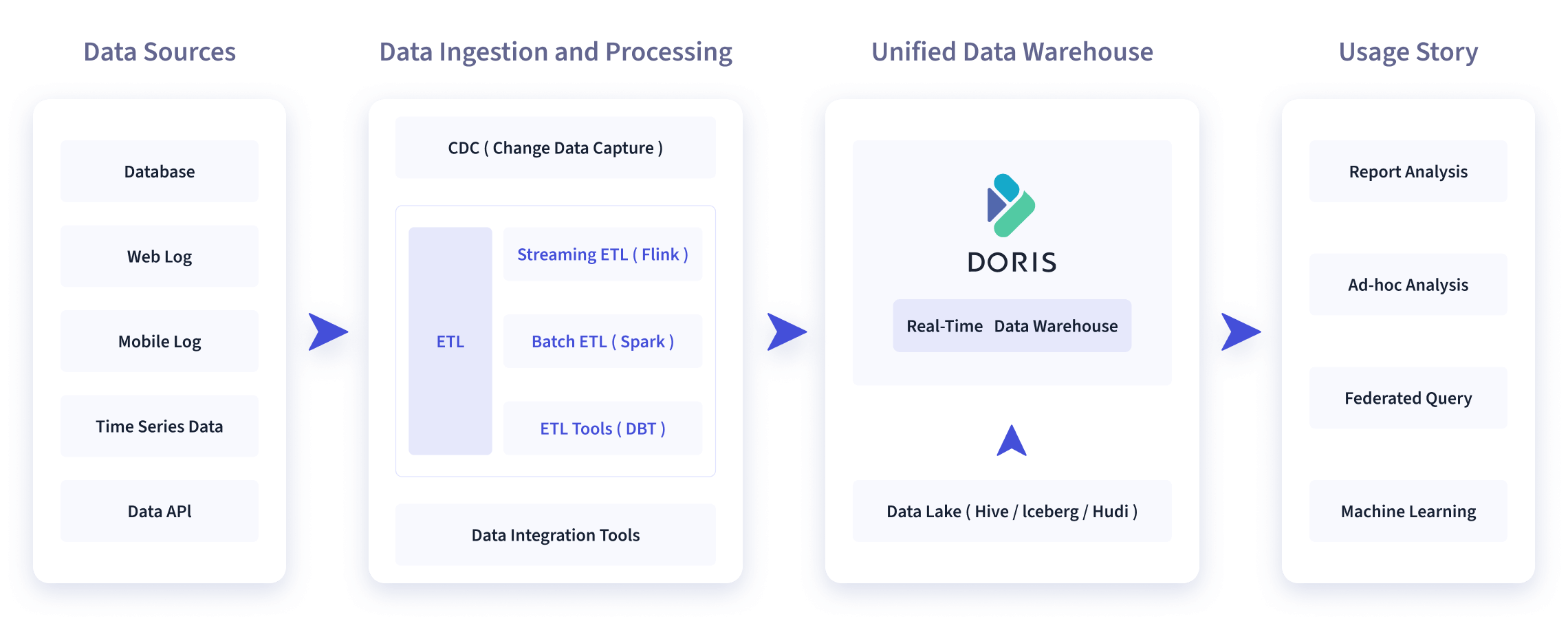
-
+You can display images in simple syntax: `  `
-Apache Doris is widely used in the following scenarios:
+If the image file name consists of multiple English words, they should be
separated by hyphens "-".
-</version>
+## How to write SQL manual
-```
+SQL Manual Docs refer to the documentation under the `/sql-manual` of Master
branch and version docs.
-Rendering style:
+These documents are used in two places:
-<version since="1.2" deprecated="1.5">
+1. Official website document.
-# Usage Scenarios
+2. The output of the HELP command.
-As shown in the figure below, after various data integration and processing,
the data sources are usually stored in the real-time data warehouse Doris and
the offline data lake or data warehouse (in Apache Hive, Apache Iceberg or
Apache Hudi).
-
+In order to support HELP command output, these documents need to be written in
strict accordance with the following format, otherwise they will fail the
admission check.
-Apache Doris is widely used in the following scenarios:
+An example of the `SHOW ALTER` command is as follows:
-</version>
+```Plain
+---
+{
+ "title": "SHOW-ALTER",
+ "language": "en"
+}
+---
-### Comments
+<!--
+Licensed to the Apache Software Foundation (ASF) under one
+or more contributor license agreements. See the NOTICE file
+distributed with this work for additional information
+regarding copyright ownership. The ASF licenses this file
+to you under the Apache License, Version 2.0 (the
+"License"); you may not use this file except in compliance
+with the License. You may obtain a copy of the License at
-```
+ http://www.apache.org/licenses/LICENSE-2.0
-<version since="1.3" comment="This is comment, Both types of processes are
horizontally scalable, and a single cluster can support up to hundreds of
machines and tens of petabytes of storage capacity. ">
+Unless required by applicable law or agreed to in writing,
+software distributed under the License is distributed on an
+"AS IS" BASIS, WITHOUT WARRANTIES OR CONDITIONS OF ANY
+KIND, either express or implied. See the License for the
+specific language governing permissions and limitations
+under the License.
+-->
-- Frontend(FE): It is mainly responsible for user request access, query
parsing and planning, management of metadata, and node management-related work.
-- Backend(BE): It is mainly responsible for data storage and query plan
execution.
+## SHOW-ALTER
-Both types of processes are horizontally scalable, and a single cluster can
support up to hundreds of machines and tens of petabytes of storage capacity.
And these two types of processes guarantee high availability of services and
high reliability of data through consistency protocols. This highly integrated
architecture design greatly reduces the operation and maintenance cost of a
distributed system.
+### Name
-</version>
+SHOW ALTER
-```
+### Description
-Rendering style:
+Describe the command sytax
-<version since="1.3" comment="This is comment, Both types of processes are
horizontally scalable, and a single cluster can support up to hundreds of
machines and tens of petabytes of storage capacity. ">
+### Example
-- Frontend(FE): It is mainly responsible for user request access, query
parsing and planning, management of metadata, and node management-related work.
-- Backend(BE): It is mainly responsible for data storage and query plan
execution.
+Support command examples
-Both types of processes are horizontally scalable, and a single cluster can
support up to hundreds of machines and tens of petabytes of storage capacity.
And these two types of processes guarantee high availability of services and
high reliability of data through consistency protocols. This highly integrated
architecture design greatly reduces the operation and maintenance cost of a
distributed system.
+### Keywords
-</version>
+SHOW, ALTER
-### Inline Tag
+### Best Practice
+(optional)
```
-In terms of the storage engine, Doris uses columnar storage to encode and
compress and read data by column, <version since="1.0" type="inline" > enabling
a very high compression ratio while reducing a large number of scans of
non-relevant data,</version> thus making more efficient use of IO and CPU
resources.
-```
-
-渲染样式:
-
-In terms of the storage engine, Doris uses columnar storage to encode and
compress and read data by column, <version since="1.0" type="inline" > enabling
a very high compression ratio while reducing a large number of scans of
non-relevant data,</version> thus making more efficient use of IO and CPU
resources.
-
+:::info Note
+The above headings are in English, and pay attention to the level of the
headings.
+:::
\ No newline at end of file
diff --git a/community/how-to-contribute/contributor-guide.md
b/community/how-to-contribute/contributor-guide.md
index 1b0b814dec47..7f416ac9bad1 100644
--- a/community/how-to-contribute/contributor-guide.md
+++ b/community/how-to-contribute/contributor-guide.md
@@ -1,6 +1,6 @@
---
{
- "title": "Contributor Guide",
+ "title": "How to Become Contributor",
"language": "en"
}
---
@@ -24,7 +24,6 @@ specific language governing permissions and limitations
under the License.
-->
-# Contributor Guide
## New Contributor Guidelines
diff --git a/community/how-to-contribute/docs-format-specification.md
b/community/how-to-contribute/docs-format-specification.md
new file mode 100644
index 000000000000..4d2eec72fcb1
--- /dev/null
+++ b/community/how-to-contribute/docs-format-specification.md
@@ -0,0 +1,294 @@
+---
+{
+ "title": "Docs Format Specification",
+ "language": "en"
+}
+
+---
+
+<!--
+Licensed to the Apache Software Foundation (ASF) under one
+or more contributor license agreements. See the NOTICE file
+distributed with this work for additional information
+regarding copyright ownership. The ASF licenses this file
+to you under the Apache License, Version 2.0 (the
+"License"); you may not use this file except in compliance
+with the License. You may obtain a copy of the License at
+
+ http://www.apache.org/licenses/LICENSE-2.0
+
+Unless required by applicable law or agreed to in writing,
+software distributed under the License is distributed on an
+"AS IS" BASIS, WITHOUT WARRANTIES OR CONDITIONS OF ANY
+KIND, either express or implied. See the License for the
+specific language governing permissions and limitations
+under the License.
+-->
+
+This document primarily introduces:
+
+- Formatting specifications for the document, including the file name, URL,
and layout.
+
+- Recommending the use of markdown features for the content.
+
+- Whether it is a historical version or the latest version of the docs, all
modifications should submit pull requests to the
[apache/doris-website](https://github.com/apache/doris-website) repository.
+
+- If you need to submit docs change, please refer to the [Docs
Contribution](https://doris.apache.org/community/how-to-contribute/contribute-doc)
Guide.
+
+## Basic Format Specification
+
+### 01 File Name
+
+- The file name should provide a brief summary of the content and should not
be too long
+
+- If the file name consists of multiple English words, they should be
separated by hyphens "-", and the use of underscores "_" is not recommended.
+
+- When a specific SQL function requires an underscore, please follow the
naming convention.
+
+### 02 Proprietary Name (Continuously Updated)
+
+When referring to company brands, product names, technical terms, etc. it is
recommended to directly use the proprietary name and must use the correct
capitalization.
+
+| Proprietary Name |
+| --------------------- |
+| GitHub |
+| SQL |
+| CPU |
+| FE |
+| BE |
+| HTTP |
+| MySQL |
+| MongoDB |
+| Elasticsearch |
+| Azure |
+| AWS |
+| S3 |
+| Doris Manager |
+| WebUI |
+| Flink Doris Connector |
+
+### 03 SQL Functions and SQL Manual
+
+SQL function and SQL manual should follow the syntax conventions, it is
recommended the names be written in all uppercase letters, such as "ARRAY_MAX"
+
+:::tip
+For details about the layout of SQL function documentation, please refer to
the Docs Contribution - [How to write SQL
Manual](https://doris.apache.org/community/how-to-contribute/contribute-doc/#how-to-write-sql-manual)
+:::
+
+### 04 Abbreviation in English
+
+- It is recommended to provide the full meaning of an abbreviation when it
first appears in the body of the document.
+
+- It is not recommended use abbreviation in Titles
+
+## Document Structure Specification
+
+### 01 Heading and Title
+
+- The title of Documentation uses ` { "title": "", "language": ""}` instead
of `# `
+
+- The body starts with the level 2 title, and ends with the level 3 title. If
there is a need to differentiate content even after using a third-level
heading, you can use **numbered list, bullet points, details tag, tabs
components** to indicate the further levels of hierarchy. (Please refer to
relevant guidelines below)
+
+```Markdown
+{
+ "title": "Here is level 1 title",
+ "language": "en"
+}
+
+## Level 2 title
+### Level 3 title
+```
+
+### 02 Introduction
+
+Introduction should provide a highly summarized overview of the content. It is
recommended to keep the introduction within 150 words or less. For Examples:
+
+:::tip
+In this tutorial, you will learn:
+
+- What is XXX or What XXX, XXX, XXX are
+
+- How to XXX
+
+- When to use XXX
+:::
+
+## Markdown Features
+
+### 01 Tab Key and Space Key
+
+The Tab key and the Space key are commonly used for alignment. Therefore, the
following recommendations are suggested:
+
+- Use the Tab key for alignment and avoid mixing the usage of tabs and spaces.
+
+- Set the tab size to be equivalent to four half-width spaces in Markdown
editors, such as Visual Studio Code.
+
+### 02 Numbered Lists and Bullet Points
+
+Numbered lists typically emphasize the priority order between items. When
using numbered lists and bullet points, the following guidelines should be
followed:
+
+- For numbered lists, it is recommended to use **Bold text** to align the text
with the higher-level hierarchy without indentation.
+
+- When a numbered list contains bullet points, the numbered list is
recommended be **bolded**, while the bullet points do not need to be bolded.
+
+### 03 Link
+
+When using link, it is recommended to follow the following guidelines:
+
+**1. Link Description**
+
+Link descriptions are not advisable to repeatedly use phrases such as "see
details," "refer to," or "see specific information" within the same document.
+
+**2. Link Format**
+
+- Link to other headings within the same document, such as [Inverted
Index](#Prefix-Index)
+
+- Link to adjacent documents: [BITMAP
Index](../../data-table/index/bloomfilter)
+
+- Link to external websites: [Wikipedia - Inverted
Index](https://en.wikipedia.org/wiki/Inverted_index)
+
+**3. Link Paths**
+
+- It is recommended to use either relative paths or paths consistently within
the same document, avoiding mixing them.
+
+- It is advisable to minimize redirects to external sites to prevent broken
links from affecting the user experience. If linking to an external site is
necessary, it is recommended to inform users that they will be redirected to an
external website, such as "Click to visit XXX."
+
+### 04 Code blocks
+
+- You can create fenced code blocks by placing triple backticks ````` before
and after the code block. We recommend placing a blank line before and after
code blocks to make the raw formatting easier to read.
+
+- You can add an optional language identifier to enable syntax highlighting in
your fenced code block:
+
+| Language | Syntax Higlighting |
+| :--------- | :----------------------- |
+| Shell | ```shell``` or ```bash``` |
+| Python | ```python``` |
+| JSON | ```json``` |
+| XML | ```xml``` |
+| SQL | ```sql``` |
+| YAML | ```yaml``` or ```yml``` |
+| Markdown | ```markdown``` or```md``` |
+| JavaScript | ```js``` or ```javascript``` |
+| Java | ```java``` |
+| C++ | ```cpp``` |
+| C | ```c``` |
+| Ruby | ```ruby``` |
+| HTML | ```html``` |
+| CSS | ````css` |
+| PHP | ```php``` |
+
+- When using the ```bash` code block, it is recommended to separate the
command and the output results. Here is an example:
+ - Use the following command to view the service
+
+ ```Bash
+ kubectl get pod --namespace doris
+ ```
+
+ - The output result
+
+ ```Bash
+ NAME READY STATUS RESTARTS AGE
+ doriscluster-helm-fe-0 1/1 Running 0 1m39s
+ doriscluster-helm-fe-1 1/1 Running 0 1m39s
+ doriscluster-helm-fe-2 1/1 Running 0 1m39s
+ doriscluster-helm-be-0 1/1 Running 0 16s
+ doriscluster-helm-be-1 1/1 Running 0 16s
+ doriscluster-helm-be-2 1/1 Running 0 16s
+ ```
+
+### 05 Admonitions
+
+We have special admonitions syntax by wrapping text with a set of 3 colons,
followed by a label denoting its type. When you want to emphasize the content,
it is recommended to use admonitions.
+
+In use, the following specifications need to be followed:
+
+- Tip: mainly used for operational tips and tricks.
+
+- Note: used for more details and explanations.
+
+- Caution: used for warnings and precautions.
+
+You may also specify an optional title. Here are the examples of admonitions
syntax:
+
+```Markdown
+:::tip Tip
+Some content with tips
+:::
+
+:::info Note
+Some content with explanations
+:::
+
+:::caution Warning
+Some content with precuations and warnings
+:::
+```
+
+### 06 Images
+
+When you want to display images, it is convenient to co-locate the asset next
to the Markdown file using it. For image directory structure, please refer to
[Docs
Contribution](https://doris.apache.org/community/how-to-contribute/contribute-doc/#how-to-write-sql-manual).
+
+You can display images in two different ways:
+
+- Simple syntax: `  `
+
+- If you want the image to be centered, you can use HTML as following:
+
+```Markdown
+<div style={{textAlign:'center'}}>
+<img src="co-locate file structure or link" alt="images descrition"
style={{display: 'inline-block'}}/>
+</div >
+```
+
+- It is recommended to use **Alt text**, to convey "why" of the images as it
releates to the content of the docs, and it will be indexed by search engine.
It also displays on the page is the images fails to load.
+
+### 07 Table
+
+To wrap lines within a table, you can use the HTML: `<p>XXXX</p>`
+
+### 08 Details Tag
+
+The details tag can be used to differentiate content if there is a need to
differentiate content even after using a third-level heading.
+
+Here is an example of the details tag in Markdown:
+
+```Markdown
+<details>
+<summary>Title</summary>
+Here is the details
+<p>If you need to wrap your line, you can use HTML controls</p>
+<p>XXXXXXXX</p>
+</details>
+```
+
+### 08 `Tabs`Component
+
+Using `Tabs` components please refer to the following syntax:
+
+```Markdown
+import Tabs from '@theme/Tabs';
+import TabItem from '@theme/TabItem';
+
+<Tabs>
+ <TabItem value="Title 1" label="Title 1" default>
+ <p>XXXXX</p>
+ <p>XXXXX</p>
+ </TabItem>
+ <TabItem value="Title 2" label="Title 2" default>
+ <p>XXXXX</p>
+ <p>XXXXX</p>
+ </TabItem>
+</Tabs>
+```
+
+### 09 Version tags
+
+It is not recommended to use version tags to distinguish between different
versions.
+
+If features need to be version-specific, it is suggested to use admonitions
(refer to point six) with the `:::tip ::: `
+
+### 10 Quote
+
+It is not recommended to use the `>` to quotation for content descriptions.
+
+If there is a need for more details or explanations, it is suggested to use
admonitions (refer to point six) with the `:::info :::` annotation.
\ No newline at end of file
diff --git a/community/how-to-contribute/how-to-be-a-committer.md
b/community/how-to-contribute/how-to-be-a-committer.md
index 7ef5669e2f55..38d1448fe9e8 100644
--- a/community/how-to-contribute/how-to-be-a-committer.md
+++ b/community/how-to-contribute/how-to-be-a-committer.md
@@ -1,6 +1,6 @@
---
{
- "title": "How to Become Doris Committer",
+ "title": "How to Become Committer",
"language": "en"
}
---
@@ -29,7 +29,9 @@ under the License.
In an Apache project, developers have three roles:
1. Contributor: When the developer's code is officially merged into the code,
the developer automatically becomes the project's Contributor.
+
2. Committer: Committer has permission to merge into the code base. Committers
are generally elected by the PMC (Project Management Committee).
+
3. PMC Member: a member of the project management committee. Have the right to
vote on project decisions (such as version releases, etc.). It is generally
elected by the PMC (Project Management Committee) through voting.
Different roles have different rights and obligations. There are no strict
conditions on how to become a Committer or PMC Member, you can refer to here
for more information:
diff --git a/community/how-to-contribute/how-to-contribute.md
b/community/how-to-contribute/how-to-contribute.md
index 343660c8fb08..4231374ede4e 100644
--- a/community/how-to-contribute/how-to-contribute.md
+++ b/community/how-to-contribute/how-to-contribute.md
@@ -39,8 +39,11 @@ Any questions, you can contact us to get timely answers,
including Wechat, Gitte
For the first time in Doris community, you can:
* Follow [Doris Github](https://github.com/apache/doris)
+
* Subscribe to our [mailing list](../subscribe-mail-list.md);
+
* Join Doris Wechat Group (add WeChat-ID: morningman-cmy, note: join Doris
Group) and ask questions at any time.
+
* Enter Doris's
[Slack](https://join.slack.com/t/apachedoriscommunity/shared_invite/zt-11jb8gesh-7IukzSrdea6mqoG0HB4gZg)
Learn the development trends of Doris project in time and give your opinions
on the topics you are concerned about.
@@ -64,11 +67,15 @@ As you can see from
[GitHub](https://github.com/apache/doris), Apache Doris (inc
Documentation is the most important way for you to understand Apache Doris,
and it's where we need help most!
-Browse the document, you can deepen your understanding of Doris, can also help
you understand Doris's function and technical details, if you find that the
document has problems, please contact us in time;
+Browsing the document, you can deepen your understanding of Doris,and can also
help you understand Doris's function and technical details. If you find that
the document has problems, please contact us anytime;
If you are interested in improving the quality of documents, whether it is
revising the address of a page, correcting a link, and writing a better
introductory document, we are very welcome!
-Most of our documents are written in markdown format, and you can modify and
submit document changes directly through `docs/` in
[GitHub](https://github.com/apache/doris). If you submit code changes, you can
refer to [Pull Request](./pull-request.md).
+Most of our documents are written in markdown format, and you can modify and
submit document changes directly through
[apache/doris-website](https://github.com/apache/doris-website) .
+
+If you are committing a document change, you can refer to the [Docs
Contribute](https://doris.apache.org/community/how-to-contribute/contribute-doc)
+
+If you submit code changes, you can refer to [Pull
Request](https://doris.apache.org/community/how-to-contribute/pull-request).
## If a Bug or problem is found
@@ -78,7 +85,7 @@ You can also fix it yourself by reading the analysis code (of
course, it's bette
## Modify the code and submit PR (Pull Request)
-You can download the code, compile and install it, deploy and run it for a try
(refer to the [compilation
document](/docs/dev/install/source-install/compilation-general) to see if it
works as you expected. If you have problems, you can contact us directly, ask
questions or fix them by reading and analyzing the source code.
+You can download the code, compile and install it, deploy and run it for a try
(refer to the [compilation
document](/docs/dev/install/source-install/compilation-general)) to see if it
works as you expected. If you have problems, you can contact us directly, ask
questions or fix them by reading and analyzing the source code.
Whether it's fixing Bugs or adding Features, we're all very welcome. If you
want to submit code to Doris, you need to create a new branch for your
submitted code from the fork code library on GitHub to your project space, add
the source project upstream, and submit PR.
diff --git a/community/developer-guide/how-to-share-blogs.md
b/community/how-to-contribute/how-to-share-blogs.md
similarity index 97%
copy from community/developer-guide/how-to-share-blogs.md
copy to community/how-to-contribute/how-to-share-blogs.md
index 56ed87e07283..38c16a039fe6 100644
--- a/community/developer-guide/how-to-share-blogs.md
+++ b/community/how-to-contribute/how-to-share-blogs.md
@@ -1,6 +1,6 @@
---
{
- "title": "How to share blogs",
+ "title": "How to Share Blogs",
"language": "en"
}
---
@@ -31,9 +31,13 @@ The Doris community welcomes the sharing of Doris-related
articles. Once merged,
Articles include, but are not limited to.
* Doris usage tips
+
* Introduction to Doris features
+
* Doris system tuning
+
* How Doris works
+
* Doris business scenarios in practice
For details, please go to: https://github.com/apache/doris-website
[README](https://github.com/apache/doris-website)
diff --git a/community/how-to-contribute/pull-request.md
b/community/how-to-contribute/pull-request.md
index 9670d9f91a9f..2c9d381148b7 100644
--- a/community/how-to-contribute/pull-request.md
+++ b/community/how-to-contribute/pull-request.md
@@ -24,19 +24,18 @@ specific language governing permissions and limitations
under the License.
-->
-# Code Submission Guide
[Pull Request (PR)](https://help.github.com/articles/about-pull-requests/) can
be easily submitted on [Github](https://github.com/apache/doris). The PR method
of Doris project is described below.
-## Fork Repository
+## 1. Fork Repository
Go to the [github page](https://github.com/apache/doris) of apache/doris , and
click the button `Fork` in the upper right corner for Fork.

-### 2. Configuring GIT and submitting modifications
+## 2. Configuring GIT and submitting modifications
-#### (1) Clone the code locally:
+### (1) Clone the code locally:
```
git clone https://github.com/<your_github_name>/doris.git
@@ -48,13 +47,13 @@ Note: Please replace your GitHub name with your
yourgithubname.
When clone is completed, origin defaults to the remote fork address on github.
-#### (2) Add apache/doris to the remote branch upstream of the local warehouse:
+### (2) Add apache/doris to the remote branch upstream of the local warehouse:
```
git remote add upstream https://github.com/apache/doris.git
```
-#### (3) Check remote warehouse settings:
+### (3) Check remote warehouse settings:
```
git remote -v
@@ -64,7 +63,7 @@ upstream https://github.com/apache/doris.git (fetch)
upstream https://github.com/apache/doris.git (push)
```
-#### (4) New branches to modify them:
+### (4) New branches to modify them:
```
git checkout -b <your_branch_name>
@@ -74,7 +73,7 @@ Note: \<your\_branch\_name\> name is customized for you.
Code changes can be made after creation.
-#### (5) Submit code to remote branch:
+### (5) Submit code to remote branch:
```
git commit -a -m "<you_commit_message>"
@@ -83,65 +82,71 @@ git push origin <your_branch_name>
For more git usage, please visit: [git
usage](https://www.atlassian.com/git/tutorials/set-up-a-repository), not to
mention here.
-### 3. Create PR
+## 3. Create PR
-#### (1) New PR
+### (1) New PR
Switch to your GitHub page in the browser, switch to the submitted branch
yourbranchname\\ and click the `Compare & pull request` button to create it, as
shown in the following figure:

-#### (2) preparation branch
+### (2) preparation branch
At this time, the `Create pull request` button will appear. If not, please
check whether the branch is selected correctly or click on `compare across
forks' to re-select the repo and branch.

-#### (3) Fill Commit Message
+### (3) Fill Commit Message
Here, please fill in the summary and details of the comment, and then click
`Create pull request` to create it.
For how to write Commit Message, here are some Tips:
* Please use the form of English verb + object. The verb does not use the past
tense and the sentence uses imperative sentence.
+
* Subject and body should be written, and they should be separated by blank
lines (fill in separately on GitHub PR interface).
+
* Message topic length should not exceed **50** characters;
+
* Message content should not exceed **72** characters per line, and the excess
should be replaced manually.
+
* Message content is used to explain what has been done, why and how.
+
* The first letter of the message subject should be **capitalized**, and the
end of the sentence **should not** have a full stop.
+
* The message content specifies the associated issue (if any), such as # 233;
For more details, see <https://chris.beams.io/posts/git-commit>.

-#### (4) Complete the creation
+### (4) Complete the creation
After successful creation, you can see that Doris project needs review, you
can wait for us to review and join, you can also contact us directly.

So far, your PR creation is complete. Read more about PR
[collaborating-with-issues-and-pull-requests]
(https://help.github.com/categories/collaborating-with-issues-and-pull-requests/).
-### 4. Conflict Resolution
+## 4. Conflict Resolution
When submitting PR, code conflicts are usually caused by multiple people
editing the same file. The main steps to resolve conflicts are as follows:
-#### (1) Switch to the main branch
+### (1) Switch to the main branch
```
git checkout master
```
-#### (2) Synchronize remote main branch to local
+### (2) Synchronize remote main branch to local
```
git pull upstream master
```
-#### (3) Switch back to the previous branch (assuming the branch is named fix)
+### (3) Switch back to the previous branch (assuming the branch is named fix)
```
git checkout fix
```
-#### (4) rebase
+### (4) rebase
```
git rebase -i master
@@ -160,9 +165,9 @@ Then you can go back and forth until the screen appears
something like * rebase
git push -f origin fix
```
-### 5. An example
+## 5. An example
-#### (1) fetch to the latest code for the local branch of upstream that has
been configured
+### (1) fetch to the latest code for the local branch of upstream that has
been configured
```
$ git branch
@@ -178,7 +183,7 @@ From https://github.com/apache/doris
9c36200..0c4edc2 master -> upstream/master
```
-#### (2) rebase
+### (2) rebase
```
$ git rebase upstream/master
@@ -186,7 +191,7 @@ First, rewinding head to replay your work on top of it...
Fast-forwarded master to upstream/master.
```
-#### (3) Check to see if other submissions are not synchronized to their own
repo submissions
+### (3) Check to see if other submissions are not synchronized to their own
repo submissions
```
$ git status
@@ -200,7 +205,7 @@ $ git status
nothing added to commit but untracked files present (use "git add" to track)
```
-#### (4) Merge code submitted by others into their own repo
+### (4) Merge code submitted by others into their own repo
```
$ git push origin master
@@ -214,7 +219,7 @@ To https://lide-reed:[email protected]/lide-reed/doris.git
9c36200..0c4edc2 master -> master
```
-#### (5) New branch, ready for development
+### (5) New branch, ready for development
```
$ git checkout -b my_branch
@@ -225,13 +230,13 @@ $ git branch
* my_branch
```
-#### (6) Prepare to submit after code modification is completed
+### (6) Prepare to submit after code modification is completed
```
$ git add -u
```
-#### (7) Fill in the message and submit it it to the new local branch
+### (7) Fill in the message and submit it it to the new local branch
```
$ git commit -m "Fix a typo"
@@ -239,7 +244,7 @@ $ git commit -m "Fix a typo"
1 files changed, 2 insertions(+), 2 deletions(-)
```
-#### (8) Push the branch into GitHub's own repo far away
+### (8) Push the branch into GitHub's own repo far away
```
$ git push origin my_branch
diff --git a/community/release-and-verify/release-verify.md
b/community/release-and-verify/release-verify.md
index 800912e87007..90f7239ee6c4 100644
--- a/community/release-and-verify/release-verify.md
+++ b/community/release-and-verify/release-verify.md
@@ -1,6 +1,6 @@
---
{
- "title": "Verify the Apache release version",
+ "title": "Verify the Apache Release Version",
"language": "en"
}
---
diff --git a/i18n/zh-CN/docusaurus-plugin-content-docs-community/current.json
b/i18n/zh-CN/docusaurus-plugin-content-docs-community/current.json
new file mode 100644
index 000000000000..87ef2810dcca
--- /dev/null
+++ b/i18n/zh-CN/docusaurus-plugin-content-docs-community/current.json
@@ -0,0 +1,26 @@
+{
+ "version.label": {
+ "message": "current",
+ "description": "The label for version current"
+ },
+ "sidebar.community.category.How to Contribute": {
+ "message": "贡献指南",
+ "description": "The label for category How to Contribute in sidebar
community"
+ },
+ "sidebar.community.category.Release Process & Verification": {
+ "message": "版本发布与校验",
+ "description": "The label for category Doris Introduction in sidebar
community"
+ },
+ "sidebar.community.category.Design Documents": {
+ "message": "设计文档",
+ "description": "The label for category Developer Guide in sidebar
community"
+ },
+ "sidebar.community.category.Developer Guide": {
+ "message": "开发者手册",
+ "description": "The label for category Developer Guide in sidebar
community"
+ },
+ "sidebar.community.category.Mac Local Dev": {
+ "message": "Mac Local 开发",
+ "description": "The label for category Mac Local Dev in sidebar community"
+ }
+}
\ No newline at end of file
diff --git
a/i18n/zh-CN/docusaurus-plugin-content-docs-community/current/doris-future.md
b/i18n/zh-CN/docusaurus-plugin-content-docs-community/current/doris-future.md
index 83aee86cff56..66ff5651978b 100644
---
a/i18n/zh-CN/docusaurus-plugin-content-docs-community/current/doris-future.md
+++
b/i18n/zh-CN/docusaurus-plugin-content-docs-community/current/doris-future.md
@@ -1,6 +1,6 @@
---
{
- "title": "Doris 未来计划",
+ "title": "开发者成长计划",
"language": "zh-CN"
}
---
@@ -24,18 +24,18 @@ specific language governing permissions and limitations
under the License.
-->
-# Doris 未来计划
+
## 简介
-Doris 未来计划是一个面向新手开发者的成长计划,旨在让更多的开发者快速上手doris,社区热烈欢迎各位有兴趣的开发者加入。
+Doris Future Plan 是一个面向新手开发者的成长计划,旨在让更多的开发者快速上手 doris,社区热烈欢迎各位有兴趣的开发者加入。
## 参与方式
-新手开发者们可以在 Doris 社区的[Github
Issue](https://github.com/apache/doris/issues)界面筛选带有`doris-future`标签的任务,每个任务都有需要的技能,例如c++或java,以及难度区分,新开发者可在感兴趣的任务下方评论并且与导师沟通任务细节,对于机器资源困难的开发者社区也会提供开发机。
+新手开发者们可以在 Doris 社区的[Github
Issue](https://github.com/apache/doris/issues)界面筛选带有`doris-future`标签的任务,每个任务都有需要的技能,例如
c++ 或 java,以及难度区分,新开发者可在感兴趣的任务下方评论并且与导师沟通任务细节,对于机器资源困难的开发者社区也会提供开发机。
如果有任何困难或遇到了问题,可以发送邮件至 `[email protected]` 来描述困难或者问题,我们会尽力帮你解决。
## 导师机制
-每个任务都会有导师跟进指导任务细节,导师可以提供如下帮助:1. 讲解任务需要实现的目标,任务基本原理和实现细节;2.
任务具体的实现思路以及相关所需知识;3. review代码,优化实际代码结构,提升工程代码水平。
+每个任务都会有导师跟进指导任务细节,导师可以提供如下帮助:1. 讲解任务需要实现的目标,任务基本原理和实现细节;2.
任务具体的实现思路以及相关所需知识;3. review 代码,优化实际代码结构,提升工程代码水平。
diff --git
a/i18n/zh-CN/docusaurus-plugin-content-docs-community/current/how-to-contribute/commit-format-specification.md
b/i18n/zh-CN/docusaurus-plugin-content-docs-community/current/how-to-contribute/commit-format-specification.md
index 70f228be8f56..ce6f03e3d782 100644
---
a/i18n/zh-CN/docusaurus-plugin-content-docs-community/current/how-to-contribute/commit-format-specification.md
+++
b/i18n/zh-CN/docusaurus-plugin-content-docs-community/current/how-to-contribute/commit-format-specification.md
@@ -37,7 +37,7 @@ Commit 分为“标题”和“内容”。原则上标题全部小写。内容
本次提交的类型,限定在以下类型(全小写)
- * fix:bug修复
+ * fix:bug 修复
* feature:新增功能
* feature-wip:开发中的功能,比如某功能的部分代码。
* improvement:原有功能的优化和改进
@@ -99,7 +99,7 @@ Commit 分为“标题”和“内容”。原则上标题全部小写。内容
```
1. 如无 issue,可不填。issue 也可以出现在 message 里。
- 1. 一行原则不超过100个字符。
+ 1. 一行原则不超过 100 个字符。
3. 示例
diff --git
a/i18n/zh-CN/docusaurus-plugin-content-docs-community/current/how-to-contribute/contribute-doc.md
b/i18n/zh-CN/docusaurus-plugin-content-docs-community/current/how-to-contribute/contribute-doc.md
index 985fdb881d70..9f67d9f0d384 100644
---
a/i18n/zh-CN/docusaurus-plugin-content-docs-community/current/how-to-contribute/contribute-doc.md
+++
b/i18n/zh-CN/docusaurus-plugin-content-docs-community/current/how-to-contribute/contribute-doc.md
@@ -1,6 +1,6 @@
---
{
- "title": "文档贡献",
+ "title": "文档贡献指南",
"language": "zh-CN"
}
---
@@ -24,264 +24,356 @@ specific language governing permissions and limitations
under the License.
-->
-# Doris 文档贡献
+本篇文档贡献指南主要介绍 Doris 的文档如何修改与贡献。**不论是历史版本的文档或最新版本文档,皆在
[apache/doris-website](https://github.com/apache/doris-website) 代码库上提交 PR 修改。**
-这里我们主要介绍 Doris 的文档怎么修改和贡献,
+:::tip
-怎么去提交你的文档修改,请参照
+PR 提交指南还可以参考:
-[为 Doris 做贡献](./)
+- [为 Doris 做贡献](https://doris.apache.org/zh-CN/community/how-to-contribute/)
-[代码提交指南](./pull-request.md)
+-
[代码提交指南](https://doris.apache.org/zh-CN/community/how-to-contribute/pull-request)
+:::
-历史版本的文档,直接在 [apache/doris-website](https://github.com/apache/doris-website)
上提交 PR 即可,如果是最新版本的,需要在
[apache/doris-website](https://github.com/apache/doris-website) 和
[apache/doris](https://github.com/apache/doris) 代码库上同时提交修改。
-
-下面介绍 Doris Website站点的目录结构,以方便用户修改提交文档
## Doris Website 目录结构
-```
+```Plain
.
-├── README.md
-├── babel.config.js
├── blog
-│ ├── 1.1 Release.md
-│ ├── Annoucing.md
-│ ├── jd.md
-│ ├── meituan.md
-│ ├── release-note-0.15.0.md
-│ ├── release-note-1.0.0.md
-│ └── xiaomi.md
-├── build.sh
+│ ├── 1.1 Release.md
+│ ├── Annoucing.md
+│ ├── jd.md
+│ ├── meituan.md
+│ ├── release-note-0.15.0.md
+│ ├── release-note-1.0.0.md
+│ └── xiaomi.md
├── community
-│ ├── design
-│ │ ├── Flink-doris-connector-Design.md
-│ │ ├── doris_storage_optimization.md
-│ │ ├── grouping_sets_design.md
-│ │ └── metadata-design.md
-│ ├── ......
+│ ├── design
+│ │ ├── spark_load.md
+│ │ ├── doris_storage_optimization.md
+│ │ ├── grouping_sets_design.md
+│ │ └── metadata-design.md
+│ ├── ......
├── docs
-│ ├── admin-manual
-│ │ ├── cluster-management
-│ │ ├── config
-│ │ ├── data-admin
-│ │ ├── http-actions
-│ │ ├── maint-monitor
-│ │ ├── multi-tenant.md
-│ │ ├── optimization.md
-│ │ ├── privilege-ldap
-│ │ ├── query-profile.md
-│ │ └── sql-interception.md
-│ ├── ......
-├── docusaurus.config.js
+│ ├── admin-manual
+│ │ ├── cluster-management
+│ │ ├── config
+│ │ ├── data-admin
+│ │ ├── http-actions
+│ │ ├── maint-monitor
+│ │ ├── privilege-ldap
+│ │ ├── multi-tenant.md
+│ │ ├── optimization.md
+│ │ ├── query-profile.md
+│ │ └── sql-interception.md
+│ │ └── workload-group.md
+│ ├── ......
├── i18n
-│ └── zh-CN
-│ ├── code.json
-│ ├── docusaurus-plugin-content-blog
-│ ├── docusaurus-plugin-content-docs
-│ ├── docusaurus-plugin-content-docs-community
-│ └── docusaurus-theme-classic
+│ └── zh-CN
+│ ├── docusaurus-plugin-content-docs
+│ │ ├── current
+│ │ ├── version-1.2
+│ │ ├── version-2.0
+│ │ ├── version-2.1
+│ │ ├── current.json
+│ │ ├── version-1.2.json
+│ │ ├── version-2.0.json
+│ │ ├── version-2.1.json
+│ ├── docusaurus-plugin-content-docs-community
+│ └── local_build_docs.sh
+├── src
+│ ├── components
+│ │ ├── Icons
+│ │ ├── More
+│ │ ├── PageBanner
+│ │ └── PageColumn
+│ ├── ......
+├── static
+│ ├── images
+│ │ ├── Bloom_filter.svg.png
+│ │ ├── .....
+│ └── js
+│ └── redirect.js
+├── versioned_docs
+│ ├── version-1.2
+│ │ ├── admin-manual
+│ │ ├── advanced
+│ │ ├── benchmark
+│ │ ├── data-operate
+│ │ ├── data-table
+│ │ ├── ecosystem
+│ │ ├── faq
+│ │ ├── get-starting
+│ │ ├── install
+│ │ ├── lakehouse
+│ │ ├── query-acceleration
+│ │ ├── releasenotes
+│ │ └── sql-manual
+│ └── version-2.0
+│ ├── admin-manual
+│ ├── benchmark
+│ ├── data-operate
+│ ├── db-connect
+│ ├── ecosystem
+│ ├── faq
+│ ├── get-starting
+│ ├── install
+│ ├── lakehouse
+│ ├── query
+│ ├── releasenotes
+│ ├── sql-manual
+│ └── table-design
+└── version-2.1
+│ ├── admin-manual
+│ ├── advanced
+│ ├── benchmark
+│ ├── data-operate
+│ ├── data-table
+│ ├── ecosystem
+│ ├── faq
+│ ├── get-starting
+│ ├── install
+│ ├── lakehouse
+│ ├── query-acceleration
+│ ├── releasenotes
+│ └── sql-manual
+├── versioned_sidebars
+│ ├── version-1.2-sidebars.json
+│ └── version-2.0-sidebars.json
+│ └── version-2.1-sidebars.json
+├── babel.config.js
+├── build.sh
+├── buildVersions.sh
+├── docusaurus.config.js
├── package.json
+├── README.md
├── sidebars.json
├── sidebarsCommunity.json
-├── src
-│ ├── components
-│ │ ├── Icons
-│ │ ├── More
-│ │ ├── PageBanner
-│ │ └── PageColumn
-│ ├── ......
-├── static
-│ ├── images
-│ │ ├── Bloom_filter.svg.png
-│ │ ├── .....
-│ └── js
-│ └── redirect.js
├── tree.out
├── tsconfig.json
+├── versions.json
+```
+
+下面介绍 Doris Website 站点的各个目录结构,以方便用户找到对应根目录并提交修改文档。
+
+### 01 博客目录
+
+博客目录在根目录 `/blog` 下,所有博客 Markdown 文件放到该目录下。如果您感兴趣参与博客贡献或愿意分享技术心得,欢迎通过
[email protected] 或直接提交 Blog PR 参与博客共建
+
+### 02 文档目录
+
+- 当你需要**修改已有文档内容**时,需要**同时更新** Master 分支最新文档版本和相应的各版本(如 2.1、2.0、1.2 或多版本);
+
+- 当你需要**添加新文档**时,除了上传新的 Markdown 文件之外,还需要在文档目录结构中添加新文档链接路径;
+
+- 当你需要**新增文档目录栏**时,除了对目录结构进行调整,还需要对新增的目录栏进行中文翻译。
+
+以下是需要进行修改的文件列表:
+
+1. **Markdown 文件:** 这是你新增的文档内容,你需要将其上传到相应的文件夹中,并在 Markdown 文件中编写具体的文档内容。
+
+2. **Sidebar 文件:** 这是控制中英文文档的目录结构文件,你需要在其中添加新文档路径链接,以便在目录中正确显示新文档的位置。当前 Master
最新文档分支与各版本文档皆由不同的 Sidebar 文件控制,包括 `sidebar.json` / `version-2.0-sidebars.json`
/ `version-2.1-sidebars.json`
+
+3. **目录栏中文翻译文件:** 这是在新增文档目录栏后,控制目录栏在中文文档中的翻译文件。你需要按照正确的格式进行编辑,以确保目录栏名称正确显示。与
Sidebar 文件相同,当前 Master 最新文档分支与各版本文档由不同翻译文件控制,包括`current.json / version-1.2.json
/ version-2.0.json /version-2.1.json`
+
+
+:::caution 注意
+
+所有文档必须同时含有中文与英文文档,否则会造成目录结构不一致、中文文档无法显示等问题。这个适用于所有博客、文档、社区内容。
+:::
+
+
+下面将介绍各版本文档如何进行内容修改、文档目录结构修改、目录栏中文翻译的操作。
+
+**Dev 版本:为 Doris 最新 Master 分支文档。**
+
+**1. 内容修改**
+
+该版本的英文文档在根目录 `docs` 下进行修改
+
+```Plain
+.
+├── docs
+│ ├── admin-manual
+│ ├── ......
+```
+
+中文文档在根目录 `i18n / zh-CN / docusaurus-plugin-content-docs / current`下进行修改
+
+```Plain
+.
+├── docs
+├── i18n
+│ └── zh-CN
+│ ├── docusaurus-plugin-content-docs
+│ │ ├── current
+│ │ │ ├── admin-manual
+│ │ │ ├── ......
+```
+
+**2. 文档目录结构**
+
+Dev 版本中英文文档统一由根目录下 `sidebar.json`进行控制。
+
+```Plain
+.
+├── docs
+│ ├── admin-manua
+│ ├── ......
+├── i18n
+├── src
+├── static
├── versioned_docs
-│ ├── version-0.15
-│ │ ├── administrator-guide
-│ │ ├── best-practices
-│ │ ├── extending-doris
-│ │ ├── getting-started
-│ │ ├── installing
-│ │ ├── internal
-│ │ ├── sql-reference
-│ │ └── sql-reference-v2
-│ └── version-1.0
-│ ├── administrator-guide
-│ ├── benchmark
-│ ├── extending-doris
-│ ├── faq
-│ ├── getting-started
-│ ├── installing
-│ ├── internal
-│ ├── sql-reference
-│ └── sql-reference-v2
├── versioned_sidebars
-│ ├── version-0.15-sidebars.json
-│ └── version-1.0-sidebars.json
-├── versions.json
+├── sidebars.json
+```
+`sidebar.json` 示例如下:
+
+```JSON
+{
+ "docs": [
+ {
+ "type": "category",
+ "label": "Getting Started",
+ "items": [
+ "get-starting/quick-start",
+ "get-starting/what-is-apache-doris"
+ ]
+ },
+ {
+ "type": "category",
+ "label": "Install and Deploy",
+ "items": [
+ "install/standard-deployment",
+ {
+ "type": "category",
+ "label": "Docker Deployment",
+ "items": [
+ "install/construct-docker/build-docker-image",
+ "install/construct-docker/run-docker-cluster"
+ ]
+ }
+ ......
+ }
+ ]
+ }
```
-目录结构说明:
-
-1. 博客目录
-
- - 英文博客目录在根目录下的blog下面,所有博客的英文文件放到这个目录下
- - 中文博客的目录在 `i18n/zh-CN/docusaurus-plugin-content-blog` 目录下,所有中文博客文件放到这个下面
- - 中英文博客的文件名称要一致
-
-2. 文档内容目录
-
- - 最新版本的英文文档内容在根目录下的docs下面
-
- - 英文文档的版本在根目录下的 `versioned_docs/` 下面
-
- - 这个目录只放历史版本的文档
-
- ```
- .
- ├── version-0.15
- │ ├── administrator-guide
- │ ├── best-practices
- │ ├── extending-doris
- │ ├── getting-started
- │ ├── installing
- │ ├── internal
- │ ├── sql-reference
- │ └── sql-reference-v2
- └── version-1.0
- ├── administrator-guide
- ├── benchmark
- ├── extending-doris
- ├── faq
- ├── getting-started
- ├── installing
- ├── internal
- ├── sql-reference
- └── sql-reference-v2
- ```
-
- - 英文文档的版本控制在根目录下的 `versioned_sidebars` 下面
-
- ```
- .
- ├── version-0.15-sidebars.json
- └── version-1.0-sidebars.json
- ```
-
- 这里的 json 文件按照对应版本的目录结构进行编写
-
- - 中文文档在 `i18n/zh-CN/docusaurus-plugin-content-docs`
-
- - 在这个下面对应不同的版本目录及版本对应的 json 文件 ,如下效果
-
- current是当前最新版本的文档,示例中对应的是 1.1 版本,修改的时候,根据要修改的文档版本,在对应目录下找到相应的文件修改,提交即可。
-
- ```
- .
- ├── current
- │ ├── admin-manual
- │ ├── advanced
- │ ├── benchmark
- │ ├── data-operate
- │ ├── data-table
- │ ├── ecosystem
- │ ├── faq
- │ ├── get-starting
- │ ├── install
- │ ├── sql-manual
- │ └── summary
- ├── current.json
- ├── version-0.15
- │ ├── administrator-guide
- │ ├── best-practices
- │ ├── extending-doris
- │ ├── getting-started
- │ ├── installing
- │ ├── internal
- │ ├── sql-reference
- │ └── sql-reference-v2
- ├── version-0.15.json
- ├── version-1.0
- │ ├── administrator-guide
- │ ├── benchmark
- │ ├── extending-doris
- │ ├── faq
- │ ├── getting-started
- │ ├── installing
- │ ├── internal
- │ ├── sql-reference
- │ └── sql-reference-v2
- └── version-1.0.json
- ```
-
- - Version Json 文件
-
- Current.json 对应的是最新版本文档的中文翻译内容,例如:
-
- ```
- {
- "version.label": {
- "message": "1.1",
- "description": "The label for version current"
- },
- "sidebar.docs.category.Getting Started": {
- "message": "快速开始",
- "description": "The label for category Getting Started in sidebar
docs"
+**3. 文档目录栏中文翻译**
+
+Dev 版本的目录栏中文翻译文件在根目录`i18n / zh-CN / docusaurus-plugin-content-docs /
current.json `中。
+
+以文档目录“快速开始”为例:
+
+- 这里的 `sidebar.docs.category.Getting Started` 与目录下的 `sidebars.json` 里的
`label`层级对应
+- 编写格式为:sidebar + "." + docs + "." + [type] + [label]
+
+```JSON
+{
+ "version.label": {
+ "message": "dev",
+ "description": "The label for version current"
+ },
+ "sidebar.docs.category.Getting Started": {
+ "message": "快速开始",
+ "description": "The label for category Getting Started in sidebar docs"
+ },
+ ......
+ }
+{
+ "docs": [
+ {
+ "type": "category",
+ "label": "Getting Started",
+ "items": [
+ "get-starting/quick-start",
+ "get-starting/what-is-apache-doris"
+ ]
+ },
+ ......
}
- .....
- }
- ```
-
- 这里的 `sidebar.docs.category.Getting Started` 和根目录下的 `sidebars.json` 里的
`label` 对应
-
- 例如刚才这个 `sidebar.docs.category.Getting Started` ,是由 `sidebar` 前缀和
`sidebars.json` 里面的结构对应的
-
- 首先是 `sidebar + "." + docs + ".'" + [ type ] + [ label ] ` 组成.
-
- ```json
- {
- "docs": [
- {
- "type": "category",
- "label": "Getting Started",
- "items": [
- "get-starting/get-starting"
- ]
- },
- {
- "type": "category",
- "label": "Doris Introduction",
- "items": [
- "summary/basic-summary"
- ]
- }
- .....
- }
- ```
+ ]
+ }
+```
+
+**2.1 / 2.0 /1.2 版本**
+
+**1. 内容修改**
+
+- 2.1 版本的英文文档在根目录 `/versioned_docs/version-2.1` 下,中文文档在根目录 `i18n / zh-CN /
docusaurus-plugin-content-docs / version-2.1`下
+
+- 2.0 版本的英文文档在根目录 `/versioned_docs / version-2.0` 下,中文文档在根目录 `i18n / zh-CN /
docusaurus-plugin-content-docs / version-2.0 ` 下
+
+- 1.2 版本的英文文档在根目录 `/versioned_docs / version-1.2` 下,中文文档在根目录 `i18n / zh-CN /
docusaurus-plugin-content-docs / version-1.2`下
+
+```Plain
+.
+├── blog
+├── community
+├── docs
+├── i18n
+│ └── zh-CN
+│ ├── docusaurus-plugin-content-docs
+│ │ ├── current
+│ │ ├── version-1.2
+│ │ ├── version-2.0
+│ │ ├── version-2.1
+├── versioned_docs
+│ ├── version-1.2
+│ ├── version-2.0
+│ ├── version-2.1
+```
+
+**1. 文档目录结构**
+
+各版本中英文文档统一由根目录下的 `version-X.X-sidebars.json`进行控制。
+
+```Plain
+.
+├── blog
+├── community
+├── docs
+├── i18n
+├── versioned_docs
+├── versioned_sidebars
+│ ├── version-1.2-sidebars.json
+│ └── version-2.0-sidebars.json
+│ └── version-2.1-sidebars.json
+```
- - 在中文的 version json 文件中支持 label 的翻译,不需要描述文档层级关系,文档层级关系是在 `sidebar.json`
文件里描述的
+各版本 Sidebar 层级修改与上文 Dev 版本修改基本一致,在此不进行举例说明。
+
+**2. 目录栏中文翻译**
+
+各版本目录栏的中文翻译文件统一在根目录`i18n / zh-CN / docusaurus-plugin-content-docs /
version-X.X.json `中。
+
+```Plain
+├── i18n
+│ └── zh-CN
+│ ├── docusaurus-plugin-content-docs
+│ │ ├── version-1.2.json
+│ │ ├── version-2.0.json
+│ │ ├── version-2.1.json
+```
- - 所有的文档必须有英文的,中文才能显示,如果英文没写,可以创建一个空文件,不然中文文档也显示不出来,这个适用于所有博客、文档、社区内容
+各版本中文文档 `label` 翻译与上文 Dev 版本修改基本一致,在此不进行举例说明
-3. 社区文档
+### 03 社区文档目录
- 这块的文档不区分版本,是通用的
+社区文档当前为通用版,不区分版本。
- - 英文文档在根目录下的 `community/` 目录下面。
+1. 英文文档在根目录下的 `community/` 目录下面。
- - 中文文档在 `i18n/zh-CN/docusaurus-plugin-content-docs-community/` 目录下面。
+2. 中文文档在 `i18n/zh-CN/docusaurus-plugin-content-docs-community/` 目录下面。
- - 社区文档的目录结构控制在根目录下的 `sidebarsCommunity.json` 文件中,
+3. 社区文档的目录结构在根目录下的 `sidebarsCommunity.json` 文件中
- - 社区文档目录结构对应的中文翻译在
`i18n/zh-CN/docusaurus-plugin-content-docs-community/current.json` 文件中
+4. 社区文档的目录栏中文翻译文件在
`i18n/zh-CN/docusaurus-plugin-content-docs-community/current.json`中
- ```json
- {
+```JSON
+ {
"version.label": {
"message": "Next",
"description": "The label for version current"
@@ -303,24 +395,31 @@ under the License.
"description": "The label for category Developer Guide in sidebar
community"
}
}
- ```
+```
+
+### 04 图片目录
-4. 图片
+1. 所有图片都在 `static/images `目录下
- 所有图片都在 `static/images `目录下面
+2. 图片引用路径格式为 ``
+
+ - 文本描述:根据图片内容自定义,建议文本描述就近引用该图片所在的标题内容
+
+ - 图片名称:文件名由多个英文单词组成时,单词中间**由短划线“-”隔开**
-## 如何编写命令帮助手册
+## **如何编写命令帮助手册**
-命令帮助手册文档,是指在 `docs/sql-manual` 下的文档。这些文档用于两个地方:
+命令帮助手册文档,是指在 Master 分支与各版本文档 `/sql-manual` 下的文档。这些文档主要用于两个地方:
1. 官网文档展示。
+
2. HELP 命令的输出。
-为了支持 HELP 命令输出,这些文档需要严格按照以下格式排版编写,否则无法通过准入检查。
+为了支持 HELP 命令输出,文档需要严格按照以下格式排版编写,否则无法通过准入检查。
以 `SHOW ALTER` 命令示例如下:
-```
+```markdown
---
{
"title": "SHOW-ALTER",
@@ -368,126 +467,9 @@ SHOW, ALTER
### Best Practice
(最佳实践(如有))
-
-```
-
-注意,不论中文还是英文文档,以上标题都是用英文,并且注意标题的层级。
-
-## 文档多版本
-
-网站文档支持通过 html 标签标记版本。可以通过 `<version>` 标签标记文档中的某段内容是从哪个版本开始的,或者从哪个版本移除。
-
-### 参数介绍
-
-| 参数 | 说明 | 值 |
-|---|---|---|
-| since | 从该版本支持 | 版本号 |
-| deprecated | 从该版本移除 | 版本号 |
-| comment | 注释 | |
-| type | 有默认和行内两种样式 | 不传值表示默认样式,传inline表示行内样式 |
-
-注意:`<version>` 标签前后要有空行,避免样式渲染异常。
-
-### 单标签
-
-```
-
-<version since="1.1">
-
-Apache Doris was first born as Palo project for Baidu's ad reporting business,
- officially open-sourced in 2017, donated by Baidu to the Apache Foundation
- for incubation in July 2018, and then incubated and operated by members of
- the incubator project management committee under the guidance of
- Apache mentors. Currently, the Apache Doris community has gathered
- more than 300 contributors from nearly 100 companies in different
- industries, and the number of active contributors is close to 100 per month.
- Apache Doris has graduated from Apache incubator successfully and
- become a Top-Level Project in June 2022.
-
-</version>
-
```
-渲染样式:
-
-<version since="1.1">
-
-Apache Doris was first born as Palo project for Baidu's ad reporting business,
- officially open-sourced in 2017, donated by Baidu to the Apache Foundation
- for incubation in July 2018, and then incubated and operated by members of
- the incubator project management committee under the guidance of
- Apache mentors. Currently, the Apache Doris community has gathered
- more than 300 contributors from nearly 100 companies in different
- industries, and the number of active contributors is close to 100 per month.
- Apache Doris has graduated from Apache incubator successfully and
- become a Top-Level Project in June 2022.
-
-</version>
-
-### 多标签
-
-```
-
-<version since="1.2" deprecated="1.5">
-
-# Usage Scenarios
-
-As shown in the figure below, after various data integration and processing,
the data sources are usually stored in the real-time data warehouse Doris and
the offline data lake or data warehouse (in Apache Hive, Apache Iceberg or
Apache Hudi).
-
-
-Apache Doris is widely used in the following scenarios:
-
-</version>
-
-```
-
-渲染样式:
-
-<version since="1.2" deprecated="1.5">
-
-# Usage Scenarios
-
-As shown in the figure below, after various data integration and processing,
the data sources are usually stored in the real-time data warehouse Doris and
the offline data lake or data warehouse (in Apache Hive, Apache Iceberg or
Apache Hudi).
-
-
-Apache Doris is widely used in the following scenarios:
-
-</version>
-
-### 包含注释
-
-```
-
-<version since="1.3" comment="This is comment, Both types of processes are
horizontally scalable, and a single cluster can support up to hundreds of
machines and tens of petabytes of storage capacity. ">
-
-- Frontend(FE): It is mainly responsible for user request access, query
parsing and planning, management of metadata, and node management-related work.
-- Backend(BE): It is mainly responsible for data storage and query plan
execution.
-
-Both types of processes are horizontally scalable, and a single cluster can
support up to hundreds of machines and tens of petabytes of storage capacity.
And these two types of processes guarantee high availability of services and
high reliability of data through consistency protocols. This highly integrated
architecture design greatly reduces the operation and maintenance cost of a
distributed system.
-
-</version>
-
-```
-
-渲染样式:
-
-<version since="1.3" comment="This is comment, Both types of processes are
horizontally scalable, and a single cluster can support up to hundreds of
machines and tens of petabytes of storage capacity. ">
-
-- Frontend(FE): It is mainly responsible for user request access, query
parsing and planning, management of metadata, and node management-related work.
-- Backend(BE): It is mainly responsible for data storage and query plan
execution.
-
-Both types of processes are horizontally scalable, and a single cluster can
support up to hundreds of machines and tens of petabytes of storage capacity.
And these two types of processes guarantee high availability of services and
high reliability of data through consistency protocols. This highly integrated
architecture design greatly reduces the operation and maintenance cost of a
distributed system.
-
-</version>
-
-### 行内标签
-
-```
-In terms of the storage engine, Doris uses columnar storage to encode and
compress and read data by column, <version since="1.0" type="inline" > enabling
a very high compression ratio while reducing a large number of scans of
non-relevant data,</version> thus making more efficient use of IO and CPU
resources.
-```
-
-渲染样式:
-
-In terms of the storage engine, Doris uses columnar storage to encode and
compress and read data by column, <version since="1.0" type="inline" > enabling
a very high compression ratio while reducing a large number of scans of
non-relevant data,</version> thus making more efficient use of IO and CPU
resources.
-
+:::caution 注意
+不论中文还是英文文档,以上标题都需使用英文,并且注意标题的层级。
+:::
diff --git
a/i18n/zh-CN/docusaurus-plugin-content-docs-community/current/how-to-contribute/contributor-guide.md
b/i18n/zh-CN/docusaurus-plugin-content-docs-community/current/how-to-contribute/contributor-guide.md
index 2628bd79242a..404ec8542ab0 100644
---
a/i18n/zh-CN/docusaurus-plugin-content-docs-community/current/how-to-contribute/contributor-guide.md
+++
b/i18n/zh-CN/docusaurus-plugin-content-docs-community/current/how-to-contribute/contributor-guide.md
@@ -1,6 +1,6 @@
---
{
- "title": "Contributor 指南",
+ "title": "如何成为 Contributor",
"language": "zh-CN"
}
---
@@ -24,69 +24,71 @@ specific language governing permissions and limitations
under the License.
-->
-# Contributor 指南
## Contributor 新人指南
### 订阅公共邮件列表
-请订阅{dev,commits}@doris.apache.org邮件列表,通过发送邮件到{dev,commits}[email protected]完成订阅。
-commits邮件非常重要,因为所有的GitHub Issue,PR提交都会发往这个邮件列表。
+请订阅{dev,commits}@doris.apache.org
邮件列表,通过发送邮件到{dev,commits}[email protected] 完成订阅。
+commits 邮件非常重要,因为所有的 GitHub Issue,PR 提交都会发往这个邮件列表。
-## Code Review指南
+## Code Review 指南
-1. 始终保持一个较高的标准来进行review,这样才能更好地保证整个产品的质量。
+1. 始终保持一个较高的标准来进行 review,这样才能更好地保证整个产品的质量。
-2. 对于用户接口类的、整体架构方面的修改,需要在社区进行充分地讨论,可以在邮件组发起,也可以在issue上发起。
-用户接口的改变包括支持新的SQL函数,支持新的HTTP接口,支持新的功能等。这样能够保证产品的一致性。
+2. 对于用户接口类的、整体架构方面的修改,需要在社区进行充分地讨论,可以在邮件组发起,也可以在 issue 上发起。
+用户接口的改变包括支持新的 SQL 函数,支持新的 HTTP 接口,支持新的功能等。这样能够保证产品的一致性。
3. 测试覆盖。新增的逻辑需要有对应的测试来覆盖。对于已有老代码,不好增加的可以酌情考虑。
4. 文档。新增加的功能必须要有文档来说明,否则这样的代码不允许合入。必须要有英文文档,最好有中文文档。
-5. 代码的可读性。如果review的同学对于代码逻辑不是很清晰,那么可以要求contributor去解释这段逻辑,并且需要在代码里写充分的注释来解释逻辑。
+5. 代码的可读性。如果 review 的同学对于代码逻辑不是很清晰,那么可以要求 contributor
去解释这段逻辑,并且需要在代码里写充分的注释来解释逻辑。
-6. 尽量在评论的结尾给出明确的结论。是同意,还是要change request。如果是小问题,可以只留评论。
+6. 尽量在评论的结尾给出明确的结论。是同意,还是要 change request。如果是小问题,可以只留评论。
-7. 如果你已经看过了代码,觉得没有问题,但是觉得需要其他同学来确认下,可以留下+1 Comment。
+7. 如果你已经看过了代码,觉得没有问题,但是觉得需要其他同学来确认下,可以留下 +1 Comment。
8. 互相尊重,互相学习。在评论的时候保持礼貌的口吻,提建议尽量给出建议的理由。
-## Pull Request指南
+## Pull Request 指南
-1. 一个PR合入需要三种角色的参与。Contributor:PR的提交者;Reviewer:对PR进行代码级评论的人;Moderator:PR合入的协调者。
-Moderator主要负责给PR设定相关标签,推动相关reviewer进行评论,推动作者对PR进行修改,合入PR等工作。
-在一个具体的PR中,一个人可能充当不同的角色,比如一个Contributor 自己提交的PR,既是Contributor,又是这个PR的Moderator。
+1. 一个 PR 合入需要三种角色的参与。Contributor:PR 的提交者;Reviewer:对 PR 进行代码级评论的人;Moderator:PR
合入的协调者。
+Moderator 主要负责给 PR 设定相关标签,推动相关 reviewer 进行评论,推动作者对 PR 进行修改,合入 PR 等工作。
+在一个具体的 PR 中,一个人可能充当不同的角色,比如一个 Contributor 自己提交的 PR,既是 Contributor,又是这个 PR 的
Moderator。
-2. Contributor 可以把一个PR分配给自己作为整个PR的moderator,负责后续PR的推动工作。分配给自己之后,其他的Contributor
就知道这个PR有相关人负责了。
+2. Contributor 可以把一个 PR 分配给自己作为整个 PR 的 moderator,负责后续 PR 的推动工作。分配给自己之后,其他的
Contributor 就知道这个 PR 有相关人负责了。
-3. 鼓励Contributor 作为自己PR的Moderator。
+3. 鼓励 Contributor 作为自己 PR 的 Moderator。
-4. Reviewer需要进行代码级的review,可以参考Code Review Guideline。
+4. Reviewer 需要进行代码级的 review,可以参考 Code Review Guideline。
-5. Reviewer一旦评论了某个PR之后,需要持续跟进这个PR的后续改动,不鼓励评论了之后就不再管Contributor的后续回复了。
+5. Reviewer 一旦评论了某个 PR 之后,需要持续跟进这个 PR 的后续改动,不鼓励评论了之后就不再管 Contributor 的后续回复了。
-6. 一个PR至少要获得一个非作者外的Committer +1才能进行被合入。
+6. 一个 PR 至少要获得一个非作者外的 Committer +1 才能进行被合入。
-7. PR获得第一个+1后,至少要等一个工作日后才能进行合入。主要目的是等待社区其他同学来进行review。
+7. PR 获得第一个 +1 后,至少要等一个工作日后才能进行合入。主要目的是等待社区其他同学来进行 review。
-8. 对于接口类、整体架构方面的修改,至少要获得3个+1才能进行合入。
+8. 对于接口类、整体架构方面的修改,至少要获得 3 个 +1 才能进行合入。
9. 需要回归测试全部通过才能被合入。
-10. Moderator需要在确定所有的评论都被回复之后才能进行代码合入。
+10. Moderator 需要在确定所有的评论都被回复之后才能进行代码合入。
11. 代码合入选择“squash and merge”方式进行合入。
-12. 对于一个修改不同的reviewer有争议时,可以尝试讨论解决。如果讨论没有办法解决,可以在 [email protected]
中发邮件投票解决,采取少数服从多数的原则。
+12. 对于一个修改不同的 reviewer 有争议时,可以尝试讨论解决。如果讨论没有办法解决,可以在 [email protected]
中发邮件投票解决,采取少数服从多数的原则。
13. 新增外部依赖
在引入外部依赖项时要格外谨慎。当需要引入新库时,我们需要考虑以下因素。
-- 新增的外部库提供了什么功能? 现有的库能否提供此功能(可能需要一些努力)?
+- 新增的外部库提供了什么功能?现有的库能否提供此功能(可能需要一些努力)?
+
- 外部库是否由活跃的贡献者社区维护?
+
- 新增库的许可条款是什么。
-- 你是否将库添加到基础模块? 这将影响 Doris 代码库的其他部分。以 Java
为例,如果新库引入了大量传递依赖项,那么我们可能会遇到类冲突的意外问题,
+
+- 你是否将库添加到基础模块?这将影响 Doris 代码库的其他部分。以 Java 为例,如果新库引入了大量传递依赖项,那么我们可能会遇到类冲突的意外问题,
这些问题很难通过测试发现,因为这取决于运行时加载库的顺序。
diff --git
a/i18n/zh-CN/docusaurus-plugin-content-docs-community/current/how-to-contribute/docs-format-specification.md
b/i18n/zh-CN/docusaurus-plugin-content-docs-community/current/how-to-contribute/docs-format-specification.md
new file mode 100644
index 000000000000..0ebecda06c7c
--- /dev/null
+++
b/i18n/zh-CN/docusaurus-plugin-content-docs-community/current/how-to-contribute/docs-format-specification.md
@@ -0,0 +1,392 @@
+---
+{
+ "title": "文档格式规范",
+ "language": "zh-CN"
+}
+
+---
+
+<!--
+Licensed to the Apache Software Foundation (ASF) under one
+or more contributor license agreements. See the NOTICE file
+distributed with this work for additional information
+regarding copyright ownership. The ASF licenses this file
+to you under the Apache License, Version 2.0 (the
+"License"); you may not use this file except in compliance
+with the License. You may obtain a copy of the License at
+
+ http://www.apache.org/licenses/LICENSE-2.0
+
+Unless required by applicable law or agreed to in writing,
+software distributed under the License is distributed on an
+"AS IS" BASIS, WITHOUT WARRANTIES OR CONDITIONS OF ANY
+KIND, either express or implied. See the License for the
+specific language governing permissions and limitations
+under the License.
+-->
+
+本篇文档格式规范主要介绍:
+
+1. 文档文件名、URL、排版等基础格式规范
+
+2. 文档内容推荐可用渲染元素
+
+:::caution 注意
+
+- 不论是历史版本的文档或最新版本文档,皆在
[apache/doris-website](https://github.com/apache/doris-website) 代码库上提交 PR 修改。
+
+- 如需提交文档修改,可以参阅
[文档贡献指南](https://doris.apache.org/zh-CN/community/how-to-contribute/contribute-doc)
。
+:::
+
+## 基础格式规范
+
+### 01 文件命名与 URL 命名
+
+文档名应对应文档内容进行简要概括,不宜过长。
+
+Doris 官网文件名亦为 URL 命名,因此此处主要针对文件名与对应 sidebars.json 的相关规范:
+
+- 文件名需与 sidebars.json 文档命名相同
+
+- 文件名使用全小写单词,禁止大小写混用,无需添加标点符号
+
+- 文件名由多个英文单词组成时,单词中间由短划线“-”隔开,不建议使用下划线“_”
+
+- 当特定的函数为下划线时,依据函数习惯命名
+
+### 02 英文大小写形式规范
+
+- **标题首个单词的首个字母大写**,除专有名词外其余单词均小写。
+
+- 中文句子中夹有英文单词或者词组时主要依据**驼峰命名法**书写,**专有名词依据习惯书写(参考下方专有名词使用规范)**
+
+- 中文文档尽量统一使用中文表述,除特有词组或单词可以使用英文。英文文档同样要求。
+
+### 03 英文专有名称使用规范(**欢迎持续补充)**
+
+针对中文文档中指称国外公司品牌、产品名称、技术专业词语等,无中文官方译名时,建议直接使用英文指称,且必须使用正确的大小写形式
+
+| 无中文官方译名 |
+| --------------------- |
+| GitHub |
+| SQL |
+| CPU |
+| FE |
+| BE |
+| HTTP |
+| MySQL |
+| MongoDB |
+| Elasticsearch |
+| Azure |
+| AWS |
+| S3 |
+| Doris Manager |
+| WebUI |
+| Flink Doris Connector |
+
+### 04 SQL 函数与 SQL 手册规范
+
+- SQL 函数名全部大写,字符之间依据语法习惯使用下划线“_”分割,如“ARRAY_MAX”,“DIGITAL_MASKING”;
+
+- SQL 手册中 DML、DDL、Data Type、Cluster Management 等使用大写,字符之间使用半角空格分割,如“ALTER
CATALOG”,“SELECT * FROM”;
+
+- 举例引用可使用小写,如“col_name1”,"sample_value" 等;
+
+SQL
函数文档排版请参考文档贡献指南-**[如何编写命令帮助手册](https://doris.apache.org/zh-CN/community/how-to-contribute/contribute-doc#如何编写命令帮助手册)**
+
+### 05 缩略语规范
+
+缩略语有两种:中文缩略语与英文缩略语,请遵循以下规范
+
+**中文缩略语:**只需要保证该缩略语通俗易懂、不造成其意即可,建议该词第一次出现时说明情况,提示用户按照以下缩略语形式称呼该词
+
+**英文缩略语**
+
+- 禁止在标题中解释英文缩略语
+
+- 建议在正文中第一次出现缩略语的地方解释其完整含义,如 Tablet & Partition(以下文档简称:分区与分桶)
+
+- **禁止使用不规范的缩略语**
+
+:::tip
+- 错误:16c32g
+
+- 正确:16 核、32 GB
+
+- 错误:10w
+
+- 正确:10 万
+:::
+
+## 文档结构规范
+
+### 01 标题
+
+合理的标题层级与标题描述能够帮助用户理清整篇文档的逻辑,使文章结构一目了然。
+
+**1. 标题层级**
+
+技术文档标题最多不超过两级。**正文标题从 `##` 开始递增使用,禁止跳级使用**
+
+- 一级标题:文章标题,使用 ` { "title": "", "language": ""}`编写。**禁止使用 `#` 定义文章标题**
+
+- 二级标题:文章正文部份的标题,使用`##` 编写
+
+- 三级标题:二级标题下面以及的小标题,使用 `###` 编写
+
+```Markdown
+{
+ "title": "文档标题(即 # 一级标题)",
+ "language": "zh-CN"
+}
+
+
+## 二级标题
+
+### 三级标题
+```
+
+
+**2. 标题描述结构**
+
+技术文档的标题包括但不限于以下几种描述:
+
+- 名词词组,如“高并发点查原理”
+
+- 主题词 + 动词,如“Docker 部署”
+
+- 动词 + 主题词,如“配置文件目录”
+
+- 定语 + 主题词,如“表结构的变更”、“Flink-Doris-Connector 的使用指南”
+
+- 介词 + 定语 + 主题词,如“基于 Doris-Operator 部署”
+
+**3. 其他注意事项**
+
+标题描述无严格模版,仅需要遵循以下几个原则:
+
+- 能够概括反映本章节的中心内容、简明扼要
+
+- 同级别的标题尽量使用相同的结构
+
+- **下级标题禁止重复上级标题的内容**
+
+- **标题不以标点符号结尾**
+
+- 标题不解释缩略语
+
+### 02 导语
+
+**导语出现在正文开始之前,需高度概述文档内容,并尽量控制在 150 字以内。**
+
+可以参考以下两种书写方式:
+
+- XXX 是什么,如“数据导出(Export)是 Doris 提供的一种将数据导出的功能,该功能可以....”
+
+- 本文档主要介绍 XXX,如“本文主要介绍数据导出(Export)基本原理、使用方式、最佳实践以及注意事项”
+
+## 文档内容元素(供参考)
+
+### 01 Tab 使用
+
+技术文档经常使用 Tab 键和空格键进行缩紧和对齐。因此建议:
+
+- 使用 Tab 缩进,禁止混用 Tab 和空格进行缩进
+
+- 在 Visual Studio Code 等编辑器中统一设置一个 Tab 等于四个半角空格
+
+### 03 空格使用
+
+- 英文、数字与中文需要前后半角空格
+
+- 代码框与中文需要前后半角空格
+
+- **括号内**不加空格、**括号外**前后加入半角空格
+
+:::tip
+批量添加半角空格工具:https://github.com/huacnlee/autocorrect
+:::
+
+### 04 有序和无序
+
+有序与无序通常在技术文档正文中使用,有序通常强调文本间顺序优先级,在使用中有序与无序需遵循以下规范
+
+- **有序文本建议使用 `\1. 有序文本加粗\ `,使文本与上级层级对齐无缩进。**
+
+- 有序文本涵盖无序文本时,有序文本需加粗,无序文本不需要加粗
+
+### 05 链接
+
+文档中的链接设置主要为了引导用户浏览相邻文档或者外部站点,在链接设置(锚文本)编写中建议遵循以下规范:
+
+- **链接描述:** 同类型的链接描述应尽量统一风格,同一文档内不宜多次出现“详情参见”、“详情参阅”、“具体请见”等词语
+
+- **链接格式**
+
+ - 链接至同一文档中的其他标题:[倒排索引](# 前缀索引)
+
+ - 链接至相邻文档:[BITMAP 索引](../data-table/index/bloomfilter)
+
+ - 链接至外部站点:[维基百科 - Inverted
Index](https://en.wikipedia.org/wiki/Inverted_index)
+
+- **链接路径**
+
+ - 建议同一文档下统一使用相对路径或者绝对路径,不建议混用
+
+ - **建议减少至外部站点的次数,以避免外部站点页面失效影响用户体验,**如必须将用户链至外链,建议提示用户将前往外部站点,如“点击前往 XXX”
+
+### 06 代码块和代码注释
+
+插入代码块建议遵循以下规范:
+
+- 行内代码,使用反引号 ``` 创建,多行代码使用三个反引号 创建。
+
+- 行内代码块前后加上空格、多行代码与正文空一行
+
+- **代码块注意缩进,如在有序文本、列表项等内容之下,需要在该内容层级的缩近基础上缩近**
+
+- 当使用多行代码时,建议**增加代码围栏,指定代码块语言,从而支持对应语法高亮**。常见语言以及对应代码围栏中的指定方式具体如下:
+
+ | 代码类型 | 代码围栏指定方式 |
+ | :-------------------------------------- | :----------------------- |
+ | Shell 脚本 | ```shell``` 或 ```bash``` |
+ | Python 代码 | ````python``` |
+ | JSON 代码 | ````json``` |
+ | XML 文档 | ````xml``` |
+ | SQL 查询(请使用小写 sql 否则渲染失败) | ````sql``` |
+ | YAML 文件 | ````yaml``` 或```yml``` |
+ | Markdown 文本 | ```markdown``` 或```md``` |
+ | JavaScript 代码 | ```js```或```javascript``` |
+ | Java 代码 | ```java``` |
+ | C++ 代码 | ```cpp``` |
+ | C 代码 | ```c``` |
+ | Ruby 代码 | ```ruby``` |
+ | HTML 代码 | ```html``` |
+ | CSS 代码 | ```css``` |
+ | PHP 代码 | ```php``` |
+
+- 当使用 ```bash``` 代码时,写入命令与输出结果需分开编写。下面以 Kubernetes 集群访问文档为例:
+
+ - 使用以下命令查看相应 Service:
+
+ ```Bash
+ kubectl get pod --namespace doris
+ ```
+
+ - 返回结果如下
+
+ ```Bash
+ NAME READY STATUS RESTARTS AGE
+ doriscluster-helm-fe-0 1/1 Running 0 1m39s
+ doriscluster-helm-fe-1 1/1 Running 0 1m39s
+ doriscluster-helm-fe-2 1/1 Running 0 1m39s
+ doriscluster-helm-be-0 1/1 Running 0 16s
+ doriscluster-helm-be-1 1/1 Running 0 16s
+ doriscluster-helm-be-2 1/1 Running 0 16s
+ ```
+
+### 07 注释说明
+
+注释说明在技术文档中起强调作用。在使用中,需遵循以下规范:
+
+- 根据提示内容,可以将注释分为“提示”、“备注”、“注意”三类。注释框标题与使用场景请遵循以下规范:
+
+ - 提示:主要用于操作技巧提示
+
+ - 备注:用于补充内容补充解释
+
+ - 注意:用于操作、注意事项警告
+
+- 提示框内容可以使用有序、无序、代码块
+
+
+下面是 Markdown 文档中注释说明示例:
+
+```Markdown
+:::tip 提示
+这是一条提示
+:::
+
+:::info 备注
+这是一条备注
+:::
+
+:::caution 注意
+这是一条注意事项
+:::
+```
+
+### 08 图片
+
+插入图片建议遵循以下规范:
+
+- 图片的命名建议使用描述性文字,如 "Broadcast Join 原理"
+
+- 插入图片时**需添加替代文本 Alt**,建议使用`  `
+
+- 如需图片居中,可使用:
+
+```Markdown
+ <div style={{textAlign:'center'}}>
+ <img src="图片地址" alt="文本描述" style={{display: 'inline-block'}}/>
+ </div >
+```
+
+### 09 表格
+
+如需在表格内进行换行,可以使用代码 `<p>XXXX</p>`
+
+### 10 折叠框
+
+折叠框用于三级标题后,当出现内容层级过多时,可以使用折叠框进行区分。
+
+在使用中,需遵循以下规范:
+
+- 使用代码为 `<details><summary>折叠框标题</summary> 折叠框内容</details>`
+
+- 折叠框注意缩进,三级标题下以顶格开始
+
+下图是 Markdown 中折叠框的示例:
+
+```Markdown
+<details>
+<summary>这里填写标题</summary>
+这里是折叠框内容
+<p>如需换行,可以使用 HTML 标签控制</p>
+<p>XXXXXXXX</p>
+</details>
+```
+
+### 11 Tab 选项卡
+
+选项卡用于三级标题后,当文档内容层级过多时,可以是使用 Tab 选项卡容器。
+
+在使用该功能时,需遵循以下规范:
+
+- 选项卡注意缩进,三级标题下以顶格开始
+
+- 使用时需参考以下语法:
+
+```Markdown
+import Tabs from '@theme/Tabs';
+import TabItem from '@theme/TabItem';
+
+<Tabs>
+ <TabItem value="内容标题 1" label="内容标题 1" default>
+ <p>内容 1 </p>
+ <p>内容 2 </p>
+ </TabItem>
+ <TabItem value="内容标题 2" label="内容标题 2" default>
+ <p>内容 1 </p>
+ <p>内容 2 </p>
+ </TabItem>
+</Tabs>
+```
+
+### 12 版本标签
+
+在新版文档中,**不建议使用版本标签区分多文档版本。** 如部分功能需区分版本,可以使用注释说明 (参考第六点) `:::tip :::`标注。
+
+### 13 引用块
+
+在新版文档中,**不建议使用 ` > ` 引用符号**进行内容描述或嵌套。如需说明备注,可使用注释说明(参考第六点)`:::info :::` 标注。
\ No newline at end of file
diff --git
a/i18n/zh-CN/docusaurus-plugin-content-docs-community/current/how-to-contribute/how-to-be-a-committer.md
b/i18n/zh-CN/docusaurus-plugin-content-docs-community/current/how-to-contribute/how-to-be-a-committer.md
index acfe9de659af..7e927d63b36e 100644
---
a/i18n/zh-CN/docusaurus-plugin-content-docs-community/current/how-to-contribute/how-to-be-a-committer.md
+++
b/i18n/zh-CN/docusaurus-plugin-content-docs-community/current/how-to-contribute/how-to-be-a-committer.md
@@ -24,12 +24,14 @@ specific language governing permissions and limitations
under the License.
-->
-# 如何成为 Committer
+
在 Apache 项目中,开发者有三种角色:
1. Contributor:当开发者的代码正式合入代码后,该开发这自动成为该项目的 Contributor。
+
2. Committer:Committer 对代码库有合入权限。Committer 一般由 PMC(项目管理委员会)经过投票推举产生。
+
3. PMC Member:项目管理委员会成员。对项目的决策(如版本发布等)有投票权。一般由 PMC(项目管理委员会)经过投票推举产生。
不同的角色拥有不同的权利和义务。如何成为 Committer 或 PMC Member 并没有严格的条件,你可以参考这里了解更多信息:
diff --git
a/i18n/zh-CN/docusaurus-plugin-content-docs-community/current/how-to-contribute/how-to-contribute.md
b/i18n/zh-CN/docusaurus-plugin-content-docs-community/current/how-to-contribute/how-to-contribute.md
index c989d5dfd879..98affd29f3d2 100644
---
a/i18n/zh-CN/docusaurus-plugin-content-docs-community/current/how-to-contribute/how-to-contribute.md
+++
b/i18n/zh-CN/docusaurus-plugin-content-docs-community/current/how-to-contribute/how-to-contribute.md
@@ -1,6 +1,6 @@
---
{
- "title": "为 Doris 做贡献",
+ "title": "概述",
"language": "zh-CN"
}
---
@@ -24,7 +24,6 @@ specific language governing permissions and limitations
under the License.
-->
-# 为 Doris 做贡献
非常感谢您对 Doris 项目感兴趣,我们非常欢迎您对 Doris 项目的各种建议、意见(包括批评)、评论和贡献。
@@ -32,15 +31,18 @@ under the License.
参与 Doris
项目并为其作出贡献的方法有很多:代码实现、测试编写、流程工具改进、文档完善等等。任何贡献我们都会非常欢迎,并将您加入贡献者列表,进一步,有了足够的贡献后,您还可以有机会成为
Apache 的 Committer,拥有 Apache 邮箱,并被收录到 [Apache Committer
列表中](http://people.apache.org/committer-index.html)。
-任何问题,您都可以联系我们得到及时解答,联系方式包括微信、Gitter(GitHub提供的即时聊天工具)、邮件等等。
+任何问题,您都可以联系我们得到及时解答,联系方式包括微信、Gitter(GitHub 提供的即时聊天工具)、邮件等等。
## 初次接触
初次来到 Doris 社区,您可以:
* 关注 Doris [Github 代码库](https://github.com/apache/doris)
+
* 订阅我们的 [邮件列表](../subscribe-mail-list.md);
-* 加入 Doris 微信群(加微信号:morningman-cmy, 备注:加入Doris群) 随时提问;
+
+* 加入 Doris 微信群 (加微信号:morningman-cmy, 备注:加入 Doris 群) 随时提问;
+
* 加入
[Slack](https://join.slack.com/t/apachedoriscommunity/shared_invite/zt-11jb8gesh-7IukzSrdea6mqoG0HB4gZg);
通过以上方式及时了解 Doris 项目的开发动态并为您关注的话题发表意见。
@@ -68,7 +70,11 @@ under the License.
如果您对改进文档的质量感兴趣,不论是修订一个页面的地址、更正一个链接、以及写一篇更优秀的入门文档,我们都非常欢迎!
-我们的文档大多数是使用 markdown 格式编写的,您可以直接通过在 [GitHub](https://github.com/apache/doris)
中的 `docs/` 中修改并提交文档变更。如果提交代码变更,可以参阅 [Pull Request](./pull-request.md)。
+我们的文档大多数是使用 Markdown 格式编写的,您可以直接通过在
**[apache/doris-website](https://github.com/apache/doris-website)**
代码库中修改并提交文档变更。
+
+- 如果提交文档变更,可以参阅
[文档贡献指南](https://doris.apache.org/zh-CN/community/how-to-contribute/contribute-doc)
。
+
+- 如果提交代码变更,可以参阅
[代码提交指南](https://doris.apache.org/zh-CN/community/how-to-contribute/pull-request)。
## 如果发现了一个 Bug 或问题
@@ -76,9 +82,9 @@ under the License.
您也可以通过阅读分析代码自己修复(当然在这之前最好能和我们交流下,或许已经有人在修复同样的问题了),然后提交一个 [Pull
Request](./pull-request.md)。
-## 修改代码和提交PR(Pull Request)
+## 修改代码和提交 PR(Pull Request)
您可以下载代码,编译安装,部署运行试一试(可以参考[编译文档](/docs/dev/install/source-install/compilation-general),看看是否与您预想的一样工作。如果有问题,您可以直接联系我们,提
Issue 或者通过阅读和分析源代码自己修复。
-无论是修复 Bug 还是增加 Feature,我们都非常欢迎。如果您希望给 Doris 提交代码,您需要从 GitHub 上 fork
代码库至您的项目空间下,为您提交的代码创建一个新的分支,添加源项目为upstream,并提交PR。
-提交PR的方式可以参考文档 [Pull Request](./pull-request.md)。
+无论是修复 Bug 还是增加 Feature,我们都非常欢迎。如果您希望给 Doris 提交代码,您需要从 GitHub 上 fork
代码库至您的项目空间下,为您提交的代码创建一个新的分支,添加源项目为 upstream,并提交 PR。
+提交 PR 的方式可以参考文档 [Pull Request](./pull-request.md)。
diff --git a/community/developer-guide/how-to-share-blogs.md
b/i18n/zh-CN/docusaurus-plugin-content-docs-community/current/how-to-contribute/how-to-share-blogs.md
similarity index 60%
rename from community/developer-guide/how-to-share-blogs.md
rename to
i18n/zh-CN/docusaurus-plugin-content-docs-community/current/how-to-contribute/how-to-share-blogs.md
index 56ed87e07283..d6fbb9a37a38 100644
--- a/community/developer-guide/how-to-share-blogs.md
+++
b/i18n/zh-CN/docusaurus-plugin-content-docs-community/current/how-to-contribute/how-to-share-blogs.md
@@ -1,7 +1,7 @@
---
{
- "title": "How to share blogs",
- "language": "en"
+ "title": "如何分享 Blog",
+ "language": "zh-CN"
}
---
@@ -24,16 +24,19 @@ specific language governing permissions and limitations
under the License.
-->
-# How to share a blog
-The Doris community welcomes the sharing of Doris-related articles. Once
merged, these articles will appear on the official Doris website.
+Doris 社区欢迎大家分享 Doris 相关的文章。这些文章一经合入,将会出现在 Doris 官网网站上。
-Articles include, but are not limited to.
+文章内容包括但不限于:
-* Doris usage tips
-* Introduction to Doris features
-* Doris system tuning
-* How Doris works
-* Doris business scenarios in practice
+* Doris 使用技巧
-For details, please go to: https://github.com/apache/doris-website
[README](https://github.com/apache/doris-website)
+* Doris 功能介绍
+
+* Doris 系统调优
+
+* Doris 功能原理解读
+
+* Doris 业务场景实践
+
+具体说明,请前往:https://github.com/apache/doris-website 参阅
[README](https://github.com/apache/doris-website)
diff --git
a/i18n/zh-CN/docusaurus-plugin-content-docs-community/current/how-to-contribute/pull-request.md
b/i18n/zh-CN/docusaurus-plugin-content-docs-community/current/how-to-contribute/pull-request.md
index 04fb9065e2e6..24063be28ec6 100644
---
a/i18n/zh-CN/docusaurus-plugin-content-docs-community/current/how-to-contribute/pull-request.md
+++
b/i18n/zh-CN/docusaurus-plugin-content-docs-community/current/how-to-contribute/pull-request.md
@@ -24,19 +24,19 @@ specific language governing permissions and limitations
under the License.
-->
-# 代码提交指南
+
在 [Github](https://github.com/apache/doris) 上面可以很方便地提交 [Pull Request
(PR)](https://help.github.com/articles/about-pull-requests/),下面介绍 Doris 项目的 PR
方法。
-### 1. Fork仓库
+## 1. Fork 仓库
进入 apache/doris 的 [github 页面](https://github.com/apache/doris) ,点击右上角按钮 `Fork`
进行 Fork。

-### 2. 配置git和提交修改
+## 2. 配置 git 和提交修改
-#### (1)将代码克隆到本地:
+### (1)将代码克隆到本地:
```
git clone https://github.com/<your_github_name>/doris.git
@@ -48,14 +48,14 @@ git submodule update --init --recursive
clone 完成后,origin 会默认指向 github 上的远程 fork 地址。
-#### (2)将 apache/doris 添加为本地仓库的远程分支 upstream:
+### (2)将 apache/doris 添加为本地仓库的远程分支 upstream:
```
cd doris
git remote add upstream https://github.com/apache/doris.git
```
-#### (3)检查远程仓库设置:
+### (3)检查远程仓库设置:
```
git remote -v
@@ -65,7 +65,7 @@ upstream https://github.com/apache/doris.git (fetch)
upstream https://github.com/apache/doris.git (push)
```
-#### (4)新建分支以便在分支上做修改:
+### (4)新建分支以便在分支上做修改:
```
git checkout -b <your_branch_name>
@@ -75,7 +75,7 @@ git checkout -b <your_branch_name>
创建完成后可进行代码更改。
-#### (5)提交代码到远程分支:
+### (5)提交代码到远程分支:
```
git commit -a -m "<you_commit_message>"
@@ -84,65 +84,72 @@ git push origin <your_branch_name>
更多 git 使用方法请访问:[git
使用](https://www.atlassian.com/git/tutorials/setting-up-a-repository),这里不赘述。
-### 3. 创建PR
+## 3. 创建 PR
+
+### (1)新建 PR
-#### (1)新建 PR
在浏览器切换到自己的 github 页面,切换分支到提交的分支 \<your\_branch\_name\> ,点击 `Compare & pull
request` 按钮进行创建,如下图所示:

-#### (2)准备分支
-这时候,会出现 `Create pull request` 按钮,如果没有请检查是否正确选择了分支,也可以点击 “compare across forks”
重新选择 repo 和分支。
+### (2)准备分支
+这时候,会出现 `Create pull request` 按钮,如果没有请检查是否正确选择了分支,也可以点击“compare across
forks”重新选择 repo 和分支。

-#### (3)填写 Commit Message
+### (3)填写 Commit Message
这里请填写 comment 的总结和详细内容,然后点击 `Create pull request` 进行创建。
关于如何写 Commit Message,下面列出了一些 Tips:
* 请用英文 动词 + 宾语 的形式,动词不用过去式,语句用祈使句;
-* 消息主题(Subject)和具体内容(Body)都要写,它们之间要有空行分隔(GitHub PR界面上分别填写即可);
+
+* 消息主题(Subject)和具体内容(Body)都要写,它们之间要有空行分隔(GitHub PR 界面上分别填写即可);
+
* 消息主题长度不要超过**50**个字符;
+
* 消息内容每行不要超过**72**个字符,超过的需要手动换行;
+
* 消息内容用于解释做了什么、为什么做以及怎么做的;
+
* 消息主题第一个字母要**大写**,句尾**不要**有句号;
-* 消息内容中写明关联的issue(如果有),例如 #233;
+
+* 消息内容中写明关联的 issue(如果有),例如 #233;
更详细的内容请参考 <https://chris.beams.io/posts/git-commit>

-#### (4)完成创建
+### (4)完成创建
创建成功后,您可以看到 Doris 项目需要 review,您可以等待我们 review 和合入,您也可以直接联系我们。

-至此,您的PR创建完成,更多关于 PR 请阅读
[collaborating-with-issues-and-pull-requests](https://help.github.com/categories/collaborating-with-issues-and-pull-requests/)
。
+至此,您的 PR 创建完成,更多关于 PR 请阅读
[collaborating-with-issues-and-pull-requests](https://help.github.com/categories/collaborating-with-issues-and-pull-requests/)
。
-### 4. 冲突解决
+## 4. 冲突解决
-提交PR时的代码冲突一般是由于多人编辑同一个文件引起的,解决冲突主要通过以下步骤即可:
+提交 PR 时的代码冲突一般是由于多人编辑同一个文件引起的,解决冲突主要通过以下步骤即可:
-#### (1)切换至主分支
+### (1)切换至主分支
```
git checkout master
```
-#### (2)同步远端主分支至本地
+### (2)同步远端主分支至本地
```
git pull upstream master
```
-#### (3)切换回刚才的分支(假设分支名为fix)
+### (3)切换回刚才的分支(假设分支名为 fix)
```
git checkout fix
```
-#### (4)进行rebase
+### (4)进行 rebase
```
git rebase -i master
@@ -155,15 +162,15 @@ git add .
git rebase --continue
```
-依此往复,直至屏幕出现类似 *rebase successful* 字样即可,此时您可以进行往提交PR的分支进行更新:
+依此往复,直至屏幕出现类似 *rebase successful* 字样即可,此时您可以进行往提交 PR 的分支进行更新:
```
git push -f origin fix
```
-### 5. 一个例子
+## 5. 一个例子
-#### (1)对于已经配置好 upstream 的本地分支 fetch 到最新代码
+### (1)对于已经配置好 upstream 的本地分支 fetch 到最新代码
```
$ git branch
@@ -179,7 +186,7 @@ From https://github.com/apache/doris
9c36200..0c4edc2 master -> upstream/master
```
-#### (2)进行rebase
+### (2)进行 rebase
```
$ git rebase upstream/master
@@ -187,7 +194,7 @@ First, rewinding head to replay your work on top of it...
Fast-forwarded master to upstream/master.
```
-#### (3)检查看是否有别人提交未同步到自己 repo 的提交
+### (3)检查看是否有别人提交未同步到自己 repo 的提交
```
$ git status
@@ -201,7 +208,7 @@ $ git status
nothing added to commit but untracked files present (use "git add" to track)
```
-#### (4)合并其他人提交的代码到自己的 repo
+###(4)合并其他人提交的代码到自己的 repo
```
$ git push origin master
@@ -215,7 +222,7 @@ To https://lide-reed:[email protected]/lide-reed/doris.git
9c36200..0c4edc2 master -> master
```
-#### (5)新建分支,准备开发
+### (5)新建分支,准备开发
```
$ git checkout -b my_branch
@@ -226,13 +233,13 @@ $ git branch
* my_branch
```
-#### (6)代码修改完成后,准备提交
+### (6)代码修改完成后,准备提交
```
$ git add -u
```
-#### (7)填写 message 并提交到本地的新建分支上
+### (7)填写 message 并提交到本地的新建分支上
```
$ git commit -m "Fix a typo"
@@ -240,7 +247,7 @@ $ git commit -m "Fix a typo"
1 files changed, 2 insertions(+), 2 deletions(-)
```
-#### (8)将分支推到 GitHub 远端自己的 repo 中
+### (8)将分支推到 GitHub 远端自己的 repo 中
```
$ git push origin my_branch
diff --git
a/i18n/zh-CN/docusaurus-plugin-content-docs-community/current/join-community.md
b/i18n/zh-CN/docusaurus-plugin-content-docs-community/current/join-community.md
index 6cb60662edab..70d8c256b20a 100644
---
a/i18n/zh-CN/docusaurus-plugin-content-docs-community/current/join-community.md
+++
b/i18n/zh-CN/docusaurus-plugin-content-docs-community/current/join-community.md
@@ -1,6 +1,6 @@
---
{
- "title": "加入 Doris 社区",
+ "title": "加入社区",
"language": "zh-CN"
}
@@ -29,7 +29,7 @@ under the License.
[Apache Doris](https://github.com/apache/doris)
聚集了世界全国各地的用户与开发人员,致力于打造一个内容完整、持续成长的互联网开发者学习生态圈!在 2022 年 6 月,Apache Doris 成功从
Apache 孵化器毕业,正式成为 Apache 顶级项目(Top-Level Project, TLP)。
-<hr />
+
## 🙌 更多开发者加入我们
@@ -89,21 +89,20 @@ under the License.
-##### 我们非常感谢 🔗[社区贡献者](https://github.com/apache/doris/graphs/contributors) 对
Apache Doris 的大力支持!
+**我们非常感谢 🔗[社区贡献者](https://github.com/apache/doris/graphs/contributors) 对
Apache Doris 的大力支持!**
-<hr />
## 👋 想要了解更多?别错过社区最新动态!
一起加入 Apache Doris 社区,了解头部企业如何基于 Apache Doris 构建统一实时数仓,从技术见解获得更多灵感!
-- ### 加入社群参与讨论 - 💬
[Slack](https://join.slack.com/t/apachedoriscommunity/shared_invite/zt-1x7x8fger-F7NoshFQn~djlvGdnEtxUQ)
📇 [Github](https://github.com/apache/doris)
+- 加入社群参与讨论 - 💬
[Slack](https://join.slack.com/t/apachedoriscommunity/shared_invite/zt-1x7x8fger-F7NoshFQn~djlvGdnEtxUQ)
📇 [Github](https://github.com/apache/doris)
-- ### 用户案例与技术见解 - 📭 [Twitter](https://twitter.com/doris_apache)
+- 用户案例与技术见解 - 📭 [Twitter](https://twitter.com/doris_apache)
-- ### 来领英拓展技术大牛社交圈 - 🌐
[LinkedIn](https://www.linkedin.com/company/doris-apache/)
+- 来领英拓展技术大牛社交圈 - 🌐 [LinkedIn](https://www.linkedin.com/company/doris-apache/)
-- ### 活动视频回顾 - ▶️ [YouTube](https://www.youtube.com/@Select_DB) 📺
[Bilibili](https://space.bilibili.com/362350065)
+- 活动视频回顾 - ▶️ [YouTube](https://www.youtube.com/@Select_DB) 📺
[Bilibili](https://space.bilibili.com/362350065)
diff --git a/sidebarsCommunity.json b/sidebarsCommunity.json
index 51cd80b0e553..49a206cb3171 100644
--- a/sidebarsCommunity.json
+++ b/sidebarsCommunity.json
@@ -1,7 +1,6 @@
{
"community": [
"join-community",
- "team",
"subscribe-mail-list",
"feedback",
"doris-future",
@@ -13,8 +12,10 @@
"how-to-contribute/contributor-guide",
"how-to-contribute/how-to-be-a-committer",
"how-to-contribute/commit-format-specification",
+ "how-to-contribute/docs-format-specification",
"how-to-contribute/pull-request",
- "how-to-contribute/contribute-doc"
+ "how-to-contribute/contribute-doc",
+ "how-to-contribute/how-to-share-blogs"
]
},
{
@@ -65,16 +66,16 @@
"developer-guide/java-format-code",
"developer-guide/cpp-format-code",
"developer-guide/cpp-diagnostic-code",
- "developer-guide/how-to-share-blogs",
"developer-guide/bitmap-hll-file-format",
"developer-guide/github-checks",
"developer-guide/regression-testing"
]
},
+ "team",
{
"type": "link",
"href":
"https://cwiki.apache.org/confluence/display/DORIS/Doris+Improvement+Proposals";,
- "label" : "Improvement Proposals"
+ "label": "Improvement Proposals"
}
]
-}
+}
\ No newline at end of file
---------------------------------------------------------------------
To unsubscribe, e-mail: [email protected]
For additional commands, e-mail: [email protected]

