SharuBob opened a new issue #11317:
URL: https://github.com/apache/druid/issues/11317
Trying to deploy Druid Cluster for the first time and facing issue around hostname, despite of deploying it on different machines in console it looks all service registered as localhost. Mainly following https://druid.apache.org/docs/latest/tutorials/cluster.html  ### Affected Version 0.21.0 The Druid version where the problem was encountered. ### Description Please include as much detailed information about the problem as possible. - Cluster size - 1 master, 2 data and 1 Query server as mentioned in https://druid.apache.org/docs/latest/tutorials/cluster.html - Configurations in use - # # Licensed to the Apache Software Foundation (ASF) under one # or more contributor license agreements. See the NOTICE file # distributed with this work for additional information # regarding copyright ownership. The ASF licenses this file # to you under the Apache License, Version 2.0 (the # "License"); you may not use this file except in compliance # with the License. You may obtain a copy of the License at # # http://www.apache.org/licenses/LICENSE-2.0 # # Unless required by applicable law or agreed to in writing, # software distributed under the License is distributed on an # "AS IS" BASIS, WITHOUT WARRANTIES OR CONDITIONS OF ANY # KIND, either express or implied. See the License for the # specific language governing permissions and limitations # under the License. # # Extensions specified in the load list will be loaded by Druid # We are using local fs for deep storage - not recommended for production - use S3, HDFS, or NFS instead # We are using local derby for the metadata store - not recommended for production - use MySQL or Postgres instead # If you specify `druid.extensions.loadList=[]`, Druid won't load any extension from file system. # If you don't specify `druid.extensions.loadList`, Druid will load all the extensions under root extension directory. # More info: https://druid.apache.org/docs/latest/operations/including-extensions.html druid.extensions.loadList=["mysql-metadata-storage", "druid-s3-extensions", "druid-hdfs-storage", "druid-kafka-indexing-service", "druid-datasketches"] # If you have a different version of Hadoop, place your Hadoop client jar files in your hadoop-dependencies directory # and uncomment the line below to point to your directory. #druid.extensions.hadoopDependenciesDir=/my/dir/hadoop-dependencies # # Hostname # druid.host=localhost # # Logging # # Log all runtime properties on startup. Disable to avoid logging properties on startup: druid.startup.logging.logProperties=true # # Zookeeper # druid.zk.service.host=<MasterNodeIP_MASKED>:2181 druid.zk.paths.base=/druid # # Metadata storage # # For Derby server on your Druid Coordinator (only viable in a cluster with a single Coordinator, no fail-over): #druid.metadata.storage.type=derby #druid.metadata.storage.connector.connectURI=jdbc:derby://localhost:1527/var/druid/metadata.db;create=true #druid.metadata.storage.connector.host=localhost #druid.metadata.storage.connector.port=1527 # For MySQL (make sure to include the MySQL JDBC driver on the classpath): druid.metadata.storage.type=mysql druid.metadata.storage.connector.connectURI=jdbc:mysql://<masked>:3306/xxxx druid.metadata.storage.connector.user=<masked> druid.metadata.storage.connector.password=<masked> # For PostgreSQL: #druid.metadata.storage.type=postgresql #druid.metadata.storage.connector.connectURI=jdbc:postgresql://db.example.com:5432/druid #druid.metadata.storage.connector.user=... #druid.metadata.storage.connector.password=... # # Deep storage # # For local disk (only viable in a cluster if this is a network mount): druid.storage.type=local druid.storage.storageDirectory=var/druid/segments # For HDFS: #druid.storage.type=hdfs #druid.storage.storageDirectory=/druid/segments # For S3: #druid.storage.type=s3 #druid.storage.bucket=your-bucket #druid.storage.baseKey=druid/segments #druid.s3.accessKey=... #druid.s3.secretKey=... # # Indexing service logs # # For local disk (only viable in a cluster if this is a network mount): druid.indexer.logs.type=file druid.indexer.logs.directory=var/druid/indexing-logs # For HDFS: #druid.indexer.logs.type=hdfs #druid.indexer.logs.directory=/druid/indexing-logs # For S3: #druid.indexer.logs.type=s3 #druid.indexer.logs.s3Bucket=your-bucket #druid.indexer.logs.s3Prefix=druid/indexing-logs # # Service discovery # druid.selectors.indexing.serviceName=druid/overlord druid.selectors.coordinator.serviceName=druid/coordinator # # Monitoring # druid.monitoring.monitors=["org.apache.druid.java.util.metrics.JvmMonitor"] druid.emitter=noop druid.emitter.logging.logLevel=info # Storage type of double columns # ommiting this will lead to index double as float at the storage layer druid.indexing.doubleStorage=double # # Security # druid.server.hiddenProperties=["druid.s3.accessKey","druid.s3.secretKey","druid.metadata.storage.connector.password"] # # SQL # druid.sql.enable=true # # Lookups # druid.lookup.enableLookupSyncOnStartup=false - Steps to reproduce the problem - Just following the cluster deployment steps here https://druid.apache.org/docs/latest/tutorials/cluster.html - The error message or stack traces encountered. Providing more context, such as nearby log messages or even entire logs, can be helpful. Looks the problem is zookeeper is not working for service discovery and all services are registered as localhost. So, java.net.ConnectException: Connection refused: localhost/127.0.0.1:8081 Below are logs from router and broker logs, - at java.lang.Thread.run(Thread.java:748) [?:1.8.0_292] 2021-05-29T11:31:37,217 INFO [main] com.sun.jersey.server.impl.application.WebApplicationImpl - Initiating Jersey application, version 'Jersey: 1.19.3 10/24/2016 03:43 PM' 2021-05-29T11:31:37,613 INFO [main] org.eclipse.jetty.server.handler.ContextHandler - Started o.e.j.s.ServletContextHandler@70d3cdbf{/,jar:file:/home/druid/druid_0.21/apache-druid-0.21.0/lib/druid-console-0.21.0.jar!/org/apache/druid/console,AVAILABLE} 2021-05-29T11:31:37,617 INFO [main] org.eclipse.jetty.server.AbstractConnector - Started ServerConnector@63de4fa{HTTP/1.1, (http/1.1)}{0.0.0.0:8888} 2021-05-29T11:31:37,617 INFO [main] org.eclipse.jetty.server.Server - Started @4846ms 2021-05-29T11:31:37,632 INFO [main] org.apache.druid.java.util.common.lifecycle.Lifecycle - Starting lifecycle [module] stage [ANNOUNCEMENTS] 2021-05-29T11:31:37,636 INFO [main] org.apache.druid.curator.discovery.CuratorServiceAnnouncer - Announcing service[DruidNode{serviceName='druid/router', host='localhost', bindOnHost=false, port=-1, plaintextPort=8888, enablePlaintextPort=true, tlsPort=-1, enableTlsPort=false}] 2021-05-29T11:31:37,658 INFO [main] org.apache.druid.curator.discovery.CuratorDruidNodeAnnouncer - Announced self [{"druidNode":{"service":"druid/router","host":"localhost","bindOnHost":false,"plaintextPort":8888,"port":-1,"tlsPort":-1,"enablePlaintextPort":true,"enableTlsPort":false},"nodeType":"router","services":{}}]. 2021-05-29T11:31:37,658 INFO [main] org.apache.druid.java.util.common.lifecycle.Lifecycle - Successfully started lifecycle [module] 2021-05-29T11:31:40,108 INFO [NodeRoleWatcher[BROKER]] org.apache.druid.discovery.BaseNodeRoleWatcher - Node[http://localhost:8082] of role[broker] detected. 2021-05-29T11:32:37,143 WARN [HttpClient-Netty-Boss-0] org.jboss.netty.channel.SimpleChannelUpstreamHandler - EXCEPTION, please implement org.jboss.netty.handler.codec.http.HttpContentDecompressor.exceptionCaught() for proper handling. java.net.ConnectException: Connection refused: localhost/127.0.0.1:8081 at sun.nio.ch.SocketChannelImpl.checkConnect(Native Method) ~[?:1.8.0_292] at sun.nio.ch.SocketChannelImpl.finishConnect(SocketChannelImpl.java:716) ~[?:1.8.0_292] at org.jboss.netty.channel.socket.nio.NioClientBoss.connect(NioClientBoss.java:152) ~[netty-3.10.6.Final.jar:?] at org.jboss.netty.channel.socket.nio.NioClientBoss.processSelectedKeys(NioClientBoss.java:105) [netty-3.10.6.Final.jar:?] at org.jboss.netty.channel.socket.nio.NioClientBoss.process(NioClientBoss.java:79) [netty-3.10.6.Final.jar:?] at org.jboss.netty.channel.socket.nio.AbstractNioSelector.run(AbstractNioSelector.java:337) [netty-3.10.6.Final.jar:?] at org.jboss.netty.channel.socket.nio.NioClientBoss.run(NioClientBoss.java:42) [netty-3.10.6.Final.jar:?] at org.jboss.netty.util.ThreadRenamingRunnable.run(ThreadRenamingRunnable.java:108) [netty-3.10.6.Final.jar:?] at org.jboss.netty.util.internal.DeadLockProofWorker$1.run(DeadLockProofWorker.java:42) [netty-3.10.6.Final.jar:?] at java.util.concurrent.ThreadPoolExecutor.runWorker(ThreadPoolExecutor.java:1149) [?:1.8.0_292] at java.util.concurrent.ThreadPoolExecutor$Worker.run(ThreadPoolExecutor.java:624) [?:1.8.0_292] at java.lang.Thread.run(Thread.java:748) [?:1.8.0_292] 2021-05-29T11:51:37,382 ERROR [CoordinatorRuleManager-Exec--0] org.apache.druid.server.router.CoordinatorRuleManager - Exception while polling for rules org.apache.druid.java.util.common.IOE: Retries exhausted, couldn't fulfill request to [http://localhost:8081/druid/coordinator/v1/rules]. at org.apache.druid.discovery.DruidLeaderClient.go(DruidLeaderClient.java:221) ~[druid-server-0.21.0.jar:0.21.0] - Any debugging that you have already done Tried With Zookeeper on Master command as in bin/start-cluster-master-with-zk-server 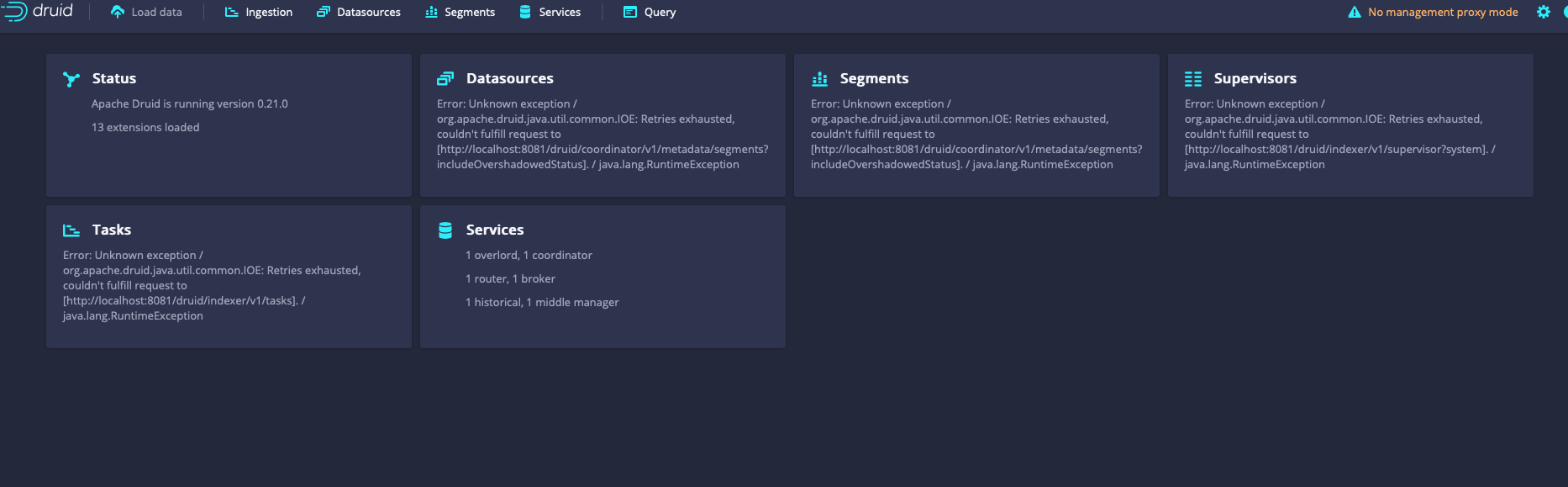 https://druid.apache.org/docs/latest/tutorials/cluster.html and same issue, all services are still registered as localhost in console and router and broker same as above. -- This is an automated message from the Apache Git Service. To respond to the message, please log on to GitHub and use the URL above to go to the specific comment. For queries about this service, please contact Infrastructure at: [email protected] --------------------------------------------------------------------- To unsubscribe, e-mail: [email protected] For additional commands, e-mail: [email protected]


