This is an automated email from the ASF dual-hosted git repository.

victory pushed a commit to branch asf-site
in repository https://gitbox.apache.org/repos/asf/incubator-dubbo-website.git
The following commit(s) were added to refs/heads/asf-site by this push:
new 149c843 2.7.0 doc
149c843 is described below
commit 149c843448474463f3af6ed2c0cad89d22b3a628
Author: cvictory <[email protected]>
AuthorDate: Wed Jan 30 11:46:33 2019 +0800
2.7.0 doc
---
blog/en-us/prepare-an-apache-release.md | 34 +-
...{prepare-an-apache-release.md => release_en.md} | 96 +++---
...bbo-basic-usage-dubbo-consumer-configuration.md | 195 +++++++++++
blog/zh-cn/prepare-an-apache-release.md | 15 +
docs/zh-cn/user/demos/metadata-report.md | 368 +++++++++++++++++++++
docs/zh-cn/user/demos/simplify-registry-data.md | 230 +++++++++++++
6 files changed, 884 insertions(+), 54 deletions(-)
diff --git a/blog/en-us/prepare-an-apache-release.md
b/blog/en-us/prepare-an-apache-release.md
index 6532eef..93de5ba 100644
--- a/blog/en-us/prepare-an-apache-release.md
+++ b/blog/en-us/prepare-an-apache-release.md
@@ -75,12 +75,20 @@ Mainly including the related preparation of signature
utilities and Maven reposi
uid [ultimate] liujun (apache-dubbo) <[email protected]>
sub rsa4096/D3D6984B 2018-04-26
+ ########### Note: Different diaplay for different version.
+ $ gpg --list-keys
+ pub rsa4096 2018-11-12 [SC]
+ 63AAE9838F4A303E40BAF5FEA3A1CA7A5D4A3981 # Last 8
character(5D4A3981) as key id,it will be used when send public key to keyserver
+ uid [ 绝对 ] Victory Cao (CODE SIGNING KEY) <[email protected]>
+ sub rsa4096 2018-11-12 [E]
+
+
# send public key to keyserver via key id
$ gpg --keyserver pgpkeys.mit.edu --send-key 28681CB1
# Here pgpkeys.mit.edu is a random selection of keyserver. Any key server
from the list https://sks-keyservers.net/status/ is acceptable because they are
automatically synchronized.
```
- - If there are multiple public keys,set the default key
+ - If there are multiple public keys,you can set the default key
~/.gnupg/gpg.conf
@@ -90,6 +98,17 @@ Mainly including the related preparation of signature
utilities and Maven reposi
default-key 28681CB1
```
+
+ - If there are multiple public keys, you can also delete unuseful key:
+
+ ```sh
+ ### Delete the private key first, then delete the public key.
+
+ $ gpg --yes --delete-secret-keys [email protected] ### indicate
email address
+
+ $ gpg --delete-keys 1808C6444C781C0AEA0AAD4C4D6A8007D20DB8A4
+
+ ```
3. Set up Apache central repository.
@@ -177,6 +196,12 @@ modifications and taggings related to ${release_version}
Release Candidates are
```shell
$ mvn release:perform -Prelease -Darguments="-Dmaven.test.skip=true"
-DautoVersionSubmodules=true -Dusername=YOUR GITHUB ID
```
+
+#### Note
+
+- When you deploy the package into repository, it will be interrupted for
network. So you must restart to desploy。
+- The problem that missing package occurred many times at deploying. So you
should check the quantity of package, especially parent package。
+
All artifacts are released to configured remote maven central repository,
in staging state
@@ -206,7 +231,7 @@ modifications and taggings related to ${release_version}
Release Candidates are
6. Generate sha512 sign
```shell
- $ shasum -a 512
apache-dubbo-incubating-${release_version}-source-release.zip >>
apache-dubbo-incubating-${release_version}-source-release.zip.sha512
+ $ shasum -b -a 512
apache-dubbo-incubating-${release_version}-source-release.zip >>
apache-dubbo-incubating-${release_version}-source-release.zip.sha512
```
7. If the binary release is accompanied with the source release
@@ -327,6 +352,7 @@ The Apache Dubbo (Incubating) Team
## Official Release
+<<<<<<< Updated upstream
When the release vote has passed,
0. Release the maven artifacts. This is **required step** for 2.7.0 and above.
Go to [here](https://repository.apache.org), and choose the staging repository,
click the release button. Wait for a moment and verify it at
[here](https://repository.apache.org/content/repositories/releases/org/apache/dubbo/),
make sure your artifacts are there and correct. It will take some time to sync
to maven central repository. You can verify it at
[here](https://repo.maven.apache.org/maven2/org/apache/dubbo)
@@ -336,9 +362,9 @@ When the release vote has passed,
5. Publish [release notes](https://github.com/apache/incubator-dubbo/releases)
on Github.
6. Update the recommend dependency on
[Github](https://github.com/apache/incubator-dubbo#maven-dependency) to the
latest version, also update the version in other place if necessary.
7. Add the download link to official website
http://dubbo.apache.org/en-us/blog/download.html, using the ASF mirror system.
The latest release download link should be something like this
`https://www.apache.org/dyn/closer.cgi?path=incubator/dubbo/$VERSION/apache-dubbo-incubating-$VERSION-source-release.zip`.
The download link for the previous release version should be changed to
`https://archive.apache.org/dist/incubator/dubbo/$VERSION/apache-dubbo-incubating-$VERSION-bin-release.zip`.
P [...]
+8. Make sure all the commits in the release branch are merged into master
branch, and then remove the remote release branch. For example: `git push
origin --delete 2.7.0-release`
+9. Send mail to [email protected] and [email protected], notify
the community that the release is completed.
-4. Make sure all the commits in the release branch are merged into master
branch, and then remove the remote release branch. For example: `git push
origin --delete 2.7.0-release`
-2. Send mail to [email protected] and [email protected], notify
the community that the release is completed.
## Complete Maven Convenient Binary release
diff --git a/blog/en-us/prepare-an-apache-release.md b/blog/en-us/release_en.md
similarity index 66%
copy from blog/en-us/prepare-an-apache-release.md
copy to blog/en-us/release_en.md
index 6532eef..89478e9 100644
--- a/blog/en-us/prepare-an-apache-release.md
+++ b/blog/en-us/release_en.md
@@ -75,12 +75,20 @@ Mainly including the related preparation of signature
utilities and Maven reposi
uid [ultimate] liujun (apache-dubbo) <[email protected]>
sub rsa4096/D3D6984B 2018-04-26
+ ########### Note: Different diaplay for different version.
+ $ gpg --list-keys
+ pub rsa4096 2018-11-12 [SC]
+ 63AAE9838F4A303E40BAF5FEA3A1CA7A5D4A3981 # Last 8
character(5D4A3981) as key id,it will be used when send public key to keyserver
+ uid [ 绝对 ] Victory Cao (CODE SIGNING KEY) <[email protected]>
+ sub rsa4096 2018-11-12 [E]
+
+
# send public key to keyserver via key id
$ gpg --keyserver pgpkeys.mit.edu --send-key 28681CB1
# Here pgpkeys.mit.edu is a random selection of keyserver. Any key server
from the list https://sks-keyservers.net/status/ is acceptable because they are
automatically synchronized.
```
- - If there are multiple public keys,set the default key
+ - If there are multiple public keys,you can set the default key
~/.gnupg/gpg.conf
@@ -90,6 +98,17 @@ Mainly including the related preparation of signature
utilities and Maven reposi
default-key 28681CB1
```
+
+ - If there are multiple public keys, you can also delete unuseful key:
+
+ ```sh
+ ### Delete the private key first, then delete the public key.
+
+ $ gpg --yes --delete-secret-keys [email protected] ### indicate
email address
+
+ $ gpg --delete-keys 1808C6444C781C0AEA0AAD4C4D6A8007D20DB8A4
+
+ ```
3. Set up Apache central repository.
@@ -145,40 +164,37 @@ modifications and taggings related to ${release_version}
Release Candidates are
```shell
$ mvn clean install -Papache-release
$ mvn deploy
+ # push the snapshot package to the maven central repository,in staging state
```
- This push the snapshot package to the maven central repository.
-
3. Release with maven-release-plugin
- verify with dryRun
```shell
- $ mvn release:prepare -Prelease -Darguments="-Dmaven.test.skip=true"
-DautoVersionSubmodules=true -Dusername=YOUR GITHUB ID -DdryRun=true
+ $ mvn release:prepare -Papache-release -Darguments="-DskipTests"
-DautoVersionSubmodules=true -Dusername=YOUR GITHUB ID -DdryRun=true
```
- After verification, run release:prepare
```shell
$ mvn release:clean
- $ mvn release:prepare -Prelease -Darguments="-Dmaven.test.skip=true"
-DautoVersionSubmodules=true -Dusername=YOUR GITHUB ID -DpushChanges=false
+ $ mvn release:prepare -Papache-release -Darguments="-DskipTests"
-DautoVersionSubmodules=true -Dusername=YOUR GITHUB ID
+ # After running:1. Generate source.zip; 2. Tag and push to github
repository; 3. The branch version is upgraded to ${release_version}-SNAPSHOT
automatically and the modifications are pushed to the github repository
```
- > If you are promted to input password for pushing to GitHub (basically
including adding new commits and tags), do not input your login password of
GitHub. Use `Personal access tokens` instead. You can go to
https://github.com/settings/profile, click `Developer settings` -> `Personal
access tokens`, and generate a new token if not.
-
-
- After executing the above commands, you will find that:
- 1. source-release.zip and bin-release.zip are generated under
dubbo-distribution directory, please unzip it and check the file structure
- 2. -DpushChanges tells maven not to push the commits and tags to the
remote repostiroy. If not specified, the version tag will be pushed to github
repository, you will see a commit called `[maven-release-plugin] prepare
release dubbo-x.x.x` added.
- 3. The branch version is upgraded to ${release_version+1}-SNAPSHOT
automatically. If -DpushChanges=true is specified, the modifications will be
pushed to the remote repository, you will see a commit called
`[maven-release-plugin] prepare for next development iteration` added.
-
- Run release:perform, make an offical release
```shell
- $ mvn release:perform -Prelease -Darguments="-Dmaven.test.skip=true"
-DautoVersionSubmodules=true -Dusername=YOUR GITHUB ID
+ $ mvn -Prelease release:perform -Darguments="-DskipTests"
-DautoVersionSubmodules=true -Dusername=YOUR GITHUB ID
+ # All artifacts are released to configured remote maven central
repository, in staging state
```
+
+#### Note
- All artifacts are released to configured remote maven central repository,
in staging state
+- When you deploy the package into repository, it will be interrupted for
network. So you must restart to desploy。
+- The problem that missing package occurred many times at deploying. So you
should check the quantity of package, especially parent package。
+
## Prepare Apache Release
@@ -192,21 +208,21 @@ modifications and taggings related to ${release_version}
Release Candidates are
~/apache/incubator/dubbo
```
-3. The current release version is ${release_version}, new directory
+3. The current release version is ${release_version},new directory
```shell
$ cd ~/apache/incubator/dubbo # dubbo svn root directory
$ mkdir ${release_version}
```
-4. Add public key to
[KEYS](https://dist.apache.org/repos/dist/dev/incubator/dubbo/KEYS) file. KEYS
is mainly used to allow people who participate in the voting to be imported
locally to verify the correctness of the sign.
+4. Add public key to
[KEYS](https://dist.apache.org/repos/dist/dev/incubator/dubbo/KEYS) file.KEYS
is mainly used to allow people who participate in the voting to be imported
locally to verify the correctness of the sign.
5. Copy the source.zip package from the Dubbo root directory to the svn local
repository dubbo/${release_version}
6. Generate sha512 sign
```shell
- $ shasum -a 512
apache-dubbo-incubating-${release_version}-source-release.zip >>
apache-dubbo-incubating-${release_version}-source-release.zip.sha512
+ $ shasum -b -a 512
apache-dubbo-incubating-${release_version}-source-release.zip >>
apache-dubbo-incubating-${release_version}-source-release.zip.sha512
```
7. If the binary release is accompanied with the source release
@@ -232,7 +248,7 @@ The verification link includes but is not limited to the
following contents and
1. Check signatures and hashes are good
* sha512
- ```sh
+```sh
$ shasum -c
apache-dubbo-incubating-${release_version}-source-release.zip.sha512
$ shasum -c apache-dubbo-incubating-${release_version}-bin-release.zip.sha512
```
@@ -276,7 +292,7 @@ $ shasum -c
apache-dubbo-incubating-${release_version}-bin-release.zip.sha512
- Release candidates match with corresponding tags, you can find tag link and
hash in vote email.
- check the version number in pom.xml are the same
- check there are no extra files or directories in the source package, for
example, no empty directories or useless log files.
- `diff -r rc_dir tag_dir`
+ `diff -r a rc_dir tag_dir`
- check the top n tag commits, dive into the related files and check if the
source package has the same changes
3. Unzip apache-dubbo-incubating-${release_version}-bin-release.zip and check:
@@ -284,12 +300,15 @@ $ shasum -c
apache-dubbo-incubating-${release_version}-bin-release.zip.sha512
* 'incubating' in name
* LICENSE and NOTICE exists and contents are good
-## Release vote
+## Begin voting
The voting is divided into two phases:
1. Dubbo community votes and sends the voting email to [email protected].
After reviewing by community developers and winning 3 binding tickets that
agree to release, you can go to the next stage of voting.
-2. Apache community votes and sends the voting email to
[email protected]. After reviewing by Apache IPMC(Incubator PMC)
members and winning 3 binding votes that agree to release, you will be allowed
to release officially.
+2. Apache community votes and sends the voting email to [email protected].
After reviewing by Apache PMC Review and winning 3 binding tickets that agree
to release,you will be allowed to release officially.
+3. Publish [release notes](https://github.com/apache/incubator-dubbo/releases)
on Github.
+4. Update the recommend dependency on
[Github](https://github.com/apache/incubator-dubbo#maven-dependency) to the
latest version, also update the version in other place if necessary.
+5. Announce on the [official site](http://dubbo.apache.org/) that the version
was successfully released.
Mail template:
@@ -327,34 +346,11 @@ The Apache Dubbo (Incubating) Team
## Official Release
-When the release vote has passed,
-
-0. Release the maven artifacts. This is **required step** for 2.7.0 and above.
Go to [here](https://repository.apache.org), and choose the staging repository,
click the release button. Wait for a moment and verify it at
[here](https://repository.apache.org/content/repositories/releases/org/apache/dubbo/),
make sure your artifacts are there and correct. It will take some time to sync
to maven central repository. You can verify it at
[here](https://repo.maven.apache.org/maven2/org/apache/dubbo)
-1. Add the release files to [official release
directory](https://dist.apache.org/repos/dist/release/incubator/dubbo)
-2. Remove the release files in [dev
directory](https://dist.apache.org/repos/dist/dev/incubator/dubbo)
-3. Remove the the release file for the previous release under [official
release
directory](https://dist.apache.org/repos/dist/release/incubator/dubbo/), which
will be archived and can be found
[here](https://archive.apache.org/dist/incubator/dubbo/)
-5. Publish [release notes](https://github.com/apache/incubator-dubbo/releases)
on Github.
-6. Update the recommend dependency on
[Github](https://github.com/apache/incubator-dubbo#maven-dependency) to the
latest version, also update the version in other place if necessary.
-7. Add the download link to official website
http://dubbo.apache.org/en-us/blog/download.html, using the ASF mirror system.
The latest release download link should be something like this
`https://www.apache.org/dyn/closer.cgi?path=incubator/dubbo/$VERSION/apache-dubbo-incubating-$VERSION-source-release.zip`.
The download link for the previous release version should be changed to
`https://archive.apache.org/dist/incubator/dubbo/$VERSION/apache-dubbo-incubating-$VERSION-bin-release.zip`.
P [...]
-
-4. Make sure all the commits in the release branch are merged into master
branch, and then remove the remote release branch. For example: `git push
origin --delete 2.7.0-release`
-2. Send mail to [email protected] and [email protected], notify
the community that the release is completed.
-
-## Complete Maven Convenient Binary release
-
-> This is an option step for 2.6.x release.
+1. Commit release package of
https://dist.apache.org/repos/dist/dev/incubator/dubbo to
https://dist.apache.org/repos/dist/release/incubator/dubbo/, complete official
release。
+2. Send mail to [email protected] and [email protected], notify the
community that the release is completed.
-**[repository.apache.org](https://repository.apache.org/) The permissions of
the nexus repository have been applied, see
[jira](https://issues.apache.org/jira/browse/INFRA-16451)。**
+## Complete Maven Convenient Binary release(Optional)
-The artifacts that were previously published to the maven repository are in
the staging state. Log in to
[apache.repository.org](https://repository.apache.org/) with the Apache id and
release it.
+**apache.repository.org The permissions of the nexus repository have been
applied, see [jira](https://issues.apache.org/jira/browse/INFRA-16451)。**
-
-## FAQ
-
-#### gpg: signing failed: Inappropriate ioctl for device
-
-If you've encoutered this error, try the following commands:
-
-```
-export GPG_TTY=$(tty)
-```
\ No newline at end of file
+The artifacts that were previously published to the maven repository are in
the staging state. Log in to apache.repository.org with the Apache id and
release it.
diff --git a/blog/zh-cn/dubbo-basic-usage-dubbo-consumer-configuration.md
b/blog/zh-cn/dubbo-basic-usage-dubbo-consumer-configuration.md
new file mode 100644
index 0000000..3f47a6c
--- /dev/null
+++ b/blog/zh-cn/dubbo-basic-usage-dubbo-consumer-configuration.md
@@ -0,0 +1,195 @@
+# Dubbo基本用法-Dubbo Consumer配置
+
+## Dubbo Consumer配置
+
+### Consumer配置详解
+
+配置Dubbo Consumer有3种方式:XML配置,API调用方式配置,注解方式配置。
+
+#### XML配置
+
+###### 最简单的配置的样例:
+
+```
+
+<?xml version="1.0" encoding="UTF-8"?>
+<beans xmlns="http://www.springframework.org/schema/beans";
+ xmlns:xsi="http://www.w3.org/2001/XMLSchema-instance";
+ xmlns:dubbo="http://dubbo.apache.org/schema/dubbo";
+ xsi:schemaLocation="http://www.springframework.org/schema/beans
http://www.springframework.org/schema/beans/spring-beans-4.3.xsd
http://dubbo.apache.org/schema/dubbo
http://dubbo.apache.org/schema/dubbo/dubbo.xsd";>
+ <dubbo:application name="hello-world-app" />
+ <dubbo:registry address="multicast://224.5.6.7:1234" />
+ <dubbo:protocol name="dubbo" port="20880" />
+ <dubbo:reference id="demoServiceRemote"
interface="com.alibaba.dubbo.demo.DemoService" />
+</beans>
+```
+
+
+
+> 支持的配置标签及对应的配置项详解,参考provider中的用法。
+
+> 接下来重点讲解下<dubbo:reference/>的配置。
+
+
+
+* <dubbo:reference/>支持的主要属性列表:
+
+| 属性名 | 说明 |
+| -------- | ----- |
+| id | 服务引用id,作为java bean id,需要唯一 |
+| interface | 接口名,用于查找服务 |
+| version | 版本号,与服务提供者的版本一致 |
+| timeout | 服务方法调用超时时间(毫秒) |
+| retries | 远程服务调用重试次数,不包括第一次调用,不需要重试请设为0 |
+| connections |
对每个提供者的最大连接数,rmi、http、hessian等短连接协议表示限制连接数,dubbo等长连接协表示建立的长连接个数 |
+| loadbalance | 负载均衡策略,可选值:random,roundrobin,leastactive,分别表示:随机,轮询,最少活跃调用 |
+| async | 是否异步执行,不可靠异步,只是忽略返回值,不阻塞执行线程 |
+| generic | 泛化调用,可以绕过 |
+| check | 启动时检查提供者是否存在,true报错,false忽略 |
+| actives | 每服务消费者每服务每方法最大并发调用数 |
+
+
+
+其他配置属性请参考xsd:http://dubbo.apache.org/schema/dubbo/dubbo.xsd
+
+
+
+* <dubbo:method/>作为<dubbo:reference/>的子元素,它可以针对方法进行配置。比较常用的属性有:
+
+
+
+| 属性名 | 说明 |
+| -------- | ----- |
+| executes | 服务执行的请求上限 |
+| retries | 超时重试次数 |
+| timeout | 调用超时时间 |
+| loadbalance | 负载均衡策略,可选值:random,roundrobin,leastactive,分别表示:随机,轮询,最少活跃调用 |
+| async | 是否异步执行,不可靠异步,只是忽略返回值,不阻塞执行线程 |
+| actives | 每服务消费者最大并发调用限制 |
+
+其他属性,可以参考上面的xsd。
+
+###### 配置的覆盖关系
+
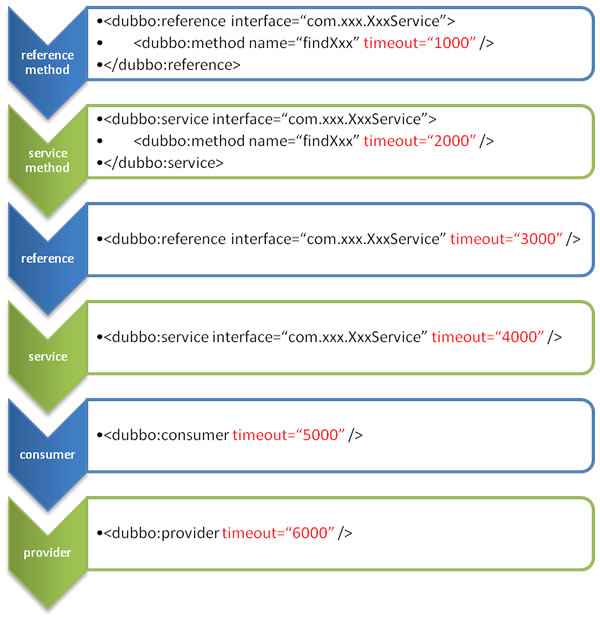
+
+
+<center>配置的覆盖关系图</center>
+
+其中包含了consumer端和provider的配置,注意区分。
+
+#### annotation
+
+
+###### Reference注解远程服务
+
+```
+
+public class AnnotationConsumeService {
+
+ @com.alibaba.dubbo.config.annotation.Reference
+ public AnnotateService annotateService;
+
+ // ...
+
+}
+
+```
+
+
+
+这种方式的配置和前面用xml配置的方式是一样的效果。
+
+
+
+> 指定dubbo扫描路径的方式,可以参考前一章节中provider的实现。
+
+
+
+
+
+#### api直接触发
+
+```
+import com.alibaba.dubbo.rpc.config.ApplicationConfig;
+import com.alibaba.dubbo.rpc.config.RegistryConfig;
+import com.alibaba.dubbo.rpc.config.ConsumerConfig;
+import com.alibaba.dubbo.rpc.config.ReferenceConfig;
+import com.xxx.XxxService;
+// 当前应用配置
+
+ApplicationConfig application = new ApplicationConfig();
+application.setName("yyy");
+// 连接注册中心配置
+RegistryConfig registry = new RegistryConfig();
+registry.setAddress("10.20.130.230:9090");
+registry.setUsername("aaa");
+registry.setPassword("bbb");
+
+// 注意:ReferenceConfig为重对象,内部封装了与注册中心的连接,以及与服务提供方的连接
+// 引用远程服务
+ReferenceConfig<XxxService> reference = new ReferenceConfig<XxxService>(); //
此实例很重,封装了与注册中心的连接以及与提供者的连接,请自行缓存,否则可能造成内存和连接泄漏
+
+reference.setApplication(application);
+reference.setRegistry(registry); // 多个注册中心可以用setRegistries()
+reference.setInterface(XxxService.class);
+reference.setVersion("1.0.0");
+
+// 和本地bean一样使用xxxService
+XxxService xxxService = reference.get();
+```
+
+###### method特殊设置
+
+```
+
+// 方法级配置
+List<MethodConfig> methods = new ArrayList<MethodConfig>();
+MethodConfig method = new MethodConfig();
+method.setName("createXxx");
+method.setTimeout(10000);
+method.setRetries(0);
+methods.add(method);
+// 引用远程服务
+ReferenceConfig<XxxService> reference = new ReferenceConfig<XxxService>(); //
此实例很重,封装了与注册中心的连接以及与提供者的连接,请自行缓存,否则可能造成内存和连接泄漏
+...
+reference.setMethods(methods); // 设置方法级配置
+```
+
+### Consumer 调用远程服务
+上面章节更多从配置角度出发,接下来通过一个完整的例子,来讲解下dubbo consumer的完整使用。
+
+这个例子中只有一个服务UserReadService,有一个方法 getUserById。 需要将通过Dubbo调用远程的服务。具体的步骤如下:
+
+1.创建一个工程
+如果本来已经有工程,可以忽略。创建一个spring boot工程,可以通过 https://start.spring.io/ 创建。
+服务的提供方,已经在provider章节中进行了定义。
+2.调用服务
+```
+@RestController
+public class UserTestController{
+ @Autowired
+ private UserReadService userReadService;
+ @RequestMapping("/user/getById")
+ public String getUserById(Long id){
+ // just test
+ return userReadService.getUserById(id).toString();
+ }
+}
+```
+3.Dubbo配置
+```
+
+<?xml version="1.0" encoding="UTF-8"?>
+<beans xmlns="http://www.springframework.org/schema/beans";
+ xmlns:xsi="http://www.w3.org/2001/XMLSchema-instance";
+ xmlns:dubbo="http://dubbo.apache.org/schema/dubbo";
+ xsi:schemaLocation="http://www.springframework.org/schema/beans
http://www.springframework.org/schema/beans/spring-beans-4.3.xsd
http://dubbo.apache.org/schema/dubbo
http://dubbo.apache.org/schema/dubbo/dubbo.xsd";>
+ <dubbo:application name="hello-world-app" />
+ <dubbo:registry address="multicast://224.5.6.7:1234" />
+ <dubbo:protocol name="dubbo" port="20880" />
+ <dubbo:reference id="userReadService"
interface="com.package.UserReadService"check="false" />
+</beans>
+```
+Dubbo配置的其他方式可以参考上一章节的相关配置,或者使用集成dubbo spring boot starter方式。
+
+
diff --git a/blog/zh-cn/prepare-an-apache-release.md
b/blog/zh-cn/prepare-an-apache-release.md
index c88f0d4..d841504 100644
--- a/blog/zh-cn/prepare-an-apache-release.md
+++ b/blog/zh-cn/prepare-an-apache-release.md
@@ -92,6 +92,15 @@ keywords: Dubbo, Apache, Release
default-key 28681CB1
```
+ - 如果有多个public key, 也可以删除无用的key:
+ ```sh
+ ### 先删除私钥,再删除公钥
+
+ $ gpg --yes --delete-secret-keys [email protected] ###老的私钥,指明邮箱即可
+
+ $ gpg --delete-keys 1808C6444C781C0AEA0AAD4C4D6A8007D20DB8A4
+
+ ```
PS:
最新版本经过实测,本地没有gpg.conf这个文件,因此如果在执行过程中遇到签名失败,可以参考这个文章:https://blog.csdn.net/wenbo20182/article/details/72850810
或 https://d.sb/2016/11/gpg-inappropriate-ioctl-for-device-errors
@@ -176,6 +185,12 @@ keywords: Dubbo, Apache, Release
PS:
执行release插件时,需要输入github的密码,这里不是输入web页面的登录密码,而是一个token,详见这里:https://help.github.com/articles/creating-a-personal-access-token-for-the-command-line/
+#### 注意点
+
+- 在deploy执行过程中,有可能因为网络等原因被中断,如果是这样,可以重新开始执行。
+- deploy执行到maven仓库的时候,请确认下包的总量是否正确。多次出现了包丢失的情况,特别是parent包。
+
+
## 准备Apache发布
1. 准备svn本机环境(Apache使用svn托管项目的发布内容)
diff --git a/docs/zh-cn/user/demos/metadata-report.md
b/docs/zh-cn/user/demos/metadata-report.md
new file mode 100644
index 0000000..77d3116
--- /dev/null
+++ b/docs/zh-cn/user/demos/metadata-report.md
@@ -0,0 +1,368 @@
+# 背景
+dubbo
provider中的服务配置项有接近[30个配置项](http://dubbo.apache.org/en-us/docs/user/references/xml/dubbo-service.html)。
排除注册中心服务治理需要之外,很大一部分配置项是provider自己使用,不需要透传给消费者。这部分数据不需要进入注册中心,而只需要以key-value形式持久化存储。
+dubbo
consumer中的配置项也有[20+个配置项](http://dubbo.apache.org/en-us/docs/user/references/xml/dubbo-reference.html)。在注册中心之中,服务消费者列表中只需要关注application,version,group,ip,dubbo版本等少量配置,其他配置也可以以key-value形式持久化存储。
+这些数据是以服务为维度注册进入注册中心,导致了数据量的膨胀,进而引发注册中心(如zookeeper)的网络开销增大,性能降低。
+除了上述配置项的存储之外,dubbo服务元数据信息也需要被存储下来。元数据信息包括服务接口,及接口的方法信息。这些信息将被用于服务mock,服务测试。
+
+
+
+# 目标
+
+需要将注册中心原来的数据信息和元数据信息保存到独立的key-value的存储中,这个key-value可以是DB,redis或者其他持久化存储。核心代码中支持了zookeeper,redis(推荐)的默认支持。
+
+provider存储内容的格式,参见:org.apache.dubbo.metadata.definition.model.FullServiceDefinition。是该类型gson化之后的存储。
+Consumer存储内容,为Map格式。从Consumer端注册到注册中心的URL中的获取参数信息。即通过URL.getParameterMap()获取到的Map,进行gson话之后进行存储。
+
+详细的内容,可以参考下面的sample输出。
+
+
+
+# 配置
+
+默认的元数据存储,额外支持以下几个特性:
+* 失败重试
+* 每天定时重刷
+
+#### 失败重试
+失败重试可以通过retrytimes (重试次数,默认100),retryperiod(重试周期,默认3000ms)进行设置。
+
+#### 定时刷新
+默认开启,可以通过设置cycleReport=false进行关闭。
+
+#### 完整的配置项:
+
+```
+dubbo.metadata-report.address=zookeeper://127.0.0.1:2181
+dubbo.metadata-report.username=xxx ##非必须
+dubbo.metadata-report.password=xxx ##非必须
+dubbo.metadata-report.retry-times=30 ##非必须,default值100
+dubbo.metadata-report.retry-period=5000 ##非必须,default值3000
+dubbo.metadata-report.cycle-report=false ##非必须,default值true
+```
+> 如果元数据地址(dubbo.metadata-report.address)也不进行配置,整个元数据的写入不会生效,但是不影响程序运行。
+
+
+接下来看几个sample的配置。无论哪种配置方式,都需要引入maven依赖:
+```
+<dependency>
+ <groupId>org.apache.dubbo</groupId>
+ <artifactId>dubbo-metadata-report-zookeeper</artifactId>
+</dependency>
+```
+如果需要使用redis,可以引入对应的redis的依赖:
+```
+<dependency>
+ <groupId>org.apache.dubbo</groupId>
+ <artifactId>dubbo-metadata-report-redis</artifactId>
+</dependency>
+```
+>
**完整的sample,查看[sample-2.7](https://github.com/dubbo/dubbo-samples/tree/samples-for-2.7.0-SNAPSHOT)**
+
+## 方式一:配置中心配置
+
+参考sample:dubbo-samples-metadata-report/dubbo-samples-metadata-report-configcenter
工程。
+
+##### 在配置中心配置
+
+配置中心的配置,可以参考configcenter的文档。配置的内容如下:
+```.properties
+dubbo.registry.address=zookeeper://127.0.0.1:2181
+### 注意驼峰式风格
+dubbo.metadata-report.address=zookeeper://127.0.0.1:2181 ###元数据存储的地址
+```
+在sample中,使用了Zookeeper作为配置中心。启动本地zookeeper服务之后,直接运行:org.apache.dubbo.samples.metadatareport.configcenter.ZKTools
就可以完成写入。
+如果配置中心使用了nacos,apollo,这些产品本身支持ops配置。
+
+##### 应用中配置
+
+```
+###dubbo.properties
+dubbo.configCenter.address=zookeeper://127.0.0.1:2181
+...
+```
+
+完成上述两部之后,注册中心地址、元数据地址将从配置中心进行获取。现在可以依次运行Provider类和Consumer类,会在console中得到对应的输出或者直接通过zookeeper的cli查看。
+
+##### provider
+
+provider端存储的元数据内容如下:
+```json
+{
+ "parameters": {
+ "side": "provider",
+ "methods": "sayHello",
+ "dubbo": "2.0.2",
+ "threads": "100",
+ "interface":
"org.apache.dubbo.samples.metadatareport.configcenter.api.AnnotationService",
+ "threadpool": "fixed",
+ "version": "1.1.1",
+ "generic": "false",
+ "revision": "1.1.1",
+ "valid": "true",
+ "application": "metadatareport-configcenter-provider",
+ "default.timeout": "5000",
+ "group": "d-test",
+ "anyhost": "true"
+ },
+ "canonicalName":
"org.apache.dubbo.samples.metadatareport.configcenter.api.AnnotationService",
+ "codeSource":
"file:/Users/cvictory/workspace/work-mw/dubbo-samples/dubbo-samples-metadata-report/dubbo-samples-metadata-report-configcenter/target/classes/",
+ "methods": [{
+ "name": "sayHello",
+ "parameterTypes": ["java.lang.String"],
+ "returnType": "java.lang.String"
+ }],
+ "types": [{
+ "type": "java.lang.String",
+ "properties": {
+ "value": {
+ "type": "char[]"
+ },
+ "hash": {
+ "type": "int"
+ }
+ }
+ }, {
+ "type": "int"
+ }, {
+ "type": "char"
+ }]
+}
+
+```
+provider存储的内容包括了provider服务往注册中心填写的全部参数,以及服务的方法信息(方法名,入参出参的格式)。
+
+##### consumer端存储的内容:
+```
+{
+ "valid": "true",
+ "side": "consumer",
+ "application": "metadatareport-configcenter-consumer",
+ "methods": "sayHello",
+ "default.timeout": "6666",
+ "dubbo": "2.0.2",
+ "interface":
"org.apache.dubbo.samples.metadatareport.configcenter.api.AnnotationService",
+ "version": "1.1.1",
+ "revision": "1.1.1",
+ "group": "d-test"
+}
+```
+
+consumer端存储了consumer往注册中心填写的全部参数。
+
+
+
+上面的例子中,主要是将元数据地址放在配置中心。在元数据存储下来的provider服务信息和consumer端服务信息的展示。
+接下来的两个例子,主要讲解在工程中配置:xml方式,annotation方式。
+
+## 方式二:配置在项目中-properties方式引入配置
+
+参考sample:dubbo-samples-metadata-report/dubbo-samples-metadata-report-local-xml工程。
+
+##### dubbo.properties
+```
+dubbo.metadata-report.address=zookeeper://127.0.0.1:2181
+```
+
+配置完成这个之后,其余的不用特别关注。也可以直接查看对应的provider和consumer端的服务信息。
+
+##### provider存储的某个服务的内容:
+```
+{
+ "parameters": {
+ "valid": "true",
+ "async": "true",
+ "side": "provider",
+ "application": "metadatareport-local-xml-provider",
+ "methods": "sayHello",
+ "dubbo": "2.0.2",
+ "interface":
"org.apache.dubbo.samples.metadatareport.local.xml.api.DemoService",
+ "generic": "false",
+ "anyhost": "true"
+ },
+ "canonicalName":
"org.apache.dubbo.samples.metadatareport.local.xml.api.DemoService",
+ "codeSource":
"file:/Users/cvictory/workspace/work-mw/dubbo-samples/dubbo-samples-metadata-report/dubbo-samples-metadata-report-local-xml/target/classes/",
+ "methods": [{
+ "name": "sayHello",
+ "parameterTypes": ["java.lang.String"],
+ "returnType": "java.lang.String"
+ }],
+ "types": [{
+ "type": "int"
+ }, {
+ "type": "char"
+ }, {
+ "type": "java.lang.String",
+ "properties": {
+ "value": {
+ "type": "char[]"
+ },
+ "hash": {
+ "type": "int"
+ }
+ }
+ }]
+}
+
+```
+
+##### consumer端存储的内容:
+
+```
+{
+ "valid": "true",
+ "side": "consumer",
+ "application": "metadatareport-local-xml-consumer",
+ "methods": "sayHello",
+ "dubbo": "2.0.2",
+ "interface":
"org.apache.dubbo.samples.metadatareport.local.xml.api.DemoService"
+}
+
+```
+
+
+
+## 方式三:配置在项目中-annotation方式引入配置
+
+参考sample:dubbo-samples-metadata-report/dubbo-samples-metadata-report-local-annotaion工程。
+
+##### @Bean 引入bean
+```
+@Bean
+public MetadataReportConfig metadataReportConfig() {
+ MetadataReportConfig metadataReportConfig = new MetadataReportConfig();
+ metadataReportConfig.setAddress("zookeeper://127.0.0.1:2181");
+ return metadataReportConfig;
+}
+
+```
+引入Bean之后,其余的地方也不需要特别配置。直接查看对应的服务信息:
+
+##### provider存储的某个服务的内容:
+
+```
+{
+ "parameters": {
+ "side": "provider",
+ "methods": "sayHello",
+ "dubbo": "2.0.2",
+ "interface":
"org.apache.dubbo.samples.metadatareport.local.annotation.api.AnnotationService",
+ "version": "1.1.8",
+ "generic": "false",
+ "revision": "1.1.8",
+ "valid": "true",
+ "application": "metadatareport-local-annotaion-provider",
+ "default.timeout": "1000",
+ "group": "d-test",
+ "anyhost": "true"
+ },
+ "canonicalName":
"org.apache.dubbo.samples.metadatareport.local.annotation.api.AnnotationService",
+ "codeSource":
"file:/Users/cvictory/workspace/work-mw/dubbo-samples/dubbo-samples-metadata-report/dubbo-samples-metadata-report-local-annotaion/target/classes/",
+ "methods": [{
+ "name": "sayHello",
+ "parameterTypes": ["java.lang.String"],
+ "returnType": "java.lang.String"
+ }],
+ "types": [{
+ "type": "int"
+ }, {
+ "type": "java.lang.String",
+ "properties": {
+ "value": {
+ "type": "char[]"
+ },
+ "hash": {
+ "type": "int"
+ }
+ }
+ }, {
+ "type": "char"
+ }]
+}
+```
+
+##### consumer端存储的内容:
+```
+{
+ "valid": "true",
+ "side": "consumer",
+ "application": "metadatareport-local-annotaion-consumer",
+ "methods": "sayHello",
+ "dubbo": "2.0.2",
+ "interface":
"org.apache.dubbo.samples.metadatareport.local.annotation.api.AnnotationService",
+ "version": "1.1.8",
+ "revision": "1.1.8",
+ "group": "d-test"
+}
+```
+
+# 扩展
+## SPI定义
+
+参考:org.apache.dubbo.metadata.store.MetadataReportFactory ,
org.apache.dubbo.metadata.store.MetadataReport
+
+```
+@SPI("redis")
+public interface MetadataReportFactory {
+ @Adaptive({"protocol"})
+ MetadataReport getMetadataReport(URL url);
+}
+```
+
+
+
+## 自定义元数据的存储
+
+下面以Redis存储为例进行说明。
+
+新建一个project,需要支持以下修改:
+
+#### 扩展AbstractMetadataReport
+
+```
+public class RedisMetadataReport extends AbstractMetadataReport {
+ private final static Logger logger =
LoggerFactory.getLogger(RedisMetadataReport.class);
+ final JedisPool pool;
+
+ public RedisMetadataReport(URL url) {
+ super(url);
+ pool = new JedisPool(new JedisPoolConfig(), url.getHost(),
url.getPort());
+ }
+ @Override
+ protected void doStoreProviderMetadata(ProviderMetadataIdentifier
providerMetadataIdentifier, String serviceDefinitions) {
+ this.storeMetadata(providerMetadataIdentifier, serviceDefinitions);
+ }
+ @Override
+ protected void doStoreConsumerMetadata(ConsumerMetadataIdentifier
consumerMetadataIdentifier, String value) {
+ this.storeMetadata(consumerMetadataIdentifier, value);
+ }
+ private void storeMetadata(MetadataIdentifier metadataIdentifier, String
v) {
+ try (Jedis jedis = pool.getResource()) {
+ jedis.set(metadataIdentifier.getIdentifierKey() +
META_DATA_SOTRE_TAG, v);
+ } catch (Throwable e) {
+ logger.error("Failed to put " + metadataIdentifier + " to redis "
+ v + ", cause: " + e.getMessage(), e);
+ throw new RpcException("Failed to put " + metadataIdentifier + "
to redis " + v + ", cause: " + e.getMessage(), e);
+ }
+ }
+}
+```
+
+#### 扩展AbstractMetadataReportFactory
+
+```
+public class RedisMetadataReportFactory extends AbstractMetadataReportFactory {
+ @Override
+ public MetadataReport createMetadataReport(URL url) {
+ return new RedisMetadataReport(url);
+ }
+}
+```
+
+####
增加META-INF/dubbo/internal/org.apache.dubbo.metadata.store.MetadataReportFactory
+
+```
+redis=org.apache.dubbo.metadata.store.redis.RedisMetadataReportFactory
+```
+
+只要将上面的修改和project打包成jar包,然后配置元数据中心的url:redis://10.20.153.10:6379。
+
+至此,一个自定义的元数据存储就可以运行了。
diff --git a/docs/zh-cn/user/demos/simplify-registry-data.md
b/docs/zh-cn/user/demos/simplify-registry-data.md
new file mode 100644
index 0000000..570212b
--- /dev/null
+++ b/docs/zh-cn/user/demos/simplify-registry-data.md
@@ -0,0 +1,230 @@
+# 背景
+
+dubbo
provider中的服务配置项有接近[30个配置项](http://dubbo.apache.org/en-us/docs/user/references/xml/dubbo-service.html)。
排除注册中心服务治理需要之外,很大一部分配置项是provider自己使用,不需要透传给消费者。这部分数据不需要进入注册中心,而只需要以key-value形式持久化存储。
+
+dubbo
consumer中的配置项也有[20+个配置项](http://dubbo.apache.org/en-us/docs/user/references/xml/dubbo-reference.html)。在注册中心之中,服务消费者列表中只需要关注application,version,group,ip,dubbo版本等少量配置,其他配置也可以以key-value形式持久化存储。
+
+这些数据是以服务为维度注册进入注册中心,导致了数据量的膨胀,进而引发注册中心(如zookeeper)的网络开销增大,性能降低。
+
+### 现有功能sample
+
+当前现状一个简单展示。通过这个展示,分析下为什么需要做简化配置。
+
+参考sample子工程:
dubbo-samples-simplified-registry/dubbo-samples-simplified-registry-nosimple
(跑sample前,先跑下ZKClean进行配置项清理)
+
+###### dubbo-provider.xml配置
+
+```
+<dubbo:application name="simplified-registry-nosimple-provider"/>
+<dubbo:registry address="zookeeper://127.0.0.1:2181"/>
+<bean id="demoService"
class="org.apache.dubbo.samples.simplified.registry.nosimple.impl.DemoServiceImpl"/>
+<dubbo:service async="true"
interface="org.apache.dubbo.samples.simplified.registry.nosimple.api.DemoService"
+ version="1.2.3" group="dubbo-simple" ref="demoService"
+ executes="4500" retries="7" owner="vict" timeout="5300"/>
+```
+
+启动provider的main方法之后,查看zookeeper的叶子节点(路径为:/dubbo/org.apache.dubbo.samples.simplified.registry.nosimple.api.DemoService/providers目录下)的内容如下:
+
+dubbo%3A%2F%2F30.5.124.158%3A20880%2Forg.apache.dubbo.samples.simplified.registry.nosimple.api.DemoService%3Fanyhost%3Dtrue%26application%3Dsimplified-registry-xml-provider%26async%3Dtrue%26dubbo%3D2.0.2%26**executes**%3D4500%26generic%3Dfalse%26group%3Ddubbo-simple%26interface%3Dorg.apache.dubbo.samples.simplified.registry.nosimple.api.DemoService%26methods%3DsayHello%26**owner**%3Dvict%26pid%3D2767%26**retries**%3D7%26revision%3D1.2.3%26side%3Dprovider%26**timeout**%3D5300%26timestamp%
[...]
+
+从加粗字体中能看到有:executes, retries, owner, timeout. 但是这些字段不是每个都需要传递给dubbo ops或者dubbo
consumer。
+同样的,consumer也有这个问题,可以在例子中启动Consumer的main方法进行查看。
+
+# 设计目标和宗旨
+
+期望简化进入注册中心的provider和consumer配置数量。
+期望将部分配置项以其他形式存储。这些配置项需要满足:不在服务调用链路上,同时这些配置项不在注册中心的核心链路上(服务查询,服务列表)。
+
+# 配置
+
+简化注册中心的配置,只在2.7之后的版本中进行支持。
+开启provider或者consumer简化配置之后,默认保留的配置项如下:
+
+provider:
+| Constant Key | Key | remark |
+| ------ | ------ | ------ |
+| APPLICATION_KEY | application | |
+| CODEC_KEY | codec | |
+| EXCHANGER_KEY | exchanger | |
+| SERIALIZATION_KEY | serialization | |
+| CLUSTER_KEY | cluster | |
+| CONNECTIONS_KEY | connections | |
+| DEPRECATED_KEY | deprecated | |
+| GROUP_KEY | group | |
+| LOADBALANCE_KEY | loadbalance | |
+| MOCK_KEY | mock | |
+| PATH_KEY | path | |
+| TIMEOUT_KEY | timeout | |
+| TOKEN_KEY | token | |
+| VERSION_KEY | version | |
+| WARMUP_KEY | warmup | |
+| WEIGHT_KEY | weight | |
+| TIMESTAMP_KEY | timestamp | |
+| DUBBO_VERSION_KEY | dubbo | |
+| SPECIFICATION_VERSION_KEY | **specVersion** | 新增,用于表述dubbo版本,如2.7.0 |
+
+
+consumer:
+| Constant Key | Key | remark |
+| ------ | ------ | ------ |
+| APPLICATION_KEY | application | |
+| VERSION_KEY | version | |
+| GROUP_KEY | group | |
+| DUBBO_VERSION_KEY | dubbo | |
+| SPECIFICATION_VERSION_KEY | **specVersion** | 新增,用于表述dubbo版本,如2.7.0 |
+
+Constant Key表示来自于类org.apache.dubbo.common.Constants的字段。
+
+下面介绍几种常用的使用方式。所有的sample,都可以查看[sample-2.7](https://github.com/dubbo/dubbo-samples/tree/samples-for-2.7.0-SNAPSHOT)
+
+### 方式1. 配置dubbo.properties
+
+sample在dubbo-samples-simplified-registry/dubbo-samples-simplified-registry-xml
工程下 (跑sample前,先跑下ZKClean进行配置项清理)
+
+dubbo.properties
+
+```properties
+
+dubbo.registry.simplified=true
+dubbo.registry.extra-keys=retries,owner
+```
+
+怎么去验证呢?
+
+##### provider端验证
+
+provider端配置
+
+```xml
+
+<beans xmlns:xsi="http://www.w3.org/2001/XMLSchema-instance";
+ xmlns:dubbo="http://dubbo.apache.org/schema/dubbo";
+ xmlns="http://www.springframework.org/schema/beans";
+ xsi:schemaLocation="http://www.springframework.org/schema/beans
http://www.springframework.org/schema/beans/spring-beans-4.3.xsd
+ http://dubbo.apache.org/schema/dubbo
http://dubbo.apache.org/schema/dubbo/dubbo.xsd";>
+ <!-- optional -->
+ <dubbo:application name="simplified-registry-xml-provider"/>
+ <dubbo:registry address="zookeeper://127.0.0.1:2181"/>
+ <bean id="demoService"
class="org.apache.dubbo.samples.simplified.registry.nosimple.impl.DemoServiceImpl"/>
+ <dubbo:service async="true"
interface="org.apache.dubbo.samples.simplified.registry.nosimple.api.DemoService"
version="1.2.3" group="dubbo-simple"
+ ref="demoService" executes="4500" retries="7" owner="vict"
timeout="5300"/>
+
+</beans>
+```
+
+得到的zookeeper的叶子节点的值如下:
+
+dubbo%3A%2F%2F30.5.124.149%3A20880%2Forg.apache.dubbo.samples.simplified.registry.nosimple.api.DemoService%3Fapplication%3Dsimplified-registry-xml-provider%26dubbo%3D2.0.2%26group%3Ddubbo-simple%26**owner**%3Dvict%26**retries**%3D7%26**timeout**%3D5300%26timestamp%3D1542594503305%26version%3D1.2.3
+
+和上面的`现有功能sample` 进行对比,上面的sample中,executes, retries, owner,
timeout四个配置项都进入了注册中心。但是本实例不是:
+* 配置了:dubbo.registry.simplified=true, 默认情况下,timeout在默认的配置项列表,所以还是会进入注册中心;
+* 配置了:dubbo.registry.extra-keys=retries,owner , 所以retries,owner也会进入注册中心。
+
+总结:timeout,retries,owner进入了注册中心,而executes没有进入。
+
+consumer端配置
+```xml
+
+<beans xmlns:xsi="http://www.w3.org/2001/XMLSchema-instance";
+ xmlns:dubbo="http://dubbo.apache.org/schema/dubbo";
+ xmlns="http://www.springframework.org/schema/beans";
+ xsi:schemaLocation="http://www.springframework.org/schema/beans
http://www.springframework.org/schema/beans/spring-beans-4.3.xsd
+ http://dubbo.apache.org/schema/dubbo
http://dubbo.apache.org/schema/dubbo/dubbo.xsd";>
+
+ <!-- optional -->
+ <dubbo:application name="simplified-registry-xml-consumer"/>
+
+ <dubbo:registry address="zookeeper://127.0.0.1:2181" username="xxx"
password="yyy" check="true"/>
+
+ <dubbo:reference id="demoService"
interface="org.apache.dubbo.samples.simplified.registry.nosimple.api.DemoService"
+ owner="vvv" retries="4" actives="6" timeout="4500"
version="1.2.3" group="dubbo-simple"/>
+
+</beans>
+```
+
+得到的zookeeper的叶子节点的值如下:
+
+consumer%3A%2F%2F30.5.124.149%2Forg.apache.dubbo.samples.simplified.registry.nosimple.api.DemoService%3Factives%3D6%26application%3Dsimplified-registry-xml-consumer%26category%3Dconsumers%26check%3Dfalse%26dubbo%3D2.0.2%26group%3Ddubbo-simple%26owner%3Dvvv%26version%3D1.2.3
+
+* 配置了:dubbo.registry.simplified=true ,
默认情况下,application,version,group,dubbo在默认的配置项列表,所以还是会进入注册中心;
+
+
+### 方式2. 声明spring bean
+
+sample在dubbo-samples-simplified-registry/dubbo-samples-simplified-registry-annotation
工程下 (跑sample前,先跑下ZKClean进行配置项清理)
+
+##### Provider配置
+
+privide端bean配置:
+```
+// 等同于dubbo.properties配置,用@Bean形式进行配置
+ @Bean
+ public RegistryConfig registryConfig() {
+ RegistryConfig registryConfig = new RegistryConfig();
+ registryConfig.setAddress("zookeeper://127.0.0.1:2181");
+ registryConfig.setSimplified(true);
+ registryConfig.setExtraKeys("retries,owner");
+ return registryConfig;
+ }
+```
+
+```
+// 暴露服务
+@Service(version = "1.1.8", group = "d-test", executes = 4500, retries = 7,
owner = "victanno", timeout = 5300)
+public class AnnotationServiceImpl implements AnnotationService {
+ @Override
+ public String sayHello(String name) {
+ System.out.println("async provider received: " + name);
+ return "annotation: hello, " + name;
+ }
+}
+```
+和上面sample中的dubbo.properties的效果是一致的。结果如下:
+* 默认情况下,timeout在默认的配置项列表,所以还是会进入注册中心;
+* 配置了retries,owner 作为额外的key进入注册中心 , 所以retries,owner也会进入注册中心。
+
+总结:timeout,retries,owner进入了注册中心,而executes没有进入。
+
+##### Consumer配置
+consumer端bean配置:
+```
+ @Bean
+ public RegistryConfig registryConfig() {
+ RegistryConfig registryConfig = new RegistryConfig();
+ registryConfig.setAddress("zookeeper://127.0.0.1:2181");
+ registryConfig.setSimplified(true);
+ return registryConfig;
+ }
+```
+消费服务:
+```
+@Component("annotationAction")
+public class AnnotationAction {
+
+ @Reference(version = "1.1.8", group = "d-test", owner = "vvvanno", retries
= 4, actives = 6, timeout = 4500)
+ private AnnotationService annotationService;
+ public String doSayHello(String name) {
+ return annotationService.sayHello(name);
+ }
+}
+```
+和上面sample中consumer端的配置是一样的。结果如下:
+* 默认情况下,application,version,group,dubbo在默认的配置项列表,所以还是会进入注册中心.
+
+###### 注意:
+如果一个应用中既有provider又有consumer,那么配置需要合并成:
+```
+ @Bean
+ public RegistryConfig registryConfig() {
+ RegistryConfig registryConfig = new RegistryConfig();
+ registryConfig.setAddress("zookeeper://127.0.0.1:2181");
+ registryConfig.setSimplified(true);
+ //只对provider生效
+ registryConfig.setExtraKeys("retries,owner");
+ return registryConfig;
+ }
+```
+
+# 后续规划
+
+本版本还保留了大量的配置项,接下来的版本中,会逐渐删除所有的配置项。

