BrianGilbert opened a new issue #12512:
URL: https://github.com/apache/incubator-echarts/issues/12512
### Version 4.7.0 ### Steps to reproduce When there is a bar chart that has some high value and low value peices of data in the same column the small numbers get occluded by data above them: 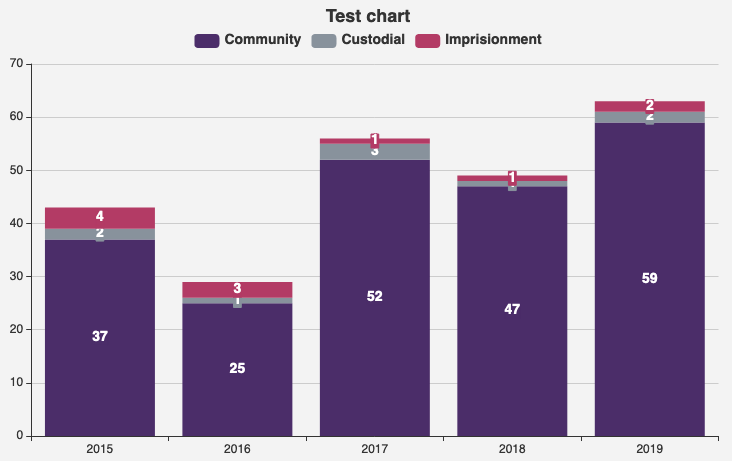 Option array for the above screenshot that can be pasted into the examples engine at https://echarts.apache.org/examples/en/editor.html ``` option = { aria: { show: true }, color: ['#522a6c', '#84939d', '#c81f66', '#039cd6', '#88982f', '#8f61ad', '#45575e', '#0172a6', '#ce5b8b', '#397519'], title: { text: 'Test chart', left: 'center' }, tooltip: { trigger: 'axis', axisPointer: { type: 'shadow' }, textStyle: { fontSize: '14', fontWeight: 'bold' } }, legend: { backgroundColor: '#F3F3F3', borderColor: '#F3F3F3', data: ['Community', 'Custodial', 'Imprisionment'], top: 25, textStyle: { fontSize: '14', fontWeight: 'bold' } }, grid: { left: '3%', right: '4%', bottom: '3%', containLabel: true }, yAxis: { textStyle: { fontSize: '14', fontWeight: 'bold' }, type: 'value' }, xAxis: { data: ['2015', '2016', '2017', '2018', '2019'], type: 'category' }, series: [ { name: 'Community', type: 'bar', stack: 'stack1', label: { backgroundColor: 'auto', borderColor: 'auto', borderWidth: 1, fontSize: '14', fontWeight: 'bold', position: 'inside', show: true }, data: ['37', '25', '52', '47', '59'] }, { name: 'Custodial', type: 'bar', stack: 'stack1', label: { backgroundColor: 'auto', borderColor: 'auto', borderWidth: 1, fontSize: '14', fontWeight: 'bold', position: 'inside', show: true }, data: ['2', '1', '3', '1', '2'] }, { name: 'Imprisionment', type: 'bar', stack: 'stack1', label: { backgroundColor: 'auto', borderColor: 'auto', borderWidth: 1, fontSize: '14', fontWeight: 'bold', position: 'inside', show: true }, data: ['4', '3', '1', '1', '2'] } ] }; ``` If there is a way to overcome this in the options I've not yet been able to find it, so advice would be greatly recommended. ### What is expected? Data labels should ideally always be visible and not occluded ### What is actually happening? labels are occluded by data above them --- I think that if the z-index of the top section of a column was always the lowest in the column this would help significantly, so that the label below would always display above the data component above it. <!-- This issue is generated by echarts-issue-helper. DO NOT REMOVE --> <!-- This issue is in English. DO NOT REMOVE --> ---------------------------------------------------------------- This is an automated message from the Apache Git Service. To respond to the message, please log on to GitHub and use the URL above to go to the specific comment. For queries about this service, please contact Infrastructure at: [email protected] --------------------------------------------------------------------- To unsubscribe, e-mail: [email protected] For additional commands, e-mail: [email protected]

