This is an automated email from the ASF dual-hosted git repository.

rong pushed a commit to branch master
in repository https://gitbox.apache.org/repos/asf/iotdb.git
The following commit(s) were added to refs/heads/master by this push:
new c85989c [IOTDB-1810] Compatibility of Apache IoTDB with InfluxDB -
Compatibility Scheme (#4090)
c85989c is described below
commit c85989c0cac4f7129185e641641ec0bf50066b9c
Author: Xieqijun <[email protected]>
AuthorDate: Sun Oct 17 01:06:43 2021 +0800
[IOTDB-1810] Compatibility of Apache IoTDB with InfluxDB - Compatibility
Scheme (#4090)
Co-authored-by: Steve Yurong Su <[email protected]>
---
docs/zh/UserGuide/API/InfluxDB-Protocol.md | 216 ++++++++++++++++++++++++++++-
site/src/main/.vuepress/config.js | 2 +-
2 files changed, 216 insertions(+), 2 deletions(-)
diff --git a/docs/zh/UserGuide/API/InfluxDB-Protocol.md
b/docs/zh/UserGuide/API/InfluxDB-Protocol.md
index e5ab023..db9f83f 100644
--- a/docs/zh/UserGuide/API/InfluxDB-Protocol.md
+++ b/docs/zh/UserGuide/API/InfluxDB-Protocol.md
@@ -19,7 +19,7 @@
-->
-# 切换方案
+## 1.切换方案
假如您原先接入 InfluxDB 的业务代码如下:
@@ -33,3 +33,217 @@ InfluxDB influxDB = InfluxDBFactory.connect(openurl,
username, password);
InfluxDB influxDB = IoTDBInfluxDBFactory.connect(openurl, username, password);
```
+## 2.方案设计
+
+### 2.1 InfluxDB-Protocol适配器
+
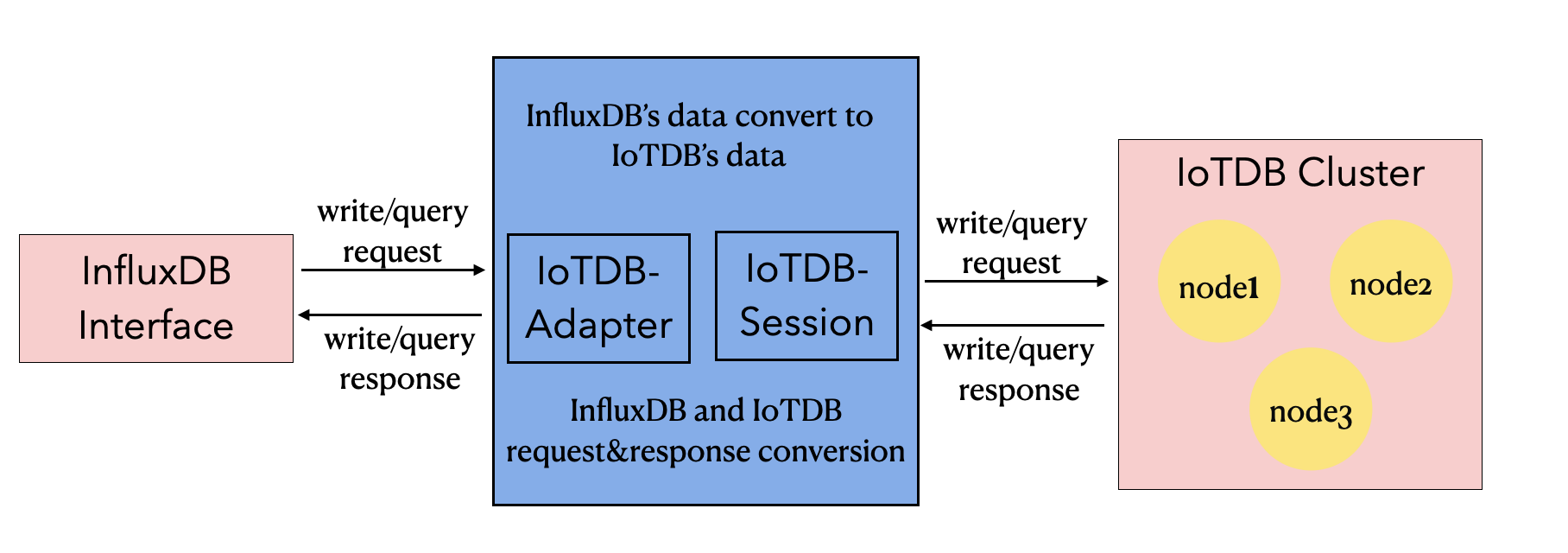
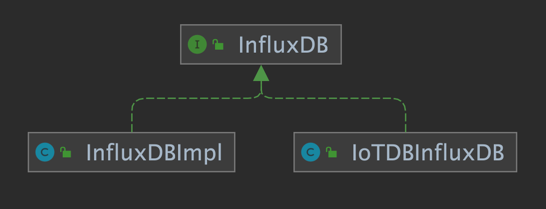
+该适配器以 IoTDB Java Session 接口为底层基础,实现了 InfluxDB 的 Java 接口 `interface
InfluxDB`,对用户提供了所有 InfluxDB 的接口方法,最终用户可以无感知地使用 InfluxDB 协议向 IoTDB 发起写入和读取请求。
+
+
+
+
+
+
+### 2.2 元数据格式转换
+
+InfluxDB 的元数据是 tag-field 模型,IoTDB 的元数据是树形模型。为了使适配器能够兼容 InfluxDB 协议,需要把
InfluxDB 的元数据模型转换成 IoTDB 的元数据模型。
+
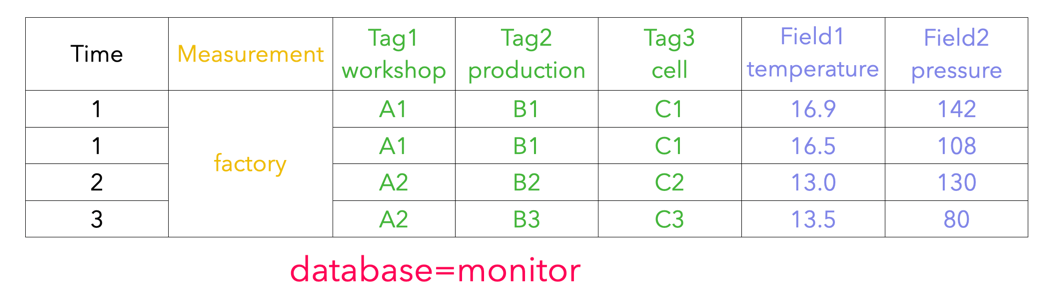
+#### 2.2.1 InfluxDB 元数据
+
+1. database: 数据库名。
+2. measurement: 测量指标名。
+3. tags : 各种有索引的属性。
+4. fields : 各种记录值(没有索引的属性)。
+
+
+
+#### 2.2.2 IoTDB 元数据
+
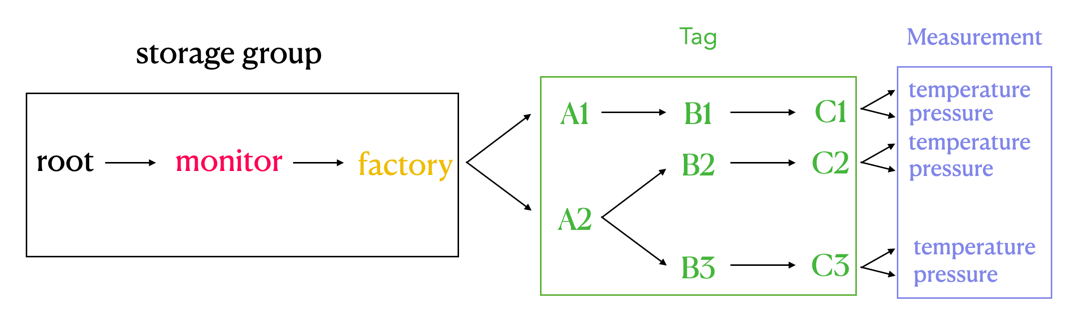
+1. storage group: 存储组。
+2. path(time series ID):存储路径。
+3. measurement: 物理量。
+
+
+
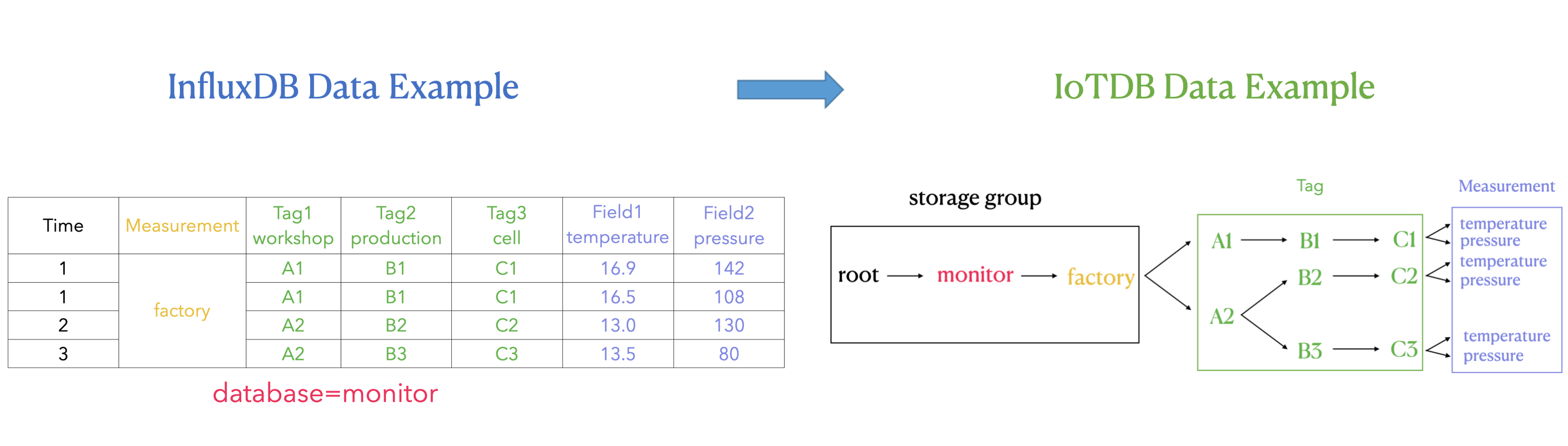
+#### 2.2.3 两者映射关系
+
+InfluxDB 元数据和 IoTDB 元数据有着如下的映射关系:
+1. InfluxDB 中的 database 和 measurement 组合起来作为 IoTDB 中的 storage group。
+2. InfluxDB 中的 field key 作为 IoTDB 中 measurement 路径,InfluxDB 中的 field value
即是该路径下记录的测点值。
+3. InfluxDB 中的 tag 在 IoTDB 中使用 storage group 和 measurement 之间的路径表达。InfluxDB 的
tag key 由 storage group 和 measurement 之间路径的顺序隐式表达,tag value 记录为对应顺序的路径的名称。
+
+InfluxDB 元数据向 IoTDB 元数据的转换关系可以由下面的公示表示:
+
+`root.{database}.{measurement}.{tag value 1}.{tag value 2}...{tag value
N-1}.{tag value N}.{field key}`
+
+
+
+如上图所示,可以看出:
+
+我们在 IoTDB 中使用 storage group 和 measurement 之间的路径来表达 InfluxDB tag
的概念,也就是图中右侧绿色方框的部分。
+
+storage group 和 measurement 之间的每一层都代表一个 tag。如果 tag key 的数量为 N,那么 storage group
和 measurement 之间的路径的层数就是 N。我们对 storage group 和 measurement
之间的每一层进行顺序编号,每一个序号都和一个 tag key 一一对应。同时,我们使用 storage group 和 measurement 之间每一层
**路径的名字** 来记 tag value,tag key 可以通过自身的序号找到对应路径层级下的 tag value.
+
+#### 2.2.4 关键问题
+
+在 InfluxDB 的 SQL 语句中,tag 出现的顺序的不同并不会影响实际的执行结果。
+
+例如:`insert factory, workshop=A1, production=B1 temperature=16.9` 和 `insert
factory, production=B1, workshop=A1 temperature=16.9` 两条 InfluxDB SQL
的含义(以及执行结果)相等。
+
+但在 IoTDB 中,上述插入的数据点可以存储在 `root.monitor.factory.A1.B1.temperature` 下,也可以存储在
`root.monitor.factory.B1.A1.temperature` 下。因此,IoTDB 路径中储存的 InfluxDB 的 tag
的顺序是需要被特别考虑的,因为 `root.monitor.factory.A1.B1.temperature` 和
+`root.monitor.factory.B1.A1.temperature` 是两条不同的序列。我们可以认为,IoTDB 元数据模型对 tag
顺序的处理是“敏感”的。
+
+基于上述的考虑,我们还需要在 IoTDB 中记录 InfluxDB 每个 tag 对应在 IoTDB 路径中的层级顺序,以确保在执行 InfluxDB
SQL 时,不论 InfluxDB SQL 中 tag 出现的顺序如何,只要该 SQL 表达的是对同一个时间序列上的操作,那么适配器都可以唯一对应到
IoTDB 中的一条时间序列上进行操作。
+
+这里还需要考虑的另一个问题是:InfluxDB 的 tag key 及对应顺序关系应该如何持久化到 IoTDB 数据库中,以确保不会丢失相关信息。
+
+**解决方案:**
+
+**tag key 对应顺序关系在内存中的形式**
+
+通过利用内存中的`Map<Measurement, Map<Tag Key, Order>>` 这样一个 Map 结构,来维护 tag 在 IoTDB
路径层级上的顺序。
+
+``` java
+ Map<String, Map<String, Integer>> measurementTagOrder
+```
+
+可以看出 Map 是一个两层的结构。
+
+第一层的 Key 是 String 类型的 InfluxDB measurement,第一层的 Value 是一个 <String, Integer>
结构的 Map。
+
+第二层的 Key 是 String 类型的 InfluxDB tag key,第二层的 Value 是 Integer 类型的 tag order,也就是
tag 在 IoTDB 路径层级上的顺序。
+
+使用时,就可以先通过 InfluxDB measurement 定位,再通过 InfluxDB tag key 定位,最后就可以获得 tag 在
IoTDB 路径层级上的顺序了。
+
+**tag key 对应顺序关系的持久化方案**
+
+存储组为`root.TAG_INFO`,分别用存储组下的 `database_name`, `measurement_name`, `tag_name` 和
`tag_order` 测点来存储 tag key 极其对应的顺序关系。
+
+```
++-----------------------------+---------------------------+------------------------------+----------------------+-----------------------+
+|
Time|root.TAG_INFO.database_name|root.TAG_INFO.measurement_name|root.TAG_INFO.tag_name|root.TAG_INFO.tag_order|
++-----------------------------+---------------------------+------------------------------+----------------------+-----------------------+
+|2021-10-12T01:21:26.907+08:00| monitor|
factory| workshop| 1|
+|2021-10-12T01:21:27.310+08:00| monitor|
factory| production| 2|
+|2021-10-12T01:21:27.313+08:00| monitor|
factory| cell| 3|
+|2021-10-12T01:21:47.314+08:00| building|
cpu| tempture| 1|
++-----------------------------+---------------------------+------------------------------+----------------------+-----------------------+
+```
+
+
+
+### 2.3 实例
+
+#### 2.3.1 插入数据
+
+1. 假定按照以下的顺序插入三条数据到 InfluxDB 中 (database=monitor):
+
+ (1)`insert student,name=A,phone=B,sex=C score=99`
+
+ (2)`insert student,address=D score=98`
+
+ (3)`insert student,name=A,phone=B,sex=C,address=D score=97`
+
+2. 简单对上述 InfluxDB 的时序进行解释,database 是 monitor; measurement 是student;tag 分别是
name,phone、sex 和 address;field 是 score。
+
+对应的InfluxDB的实际存储为:
+
+```
+time address name phone sex socre
+---- ------- ---- ----- --- -----
+1633971920128182000 A B C 99
+1633971947112684000 D 98
+1633971963011262000 D A B C 97
+```
+
+
+3. IoTDB顺序插入三条数据的过程如下:
+
+ (1)插入第一条数据时,需要将新出现的三个 tag key 更新到 table 中,IoTDB 对应的记录 tag 顺序的 table 为:
+
+ | database | measurement | tag_key | Order |
+ | -------- | ----------- | ------- | ----- |
+ | monitor | student | name | 0 |
+ | monitor | student | phone | 1 |
+ | monitor | student | sex | 2 |
+
+ (2)插入第二条数据时,由于此时记录 tag 顺序的 table 中已经有了三个 tag key,因此需要将出现的第四个 tag
key=address 更新记录。IoTDB 对应的记录 tag 顺序的 table 为:
+
+ | database | measurement | tag_key | order |
+ | -------- | ----------- | ------- | ----- |
+ | monitor | student | name | 0 |
+ | monitor | student | phone | 1 |
+ | monitor | student | sex | 2 |
+ | monitor | student | address | 3 |
+
+ (3)插入第三条数据时,此时四个 tag key 都已经记录过,所以不需要更新记录,IoTDB 对应的记录 tag 顺序的 table 为:
+
+ | database | measurement | tag_key | order |
+ | -------- | ----------- | ------- | ----- |
+ | monitor | student | name | 0 |
+ | monitor | student | phone | 1 |
+ | monitor | student | sex | 2 |
+ | monitor | student | address | 3 |
+
+4. (1)第一条插入数据对应 IoTDB 时序为 root.monitor.student.A.B.C
+
+ (2)第二条插入数据对应 IoTDB 时序为 root.monitor.student.PH.PH.PH.D (其中PH表示占位符)。
+
+ 需要注意的是,由于该条数据的 tag key=address 是第四个出现的,但是自身却没有对应的前三个 tag 值,因此需要用 PH
占位符来代替。这样做的目的是保证每条数据中的 tag 顺序不会乱,是符合当前顺序表中的顺序,从而查询数据的时候可以进行指定 tag 过滤。
+
+ (3)第三条插入数据对应 IoTDB 时序为 root.monitor.student.A.B.C.D
+
+ 对应的 IoTDB 的实际存储为:
+
+```
++-----------------------------+--------------------------------+-------------------------------------+----------------------------------+
+|
Time|root.monitor.student.A.B.C.score|root.monitor.student.PH.PH.PH.D.score|root.monitor.student.A.B.C.D.score|
++-----------------------------+--------------------------------+-------------------------------------+----------------------------------+
+|2021-10-12T01:21:26.907+08:00| 99|
NULL| NULL|
+|2021-10-12T01:21:27.310+08:00| NULL|
98| NULL|
+|2021-10-12T01:21:27.313+08:00| NULL|
NULL| 97|
++-----------------------------+--------------------------------+-------------------------------------+----------------------------------+
+```
+
+5.
如果上面三条数据插入的顺序不一样,我们可以看到对应的实际path路径也就发生了改变,因为InfluxDB数据中的Tag出现顺序发生了变化,所对应的到IoTDB中的path节点顺序也就发生了变化。
+
+
但是这样实际并不会影响查询的正确性,因为一旦Influxdb的Tag顺序确定之后,查询也会按照这个顺序表记录的顺序进行Tag值过滤。所以并不会影响查询的正确性。
+
+#### 2.3.2 查询数据
+
+1.
查询student中phone=B的数据。在database=monitor,measurement=student中tag=phone的顺序为1,order最大值是3,对应到IoTDB的查询为:
+
+ ```sql
+ select * from root.monitor.student.*.B
+ ```
+
+2. 查询student中phone=B且score>97的数据,对应到IoTDB的查询为:
+
+ ```sql
+ select * from root.monitor.student.*.B where score>97
+ ```
+
+3. 查询student中phone=B且score>97且时间在最近七天内的的数据,对应到IoTDB的查询为:
+
+ ```sql
+ select * from root.monitor.student.*.B where score>97 and time > now()-7d
+ ```
+
+
+4.
查询student中name=A或score>97,由于tag存储在路径中,因此没有办法用一次查询同时完成tag和field的*或*语义查询,因此需要多次查询进行或运算求并集,对应到IoTDB的查询为:
+
+ ```sql
+ select * from root.monitor.student.A
+ select * from root.monitor.student where score>97
+ ```
+ 最后手动对上面两次查询结果求并集。
+
+5.
查询student中(name=A或phone=B或sex=C)且score>97,由于tag存储在路径中,因此没有办法用一次查询完成tag的**或**语义,
因此需要多次查询进行或运算求并集,对应到IoTDB的查询为:
+
+ ```sql
+ select * from root.monitor.student.A where score>97
+ select * from root.monitor.student.*.B where score>97
+ select * from root.monitor.student.*.*.C where score>97
+ ```
+ 最后手动对上面三次查询结果求并集。
+
diff --git a/site/src/main/.vuepress/config.js
b/site/src/main/.vuepress/config.js
index cf955b0..c784574 100644
--- a/site/src/main/.vuepress/config.js
+++ b/site/src/main/.vuepress/config.js
@@ -1502,7 +1502,7 @@ var config = {
['API/Programming-Go-Native-API','Go 原生接口'],
['API/Programming-TsFile-API','TsFile API'],
['API/Time-zone','时区'],
-
['API/InfluxDB-Protocol','InfluxDB 协议适配器']
+
['API/InfluxDB-Protocol','InfluxDB 协议适配器(开发中)']
]
},
{





