This is an automated email from the ASF dual-hosted git repository.

rong pushed a commit to branch master
in repository https://gitbox.apache.org/repos/asf/iotdb.git
The following commit(s) were added to refs/heads/master by this push:
new 3e476e3756 [IOTDB-2806][InfluxDB] Compatibility of Apache IoTDB with
InfluxDB - Complete UserGuide (#5351)
3e476e3756 is described below
commit 3e476e375692d79af0e1414bb2199fd24c86b7f6
Author: Xieqijun <[email protected]>
AuthorDate: Mon Apr 11 00:08:04 2022 +0800
[IOTDB-2806][InfluxDB] Compatibility of Apache IoTDB with InfluxDB -
Complete UserGuide (#5351)
---
.github/workflows/influxdb-protocol.yml | 8 +-
README.md | 2 +-
README_ZH.md | 2 +-
docs/UserGuide/API/InfluxDB-Protocol.md | 341 +++++++++++++++++++++++++++++
docs/zh/UserGuide/API/InfluxDB-Protocol.md | 122 +++++++++--
site/src/main/.vuepress/config.js | 3 +-
6 files changed, 460 insertions(+), 18 deletions(-)
diff --git a/.github/workflows/influxdb-protocol.yml
b/.github/workflows/influxdb-protocol.yml
index ae7b52e080..04f78012e3 100644
--- a/.github/workflows/influxdb-protocol.yml
+++ b/.github/workflows/influxdb-protocol.yml
@@ -15,12 +15,16 @@ name: InfluxDB Protocol Test
on:
push:
branches:
- - influxdb-*
+ - master
+ - 'rel/*'
+ - "new_*"
paths-ignore:
- 'docs/**'
pull_request:
branches:
- - influxdb-*
+ - master
+ - 'rel/*'
+ - "new_*"
paths-ignore:
- 'docs/**'
# allow manually run the action:
diff --git a/README.md b/README.md
index 5c93813ddd..b4b975abae 100644
--- a/README.md
+++ b/README.md
@@ -169,7 +169,7 @@ Using `-P compile-cpp` for compiling cpp client (For more
details, read client-c
Then the binary version (including both server and cli) can be found at
**distribution/target/apache-iotdb-{project.version}-all-bin.zip**
**NOTE: Directories "`thrift/target/generated-sources/thrift`",
"`thrift-sync/target/generated-sources/thrift`",
-"`thrift-cluster/target/generated-sources/thrift`"
+"`thrift-cluster/target/generated-sources/thrift`",
"`thrift-influxdb/target/generated-sources/thrift`"
and "`antlr/target/generated-sources/antlr4`" need to be added to sources
roots to avoid compilation errors in the IDE.**
**In IDEA, you just need to right click on the root project name and choose
"`Maven->Reload Project`" after
diff --git a/README_ZH.md b/README_ZH.md
index 4705f4ae27..830cfdec19 100644
--- a/README_ZH.md
+++ b/README_ZH.md
@@ -157,7 +157,7 @@ git checkout vx.x.x
执行完成之后,可以在**distribution/target/apache-iotdb-{project.version}-all-bin.zip**找到编译完成的二进制版本(包括服务器和客户端)
-**注意:"`thrift/target/generated-sources/thrift`",
"`thrift-sync/target/generated-sources/thrift`","`thrift-cluster/target/generated-sources/thrift`"
和 "`antlr/target/generated-sources/antlr4`" 目录需要添加到源代码根中,以免在 IDE 中产生编译错误。**
+**注意:"`thrift/target/generated-sources/thrift`",
"`thrift-sync/target/generated-sources/thrift`","`thrift-cluster/target/generated-sources/thrift`","`thrift-influxdb/target/generated-sources/thrift`"
和 "`antlr/target/generated-sources/antlr4`" 目录需要添加到源代码根中,以免在 IDE 中产生编译错误。**
**IDEA的操作方法:在上述maven命令编译好后,右键项目名称,选择"`Maven->Reload project`",即可。**
diff --git a/docs/UserGuide/API/InfluxDB-Protocol.md
b/docs/UserGuide/API/InfluxDB-Protocol.md
new file mode 100644
index 0000000000..8df48181d1
--- /dev/null
+++ b/docs/UserGuide/API/InfluxDB-Protocol.md
@@ -0,0 +1,341 @@
+<!--
+
+ Licensed to the Apache Software Foundation (ASF) under one
+ or more contributor license agreements. See the NOTICE file
+ distributed with this work for additional information
+ regarding copyright ownership. The ASF licenses this file
+ to you under the Apache License, Version 2.0 (the
+ "License"); you may not use this file except in compliance
+ with the License. You may obtain a copy of the License at
+
+ http://www.apache.org/licenses/LICENSE-2.0
+
+ Unless required by applicable law or agreed to in writing,
+ software distributed under the License is distributed on an
+ "AS IS" BASIS, WITHOUT WARRANTIES OR CONDITIONS OF ANY
+ KIND, either express or implied. See the License for the
+ specific language governing permissions and limitations
+ under the License.
+
+-->
+
+## 0. Import Dependency
+
+```xml
+ <dependency>
+ <groupId>org.apache.iotdb</groupId>
+ <artifactId>influxdb-protocol</artifactId>
+ <version>0.14.0-SNAPSHOT</version>
+ </dependency>
+```
+
+Here are some examples of connecting IoTDB using the InfluxDB-Protocol adapter
:
https://github.com/apache/iotdb/tree/master/influxdb-protocol/src/main/java/org/apache/iotdb/influxdb/example
+
+## 1. Switching Scheme
+
+If your original service code for accessing InfluxDB is as follows:
+
+```java
+InfluxDB influxDB = InfluxDBFactory.connect(openurl, username, password);
+```
+
+You only need to replace the InfluxDBFactory with **IoTDBInfluxDBFactory** to
switch the business to IoTDB:
+
+```java
+InfluxDB influxDB = IoTDBInfluxDBFactory.connect(openurl, username, password);
+```
+
+## 2. Conceptual Design
+
+### 2.1 InfluxDB-Protocol Adapter
+
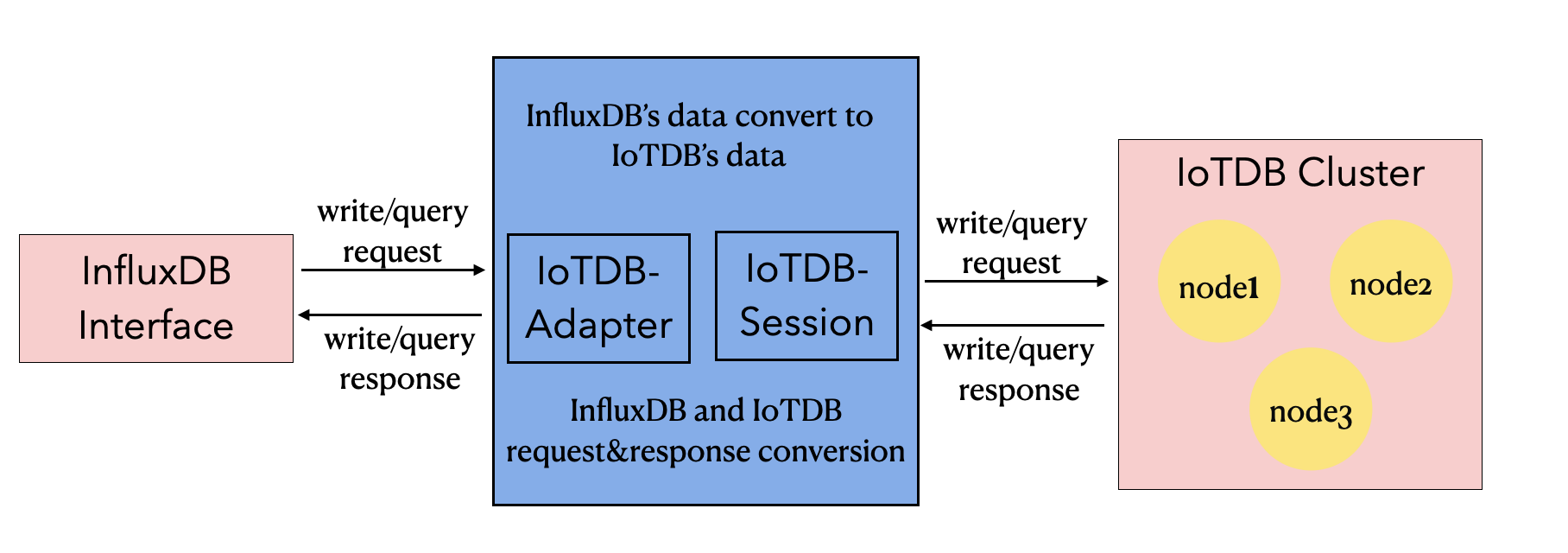
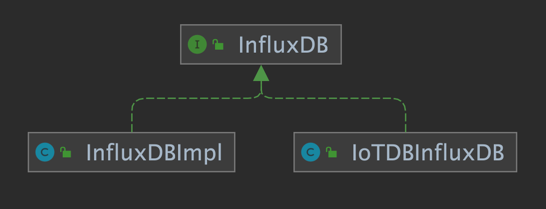
+Based on the IoTDB Java ServiceProvider interface, the adapter implements the
'interface InfluxDB' of the java interface of InfluxDB, and provides users with
all the interface methods of InfluxDB. End users can use the InfluxDB protocol
to initiate write and read requests to IoTDB without perception.
+
+
+
+
+
+
+### 2.2 Metadata Format Conversion
+The metadata of InfluxDB is tag field model, and the metadata of IoTDB is tree
model. In order to make the adapter compatible with the InfluxDB protocol, the
metadata model of InfluxDB needs to be transformed into the metadata model of
IoTDB.
+
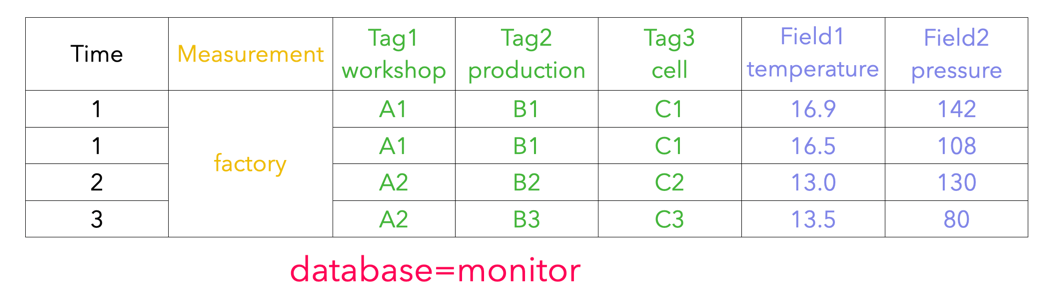
+#### 2.2.1 InfluxDB Metadata
+
+1. database: database name.
+2. measurement: measurement name.
+3. tags: various indexed attributes.
+4. fields: various record values(attributes without index).
+
+
+
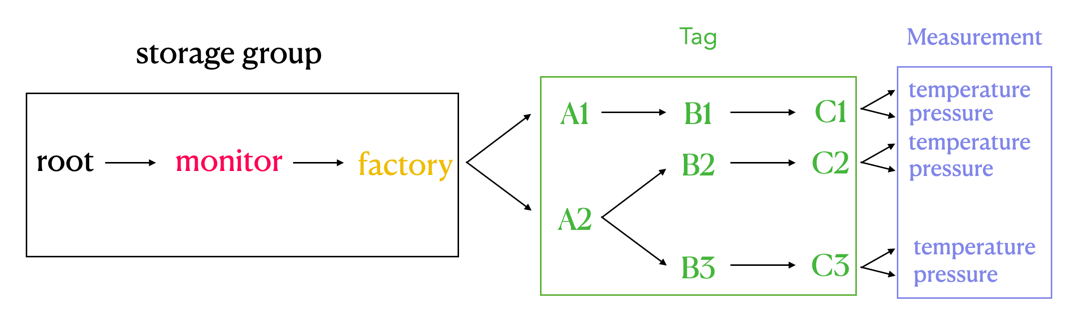
+#### 2.2.2 IoTDB Metadata
+
+1. storage group: storage group name.
+2. path(time series ID): storage path.
+3. measurement: physical quantity.
+
+
+
+#### 2.2.3 Mapping relationship between the two
+
+The mapping relationship between InfluxDB metadata and IoTDB metadata is as
follows:
+1. The database and measurement in InfluxDB are combined as the storage group
in IoTDB.
+2. The field key in InfluxDB is used as the measurement path in IoTDB, and the
field value in InfluxDB is the measured point value recorded under the path.
+3. Tag in InfluxDB is expressed by the path between storage group and
measurement in IoTDB. The tag key of InfluxDB is implicitly expressed by the
order of the path between storage group and measurement, and the tag value is
recorded as the name of the path in the corresponding order.
+
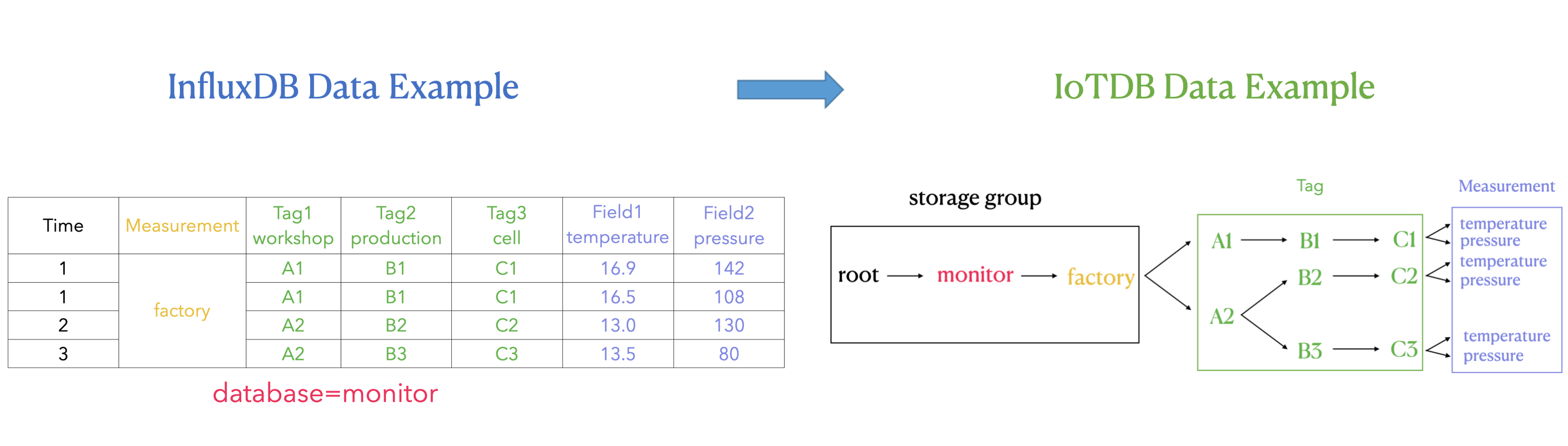
+The transformation relationship from InfluxDB metadata to IoTDB metadata can
be represented by the following publicity:
+
+`root.{database}.{measurement}.{tag value 1}.{tag value 2}...{tag value
N-1}.{tag value N}.{field key}`
+
+
+
+As shown in the figure above, it can be seen that:
+
+In IoTDB, we use the path between storage group and measurement to express the
concept of InfluxDB tag, which is the part of the green box on the right in the
figure.
+
+Each layer between storage group and measurement represents a tag. If the
number of tag keys is n, the number of layers of the path between storage group
and measurement is n. We sequentially number each layer between storage group
and measurement, and each sequence number corresponds to a tag key one by one.
At the same time, we use the **path name** of each layer between storage group
and measurement to remember tag value. Tag key can find the tag value under the
corresponding path lev [...]
+
+#### 2.2.4 Key Problem
+
+In the SQL statement of InfluxDB, the different order of tags does not affect
the actual execution .
+
+For example: `insert factory, workshop=A1, production=B1, temperature=16.9`
and `insert factory, production=B1, workshop=A1, temperature=16.9` have the
same meaning (and execution result) of the two InfluxDB SQL.
+
+However, in IoTDB, the above inserted data points can be stored in
`root.monitor.factory.A1.B1.temperature` can also be stored in
`root.monitor.factory.B1.A1.temperature`. Therefore, the order of the tags of
the InfluxDB stored in the IoTDB path needs special consideration because
`root.monitor.factory.A1.B1.temperature` and
+
+`root.monitor.factory.B1.A1.temperature` is two different sequences. We can
think that iotdb metadata model is "sensitive" to the processing of tag order.
+
+Based on the above considerations, we also need to record the hierarchical
order of each tag in the IoTDB path in the IoTDB, as to ensure that the adapter
can only operate on a time series in the IoTDB as long as the SQL expresses
operations on the same time series, regardless of the order in which the tags
appear in the InfluxDB SQL.
+
+Another problem that needs to be considered here is how to persist the tag key
and corresponding order relationship of InfluxDB into the IoTDB database to
ensure that relevant information will not be lost.
+
+**Solution:**
+
+**The form of tag key correspondence in memory**
+
+Maintain the order of tags at the IoTDB path level by using the map structure
of `Map<Measurement,Map<Tag key, order>>` in memory.
+
+``` java
+ Map<String, Map<String, Integer>> measurementTagOrder
+```
+
+It can be seen that map is a two-tier structure.
+
+The key of the first layer is an InfluxDB measurement of string type, and the
value of the first layer is a Map<string,Integer> structure.
+
+The key of the second layer is the InfluxDB tag key of string type, and the
value of the second layer is the tag order of Integer type, that is, the order
of tags at the IoTDB path level.
+
+When in use, you can first locate the tag through the InfluxDB measurement,
then locate the tag through the InfluxDB tag key, and finally get the order of
tags at the IoTDB path level.
+
+**Persistence scheme of tag key correspondence order**
+
+Storage group is `root.TAG_ Info`, using `database_name`,`measurement_ name`,
`tag_ Name ` and ` tag_ Order ` under the storage group to store tag key and
its corresponding order relationship by measuring points.
+
+```
++-----------------------------+---------------------------+------------------------------+----------------------+-----------------------+
+|
Time|root.TAG_INFO.database_name|root.TAG_INFO.measurement_name|root.TAG_INFO.tag_name|root.TAG_INFO.tag_order|
++-----------------------------+---------------------------+------------------------------+----------------------+-----------------------+
+|2021-10-12T01:21:26.907+08:00| monitor|
factory| workshop| 1|
+|2021-10-12T01:21:27.310+08:00| monitor|
factory| production| 2|
+|2021-10-12T01:21:27.313+08:00| monitor|
factory| cell| 3|
+|2021-10-12T01:21:47.314+08:00| building|
cpu| tempture| 1|
++-----------------------------+---------------------------+------------------------------+----------------------+-----------------------+
+```
+
+
+### 2.3 Example
+
+#### 2.3.1 Insert records
+
+1. Suppose three pieces of data are inserted into the InfluxDB in the
following order (database = monitor):
+
+ (1)`insert student,name=A,phone=B,sex=C score=99`
+
+ (2)`insert student,address=D score=98`
+
+ (3)`insert student,name=A,phone=B,sex=C,address=D score=97`
+
+2. Simply explain the timing of the above InfluxDB, and database is monitor;
Measurement is student; Tag is name, phone, sex and address respectively; Field
is score.
+
+The actual storage of the corresponding InfluxDB is:
+
+```
+time address name phone sex socre
+---- ------- ---- ----- --- -----
+1633971920128182000 A B C 99
+1633971947112684000 D 98
+1633971963011262000 D A B C 97
+```
+
+3. The process of inserting three pieces of data in sequence by IoTDB is as
follows:
+
+ (1) When inserting the first piece of data, we need to update the three new
tag keys to the table. The table of the record tag sequence corresponding to
IoTDB is:
+
+ | database | measurement | tag_key | Order |
+ | -------- | ----------- | ------- | ----- |
+ | monitor | student | name | 0 |
+ | monitor | student | phone | 1 |
+ | monitor | student | sex | 2 |
+
+ (2) When inserting the second piece of data, since there are already three
tag keys in the table recording the tag order, it is necessary to update the
record with the fourth tag key=address. The table of the record tag sequence
corresponding to IoTDB is:
+
+ | database | measurement | tag_key | order |
+ | -------- | ----------- | ------- | ----- |
+ | monitor | student | name | 0 |
+ | monitor | student | phone | 1 |
+ | monitor | student | sex | 2 |
+ | monitor | student | address | 3 |
+
+ (3) When inserting the third piece of data, the four tag keys have been
recorded at this time, so there is no need to update the record. The table of
the record tag sequence corresponding to IoTDB is:
+
+ | database | measurement | tag_key | order |
+ | -------- | ----------- | ------- | ----- |
+ | monitor | student | name | 0 |
+ | monitor | student | phone | 1 |
+ | monitor | student | sex | 2 |
+ | monitor | student | address | 3 |
+
+4. (1) The IoTDB sequence corresponding to the first inserted data is
root.monitor.student.A.B.C
+
+ (2) The IoTDB sequence corresponding to the second inserted data is
root.monitor.student.PH.PH.PH.D (where PH is a placeholder).
+
+ It should be noted that since the tag key = address of this data appears
the fourth, but it does not have the corresponding first three tag values, it
needs to be replaced by a PH. The purpose of this is to ensure that the tag
order in each data will not be disordered, which is consistent with the order
in the current order table, so that the specified tag can be filtered when
querying data.
+
+ (3) The IoTDB sequence corresponding to the second inserted data is
root.monitor.student.A.B.C.D
+
+ The actual storage of the corresponding IoTDB is:
+
+```
++-----------------------------+--------------------------------+-------------------------------------+----------------------------------+
+|
Time|root.monitor.student.A.B.C.score|root.monitor.student.PH.PH.PH.D.score|root.monitor.student.A.B.C.D.score|
++-----------------------------+--------------------------------+-------------------------------------+----------------------------------+
+|2021-10-12T01:21:26.907+08:00| 99|
NULL| NULL|
+|2021-10-12T01:21:27.310+08:00| NULL|
98| NULL|
+|2021-10-12T01:21:27.313+08:00| NULL|
NULL| 97|
++-----------------------------+--------------------------------+-------------------------------------+----------------------------------+
+```
+
+5. If the insertion order of the above three data is different, we can see
that the corresponding actual path has changed, because the order of tags in
the InfluxDB data has changed, and the order of the corresponding path nodes in
IoTDB has also changed.
+
+However, this will not affect the correctness of the query, because once the
tag order of InfluxDB is determined, the query will also filter the tag values
according to the order recorded in this order table. Therefore, the correctness
of the query will not be affected.
+
+#### 2.3.2 Query Data
+
+1. Query the data of phone = B in student. In database = monitor, measurement
= student, the order of tag = phone is 1, and the maximum order is 3. The query
corresponding to IoTDB is:
+
+ ```sql
+ select * from root.monitor.student.*.B
+ ```
+
+2. Query the data with phone = B and score > 97 in the student. The query
corresponding to IoTDB is:
+
+ ```sql
+ select * from root.monitor.student.*.B where score>97
+ ```
+
+3. Query the data of the student with phone = B and score > 97 in the last
seven days. The query corresponding to IoTDB is:
+
+ ```sql
+ select * from root.monitor.student.*.B where score>97 and time > now()-7d
+ ```
+
+4. Query the name = a or score > 97 in the student. Since the tag is stored in
the path, there is no way to complete the **or** semantic query of tag and
field at the same time with one query. Therefore, multiple queries or operation
union set are required. The query corresponding to IoTDB is:
+
+ ```sql
+ select * from root.monitor.student.A
+ select * from root.monitor.student where score>97
+ ```
+ Finally, manually combine the results of the above two queries.
+
+5. Query the student (name = a or phone = B or sex = C) with a score > 97.
Since the tag is stored in the path, there is no way to use one query to
complete the **or** semantics of the tag. Therefore, multiple queries or
operations are required to merge. The query corresponding to IoTDB is:
+
+ ```sql
+ select * from root.monitor.student.A where score>97
+ select * from root.monitor.student.*.B where score>97
+ select * from root.monitor.student.*.*.C where score>97
+ ```
+ Finally, manually combine the results of the above three queries.
+
+## 3. Support
+
+### 3.1 InfluxDB Version Support
+
+Currently, supports InfluxDB 1.x version, which does not support InfluxDB 2.x
version.
+
+### 3.2 Function Interface Support
+
+Currently, supports interface functions are as follows:
+
+```java
+public Pong ping();
+
+public String version();
+
+public void flush();
+
+public void close();
+
+public InfluxDB setDatabase(final String database);
+
+public QueryResult query(final Query query);
+
+public void write(final Point point);
+
+public void write(final String records);
+
+public void write(final List<String> records);
+
+public void write(final String database,final String retentionPolicy,final
Point point);
+
+public void write(final int udpPort,final Point point);
+
+public void write(final BatchPoints batchPoints);
+
+public void write(final String database,final String retentionPolicy,
+final ConsistencyLevel consistency,final String records);
+
+public void write(final String database,final String retentionPolicy,
+final ConsistencyLevel consistency,final TimeUnit precision,final String
records);
+
+public void write(final String database,final String retentionPolicy,
+final ConsistencyLevel consistency,final List<String> records);
+
+public void write(final String database,final String retentionPolicy,
+final ConsistencyLevel consistency,final TimeUnit precision,final List<String>
records);
+
+public void write(final int udpPort,final String records);
+
+public void write(final int udpPort,final List<String> records);
+```
+
+### 3.3 Query Syntax Support
+
+The currently supported query SQL syntax is:
+
+```sql
+SELECT <field_key>[, <field_key>, <tag_key>]
+FROM <measurement_name>
+WHERE <conditional_expression > [( AND | OR) <conditional_expression > [...]]
+```
+
+WHERE clause supports `conditional_expressions` on `field`,`tag` and
`timestamp`.
+
+#### field
+
+```sql
+field_key <operator> ['string' | boolean | float | integer]
+```
+
+#### tag
+
+```sql
+tag_key <operator> ['tag_value']
+```
+
+#### timestamp
+
+```sql
+timestamp <operator> ['time']
+```
+
+At present, the filter condition of timestamp only supports the expressions
related to now(), such as now () - 7d. The specific timestamp is not supported
temporarily.
diff --git a/docs/zh/UserGuide/API/InfluxDB-Protocol.md
b/docs/zh/UserGuide/API/InfluxDB-Protocol.md
index 63f8816350..a5d09dec92 100644
--- a/docs/zh/UserGuide/API/InfluxDB-Protocol.md
+++ b/docs/zh/UserGuide/API/InfluxDB-Protocol.md
@@ -19,6 +19,19 @@
-->
+## 0.引入依赖
+
+```xml
+ <dependency>
+ <groupId>org.apache.iotdb</groupId>
+ <artifactId>influxdb-protocol</artifactId>
+ <version>0.14.0-SNAPSHOT</version>
+ </dependency>
+```
+
+这里是一些使用 InfluxDB-Protocol 适配器连接 IoTDB
的示例:https://github.com/apache/iotdb/tree/master/influxdb-protocol/src/main/java/org/apache/iotdb/influxdb/example
+
+
## 1.切换方案
假如您原先接入 InfluxDB 的业务代码如下:
@@ -37,7 +50,7 @@ InfluxDB influxDB = IoTDBInfluxDBFactory.connect(openurl,
username, password);
### 2.1 InfluxDB-Protocol适配器
-该适配器以 IoTDB Java Session 接口为底层基础,实现了 InfluxDB 的 Java 接口 `interface
InfluxDB`,对用户提供了所有 InfluxDB 的接口方法,最终用户可以无感知地使用 InfluxDB 协议向 IoTDB 发起写入和读取请求。
+该适配器以 IoTDB Java ServiceProvider 接口为底层基础,实现了 InfluxDB 的 Java 接口 `interface
InfluxDB`,对用户提供了所有 InfluxDB 的接口方法,最终用户可以无感知地使用 InfluxDB 协议向 IoTDB 发起写入和读取请求。

@@ -90,7 +103,7 @@ storage group 和 measurement 之间的每一层都代表一个 tag。如果 tag
例如:`insert factory, workshop=A1, production=B1 temperature=16.9` 和 `insert
factory, production=B1, workshop=A1 temperature=16.9` 两条 InfluxDB SQL
的含义(以及执行结果)相等。
-但在 IoTDB 中,上述插入的数据点可以存储在 `root.monitor.factory.A1.B1.temperature` 下,也可以存储在
`root.monitor.factory.B1.A1.temperature` 下。因此,IoTDB 路径中储存的 InfluxDB 的 tag
的顺序是需要被特别考虑的,因为 `root.monitor.factory.A1.B1.temperature` 和
+但在 IoTDB 中,上述插入的数据点可以存储在 `root.monitor.factory.A1.B1.temperature` 下,也可以存储在
`root.monitor.factory.B1.A1.temperature` 下。因此,IoTDB 路径中储存的 InfluxDB 的 tag
的顺序是需要被特别考虑的,因为 `root.monitor.factory.A1.B1.temperature` 和
`root.monitor.factory.B1.A1.temperature` 是两条不同的序列。我们可以认为,IoTDB 元数据模型对 tag
顺序的处理是“敏感”的。
基于上述的考虑,我们还需要在 IoTDB 中记录 InfluxDB 每个 tag 对应在 IoTDB 路径中的层级顺序,以确保在执行 InfluxDB
SQL 时,不论 InfluxDB SQL 中 tag 出现的顺序如何,只要该 SQL 表达的是对同一个时间序列上的操作,那么适配器都可以唯一对应到
IoTDB 中的一条时间序列上进行操作。
@@ -110,14 +123,14 @@ storage group 和 measurement 之间的每一层都代表一个 tag。如果 tag
可以看出 Map 是一个两层的结构。
第一层的 Key 是 String 类型的 InfluxDB measurement,第一层的 Value 是一个 <String, Integer>
结构的 Map。
-
+
第二层的 Key 是 String 类型的 InfluxDB tag key,第二层的 Value 是 Integer 类型的 tag order,也就是
tag 在 IoTDB 路径层级上的顺序。
使用时,就可以先通过 InfluxDB measurement 定位,再通过 InfluxDB tag key 定位,最后就可以获得 tag 在
IoTDB 路径层级上的顺序了。
-
+
**tag key 对应顺序关系的持久化方案**
-存储组为`root.TAG_INFO`,分别用存储组下的 `database_name`, `measurement_name`, `tag_name` 和
`tag_order` 测点来存储 tag key 极其对应的顺序关系。
+存储组为`root.TAG_INFO`,分别用存储组下的 `database_name`, `measurement_name`, `tag_name` 和
`tag_order` 测点来存储 tag key及其对应的顺序关系。
```
+-----------------------------+---------------------------+------------------------------+----------------------+-----------------------+
@@ -137,10 +150,10 @@ storage group 和 measurement 之间的每一层都代表一个 tag。如果 tag
#### 2.3.1 插入数据
1. 假定按照以下的顺序插入三条数据到 InfluxDB 中 (database=monitor):
-
+
(1)`insert student,name=A,phone=B,sex=C score=99`
- (2)`insert student,address=D score=98`
+ (2)`insert student,address=D score=98`
(3)`insert student,name=A,phone=B,sex=C,address=D score=97`
@@ -188,11 +201,11 @@ time address name phone sex socre
4. (1)第一条插入数据对应 IoTDB 时序为 root.monitor.student.A.B.C
(2)第二条插入数据对应 IoTDB 时序为 root.monitor.student.PH.PH.PH.D (其中PH表示占位符)。
-
+
需要注意的是,由于该条数据的 tag key=address 是第四个出现的,但是自身却没有对应的前三个 tag 值,因此需要用 PH
占位符来代替。这样做的目的是保证每条数据中的 tag 顺序不会乱,是符合当前顺序表中的顺序,从而查询数据的时候可以进行指定 tag 过滤。
- (3)第三条插入数据对应 IoTDB 时序为 root.monitor.student.A.B.C.D
-
+ (3)第三条插入数据对应 IoTDB 时序为 root.monitor.student.A.B.C.D
+
对应的 IoTDB 的实际存储为:
```
@@ -212,19 +225,19 @@ time address name phone sex socre
#### 2.3.2 查询数据
1.
查询student中phone=B的数据。在database=monitor,measurement=student中tag=phone的顺序为1,order最大值是3,对应到IoTDB的查询为:
-
+
```sql
select * from root.monitor.student.*.B
```
2. 查询student中phone=B且score>97的数据,对应到IoTDB的查询为:
-
+
```sql
select * from root.monitor.student.*.B where score>97
```
3. 查询student中phone=B且score>97且时间在最近七天内的的数据,对应到IoTDB的查询为:
-
+
```sql
select * from root.monitor.student.*.B where score>97 and time > now()-7d
```
@@ -247,3 +260,86 @@ time address name phone sex socre
```
最后手动对上面三次查询结果求并集。
+## 3 支持情况
+
+### 3.1 InfluxDB版本支持情况
+
+目前支持InfluxDB 1.x 版本,暂不支持InfluxDB 2.x 版本。
+
+### 3.2 函数接口支持情况
+
+目前支持的接口函数如下:
+
+```java
+public Pong ping();
+
+public String version();
+
+public void flush();
+
+public void close();
+
+public InfluxDB setDatabase(final String database);
+
+public QueryResult query(final Query query);
+
+public void write(final Point point);
+
+public void write(final String records);
+
+public void write(final List<String> records);
+
+public void write(final String database,final String retentionPolicy,final
Point point);
+
+public void write(final int udpPort,final Point point);
+
+public void write(final BatchPoints batchPoints);
+
+public void write(final String database,final String retentionPolicy,
+final ConsistencyLevel consistency,final String records);
+
+public void write(final String database,final String retentionPolicy,
+final ConsistencyLevel consistency,final TimeUnit precision,final String
records);
+
+public void write(final String database,final String retentionPolicy,
+final ConsistencyLevel consistency,final List<String> records);
+
+public void write(final String database,final String retentionPolicy,
+final ConsistencyLevel consistency,final TimeUnit precision,final List<String>
records);
+
+public void write(final int udpPort,final String records);
+
+public void write(final int udpPort,final List<String> records);
+```
+
+### 3.3 查询语法支持情况
+
+目前支持的查询sql语法为
+
+```sql
+SELECT <field_key>[, <field_key>, <tag_key>]
+FROM <measurement_name>
+WHERE <conditional_expression > [( AND | OR) <conditional_expression > [...]]
+```
+
+WHERE子句在`field`,`tag`和`timestamp`上支持`conditional_expressions`.
+
+#### field
+
+```sql
+field_key <operator> ['string' | boolean | float | integer]
+```
+
+#### tag
+
+```sql
+tag_key <operator> ['tag_value']
+```
+
+#### timestamp
+
+```sql
+timestamp <operator> ['time']
+```
+
+目前timestamp的过滤条件只支持now()有关表达式,如:now()-7D,具体的时间戳暂不支持。
diff --git a/site/src/main/.vuepress/config.js
b/site/src/main/.vuepress/config.js
index 49ee7a536d..e6f51fe163 100644
--- a/site/src/main/.vuepress/config.js
+++ b/site/src/main/.vuepress/config.js
@@ -878,6 +878,7 @@ var config = {
['API/Programming-MQTT','MQTT'],
['API/RestService','REST API'],
['API/Programming-TsFile-API','TsFile API'],
+
['API/InfluxDB-Protocol','InfluxDB Protocol'],
['API/Status-Codes','Status Codes']
]
},
@@ -1797,7 +1798,7 @@ var config = {
['API/Programming-MQTT','MQTT'],
['API/RestService','REST API'],
['API/Programming-TsFile-API','TsFile API'],
-
['API/InfluxDB-Protocol','InfluxDB 协议适配器(开发中)'],
+
['API/InfluxDB-Protocol','InfluxDB 协议适配器'],
['API/Status-Codes','状态码']
]
},





