This is an automated email from the ASF dual-hosted git repository.

haonan pushed a commit to branch fix_pic
in repository https://gitbox.apache.org/repos/asf/iotdb.git
commit 61f60b187a2b34a55f2d14162774db1914ada2d6 Author: HTHou <[email protected]> AuthorDate: Sat May 14 21:26:08 2022 +0800 fix some invalid pic links and move some pics to iotdb-bin-resources --- docs/Development/HowToJoin.md | 2 +- docs/zh/Development/HowToJoin.md | 2 +- integration/README.md | 10 +++++----- integration/pic/Add_New_Configuration.png | Bin 129654 -> 0 bytes integration/pic/Cluster_Category.png | Bin 175311 -> 0 bytes integration/pic/Fork_mode.png | Bin 188976 -> 0 bytes integration/pic/Run(Menu).png | Bin 99077 -> 0 bytes integration/pic/Standalone_Category.png | Bin 183256 -> 0 bytes 8 files changed, 7 insertions(+), 7 deletions(-) diff --git a/docs/Development/HowToJoin.md b/docs/Development/HowToJoin.md index e0a1df7cd7..3ef4e7f9ab 100644 --- a/docs/Development/HowToJoin.md +++ b/docs/Development/HowToJoin.md @@ -41,7 +41,7 @@ After creation, please send an email to the mailing list including **self introd ## Subscribe WeChat public account Scan the QR code to subscribe official public account: Apache IoTDB - + ## Long term considerations ### Learn the basic use of IoTDB diff --git a/docs/zh/Development/HowToJoin.md b/docs/zh/Development/HowToJoin.md index f75a437450..d877a31540 100644 --- a/docs/zh/Development/HowToJoin.md +++ b/docs/zh/Development/HowToJoin.md @@ -41,7 +41,7 @@ ## 关注公众号 扫码关注官方公众号:Apache IoTDB - + ## 长期事项 ### 学习IoTDB的基本使用 diff --git a/integration/README.md b/integration/README.md index ca7aafedbc..7f7aa54fd2 100644 --- a/integration/README.md +++ b/integration/README.md @@ -45,19 +45,19 @@ mvn clean verify -Dsession.test.skip=true -Diotdb.test.skip=true -Dcluster.test. And if you want to run IT in the IDE like IntelliJ, you need to achieve the effect as the `LocalStandalone` profile in maven. Follow Steps 1-4 to achieve it. - Step 1. Run(Menu) -> Edit Configurations... - .png) + .png?raw=true) - Step 2. Add New Configuration -> JUnit -  + 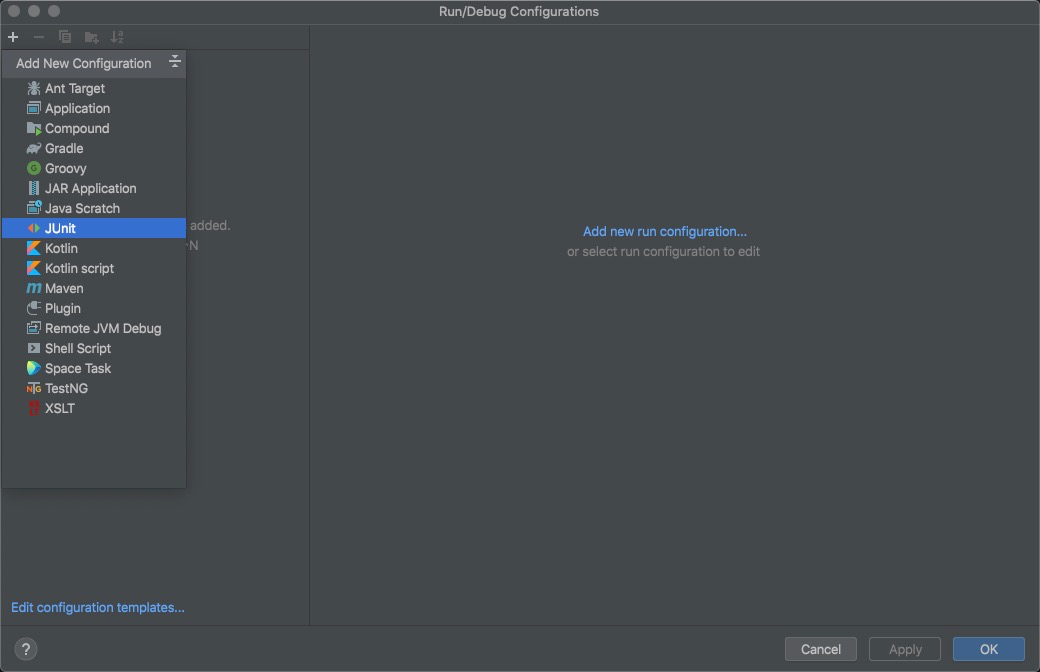 - Step 3. Input some fields as the following picture -  + 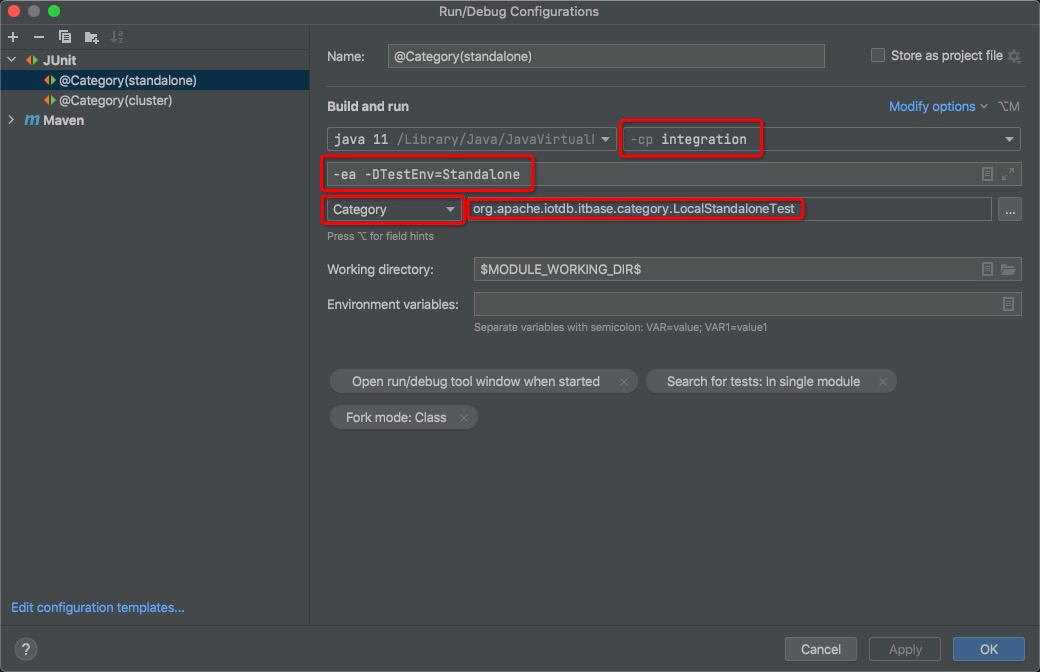 - Step 4. Pay attention to the `Fork mode` in `Modify options`: you need to change `None` to `class` in `Fork mode` -  + 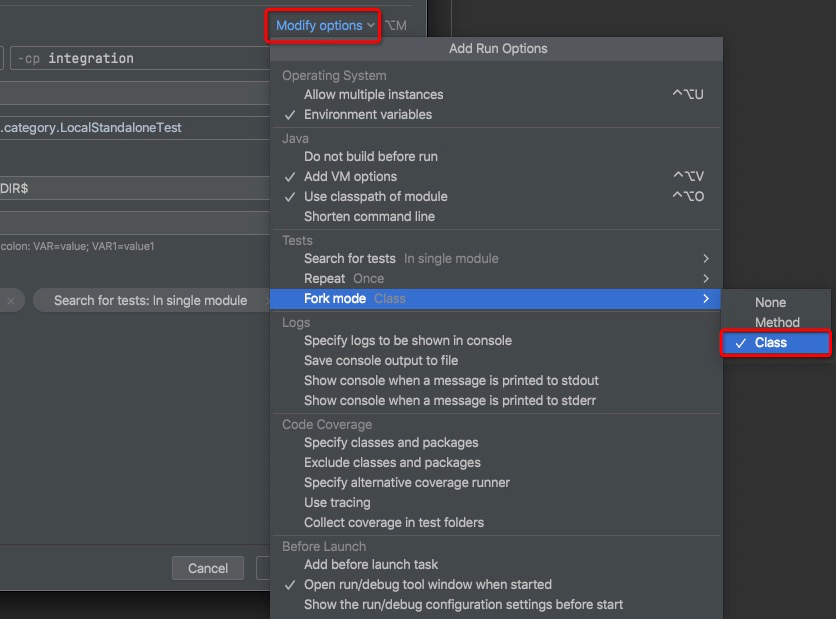 Integration Testing with Cluster Mode ------------------- @@ -80,7 +80,7 @@ mvn clean package -pl integration -am -DskipTests -PCluster - Step 1. You can copy configuration and change some fields as the following picture, -  + 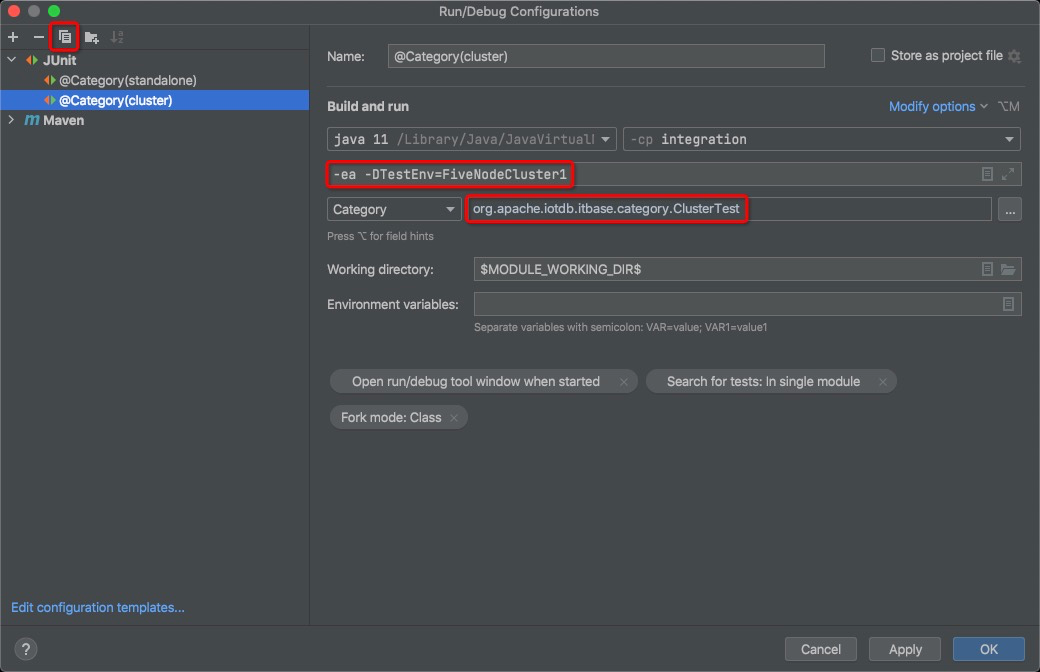 Integration Testing with Remote Mode diff --git a/integration/pic/Add_New_Configuration.png b/integration/pic/Add_New_Configuration.png deleted file mode 100644 index d6b647c6ec..0000000000 Binary files a/integration/pic/Add_New_Configuration.png and /dev/null differ diff --git a/integration/pic/Cluster_Category.png b/integration/pic/Cluster_Category.png deleted file mode 100644 index fa2531da01..0000000000 Binary files a/integration/pic/Cluster_Category.png and /dev/null differ diff --git a/integration/pic/Fork_mode.png b/integration/pic/Fork_mode.png deleted file mode 100644 index e09e06672d..0000000000 Binary files a/integration/pic/Fork_mode.png and /dev/null differ diff --git a/integration/pic/Run(Menu).png b/integration/pic/Run(Menu).png deleted file mode 100644 index d1be472b99..0000000000 Binary files a/integration/pic/Run(Menu).png and /dev/null differ diff --git a/integration/pic/Standalone_Category.png b/integration/pic/Standalone_Category.png deleted file mode 100644 index 9c2d947d4b..0000000000 Binary files a/integration/pic/Standalone_Category.png and /dev/null differ






