This is an automated email from the ASF dual-hosted git repository.

qiaojialin pushed a commit to branch main
in repository https://gitbox.apache.org/repos/asf/iotdb-docs.git
The following commit(s) were added to refs/heads/main by this push:
new 092d86a fix title bug and add English doc (#100)
092d86a is described below
commit 092d86a7d73c6c544141e4fa090d321bf0828a81
Author: wanghui42 <[email protected]>
AuthorDate: Tue Oct 17 20:39:37 2023 +0800
fix title bug and add English doc (#100)
---
.../V1.2.x/IoTDB-Introduction/Publication.md | 8 +--
.../V1.2.x/User-Manual/IoTDB-Data-Pipe_timecho.md | 24 -------
.../V1.2.x/User-Manual/IoTDB-View_timecho.md | 2 +-
.../User-Manual/Security-Management_timecho.md | 4 +-
.../V1.2.x/User-Manual/Tiered-Storage_timecho.md | 76 +++++++++++++++++++++-
.../Environmental-Requirement.md | 2 +-
.../V1.2.x/IoTDB-Introduction/Publication.md | 9 +--
.../UserGuide/V1.2.x/Tools-System/Monitor-Tool.md | 22 +++----
.../V1.2.x/User-Manual/Database-Programming.md | 2 +-
.../V1.2.x/User-Manual/Write-Delete-Data.md | 2 +-
10 files changed, 94 insertions(+), 57 deletions(-)
diff --git a/src/UserGuide/V1.2.x/IoTDB-Introduction/Publication.md
b/src/UserGuide/V1.2.x/IoTDB-Introduction/Publication.md
index db23cdb..94413e4 100644
--- a/src/UserGuide/V1.2.x/IoTDB-Introduction/Publication.md
+++ b/src/UserGuide/V1.2.x/IoTDB-Introduction/Publication.md
@@ -19,9 +19,7 @@
-->
-# Publication
-
-## Research Papers
+# Research Papers
Apache IoTDB starts at Tsinghua University, School of Software. IoTDB is a
database for managing large amount of time series data with columnar storage,
data encoding, pre-computation, and index techniques. It has SQL-like interface
to write millions of data points per second per node and is optimized to get
query results in few seconds over trillions of data points. It can also be
easily integrated with Apache Hadoop MapReduce and Apache Spark for analytics.
@@ -35,8 +33,4 @@ The research papers related are as follows:
* [The Design of Apache IoTDB distributed
framework](http://ndbc2019.sdu.edu.cn/info/1002/1044.htm), Tianan Li, Jianmin
Wang, Xiangdong Huang, Yi Xu, Dongfang Mao, Jun Yuan. NDBC 2019
* [Dual-PISA: An index for aggregation operations on time series
data](https://www.sciencedirect.com/science/article/pii/S0306437918305489),
Jialin Qiao, Xiangdong Huang, Jianmin Wang, Raymond K Wong. IS 2020
-## Benchmark tools
-
-We also developed Benchmark tools for time series databases
-[https://github.com/thulab/iot-benchmark](https://github.com/thulab/iot-benchmark)
diff --git a/src/UserGuide/V1.2.x/User-Manual/IoTDB-Data-Pipe_timecho.md
b/src/UserGuide/V1.2.x/User-Manual/IoTDB-Data-Pipe_timecho.md
deleted file mode 100644
index f4f038a..0000000
--- a/src/UserGuide/V1.2.x/User-Manual/IoTDB-Data-Pipe_timecho.md
+++ /dev/null
@@ -1,24 +0,0 @@
-<!--
-
- Licensed to the Apache Software Foundation (ASF) under one
- or more contributor license agreements. See the NOTICE file
- distributed with this work for additional information
- regarding copyright ownership. The ASF licenses this file
- to you under the Apache License, Version 2.0 (the
- "License"); you may not use this file except in compliance
- with the License. You may obtain a copy of the License at
-
- http://www.apache.org/licenses/LICENSE-2.0
-
- Unless required by applicable law or agreed to in writing,
- software distributed under the License is distributed on an
- "AS IS" BASIS, WITHOUT WARRANTIES OR CONDITIONS OF ANY
- KIND, either express or implied. See the License for the
- specific language governing permissions and limitations
- under the License.
-
--->
-
-# IoTDB Data Pipe
-
-TODO
\ No newline at end of file
diff --git a/src/UserGuide/V1.2.x/User-Manual/IoTDB-View_timecho.md
b/src/UserGuide/V1.2.x/User-Manual/IoTDB-View_timecho.md
index a9ea5a7..20d3a9d 100644
--- a/src/UserGuide/V1.2.x/User-Manual/IoTDB-View_timecho.md
+++ b/src/UserGuide/V1.2.x/User-Manual/IoTDB-View_timecho.md
@@ -21,4 +21,4 @@
# IoTDB View
-TODO
\ No newline at end of file
+coming soon
\ No newline at end of file
diff --git a/src/UserGuide/V1.2.x/User-Manual/Security-Management_timecho.md
b/src/UserGuide/V1.2.x/User-Manual/Security-Management_timecho.md
index 021baac..222820b 100644
--- a/src/UserGuide/V1.2.x/User-Manual/Security-Management_timecho.md
+++ b/src/UserGuide/V1.2.x/User-Manual/Security-Management_timecho.md
@@ -23,11 +23,11 @@
## White List
-TODO
+coming soon
## Audit Log
-TODO
+coming soon
## Administration Management
diff --git a/src/UserGuide/V1.2.x/User-Manual/Tiered-Storage_timecho.md
b/src/UserGuide/V1.2.x/User-Manual/Tiered-Storage_timecho.md
index c5ac54a..23ea05e 100644
--- a/src/UserGuide/V1.2.x/User-Manual/Tiered-Storage_timecho.md
+++ b/src/UserGuide/V1.2.x/User-Manual/Tiered-Storage_timecho.md
@@ -19,6 +19,78 @@
-->
-# Tiered Storage
+# Tiered Storage
+## Overview
-TODO
\ No newline at end of file
+Tiered storage function provides users with the ability to manage tiered
storage media. users can use the tiered storage function to configure different
types of storage media for IoTDB and to classify the storage media. ioTDB can
support tiered storage from memory, SSD, normal hard disc to network hard disc
by parameter configuration only according to the degree of hot and cold data.
Specifically, in IoTDB, the configuration of tiered storage is reflected in the
management of multiple d [...]
+
+## Parameter Definition
+
+To enable tiered storage in IoTDB, you need to configure the following aspects:
+
+1. configure the data catalogue and divide the data catalogue into different
tiers
+2. configure the TTL of the data managed in each tier to distinguish between
hot and cold data categories managed in different tiers.
+3. configure the minimum remaining storage space ratio for each tier so that
when the storage space of the tier triggers the threshold, the data of the tier
will be automatically migrated to the next tier (optional).
+
+The specific parameter definitions and their descriptions are as follows.
+
+| Configuration | Default
| Description |
Constraint |
+| ---------------------------------------- | ------------------------ |
------------------------------------------------------------ |
------------------------------------------------------------ |
+| dn_data_dirs | None |
specify different storage directories and divide the storage directories into
tiers | Each level of storage uses a semicolon to separate, and
commas to separate within a single level; cloud configuration can only be used
as the last level of storage and the first level can't be used as cloud
storage; a cloud object at most; the remote storage directory is denoted by
OBJECT_STORAGE |
+| default_ttl_in_ms | None |
Define the scope of data for which each tier is responsible, expressed through
a TTL | Each level of storage is separated by a semicolon;
the number of levels should match the number of levels defined by dn_data_dirs |
+| dn_default_space_move_thresholds | 0.15 | Define
the minimum remaining space ratio for each tier data catalogue; when the
remaining space is less than this ratio, the data will be automatically
migrated to the next tier; when the remaining storage space of the last tier
falls below this threshold, the system will be set to READ_ONLY | Each level of
storage is separated by a semicolon; the number of levels should match the
number of levels defined by dn_data_dirs |
+| object_storage_type | AWS_S3 | Cloud
Storage Type | IoTDB currently
only supports AWS S3 as a remote storage type, and this parameter can't be
modified |
+| object_storage_bucket | None |
Name of cloud storage bucket | Bucket
definition in AWS S3; no need to configure if remote storage is not used
|
+| object_storage_endpoiont | |
endpoint of cloud storage | endpoint
of AWS S3;If remote storage is not used, no configuration required |
+| object_storage_access_key | |
Authentication information stored in the cloud: key
| AWS S3 的 credential key;If remote storage is not used, no
configuration required |
+| object_storage_access_secret | |
Authentication information stored in the cloud: secret
| AWS S3 的 credential secret;If remote storage is not used, no
configuration required |
+| remote_tsfile_cache_dirs | data/datanode/data/cache | Cache
directory stored locally in the cloud | If
remote storage is not used, no configuration required
|
+| remote_tsfile_cache_page_size_in_kb | 20480 |Block
size of locally cached files stored in the cloud
| If remote storage is not used, no configuration required
|
+| remote_tsfile_cache_max_disk_usage_in_mb | 51200 |
Maximum Disk Occupancy Size for Cloud Storage Local Cache
| If remote storage is not used, no configuration required
|
+
+## local tiered storag configuration example
+
+The following is an example of a local two-level storage configuration.
+
+```JavaScript
+//Required configuration items
+dn_data_dirs=/data1/data;/data2/data,/data3/data;
+default_ttl_in_ms=86400000;-1
+dn_default_space_move_thresholds=0.2;0.1
+```
+
+In this example, two levels of storage are configured, specifically:
+
+| **tier** | **data path** | **data range** |
**threshold for minimum remaining disk space** |
+| -------- | -------------------------------------- | --------------- |
------------------------ |
+| tier 1 | path 1:/data1/data | data for last 1 day | 20%
|
+| tier 2 | path 2:/data2/data path 2:/data3/data | data from 1 day ago |
10% |
+
+## remote tiered storag configuration example
+
+The following takes three-level storage as an example:
+
+```JavaScript
+//Required configuration items
+dn_data_dirs=/data1/data;/data2/data,/data3/data;OBJECT_STORAGE
+default_ttl_in_ms=86400000;864000000;-1
+dn_default_space_move_thresholds=0.2;0.15;0.1
+object_storage_name=AWS_S3
+object_storage_bucket=iotdb
+object_storage_endpoiont=<your_endpoint>
+object_storage_access_key=<your_access_key>
+object_storage_access_secret=<your_access_secret>
+
+// Optional configuration items
+remote_tsfile_cache_dirs=data/datanode/data/cache
+remote_tsfile_cache_page_size_in_kb=20971520
+remote_tsfile_cache_max_disk_usage_in_mb=53687091200
+```
+
+In this example, a total of three levels of storage are configured,
specifically:
+
+| **tier** | **data path** | **data range**
| **threshold for minimum remaining disk space** |
+| -------- | -------------------------------------- |
---------------------------- | ------------------------ |
+| tier一 | path 1:/data1/data | data for last 1 day
| 20% |
+| tier二 | path 1:/data2/data path 2:/data3/data | data from past 1 day to
past 10 days | 15% |
+| tier三 | Remote AWS S3 Storage | data from 1 day ago
| 10% |
diff --git
a/src/zh/UserGuide/V1.2.x/Deployment-and-Maintenance/Environmental-Requirement.md
b/src/zh/UserGuide/V1.2.x/Deployment-and-Maintenance/Environmental-Requirement.md
index 60b6fce..74646a4 100644
---
a/src/zh/UserGuide/V1.2.x/Deployment-and-Maintenance/Environmental-Requirement.md
+++
b/src/zh/UserGuide/V1.2.x/Deployment-and-Maintenance/Environmental-Requirement.md
@@ -19,7 +19,7 @@
-->
-## 环境要求
+# 环境要求
要使用IoTDB,你需要具备以下条件:
diff --git a/src/zh/UserGuide/V1.2.x/IoTDB-Introduction/Publication.md
b/src/zh/UserGuide/V1.2.x/IoTDB-Introduction/Publication.md
index 4605b17..d842aee 100644
--- a/src/zh/UserGuide/V1.2.x/IoTDB-Introduction/Publication.md
+++ b/src/zh/UserGuide/V1.2.x/IoTDB-Introduction/Publication.md
@@ -19,9 +19,9 @@
-->
-# 公开发表
-## 研究论文
+
+# 研究论文
Apache IoTDB 始于清华大学软件学院。IoTDB 是一个用于管理大量时间序列数据的数据库,它采用了列式存储、数据编码、预计算和索引技术,具有类
SQL 的接口,可支持每秒每节点写入数百万数据点,可以秒级获得超过数万亿个数据点的查询结果。它还可以很容易地与 Apache Hadoop、MapReduce
和 Apache Spark 集成以进行分析。
@@ -34,8 +34,3 @@ Apache IoTDB 始于清华大学软件学院。IoTDB 是一个用于管理大量
* [The Design of Apache IoTDB distributed
framework](http://ndbc2019.sdu.edu.cn/info/1002/1044.htm), Tianan Li, Jianmin
Wang, Xiangdong Huang, Yi Xu, Dongfang Mao, Jun Yuan. NDBC 2019
* [Dual-PISA: An index for aggregation operations on time series
data](https://www.sciencedirect.com/science/article/pii/S0306437918305489),
Jialin Qiao, Xiangdong Huang, Jianmin Wang, Raymond K Wong. IS 2020
-## Benchmark 工具
-
-我们还研发了面向时间序列数据库的 Benchmark 工具:
-
-[https://github.com/thulab/iot-benchmark](https://github.com/thulab/iot-benchmark)
diff --git a/src/zh/UserGuide/V1.2.x/Tools-System/Monitor-Tool.md
b/src/zh/UserGuide/V1.2.x/Tools-System/Monitor-Tool.md
index 4df4ffc..4232582 100644
--- a/src/zh/UserGuide/V1.2.x/Tools-System/Monitor-Tool.md
+++ b/src/zh/UserGuide/V1.2.x/Tools-System/Monitor-Tool.md
@@ -19,10 +19,10 @@
-->
+# 监控工具
+## Prometheus
-# Prometheus
-
-## 监控指标的 Prometheus 映射关系
+### 监控指标的 Prometheus 映射关系
> 对于 Metric Name 为 name, Tags 为 K1=V1, ..., Kn=Vn 的监控指标有如下映射,其中 value 为具体值
@@ -34,7 +34,7 @@
| Rate | name_total{cluster="clusterName", nodeType="nodeType",
nodeId="nodeId",k1="V1" , ..., Kn="Vn"} value <br>
name_total{cluster="clusterName", nodeType="nodeType", nodeId="nodeId",k1="V1"
, ..., Kn="Vn", rate="m1"} value <br> name_total{cluster="clusterName",
nodeType="nodeType", nodeId="nodeId",k1="V1" , ..., Kn="Vn", rate="m5"} value
<br> name_total{cluster="clusterName", nodeType="nodeType",
nodeId="nodeId",k1="V1" , ..., Kn="Vn", rate="m15"} value <br> name_total{cl
[...]
| Timer | name_seconds_max{cluster="clusterName",
nodeType="nodeType", nodeId="nodeId",k1="V1" , ..., Kn="Vn"} value <br>
name_seconds_sum{cluster="clusterName", nodeType="nodeType",
nodeId="nodeId",k1="V1" , ..., Kn="Vn"} value <br>
name_seconds_count{cluster="clusterName", nodeType="nodeType",
nodeId="nodeId",k1="V1" , ..., Kn="Vn"} value <br>
name_seconds{cluster="clusterName", nodeType="nodeType",
nodeId="nodeId",k1="V1" , ..., Kn="Vn", quantile="0.5"} value value <br> nam
[...]
-## 修改配置文件
+### 修改配置文件
1) 以 DataNode 为例,修改 iotdb-datanode.properties 配置文件如下:
@@ -58,7 +58,7 @@ file_count{name="seq",} 2.0
...
```
-## Prometheus + Grafana
+### Prometheus + Grafana
如上所示,IoTDB 对外暴露出标准的 Prometheus 格式的监控指标数据,可以使用 Prometheus 采集并存储监控指标,使用 Grafana
可视化监控指标。
@@ -100,7 +100,7 @@ static_configs:
[Grafana从Prometheus查询数据并绘图的文档](https://prometheus.io/docs/visualization/grafana/#grafana-support-for-prometheus)
-## Apache IoTDB Dashboard
+### Apache IoTDB Dashboard
我们提供了Apache IoTDB Dashboard,支持统一集中式运维管理,可通过一个监控面板监控多个集群。
@@ -110,7 +110,7 @@ static_configs:
你可以在企业版中获取到 Dashboard 的 Json文件。
-### 集群概览
+#### 集群概览
可以监控包括但不限于:
- 集群总CPU核数、总内存空间、总硬盘空间
@@ -122,7 +122,7 @@ static_configs:
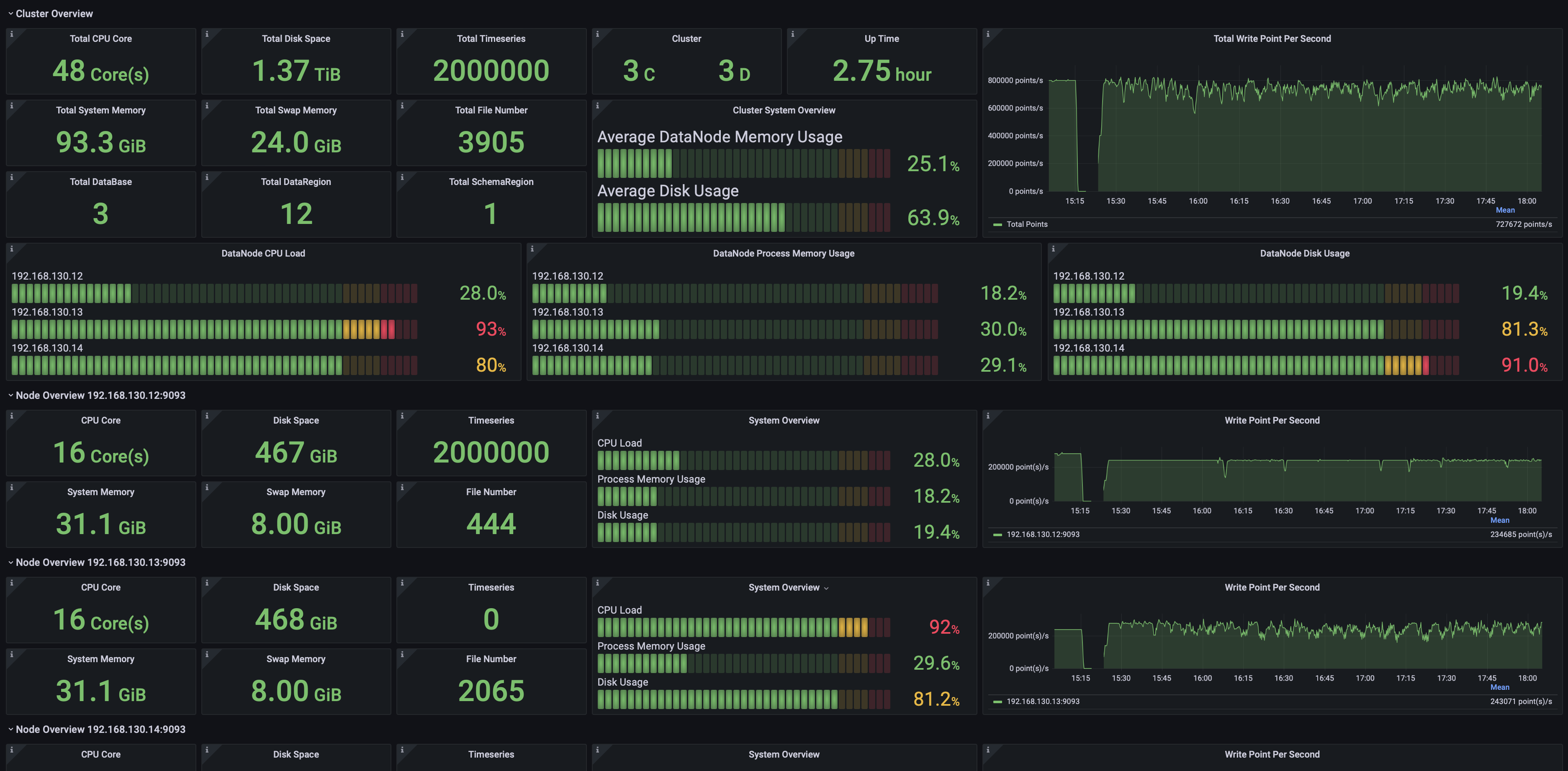
-### 数据写入
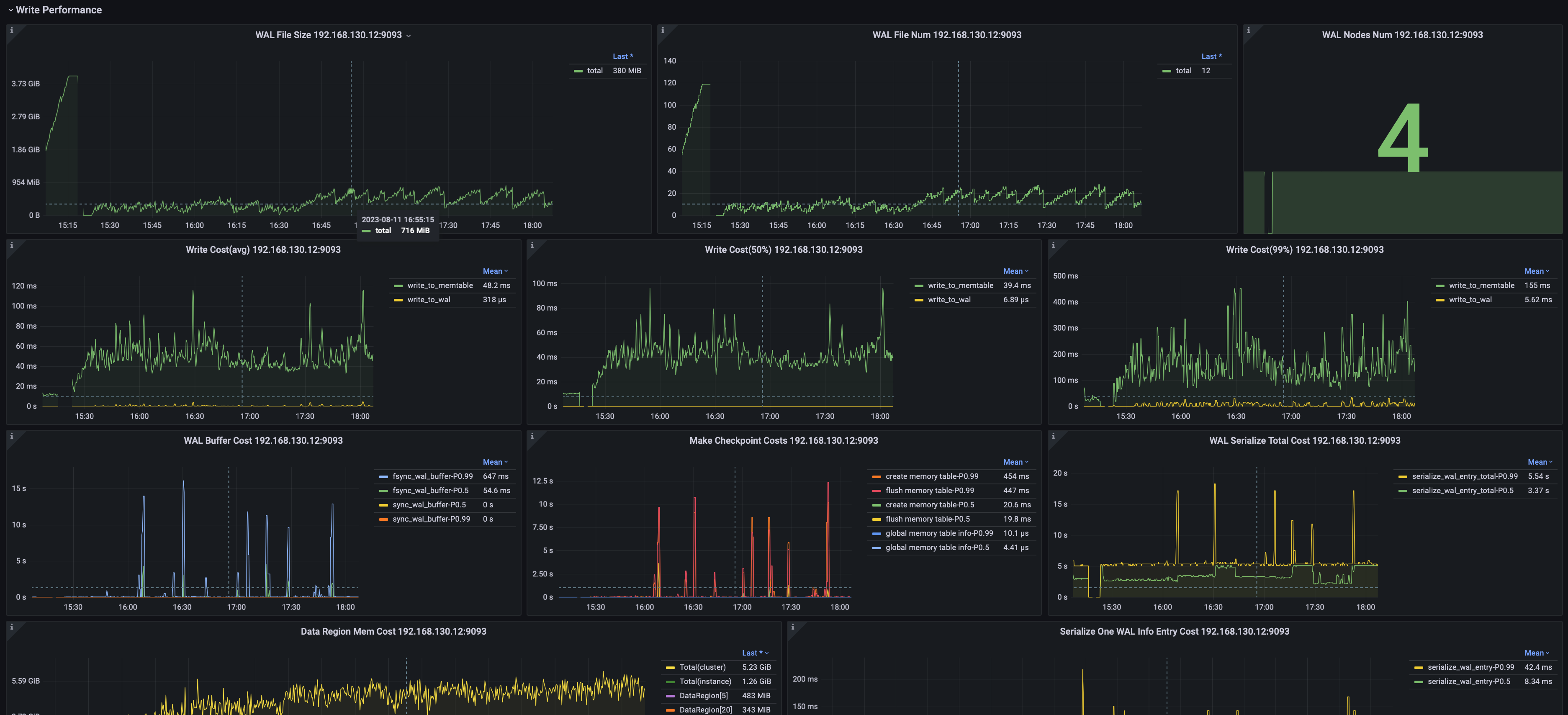
+#### 数据写入
可以监控包括但不限于:
- 写入平均耗时、耗时中位数、99%分位耗时
@@ -131,7 +131,7 @@ static_configs:
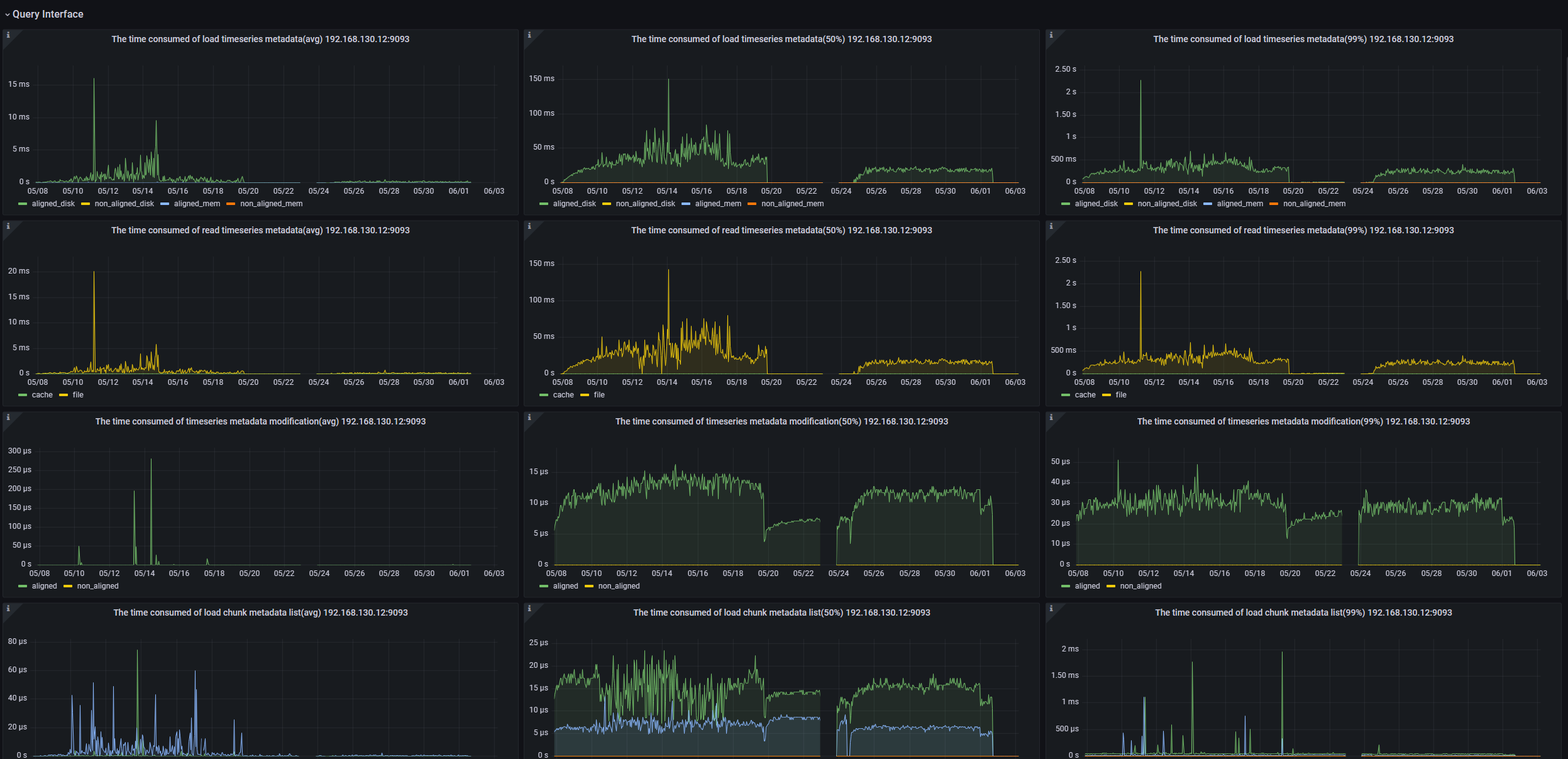
-### 数据查询
+#### 数据查询
可以监控包括但不限于:
- 节点查询加载时间序列元数据耗时
@@ -144,7 +144,7 @@ static_configs:
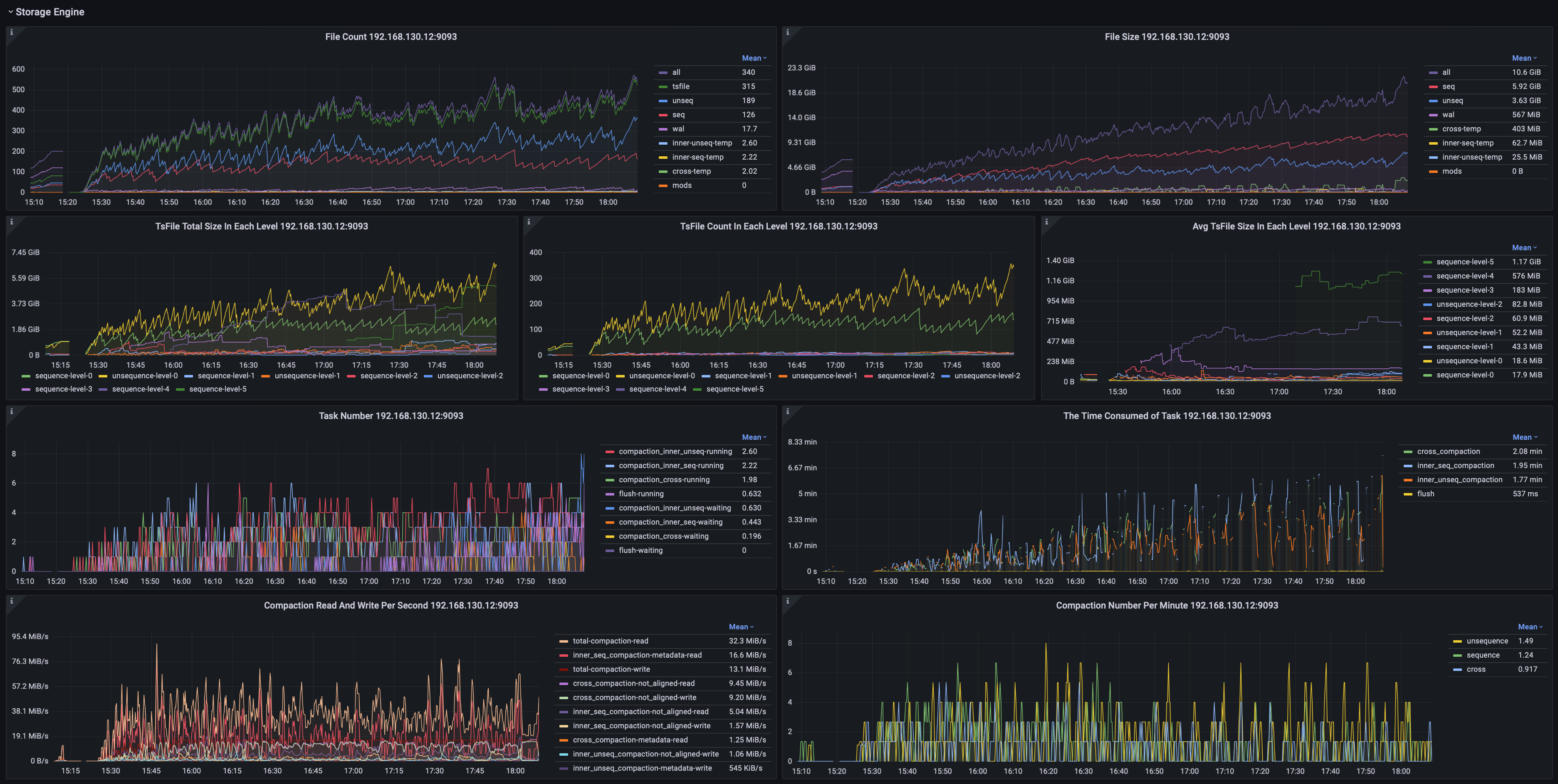
-### 存储引擎
+#### 存储引擎
可以监控包括但不限于:
- 分类型的文件数量、大小
@@ -153,7 +153,7 @@ static_configs:
-### 系统监控
+#### 系统监控
可以监控包括但不限于:
- 系统内存、交换内存、进程内存
diff --git a/src/zh/UserGuide/V1.2.x/User-Manual/Database-Programming.md
b/src/zh/UserGuide/V1.2.x/User-Manual/Database-Programming.md
index f2b86c0..ffadee0 100644
--- a/src/zh/UserGuide/V1.2.x/User-Manual/Database-Programming.md
+++ b/src/zh/UserGuide/V1.2.x/User-Manual/Database-Programming.md
@@ -19,7 +19,7 @@
-->
-
+# 数据库编程
## 触发器
### 使用说明
diff --git a/src/zh/UserGuide/V1.2.x/User-Manual/Write-Delete-Data.md
b/src/zh/UserGuide/V1.2.x/User-Manual/Write-Delete-Data.md
index 42a84cf..0dc511b 100644
--- a/src/zh/UserGuide/V1.2.x/User-Manual/Write-Delete-Data.md
+++ b/src/zh/UserGuide/V1.2.x/User-Manual/Write-Delete-Data.md
@@ -20,7 +20,7 @@
-->
-# 写入和删除数据
+# 数据增删
## CLI写入数据
IoTDB 为用户提供多种插入实时数据的方式,例如在 [Cli/Shell 工具](../Tools-System/CLI.md) 中直接输入插入数据的
INSERT 语句,或使用 Java API(标准 [Java JDBC](../API/Programming-JDBC.md)
接口)单条或批量执行插入数据的 INSERT 语句。




