This is an automated email from the ASF dual-hosted git repository.

qiaojialin pushed a commit to branch main
in repository https://gitbox.apache.org/repos/asf/iotdb-docs.git
The following commit(s) were added to refs/heads/main by this push:
new bc4a10f Add AInode sidebar and modify streaming content of English
documents (#148)
bc4a10f is described below
commit bc4a10f9e005b0c8f2a93d57b9cee10c9000ed59
Author: wanghui42 <[email protected]>
AuthorDate: Mon Jan 15 22:56:41 2024 +0800
Add AInode sidebar and modify streaming content of English documents (#148)
---
src/.vuepress/sidebar_timecho/V1.3.x/en.ts | 1 +
src/UserGuide/Master/User-Manual/Data-Sync_timecho.md | 10 +++++-----
.../{V1.2.x => Master}/User-Manual/Streaming.md | 2 +-
src/UserGuide/Master/User-Manual/Streaming_timecho.md | 16 +++++++---------
src/UserGuide/V1.2.x/User-Manual/Data-Sync.md | 2 +-
src/UserGuide/V1.2.x/User-Manual/Data-Sync_timecho.md | 2 +-
src/UserGuide/V1.2.x/User-Manual/Streaming.md | 2 +-
src/UserGuide/V1.2.x/User-Manual/Streaming_timecho.md | 3 ++-
src/UserGuide/V1.3.x/User-Manual/Data-Sync_timecho.md | 10 +++++-----
src/UserGuide/V1.3.x/User-Manual/Streaming.md | 2 +-
src/UserGuide/V1.3.x/User-Manual/Streaming_timecho.md | 16 +++++++---------
11 files changed, 32 insertions(+), 34 deletions(-)
diff --git a/src/.vuepress/sidebar_timecho/V1.3.x/en.ts
b/src/.vuepress/sidebar_timecho/V1.3.x/en.ts
index 57f045c..a1e9d5a 100644
--- a/src/.vuepress/sidebar_timecho/V1.3.x/en.ts
+++ b/src/.vuepress/sidebar_timecho/V1.3.x/en.ts
@@ -89,6 +89,7 @@ export const enSidebar = {
{ text: 'Data Sync', link: 'Data-Sync_timecho' },
{ text: 'Tiered Storage', link: 'Tiered-Storage_timecho' },
{ text: 'View', link: 'IoTDB-View_timecho' },
+ { text: 'IoTDB AINode', link: 'IoTDB-AINode_timecho' },
{ text: 'Database Programming', link: 'Database-Programming' },
{ text: 'Security Management', link: 'Security-Management_timecho' },
{ text: 'Authority Management', link: 'Authority-Management' },
diff --git a/src/UserGuide/Master/User-Manual/Data-Sync_timecho.md
b/src/UserGuide/Master/User-Manual/Data-Sync_timecho.md
index c53b376..5227555 100644
--- a/src/UserGuide/Master/User-Manual/Data-Sync_timecho.md
+++ b/src/UserGuide/Master/User-Manual/Data-Sync_timecho.md
@@ -162,7 +162,7 @@ IoTDB> show pipeplugins
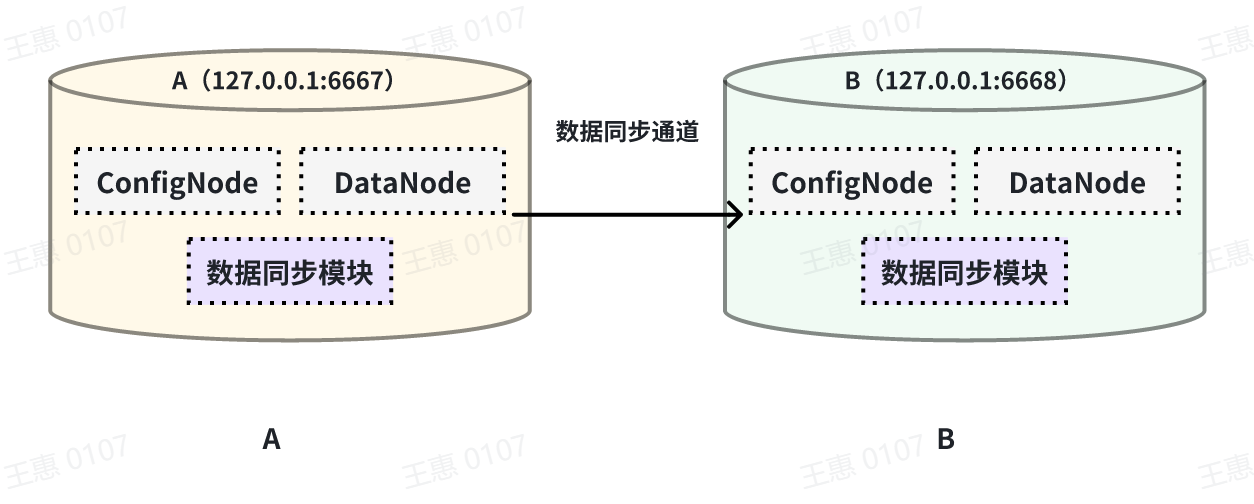
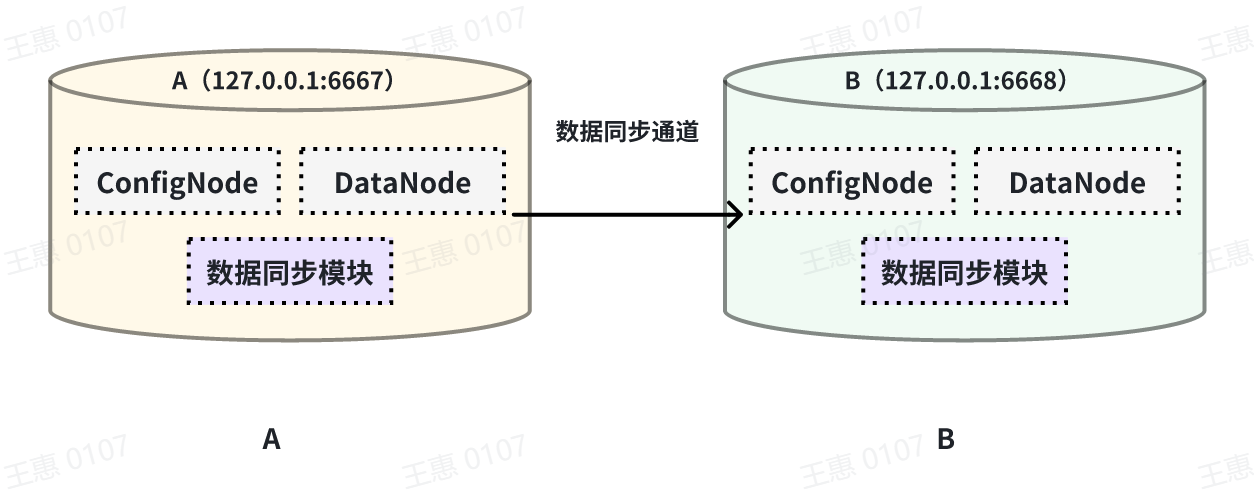
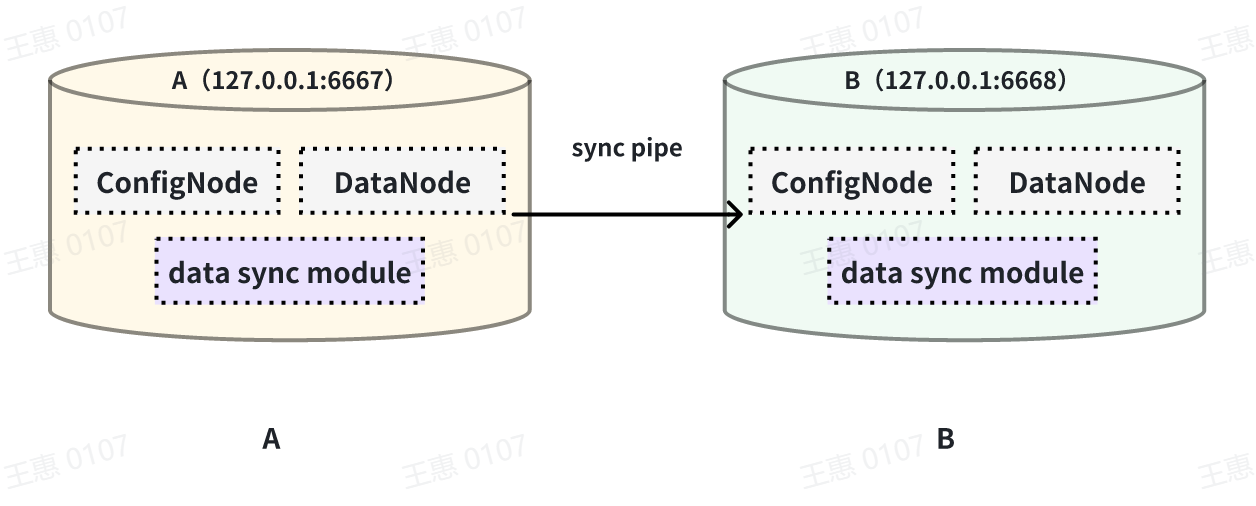
This example is used to demonstrate the synchronisation of all data from one
IoTDB to another IoTDB with the data link as shown below:
-
+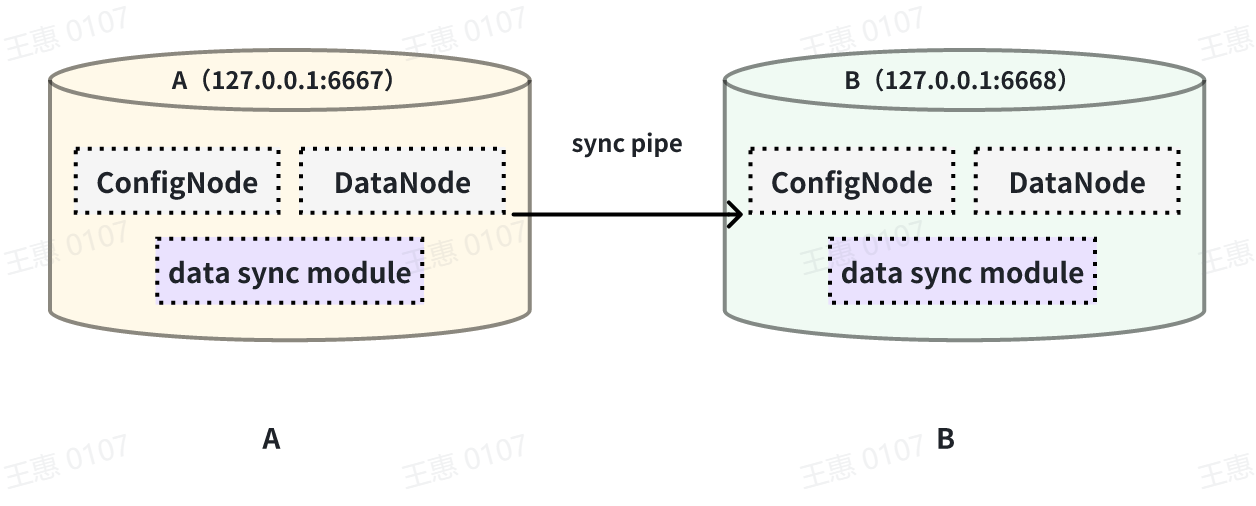
In this example, we can create a synchronisation task named A2B to synchronise
the full amount of data from IoTDB A to IoTDB B. Here we need to use the
iotdb-thrift-sink plugin (built-in plugin) which uses sink, and we need to
specify the address of the receiving end, in this example, we have specified
'sink.ip' and 'sink.port', and we can also specify 'sink.port'. This example
specifies 'sink.ip' and 'sink.port', and also 'sink.node-urls', as in the
following example statement:
@@ -180,7 +180,7 @@ with sink (
This example is used to demonstrate the synchronisation of data from a certain
historical time range (8:00pm 23 August 2023 to 8:00pm 23 October 2023) to
another IoTDB, the data link is shown below:
-
+
In this example we can create a synchronisation task called A2B. First of all,
we need to define the range of data to be transferred in source, since the data
to be transferred is historical data (historical data refers to the data that
existed before the creation of the synchronisation task), we need to configure
the source.realtime.enable parameter to false; at the same time, we need to
configure the start-time and end-time of the data and the mode mode of the
transfer. At the same tim [...]
@@ -205,7 +205,7 @@ with SINK (
This example is used to demonstrate a scenario where two IoTDBs are
dual-active with each other, with the data link shown below:
-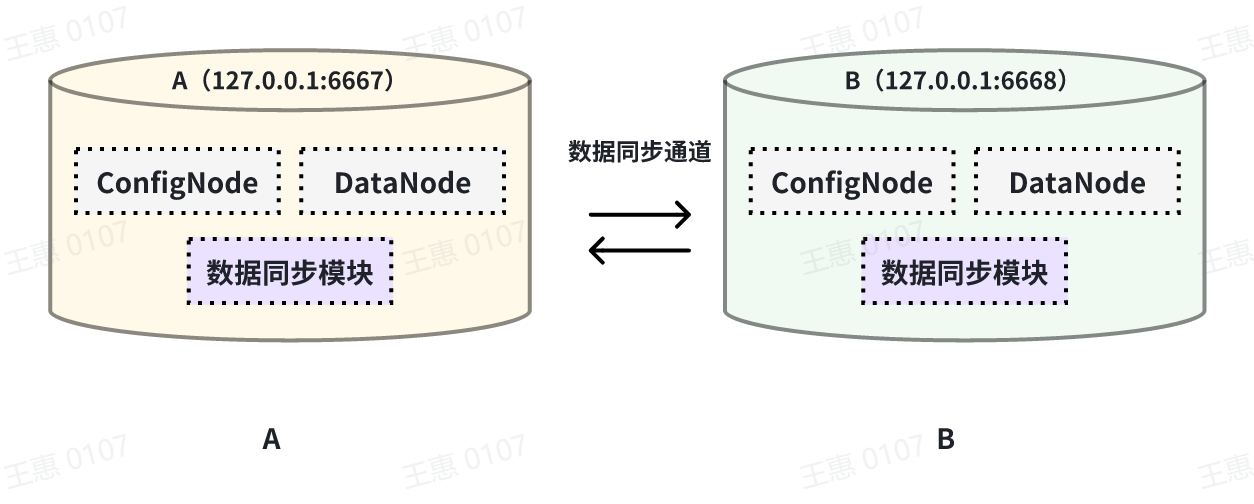
+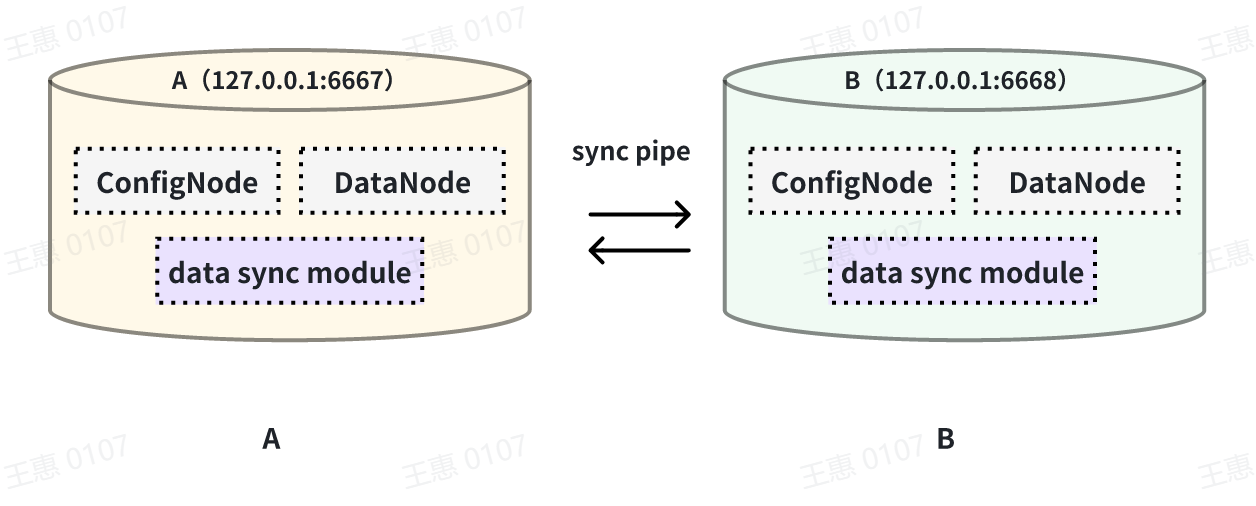
In this example, in order to avoid an infinite loop of data, the parameter
`'source.forwarding-pipe-requests` needs to be set to ``false`` on both A and B
to indicate that the data transferred from the other pipe will not be
forwarded. Also set `'source.history.enable'` to `false` to indicate that
historical data is not transferred, i.e., data prior to the creation of the
task is not synchronised.
@@ -245,7 +245,7 @@ with sink (
This example is used to demonstrate a cascading data transfer scenario between
multiple IoTDBs, where data is synchronised from cluster A to cluster B and
then to cluster C. The data link is shown in the figure below:
-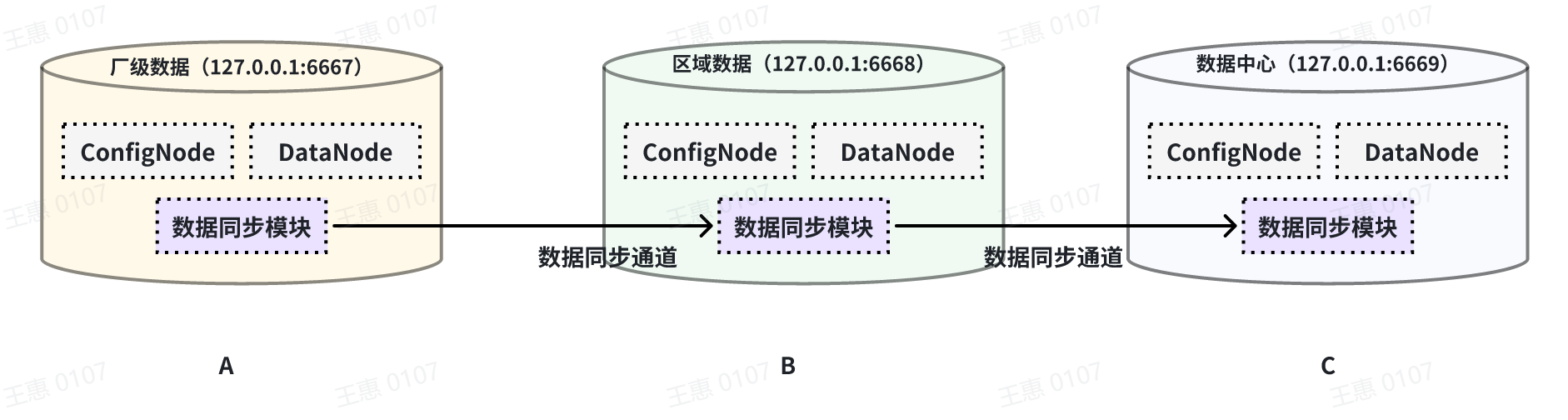
+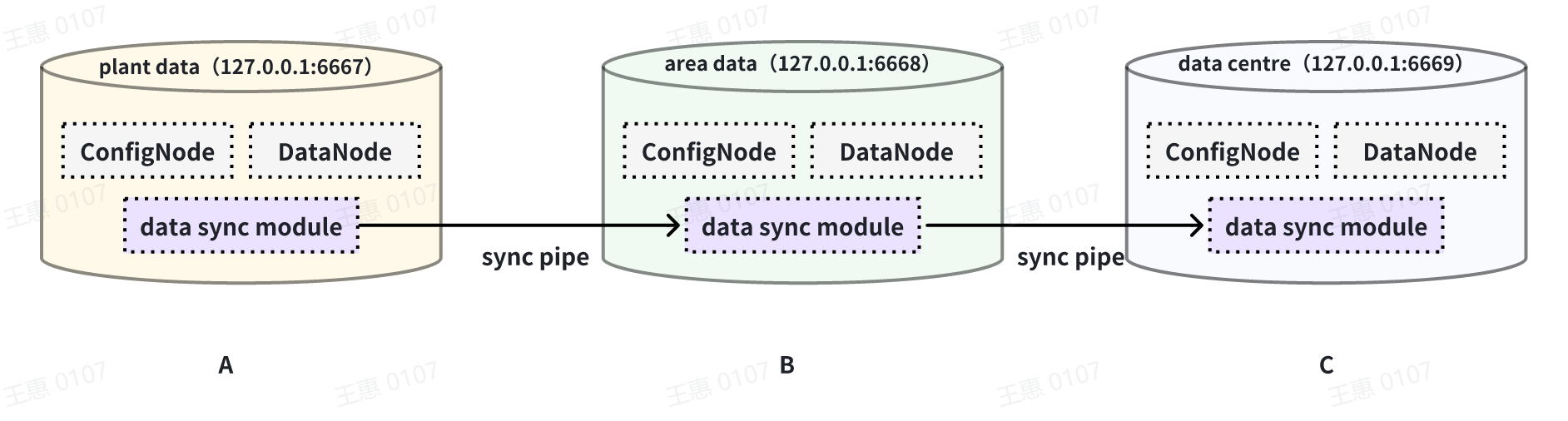
In this example, in order to synchronise the data from cluster A to C, the
pipe between BC needs to be configured with `source.forwarding-pipe-requests`
to `true`, the detailed statement is as follows:
@@ -277,7 +277,7 @@ with sink (
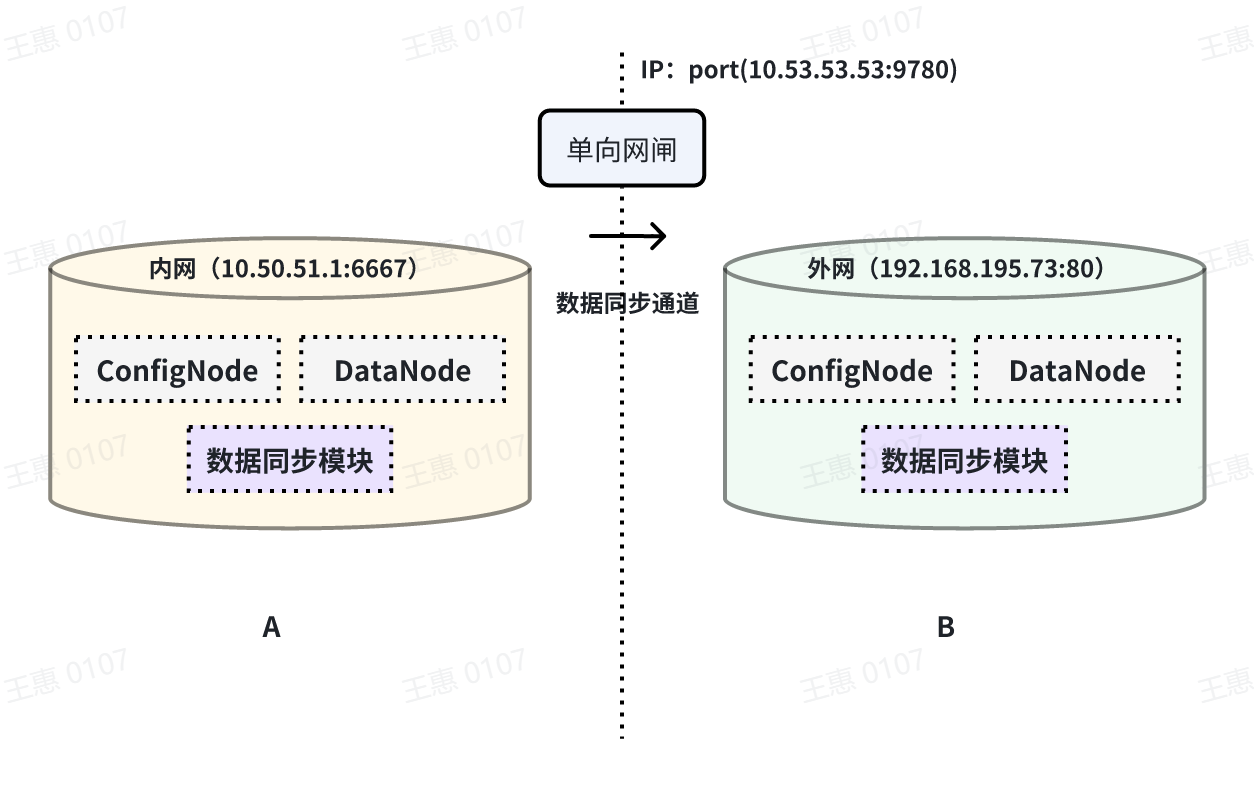
This example is used to demonstrate a scenario where data from one IoTDB is
synchronised to another IoTDB via a unidirectional gate, with the data link
shown below:
-
+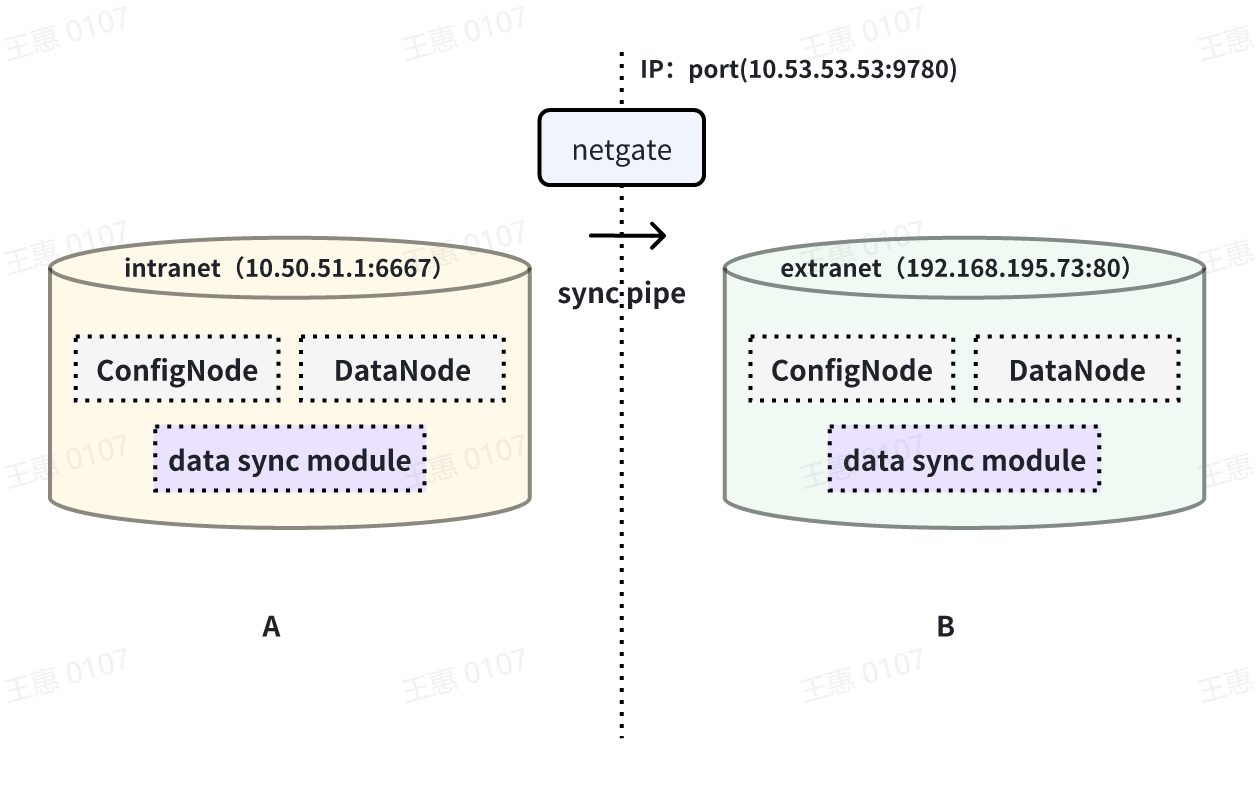
In this example, you need to use the iotdb-air-gap-sink plug-in in the sink
task (currently supports some models of network gates, please contact the staff
of Tianmou Technology to confirm the specific model), and after configuring the
network gate, execute the following statements on IoTDB A, where ip and port
fill in the information of the network gate, and the detailed statements are as
follows:
diff --git a/src/UserGuide/V1.2.x/User-Manual/Streaming.md
b/src/UserGuide/Master/User-Manual/Streaming.md
similarity index 99%
copy from src/UserGuide/V1.2.x/User-Manual/Streaming.md
copy to src/UserGuide/Master/User-Manual/Streaming.md
index da694d2..553b470 100644
--- a/src/UserGuide/V1.2.x/User-Manual/Streaming.md
+++ b/src/UserGuide/Master/User-Manual/Streaming.md
@@ -35,7 +35,7 @@ Pipe Extractor is used to extract data, Pipe Processor is
used to process data,
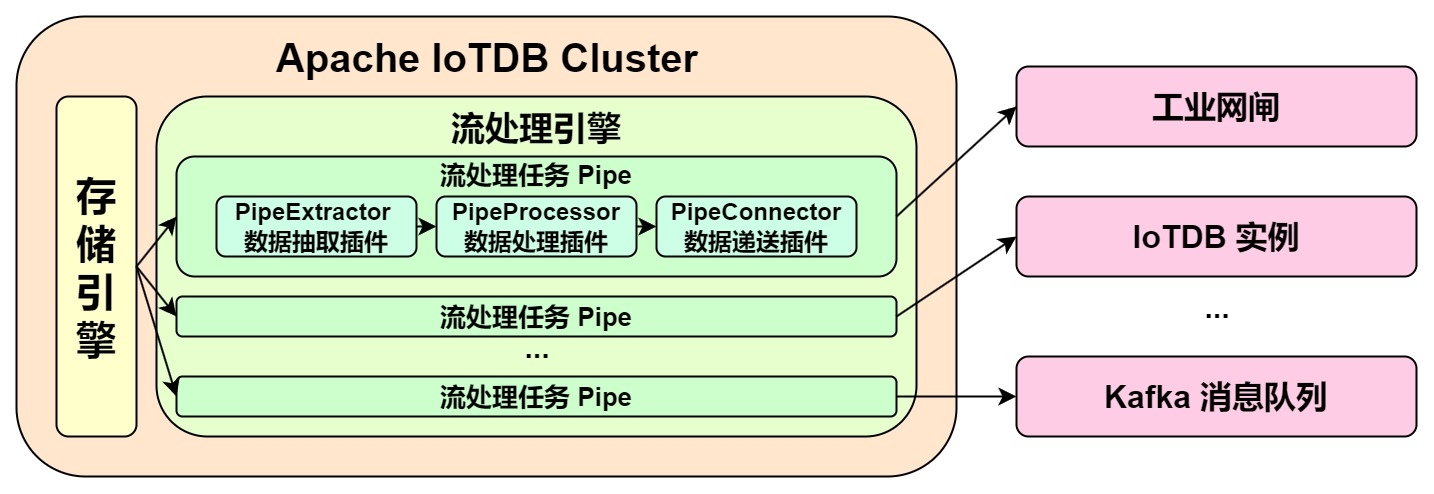
**The model for a Pipe task is as follows:**
-
+
A data stream processing task essentially describes the attributes of the Pipe
Extractor, Pipe Processor, and Pipe Connector plugins.
Users can configure the specific attributes of these three subtasks
declaratively using SQL statements. By combining different attributes, flexible
data ETL (Extract, Transform, Load) capabilities can be achieved.
diff --git a/src/UserGuide/Master/User-Manual/Streaming_timecho.md
b/src/UserGuide/Master/User-Manual/Streaming_timecho.md
index 6005077..709bfae 100644
--- a/src/UserGuide/Master/User-Manual/Streaming_timecho.md
+++ b/src/UserGuide/Master/User-Manual/Streaming_timecho.md
@@ -35,7 +35,7 @@ Pipe Extractor is used to extract data, Pipe Processor is
used to process data,
**The model of the Pipe task is as follows:**
-
+
Describing a data flow processing task essentially describes the properties of
Pipe Extractor, Pipe Processor and Pipe Connector plugins.
Users can declaratively configure the specific attributes of the three
subtasks through SQL statements, and achieve flexible data ETL capabilities by
combining different attributes.
@@ -614,14 +614,12 @@ WITH CONNECTOR (
**When creating a stream processing task, you need to configure the PipeId and
the parameters of the three plugin parts:**
-
-| Configuration item | Description
| Required or not | Default implementation
| Default implementation description
| Whether custom implementation is allowed |
-| --------- | --------------------------------------------------- |
--------------------------- | -------------------- |
-------------------------------------------------------- |
------------------------- |
-| PipeId | A globally unique name that identifies a stream processing task
| <font color=red>Required</font> | - | -
| -
|
-| extractor | Pipe Extractor plugin, responsible for extracting stream
processing data at the bottom of the database | Optional
| iotdb-extractor | Integrate the full historical data of the database and
subsequent real-time data arriving into the stream processing task | No
|
-| processor | Pipe Processor plugin, responsible for processing data |
Optional | do-nothing-processor | Optional
| do-nothing-processor | | processor | Pipe Processor plugin, responsible
for processing data | Optional | do-nothing-processor | Does not do any
processing on the incoming data | <font color=red>Yes</font> |
- | <font color=red>是</font> |
-| connector | Pipe Connector plugin, responsible for sending data
| <font color=red>Required</font> | - | -
| <font color=red>是</font> |
+| Configuration | Description
| Required or not | Default implementation | Default
implementation description | Default implementation
description |
+| ------------- | ------------------------------------------------------------
| ------------------------------- | ---------------------- |
------------------------------------------------------------ |
---------------------------------- |
+| PipeId | A globally unique name that identifies a stream processing
| <font color=red>Required</font> | - | -
| - |
+| extractor | Pipe Extractor plugin, responsible for extracting stream
processing data at the bottom of the database | Optional
| iotdb-extractor | Integrate the full historical data of the database
and subsequent real-time data arriving into the stream processing task | No
|
+| processor | Pipe Processor plugin, responsible for processing data
| Optional | do-nothing-processor | Does not do any
processing on the incoming data | <font color=red>Yes</font>
|
+| connector | Pipe Connector plugin, responsible for sending data
| <font color=red>Required</font> | - | -
| <font color=red>Yes</font> |
In the example, the iotdb-extractor, do-nothing-processor and
iotdb-thrift-connector plugins are used to build the data flow processing task.
IoTDB also has other built-in stream processing plugins, **please check the
"System Preset Stream Processing plugin" section**.
diff --git a/src/UserGuide/V1.2.x/User-Manual/Data-Sync.md
b/src/UserGuide/V1.2.x/User-Manual/Data-Sync.md
index 040b660..dda912d 100644
--- a/src/UserGuide/V1.2.x/User-Manual/Data-Sync.md
+++ b/src/UserGuide/V1.2.x/User-Manual/Data-Sync.md
@@ -32,7 +32,7 @@
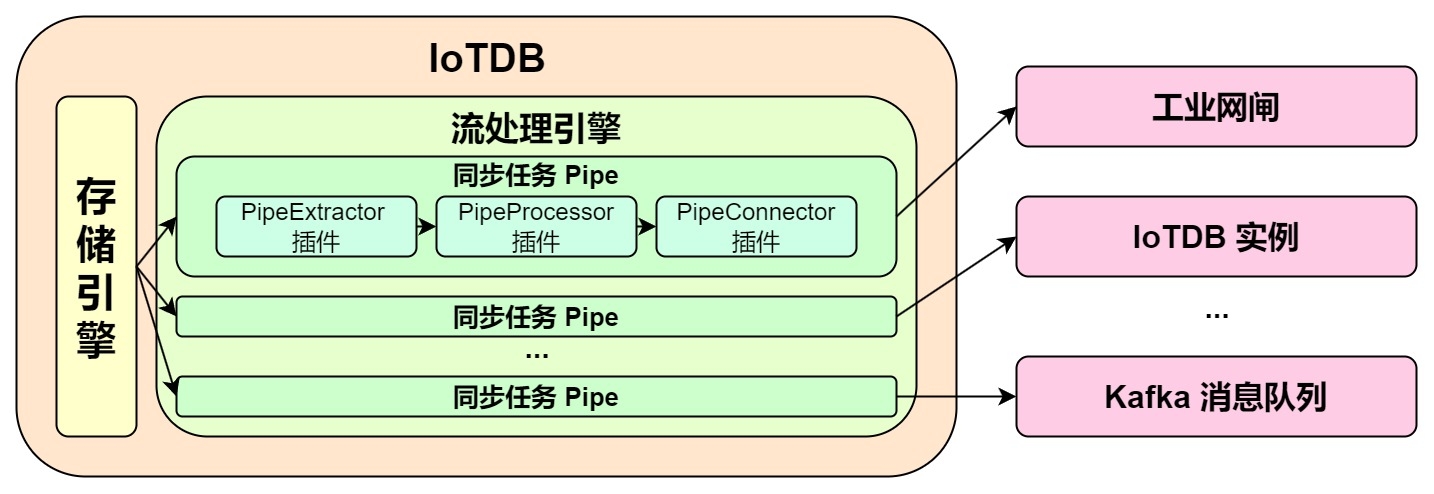
**The model of a Pipe task is as follows:**
-
+
It describes a data sync task, which essentially describes the attributes of
the Pipe Extractor, Pipe Processor, and Pipe Connector plugins. Users can
declaratively configure the specific attributes of the three subtasks through
SQL statements. By combining different attributes, flexible data ETL (Extract,
Transform, Load) capabilities can be achieved.
diff --git a/src/UserGuide/V1.2.x/User-Manual/Data-Sync_timecho.md
b/src/UserGuide/V1.2.x/User-Manual/Data-Sync_timecho.md
index 81bd9f6..933c198 100644
--- a/src/UserGuide/V1.2.x/User-Manual/Data-Sync_timecho.md
+++ b/src/UserGuide/V1.2.x/User-Manual/Data-Sync_timecho.md
@@ -32,7 +32,7 @@
**The model of a Pipe task is as follows:**
-
+
It describes a data sync task, which essentially describes the attributes of
the Pipe Extractor, Pipe Processor, and Pipe Connector plugins. Users can
declaratively configure the specific attributes of the three subtasks through
SQL statements. By combining different attributes, flexible data ETL (Extract,
Transform, Load) capabilities can be achieved.
diff --git a/src/UserGuide/V1.2.x/User-Manual/Streaming.md
b/src/UserGuide/V1.2.x/User-Manual/Streaming.md
index da694d2..553b470 100644
--- a/src/UserGuide/V1.2.x/User-Manual/Streaming.md
+++ b/src/UserGuide/V1.2.x/User-Manual/Streaming.md
@@ -35,7 +35,7 @@ Pipe Extractor is used to extract data, Pipe Processor is
used to process data,
**The model for a Pipe task is as follows:**
-
+
A data stream processing task essentially describes the attributes of the Pipe
Extractor, Pipe Processor, and Pipe Connector plugins.
Users can configure the specific attributes of these three subtasks
declaratively using SQL statements. By combining different attributes, flexible
data ETL (Extract, Transform, Load) capabilities can be achieved.
diff --git a/src/UserGuide/V1.2.x/User-Manual/Streaming_timecho.md
b/src/UserGuide/V1.2.x/User-Manual/Streaming_timecho.md
index 61cd393..06748a4 100644
--- a/src/UserGuide/V1.2.x/User-Manual/Streaming_timecho.md
+++ b/src/UserGuide/V1.2.x/User-Manual/Streaming_timecho.md
@@ -35,7 +35,8 @@ Pipe Extractor is used to extract data, Pipe Processor is
used to process data,
**The model for a Pipe task is as follows:**
-
+
+
A data stream processing task essentially describes the attributes of the Pipe
Extractor, Pipe Processor, and Pipe Connector plugins.
Users can configure the specific attributes of these three subtasks
declaratively using SQL statements. By combining different attributes, flexible
data ETL (Extract, Transform, Load) capabilities can be achieved.
diff --git a/src/UserGuide/V1.3.x/User-Manual/Data-Sync_timecho.md
b/src/UserGuide/V1.3.x/User-Manual/Data-Sync_timecho.md
index c53b376..5227555 100644
--- a/src/UserGuide/V1.3.x/User-Manual/Data-Sync_timecho.md
+++ b/src/UserGuide/V1.3.x/User-Manual/Data-Sync_timecho.md
@@ -162,7 +162,7 @@ IoTDB> show pipeplugins
This example is used to demonstrate the synchronisation of all data from one
IoTDB to another IoTDB with the data link as shown below:
-
+
In this example, we can create a synchronisation task named A2B to synchronise
the full amount of data from IoTDB A to IoTDB B. Here we need to use the
iotdb-thrift-sink plugin (built-in plugin) which uses sink, and we need to
specify the address of the receiving end, in this example, we have specified
'sink.ip' and 'sink.port', and we can also specify 'sink.port'. This example
specifies 'sink.ip' and 'sink.port', and also 'sink.node-urls', as in the
following example statement:
@@ -180,7 +180,7 @@ with sink (
This example is used to demonstrate the synchronisation of data from a certain
historical time range (8:00pm 23 August 2023 to 8:00pm 23 October 2023) to
another IoTDB, the data link is shown below:
-
+
In this example we can create a synchronisation task called A2B. First of all,
we need to define the range of data to be transferred in source, since the data
to be transferred is historical data (historical data refers to the data that
existed before the creation of the synchronisation task), we need to configure
the source.realtime.enable parameter to false; at the same time, we need to
configure the start-time and end-time of the data and the mode mode of the
transfer. At the same tim [...]
@@ -205,7 +205,7 @@ with SINK (
This example is used to demonstrate a scenario where two IoTDBs are
dual-active with each other, with the data link shown below:
-
+
In this example, in order to avoid an infinite loop of data, the parameter
`'source.forwarding-pipe-requests` needs to be set to ``false`` on both A and B
to indicate that the data transferred from the other pipe will not be
forwarded. Also set `'source.history.enable'` to `false` to indicate that
historical data is not transferred, i.e., data prior to the creation of the
task is not synchronised.
@@ -245,7 +245,7 @@ with sink (
This example is used to demonstrate a cascading data transfer scenario between
multiple IoTDBs, where data is synchronised from cluster A to cluster B and
then to cluster C. The data link is shown in the figure below:
-
+
In this example, in order to synchronise the data from cluster A to C, the
pipe between BC needs to be configured with `source.forwarding-pipe-requests`
to `true`, the detailed statement is as follows:
@@ -277,7 +277,7 @@ with sink (
This example is used to demonstrate a scenario where data from one IoTDB is
synchronised to another IoTDB via a unidirectional gate, with the data link
shown below:
-
+
In this example, you need to use the iotdb-air-gap-sink plug-in in the sink
task (currently supports some models of network gates, please contact the staff
of Tianmou Technology to confirm the specific model), and after configuring the
network gate, execute the following statements on IoTDB A, where ip and port
fill in the information of the network gate, and the detailed statements are as
follows:
diff --git a/src/UserGuide/V1.3.x/User-Manual/Streaming.md
b/src/UserGuide/V1.3.x/User-Manual/Streaming.md
index da694d2..553b470 100644
--- a/src/UserGuide/V1.3.x/User-Manual/Streaming.md
+++ b/src/UserGuide/V1.3.x/User-Manual/Streaming.md
@@ -35,7 +35,7 @@ Pipe Extractor is used to extract data, Pipe Processor is
used to process data,
**The model for a Pipe task is as follows:**
-
+
A data stream processing task essentially describes the attributes of the Pipe
Extractor, Pipe Processor, and Pipe Connector plugins.
Users can configure the specific attributes of these three subtasks
declaratively using SQL statements. By combining different attributes, flexible
data ETL (Extract, Transform, Load) capabilities can be achieved.
diff --git a/src/UserGuide/V1.3.x/User-Manual/Streaming_timecho.md
b/src/UserGuide/V1.3.x/User-Manual/Streaming_timecho.md
index 6005077..709bfae 100644
--- a/src/UserGuide/V1.3.x/User-Manual/Streaming_timecho.md
+++ b/src/UserGuide/V1.3.x/User-Manual/Streaming_timecho.md
@@ -35,7 +35,7 @@ Pipe Extractor is used to extract data, Pipe Processor is
used to process data,
**The model of the Pipe task is as follows:**
-
+
Describing a data flow processing task essentially describes the properties of
Pipe Extractor, Pipe Processor and Pipe Connector plugins.
Users can declaratively configure the specific attributes of the three
subtasks through SQL statements, and achieve flexible data ETL capabilities by
combining different attributes.
@@ -614,14 +614,12 @@ WITH CONNECTOR (
**When creating a stream processing task, you need to configure the PipeId and
the parameters of the three plugin parts:**
-
-| Configuration item | Description
| Required or not | Default implementation
| Default implementation description
| Whether custom implementation is allowed |
-| --------- | --------------------------------------------------- |
--------------------------- | -------------------- |
-------------------------------------------------------- |
------------------------- |
-| PipeId | A globally unique name that identifies a stream processing task
| <font color=red>Required</font> | - | -
| -
|
-| extractor | Pipe Extractor plugin, responsible for extracting stream
processing data at the bottom of the database | Optional
| iotdb-extractor | Integrate the full historical data of the database and
subsequent real-time data arriving into the stream processing task | No
|
-| processor | Pipe Processor plugin, responsible for processing data |
Optional | do-nothing-processor | Optional
| do-nothing-processor | | processor | Pipe Processor plugin, responsible
for processing data | Optional | do-nothing-processor | Does not do any
processing on the incoming data | <font color=red>Yes</font> |
- | <font color=red>是</font> |
-| connector | Pipe Connector plugin, responsible for sending data
| <font color=red>Required</font> | - | -
| <font color=red>是</font> |
+| Configuration | Description
| Required or not | Default implementation | Default
implementation description | Default implementation
description |
+| ------------- | ------------------------------------------------------------
| ------------------------------- | ---------------------- |
------------------------------------------------------------ |
---------------------------------- |
+| PipeId | A globally unique name that identifies a stream processing
| <font color=red>Required</font> | - | -
| - |
+| extractor | Pipe Extractor plugin, responsible for extracting stream
processing data at the bottom of the database | Optional
| iotdb-extractor | Integrate the full historical data of the database
and subsequent real-time data arriving into the stream processing task | No
|
+| processor | Pipe Processor plugin, responsible for processing data
| Optional | do-nothing-processor | Does not do any
processing on the incoming data | <font color=red>Yes</font>
|
+| connector | Pipe Connector plugin, responsible for sending data
| <font color=red>Required</font> | - | -
| <font color=red>Yes</font> |
In the example, the iotdb-extractor, do-nothing-processor and
iotdb-thrift-connector plugins are used to build the data flow processing task.
IoTDB also has other built-in stream processing plugins, **please check the
"System Preset Stream Processing plugin" section**.













