This is an automated email from the ASF dual-hosted git repository.

qiaojialin pushed a commit to branch main
in repository https://gitbox.apache.org/repos/asf/iotdb-docs.git
The following commit(s) were added to refs/heads/main by this push:
new 450b25d Fix the img in AInode doc by English version (#149)
450b25d is described below
commit 450b25dc43ed439ec89f649027051da0d12058e9
Author: wanghui42 <[email protected]>
AuthorDate: Wed Jan 17 09:32:18 2024 +0800
Fix the img in AInode doc by English version (#149)
---
src/UserGuide/Master/User-Manual/Data-Sync_timecho.md | 10 +++++-----
src/UserGuide/Master/User-Manual/Database-Programming.md | 2 +-
src/UserGuide/Master/User-Manual/IoTDB-AINode_timecho.md | 2 +-
src/UserGuide/Master/User-Manual/Streaming.md | 3 ++-
src/UserGuide/Master/User-Manual/Streaming_timecho.md | 2 +-
src/UserGuide/V1.2.x/User-Manual/Data-Sync.md | 2 +-
src/UserGuide/V1.2.x/User-Manual/Data-Sync_timecho.md | 2 +-
src/UserGuide/V1.3.x/User-Manual/Data-Sync_timecho.md | 10 +++++-----
src/UserGuide/V1.3.x/User-Manual/Database-Programming.md | 2 +-
src/UserGuide/V1.3.x/User-Manual/IoTDB-AINode_timecho.md | 2 +-
src/UserGuide/V1.3.x/User-Manual/Streaming.md | 3 ++-
src/UserGuide/V1.3.x/User-Manual/Streaming_timecho.md | 2 +-
src/zh/UserGuide/Master/User-Manual/Database-Programming.md | 2 +-
src/zh/UserGuide/V1.3.x/User-Manual/Database-Programming.md | 2 +-
14 files changed, 24 insertions(+), 22 deletions(-)
diff --git a/src/UserGuide/Master/User-Manual/Data-Sync_timecho.md
b/src/UserGuide/Master/User-Manual/Data-Sync_timecho.md
index 5227555..1efe0e6 100644
--- a/src/UserGuide/Master/User-Manual/Data-Sync_timecho.md
+++ b/src/UserGuide/Master/User-Manual/Data-Sync_timecho.md
@@ -162,7 +162,7 @@ IoTDB> show pipeplugins
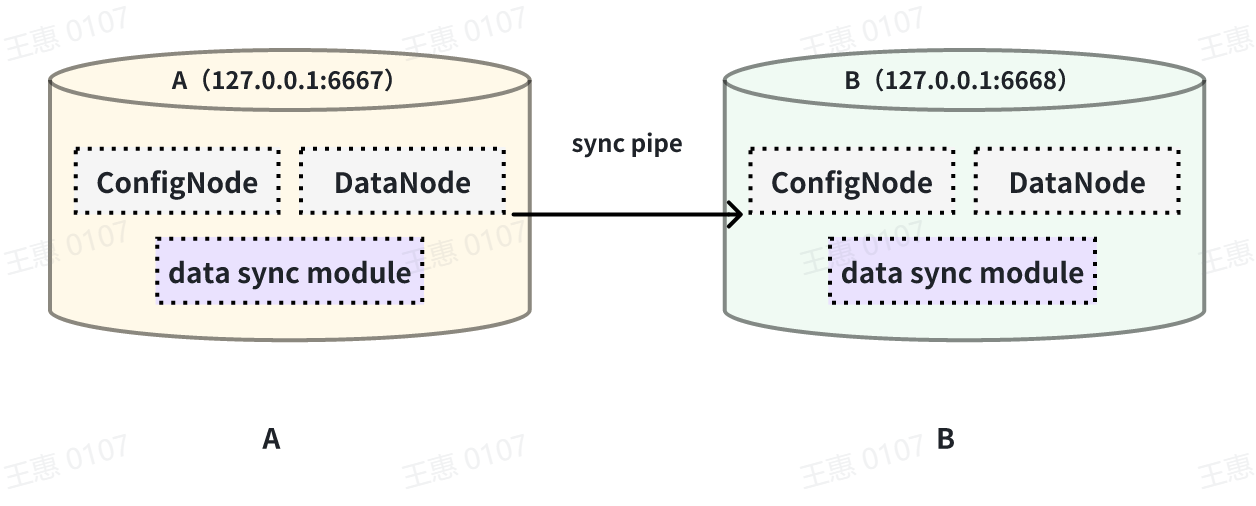
This example is used to demonstrate the synchronisation of all data from one
IoTDB to another IoTDB with the data link as shown below:
-
+
In this example, we can create a synchronisation task named A2B to synchronise
the full amount of data from IoTDB A to IoTDB B. Here we need to use the
iotdb-thrift-sink plugin (built-in plugin) which uses sink, and we need to
specify the address of the receiving end, in this example, we have specified
'sink.ip' and 'sink.port', and we can also specify 'sink.port'. This example
specifies 'sink.ip' and 'sink.port', and also 'sink.node-urls', as in the
following example statement:
@@ -180,7 +180,7 @@ with sink (
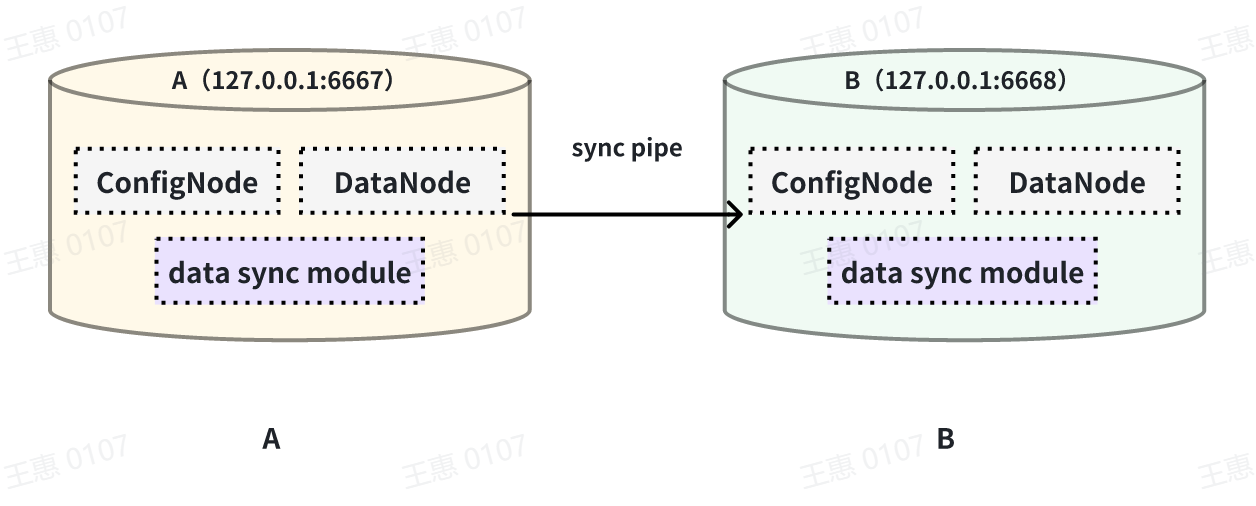
This example is used to demonstrate the synchronisation of data from a certain
historical time range (8:00pm 23 August 2023 to 8:00pm 23 October 2023) to
another IoTDB, the data link is shown below:
-
+
In this example we can create a synchronisation task called A2B. First of all,
we need to define the range of data to be transferred in source, since the data
to be transferred is historical data (historical data refers to the data that
existed before the creation of the synchronisation task), we need to configure
the source.realtime.enable parameter to false; at the same time, we need to
configure the start-time and end-time of the data and the mode mode of the
transfer. At the same tim [...]
@@ -205,7 +205,7 @@ with SINK (
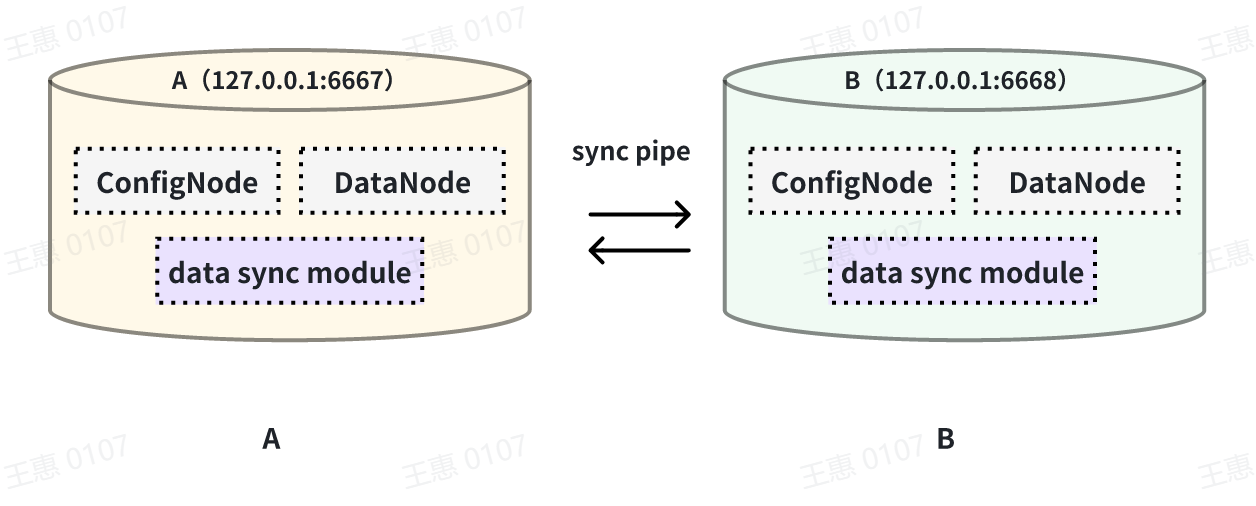
This example is used to demonstrate a scenario where two IoTDBs are
dual-active with each other, with the data link shown below:
-
+
In this example, in order to avoid an infinite loop of data, the parameter
`'source.forwarding-pipe-requests` needs to be set to ``false`` on both A and B
to indicate that the data transferred from the other pipe will not be
forwarded. Also set `'source.history.enable'` to `false` to indicate that
historical data is not transferred, i.e., data prior to the creation of the
task is not synchronised.
@@ -245,7 +245,7 @@ with sink (
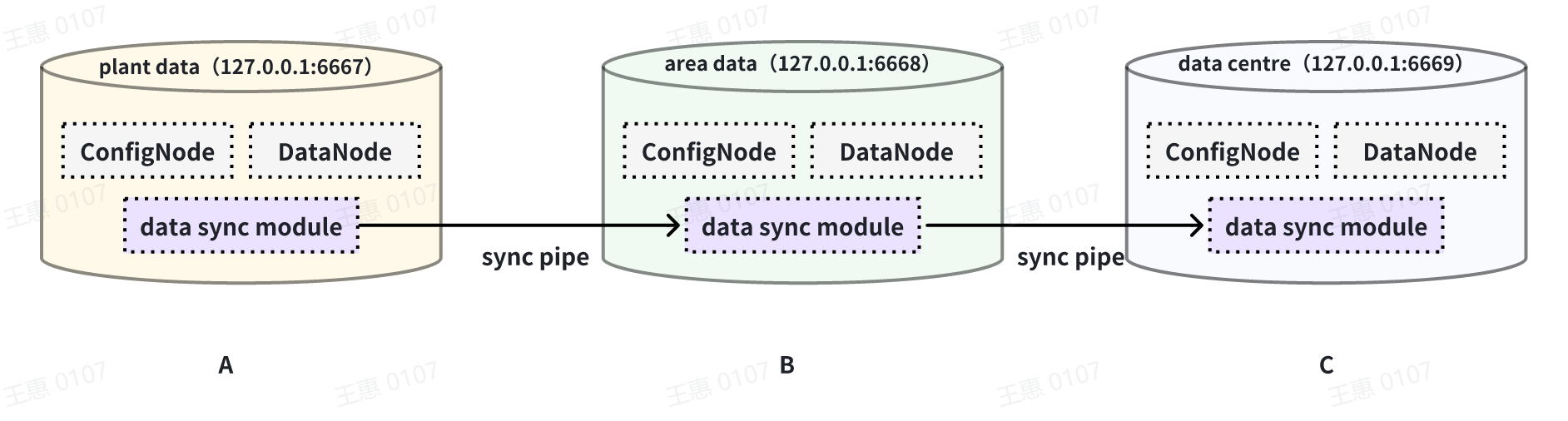
This example is used to demonstrate a cascading data transfer scenario between
multiple IoTDBs, where data is synchronised from cluster A to cluster B and
then to cluster C. The data link is shown in the figure below:
-
+
In this example, in order to synchronise the data from cluster A to C, the
pipe between BC needs to be configured with `source.forwarding-pipe-requests`
to `true`, the detailed statement is as follows:
@@ -277,7 +277,7 @@ with sink (
This example is used to demonstrate a scenario where data from one IoTDB is
synchronised to another IoTDB via a unidirectional gate, with the data link
shown below:
-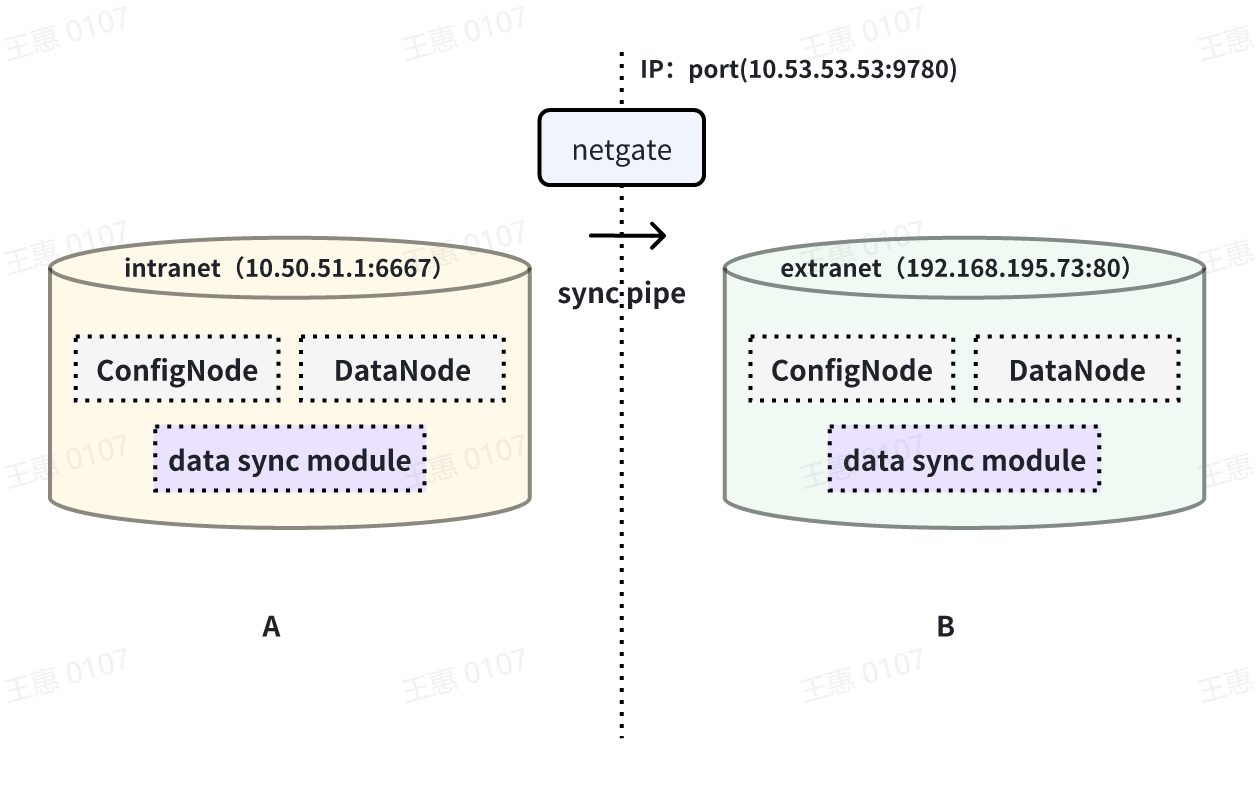
+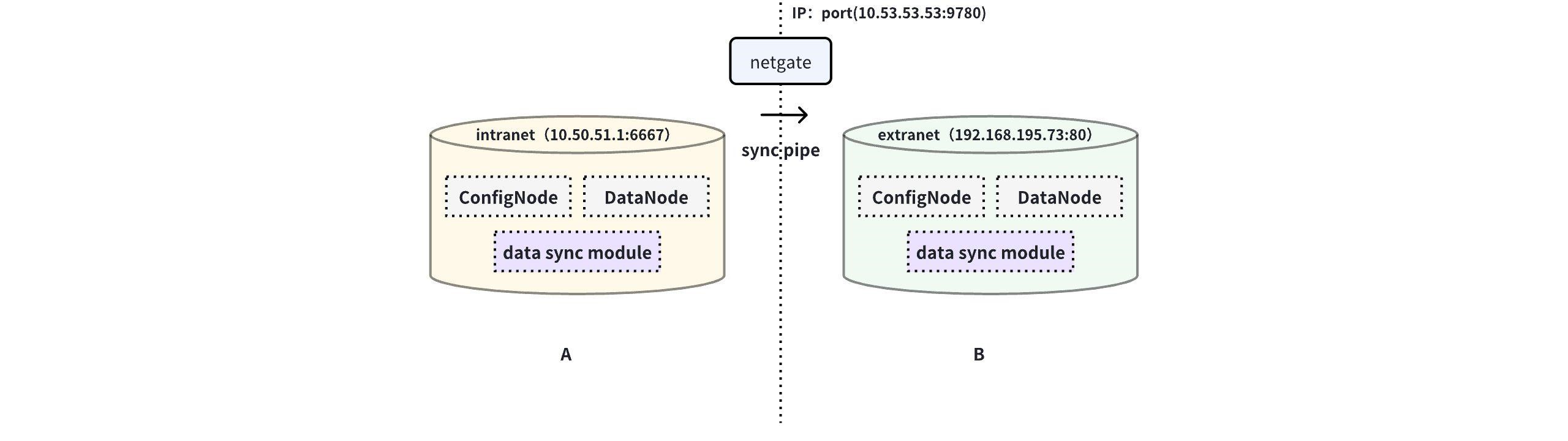
In this example, you need to use the iotdb-air-gap-sink plug-in in the sink
task (currently supports some models of network gates, please contact the staff
of Tianmou Technology to confirm the specific model), and after configuring the
network gate, execute the following statements on IoTDB A, where ip and port
fill in the information of the network gate, and the detailed statements are as
follows:
diff --git a/src/UserGuide/Master/User-Manual/Database-Programming.md
b/src/UserGuide/Master/User-Manual/Database-Programming.md
index 08032c0..74dcda8 100644
--- a/src/UserGuide/Master/User-Manual/Database-Programming.md
+++ b/src/UserGuide/Master/User-Manual/Database-Programming.md
@@ -1547,7 +1547,7 @@ SHOW FUNCTIONS
There are 3 types of user permissions related to UDF:
-* `CREATE_FUNCTION`: Only users with this permission are allowed to register
UDFs
+* `USE_UDF`: Only users with this permission are allowed to register UDFs
* `DROP_FUNCTION`: Only users with this permission are allowed to deregister
UDFs
* `READ_TIMESERIES`: Only users with this permission are allowed to use UDFs
for queries
diff --git a/src/UserGuide/Master/User-Manual/IoTDB-AINode_timecho.md
b/src/UserGuide/Master/User-Manual/IoTDB-AINode_timecho.md
index dd94526..a4847c9 100644
--- a/src/UserGuide/Master/User-Manual/IoTDB-AINode_timecho.md
+++ b/src/UserGuide/Master/User-Manual/IoTDB-AINode_timecho.md
@@ -25,7 +25,7 @@ AINode is the third type of endogenous node provided by IoTDB
after ConfigNode a
The system architecture is shown below:
::: center
-<img src="https://alioss.timecho.com/docs/img/h4.PNG"; style="zoom:50 percent"
/>
+<img src="https://alioss.timecho.com/upload/AInode.png"; style="zoom:50
percent" />
:::
The responsibilities of the three nodes are as follows:
diff --git a/src/UserGuide/Master/User-Manual/Streaming.md
b/src/UserGuide/Master/User-Manual/Streaming.md
index 553b470..21bb1cf 100644
--- a/src/UserGuide/Master/User-Manual/Streaming.md
+++ b/src/UserGuide/Master/User-Manual/Streaming.md
@@ -35,7 +35,8 @@ Pipe Extractor is used to extract data, Pipe Processor is
used to process data,
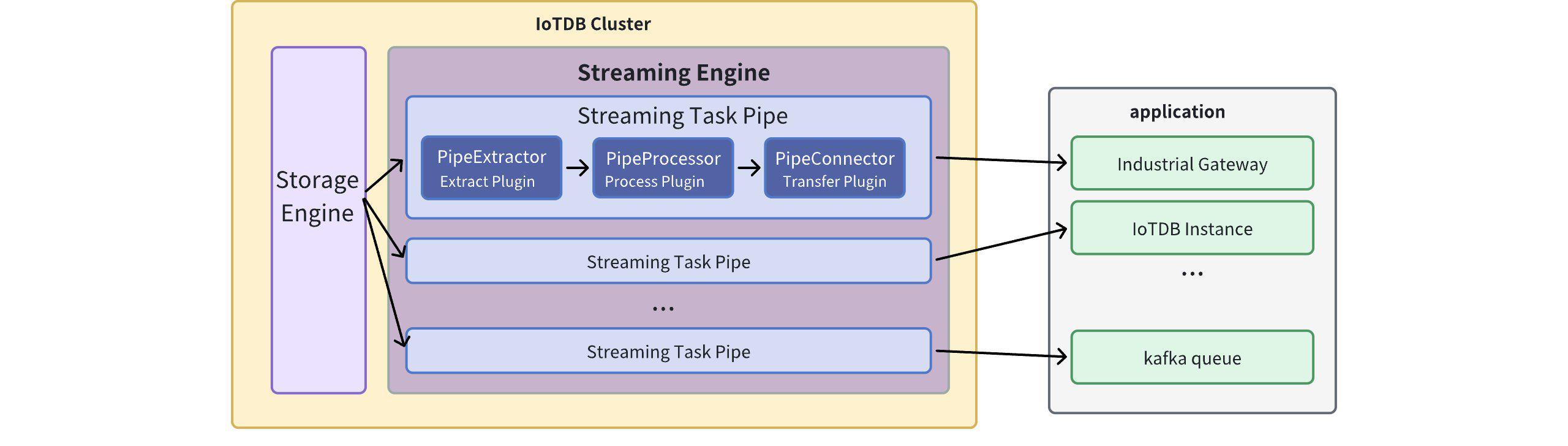
**The model for a Pipe task is as follows:**
-
+
+
A data stream processing task essentially describes the attributes of the Pipe
Extractor, Pipe Processor, and Pipe Connector plugins.
Users can configure the specific attributes of these three subtasks
declaratively using SQL statements. By combining different attributes, flexible
data ETL (Extract, Transform, Load) capabilities can be achieved.
diff --git a/src/UserGuide/Master/User-Manual/Streaming_timecho.md
b/src/UserGuide/Master/User-Manual/Streaming_timecho.md
index 709bfae..b4987e8 100644
--- a/src/UserGuide/Master/User-Manual/Streaming_timecho.md
+++ b/src/UserGuide/Master/User-Manual/Streaming_timecho.md
@@ -35,7 +35,7 @@ Pipe Extractor is used to extract data, Pipe Processor is
used to process data,
**The model of the Pipe task is as follows:**
-
+
Describing a data flow processing task essentially describes the properties of
Pipe Extractor, Pipe Processor and Pipe Connector plugins.
Users can declaratively configure the specific attributes of the three
subtasks through SQL statements, and achieve flexible data ETL capabilities by
combining different attributes.
diff --git a/src/UserGuide/V1.2.x/User-Manual/Data-Sync.md
b/src/UserGuide/V1.2.x/User-Manual/Data-Sync.md
index dda912d..32c62e5 100644
--- a/src/UserGuide/V1.2.x/User-Manual/Data-Sync.md
+++ b/src/UserGuide/V1.2.x/User-Manual/Data-Sync.md
@@ -32,7 +32,7 @@
**The model of a Pipe task is as follows:**
-
+
It describes a data sync task, which essentially describes the attributes of
the Pipe Extractor, Pipe Processor, and Pipe Connector plugins. Users can
declaratively configure the specific attributes of the three subtasks through
SQL statements. By combining different attributes, flexible data ETL (Extract,
Transform, Load) capabilities can be achieved.
diff --git a/src/UserGuide/V1.2.x/User-Manual/Data-Sync_timecho.md
b/src/UserGuide/V1.2.x/User-Manual/Data-Sync_timecho.md
index 933c198..d8cdf63 100644
--- a/src/UserGuide/V1.2.x/User-Manual/Data-Sync_timecho.md
+++ b/src/UserGuide/V1.2.x/User-Manual/Data-Sync_timecho.md
@@ -32,7 +32,7 @@
**The model of a Pipe task is as follows:**
-
+
It describes a data sync task, which essentially describes the attributes of
the Pipe Extractor, Pipe Processor, and Pipe Connector plugins. Users can
declaratively configure the specific attributes of the three subtasks through
SQL statements. By combining different attributes, flexible data ETL (Extract,
Transform, Load) capabilities can be achieved.
diff --git a/src/UserGuide/V1.3.x/User-Manual/Data-Sync_timecho.md
b/src/UserGuide/V1.3.x/User-Manual/Data-Sync_timecho.md
index 5227555..1efe0e6 100644
--- a/src/UserGuide/V1.3.x/User-Manual/Data-Sync_timecho.md
+++ b/src/UserGuide/V1.3.x/User-Manual/Data-Sync_timecho.md
@@ -162,7 +162,7 @@ IoTDB> show pipeplugins
This example is used to demonstrate the synchronisation of all data from one
IoTDB to another IoTDB with the data link as shown below:
-
+
In this example, we can create a synchronisation task named A2B to synchronise
the full amount of data from IoTDB A to IoTDB B. Here we need to use the
iotdb-thrift-sink plugin (built-in plugin) which uses sink, and we need to
specify the address of the receiving end, in this example, we have specified
'sink.ip' and 'sink.port', and we can also specify 'sink.port'. This example
specifies 'sink.ip' and 'sink.port', and also 'sink.node-urls', as in the
following example statement:
@@ -180,7 +180,7 @@ with sink (
This example is used to demonstrate the synchronisation of data from a certain
historical time range (8:00pm 23 August 2023 to 8:00pm 23 October 2023) to
another IoTDB, the data link is shown below:
-
+
In this example we can create a synchronisation task called A2B. First of all,
we need to define the range of data to be transferred in source, since the data
to be transferred is historical data (historical data refers to the data that
existed before the creation of the synchronisation task), we need to configure
the source.realtime.enable parameter to false; at the same time, we need to
configure the start-time and end-time of the data and the mode mode of the
transfer. At the same tim [...]
@@ -205,7 +205,7 @@ with SINK (
This example is used to demonstrate a scenario where two IoTDBs are
dual-active with each other, with the data link shown below:
-
+
In this example, in order to avoid an infinite loop of data, the parameter
`'source.forwarding-pipe-requests` needs to be set to ``false`` on both A and B
to indicate that the data transferred from the other pipe will not be
forwarded. Also set `'source.history.enable'` to `false` to indicate that
historical data is not transferred, i.e., data prior to the creation of the
task is not synchronised.
@@ -245,7 +245,7 @@ with sink (
This example is used to demonstrate a cascading data transfer scenario between
multiple IoTDBs, where data is synchronised from cluster A to cluster B and
then to cluster C. The data link is shown in the figure below:
-
+
In this example, in order to synchronise the data from cluster A to C, the
pipe between BC needs to be configured with `source.forwarding-pipe-requests`
to `true`, the detailed statement is as follows:
@@ -277,7 +277,7 @@ with sink (
This example is used to demonstrate a scenario where data from one IoTDB is
synchronised to another IoTDB via a unidirectional gate, with the data link
shown below:
-
+
In this example, you need to use the iotdb-air-gap-sink plug-in in the sink
task (currently supports some models of network gates, please contact the staff
of Tianmou Technology to confirm the specific model), and after configuring the
network gate, execute the following statements on IoTDB A, where ip and port
fill in the information of the network gate, and the detailed statements are as
follows:
diff --git a/src/UserGuide/V1.3.x/User-Manual/Database-Programming.md
b/src/UserGuide/V1.3.x/User-Manual/Database-Programming.md
index 08032c0..74dcda8 100644
--- a/src/UserGuide/V1.3.x/User-Manual/Database-Programming.md
+++ b/src/UserGuide/V1.3.x/User-Manual/Database-Programming.md
@@ -1547,7 +1547,7 @@ SHOW FUNCTIONS
There are 3 types of user permissions related to UDF:
-* `CREATE_FUNCTION`: Only users with this permission are allowed to register
UDFs
+* `USE_UDF`: Only users with this permission are allowed to register UDFs
* `DROP_FUNCTION`: Only users with this permission are allowed to deregister
UDFs
* `READ_TIMESERIES`: Only users with this permission are allowed to use UDFs
for queries
diff --git a/src/UserGuide/V1.3.x/User-Manual/IoTDB-AINode_timecho.md
b/src/UserGuide/V1.3.x/User-Manual/IoTDB-AINode_timecho.md
index dd94526..a4847c9 100644
--- a/src/UserGuide/V1.3.x/User-Manual/IoTDB-AINode_timecho.md
+++ b/src/UserGuide/V1.3.x/User-Manual/IoTDB-AINode_timecho.md
@@ -25,7 +25,7 @@ AINode is the third type of endogenous node provided by IoTDB
after ConfigNode a
The system architecture is shown below:
::: center
-<img src="https://alioss.timecho.com/docs/img/h4.PNG"; style="zoom:50 percent"
/>
+<img src="https://alioss.timecho.com/upload/AInode.png"; style="zoom:50
percent" />
:::
The responsibilities of the three nodes are as follows:
diff --git a/src/UserGuide/V1.3.x/User-Manual/Streaming.md
b/src/UserGuide/V1.3.x/User-Manual/Streaming.md
index 553b470..21bb1cf 100644
--- a/src/UserGuide/V1.3.x/User-Manual/Streaming.md
+++ b/src/UserGuide/V1.3.x/User-Manual/Streaming.md
@@ -35,7 +35,8 @@ Pipe Extractor is used to extract data, Pipe Processor is
used to process data,
**The model for a Pipe task is as follows:**
-
+
+
A data stream processing task essentially describes the attributes of the Pipe
Extractor, Pipe Processor, and Pipe Connector plugins.
Users can configure the specific attributes of these three subtasks
declaratively using SQL statements. By combining different attributes, flexible
data ETL (Extract, Transform, Load) capabilities can be achieved.
diff --git a/src/UserGuide/V1.3.x/User-Manual/Streaming_timecho.md
b/src/UserGuide/V1.3.x/User-Manual/Streaming_timecho.md
index 709bfae..b4987e8 100644
--- a/src/UserGuide/V1.3.x/User-Manual/Streaming_timecho.md
+++ b/src/UserGuide/V1.3.x/User-Manual/Streaming_timecho.md
@@ -35,7 +35,7 @@ Pipe Extractor is used to extract data, Pipe Processor is
used to process data,
**The model of the Pipe task is as follows:**
-
+
Describing a data flow processing task essentially describes the properties of
Pipe Extractor, Pipe Processor and Pipe Connector plugins.
Users can declaratively configure the specific attributes of the three
subtasks through SQL statements, and achieve flexible data ETL capabilities by
combining different attributes.
diff --git a/src/zh/UserGuide/Master/User-Manual/Database-Programming.md
b/src/zh/UserGuide/Master/User-Manual/Database-Programming.md
index 0032580..b7e2b8a 100644
--- a/src/zh/UserGuide/Master/User-Manual/Database-Programming.md
+++ b/src/zh/UserGuide/Master/User-Manual/Database-Programming.md
@@ -1499,7 +1499,7 @@ SHOW FUNCTIONS
用户在使用 UDF 时会涉及到 3 种权限:
-* `CREATE_FUNCTION`:具备该权限的用户才被允许执行 UDF 注册操作
+* `USE_UDF `:具备该权限的用户才被允许执行 UDF 注册操作
* `DROP_FUNCTION`:具备该权限的用户才被允许执行 UDF 卸载操作
* `READ_TIMESERIES`:具备该权限的用户才被允许使用 UDF 进行查询
diff --git a/src/zh/UserGuide/V1.3.x/User-Manual/Database-Programming.md
b/src/zh/UserGuide/V1.3.x/User-Manual/Database-Programming.md
index 0032580..3ac70b4 100644
--- a/src/zh/UserGuide/V1.3.x/User-Manual/Database-Programming.md
+++ b/src/zh/UserGuide/V1.3.x/User-Manual/Database-Programming.md
@@ -1499,7 +1499,7 @@ SHOW FUNCTIONS
用户在使用 UDF 时会涉及到 3 种权限:
-* `CREATE_FUNCTION`:具备该权限的用户才被允许执行 UDF 注册操作
+* `USE_UDF`:具备该权限的用户才被允许执行 UDF 注册操作
* `DROP_FUNCTION`:具备该权限的用户才被允许执行 UDF 卸载操作
* `READ_TIMESERIES`:具备该权限的用户才被允许使用 UDF 进行查询













