This is an automated email from the ASF dual-hosted git repository.

qiaojialin pushed a commit to branch main
in repository https://gitbox.apache.org/repos/asf/iotdb-docs.git
The following commit(s) were added to refs/heads/main by this push:
new 839b15e Upload the pipe supplementary plug-in package to the cluster
(#161)
839b15e is described below
commit 839b15e2573dce901d5a98bcb184857b2e0f0d9e
Author: Tansgr <[email protected]>
AuthorDate: Thu Jan 25 15:30:52 2024 +0800
Upload the pipe supplementary plug-in package to the cluster (#161)
---
.../Master/User-Manual/Streaming_timecho.md | 31 +-
.../V1.2.x/User-Manual/Streaming_timecho.md | 419 +++++++++++----------
.../latest/User-Manual/Streaming_timecho.md | 31 +-
.../Master/User-Manual/Streaming_timecho.md | 32 +-
.../V1.2.x/User-Manual/Streaming_timecho.md | 32 +-
.../latest/User-Manual/Streaming_timecho.md | 32 +-
6 files changed, 344 insertions(+), 233 deletions(-)
diff --git a/src/UserGuide/Master/User-Manual/Streaming_timecho.md
b/src/UserGuide/Master/User-Manual/Streaming_timecho.md
index b4987e8..6c4a633 100644
--- a/src/UserGuide/Master/User-Manual/Streaming_timecho.md
+++ b/src/UserGuide/Master/User-Manual/Streaming_timecho.md
@@ -7,9 +7,9 @@
to you under the Apache License, Version 2.0 (the
"License"); you may not use this file except in compliance
with the License. You may obtain a copy of the License at
-
+
http://www.apache.org/licenses/LICENSE-2.0
-
+
Unless required by applicable law or agreed to in writing,
software distributed under the License is distributed on an
"AS IS" BASIS, WITHOUT WARRANTIES OR CONDITIONS OF ANY
@@ -455,15 +455,32 @@ AS <full class name>
USING <URI of JAR package>
```
-For example, the user has implemented a data processing plugin with the full
class name edu.tsinghua.iotdb.pipe.ExampleProcessor.
-The packaged jar resource package is stored at
https://example.com:8080/iotdb/pipe-plugin.jar. The user wants to use this
plugin in the stream processing engine.
-Mark the plugin as example. Then, the creation statement of this data
processing plugin is as shown in the figure.
+Example: If you implement a data processing plugin named
edu.tsinghua.iotdb.pipe.ExampleProcessor, and the packaged jar package is
pipe-plugin.jar, you want to use this plugin in the stream processing engine,
and mark the plugin as example. There are two ways to use the plug-in package,
one is to upload to the URI server, and the other is to upload to the local
directory of the cluster.
+
+Method 1: Upload to the URI server
+
+Preparation: To register in this way, you need to upload the JAR package to
the URI server in advance and ensure that the IoTDB instance that executes the
registration statement can access the URI server. For example
https://example.com:8080/iotdb/pipe-plugin.jar .
+
+SQL:
+
```sql
-CREATE PIPEPLUGIN example
-AS 'edu.tsinghua.iotdb.pipe.ExampleProcessor'
+SQL CREATE PIPEPLUGIN example
+AS 'edu.tsinghua.iotdb.pipe.ExampleProcessor'
USING URI '<https://example.com:8080/iotdb/pipe-plugin.jar>'
```
+Method 2: Upload the data to the local directory of the cluster
+
+Preparation: To register in this way, you need to place the JAR package in any
path on the machine where the DataNode node is located, and we recommend that
you place the JAR package in the /ext/pipe directory of the IoTDB installation
path (the installation package is already in the installation package, so you
do not need to create a new one). For example:
iotdb-1.x.x-bin/ext/pipe/pipe-plugin.jar. **(Note: If you are using a cluster,
you will need to place the JAR package under the sam [...]
+
+SQL:
+
+```sql
+SQL CREATE PIPEPLUGIN example
+AS 'edu.tsinghua.iotdb.pipe.ExampleProcessor'
+USING URI '<file:/IoTDB installation
path/iotdb-1.x.x-bin/ext/pipe/pipe-plugin.jar>'
+```
+
### Delete plugin statement
When the user no longer wants to use a plugin and needs to uninstall the
plugin from the system, he can use the delete plugin statement as shown in the
figure.
diff --git a/src/UserGuide/V1.2.x/User-Manual/Streaming_timecho.md
b/src/UserGuide/V1.2.x/User-Manual/Streaming_timecho.md
index 06748a4..6c4a633 100644
--- a/src/UserGuide/V1.2.x/User-Manual/Streaming_timecho.md
+++ b/src/UserGuide/V1.2.x/User-Manual/Streaming_timecho.md
@@ -7,9 +7,9 @@
to you under the Apache License, Version 2.0 (the
"License"); you may not use this file except in compliance
with the License. You may obtain a copy of the License at
-
+
http://www.apache.org/licenses/LICENSE-2.0
-
+
Unless required by applicable law or agreed to in writing,
software distributed under the License is distributed on an
"AS IS" BASIS, WITHOUT WARRANTIES OR CONDITIONS OF ANY
@@ -19,7 +19,7 @@
-->
-# IoTDB Stream Processing Framework
+# IoTDB stream processing framework
The IoTDB stream processing framework allows users to implement customized
stream processing logic, which can monitor and capture storage engine changes,
transform changed data, and push transformed data outward.
@@ -30,24 +30,23 @@ We call <font color=RED>a data flow processing task a
Pipe</font>. A stream proc
- Send (Connect)
The stream processing framework allows users to customize the processing logic
of three subtasks using Java language and process data in a UDF-like manner.
-In a Pipe, the three subtasks mentioned above are executed and implemented by
three types of plugins. Data flows through these three plugins sequentially for
processing:
+In a Pipe, the above three subtasks are executed by three plugins
respectively, and the data will be processed by these three plugins in turn:
Pipe Extractor is used to extract data, Pipe Processor is used to process
data, Pipe Connector is used to send data, and the final data will be sent to
an external system.
-**The model for a Pipe task is as follows:**
+**The model of the Pipe task is as follows:**
-
+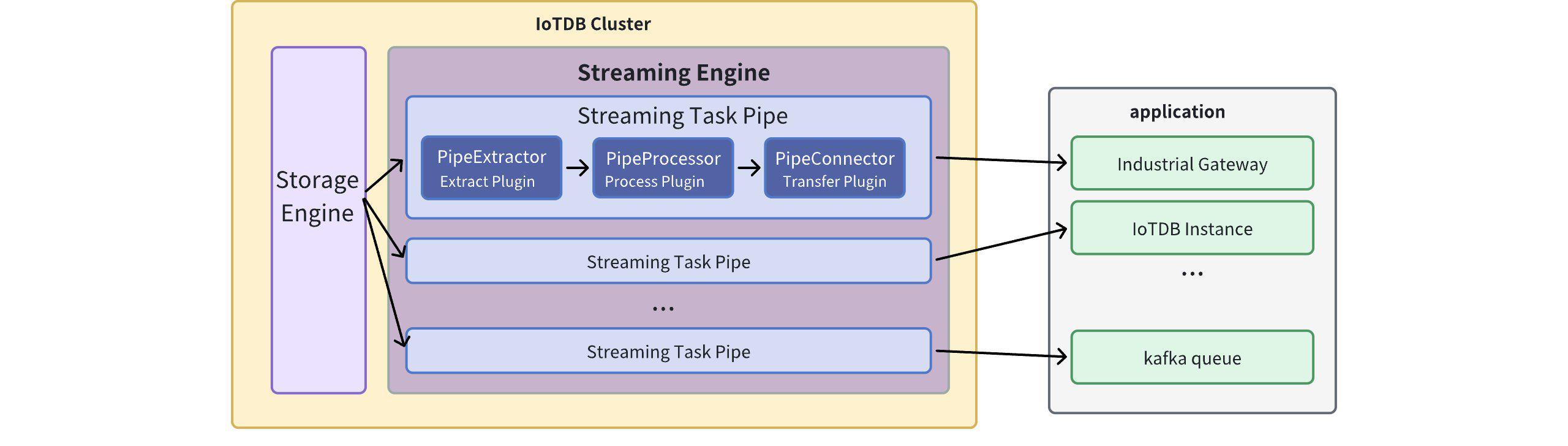
-A data stream processing task essentially describes the attributes of the Pipe
Extractor, Pipe Processor, and Pipe Connector plugins.
+Describing a data flow processing task essentially describes the properties of
Pipe Extractor, Pipe Processor and Pipe Connector plugins.
+Users can declaratively configure the specific attributes of the three
subtasks through SQL statements, and achieve flexible data ETL capabilities by
combining different attributes.
-Users can configure the specific attributes of these three subtasks
declaratively using SQL statements. By combining different attributes, flexible
data ETL (Extract, Transform, Load) capabilities can be achieved.
+Using the stream processing framework, a complete data link can be built to
meet the needs of end-side-cloud synchronization, off-site disaster recovery,
and read-write load sub-library*.
-Using the stream processing framework, it is possible to build a complete data
pipeline to fulfill various requirements such as *edge-to-cloud
synchronization, remote disaster recovery, and read/write load balancing across
multiple databases*.
-
-## Custom Stream Processing Plugin Development
+## Custom stream processing plugin development
### Programming development dependencies
-It is recommended to use Maven to build the project. Add the following
dependencies in the `pom.xml` file. Please make sure to choose dependencies
with the same version as the IoTDB server version.
+It is recommended to use maven to build the project and add the following
dependencies in `pom.xml`. Please be careful to select the same dependency
version as the IoTDB server version.
```xml
<dependency>
@@ -58,23 +57,23 @@ It is recommended to use Maven to build the project. Add
the following dependenc
</dependency>
```
-### Event-Driven Programming Model
+### Event-driven programming model
-The design of user programming interfaces for stream processing plugins
follows the principles of the event-driven programming model. In this model,
events serve as the abstraction of data in the user programming interface. The
programming interface is decoupled from the specific execution method, allowing
the focus to be on describing how the system expects events (data) to be
processed upon arrival.
+The user programming interface design of the stream processing plugin refers
to the general design concept of the event-driven programming model. Events are
data abstractions in the user programming interface, and the programming
interface is decoupled from the specific execution method. It only needs to
focus on describing the processing method expected by the system after the
event (data) reaches the system.
-In the user programming interface of stream processing plugins, events
abstract the write operations of database data. Events are captured by the
local stream processing engine and passed sequentially through the three stages
of stream processing, namely Pipe Extractor, Pipe Processor, and Pipe Connector
plugins. User logic is triggered and executed within these three plugins.
+In the user programming interface of the stream processing plugin, events are
an abstraction of database data writing operations. The event is captured by
the stand-alone stream processing engine, and is passed to the PipeExtractor
plugin, PipeProcessor plugin, and PipeConnector plugin in sequence according to
the three-stage stream processing process, and triggers the execution of user
logic in the three plugins in turn.
-To accommodate both low-latency stream processing in low-load scenarios and
high-throughput stream processing in high-load scenarios at the edge, the
stream processing engine dynamically chooses the processing objects from
operation logs and data files. Therefore, the user programming interface for
stream processing requires the user to provide the handling logic for two types
of events: TabletInsertionEvent for operation log write events and
TsFileInsertionEvent for data file write events.
+In order to take into account the low latency of stream processing in low load
scenarios on the end side and the high throughput of stream processing in high
load scenarios on the end side, the stream processing engine will dynamically
select processing objects in the operation logs and data files. Therefore, user
programming of stream processing The interface requires users to provide
processing logic for the following two types of events: operation log writing
event TabletInsertionEven [...]
-#### **TabletInsertionEvent**
+#### **Operation log writing event (TabletInsertionEvent)**
-The TabletInsertionEvent is a high-level data abstraction for user write
requests, which provides the ability to manipulate the underlying data of the
write request by providing a unified operation interface.
+The operation log write event (TabletInsertionEvent) is a high-level data
abstraction for user write requests. It provides users with the ability to
manipulate the underlying data of write requests by providing a unified
operation interface.
-For different database deployments, the underlying storage structure
corresponding to the operation log write event is different. For stand-alone
deployment scenarios, the operation log write event is an encapsulation of
write-ahead log (WAL) entries; for distributed deployment scenarios, the
operation log write event is an encapsulation of individual node consensus
protocol operation log entries.
+For different database deployment methods, the underlying storage structures
corresponding to operation log writing events are different. For stand-alone
deployment scenarios, the operation log writing event is an encapsulation of
write-ahead log (WAL) entries; for a distributed deployment scenario, the
operation log writing event is an encapsulation of a single node consensus
protocol operation log entry.
-For write operations generated by different write request interfaces of the
database, the data structure of the request structure corresponding to the
operation log write event is also different.IoTDB provides many write
interfaces such as InsertRecord, InsertRecords, InsertTablet, InsertTablets,
and so on, and each kind of write request uses a completely different
serialisation method to generate a write request. completely different
serialisation methods and generate different binary entries.
+For write operations generated by different write request interfaces in the
database, the data structure of the request structure corresponding to the
operation log write event is also different. IoTDB provides numerous writing
interfaces such as InsertRecord, InsertRecords, InsertTablet, InsertTablets,
etc. Each writing request uses a completely different serialization method, and
the generated binary entries are also different.
-The existence of operation log write events provides users with a unified view
of data operations, which shields the implementation differences of the
underlying data structures, greatly reduces the programming threshold for
users, and improves the ease of use of the functionality.
+The existence of operation log writing events provides users with a unified
view of data operations, which shields the implementation differences of the
underlying data structure, greatly reduces the user's programming threshold,
and improves the ease of use of the function.
```java
/** TabletInsertionEvent is used to define the event of data insertion. */
@@ -98,19 +97,19 @@ public interface TabletInsertionEvent extends Event {
}
```
-#### **TsFileInsertionEvent**
+#### **Data file writing event (TsFileInsertionEvent)**
-The TsFileInsertionEvent represents a high-level abstraction of the database's
disk flush operation and is a collection of multiple TabletInsertionEvents.
+The data file writing event (TsFileInsertionEvent) is a high-level abstraction
of the database file writing operation. It is a data collection of several
operation log writing events (TabletInsertionEvent).
-IoTDB's storage engine is based on the LSM (Log-Structured Merge) structure.
When data is written, the write operations are first flushed to log-structured
files, while the written data is also stored in memory. When the memory reaches
its capacity limit, a flush operation is triggered, converting the data in
memory into a database file while deleting the previously written log entries.
During the conversion from memory data to database file data, two compression
processes, encoding comp [...]
+The storage engine of IoTDB is LSM structured. When data is written, the
writing operation will first be placed into a log-structured file, and the
written data will be stored in the memory at the same time. When the memory
reaches the control upper limit, the disk flushing behavior will be triggered,
that is, the data in the memory will be converted into a database file, and the
previously prewritten operation log will be deleted. When the data in the
memory is converted into the data i [...]
-In extreme network conditions, directly transferring data files is more
cost-effective than transmitting individual write operations. It consumes lower
network bandwidth and achieves faster transmission speed. However, there is no
such thing as a free lunch. Performing calculations on data in the disk file
incurs additional costs for file I/O compared to performing calculations
directly on data in memory. Nevertheless, the coexistence of disk data files
and memory write operations permit [...]
+In extreme network conditions, directly transmitting data files is more
economical than transmitting data writing operations. It will occupy lower
network bandwidth and achieve faster transmission speeds. Of course, there is
no free lunch. Computing and processing data in files requires additional file
I/O costs compared to directly computing and processing data in memory.
However, it is precisely the existence of two structures, disk data files and
memory write operations, with their ow [...]
-In summary, the data file write event appears in the event stream of stream
processing plugins in the following two scenarios:
+To sum up, the data file writing event appears in the event stream of the
stream processing plugin, and there are two situations:
-1. Historical data extraction: Before a stream processing task starts, all
persisted write data exists in the form of TsFiles. When collecting historical
data at the beginning of a stream processing task, the historical data is
abstracted as TsFileInsertionEvent.
+(1) Historical data extraction: Before a stream processing task starts, all
written data that has been placed on the disk will exist in the form of TsFile.
After a stream processing task starts, when collecting historical data, the
historical data will be abstracted using TsFileInsertionEvent;
-2. Real-time data extraction: During the execution of a stream processing
task, if the speed of processing the log entries representing real-time
operations is slower than the rate of write requests, the unprocessed log
entries will be persisted to disk in the form of TsFiles. When these data are
extracted by the stream processing engine, they are abstracted as
TsFileInsertionEvent.
+(2) Real-time data extraction: When a stream processing task is in progress,
when the real-time processing speed of operation log write events in the data
stream is slower than the write request speed, after a certain progress, the
operation log write events that cannot be processed in the future will be
persisted. to disk and exists in the form of TsFile. After this data is
extracted by the stream processing engine, TsFileInsertionEvent will be used as
an abstraction.
```java
/**
@@ -128,12 +127,15 @@ public interface TsFileInsertionEvent extends Event {
}
```
-### Custom Stream Processing Plugin Programming Interface Definition
+### Custom stream processing plugin programming interface definition
+
+Based on the custom stream processing plugin programming interface, users can
easily write data extraction plugins, data processing plugins and data sending
plugins, so that the stream processing function can be flexibly adapted to
various industrial scenarios.
-Based on the custom stream processing plugin programming interface, users can
easily write data extraction plugins, data processing plugins, and data sending
plugins, allowing the stream processing functionality to adapt flexibly to
various industrial scenarios.
-#### Data Extraction Plugin Interface
+#### Data extraction plugin interface
+
+Data extraction is the first stage of the three stages of stream processing
data from data extraction to data sending. The data extraction plugin
(PipeExtractor) is the bridge between the stream processing engine and the
storage engine. It monitors the behavior of the storage engine,
+Capture various data write events.
-Data extraction is the first stage of the three-stage process of stream
processing, which includes data extraction, data processing, and data sending.
The data extraction plugin (PipeExtractor) serves as a bridge between the
stream processing engine and the storage engine. It captures various data write
events by listening to the behavior of the storage engine.
```java
/**
* PipeExtractor
@@ -210,9 +212,10 @@ public interface PipeExtractor extends PipePlugin {
}
```
-#### Data Processing Plugin Interface
+#### Data processing plugin interface
-Data processing is the second stage of the three-stage process of stream
processing, which includes data extraction, data processing, and data sending.
The data processing plugin (PipeProcessor) is primarily used for filtering and
transforming the various events captured by the data extraction plugin
(PipeExtractor).
+Data processing is the second stage of the three stages of stream processing
data from data extraction to data sending. The data processing plugin
(PipeProcessor) is mainly used to filter and transform the data captured by the
data extraction plugin (PipeExtractor).
+various events.
```java
/**
@@ -310,9 +313,10 @@ public interface PipeProcessor extends PipePlugin {
}
```
-#### Data Sending Plugin Interface
+#### Data sending plugin interface
-Data sending is the third stage of the three-stage process of stream
processing, which includes data extraction, data processing, and data sending.
The data sending plugin (PipeConnector) is responsible for sending the various
events processed by the data processing plugin (PipeProcessor). It serves as
the network implementation layer of the stream processing framework and should
support multiple real-time communication protocols and connectors in its
interface.
+Data sending is the third stage of the three stages of stream processing data
from data extraction to data sending. The data sending plugin (PipeConnector)
is mainly used to send data processed by the data processing plugin
(PipeProcessor).
+Various events, it serves as the network implementation layer of the stream
processing framework, and the interface should allow access to multiple
real-time communication protocols and multiple connectors.
```java
/**
@@ -433,212 +437,232 @@ public interface PipeConnector extends PipePlugin {
}
```
-## Custom Stream Processing Plugin Management
+## Custom stream processing plugin management
-To ensure the flexibility and usability of user-defined plugins in production
environments, the system needs to provide the capability to dynamically manage
plugins. This section introduces the management statements for stream
processing plugins, which enable the dynamic and unified management of plugins.
+In order to ensure the flexibility and ease of use of user-defined plugins in
actual production, the system also needs to provide the ability to dynamically
and uniformly manage plugins.
+The stream processing plugin management statements introduced in this chapter
provide an entry point for dynamic unified management of plugins.
-### Load Plugin Statement
+### Load plugin statement
-In IoTDB, to dynamically load a user-defined plugin into the system, you first
need to implement a specific plugin class based on PipeExtractor,
PipeProcessor, or PipeConnector. Then, you need to compile and package the
plugin class into an executable jar file. Finally, you can use the loading
plugin management statement to load the plugin into IoTDB.
+In IoTDB, if you want to dynamically load a user-defined plugin in the system,
you first need to implement a specific plugin class based on PipeExtractor,
PipeProcessor or PipeConnector.
+Then the plugin class needs to be compiled and packaged into a jar executable
file, and finally the plugin is loaded into IoTDB using the management
statement for loading the plugin.
-The syntax of the loading plugin management statement is as follows:
+The syntax of the management statement for loading the plugin is shown in the
figure.
```sql
CREATE PIPEPLUGIN <alias>
-AS <Full class name>
-USING <URL of jar file>
+AS <full class name>
+USING <URI of JAR package>
```
-For example, if a user implements a data processing plugin with the fully
qualified class name "edu.tsinghua.iotdb.pipe.ExampleProcessor" and packages it
into a jar file, which is stored at
"https://example.com:8080/iotdb/pipe-plugin.jar";, and the user wants to use
this plugin in the stream processing engine, marking the plugin as "example".
The creation statement for this data processing plugin is as follows:
+Example: If you implement a data processing plugin named
edu.tsinghua.iotdb.pipe.ExampleProcessor, and the packaged jar package is
pipe-plugin.jar, you want to use this plugin in the stream processing engine,
and mark the plugin as example. There are two ways to use the plug-in package,
one is to upload to the URI server, and the other is to upload to the local
directory of the cluster.
+
+Method 1: Upload to the URI server
+
+Preparation: To register in this way, you need to upload the JAR package to
the URI server in advance and ensure that the IoTDB instance that executes the
registration statement can access the URI server. For example
https://example.com:8080/iotdb/pipe-plugin.jar .
+
+SQL:
```sql
-CREATE PIPEPLUGIN example
-AS 'edu.tsinghua.iotdb.pipe.ExampleProcessor'
+SQL CREATE PIPEPLUGIN example
+AS 'edu.tsinghua.iotdb.pipe.ExampleProcessor'
USING URI '<https://example.com:8080/iotdb/pipe-plugin.jar>'
```
-### Delete Plugin Statement
+Method 2: Upload the data to the local directory of the cluster
+
+Preparation: To register in this way, you need to place the JAR package in any
path on the machine where the DataNode node is located, and we recommend that
you place the JAR package in the /ext/pipe directory of the IoTDB installation
path (the installation package is already in the installation package, so you
do not need to create a new one). For example:
iotdb-1.x.x-bin/ext/pipe/pipe-plugin.jar. **(Note: If you are using a cluster,
you will need to place the JAR package under the sam [...]
+
+SQL:
+
+```sql
+SQL CREATE PIPEPLUGIN example
+AS 'edu.tsinghua.iotdb.pipe.ExampleProcessor'
+USING URI '<file:/IoTDB installation
path/iotdb-1.x.x-bin/ext/pipe/pipe-plugin.jar>'
+```
+
+### Delete plugin statement
+
+When the user no longer wants to use a plugin and needs to uninstall the
plugin from the system, he can use the delete plugin statement as shown in the
figure.
-When user no longer wants to use a plugin and needs to uninstall the plug-in
from the system, you can use the Remove plugin statement as shown below.
```sql
DROP PIPEPLUGIN <alias>
```
-### Show Plugin Statement
+### View plugin statements
-User can also view the plugin in the system on need. The statement to view
plugin is as follows.
+Users can also view plugins in the system on demand. View the statement of the
plugin as shown in the figure.
```sql
SHOW PIPEPLUGINS
```
-## System Pre-installed Stream Processing Plugin
+## System preset stream processing plugin
-### Pre-built extractor Plugin
+### Preset extractor plugin
-#### iotdb-extractor
+####iotdb-extractor
-Function: Extract historical or realtime data inside IoTDB into pipe.
+Function: Extract historical or real-time data inside IoTDB into pipe.
-| key | value
| value range | required or optional with
default |
-| ---------------------------------- |
------------------------------------------------ |
-------------------------------------- | --------------------------------- |
-| extractor | iotdb-extractor
| String: iotdb-extractor | required
|
-| extractor.pattern | path prefix for filtering time series
| String: any time series prefix | optional:
root |
-| extractor.history.enable | whether to sync historical data
| Boolean: true, false | optional:
true |
-| extractor.history.start-time | start of synchronizing historical data
event time,Include start-time | Long: [Long.MIN_VALUE, Long.MAX_VALUE] |
optional: Long.MIN_VALUE |
-| extractor.history.end-time | end of synchronizing historical data
event time,Include end-time | Long: [Long.MIN_VALUE, Long.MAX_VALUE] |
optional: Long.MAX_VALUE |
-| extractor.realtime.enable | Whether to sync realtime data
| Boolean: true, false | optional: true
|
-| extractor.realtime.mode | Extraction pattern for realtime data
| String: hybrid, log, file | optional:
hybrid |
-| extractor.forwarding-pipe-requests | Whether to extract data written by
other pipes (usually Data sync) | Boolean: true, false |
optional: true |
+| key | value
| value range | required or not |default value|
+| ---------------------------------- |
------------------------------------------------ |
-------------------------------------- | -------- |------|
+| source | iotdb-source
| String: iotdb-source | required | - |
+| source.pattern | Path prefix for filtering time series
| String: any time series prefix | optional | root
|
+| source.history.enable | Whether to synchronise history data
| Boolean: true, false | optional |
true |
+| source.history.start-time | Synchronise the start event time of
historical data, including start-time | Long: [Long.MIN_VALUE,
Long.MAX_VALUE] | optional | Long.MIN_VALUE |
+| source.history.end-time | end event time for synchronised history
data, contains end-time | Long: [Long.MIN_VALUE, Long.MAX_VALUE] | optional
| Long.MAX_VALUE |
+| source.realtime.enable | Whether to synchronise real-time data
| Boolean: true, false | optional
| true |
+| source.realtime.mode | Extraction mode for real-time data
| String: hybrid, stream, batch | optional |
hybrid |
+| source.forwarding-pipe-requests | Whether to forward data written by another
Pipe (usually Data Sync) | Boolean: true, false | optional |
true |
-> 🚫 **extractor.pattern Parameter Description**
+> 🚫 **extractor.pattern 参数说明**
>
-> * Pattern should use backquotes to modify illegal characters or illegal path
nodes, for example, if you want to filter root.\`a@b\` or root.\`123\`, you
should set the pattern to root.\`a@b\` or root.\`123\`(Refer specifically to
[Timing of single and double quotes and
backquotes](https://iotdb.apache.org/zh/Download/#_1-0-版本不兼容的语法详细说明))
-> * In the underlying implementation, when pattern is detected as root
(default value), synchronization efficiency is higher, and any other format
will reduce performance.
+>* Pattern needs to use backticks to modify illegal characters or illegal path
nodes. For example, if you want to filter root.\`a@b\` or root.\`123\`, you
should set pattern to root.\`a@b \` or root.\`123\` (For details, please refer
to [When to use single and double quotes and
backticks](https://iotdb.apache.org/zh/Download/#_1-0-version incompatible
syntax details illustrate))
+> * In the underlying implementation, when pattern is detected as root
(default value), the extraction efficiency is higher, and any other format will
reduce performance.
> * The path prefix does not need to form a complete path. For example, when
> creating a pipe with the parameter 'extractor.pattern'='root.aligned.1':
->
-> * root.aligned.1TS
-> * root.aligned.1TS.\`1\`
-> * root.aligned.100TS
->
-> the data will be synchronized;
->
-> * root.aligned.\`1\`
-> * root.aligned.\`123\`
->
-> the data will not be synchronized.
-> * Data under root.\_\_system will not be extracted by the pipe. Although the
user can include any prefix in extractor.pattern, including prefixes with (or
overriding) root.\__system, data under root.\__system will always be ignored by
pipe
-
-> ❗️**start-time, end-time parameter description of extractor.history**
+ >
+ > * root.aligned.1TS
+> * root.aligned.1TS.\`1\`
+> * root.aligned.100T
+ >
+ > The data will be extracted;
+ >
+ > * root.aligned.\`1\`
+> * root.aligned.\`123\`
+ >
+ > The data will not be extracted.
+> * The data of root.\_\_system will not be extracted by pipe. Although users
can include any prefix in extractor.pattern, including prefixes with (or
overriding) root.\__system, the data under root.__system will always be ignored
by pipe
+
+> ❗️**Start-time, end-time parameter description of extractor.history**
>
> * start-time, end-time should be in ISO format, such as 2011-12-03T10:15:30
> or 2011-12-03T10:15:30+01:00
-> ✅ **a piece of data from production to IoTDB contains two key concepts of
time**
+> ✅ **A piece of data from production to IoTDB contains two key concepts of
time**
>
-> * **event time:** the time when the data is actually produced (or the
generation time assigned to the data by the data production system, which is a
time item in the data point), also called the event time.
-> * **arrival time:** the time the data arrived in the IoTDB system.
+> * **event time:** The time when the data is actually produced (or the
generation time assigned to the data by the data production system, which is
the time item in the data point), also called event time.
+> * **arrival time:** The time when data arrives in the IoTDB system.
>
-> The out-of-order data we often refer to refers to data whose **event time**
is far behind the current system time (or the maximum **event time** that has
been dropped) when the data arrives. On the other hand, whether it is
out-of-order data or sequential data, as long as they arrive newly in the
system, their **arrival time** will increase with the order in which the data
arrives at IoTDB.
+> What we often call out-of-order data refers to data whose **event time** is
far behind the current system time (or the maximum **event time** that has been
dropped) when the data arrives. On the other hand, whether it is out-of-order
data or sequential data, as long as they arrive newly in the system, their
**arrival time** will increase with the order in which the data arrives at
IoTDB.
-> 💎 **the work of iotdb-extractor can be split into two stages**
+> 💎 **iotdb-extractor’s work can be split into two stages**
>
-> 1. Historical data extraction: All data with **arrival time** < **current
system time** when creating the pipe is called historical data
-> 2. Realtime data extraction: All data with **arrival time** >= **current
system time** when the pipe is created is called realtime data
+> 1. Historical data extraction: all data with **arrival time** < **current
system time** when creating pipe is called historical data
+> 2. Real-time data extraction: all **arrival time** >= data of **current
system time** when creating pipe is called real-time data
>
-> The historical data transmission phase and the realtime data transmission
phase are executed serially. Only when the historical data transmission phase
is completed, the realtime data transmission phase is executed.**
+> The historical data transmission phase and the real-time data transmission
phase are executed serially. Only when the historical data transmission phase
is completed, the real-time data transmission phase is executed. **
>
> Users can specify iotdb-extractor to:
>
-> * Historical data extraction(`'extractor.history.enable' = 'true'`,
`'extractor.realtime.enable' = 'false'` )
-> * Realtime data extraction(`'extractor.history.enable' = 'false'`,
`'extractor.realtime.enable' = 'true'` )
-> * Full data extraction(`'extractor.history.enable' = 'true'`,
`'extractor.realtime.enable' = 'true'` )
-> * Disable simultaneous sets `extractor.history.enable` and
`extractor.realtime.enable` to `false`
-
-> 📌 **extractor.realtime.mode: mode in which data is extracted**
+> * Historical data extraction (`'extractor.history.enable' = 'true'`,
`'extractor.realtime.enable' = 'false'` )
+> * Real-time data extraction (`'extractor.history.enable' = 'false'`,
`'extractor.realtime.enable' = 'true'` )
+> * Full data extraction (`'extractor.history.enable' = 'true'`,
`'extractor.realtime.enable' = 'true'` )
+> * Disable setting `extractor.history.enable` and `extractor.realtime.enable`
to `false` at the same time
+>
+> 📌 **extractor.realtime.mode: Data extraction mode**
>
-> * log: in this mode, the task uses only operation logs for data processing
and sending.
-> * file: in this mode, the task uses only data files for data processing and
sending.
-> * hybrid: This mode takes into account the characteristics of low latency
but low throughput when sending data item by item according to the operation
log and high throughput but high latency when sending data in batches according
to the data file, and is able to automatically switch to a suitable data
extraction method under different write loads. When data backlog is generated,
it automatically switches to data file-based data extraction to ensure high
sending throughput, and when th [...]
+> * log: In this mode, the task only uses the operation log for data
processing and sending
+> * file: In this mode, the task only uses data files for data processing and
sending.
+> * hybrid: This mode takes into account the characteristics of low latency
but low throughput when sending data one by one in the operation log, and the
characteristics of high throughput but high latency when sending in batches of
data files. It can automatically operate under different write loads. Switch
the appropriate data extraction method. First, adopt the data extraction method
based on operation logs to ensure low sending delay. When a data backlog
occurs, it will automatically [...]
-> 🍕 **extractor.forwarding-pipe-requests: whether to allow forwarding of data
transferred from another pipe**.
+> 🍕 **extractor.forwarding-pipe-requests: Whether to allow forwarding data
transmitted from another pipe**
>
-> * If pipe is to be used to build A -> B -> C data sync, then the pipe of B
-> C needs to have this parameter set to true for the data written from A -> B
to B via the pipe to be forwarded to C correctly.
-> * If using pipe to build bi-directional data syncn for A \<-> B
(dual-living), then the pipe for A -> B and B -> A need to be set to false,
otherwise it will result in an endless loop of data being forwarded between
clusters.
+> * If you want to use pipe to build data synchronization of A -> B -> C, then
the pipe of B -> C needs to set this parameter to true, so that the data
written by A to B through the pipe in A -> B can be forwarded correctly. to C
+> * If you want to use pipe to build two-way data synchronization
(dual-active) of A \<-> B, then the pipes of A -> B and B -> A need to set this
parameter to false, otherwise the data will be endless. inter-cluster
round-robin forwarding
-### Pre-built Processor Plugin
+### Preset processor plugin
#### do-nothing-processor
-Function: Do not do anything with the events passed in by the extractor.
+Function: No processing is done on the events passed in by the extractor.
| key | value | value range | required or
optional with default |
| --------- | -------------------- | ---------------------------- |
--------------------------------- |
| processor | do-nothing-processor | String: do-nothing-processor | required
|
-### Pre-built Connector Plugin
-#### do-nothing-connector
+### Preset connector plugin
-Function: Does not do anything with the events passed in by the processor.
+#### do-nothing-connector
+Function: No processing is done on the events passed in by the processor.
| key | value | value range | required or
optional with default |
| --------- | -------------------- | ---------------------------- |
--------------------------------- |
| connector | do-nothing-connector | String: do-nothing-connector | required
|
-## Stream Processing Task Management
+## Stream processing task management
-### Create Stream Processing Task
+### Create a stream processing task
-A stream processing task can be created using the `CREATE PIPE` statement, a
sample SQL statement is shown below:
+Use the `CREATE PIPE` statement to create a stream processing task. Taking the
creation of a data synchronization stream processing task as an example, the
sample SQL statement is as follows:
```sql
-CREATE PIPE <PipeId> -- PipeId is the name that uniquely identifies the sync
task
+CREATE PIPE <PipeId> -- PipeId is a name that uniquely identifies the stream
processing task
WITH EXTRACTOR (
- -- Default IoTDB Data Extraction Plugin
- 'extractor' = 'iotdb-extractor',
- -- Path prefix, only data that can match the path prefix will be extracted
for subsequent processing and delivery
- 'extractor.pattern' = 'root.timecho',
- -- Whether to extract historical data
- 'extractor.history.enable' = 'true',
- -- Describes the time range of the historical data being extracted,
indicating the earliest possible time
- 'extractor.history.start-time' = '2011.12.03T10:15:30+01:00',
- -- Describes the time range of the extracted historical data, indicating the
latest time
- 'extractor.history.end-time' = '2022.12.03T10:15:30+01:00',
- -- Whether to extract realtime data
- 'extractor.realtime.enable' = 'true',
- -- 描述实时数据的抽取方式
- 'extractor.realtime.mode' = 'hybrid',
+ --Default IoTDB data extraction plugin
+ 'extractor' = 'iotdb-extractor',
+ --Path prefix, only data that can match the path prefix will be extracted
for subsequent processing and sending
+ 'extractor.pattern' = 'root.timecho',
+ -- Whether to extract historical data
+ 'extractor.history.enable' = 'true',
+ -- Describes the time range of the extracted historical data, indicating
the earliest time
+ 'extractor.history.start-time' = '2011.12.03T10:15:30+01:00',
+ -- Describes the time range of the extracted historical data, indicating
the latest time
+ 'extractor.history.end-time' = '2022.12.03T10:15:30+01:00',
+ -- Whether to extract real-time data
+ 'extractor.realtime.enable' = 'true',
+ --Describe the extraction method of real-time data
+ 'extractor.realtime.mode' = 'hybrid',
)
WITH PROCESSOR (
- -- Default data processing plugin, means no processing
- 'processor' = 'do-nothing-processor',
+ --The default data processing plugin, which does not do any processing
+ 'processor' = 'do-nothing-processor',
)
WITH CONNECTOR (
- -- IoTDB data sending plugin with target IoTDB
- 'connector' = 'iotdb-thrift-connector',
- -- Data service for one of the DataNode nodes on the target IoTDB ip
- 'connector.ip' = '127.0.0.1',
- -- Data service port of one of the DataNode nodes of the target IoTDB
- 'connector.port' = '6667',
+ -- IoTDB data sending plugin, the target is IoTDB
+ 'connector' = 'iotdb-thrift-connector',
+ --The data service IP of one of the DataNode nodes in the target IoTDB
+ 'connector.ip' = '127.0.0.1',
+ -- The data service port of one of the DataNode nodes in the target IoTDB
+ 'connector.port' = '6667',
)
```
-**To create a stream processing task it is necessary to configure the PipeId
and the parameters of the three plugin sections:**
+**When creating a stream processing task, you need to configure the PipeId and
the parameters of the three plugin parts:**
+| Configuration | Description
| Required or not | Default implementation | Default
implementation description | Default implementation
description |
+| ------------- | ------------------------------------------------------------
| ------------------------------- | ---------------------- |
------------------------------------------------------------ |
---------------------------------- |
+| PipeId | A globally unique name that identifies a stream processing
| <font color=red>Required</font> | - | -
| - |
+| extractor | Pipe Extractor plugin, responsible for extracting stream
processing data at the bottom of the database | Optional
| iotdb-extractor | Integrate the full historical data of the database
and subsequent real-time data arriving into the stream processing task | No
|
+| processor | Pipe Processor plugin, responsible for processing data
| Optional | do-nothing-processor | Does not do any
processing on the incoming data | <font color=red>Yes</font>
|
+| connector | Pipe Connector plugin, responsible for sending data
| <font color=red>Required</font> | - | -
| <font color=red>Yes</font> |
-| configuration item | description
| Required or not | default implementation |
Default implementation description |
Whether to allow custom implementations |
-| --------- | ------------------------------------------------- |
--------------------------- | -------------------- |
------------------------------------------------------ |
------------------------- |
-| pipeId | Globally uniquely identifies the name of a sync task
| <font color=red>required</font> | - | -
| - |
-| extractor | pipe Extractor plug-in, for extracting synchronized data at the
bottom of the database | Optional | iotdb-extractor
| Integrate all historical data of the database and subsequent realtime data
into the sync task | no |
-| processor | Pipe Processor plug-in, for processing data |
Optional | do-nothing-processor | no processing of
incoming data | <font color=red>yes</font> |
-| connector | Pipe Connector plug-in,for sending data | <font
color=red>required</font> | - | -
| <font color=red>yes</font> |
+In the example, the iotdb-extractor, do-nothing-processor and
iotdb-thrift-connector plugins are used to build the data flow processing task.
IoTDB also has other built-in stream processing plugins, **please check the
"System Preset Stream Processing plugin" section**.
-In the example, the iotdb-extractor, do-nothing-processor, and
iotdb-thrift-connector plug-ins are used to build the data synchronisation
task. iotdb has other built-in data synchronisation plug-ins, **see the section
"System pre-built data synchronisation plug-ins" **. See the "System
Pre-installed Stream Processing Plugin" section**.
-
-**An example of a minimalist CREATE PIPE statement is as follows:**
+**A simplest example of the CREATE PIPE statement is as follows:**
```sql
-CREATE PIPE <PipeId> -- PipeId is a name that uniquely identifies the task.
+CREATE PIPE <PipeId> -- PipeId is a name that uniquely identifies the stream
processing task
WITH CONNECTOR (
- -- IoTDB data sending plugin with target IoTDB
- 'connector' = 'iotdb-thrift-connector',
- -- Data service for one of the DataNode nodes on the target IoTDB ip
- 'connector.ip' = '127.0.0.1',
- -- Data service port of one of the DataNode nodes of the target IoTDB
- 'connector.port' = '6667',
+ -- IoTDB data sending plugin, the target is IoTDB
+ 'connector' = 'iotdb-thrift-connector',
+ --The data service IP of one of the DataNode nodes in the target IoTDB
+ 'connector.ip' = '127.0.0.1',
+ -- The data service port of one of the DataNode nodes in the target IoTDB
+ 'connector.port' = '6667',
)
```
-The expressed semantics are: synchronise the full amount of historical data
and subsequent arrivals of realtime data from this database instance to the
IoTDB instance with target 127.0.0.1:6667.
+The semantics expressed are: synchronize all historical data in this database
instance and subsequent real-time data arriving to the IoTDB instance with the
target 127.0.0.1:6667.
-**Note:**
+**Notice:**
-- EXTRACTOR and PROCESSOR are optional, if no configuration parameters are
filled in, the system will use the corresponding default implementation.
-- The CONNECTOR is a mandatory configuration that needs to be declared in the
CREATE PIPE statement for configuring purposes.
-- The CONNECTOR exhibits self-reusability. For different tasks, if their
CONNECTOR possesses identical KV properties (where the value corresponds to
every key), **the system will ultimately create only one instance of the
CONNECTOR** to achieve resource reuse for connections.
+- EXTRACTOR and PROCESSOR are optional configurations. If you do not fill in
the configuration parameters, the system will use the corresponding default
implementation.
+- CONNECTOR is a required configuration and needs to be configured
declaratively in the CREATE PIPE statement
+- CONNECTOR has self-reuse capability. For different stream processing tasks,
if their CONNECTORs have the same KV attributes (the keys corresponding to the
values of all attributes are the same), then the system will only create one
CONNECTOR instance in the end to realize the duplication of connection
resources. use.
- - For example, there are the following pipe1, pipe2 task declarations:
+ - For example, there are the following declarations of two stream
processing tasks, pipe1 and pipe2:
```sql
CREATE PIPE pipe1
@@ -656,23 +680,23 @@ The expressed semantics are: synchronise the full amount
of historical data and
)
```
- - Since they have identical CONNECTOR declarations (**even if the order of
some properties is different**), the framework will automatically reuse the
CONNECTOR declared by them. Hence, the CONNECTOR instances for pipe1 and pipe2
will be the same.
-- Please note that we should avoid constructing application scenarios that
involve data cycle sync (as it can result in an infinite loop):
+- Because their declarations of CONNECTOR are exactly the same (**even if the
order of declaration of some attributes is different**), the framework will
automatically reuse the CONNECTORs they declared, and ultimately the CONNECTORs
of pipe1 and pipe2 will be the same instance. .
+- When the extractor is the default iotdb-extractor, and
extractor.forwarding-pipe-requests is the default value true, please do not
build an application scenario that includes data cycle synchronization (it will
cause an infinite loop):
- - IoTDB A -> IoTDB B -> IoTDB A
- - IoTDB A -> IoTDB A
+ - IoTDB A -> IoTDB B -> IoTDB A
+ - IoTDB A -> IoTDB A
+### Start the stream processing task
-### Start Stream Processing Task
+After the CREATE PIPE statement is successfully executed, the stream
processing task-related instance will be created, but the running status of the
entire stream processing task will be set to STOPPED, that is, the stream
processing task will not process data immediately.
-After the successful execution of the CREATE PIPE statement, an instance of
the stream processing task is created, but the overall task's running status
will be set to STOPPED, meaning the task will not immediately process data.
+You can use the START PIPE statement to cause a stream processing task to
start processing data:
-You can use the START PIPE statement to make the stream processing task start
processing data:
```sql
START PIPE <PipeId>
```
-### Stop Stream Processing Task
+### Stop the stream processing task
Use the STOP PIPE statement to stop the stream processing task from processing
data:
@@ -680,19 +704,20 @@ Use the STOP PIPE statement to stop the stream processing
task from processing d
STOP PIPE <PipeId>
```
-### Delete Stream Processing Task
+### Delete stream processing tasks
-If a stream processing task is in the RUNNING state, you can use the DROP PIPE
statement to stop it and delete the entire task:
+Use the DROP PIPE statement to stop the stream processing task from processing
data (when the stream processing task status is RUNNING), and then delete the
entire stream processing task:
```sql
DROP PIPE <PipeId>
```
-Before deleting a stream processing task, there is no need to execute the STOP
operation.
+Users do not need to perform a STOP operation before deleting the stream
processing task.
-### Show Stream Processing Task
+### Display stream processing tasks
Use the SHOW PIPES statement to view all stream processing tasks:
+
```sql
SHOW PIPES
```
@@ -710,54 +735,58 @@ The query results are as follows:
```
You can use `<PipeId>` to specify the status of a stream processing task you
want to see:
+
```sql
SHOW PIPE <PipeId>
```
-Additionally, the WHERE clause can be used to determine if the Pipe Connector
used by a specific \<PipeId\> is being reused.
+You can also use the where clause to determine whether the Pipe Connector used
by a certain \<PipeId\> is reused.
```sql
SHOW PIPES
WHERE CONNECTOR USED BY <PipeId>
```
-### Stream Processing Task Running Status Migration
-A stream processing task status can transition through several states during
the lifecycle of a data synchronization pipe:
+### Stream processing task running status migration
+
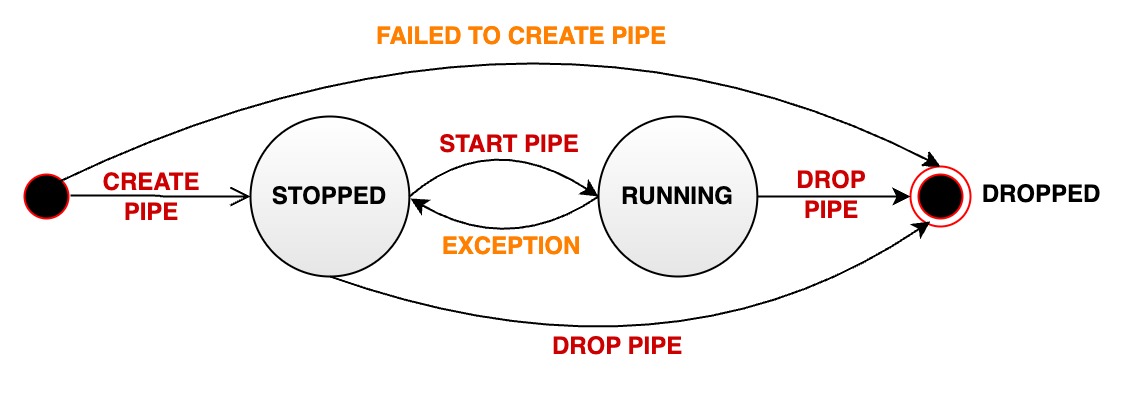
+A stream processing pipe will pass through various states during its managed
life cycle:
+
+- **STOPPED:** The pipe is stopped. When the pipeline is in this state, there
are several possibilities:
+ - When a pipe is successfully created, its initial state is paused.
+ - The user manually pauses a pipe that is in normal running status, and its
status will passively change from RUNNING to STOPPED.
+ - When an unrecoverable error occurs during the running of a pipe, its
status will automatically change from RUNNING to STOPPED
+- **RUNNING:** pipe is working properly
+- **DROPPED:** The pipe task was permanently deleted
+
+The following diagram shows all states and state transitions:
-- **STOPPED:** The pipe is in a stopped state. It can have the following
possibilities:
- - After the successful creation of a pipe, its initial state is set to
stopped
- - The user manually pauses a pipe that is in normal running state,
transitioning its status from RUNNING to STOPPED
- - If a pipe encounters an unrecoverable error during execution, its status
automatically changes from RUNNING to STOPPED.
-- **RUNNING:** The pipe is actively processing data
-- **DROPPED:** The pipe is permanently deleted
+
-The following diagram illustrates the different states and their transitions:
+## authority management
-
+### Stream processing tasks
-## Authority Management
-### Stream Processing Task
+| Permission name | Description |
+| ----------- | -------------------------- |
+| CREATE_PIPE | Register a stream processing task. The path is irrelevant. |
+| START_PIPE | Start the stream processing task. The path is irrelevant. |
+| STOP_PIPE | Stop the stream processing task. The path is irrelevant. |
+| DROP_PIPE | Offload stream processing tasks. The path is irrelevant. |
+| SHOW_PIPES | Query stream processing tasks. The path is irrelevant. |
-| Authority Name | Description |
-| ----------- | -------------------- |
-| CREATE_PIPE | Register task,path-independent |
-| START_PIPE | Start task,path-independent |
-| STOP_PIPE | Stop task,path-independent |
-| DROP_PIPE | Uninstall task,path-independent |
-| SHOW_PIPES | Query task,path-independent |
-### Stream Processing Task Plugin
+### Stream processing task plugin
-| Authority Name | Description |
-| ----------------- | ------------------------------ |
-| CREATE_PIPEPLUGIN | Register stream processing task plugin,path-independent |
-| DROP_PIPEPLUGIN | Delete stream processing task plugin,path-independent |
-| SHOW_PIPEPLUGINS | Query stream processing task plugin,path-independent |
+| Permission name | Description |
+| ------------------ | ---------------------------------- |
+| CREATE_PIPEPLUGIN | Register stream processing task plugin. The path is
irrelevant. |
+| DROP_PIPEPLUGIN | Uninstall the stream processing task plugin. The path is
irrelevant. |
+| SHOW_PIPEPLUGINS | Query stream processing task plugin. The path is
irrelevant. |
-## Configure Parameters
+## Configuration parameters
-In iotdb-common.properties :
+In iotdb-common.properties:
```Properties
####################
diff --git a/src/UserGuide/latest/User-Manual/Streaming_timecho.md
b/src/UserGuide/latest/User-Manual/Streaming_timecho.md
index b4987e8..6c4a633 100644
--- a/src/UserGuide/latest/User-Manual/Streaming_timecho.md
+++ b/src/UserGuide/latest/User-Manual/Streaming_timecho.md
@@ -7,9 +7,9 @@
to you under the Apache License, Version 2.0 (the
"License"); you may not use this file except in compliance
with the License. You may obtain a copy of the License at
-
+
http://www.apache.org/licenses/LICENSE-2.0
-
+
Unless required by applicable law or agreed to in writing,
software distributed under the License is distributed on an
"AS IS" BASIS, WITHOUT WARRANTIES OR CONDITIONS OF ANY
@@ -455,15 +455,32 @@ AS <full class name>
USING <URI of JAR package>
```
-For example, the user has implemented a data processing plugin with the full
class name edu.tsinghua.iotdb.pipe.ExampleProcessor.
-The packaged jar resource package is stored at
https://example.com:8080/iotdb/pipe-plugin.jar. The user wants to use this
plugin in the stream processing engine.
-Mark the plugin as example. Then, the creation statement of this data
processing plugin is as shown in the figure.
+Example: If you implement a data processing plugin named
edu.tsinghua.iotdb.pipe.ExampleProcessor, and the packaged jar package is
pipe-plugin.jar, you want to use this plugin in the stream processing engine,
and mark the plugin as example. There are two ways to use the plug-in package,
one is to upload to the URI server, and the other is to upload to the local
directory of the cluster.
+
+Method 1: Upload to the URI server
+
+Preparation: To register in this way, you need to upload the JAR package to
the URI server in advance and ensure that the IoTDB instance that executes the
registration statement can access the URI server. For example
https://example.com:8080/iotdb/pipe-plugin.jar .
+
+SQL:
+
```sql
-CREATE PIPEPLUGIN example
-AS 'edu.tsinghua.iotdb.pipe.ExampleProcessor'
+SQL CREATE PIPEPLUGIN example
+AS 'edu.tsinghua.iotdb.pipe.ExampleProcessor'
USING URI '<https://example.com:8080/iotdb/pipe-plugin.jar>'
```
+Method 2: Upload the data to the local directory of the cluster
+
+Preparation: To register in this way, you need to place the JAR package in any
path on the machine where the DataNode node is located, and we recommend that
you place the JAR package in the /ext/pipe directory of the IoTDB installation
path (the installation package is already in the installation package, so you
do not need to create a new one). For example:
iotdb-1.x.x-bin/ext/pipe/pipe-plugin.jar. **(Note: If you are using a cluster,
you will need to place the JAR package under the sam [...]
+
+SQL:
+
+```sql
+SQL CREATE PIPEPLUGIN example
+AS 'edu.tsinghua.iotdb.pipe.ExampleProcessor'
+USING URI '<file:/IoTDB installation
path/iotdb-1.x.x-bin/ext/pipe/pipe-plugin.jar>'
+```
+
### Delete plugin statement
When the user no longer wants to use a plugin and needs to uninstall the
plugin from the system, he can use the delete plugin statement as shown in the
figure.
diff --git a/src/zh/UserGuide/Master/User-Manual/Streaming_timecho.md
b/src/zh/UserGuide/Master/User-Manual/Streaming_timecho.md
index b5abd3f..c319f18 100644
--- a/src/zh/UserGuide/Master/User-Manual/Streaming_timecho.md
+++ b/src/zh/UserGuide/Master/User-Manual/Streaming_timecho.md
@@ -7,9 +7,9 @@
to you under the Apache License, Version 2.0 (the
"License"); you may not use this file except in compliance
with the License. You may obtain a copy of the License at
-
+
http://www.apache.org/licenses/LICENSE-2.0
-
+
Unless required by applicable law or agreed to in writing,
software distributed under the License is distributed on an
"AS IS" BASIS, WITHOUT WARRANTIES OR CONDITIONS OF ANY
@@ -455,16 +455,32 @@ AS <全类名>
USING <JAR 包的 URI>
```
-例如,用户实现了一个全类名为 edu.tsinghua.iotdb.pipe.ExampleProcessor 的数据处理插件,
-打包后的 jar 资源包存放到了 https://example.com:8080/iotdb/pipe-plugin.jar
上,用户希望在流处理引擎中使用这个插件,
-将插件标记为 example。那么,这个数据处理插件的创建语句如图所示。
+示例:假如用户实现了一个全类名为edu.tsinghua.iotdb.pipe.ExampleProcessor 的数据处理插件,打包后的jar包为
pipe-plugin.jar ,用户希望在流处理引擎中使用这个插件,将插件标记为
example。插件包有两种使用方式,一种为上传到URI服务器,一种为上传到集群本地目录,两种方法任选一种即可。
+
+【方式一】上传到URI服务器
+
+准备工作:使用该种方式注册,您需要提前将 JAR 包上传到 URI 服务器上并确保执行注册语句的IoTDB实例能够访问该 URI 服务器。例如
https://example.com:8080/iotdb/pipe-plugin.jar 。
+
+创建语句:
```sql
-CREATE PIPEPLUGIN example
-AS 'edu.tsinghua.iotdb.pipe.ExampleProcessor'
+SQL CREATE PIPEPLUGIN example
+AS 'edu.tsinghua.iotdb.pipe.ExampleProcessor'
USING URI '<https://example.com:8080/iotdb/pipe-plugin.jar>'
```
+【方式二】上传到集群本地目录
+
+准备工作:使用该种方式注册,您需要提前将 JAR
包放置到DataNode节点所在机器的任意路径下,推荐您将JAR包放在IoTDB安装路径的/ext/pipe目录下(安装包中已有,无需新建)。例如:iotdb-1.x.x-bin/ext/pipe/pipe-plugin.jar。(**注意:如果您使用的是集群,那么需要将
JAR 包放置到每个 DataNode 节点所在机器的该路径下)**
+
+创建语句:
+
+```sql
+SQL CREATE PIPEPLUGIN example
+AS 'edu.tsinghua.iotdb.pipe.ExampleProcessor'
+USING URI '<file:/iotdb安装路径/iotdb-1.x.x-bin/ext/pipe/pipe-plugin.jar>'
+```
+
### 删除插件语句
当用户不再想使用一个插件,需要将插件从系统中卸载时,可以使用如图所示的删除插件语句。
@@ -658,7 +674,7 @@ WITH CONNECTOR (
'connector.thrift.host' = 'localhost',
'connector.thrift.port' = '9999',
)
-
+
CREATE PIPE pipe2
WITH CONNECTOR (
'connector' = 'iotdb-thrift-connector',
diff --git a/src/zh/UserGuide/V1.2.x/User-Manual/Streaming_timecho.md
b/src/zh/UserGuide/V1.2.x/User-Manual/Streaming_timecho.md
index b5abd3f..c319f18 100644
--- a/src/zh/UserGuide/V1.2.x/User-Manual/Streaming_timecho.md
+++ b/src/zh/UserGuide/V1.2.x/User-Manual/Streaming_timecho.md
@@ -7,9 +7,9 @@
to you under the Apache License, Version 2.0 (the
"License"); you may not use this file except in compliance
with the License. You may obtain a copy of the License at
-
+
http://www.apache.org/licenses/LICENSE-2.0
-
+
Unless required by applicable law or agreed to in writing,
software distributed under the License is distributed on an
"AS IS" BASIS, WITHOUT WARRANTIES OR CONDITIONS OF ANY
@@ -455,16 +455,32 @@ AS <全类名>
USING <JAR 包的 URI>
```
-例如,用户实现了一个全类名为 edu.tsinghua.iotdb.pipe.ExampleProcessor 的数据处理插件,
-打包后的 jar 资源包存放到了 https://example.com:8080/iotdb/pipe-plugin.jar
上,用户希望在流处理引擎中使用这个插件,
-将插件标记为 example。那么,这个数据处理插件的创建语句如图所示。
+示例:假如用户实现了一个全类名为edu.tsinghua.iotdb.pipe.ExampleProcessor 的数据处理插件,打包后的jar包为
pipe-plugin.jar ,用户希望在流处理引擎中使用这个插件,将插件标记为
example。插件包有两种使用方式,一种为上传到URI服务器,一种为上传到集群本地目录,两种方法任选一种即可。
+
+【方式一】上传到URI服务器
+
+准备工作:使用该种方式注册,您需要提前将 JAR 包上传到 URI 服务器上并确保执行注册语句的IoTDB实例能够访问该 URI 服务器。例如
https://example.com:8080/iotdb/pipe-plugin.jar 。
+
+创建语句:
```sql
-CREATE PIPEPLUGIN example
-AS 'edu.tsinghua.iotdb.pipe.ExampleProcessor'
+SQL CREATE PIPEPLUGIN example
+AS 'edu.tsinghua.iotdb.pipe.ExampleProcessor'
USING URI '<https://example.com:8080/iotdb/pipe-plugin.jar>'
```
+【方式二】上传到集群本地目录
+
+准备工作:使用该种方式注册,您需要提前将 JAR
包放置到DataNode节点所在机器的任意路径下,推荐您将JAR包放在IoTDB安装路径的/ext/pipe目录下(安装包中已有,无需新建)。例如:iotdb-1.x.x-bin/ext/pipe/pipe-plugin.jar。(**注意:如果您使用的是集群,那么需要将
JAR 包放置到每个 DataNode 节点所在机器的该路径下)**
+
+创建语句:
+
+```sql
+SQL CREATE PIPEPLUGIN example
+AS 'edu.tsinghua.iotdb.pipe.ExampleProcessor'
+USING URI '<file:/iotdb安装路径/iotdb-1.x.x-bin/ext/pipe/pipe-plugin.jar>'
+```
+
### 删除插件语句
当用户不再想使用一个插件,需要将插件从系统中卸载时,可以使用如图所示的删除插件语句。
@@ -658,7 +674,7 @@ WITH CONNECTOR (
'connector.thrift.host' = 'localhost',
'connector.thrift.port' = '9999',
)
-
+
CREATE PIPE pipe2
WITH CONNECTOR (
'connector' = 'iotdb-thrift-connector',
diff --git a/src/zh/UserGuide/latest/User-Manual/Streaming_timecho.md
b/src/zh/UserGuide/latest/User-Manual/Streaming_timecho.md
index b5abd3f..c319f18 100644
--- a/src/zh/UserGuide/latest/User-Manual/Streaming_timecho.md
+++ b/src/zh/UserGuide/latest/User-Manual/Streaming_timecho.md
@@ -7,9 +7,9 @@
to you under the Apache License, Version 2.0 (the
"License"); you may not use this file except in compliance
with the License. You may obtain a copy of the License at
-
+
http://www.apache.org/licenses/LICENSE-2.0
-
+
Unless required by applicable law or agreed to in writing,
software distributed under the License is distributed on an
"AS IS" BASIS, WITHOUT WARRANTIES OR CONDITIONS OF ANY
@@ -455,16 +455,32 @@ AS <全类名>
USING <JAR 包的 URI>
```
-例如,用户实现了一个全类名为 edu.tsinghua.iotdb.pipe.ExampleProcessor 的数据处理插件,
-打包后的 jar 资源包存放到了 https://example.com:8080/iotdb/pipe-plugin.jar
上,用户希望在流处理引擎中使用这个插件,
-将插件标记为 example。那么,这个数据处理插件的创建语句如图所示。
+示例:假如用户实现了一个全类名为edu.tsinghua.iotdb.pipe.ExampleProcessor 的数据处理插件,打包后的jar包为
pipe-plugin.jar ,用户希望在流处理引擎中使用这个插件,将插件标记为
example。插件包有两种使用方式,一种为上传到URI服务器,一种为上传到集群本地目录,两种方法任选一种即可。
+
+【方式一】上传到URI服务器
+
+准备工作:使用该种方式注册,您需要提前将 JAR 包上传到 URI 服务器上并确保执行注册语句的IoTDB实例能够访问该 URI 服务器。例如
https://example.com:8080/iotdb/pipe-plugin.jar 。
+
+创建语句:
```sql
-CREATE PIPEPLUGIN example
-AS 'edu.tsinghua.iotdb.pipe.ExampleProcessor'
+SQL CREATE PIPEPLUGIN example
+AS 'edu.tsinghua.iotdb.pipe.ExampleProcessor'
USING URI '<https://example.com:8080/iotdb/pipe-plugin.jar>'
```
+【方式二】上传到集群本地目录
+
+准备工作:使用该种方式注册,您需要提前将 JAR
包放置到DataNode节点所在机器的任意路径下,推荐您将JAR包放在IoTDB安装路径的/ext/pipe目录下(安装包中已有,无需新建)。例如:iotdb-1.x.x-bin/ext/pipe/pipe-plugin.jar。(**注意:如果您使用的是集群,那么需要将
JAR 包放置到每个 DataNode 节点所在机器的该路径下)**
+
+创建语句:
+
+```sql
+SQL CREATE PIPEPLUGIN example
+AS 'edu.tsinghua.iotdb.pipe.ExampleProcessor'
+USING URI '<file:/iotdb安装路径/iotdb-1.x.x-bin/ext/pipe/pipe-plugin.jar>'
+```
+
### 删除插件语句
当用户不再想使用一个插件,需要将插件从系统中卸载时,可以使用如图所示的删除插件语句。
@@ -658,7 +674,7 @@ WITH CONNECTOR (
'connector.thrift.host' = 'localhost',
'connector.thrift.port' = '9999',
)
-
+
CREATE PIPE pipe2
WITH CONNECTOR (
'connector' = 'iotdb-thrift-connector',



