This is an automated email from the ASF dual-hosted git repository.

qiaojialin pushed a commit to branch main
in repository https://gitbox.apache.org/repos/asf/iotdb-docs.git
The following commit(s) were added to refs/heads/main by this push:
new 27f9576 fix little bug (#211)
27f9576 is described below
commit 27f9576a29398311d828d8d24ac773331be08a49
Author: wanghui42 <[email protected]>
AuthorDate: Mon Apr 8 15:45:55 2024 +0800
fix little bug (#211)
---
src/.vuepress/sidebar/V1.3.x/en.ts | 1 +
src/.vuepress/sidebar_timecho/V1.3.x/en.ts | 1 +
.../Monitoring-Board-Install-and-Deploy.md | 4 ++--
src/UserGuide/Master/User-Manual/Maintennance.md | 11 ++++++-----
.../Monitoring-Board-Install-and-Deploy.md | 4 ++--
src/UserGuide/latest/User-Manual/Maintennance.md | 11 ++++++-----
.../Monitoring-Board-Install-and-Deploy.md | 5 +++--
src/zh/UserGuide/Master/User-Manual/Maintennance.md | 11 ++++++-----
.../Monitoring-Board-Install-and-Deploy.md | 4 ++--
src/zh/UserGuide/latest/User-Manual/Maintennance.md | 11 ++++++-----
10 files changed, 35 insertions(+), 28 deletions(-)
diff --git a/src/.vuepress/sidebar/V1.3.x/en.ts
b/src/.vuepress/sidebar/V1.3.x/en.ts
index 3b6d283..428c0b2 100644
--- a/src/.vuepress/sidebar/V1.3.x/en.ts
+++ b/src/.vuepress/sidebar/V1.3.x/en.ts
@@ -168,6 +168,7 @@ export const enSidebar = {
// children: 'structure',
children: [
{ text: 'UDF Libraries', link: 'UDF-Libraries' },
+ { text: 'Function and Expression', link: 'Function-and-Expression' },
{ text: 'Common Config Manual', link: 'Common-Config-Manual' },
{ text: 'Status Codes', link: 'Status-Codes' },
{ text: 'Keywords', link: 'Keywords' },
diff --git a/src/.vuepress/sidebar_timecho/V1.3.x/en.ts
b/src/.vuepress/sidebar_timecho/V1.3.x/en.ts
index d3927dc..ee7be80 100644
--- a/src/.vuepress/sidebar_timecho/V1.3.x/en.ts
+++ b/src/.vuepress/sidebar_timecho/V1.3.x/en.ts
@@ -173,6 +173,7 @@ export const enSidebar = {
// children: 'structure',
children: [
{ text: 'UDF Libraries', link: 'UDF-Libraries' },
+ { text: 'Function and Expression', link: 'Function-and-Expression' },
{ text: 'Common Config Manual', link: 'Common-Config-Manual' },
{ text: 'ConfigNode Config Manual', link: 'ConfigNode-Config-Manual' },
{ text: 'DataNode Config Manual', link: 'DataNode-Config-Manual' },
diff --git
a/src/UserGuide/Master/Deployment-and-Maintenance/Monitoring-Board-Install-and-Deploy.md
b/src/UserGuide/Master/Deployment-and-Maintenance/Monitoring-Board-Install-and-Deploy.md
index 38612f6..b5e8f86 100644
---
a/src/UserGuide/Master/Deployment-and-Maintenance/Monitoring-Board-Install-and-Deploy.md
+++
b/src/UserGuide/Master/Deployment-and-Maintenance/Monitoring-Board-Install-and-Deploy.md
@@ -29,7 +29,7 @@ From the IoTDB 1.0 version, we introduced the system
monitoring module, you can
1. IoTDB: version 1.0 and above, you may contact your sales for the relevant
installer
2. Prometheus: version 2.30.3 and above, download from the official website:
https://prometheus.io/download/
3. Grafana: version 8.4.2 and above, download from the official website:
https://grafana.com/grafana/download
-4. Grafana Dashboards: Grafana Dashboard is a tool for Enterprise IoTDB, and
you may contact your sales for the relevant installer.
+4. IoTDB Dashboards: IoTDB Dashboard is a tool for Enterprise IoTDB, and you
may contact your sales for the relevant installer.
### 1.1.2 Start ConfigNode
1. Enter the `iotdb-enterprise-1.x.x.x-bin` package
@@ -156,7 +156,7 @@ cd grafana-*
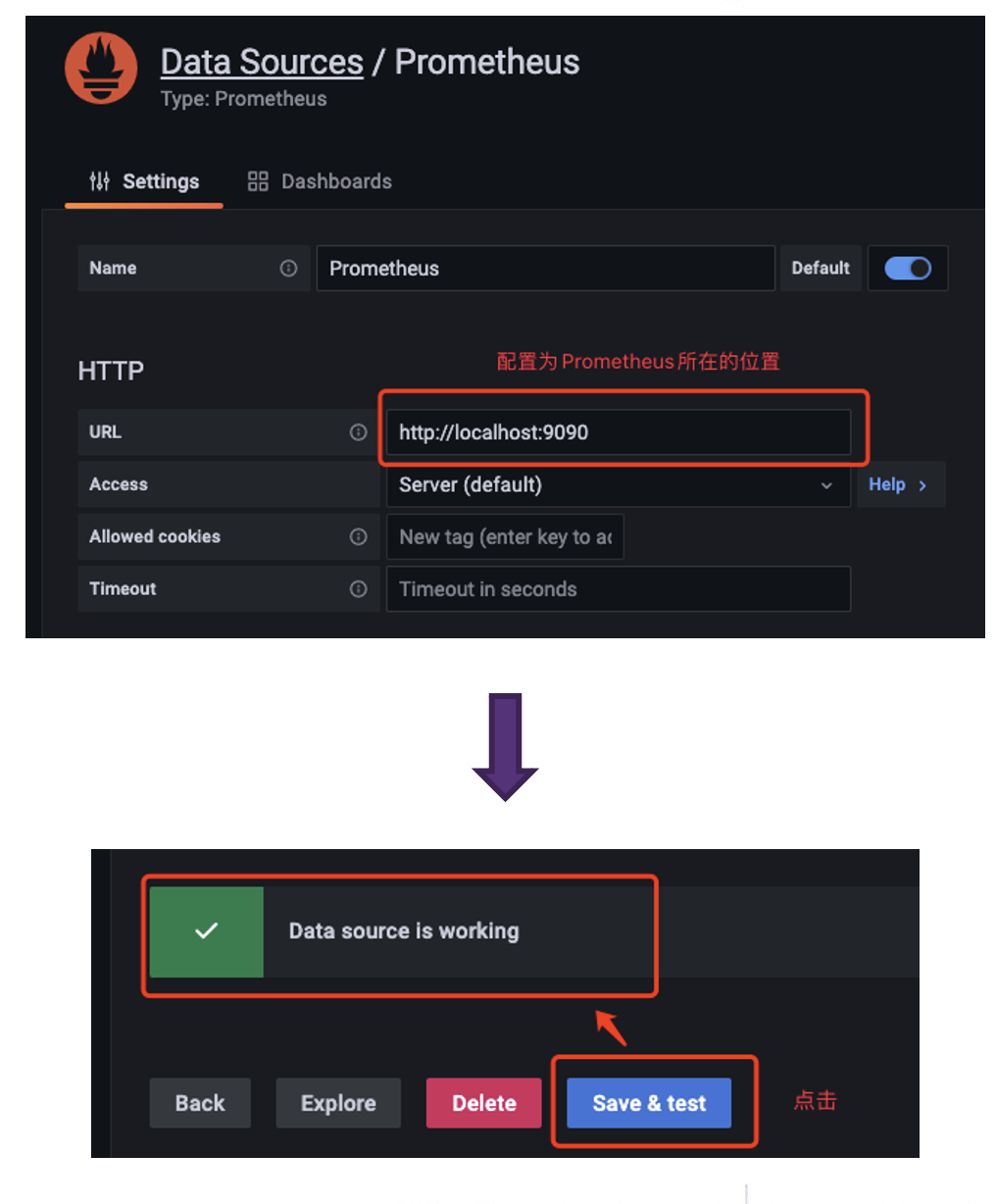
-### 1.3.2 Step2:Import the Grafana Dashboards
+### 1.3.2 Step2:Import the IoTDB Dashboards
1. Enter Grafana,click Browse of Dashboards
diff --git a/src/UserGuide/Master/User-Manual/Maintennance.md
b/src/UserGuide/Master/User-Manual/Maintennance.md
index 79e3149..6e0f837 100644
--- a/src/UserGuide/Master/User-Manual/Maintennance.md
+++ b/src/UserGuide/Master/User-Manual/Maintennance.md
@@ -20,14 +20,15 @@
-->
# Maintennance
-## Overview
+## Explain tool
+### Overview
The significance of query analysis lies in assisting users to understand the
execution mechanism and performance bottlenecks of queries, thereby achieving
query optimization and performance improvement. This concerns not only the
efficiency of query execution but also directly affects the user experience of
applications and the effective use of resources. To conduct effective query
analysis, IoTDB provides query analysis tools: Explain and Explain Analyze.
The Explain tool allows users to preview the execution plan of a query SQL,
including how IoTDB organizes data retrieval and processing.
Explain Analyze goes further by adding performance analysis, fully executing
the SQL and displaying the time and resources consumed during the execution of
the query. It provides detailed information for IoTDB users to deeply
understand query details and perform query optimization.
-### Explain
+#### Explain
The Explain command allows users to view the execution plan of an SQL query.
The execution plan is presented in the form of operators, describing how IoTDB
will execute the query. The output of Explain includes information such as data
access strategies, whether filter conditions are pushed down, and the
distribution of the query plan across different nodes, providing users with a
means to visualize the internal logic of the query execution. Its syntax is as
follows:
```sql
@@ -58,7 +59,7 @@ Execute the SQL and get the following result:
+-----------------------------------------------------------------------+
```
It can be seen that IoTDB retrieves the data for column1 and column2 through
two separate SeriesScan nodes, and finally connects them using
fullOuterTimeJoin.
-### Explain Analyze
+#### Explain Analyze
Explain Analyze is a performance analysis SQL built into the IoTDB query
engine. Unlike Explain, it executes the corresponding query plan and collects
execution information. It can be used to track the specific performance
distribution of a query, observe resources, and conduct performance tuning and
anomaly analysis.
Compared to other analysis methods where can be attached in IoTDB, Explain
Analyze does not require deployment effort and can analyze individual SQL
statements, allowing for more precise problem identification:
@@ -156,7 +157,7 @@ Get result following:
| SeriesPath: root.explain.analyze.data.column1
|
+-------------------------------------------------------------------------------------------------+
```
-#### PlanNode Compaction in the Result Of EXPLAIN ANALYZE
+##### PlanNode Compaction in the Result Of EXPLAIN ANALYZE
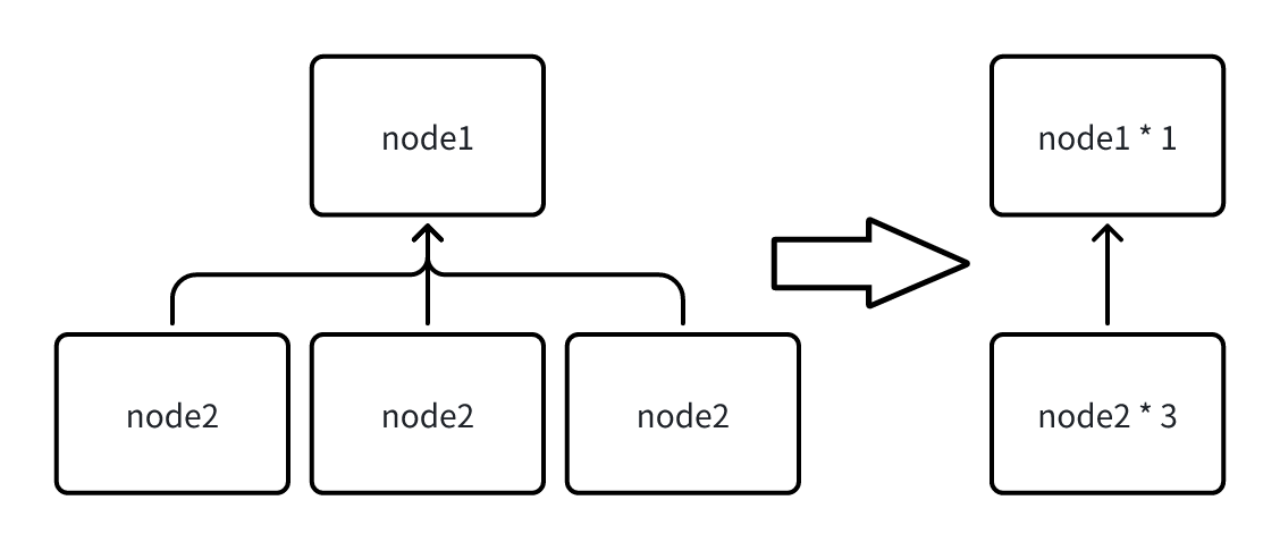
@@ -233,7 +234,7 @@ FRAGMENT-INSTANCE[Id: 20240311_041502_00001_1.3.0][IP:
192.168.130.9][DataRegion
```
-#### Query Timeout Handling
+##### Query Timeout Handling
Explain Analyze is a unique type of query. When it times out, we are unable to
obtain the analysis results from the return. To address this, allowing for the
investigation of timeout reasons through analysis results even in cases of
timeout, Explain Analyze offers a timed logging mechanism. After certain
intervals, the current results of Explain Analyze are output in text form to a
dedicated log file. This way, when a query times out, one can go to the logs to
investigate the correspondi [...]
The logging interval is calculated based on the query's timeout setting,
ensuring that there are at least two records of results in case of a timeout.
\ No newline at end of file
diff --git
a/src/UserGuide/latest/Deployment-and-Maintenance/Monitoring-Board-Install-and-Deploy.md
b/src/UserGuide/latest/Deployment-and-Maintenance/Monitoring-Board-Install-and-Deploy.md
index 38612f6..b5e8f86 100644
---
a/src/UserGuide/latest/Deployment-and-Maintenance/Monitoring-Board-Install-and-Deploy.md
+++
b/src/UserGuide/latest/Deployment-and-Maintenance/Monitoring-Board-Install-and-Deploy.md
@@ -29,7 +29,7 @@ From the IoTDB 1.0 version, we introduced the system
monitoring module, you can
1. IoTDB: version 1.0 and above, you may contact your sales for the relevant
installer
2. Prometheus: version 2.30.3 and above, download from the official website:
https://prometheus.io/download/
3. Grafana: version 8.4.2 and above, download from the official website:
https://grafana.com/grafana/download
-4. Grafana Dashboards: Grafana Dashboard is a tool for Enterprise IoTDB, and
you may contact your sales for the relevant installer.
+4. IoTDB Dashboards: IoTDB Dashboard is a tool for Enterprise IoTDB, and you
may contact your sales for the relevant installer.
### 1.1.2 Start ConfigNode
1. Enter the `iotdb-enterprise-1.x.x.x-bin` package
@@ -156,7 +156,7 @@ cd grafana-*

-### 1.3.2 Step2:Import the Grafana Dashboards
+### 1.3.2 Step2:Import the IoTDB Dashboards
1. Enter Grafana,click Browse of Dashboards
diff --git a/src/UserGuide/latest/User-Manual/Maintennance.md
b/src/UserGuide/latest/User-Manual/Maintennance.md
index 79e3149..6e0f837 100644
--- a/src/UserGuide/latest/User-Manual/Maintennance.md
+++ b/src/UserGuide/latest/User-Manual/Maintennance.md
@@ -20,14 +20,15 @@
-->
# Maintennance
-## Overview
+## Explain tool
+### Overview
The significance of query analysis lies in assisting users to understand the
execution mechanism and performance bottlenecks of queries, thereby achieving
query optimization and performance improvement. This concerns not only the
efficiency of query execution but also directly affects the user experience of
applications and the effective use of resources. To conduct effective query
analysis, IoTDB provides query analysis tools: Explain and Explain Analyze.
The Explain tool allows users to preview the execution plan of a query SQL,
including how IoTDB organizes data retrieval and processing.
Explain Analyze goes further by adding performance analysis, fully executing
the SQL and displaying the time and resources consumed during the execution of
the query. It provides detailed information for IoTDB users to deeply
understand query details and perform query optimization.
-### Explain
+#### Explain
The Explain command allows users to view the execution plan of an SQL query.
The execution plan is presented in the form of operators, describing how IoTDB
will execute the query. The output of Explain includes information such as data
access strategies, whether filter conditions are pushed down, and the
distribution of the query plan across different nodes, providing users with a
means to visualize the internal logic of the query execution. Its syntax is as
follows:
```sql
@@ -58,7 +59,7 @@ Execute the SQL and get the following result:
+-----------------------------------------------------------------------+
```
It can be seen that IoTDB retrieves the data for column1 and column2 through
two separate SeriesScan nodes, and finally connects them using
fullOuterTimeJoin.
-### Explain Analyze
+#### Explain Analyze
Explain Analyze is a performance analysis SQL built into the IoTDB query
engine. Unlike Explain, it executes the corresponding query plan and collects
execution information. It can be used to track the specific performance
distribution of a query, observe resources, and conduct performance tuning and
anomaly analysis.
Compared to other analysis methods where can be attached in IoTDB, Explain
Analyze does not require deployment effort and can analyze individual SQL
statements, allowing for more precise problem identification:
@@ -156,7 +157,7 @@ Get result following:
| SeriesPath: root.explain.analyze.data.column1
|
+-------------------------------------------------------------------------------------------------+
```
-#### PlanNode Compaction in the Result Of EXPLAIN ANALYZE
+##### PlanNode Compaction in the Result Of EXPLAIN ANALYZE

@@ -233,7 +234,7 @@ FRAGMENT-INSTANCE[Id: 20240311_041502_00001_1.3.0][IP:
192.168.130.9][DataRegion
```
-#### Query Timeout Handling
+##### Query Timeout Handling
Explain Analyze is a unique type of query. When it times out, we are unable to
obtain the analysis results from the return. To address this, allowing for the
investigation of timeout reasons through analysis results even in cases of
timeout, Explain Analyze offers a timed logging mechanism. After certain
intervals, the current results of Explain Analyze are output in text form to a
dedicated log file. This way, when a query times out, one can go to the logs to
investigate the correspondi [...]
The logging interval is calculated based on the query's timeout setting,
ensuring that there are at least two records of results in case of a timeout.
\ No newline at end of file
diff --git
a/src/zh/UserGuide/Master/Deployment-and-Maintenance/Monitoring-Board-Install-and-Deploy.md
b/src/zh/UserGuide/Master/Deployment-and-Maintenance/Monitoring-Board-Install-and-Deploy.md
index 9ed81e2..8cfb534 100644
---
a/src/zh/UserGuide/Master/Deployment-and-Maintenance/Monitoring-Board-Install-and-Deploy.md
+++
b/src/zh/UserGuide/Master/Deployment-and-Maintenance/Monitoring-Board-Install-and-Deploy.md
@@ -29,7 +29,8 @@
1. IoTDB:1.0 版本及以上,可以前往官网下载:https://iotdb.apache.org/Download/
2. Prometheus:2.30.3 版本及以上,可以前往官网下载:https://prometheus.io/download/
3. Grafana:8.4.2 版本及以上,可以前往官网下载:https://grafana.com/grafana/download
-4. Grafana监控面板:基于企业版IoTDB的数据库工具,您可联系商务获取
+4. IoTDB 监控面板:基于企业版IoTDB的数据库监控面板,您可联系商务获取
+
### 1.1.2 启动 ConfigNode
> 本文以 3C3D 为例
@@ -156,7 +157,7 @@ cd grafana-*

-### 1.3.2 Step2:导入IoTDB官方提供的Grafana看板
+### 1.3.2 Step2:导入 IoTDB 监控看板
1. 进入 Grafana,选择 Dashboards 的 Browse
diff --git a/src/zh/UserGuide/Master/User-Manual/Maintennance.md
b/src/zh/UserGuide/Master/User-Manual/Maintennance.md
index cd5aa18..c154d6d 100644
--- a/src/zh/UserGuide/Master/User-Manual/Maintennance.md
+++ b/src/zh/UserGuide/Master/User-Manual/Maintennance.md
@@ -20,14 +20,15 @@
-->
# 运维语句
-## 概述
+## 查询分析
+### 概述
查询分析的意义在于帮助用户理解查询的执行机制和性能瓶颈,从而实现查询优化和性能提升。这不仅关乎到查询的执行效率,也直接影响到应用的用户体验和资源的有效利用。为了进行有效的查询分析,IoTDB提供了查询分析工具:Explain和Explain
Analyze。
Explain工具允许用户预览查询SQL的执行计划,包括IoTDB如何组织数据检索和处理。
Explain
Analyze则在此基础上增加了性能分析,完整执行SQL并展示查询执行过程中的时间和资源消耗。为IoTDB用户深入理解查询详情以及进行查询优化提供了详细的相关信息。
-### Explain
+#### Explain
Explain命令允许用户查看SQL查询的执行计划。执行计划以算子的形式展示,描述了IoTDB会如何执行查询。Explain的输出包括了数据访问策略、过滤条件是否下推以及查询计划在不同节点的分配等信息,为用户提供了一种手段,以可视化查询的内部执行逻辑。其语法如下:
```sql
EXPLAIN <SELECT_STATEMENT>
@@ -57,7 +58,7 @@ explain select * from root.explain.data
+-----------------------------------------------------------------------+
```
不难看出,IoTDB分别通过两个SeriesScan节点去获取column1和column2的数据,最后通过fullOuterTimeJoin将其连接。
-### Explain Analyze
+#### Explain Analyze
Explain
Analyze是IOTDB查询引擎自带的性能分析SQL,与Explain不同,它会执行对应的查询计划并统计执行信息,可以用于追踪一条查询的具体性能分布,用于对资源进行观察,进行性能调优与异常分析。
与IoTDB常用的排查手段相比,Explain Analyze没有部署负担,同时能够针对单条sql进行分析,能够更好定位问题:
@@ -154,7 +155,7 @@ explain analyze select column2 from
root.explain.analyze.data order by column1
| SeriesPath: root.explain.analyze.data.column1
|
+-------------------------------------------------------------------------------------------------+
```
-#### EXPLAIN ANALYZE分析结果中的算子压缩
+##### EXPLAIN ANALYZE分析结果中的算子压缩

@@ -229,7 +230,7 @@ FRAGMENT-INSTANCE[Id: 20240311_041502_00001_1.3.0][IP:
192.168.130.9][DataRegion
......
```
-#### 查询超时处理
+##### 查询超时处理
Explain
Analyze本身是一种特殊的查询,当执行超时的时候,我们是无法从返回结果中获得分析结果的。为了处理该情况,使得在超时的情况下也可以通过分析结果排查超时原因,Explain
Analyze提供了**定时日志**机制,每经过一定的时间间隔会将Explain
Analyze的当前结果以文本的形式输出到专门的日志中。这样当查询超时时,就可以前往logs中查看对应的日志进行排查。
diff --git
a/src/zh/UserGuide/latest/Deployment-and-Maintenance/Monitoring-Board-Install-and-Deploy.md
b/src/zh/UserGuide/latest/Deployment-and-Maintenance/Monitoring-Board-Install-and-Deploy.md
index 9ed81e2..2a670b6 100644
---
a/src/zh/UserGuide/latest/Deployment-and-Maintenance/Monitoring-Board-Install-and-Deploy.md
+++
b/src/zh/UserGuide/latest/Deployment-and-Maintenance/Monitoring-Board-Install-and-Deploy.md
@@ -29,7 +29,7 @@
1. IoTDB:1.0 版本及以上,可以前往官网下载:https://iotdb.apache.org/Download/
2. Prometheus:2.30.3 版本及以上,可以前往官网下载:https://prometheus.io/download/
3. Grafana:8.4.2 版本及以上,可以前往官网下载:https://grafana.com/grafana/download
-4. Grafana监控面板:基于企业版IoTDB的数据库工具,您可联系商务获取
+4. IoTDB 监控面板:基于企业版IoTDB的数据库监控面板,您可联系商务获取
### 1.1.2 启动 ConfigNode
> 本文以 3C3D 为例
@@ -156,7 +156,7 @@ cd grafana-*

-### 1.3.2 Step2:导入IoTDB官方提供的Grafana看板
+### 1.3.2 Step2:导入 IoTDB 监控看板
1. 进入 Grafana,选择 Dashboards 的 Browse
diff --git a/src/zh/UserGuide/latest/User-Manual/Maintennance.md
b/src/zh/UserGuide/latest/User-Manual/Maintennance.md
index cd5aa18..c154d6d 100644
--- a/src/zh/UserGuide/latest/User-Manual/Maintennance.md
+++ b/src/zh/UserGuide/latest/User-Manual/Maintennance.md
@@ -20,14 +20,15 @@
-->
# 运维语句
-## 概述
+## 查询分析
+### 概述
查询分析的意义在于帮助用户理解查询的执行机制和性能瓶颈,从而实现查询优化和性能提升。这不仅关乎到查询的执行效率,也直接影响到应用的用户体验和资源的有效利用。为了进行有效的查询分析,IoTDB提供了查询分析工具:Explain和Explain
Analyze。
Explain工具允许用户预览查询SQL的执行计划,包括IoTDB如何组织数据检索和处理。
Explain
Analyze则在此基础上增加了性能分析,完整执行SQL并展示查询执行过程中的时间和资源消耗。为IoTDB用户深入理解查询详情以及进行查询优化提供了详细的相关信息。
-### Explain
+#### Explain
Explain命令允许用户查看SQL查询的执行计划。执行计划以算子的形式展示,描述了IoTDB会如何执行查询。Explain的输出包括了数据访问策略、过滤条件是否下推以及查询计划在不同节点的分配等信息,为用户提供了一种手段,以可视化查询的内部执行逻辑。其语法如下:
```sql
EXPLAIN <SELECT_STATEMENT>
@@ -57,7 +58,7 @@ explain select * from root.explain.data
+-----------------------------------------------------------------------+
```
不难看出,IoTDB分别通过两个SeriesScan节点去获取column1和column2的数据,最后通过fullOuterTimeJoin将其连接。
-### Explain Analyze
+#### Explain Analyze
Explain
Analyze是IOTDB查询引擎自带的性能分析SQL,与Explain不同,它会执行对应的查询计划并统计执行信息,可以用于追踪一条查询的具体性能分布,用于对资源进行观察,进行性能调优与异常分析。
与IoTDB常用的排查手段相比,Explain Analyze没有部署负担,同时能够针对单条sql进行分析,能够更好定位问题:
@@ -154,7 +155,7 @@ explain analyze select column2 from
root.explain.analyze.data order by column1
| SeriesPath: root.explain.analyze.data.column1
|
+-------------------------------------------------------------------------------------------------+
```
-#### EXPLAIN ANALYZE分析结果中的算子压缩
+##### EXPLAIN ANALYZE分析结果中的算子压缩

@@ -229,7 +230,7 @@ FRAGMENT-INSTANCE[Id: 20240311_041502_00001_1.3.0][IP:
192.168.130.9][DataRegion
......
```
-#### 查询超时处理
+##### 查询超时处理
Explain
Analyze本身是一种特殊的查询,当执行超时的时候,我们是无法从返回结果中获得分析结果的。为了处理该情况,使得在超时的情况下也可以通过分析结果排查超时原因,Explain
Analyze提供了**定时日志**机制,每经过一定的时间间隔会将Explain
Analyze的当前结果以文本的形式输出到专门的日志中。这样当查询超时时,就可以前往logs中查看对应的日志进行排查。


