This is an automated email from the ASF dual-hosted git repository.

caogaofei pushed a commit to branch main
in repository https://gitbox.apache.org/repos/asf/iotdb-docs.git
The following commit(s) were added to refs/heads/main by this push:
new 5dfa6fe Modify image size and link address
5dfa6fe is described below
commit 5dfa6fe2f1fc76a672a7329e95c668ffab87e141
Author: majialin <[email protected]>
AuthorDate: Tue Jul 9 10:34:49 2024 +0800
Modify image size and link address
---
.../Master/Deployment-and-Maintenance/Cluster-Deployment.md | 6 ++++--
.../Deployment-and-Maintenance/Cluster-Deployment_timecho.md | 6 ++++--
.../latest/Deployment-and-Maintenance/Cluster-Deployment.md | 6 ++++--
.../Deployment-and-Maintenance/Cluster-Deployment_timecho.md | 6 ++++--
.../Master/Deployment-and-Maintenance/Cluster-Deployment.md | 6 ++++--
.../Deployment-and-Maintenance/Cluster-Deployment_timecho.md | 10 +++++-----
.../latest/Deployment-and-Maintenance/Cluster-Deployment.md | 6 ++++--
.../Deployment-and-Maintenance/Cluster-Deployment_timecho.md | 11 +++++------
8 files changed, 34 insertions(+), 23 deletions(-)
diff --git
a/src/UserGuide/Master/Deployment-and-Maintenance/Cluster-Deployment.md
b/src/UserGuide/Master/Deployment-and-Maintenance/Cluster-Deployment.md
index c736b90..685265e 100644
--- a/src/UserGuide/Master/Deployment-and-Maintenance/Cluster-Deployment.md
+++ b/src/UserGuide/Master/Deployment-and-Maintenance/Cluster-Deployment.md
@@ -22,7 +22,9 @@
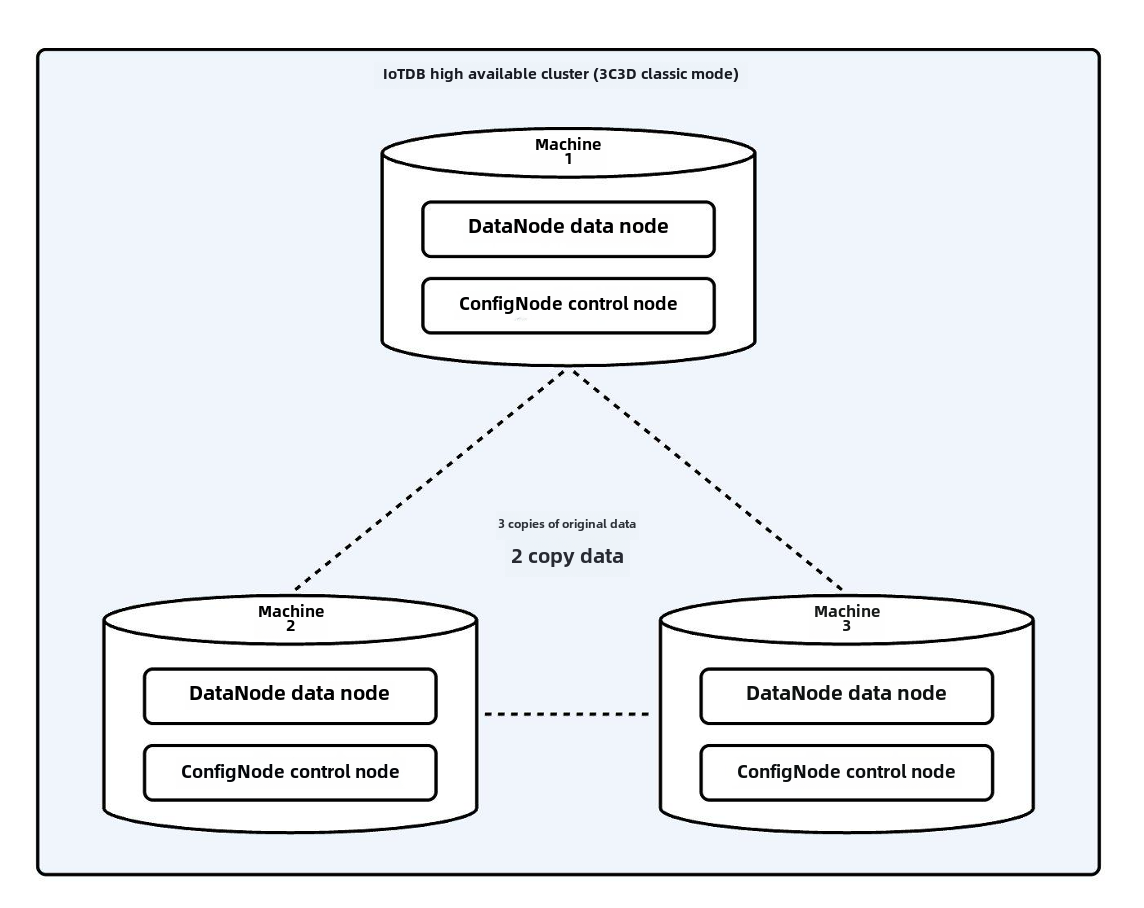
This section will take the IoTDB classic cluster deployment architecture 3C3D
(3 ConfigNodes and 3 DataNodes) as an example to introduce how to deploy a
cluster, commonly known as the 3C3D cluster. The architecture diagram of the
3C3D cluster is as follows:
-
+<div align="center">
+ <img src="https://alioss.timecho.com/docs/img/20240705141552.png"; alt=""
style="width: 60%;"/>
+</div>
## Note
@@ -38,7 +40,7 @@ This section will take the IoTDB classic cluster deployment
architecture 3C3D (3
1. Prepare the IoTDB database installation
package::apache-iotdb-{version}-all-bin.zip(Please refer to the installation
package for
details:[IoTDB-Package](https://iotdb.apache.org/UserGuide/latest/Deployment-and-Maintenance/IoTDB-Package.html))
-2. Configure the operating system environment according to environmental
requirements (system environment configuration can be found in:[Database
Resources](https://iotdb.apache.org/UserGuide/latest/Deployment-and-Maintenance/Database-Resources.html))
+2. Configure the operating system environment according to environmental
requirements (system environment configuration can be found in:[Environment
Requirements](https://iotdb.apache.org/UserGuide/latest/Deployment-and-Maintenance/Environment-Requirements.html))
## Installation Steps
diff --git
a/src/UserGuide/Master/Deployment-and-Maintenance/Cluster-Deployment_timecho.md
b/src/UserGuide/Master/Deployment-and-Maintenance/Cluster-Deployment_timecho.md
index efe985f..69f1ea3 100644
---
a/src/UserGuide/Master/Deployment-and-Maintenance/Cluster-Deployment_timecho.md
+++
b/src/UserGuide/Master/Deployment-and-Maintenance/Cluster-Deployment_timecho.md
@@ -22,7 +22,9 @@
This section describes how to manually deploy an instance that includes 3
ConfigNodes and 3 DataNodes, commonly known as a 3C3D cluster.
-
+<div align="center">
+ <img src="https://alioss.timecho.com/docs/img/20240705141552.png"; alt=""
style="width: 60%;"/>
+</div>
## Note
@@ -38,7 +40,7 @@ This section describes how to manually deploy an instance
that includes 3 Config
## Preparation Steps
1. Prepare the IoTDB database installation package: iotdb enterprise-
{version}-bin.zip(The installation package can be obtained
from:[IoTDB-Package](https://www.timecho.com/docs/UserGuide/latest/Deployment-and-Maintenance/IoTDB-Package_timecho.html))
-2. Configure the operating system environment according to environmental
requirements(The system environment configuration can be found in:[Database
Resources](https://www.timecho.com/docs/UserGuide/latest/Deployment-and-Maintenance/Database-Resources.html))
+2. Configure the operating system environment according to environmental
requirements(The system environment configuration can be found in:[Environment
Requirement](https://www.timecho.com/docs/UserGuide/latest/Deployment-and-Maintenance/Environment-Requirements.html))
## Installation Steps
diff --git
a/src/UserGuide/latest/Deployment-and-Maintenance/Cluster-Deployment.md
b/src/UserGuide/latest/Deployment-and-Maintenance/Cluster-Deployment.md
index c736b90..685265e 100644
--- a/src/UserGuide/latest/Deployment-and-Maintenance/Cluster-Deployment.md
+++ b/src/UserGuide/latest/Deployment-and-Maintenance/Cluster-Deployment.md
@@ -22,7 +22,9 @@
This section will take the IoTDB classic cluster deployment architecture 3C3D
(3 ConfigNodes and 3 DataNodes) as an example to introduce how to deploy a
cluster, commonly known as the 3C3D cluster. The architecture diagram of the
3C3D cluster is as follows:
-
+<div align="center">
+ <img src="https://alioss.timecho.com/docs/img/20240705141552.png"; alt=""
style="width: 60%;"/>
+</div>
## Note
@@ -38,7 +40,7 @@ This section will take the IoTDB classic cluster deployment
architecture 3C3D (3
1. Prepare the IoTDB database installation
package::apache-iotdb-{version}-all-bin.zip(Please refer to the installation
package for
details:[IoTDB-Package](https://iotdb.apache.org/UserGuide/latest/Deployment-and-Maintenance/IoTDB-Package.html))
-2. Configure the operating system environment according to environmental
requirements (system environment configuration can be found in:[Database
Resources](https://iotdb.apache.org/UserGuide/latest/Deployment-and-Maintenance/Database-Resources.html))
+2. Configure the operating system environment according to environmental
requirements (system environment configuration can be found in:[Environment
Requirements](https://iotdb.apache.org/UserGuide/latest/Deployment-and-Maintenance/Environment-Requirements.html))
## Installation Steps
diff --git
a/src/UserGuide/latest/Deployment-and-Maintenance/Cluster-Deployment_timecho.md
b/src/UserGuide/latest/Deployment-and-Maintenance/Cluster-Deployment_timecho.md
index ecd718f..06eaebc 100644
---
a/src/UserGuide/latest/Deployment-and-Maintenance/Cluster-Deployment_timecho.md
+++
b/src/UserGuide/latest/Deployment-and-Maintenance/Cluster-Deployment_timecho.md
@@ -22,7 +22,9 @@
This section describes how to manually deploy an instance that includes 3
ConfigNodes and 3 DataNodes, commonly known as a 3C3D cluster.
-
+<div align="center">
+ <img src="https://alioss.timecho.com/docs/img/20240705141552.png"; alt=""
style="width: 60%;"/>
+</div>
## Note
@@ -38,7 +40,7 @@ This section describes how to manually deploy an instance
that includes 3 Config
## Preparation Steps
1. Prepare the IoTDB database installation package: iotdb enterprise-
{version}-bin.zip(The installation package can be obtained
from:[IoTDB-Package](https://www.timecho.com/docs/UserGuide/latest/Deployment-and-Maintenance/IoTDB-Package_timecho.html))
-2. Configure the operating system environment according to environmental
requirements(The system environment configuration can be found in:[Database
Resources](https://www.timecho.com/docs/UserGuide/latest/Deployment-and-Maintenance/Database-Resources.html))
+2. Configure the operating system environment according to environmental
requirements(The system environment configuration can be found in:[Environment
Requirements](https://www.timecho.com/docs/UserGuide/latest/Deployment-and-Maintenance/Environment-Requirements.html))
## Installation Steps
diff --git
a/src/zh/UserGuide/Master/Deployment-and-Maintenance/Cluster-Deployment.md
b/src/zh/UserGuide/Master/Deployment-and-Maintenance/Cluster-Deployment.md
index 72ebf7d..c426001 100644
--- a/src/zh/UserGuide/Master/Deployment-and-Maintenance/Cluster-Deployment.md
+++ b/src/zh/UserGuide/Master/Deployment-and-Maintenance/Cluster-Deployment.md
@@ -22,7 +22,9 @@
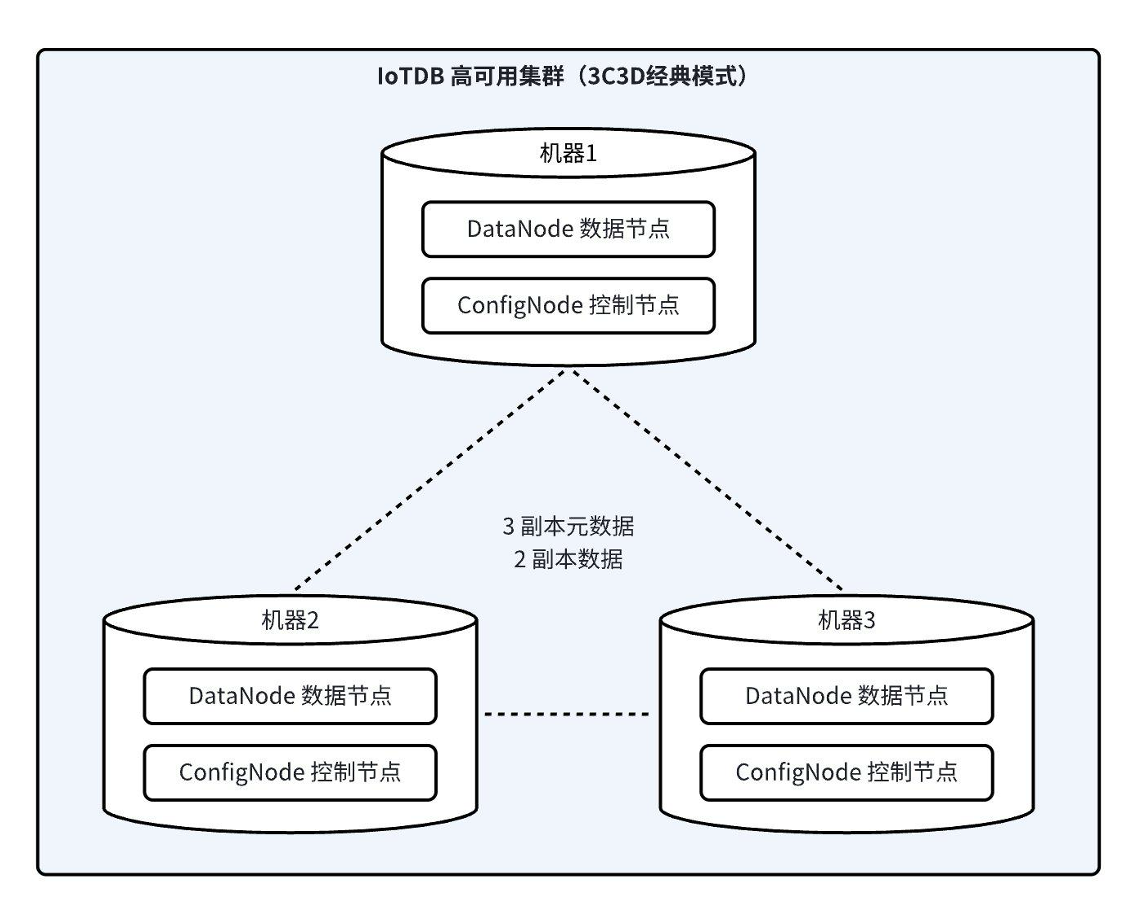
本小节将以IoTDB经典集群部署架构3C3D(3个ConfigNode和3个DataNode)为例,介绍如何部署集群,即通常所说的3C3D集群。3C3D集群架构图如下:
-
+<div align="center">
+ <img
src="https://alioss.timecho.com/docs/img/%E9%9B%86%E7%BE%A4%E9%83%A8%E7%BD%B2.png)"
alt="" style="width: 60%;"/>
+</div>
## 注意事项
@@ -38,7 +40,7 @@
1. 准备IoTDB数据库安装包
:apache-iotdb-{version}-all-bin.zip(安装包获取见:[链接](https://iotdb.apache.org/zh/UserGuide/latest/Deployment-and-Maintenance/IoTDB-Package.html))
-2.
按环境要求配置好操作系统环境(系统环境配置见:[链接](https://iotdb.apache.org/zh/UserGuide/latest/Deployment-and-Maintenance/Database-Resources.html))
+2.
按环境要求配置好操作系统环境(系统环境配置见:[链接](https://iotdb.apache.org/zh/UserGuide/latest/Deployment-and-Maintenance/Environment-Requirements.html))
## 安装步骤
diff --git
a/src/zh/UserGuide/Master/Deployment-and-Maintenance/Cluster-Deployment_timecho.md
b/src/zh/UserGuide/Master/Deployment-and-Maintenance/Cluster-Deployment_timecho.md
index 8552a02..334b671 100644
---
a/src/zh/UserGuide/Master/Deployment-and-Maintenance/Cluster-Deployment_timecho.md
+++
b/src/zh/UserGuide/Master/Deployment-and-Maintenance/Cluster-Deployment_timecho.md
@@ -22,7 +22,9 @@
本小节描述如何手动部署包括3个ConfigNode和3个DataNode的实例,即通常所说的3C3D集群。
-
+<div align="center">
+ <img
src="https://alioss.timecho.com/docs/img/%E9%9B%86%E7%BE%A4%E9%83%A8%E7%BD%B2.png";
alt="" style="width: 60%;"/>
+</div>
## 注意事项
@@ -33,14 +35,12 @@
```
2. 有些参数首次启动后不能修改,请参考下方的"参数配置"章节来进行设置。
-3. 推荐部署监控面板,可以对重要运行指标进行监控,随时掌握数据库运行状态,监控面板可以联系商务获取,
-
-
部署监控面板步骤可以参考:[监控面板部署](https://timecho.com/docs/zh/UserGuide/latest/Deployment-and-Maintenance/Monitoring-panel-deployment.html)
+3.
推荐部署监控面板,可以对重要运行指标进行监控,随时掌握数据库运行状态,监控面板可以联系商务获取,部署监控面板步骤可以参考:[监控面板部署](https://timecho.com/docs/zh/UserGuide/latest/Deployment-and-Maintenance/Monitoring-panel-deployment.html)
## 准备步骤
1. 准备IoTDB数据库安装包
:iotdb-enterprise-{version}-bin.zip(安装包获取见:[链接](https://www.timecho.com/docs/zh/UserGuide/latest/Deployment-and-Maintenance/IoTDB-Package_timecho.html))
-2.
按环境要求配置好操作系统环境(系统环境配置见:[链接](https://www.timecho.com/docs/zh/UserGuide/latest/Deployment-and-Maintenance/Database-Resources.html))
+2.
按环境要求配置好操作系统环境(系统环境配置见:[链接](https://www.timecho.com/docs/zh/UserGuide/latest/Deployment-and-Maintenance/Environment-Requirements.html))
## 安装步骤
diff --git
a/src/zh/UserGuide/latest/Deployment-and-Maintenance/Cluster-Deployment.md
b/src/zh/UserGuide/latest/Deployment-and-Maintenance/Cluster-Deployment.md
index cbb24a9..72fb055 100644
--- a/src/zh/UserGuide/latest/Deployment-and-Maintenance/Cluster-Deployment.md
+++ b/src/zh/UserGuide/latest/Deployment-and-Maintenance/Cluster-Deployment.md
@@ -22,7 +22,9 @@
本小节将以IoTDB经典集群部署架构3C3D(3个ConfigNode和3个DataNode)为例,介绍如何部署集群,即通常所说的3C3D集群。3C3D集群架构图如下:
-
+<div align="center">
+ <img
src="https://alioss.timecho.com/docs/img/%E9%9B%86%E7%BE%A4%E9%83%A8%E7%BD%B2.png";
alt="" style="width: 60%;"/>
+</div>
## 注意事项
@@ -38,7 +40,7 @@
1. 准备IoTDB数据库安装包
:apache-iotdb-{version}-all-bin.zip(安装包获取见:[链接](https://iotdb.apache.org/zh/UserGuide/latest/Deployment-and-Maintenance/IoTDB-Package.html))
-2.
按环境要求配置好操作系统环境(系统环境配置见:[链接](https://iotdb.apache.org/zh/UserGuide/latest/Deployment-and-Maintenance/Database-Resources.html))
+2.
按环境要求配置好操作系统环境(系统环境配置见:[链接](https://iotdb.apache.org/zh/UserGuide/latest/Deployment-and-Maintenance/Environment-Requirements.html))
## 安装步骤
diff --git
a/src/zh/UserGuide/latest/Deployment-and-Maintenance/Cluster-Deployment_timecho.md
b/src/zh/UserGuide/latest/Deployment-and-Maintenance/Cluster-Deployment_timecho.md
index 9101552..6ad3fd3 100644
---
a/src/zh/UserGuide/latest/Deployment-and-Maintenance/Cluster-Deployment_timecho.md
+++
b/src/zh/UserGuide/latest/Deployment-and-Maintenance/Cluster-Deployment_timecho.md
@@ -21,8 +21,9 @@
# 集群版安装部署
本小节描述如何手动部署包括3个ConfigNode和3个DataNode的实例,即通常所说的3C3D集群。
-
-
+<div align="center">
+ <img
src="https://alioss.timecho.com/docs/img/%E9%9B%86%E7%BE%A4%E9%83%A8%E7%BD%B2.png";
alt="" style="width: 60%;"/>
+</div>
## 注意事项
@@ -33,14 +34,12 @@
```
2. 有些参数首次启动后不能修改,请参考下方的"参数配置"章节来进行设置。
-3. 推荐部署监控面板,可以对重要运行指标进行监控,随时掌握数据库运行状态,监控面板可以联系商务获取,
-
-
部署监控面板步骤可以参考:[监控面板部署](https://timecho.com/docs/zh/UserGuide/latest/Deployment-and-Maintenance/Monitoring-panel-deployment.html)
+3.
推荐部署监控面板,可以对重要运行指标进行监控,随时掌握数据库运行状态,监控面板可以联系商务获取,部署监控面板步骤可以参考:[监控面板部署](https://timecho.com/docs/zh/UserGuide/latest/Deployment-and-Maintenance/Monitoring-panel-deployment.html)
## 准备步骤
1. 准备IoTDB数据库安装包
:iotdb-enterprise-{version}-bin.zip(安装包获取见:[链接](https://www.timecho.com/docs/zh/UserGuide/latest/Deployment-and-Maintenance/IoTDB-Package_timecho.html))
-2.
按环境要求配置好操作系统环境(系统环境配置见:[链接](https://www.timecho.com/docs/zh/UserGuide/latest/Deployment-and-Maintenance/Database-Resources.html))
+2.
按环境要求配置好操作系统环境(系统环境配置见:[链接](https://www.timecho.com/docs/zh/UserGuide/latest/Deployment-and-Maintenance/Environment-Requirements.html))
## 安装步骤




