This is an automated email from the ASF dual-hosted git repository.

haonan pushed a commit to branch main
in repository https://gitbox.apache.org/repos/asf/iotdb-docs.git
The following commit(s) were added to refs/heads/main by this push:
new 2ce32dd Update AINode docs (#281)
2ce32dd is described below
commit 2ce32dd0cbf5985ec598e5754585c9249c3ecbad
Author: W1y1r <[email protected]>
AuthorDate: Fri Jul 19 18:37:10 2024 +0800
Update AINode docs (#281)
---
.../Environment-Requirements.md | 2 +-
src/UserGuide/Master/User-Manual/AINode_timecho.md | 16 ++++++++--------
.../Environment-Requirements.md | 2 +-
src/UserGuide/latest/User-Manual/AINode_timecho.md | 16 ++++++++--------
.../Environment-Requirements.md | 2 +-
src/zh/UserGuide/Master/User-Manual/AINode_timecho.md | 12 ++++++------
.../Environment-Requirements.md | 2 +-
src/zh/UserGuide/latest/User-Manual/AINode_timecho.md | 12 ++++++------
8 files changed, 32 insertions(+), 32 deletions(-)
diff --git
a/src/UserGuide/Master/Deployment-and-Maintenance/Environment-Requirements.md
b/src/UserGuide/Master/Deployment-and-Maintenance/Environment-Requirements.md
index 5d442ed..86eb0e4 100644
---
a/src/UserGuide/Master/Deployment-and-Maintenance/Environment-Requirements.md
+++
b/src/UserGuide/Master/Deployment-and-Maintenance/Environment-Requirements.md
@@ -38,7 +38,7 @@ Whether in Linux or Windows, please ensure that the
installation path of IoTDB d
To use IoTDB, the system environment needs to meet the following conditions
(using the centos7 command as an example):
-1. Install Java runtime environment, Java version>=1.8, please ensure that the
jdk environment variable is set.
+1. Install Java runtime environment, Java version>=1.8, please ensure that the
jdk environment variable is set. V1.3.2.2 and above versions are recommended
to deploy JDK17 directly. In some scenarios, older versions of JDK may have
performance issues, and the datanode may not stop.
```shell
# Taking JDK-17 installation in Centos7 as an example:
diff --git a/src/UserGuide/Master/User-Manual/AINode_timecho.md
b/src/UserGuide/Master/User-Manual/AINode_timecho.md
index ddd3879..fb6ed61 100644
--- a/src/UserGuide/Master/User-Manual/AINode_timecho.md
+++ b/src/UserGuide/Master/User-Manual/AINode_timecho.md
@@ -166,9 +166,9 @@ In addition to displaying information about all models
directly, you can specify
State is used to show the current state of model registration, which consists
of the following three stages
-- **LOADING:** The corresponding model meta information has been added to the
configNode, and the model file is being transferred to the AINode node.
-- **ACTIVE:** The model has been set up and the model is in the available state
-- **DROPPING:** Model deletion is in progress, model related information is
being deleted from configNode and AINode.
+- **LOADING**: The corresponding model meta information has been added to the
configNode, and the model file is being transferred to the AINode node.
+- **ACTIVE**: The model has been set up and the model is in the available state
+- **DROPPING**: Model deletion is in progress, model related information is
being deleted from configNode and AINode.
- **UNAVAILABLE**: Model creation failed, you can delete the failed model_name
by drop model.
#### 4.2.1 Example
@@ -217,9 +217,9 @@ call
inference(<built_in_model_name>,sql[,<parameterName>=<parameterValue>])
Built-in model inference does not require a registration process, the
inference function can be used by calling the inference function through the
call keyword, and its corresponding parameters are described as follows:
-- **built_in_model_name:** built-in model name
-- **parameterName:** parameter name
-- **parameterValue:** parameter value
+- **built_in_model_name**: built-in model name
+- **parameterName**: parameter name
+- **parameterValue**: parameter value
#### 4.4.1 Built-in Models and Parameter Descriptions
@@ -293,7 +293,7 @@ window_function:
After completing the registration of the model, the inference function can be
used by calling the inference function through the call keyword, and its
corresponding parameters are described as follows:
- **model_name**: corresponds to a registered model
-- **sql**: sql query statement, the result of the query is used as input to
the model for model inference. The dimensions of the rows and columns in the
result of the query need to match the size specified in the specific model
config. (It is not recommended to use the 'SELECT *' clause for the sql here
because in IoTDB, '*' does not sort the columns, so the order of the columns is
undefined, you can use 'SELECT s0,s1' to ensure that the columns order matches
the expectations of the mode [...]
+- **sql**: sql query statement, the result of the query is used as input to
the model for model inference. The dimensions of the rows and columns in the
result of the query need to match the size specified in the specific model
config. (It is not recommended to use the `SELECT *` clause for the sql here
because in IoTDB, `*` does not sort the columns, so the order of the columns is
undefined, you can use `SELECT s0,s1` to ensure that the columns order matches
the expectations of the mode [...]
- **window_function**: Window functions that can be used in the inference
process, there are currently three types of window functions provided to assist
in model inference:
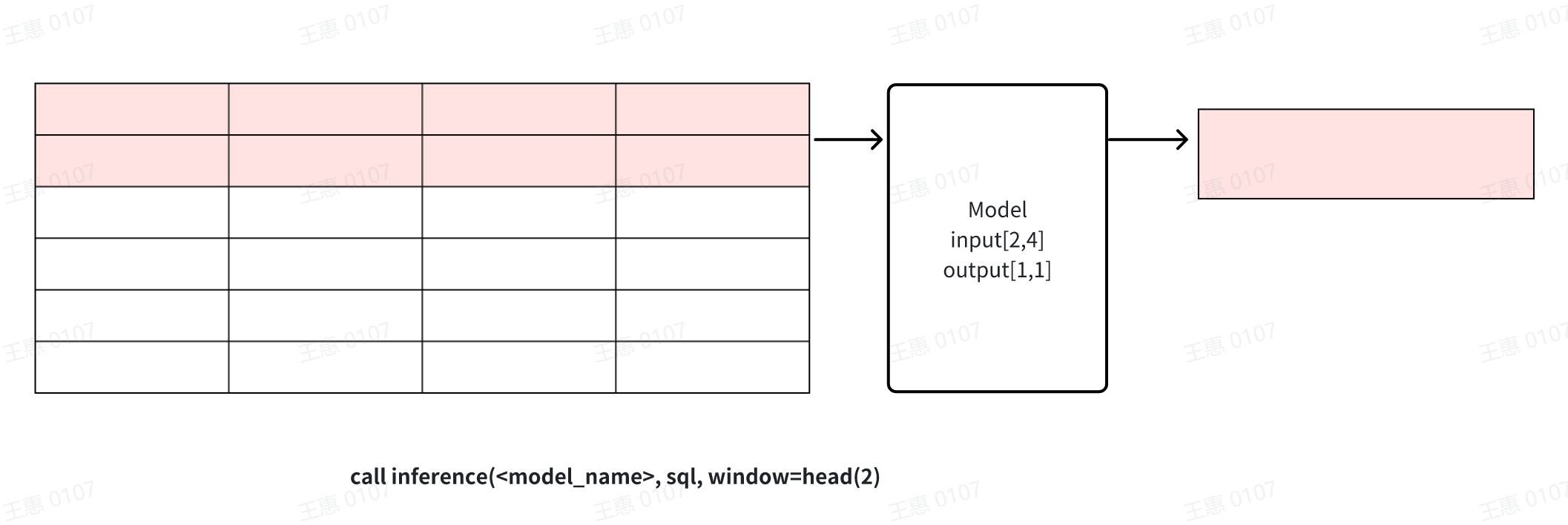
- **head(window_size)**: Get the top window_size points in the data for
model inference, this window can be used for data cropping.
@@ -301,7 +301,7 @@ After completing the registration of the model, the
inference function can be us
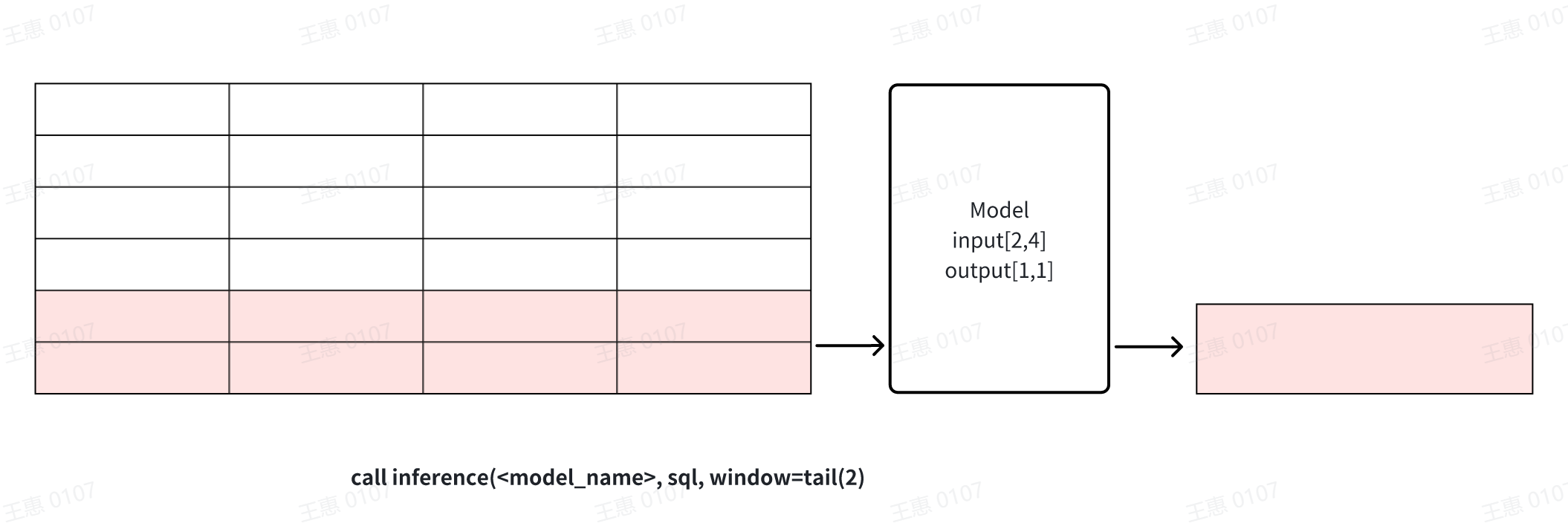
- **tail(window_size)**: get the last window_size point in the data for
model inference, this window can be used for data cropping.
- - **count(window_size, sliding_step):** sliding window based on the number
of points, the data in each window will be reasoned through the model
respectively, as shown in the example below, window_size for 2 window function
will be divided into three windows of the input dataset, and each window will
perform reasoning operations to generate results respectively. The window can
be used for continuous inference
+ - **count(window_size, sliding_step)**: sliding window based on the number
of points, the data in each window will be reasoned through the model
respectively, as shown in the example below, window_size for 2 window function
will be divided into three windows of the input dataset, and each window will
perform reasoning operations to generate results respectively. The window can
be used for continuous inference
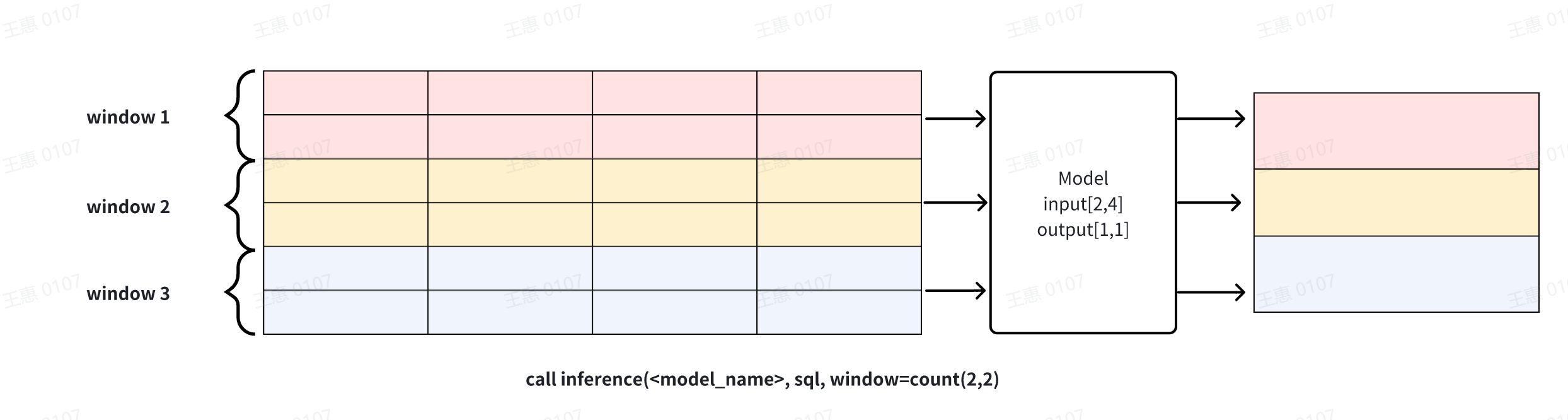
**Explanation 1**: window can be used to solve the problem of cropping rows
when the results of the sql query and the input row requirements of the model
do not match. Note that when the number of columns does not match or the number
of rows is directly less than the model requirement, the inference cannot
proceed and an error message will be returned.
diff --git
a/src/UserGuide/latest/Deployment-and-Maintenance/Environment-Requirements.md
b/src/UserGuide/latest/Deployment-and-Maintenance/Environment-Requirements.md
index 5d442ed..86eb0e4 100644
---
a/src/UserGuide/latest/Deployment-and-Maintenance/Environment-Requirements.md
+++
b/src/UserGuide/latest/Deployment-and-Maintenance/Environment-Requirements.md
@@ -38,7 +38,7 @@ Whether in Linux or Windows, please ensure that the
installation path of IoTDB d
To use IoTDB, the system environment needs to meet the following conditions
(using the centos7 command as an example):
-1. Install Java runtime environment, Java version>=1.8, please ensure that the
jdk environment variable is set.
+1. Install Java runtime environment, Java version>=1.8, please ensure that the
jdk environment variable is set. V1.3.2.2 and above versions are recommended
to deploy JDK17 directly. In some scenarios, older versions of JDK may have
performance issues, and the datanode may not stop.
```shell
# Taking JDK-17 installation in Centos7 as an example:
diff --git a/src/UserGuide/latest/User-Manual/AINode_timecho.md
b/src/UserGuide/latest/User-Manual/AINode_timecho.md
index ddd3879..fb6ed61 100644
--- a/src/UserGuide/latest/User-Manual/AINode_timecho.md
+++ b/src/UserGuide/latest/User-Manual/AINode_timecho.md
@@ -166,9 +166,9 @@ In addition to displaying information about all models
directly, you can specify
State is used to show the current state of model registration, which consists
of the following three stages
-- **LOADING:** The corresponding model meta information has been added to the
configNode, and the model file is being transferred to the AINode node.
-- **ACTIVE:** The model has been set up and the model is in the available state
-- **DROPPING:** Model deletion is in progress, model related information is
being deleted from configNode and AINode.
+- **LOADING**: The corresponding model meta information has been added to the
configNode, and the model file is being transferred to the AINode node.
+- **ACTIVE**: The model has been set up and the model is in the available state
+- **DROPPING**: Model deletion is in progress, model related information is
being deleted from configNode and AINode.
- **UNAVAILABLE**: Model creation failed, you can delete the failed model_name
by drop model.
#### 4.2.1 Example
@@ -217,9 +217,9 @@ call
inference(<built_in_model_name>,sql[,<parameterName>=<parameterValue>])
Built-in model inference does not require a registration process, the
inference function can be used by calling the inference function through the
call keyword, and its corresponding parameters are described as follows:
-- **built_in_model_name:** built-in model name
-- **parameterName:** parameter name
-- **parameterValue:** parameter value
+- **built_in_model_name**: built-in model name
+- **parameterName**: parameter name
+- **parameterValue**: parameter value
#### 4.4.1 Built-in Models and Parameter Descriptions
@@ -293,7 +293,7 @@ window_function:
After completing the registration of the model, the inference function can be
used by calling the inference function through the call keyword, and its
corresponding parameters are described as follows:
- **model_name**: corresponds to a registered model
-- **sql**: sql query statement, the result of the query is used as input to
the model for model inference. The dimensions of the rows and columns in the
result of the query need to match the size specified in the specific model
config. (It is not recommended to use the 'SELECT *' clause for the sql here
because in IoTDB, '*' does not sort the columns, so the order of the columns is
undefined, you can use 'SELECT s0,s1' to ensure that the columns order matches
the expectations of the mode [...]
+- **sql**: sql query statement, the result of the query is used as input to
the model for model inference. The dimensions of the rows and columns in the
result of the query need to match the size specified in the specific model
config. (It is not recommended to use the `SELECT *` clause for the sql here
because in IoTDB, `*` does not sort the columns, so the order of the columns is
undefined, you can use `SELECT s0,s1` to ensure that the columns order matches
the expectations of the mode [...]
- **window_function**: Window functions that can be used in the inference
process, there are currently three types of window functions provided to assist
in model inference:
- **head(window_size)**: Get the top window_size points in the data for
model inference, this window can be used for data cropping.

@@ -301,7 +301,7 @@ After completing the registration of the model, the
inference function can be us
- **tail(window_size)**: get the last window_size point in the data for
model inference, this window can be used for data cropping.

- - **count(window_size, sliding_step):** sliding window based on the number
of points, the data in each window will be reasoned through the model
respectively, as shown in the example below, window_size for 2 window function
will be divided into three windows of the input dataset, and each window will
perform reasoning operations to generate results respectively. The window can
be used for continuous inference
+ - **count(window_size, sliding_step)**: sliding window based on the number
of points, the data in each window will be reasoned through the model
respectively, as shown in the example below, window_size for 2 window function
will be divided into three windows of the input dataset, and each window will
perform reasoning operations to generate results respectively. The window can
be used for continuous inference

**Explanation 1**: window can be used to solve the problem of cropping rows
when the results of the sql query and the input row requirements of the model
do not match. Note that when the number of columns does not match or the number
of rows is directly less than the model requirement, the inference cannot
proceed and an error message will be returned.
diff --git
a/src/zh/UserGuide/Master/Deployment-and-Maintenance/Environment-Requirements.md
b/src/zh/UserGuide/Master/Deployment-and-Maintenance/Environment-Requirements.md
index 8c3e4f2..122d8ac 100644
---
a/src/zh/UserGuide/Master/Deployment-and-Maintenance/Environment-Requirements.md
+++
b/src/zh/UserGuide/Master/Deployment-and-Maintenance/Environment-Requirements.md
@@ -38,7 +38,7 @@ IoTDB 支持 Linux、Windows、MacOS 等操作系统,同时企业版支持龙
要使用 IoTDB,需要系统环境具备以下条件(以 centos7 命令为例):
-1. 安装 Java 运行环境 ,Java 版本 >= 1.8,请确保已设置 jdk 环境变量。
+1. 安装 Java 运行环境 ,Java 版本 >= 1.8,请确保已设置 jdk 环境变量。 V1.3.2.2
及之上版本推荐直接部署JDK17,老版本JDK部分场景下性能有问题,且datanode会出现stop不掉的问题。
```shell
#下面以在centos7,使用JDK-17安装为例:
diff --git a/src/zh/UserGuide/Master/User-Manual/AINode_timecho.md
b/src/zh/UserGuide/Master/User-Manual/AINode_timecho.md
index 22f9d89..e592a0a 100644
--- a/src/zh/UserGuide/Master/User-Manual/AINode_timecho.md
+++ b/src/zh/UserGuide/Master/User-Manual/AINode_timecho.md
@@ -165,9 +165,9 @@ show models <model_name>
其中,State用于展示当前模型注册的状态,包含以下三个阶段
-- **LOADING:**已经在configNode中添加对应的模型元信息,正将模型文件传输到AINode节点上
+- **LOADING**:已经在configNode中添加对应的模型元信息,正将模型文件传输到AINode节点上
- **ACTIVE:** 模型已经设置完成,模型处于可用状态
-- **DROPPING:**模型删除中,正在从configNode以及AINode处删除模型相关信息
+- **DROPPING**:模型删除中,正在从configNode以及AINode处删除模型相关信息
- **UNAVAILABLE**: 模型创建失败,可以通过drop model删除创建失败的model_name。
#### 4.2.1 示例
@@ -217,8 +217,8 @@ call
inference(<built_in_model_name>,sql[,<parameterName>=<parameterValue>])
内置模型推理无需注册流程,通过call关键字,调用inference函数就可以使用模型的推理功能,其对应的参数介绍如下:
- **built_in_model_name:** 内置模型名称
-- **parameterName:**参数名
-- **parameterValue:**参数值
+- **parameterName**:参数名
+- **parameterValue**:参数值
#### 4.4.1 内置模型及参数说明
@@ -291,7 +291,7 @@ window_function:
在完成模型的注册后,通过call关键字,调用inference函数就可以使用模型的推理功能,其对应的参数介绍如下:
- **model_name**: 对应一个已经注册的模型
--
**sql**:sql查询语句,查询的结果作为模型的输入进行模型推理。查询的结果中行列的维度需要与具体模型config中指定的大小相匹配。(这里的sql不建议使用‘SELECT
*’子句,因为在IoTDB中,‘*’并不会对列进行排序,因此列的顺序是未定义的,可以使用'SELECT s0,s1'的方式确保列的顺序符合模型输入的预期)
+-
**sql**:sql查询语句,查询的结果作为模型的输入进行模型推理。查询的结果中行列的维度需要与具体模型config中指定的大小相匹配。(这里的sql不建议使用`SELECT
*`子句,因为在IoTDB中,`*`并不会对列进行排序,因此列的顺序是未定义的,可以使用`SELECT s0,s1`的方式确保列的顺序符合模型输入的预期)
- **window_function**: 推理过程中可以使用的窗口函数,目前提供三种类型的窗口函数用于辅助模型推理:
- **head(window_size)**: 获取数据中最前的window_size个点用于模型推理,该窗口可用于数据裁剪

@@ -299,7 +299,7 @@ window_function:
- **tail(window_size)**:获取数据中最后的window_size个点用于模型推,该窗口可用于数据裁剪

- - **count(window_size,
sliding_step):**基于点数的滑动窗口,每个窗口的数据会分别通过模型进行推理,如下图示例所示,window_size为2的窗口函数将输入数据集分为三个窗口,每个窗口分别进行推理运算生成结果。该窗口可用于连续推理
+ - **count(window_size,
sliding_step)**:基于点数的滑动窗口,每个窗口的数据会分别通过模型进行推理,如下图示例所示,window_size为2的窗口函数将输入数据集分为三个窗口,每个窗口分别进行推理运算生成结果。该窗口可用于连续推理

**说明1:
window可以用来解决sql查询结果和模型的输入行数要求不一致时的问题,对行进行裁剪。需要注意的是,当列数不匹配或是行数直接少于模型需求时,推理无法进行,会返回错误信息。**
diff --git
a/src/zh/UserGuide/latest/Deployment-and-Maintenance/Environment-Requirements.md
b/src/zh/UserGuide/latest/Deployment-and-Maintenance/Environment-Requirements.md
index 283b5c1..94c1a35 100644
---
a/src/zh/UserGuide/latest/Deployment-and-Maintenance/Environment-Requirements.md
+++
b/src/zh/UserGuide/latest/Deployment-and-Maintenance/Environment-Requirements.md
@@ -38,7 +38,7 @@ IoTDB 支持 Linux、Windows、MacOS 等操作系统,同时企业版支持龙
要使用 IoTDB,需要系统环境具备以下条件(以 centos7 命令为例):
-1. 安装 Java 运行环境 ,Java 版本 >= 1.8,请确保已设置 jdk 环境变量。
+1. 安装 Java 运行环境 ,Java 版本 >= 1.8,请确保已设置 jdk 环境变量。 V1.3.2.2
及之上版本推荐直接部署JDK17,老版本JDK部分场景下性能有问题,且datanode会出现stop不掉的问题。
```shell
#下面以在centos7,使用JDK-17安装为例:
diff --git a/src/zh/UserGuide/latest/User-Manual/AINode_timecho.md
b/src/zh/UserGuide/latest/User-Manual/AINode_timecho.md
index 22f9d89..e592a0a 100644
--- a/src/zh/UserGuide/latest/User-Manual/AINode_timecho.md
+++ b/src/zh/UserGuide/latest/User-Manual/AINode_timecho.md
@@ -165,9 +165,9 @@ show models <model_name>
其中,State用于展示当前模型注册的状态,包含以下三个阶段
-- **LOADING:**已经在configNode中添加对应的模型元信息,正将模型文件传输到AINode节点上
+- **LOADING**:已经在configNode中添加对应的模型元信息,正将模型文件传输到AINode节点上
- **ACTIVE:** 模型已经设置完成,模型处于可用状态
-- **DROPPING:**模型删除中,正在从configNode以及AINode处删除模型相关信息
+- **DROPPING**:模型删除中,正在从configNode以及AINode处删除模型相关信息
- **UNAVAILABLE**: 模型创建失败,可以通过drop model删除创建失败的model_name。
#### 4.2.1 示例
@@ -217,8 +217,8 @@ call
inference(<built_in_model_name>,sql[,<parameterName>=<parameterValue>])
内置模型推理无需注册流程,通过call关键字,调用inference函数就可以使用模型的推理功能,其对应的参数介绍如下:
- **built_in_model_name:** 内置模型名称
-- **parameterName:**参数名
-- **parameterValue:**参数值
+- **parameterName**:参数名
+- **parameterValue**:参数值
#### 4.4.1 内置模型及参数说明
@@ -291,7 +291,7 @@ window_function:
在完成模型的注册后,通过call关键字,调用inference函数就可以使用模型的推理功能,其对应的参数介绍如下:
- **model_name**: 对应一个已经注册的模型
--
**sql**:sql查询语句,查询的结果作为模型的输入进行模型推理。查询的结果中行列的维度需要与具体模型config中指定的大小相匹配。(这里的sql不建议使用‘SELECT
*’子句,因为在IoTDB中,‘*’并不会对列进行排序,因此列的顺序是未定义的,可以使用'SELECT s0,s1'的方式确保列的顺序符合模型输入的预期)
+-
**sql**:sql查询语句,查询的结果作为模型的输入进行模型推理。查询的结果中行列的维度需要与具体模型config中指定的大小相匹配。(这里的sql不建议使用`SELECT
*`子句,因为在IoTDB中,`*`并不会对列进行排序,因此列的顺序是未定义的,可以使用`SELECT s0,s1`的方式确保列的顺序符合模型输入的预期)
- **window_function**: 推理过程中可以使用的窗口函数,目前提供三种类型的窗口函数用于辅助模型推理:
- **head(window_size)**: 获取数据中最前的window_size个点用于模型推理,该窗口可用于数据裁剪

@@ -299,7 +299,7 @@ window_function:
- **tail(window_size)**:获取数据中最后的window_size个点用于模型推,该窗口可用于数据裁剪

- - **count(window_size,
sliding_step):**基于点数的滑动窗口,每个窗口的数据会分别通过模型进行推理,如下图示例所示,window_size为2的窗口函数将输入数据集分为三个窗口,每个窗口分别进行推理运算生成结果。该窗口可用于连续推理
+ - **count(window_size,
sliding_step)**:基于点数的滑动窗口,每个窗口的数据会分别通过模型进行推理,如下图示例所示,window_size为2的窗口函数将输入数据集分为三个窗口,每个窗口分别进行推理运算生成结果。该窗口可用于连续推理

**说明1:
window可以用来解决sql查询结果和模型的输入行数要求不一致时的问题,对行进行裁剪。需要注意的是,当列数不匹配或是行数直接少于模型需求时,推理无法进行,会返回错误信息。**



