This is an automated email from the ASF dual-hosted git repository.

caogaofei pushed a commit to branch main
in repository https://gitbox.apache.org/repos/asf/iotdb-docs.git
The following commit(s) were added to refs/heads/main by this push:
new 5098311 Add dual active deployment document
5098311 is described below
commit 50983111cdb4f7ee088a6310da4b6292bb44d91b
Author: majialin <[email protected]>
AuthorDate: Wed Jul 31 11:30:33 2024 +0800
Add dual active deployment document
---
src/.vuepress/sidebar_timecho/V1.3.x/en.ts | 1 +
src/.vuepress/sidebar_timecho/V1.3.x/zh.ts | 1 +
.../Dual-Active-Deployment_timecho.md | 164 +++++++++++++++++++++
.../Dual-Active-Deployment_timecho.md | 164 +++++++++++++++++++++
.../Stand-Alone-Deployment_timecho.md | 2 +-
.../Dual-Active-Deployment_timecho.md | 163 ++++++++++++++++++++
.../Dual-Active-Deployment_timecho.md | 163 ++++++++++++++++++++
7 files changed, 657 insertions(+), 1 deletion(-)
diff --git a/src/.vuepress/sidebar_timecho/V1.3.x/en.ts
b/src/.vuepress/sidebar_timecho/V1.3.x/en.ts
index ab32a70..f91e797 100644
--- a/src/.vuepress/sidebar_timecho/V1.3.x/en.ts
+++ b/src/.vuepress/sidebar_timecho/V1.3.x/en.ts
@@ -72,6 +72,7 @@ export const enSidebar = {
{ text: 'Environment Requirements', link: 'Environment-Requirements' },
{ text: 'Stand-Alone Deployment', link:
'Stand-Alone-Deployment_timecho' },
{ text: 'Cluster Deployment', link: 'Cluster-Deployment_timecho' },
+ { text: 'Dual Active Deployment', link:
'Dual-Active-Deployment_timecho' },
{ text: 'Docker Install', link: 'Docker-Install' },
{ text: 'AINode Deployment', link: 'AINode_Deployment' },
{ text: 'Monitoring Panel Deployment', link:
'Monitoring-panel-deployment' },
diff --git a/src/.vuepress/sidebar_timecho/V1.3.x/zh.ts
b/src/.vuepress/sidebar_timecho/V1.3.x/zh.ts
index 0ee45f6..ba80e86 100644
--- a/src/.vuepress/sidebar_timecho/V1.3.x/zh.ts
+++ b/src/.vuepress/sidebar_timecho/V1.3.x/zh.ts
@@ -72,6 +72,7 @@ export const zhSidebar = {
{ text: '环境要求', link: 'Environment-Requirements' },
{ text: '单机版部署', link: 'Stand-Alone-Deployment_timecho' },
{ text: '集群版部署', link: 'Cluster-Deployment_timecho' },
+ { text: '双活版部署', link: 'Dual-Active-Deployment_timecho' },
{ text: 'docker部署', link: 'Docker-Install' },
{ text: 'AINode部署', link: 'AINode_Deployment' },
{ text: '工具部署(监控面板)', link: 'Monitoring-panel-deployment' },
diff --git
a/src/UserGuide/Master/Deployment-and-Maintenance/Dual-Active-Deployment_timecho.md
b/src/UserGuide/Master/Deployment-and-Maintenance/Dual-Active-Deployment_timecho.md
new file mode 100644
index 0000000..eab5591
--- /dev/null
+++
b/src/UserGuide/Master/Deployment-and-Maintenance/Dual-Active-Deployment_timecho.md
@@ -0,0 +1,164 @@
+<!--
+
+ Licensed to the Apache Software Foundation (ASF) under one
+ or more contributor license agreements. See the NOTICE file
+ distributed with this work for additional information
+ regarding copyright ownership. The ASF licenses this file
+ to you under the Apache License, Version 2.0 (the
+ "License"); you may not use this file except in compliance
+ with the License. You may obtain a copy of the License at
+
+ http://www.apache.org/licenses/LICENSE-2.0
+
+ Unless required by applicable law or agreed to in writing,
+ software distributed under the License is distributed on an
+ "AS IS" BASIS, WITHOUT WARRANTIES OR CONDITIONS OF ANY
+ KIND, either express or implied. See the License for the
+ specific language governing permissions and limitations
+ under the License.
+
+-->
+# Dual Active Deployment
+
+## What is a double active version?
+
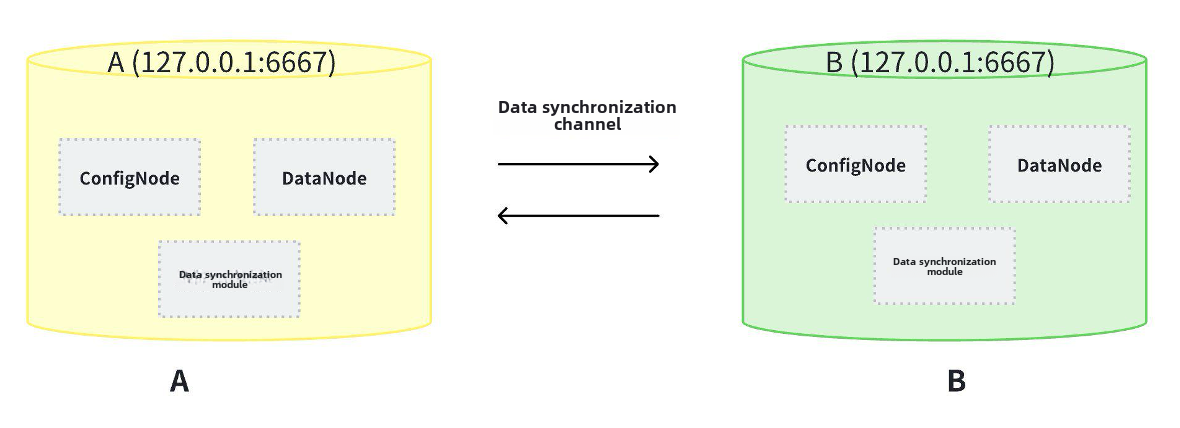
+Dual active usually refers to two independent machines (or clusters) that
perform real-time mirror synchronization. Their configurations are completely
independent and can simultaneously receive external writes. Each independent
machine (or cluster) can synchronize the data written to itself to another
machine (or cluster), and the data of the two machines (or clusters) can
achieve final consistency.
+
+- Two standalone machines (or clusters) can form a high availability group:
when one of the standalone machines (or clusters) stops serving, the other
standalone machine (or cluster) will not be affected. When the single machine
(or cluster) that stopped the service is restarted, another single machine (or
cluster) will synchronize the newly written data. Business can be bound to two
standalone machines (or clusters) for read and write operations, thereby
achieving high availability.
+- The dual active deployment scheme allows for high availability with fewer
than 3 physical nodes and has certain advantages in deployment costs. At the
same time, the physical supply isolation of two sets of single machines (or
clusters) can be achieved through the dual ring network of power and network,
ensuring the stability of operation.
+- At present, the dual active capability is a feature of the enterprise
version.
+
+
+
+## Note
+
+1. It is recommended to prioritize using `hostname` for IP configuration
during deployment to avoid the problem of database failure caused by modifying
the host IP in the later stage. To set the hostname, you need to configure
`/etc/hosts` on the target server. If the local IP is 192.168.1.3 and the
hostname is iotdb-1, you can use the following command to set the server's
hostname and configure IoTDB's `cn_internal-address` and` dn_internal-address`
using the hostname.
+
+ ```Bash
+ echo "192.168.1.3 iotdb-1" >> /etc/hosts
+ ```
+
+2. Some parameters cannot be modified after the first startup, please refer to
the "Installation Steps" section below to set them.
+
+3. Recommend deploying a monitoring panel, which can monitor important
operational indicators and keep track of database operation status at any time.
The monitoring panel can be obtained by contacting the business department. The
steps for deploying the monitoring panel can be referred to [Monitoring Panel
Deployment](https://www.timecho.com/docs/UserGuide/latest/Deployment-and-Maintenance/Monitoring-panel-deployment.html)
+
+## Installation Steps
+
+Taking the dual active version IoTDB built by two single machines A and B as
an example, the IP addresses of A and B are 192.168.1.3 and 192.168.1.4,
respectively. Here, we use hostname to represent different hosts. The plan is
as follows:
+
+| Machine | Machine IP | Host Name |
+| ------- | ----------- | --------- |
+| A | 192.168.1.3 | iotdb-1 |
+| B | 192.168.1.4 | iotdb-2 |
+
+### Step1:Install Two Independent IoTDBs Separately
+
+Install IoTDB on two machines separately, and refer to the deployment
documentation for the standalone version [Stand-Alone
Deployment](https://www.timecho.com/docs/UserGuide/latest/Deployment-and-Maintenance/Stand-Alone-Deployment_timecho.html),The
deployment document for the cluster version can be referred to [Cluster
Deployment](https://www.timecho.com/docs/UserGuide/latest/Deployment-and-Maintenance/Cluster-Deployment_timecho.html)。**It
is recommended that the configurations of clust [...]
+
+### Step2:Create A Aata Synchronization Task On Machine A To Machine B
+
+- Create a data synchronization process on machine A, where the data on
machine A is automatically synchronized to machine B. Use the cli tool in the
sbin directory to connect to the IoTDB database on machine A:
+
+ ```Bash
+ ./sbin/start-cli.sh -h iotdb-1
+ ```
+
+- Create and start the data synchronization command with the following SQL:
+
+ ```Bash
+ create pipe AB
+ with source (
+ 'source.forwarding-pipe-requests' = 'false'
+ )
+ with sink (
+ 'sink'='iotdb-thrift-sink',
+ 'sink.ip'='iotdb-2',
+ 'sink.port'='6667'
+ )
+ ```
+
+- Note: To avoid infinite data loops, it is necessary to set the parameter
`source. forwarding pipe questions` on both A and B to `false`, indicating that
data transmitted from another pipe will not be forwarded.
+
+### Step3:Create A Data Synchronization Task On Machine B To Machine A
+
+- Create a data synchronization process on machine B, where the data on
machine B is automatically synchronized to machine A. Use the cli tool in the
sbin directory to connect to the IoTDB database on machine B
+
+ ```Bash
+ ./sbin/start-cli.sh -h iotdb-2
+ ```
+
+ Create and start the pipe with the following SQL:
+
+ ```Bash
+ create pipe BA
+ with source (
+ 'source.forwarding-pipe-requests' = 'false'
+ )
+ with sink (
+ 'sink'='iotdb-thrift-sink',
+ 'sink.ip'='iotdb-1',
+ 'sink.port'='6667'
+ )
+ ```
+
+- Note: To avoid infinite data loops, it is necessary to set the parameter
`source. forwarding pipe questions` on both A and B to `false` , indicating
that data transmitted from another pipe will not be forwarded.
+
+### Step4:Validate Deployment
+
+After the above data synchronization process is created, the dual active
cluster can be started.
+
+#### Check the running status of the cluster
+
+```Bash
+#Execute the show cluster command on two nodes respectively to check the
status of IoTDB service
+show cluster
+```
+
+**Machine A**:
+
+
+
+**Machine B**:
+
+
+
+Ensure that every Configurable Node and DataNode is in the Running state.
+
+#### Check synchronization status
+
+- Check the synchronization status on machine A
+
+```Bash
+show pipes
+```
+
+
+
+- Check the synchronization status on machine B
+
+```Bash
+show pipes
+```
+
+
+
+Ensure that every pipe is in the RUNNING state.
+
+### Step5:Stop Dual Active Version IoTDB
+
+- Execute the following command on machine A:
+
+ ```SQL
+ ./sbin/start-cli.sh -h iotdb-1 #Log in to CLI
+ IoTDB> stop pipe AB #Stop the data synchronization process
+ ./sbin/stop-standalone.sh #Stop database service
+ ```
+
+- Execute the following command on machine B:
+
+ ```SQL
+ ./sbin/start-cli.sh -h iotdb-2 #Log in to CLI
+ IoTDB> stop pipe BA #Stop the data synchronization process
+ ./sbin/stop-standalone.sh #Stop database service
+ ```
+
diff --git
a/src/UserGuide/latest/Deployment-and-Maintenance/Dual-Active-Deployment_timecho.md
b/src/UserGuide/latest/Deployment-and-Maintenance/Dual-Active-Deployment_timecho.md
new file mode 100644
index 0000000..eab5591
--- /dev/null
+++
b/src/UserGuide/latest/Deployment-and-Maintenance/Dual-Active-Deployment_timecho.md
@@ -0,0 +1,164 @@
+<!--
+
+ Licensed to the Apache Software Foundation (ASF) under one
+ or more contributor license agreements. See the NOTICE file
+ distributed with this work for additional information
+ regarding copyright ownership. The ASF licenses this file
+ to you under the Apache License, Version 2.0 (the
+ "License"); you may not use this file except in compliance
+ with the License. You may obtain a copy of the License at
+
+ http://www.apache.org/licenses/LICENSE-2.0
+
+ Unless required by applicable law or agreed to in writing,
+ software distributed under the License is distributed on an
+ "AS IS" BASIS, WITHOUT WARRANTIES OR CONDITIONS OF ANY
+ KIND, either express or implied. See the License for the
+ specific language governing permissions and limitations
+ under the License.
+
+-->
+# Dual Active Deployment
+
+## What is a double active version?
+
+Dual active usually refers to two independent machines (or clusters) that
perform real-time mirror synchronization. Their configurations are completely
independent and can simultaneously receive external writes. Each independent
machine (or cluster) can synchronize the data written to itself to another
machine (or cluster), and the data of the two machines (or clusters) can
achieve final consistency.
+
+- Two standalone machines (or clusters) can form a high availability group:
when one of the standalone machines (or clusters) stops serving, the other
standalone machine (or cluster) will not be affected. When the single machine
(or cluster) that stopped the service is restarted, another single machine (or
cluster) will synchronize the newly written data. Business can be bound to two
standalone machines (or clusters) for read and write operations, thereby
achieving high availability.
+- The dual active deployment scheme allows for high availability with fewer
than 3 physical nodes and has certain advantages in deployment costs. At the
same time, the physical supply isolation of two sets of single machines (or
clusters) can be achieved through the dual ring network of power and network,
ensuring the stability of operation.
+- At present, the dual active capability is a feature of the enterprise
version.
+
+
+
+## Note
+
+1. It is recommended to prioritize using `hostname` for IP configuration
during deployment to avoid the problem of database failure caused by modifying
the host IP in the later stage. To set the hostname, you need to configure
`/etc/hosts` on the target server. If the local IP is 192.168.1.3 and the
hostname is iotdb-1, you can use the following command to set the server's
hostname and configure IoTDB's `cn_internal-address` and` dn_internal-address`
using the hostname.
+
+ ```Bash
+ echo "192.168.1.3 iotdb-1" >> /etc/hosts
+ ```
+
+2. Some parameters cannot be modified after the first startup, please refer to
the "Installation Steps" section below to set them.
+
+3. Recommend deploying a monitoring panel, which can monitor important
operational indicators and keep track of database operation status at any time.
The monitoring panel can be obtained by contacting the business department. The
steps for deploying the monitoring panel can be referred to [Monitoring Panel
Deployment](https://www.timecho.com/docs/UserGuide/latest/Deployment-and-Maintenance/Monitoring-panel-deployment.html)
+
+## Installation Steps
+
+Taking the dual active version IoTDB built by two single machines A and B as
an example, the IP addresses of A and B are 192.168.1.3 and 192.168.1.4,
respectively. Here, we use hostname to represent different hosts. The plan is
as follows:
+
+| Machine | Machine IP | Host Name |
+| ------- | ----------- | --------- |
+| A | 192.168.1.3 | iotdb-1 |
+| B | 192.168.1.4 | iotdb-2 |
+
+### Step1:Install Two Independent IoTDBs Separately
+
+Install IoTDB on two machines separately, and refer to the deployment
documentation for the standalone version [Stand-Alone
Deployment](https://www.timecho.com/docs/UserGuide/latest/Deployment-and-Maintenance/Stand-Alone-Deployment_timecho.html),The
deployment document for the cluster version can be referred to [Cluster
Deployment](https://www.timecho.com/docs/UserGuide/latest/Deployment-and-Maintenance/Cluster-Deployment_timecho.html)。**It
is recommended that the configurations of clust [...]
+
+### Step2:Create A Aata Synchronization Task On Machine A To Machine B
+
+- Create a data synchronization process on machine A, where the data on
machine A is automatically synchronized to machine B. Use the cli tool in the
sbin directory to connect to the IoTDB database on machine A:
+
+ ```Bash
+ ./sbin/start-cli.sh -h iotdb-1
+ ```
+
+- Create and start the data synchronization command with the following SQL:
+
+ ```Bash
+ create pipe AB
+ with source (
+ 'source.forwarding-pipe-requests' = 'false'
+ )
+ with sink (
+ 'sink'='iotdb-thrift-sink',
+ 'sink.ip'='iotdb-2',
+ 'sink.port'='6667'
+ )
+ ```
+
+- Note: To avoid infinite data loops, it is necessary to set the parameter
`source. forwarding pipe questions` on both A and B to `false`, indicating that
data transmitted from another pipe will not be forwarded.
+
+### Step3:Create A Data Synchronization Task On Machine B To Machine A
+
+- Create a data synchronization process on machine B, where the data on
machine B is automatically synchronized to machine A. Use the cli tool in the
sbin directory to connect to the IoTDB database on machine B
+
+ ```Bash
+ ./sbin/start-cli.sh -h iotdb-2
+ ```
+
+ Create and start the pipe with the following SQL:
+
+ ```Bash
+ create pipe BA
+ with source (
+ 'source.forwarding-pipe-requests' = 'false'
+ )
+ with sink (
+ 'sink'='iotdb-thrift-sink',
+ 'sink.ip'='iotdb-1',
+ 'sink.port'='6667'
+ )
+ ```
+
+- Note: To avoid infinite data loops, it is necessary to set the parameter
`source. forwarding pipe questions` on both A and B to `false` , indicating
that data transmitted from another pipe will not be forwarded.
+
+### Step4:Validate Deployment
+
+After the above data synchronization process is created, the dual active
cluster can be started.
+
+#### Check the running status of the cluster
+
+```Bash
+#Execute the show cluster command on two nodes respectively to check the
status of IoTDB service
+show cluster
+```
+
+**Machine A**:
+
+
+
+**Machine B**:
+
+
+
+Ensure that every Configurable Node and DataNode is in the Running state.
+
+#### Check synchronization status
+
+- Check the synchronization status on machine A
+
+```Bash
+show pipes
+```
+
+
+
+- Check the synchronization status on machine B
+
+```Bash
+show pipes
+```
+
+
+
+Ensure that every pipe is in the RUNNING state.
+
+### Step5:Stop Dual Active Version IoTDB
+
+- Execute the following command on machine A:
+
+ ```SQL
+ ./sbin/start-cli.sh -h iotdb-1 #Log in to CLI
+ IoTDB> stop pipe AB #Stop the data synchronization process
+ ./sbin/stop-standalone.sh #Stop database service
+ ```
+
+- Execute the following command on machine B:
+
+ ```SQL
+ ./sbin/start-cli.sh -h iotdb-2 #Log in to CLI
+ IoTDB> stop pipe BA #Stop the data synchronization process
+ ./sbin/stop-standalone.sh #Stop database service
+ ```
+
diff --git
a/src/UserGuide/latest/Deployment-and-Maintenance/Stand-Alone-Deployment_timecho.md
b/src/UserGuide/latest/Deployment-and-Maintenance/Stand-Alone-Deployment_timecho.md
index 07672c5..d05457c 100644
---
a/src/UserGuide/latest/Deployment-and-Maintenance/Stand-Alone-Deployment_timecho.md
+++
b/src/UserGuide/latest/Deployment-and-Maintenance/Stand-Alone-Deployment_timecho.md
@@ -18,7 +18,7 @@
under the License.
-->
-## Stand-Alone Deployment
+# Stand-Alone Deployment
This chapter will introduce how to start an IoTDB standalone instance, which
includes 1 ConfigNode and 1 DataNode (commonly known as 1C1D).
diff --git
a/src/zh/UserGuide/Master/Deployment-and-Maintenance/Dual-Active-Deployment_timecho.md
b/src/zh/UserGuide/Master/Deployment-and-Maintenance/Dual-Active-Deployment_timecho.md
new file mode 100644
index 0000000..bff2560
--- /dev/null
+++
b/src/zh/UserGuide/Master/Deployment-and-Maintenance/Dual-Active-Deployment_timecho.md
@@ -0,0 +1,163 @@
+<!--
+
+ Licensed to the Apache Software Foundation (ASF) under one
+ or more contributor license agreements. See the NOTICE file
+ distributed with this work for additional information
+ regarding copyright ownership. The ASF licenses this file
+ to you under the Apache License, Version 2.0 (the
+ "License"); you may not use this file except in compliance
+ with the License. You may obtain a copy of the License at
+
+ http://www.apache.org/licenses/LICENSE-2.0
+
+ Unless required by applicable law or agreed to in writing,
+ software distributed under the License is distributed on an
+ "AS IS" BASIS, WITHOUT WARRANTIES OR CONDITIONS OF ANY
+ KIND, either express or implied. See the License for the
+ specific language governing permissions and limitations
+ under the License.
+
+-->
+# 双活版部署
+
+## 什么是双活版?
+
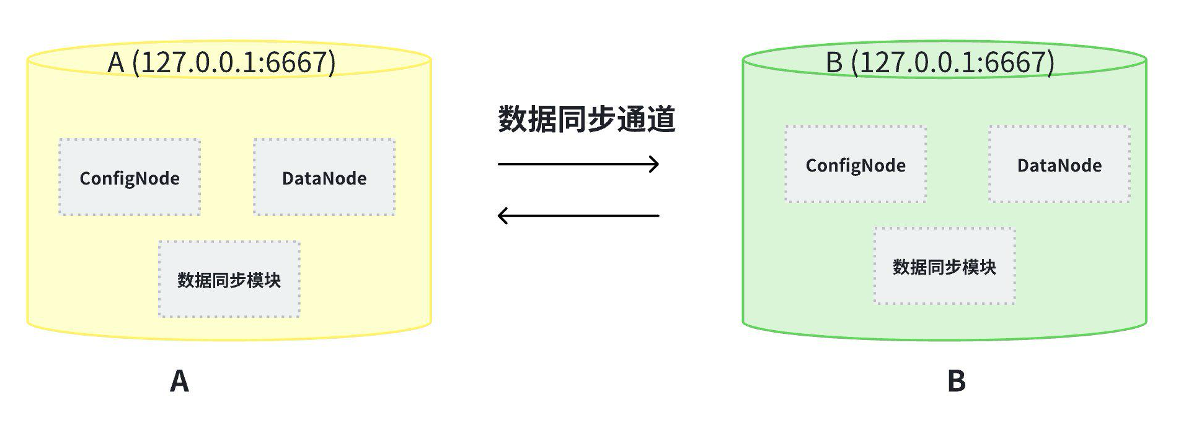
+双活通常是指两个独立的单机(或集群),实时进行镜像同步,它们的配置完全独立,可以同时接收外界的写入,每一个独立的单机(或集群)都可以将写入到自己的数据同步到另一个单机(或集群)中,两个单机(或集群)的数据可达到最终一致。
+
+-
两个单机(或集群)可构成一个高可用组:当其中一个单机(或集群)停止服务时,另一个单机(或集群)不会受到影响。当停止服务的单机(或集群)再次启动时,另一个单机(或集群)会将新写入的数据同步过来。业务可以绑定两个单机(或集群)进行读写,从而达到高可用的目的。
+- 双活部署方案允许在物理节点少于 3
的情况下实现高可用,在部署成本上具备一定优势。同时可以通过电力、网络的双环网,实现两套单机(或集群)的物理供应隔离,保障运行的稳定性。
+- 目前双活能力为企业版功能。
+
+
+
+## 注意事项
+
+1.
部署时推荐优先使用`hostname`进行IP配置,可避免后期修改主机ip导致数据库无法启动的问题。设置hostname需要在目标服务器上配置`/etc/hosts`,如本机ip是192.168.1.3,hostname是iotdb-1,则可以使用以下命令设置服务器的
hostname,并使用hostname配置IoTDB的`cn_internal_address`、`dn_internal_address`。
+
+ ```Bash
+ echo "192.168.1.3 iotdb-1" >> /etc/hosts
+ ```
+
+2. 有些参数首次启动后不能修改,请参考下方的"安装步骤"章节来进行设置。
+
+3.
推荐部署监控面板,可以对重要运行指标进行监控,随时掌握数据库运行状态,监控面板可以联系商务获取,部署监控面板步骤可以参考[文档](https://www.timecho.com/docs/zh/UserGuide/latest/Deployment-and-Maintenance/Monitoring-panel-deployment.html)
+
+## 安装步骤
+
+我们以两台单机A和B构建的双活版IoTDB为例,A和B的ip分别是192.168.1.3 和 192.168.1.4
,这里用hostname来表示不同的主机,规划如下:
+
+| 机器 | 机器ip | 主机名 |
+| ---- | ----------- | ------- |
+| A | 192.168.1.3 | iotdb-1 |
+| B | 192.168.1.4 | iotdb-2 |
+
+### Step1:分别安装两套独立的 IoTDB
+
+在2个机器上分别安装
IoTDB,单机版部署文档可参考[文档](https://www.timecho.com/docs/zh/UserGuide/latest/Deployment-and-Maintenance/Stand-Alone-Deployment_timecho.html),集群版部署文档可参考[文档](https://www.timecho.com/docs/zh/UserGuide/latest/Deployment-and-Maintenance/Cluster-Deployment_timecho.html)。**推荐
A、B 集群的各项配置保持一致,以实现最佳的双活效果。**
+
+### Step2:在机器A上创建数据同步任务至机器B
+
+- 在机器A上创建数据同步流程,即机器A上的数据自动同步到机器B,使用sbin目录下的cli工具连接A上的IoTDB数据库:
+
+ ```Bash
+ ./sbin/start-cli.sh -h iotdb-1
+ ```
+
+- 创建并启动数据同步命令,SQL 如下:
+
+ ```Bash
+ create pipe AB
+ with source (
+ 'source.forwarding-pipe-requests' = 'false'
+ )
+ with sink (
+ 'sink'='iotdb-thrift-sink',
+ 'sink.ip'='iotdb-2',
+ 'sink.port'='6667'
+ )
+ ```
+
+- 注意:为了避免数据无限循环,需要将A和B上的参数`source.forwarding-pipe-requests` 均设置为
`false`,表示不转发从另一pipe传输而来的数据。
+
+### Step3:在机器B上创建数据同步任务至机器A
+
+ - 在机器B上创建数据同步流程,即机器B上的数据自动同步到机器A,使用sbin目录下的cli工具连接B上的IoTDB数据库:
+
+ ```Bash
+ ./sbin/start-cli.sh -h iotdb-2
+ ```
+
+ 创建并启动pipe,SQL 如下:
+
+ ```Bash
+ create pipe BA
+ with source (
+ 'source.forwarding-pipe-requests' = 'false'
+ )
+ with sink (
+ 'sink'='iotdb-thrift-sink',
+ 'sink.ip'='iotdb-1',
+ 'sink.port'='6667'
+ )
+ ```
+
+- 注意:为了避免数据无限循环,需要将A和B上的参数`source.forwarding-pipe-requests` 均设置为
`false`,表示不转发从另一pipe传输而来的数据。
+
+### Step4:验证部署
+
+上述数据同步流程创建完成后,即可启动双活集群。
+
+#### 检查集群运行状态
+
+```Bash
+#在2个节点分别执行show cluster命令检查IoTDB服务状态
+show cluster
+```
+
+**机器A**:
+
+
+
+**机器B**:
+
+
+
+确保每一个 ConfigNode 和 DataNode 都处于 Running 状态。
+
+#### 检查同步状态
+
+- 机器A上检查同步状态
+
+```Bash
+show pipes
+```
+
+
+
+- 机器B上检查同步状态
+
+```Bash
+show pipes
+```
+
+
+
+确保每一个 pipe 都处于 RUNNING 状态。
+
+### Step5:停止双活版 IoTDB
+
+- 在机器A的执行下列命令:
+
+ ```SQL
+ ./sbin/start-cli.sh -h iotdb-1 #登录cli
+ IoTDB> stop pipe AB #停止数据同步流程
+ ./sbin/stop-standalone.sh #停止数据库服务
+ ```
+
+- 在机器B的执行下列命令:
+
+ ```SQL
+ ./sbin/start-cli.sh -h iotdb-2 #登录cli
+ IoTDB> stop pipe BA #停止数据同步流程
+ ./sbin/stop-standalone.sh #停止数据库服务
+ ```
\ No newline at end of file
diff --git
a/src/zh/UserGuide/latest/Deployment-and-Maintenance/Dual-Active-Deployment_timecho.md
b/src/zh/UserGuide/latest/Deployment-and-Maintenance/Dual-Active-Deployment_timecho.md
new file mode 100644
index 0000000..bff2560
--- /dev/null
+++
b/src/zh/UserGuide/latest/Deployment-and-Maintenance/Dual-Active-Deployment_timecho.md
@@ -0,0 +1,163 @@
+<!--
+
+ Licensed to the Apache Software Foundation (ASF) under one
+ or more contributor license agreements. See the NOTICE file
+ distributed with this work for additional information
+ regarding copyright ownership. The ASF licenses this file
+ to you under the Apache License, Version 2.0 (the
+ "License"); you may not use this file except in compliance
+ with the License. You may obtain a copy of the License at
+
+ http://www.apache.org/licenses/LICENSE-2.0
+
+ Unless required by applicable law or agreed to in writing,
+ software distributed under the License is distributed on an
+ "AS IS" BASIS, WITHOUT WARRANTIES OR CONDITIONS OF ANY
+ KIND, either express or implied. See the License for the
+ specific language governing permissions and limitations
+ under the License.
+
+-->
+# 双活版部署
+
+## 什么是双活版?
+
+双活通常是指两个独立的单机(或集群),实时进行镜像同步,它们的配置完全独立,可以同时接收外界的写入,每一个独立的单机(或集群)都可以将写入到自己的数据同步到另一个单机(或集群)中,两个单机(或集群)的数据可达到最终一致。
+
+-
两个单机(或集群)可构成一个高可用组:当其中一个单机(或集群)停止服务时,另一个单机(或集群)不会受到影响。当停止服务的单机(或集群)再次启动时,另一个单机(或集群)会将新写入的数据同步过来。业务可以绑定两个单机(或集群)进行读写,从而达到高可用的目的。
+- 双活部署方案允许在物理节点少于 3
的情况下实现高可用,在部署成本上具备一定优势。同时可以通过电力、网络的双环网,实现两套单机(或集群)的物理供应隔离,保障运行的稳定性。
+- 目前双活能力为企业版功能。
+
+
+
+## 注意事项
+
+1.
部署时推荐优先使用`hostname`进行IP配置,可避免后期修改主机ip导致数据库无法启动的问题。设置hostname需要在目标服务器上配置`/etc/hosts`,如本机ip是192.168.1.3,hostname是iotdb-1,则可以使用以下命令设置服务器的
hostname,并使用hostname配置IoTDB的`cn_internal_address`、`dn_internal_address`。
+
+ ```Bash
+ echo "192.168.1.3 iotdb-1" >> /etc/hosts
+ ```
+
+2. 有些参数首次启动后不能修改,请参考下方的"安装步骤"章节来进行设置。
+
+3.
推荐部署监控面板,可以对重要运行指标进行监控,随时掌握数据库运行状态,监控面板可以联系商务获取,部署监控面板步骤可以参考[文档](https://www.timecho.com/docs/zh/UserGuide/latest/Deployment-and-Maintenance/Monitoring-panel-deployment.html)
+
+## 安装步骤
+
+我们以两台单机A和B构建的双活版IoTDB为例,A和B的ip分别是192.168.1.3 和 192.168.1.4
,这里用hostname来表示不同的主机,规划如下:
+
+| 机器 | 机器ip | 主机名 |
+| ---- | ----------- | ------- |
+| A | 192.168.1.3 | iotdb-1 |
+| B | 192.168.1.4 | iotdb-2 |
+
+### Step1:分别安装两套独立的 IoTDB
+
+在2个机器上分别安装
IoTDB,单机版部署文档可参考[文档](https://www.timecho.com/docs/zh/UserGuide/latest/Deployment-and-Maintenance/Stand-Alone-Deployment_timecho.html),集群版部署文档可参考[文档](https://www.timecho.com/docs/zh/UserGuide/latest/Deployment-and-Maintenance/Cluster-Deployment_timecho.html)。**推荐
A、B 集群的各项配置保持一致,以实现最佳的双活效果。**
+
+### Step2:在机器A上创建数据同步任务至机器B
+
+- 在机器A上创建数据同步流程,即机器A上的数据自动同步到机器B,使用sbin目录下的cli工具连接A上的IoTDB数据库:
+
+ ```Bash
+ ./sbin/start-cli.sh -h iotdb-1
+ ```
+
+- 创建并启动数据同步命令,SQL 如下:
+
+ ```Bash
+ create pipe AB
+ with source (
+ 'source.forwarding-pipe-requests' = 'false'
+ )
+ with sink (
+ 'sink'='iotdb-thrift-sink',
+ 'sink.ip'='iotdb-2',
+ 'sink.port'='6667'
+ )
+ ```
+
+- 注意:为了避免数据无限循环,需要将A和B上的参数`source.forwarding-pipe-requests` 均设置为
`false`,表示不转发从另一pipe传输而来的数据。
+
+### Step3:在机器B上创建数据同步任务至机器A
+
+ - 在机器B上创建数据同步流程,即机器B上的数据自动同步到机器A,使用sbin目录下的cli工具连接B上的IoTDB数据库:
+
+ ```Bash
+ ./sbin/start-cli.sh -h iotdb-2
+ ```
+
+ 创建并启动pipe,SQL 如下:
+
+ ```Bash
+ create pipe BA
+ with source (
+ 'source.forwarding-pipe-requests' = 'false'
+ )
+ with sink (
+ 'sink'='iotdb-thrift-sink',
+ 'sink.ip'='iotdb-1',
+ 'sink.port'='6667'
+ )
+ ```
+
+- 注意:为了避免数据无限循环,需要将A和B上的参数`source.forwarding-pipe-requests` 均设置为
`false`,表示不转发从另一pipe传输而来的数据。
+
+### Step4:验证部署
+
+上述数据同步流程创建完成后,即可启动双活集群。
+
+#### 检查集群运行状态
+
+```Bash
+#在2个节点分别执行show cluster命令检查IoTDB服务状态
+show cluster
+```
+
+**机器A**:
+
+
+
+**机器B**:
+
+
+
+确保每一个 ConfigNode 和 DataNode 都处于 Running 状态。
+
+#### 检查同步状态
+
+- 机器A上检查同步状态
+
+```Bash
+show pipes
+```
+
+
+
+- 机器B上检查同步状态
+
+```Bash
+show pipes
+```
+
+
+
+确保每一个 pipe 都处于 RUNNING 状态。
+
+### Step5:停止双活版 IoTDB
+
+- 在机器A的执行下列命令:
+
+ ```SQL
+ ./sbin/start-cli.sh -h iotdb-1 #登录cli
+ IoTDB> stop pipe AB #停止数据同步流程
+ ./sbin/stop-standalone.sh #停止数据库服务
+ ```
+
+- 在机器B的执行下列命令:
+
+ ```SQL
+ ./sbin/start-cli.sh -h iotdb-2 #登录cli
+ IoTDB> stop pipe BA #停止数据同步流程
+ ./sbin/stop-standalone.sh #停止数据库服务
+ ```
\ No newline at end of file






