This is an automated email from the ASF dual-hosted git repository.

tanxinyu pushed a commit to branch main
in repository https://gitbox.apache.org/repos/asf/iotdb-docs.git
The following commit(s) were added to refs/heads/main by this push:
new f2468b2 Add <Node Maintenance Steps> (#309)
f2468b2 is described below
commit f2468b29a44f69d67273abaee041d5e324405eae
Author: Li Yu Heng <[email protected]>
AuthorDate: Sat Aug 10 11:15:05 2024 +0800
Add <Node Maintenance Steps> (#309)
---
.../Cluster-Deployment.md | 138 ++++++++++++++++++++
.../Cluster-Deployment_timecho.md | 136 ++++++++++++++++++++
.../Cluster-Deployment.md | 140 +++++++++++++++++++-
.../Cluster-Deployment_timecho.md | 141 ++++++++++++++++++++-
.../Cluster-Deployment.md | 137 ++++++++++++++++++++
.../Cluster-Deployment_timecho.md | 137 ++++++++++++++++++++
.../Cluster-Deployment.md | 137 ++++++++++++++++++++
.../Cluster-Deployment_timecho.md | 139 ++++++++++++++++++++
8 files changed, 1103 insertions(+), 2 deletions(-)
diff --git
a/src/UserGuide/Master/Deployment-and-Maintenance/Cluster-Deployment.md
b/src/UserGuide/Master/Deployment-and-Maintenance/Cluster-Deployment.md
index 3f0a260..46a84ec 100644
--- a/src/UserGuide/Master/Deployment-and-Maintenance/Cluster-Deployment.md
+++ b/src/UserGuide/Master/Deployment-and-Maintenance/Cluster-Deployment.md
@@ -156,3 +156,141 @@ You can use the `show cluster` command to view cluster
information:
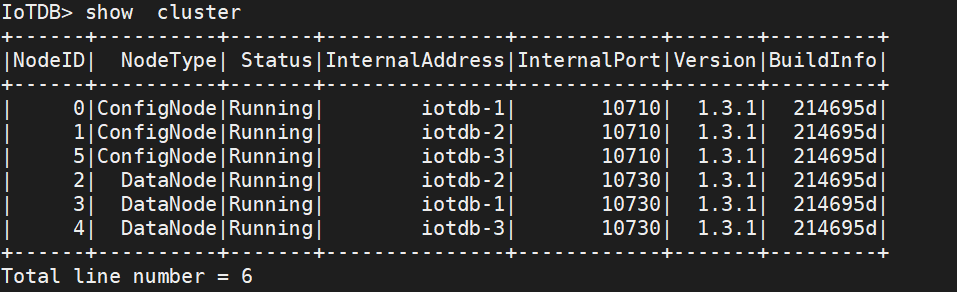
> The appearance of `ACTIVATED (W)` indicates passive activation, which means
> that this Configurable Node does not have a license file (or has not issued
> the latest license file with a timestamp), and its activation depends on
> other Activated Configurable Nodes in the cluster. At this point, it is
> recommended to check if the license file has been placed in the license
> folder. If not, please place the license file. If a license file already
> exists, it may be due to inconsistency between t [...]
+
+## Node Maintenance Steps
+
+### ConfigNode Node Maintenance
+
+ConfigNode node maintenance is divided into two types of operations: adding
and removing ConfigNodes, with two common use cases:
+- Cluster expansion: For example, when there is only one ConfigNode in the
cluster, and you want to increase the high availability of ConfigNode nodes,
you can add two ConfigNodes, making a total of three ConfigNodes in the cluster.
+- Cluster failure recovery: When the machine where a ConfigNode is located
fails, making the ConfigNode unable to run normally, you can remove this
ConfigNode and then add a new ConfigNode to the cluster.
+
+> ❗️Note, after completing ConfigNode node maintenance, you need to ensure
that there are 1 or 3 ConfigNodes running normally in the cluster. Two
ConfigNodes do not have high availability, and more than three ConfigNodes will
lead to performance loss.
+
+#### Adding ConfigNode Nodes
+
+Script command:
+```shell
+# Linux / MacOS
+# First switch to the IoTDB root directory
+sbin/start-confignode.sh
+
+# Windows
+# First switch to the IoTDB root directory
+sbin/start-confignode.bat
+```
+
+Parameter introduction:
+
+| Parameter | Description | Is it
required |
+| :--- | :--------------------------------------------- | :----------- |
+| -v | Show version information | No
|
+| -f | Run the script in the foreground, do not put it in the background
| No |
+| -d | Start in daemon mode, i.e. run in the background | No
|
+| -p | Specify a file to store the process ID for process management
| No |
+| -c | Specify the path to the configuration file folder, the script will
load the configuration file from here | No |
+| -g | Print detailed garbage collection (GC) information
| No |
+| -H | Specify the path of the Java heap dump file, used when JVM memory
overflows | No |
+| -E | Specify the path of the JVM error log file | No
|
+| -D | Define system properties, in the format key=value |
No |
+| -X | Pass -XX parameters directly to the JVM | No
|
+| -h | Help instruction | No
|
+
+#### Removing ConfigNode Nodes
+
+First connect to the cluster through the CLI and confirm the internal address
and port number of the ConfigNode you want to remove by using `show
confignodes`:
+
+```Bash
+IoTDB> show confignodes
++------+-------+---------------+------------+--------+
+|NodeID| Status|InternalAddress|InternalPort| Role|
++------+-------+---------------+------------+--------+
+| 0|Running| 127.0.0.1| 10710| Leader|
+| 1|Running| 127.0.0.1| 10711|Follower|
+| 2|Running| 127.0.0.1| 10712|Follower|
++------+-------+---------------+------------+--------+
+Total line number = 3
+It costs 0.030s
+```
+
+Then use the script to remove the DataNode. Script command:
+
+```Bash
+# Linux / MacOS
+sbin/remove-confignode.sh [confignode_id]
+or
+./sbin/remove-confignode.sh [cn_internal_address:cn_internal_port]
+
+#Windows
+sbin/remove-confignode.bat [confignode_id]
+or
+./sbin/remove-confignode.bat [cn_internal_address:cn_internal_port]
+```
+
+### DataNode Node Maintenance
+
+There are two common scenarios for DataNode node maintenance:
+
+- Cluster expansion: For the purpose of expanding cluster capabilities, add
new DataNodes to the cluster
+- Cluster failure recovery: When a machine where a DataNode is located fails,
making the DataNode unable to run normally, you can remove this DataNode and
add a new DataNode to the cluster
+
+> ❗️Note, in order for the cluster to work normally, during the process of
DataNode node maintenance and after the maintenance is completed, the total
number of DataNodes running normally should not be less than the number of data
replicas (usually 2), nor less than the number of metadata replicas (usually 3).
+
+#### Adding DataNode Nodes
+
+Script command:
+
+```Bash
+# Linux / MacOS
+# First switch to the IoTDB root directory
+sbin/start-datanode.sh
+
+# Windows
+# First switch to the IoTDB root directory
+sbin/start-datanode.bat
+```
+
+Parameter introduction:
+
+| Abbreviation | Description | Is it
required |
+| :--- | :--------------------------------------------- | :----------- |
+| -v | Show version information | No
|
+| -f | Run the script in the foreground, do not put it in the background
| No |
+| -d | Start in daemon mode, i.e. run in the background | No
|
+| -p | Specify a file to store the process ID for process management
| No |
+| -c | Specify the path to the configuration file folder, the script will
load the configuration file from here | No |
+| -g | Print detailed garbage collection (GC) information
| No |
+| -H | Specify the path of the Java heap dump file, used when JVM memory
overflows | No |
+| -E | Specify the path of the JVM error log file | No
|
+| -D | Define system properties, in the format key=value |
No |
+| -X | Pass -XX parameters directly to the JVM | No
|
+| -h | Help instruction | No
|
+
+Note: After adding a DataNode, as new writes arrive (and old data expires, if
TTL is set), the cluster load will gradually balance towards the new DataNode,
eventually achieving a balance of storage and computation resources on all
nodes.
+
+#### Removing DataNode Nodes
+
+First connect to the cluster through the CLI and confirm the RPC address and
port number of the DataNode you want to remove with `show datanodes`:
+
+```Bash
+IoTDB> show datanodes
++------+-------+----------+-------+-------------+---------------+
+|NodeID| Status|RpcAddress|RpcPort|DataRegionNum|SchemaRegionNum|
++------+-------+----------+-------+-------------+---------------+
+| 1|Running| 0.0.0.0| 6667| 0| 0|
+| 2|Running| 0.0.0.0| 6668| 1| 1|
+| 3|Running| 0.0.0.0| 6669| 1| 0|
++------+-------+----------+-------+-------------+---------------+
+Total line number = 3
+It costs 0.110s
+```
+
+Then use the script to remove the DataNode. Script command:
+
+```Bash
+# Linux / MacOS
+sbin/remove-datanode.sh [datanode_id]
+
+#Windows
+sbin/remove-datanode.bat [datanode_id]
+```
diff --git
a/src/UserGuide/Master/Deployment-and-Maintenance/Cluster-Deployment_timecho.md
b/src/UserGuide/Master/Deployment-and-Maintenance/Cluster-Deployment_timecho.md
index 6d82044..328270a 100644
---
a/src/UserGuide/Master/Deployment-and-Maintenance/Cluster-Deployment_timecho.md
+++
b/src/UserGuide/Master/Deployment-and-Maintenance/Cluster-Deployment_timecho.md
@@ -194,4 +194,140 @@ When you see the display of `Activated` on the far right,
it indicates successfu
> The appearance of `ACTIVATED (W)` indicates passive activation, which means
> that this Configurable Node does not have a license file (or has not issued
> the latest license file with a timestamp), and its activation depends on
> other Activated Configurable Nodes in the cluster. At this point, it is
> recommended to check if the license file has been placed in the license
> folder. If not, please place the license file. If a license file already
> exists, it may be due to inconsistency between t [...]
+## Node Maintenance Steps
+### ConfigNode Node Maintenance
+
+ConfigNode node maintenance is divided into two types of operations: adding
and removing ConfigNodes, with two common use cases:
+- Cluster expansion: For example, when there is only one ConfigNode in the
cluster, and you want to increase the high availability of ConfigNode nodes,
you can add two ConfigNodes, making a total of three ConfigNodes in the cluster.
+- Cluster failure recovery: When the machine where a ConfigNode is located
fails, making the ConfigNode unable to run normally, you can remove this
ConfigNode and then add a new ConfigNode to the cluster.
+
+> ❗️Note, after completing ConfigNode node maintenance, you need to ensure
that there are 1 or 3 ConfigNodes running normally in the cluster. Two
ConfigNodes do not have high availability, and more than three ConfigNodes will
lead to performance loss.
+
+#### Adding ConfigNode Nodes
+
+Script command:
+```shell
+# Linux / MacOS
+# First switch to the IoTDB root directory
+sbin/start-confignode.sh
+
+# Windows
+# First switch to the IoTDB root directory
+sbin/start-confignode.bat
+```
+
+Parameter introduction:
+
+| Parameter | Description | Is it
required |
+| :--- | :--------------------------------------------- | :----------- |
+| -v | Show version information | No
|
+| -f | Run the script in the foreground, do not put it in the background
| No |
+| -d | Start in daemon mode, i.e. run in the background | No
|
+| -p | Specify a file to store the process ID for process management
| No |
+| -c | Specify the path to the configuration file folder, the script will
load the configuration file from here | No |
+| -g | Print detailed garbage collection (GC) information
| No |
+| -H | Specify the path of the Java heap dump file, used when JVM memory
overflows | No |
+| -E | Specify the path of the JVM error log file | No
|
+| -D | Define system properties, in the format key=value |
No |
+| -X | Pass -XX parameters directly to the JVM | No
|
+| -h | Help instruction | No
|
+
+#### Removing ConfigNode Nodes
+
+First connect to the cluster through the CLI and confirm the internal address
and port number of the ConfigNode you want to remove by using `show
confignodes`:
+
+```Bash
+IoTDB> show confignodes
++------+-------+---------------+------------+--------+
+|NodeID| Status|InternalAddress|InternalPort| Role|
++------+-------+---------------+------------+--------+
+| 0|Running| 127.0.0.1| 10710| Leader|
+| 1|Running| 127.0.0.1| 10711|Follower|
+| 2|Running| 127.0.0.1| 10712|Follower|
++------+-------+---------------+------------+--------+
+Total line number = 3
+It costs 0.030s
+```
+
+Then use the script to remove the DataNode. Script command:
+
+```Bash
+# Linux / MacOS
+sbin/remove-confignode.sh [confignode_id]
+or
+./sbin/remove-confignode.sh [cn_internal_address:cn_internal_port]
+
+#Windows
+sbin/remove-confignode.bat [confignode_id]
+or
+./sbin/remove-confignode.bat [cn_internal_address:cn_internal_port]
+```
+
+### DataNode Node Maintenance
+
+There are two common scenarios for DataNode node maintenance:
+
+- Cluster expansion: For the purpose of expanding cluster capabilities, add
new DataNodes to the cluster
+- Cluster failure recovery: When a machine where a DataNode is located fails,
making the DataNode unable to run normally, you can remove this DataNode and
add a new DataNode to the cluster
+
+> ❗️Note, in order for the cluster to work normally, during the process of
DataNode node maintenance and after the maintenance is completed, the total
number of DataNodes running normally should not be less than the number of data
replicas (usually 2), nor less than the number of metadata replicas (usually 3).
+
+#### Adding DataNode Nodes
+
+Script command:
+
+```Bash
+# Linux / MacOS
+# First switch to the IoTDB root directory
+sbin/start-datanode.sh
+
+# Windows
+# First switch to the IoTDB root directory
+sbin/start-datanode.bat
+```
+
+Parameter introduction:
+
+| Abbreviation | Description | Is it
required |
+| :--- | :--------------------------------------------- | :----------- |
+| -v | Show version information | No
|
+| -f | Run the script in the foreground, do not put it in the background
| No |
+| -d | Start in daemon mode, i.e. run in the background | No
|
+| -p | Specify a file to store the process ID for process management
| No |
+| -c | Specify the path to the configuration file folder, the script will
load the configuration file from here | No |
+| -g | Print detailed garbage collection (GC) information
| No |
+| -H | Specify the path of the Java heap dump file, used when JVM memory
overflows | No |
+| -E | Specify the path of the JVM error log file | No
|
+| -D | Define system properties, in the format key=value |
No |
+| -X | Pass -XX parameters directly to the JVM | No
|
+| -h | Help instruction | No
|
+
+Note: After adding a DataNode, as new writes arrive (and old data expires, if
TTL is set), the cluster load will gradually balance towards the new DataNode,
eventually achieving a balance of storage and computation resources on all
nodes.
+
+#### Removing DataNode Nodes
+
+First connect to the cluster through the CLI and confirm the RPC address and
port number of the DataNode you want to remove with `show datanodes`:
+
+```Bash
+IoTDB> show datanodes
++------+-------+----------+-------+-------------+---------------+
+|NodeID| Status|RpcAddress|RpcPort|DataRegionNum|SchemaRegionNum|
++------+-------+----------+-------+-------------+---------------+
+| 1|Running| 0.0.0.0| 6667| 0| 0|
+| 2|Running| 0.0.0.0| 6668| 1| 1|
+| 3|Running| 0.0.0.0| 6669| 1| 0|
++------+-------+----------+-------+-------------+---------------+
+Total line number = 3
+It costs 0.110s
+```
+
+Then use the script to remove the DataNode. Script command:
+
+```Bash
+# Linux / MacOS
+sbin/remove-datanode.sh [datanode_id]
+
+#Windows
+sbin/remove-datanode.bat [datanode_id]
+```
diff --git
a/src/UserGuide/latest/Deployment-and-Maintenance/Cluster-Deployment.md
b/src/UserGuide/latest/Deployment-and-Maintenance/Cluster-Deployment.md
index b7567ee..adf3f1f 100644
--- a/src/UserGuide/latest/Deployment-and-Maintenance/Cluster-Deployment.md
+++ b/src/UserGuide/latest/Deployment-and-Maintenance/Cluster-Deployment.md
@@ -156,4 +156,142 @@ You can use the `show cluster` command to view cluster
information:

-> The appearance of `ACTIVATED (W)` indicates passive activation, which means
that this Configurable Node does not have a license file (or has not issued the
latest license file with a timestamp), and its activation depends on other
Activated Configurable Nodes in the cluster. At this point, it is recommended
to check if the license file has been placed in the license folder. If not,
please place the license file. If a license file already exists, it may be due
to inconsistency between t [...]
\ No newline at end of file
+> The appearance of `ACTIVATED (W)` indicates passive activation, which means
that this Configurable Node does not have a license file (or has not issued the
latest license file with a timestamp), and its activation depends on other
Activated Configurable Nodes in the cluster. At this point, it is recommended
to check if the license file has been placed in the license folder. If not,
please place the license file. If a license file already exists, it may be due
to inconsistency between t [...]
+
+## Node Maintenance Steps
+
+### ConfigNode Node Maintenance
+
+ConfigNode node maintenance is divided into two types of operations: adding
and removing ConfigNodes, with two common use cases:
+- Cluster expansion: For example, when there is only one ConfigNode in the
cluster, and you want to increase the high availability of ConfigNode nodes,
you can add two ConfigNodes, making a total of three ConfigNodes in the cluster.
+- Cluster failure recovery: When the machine where a ConfigNode is located
fails, making the ConfigNode unable to run normally, you can remove this
ConfigNode and then add a new ConfigNode to the cluster.
+
+> ❗️Note, after completing ConfigNode node maintenance, you need to ensure
that there are 1 or 3 ConfigNodes running normally in the cluster. Two
ConfigNodes do not have high availability, and more than three ConfigNodes will
lead to performance loss.
+
+#### Adding ConfigNode Nodes
+
+Script command:
+```shell
+# Linux / MacOS
+# First switch to the IoTDB root directory
+sbin/start-confignode.sh
+
+# Windows
+# First switch to the IoTDB root directory
+sbin/start-confignode.bat
+```
+
+Parameter introduction:
+
+| Parameter | Description | Is it
required |
+| :--- | :--------------------------------------------- | :----------- |
+| -v | Show version information | No
|
+| -f | Run the script in the foreground, do not put it in the background
| No |
+| -d | Start in daemon mode, i.e. run in the background | No
|
+| -p | Specify a file to store the process ID for process management
| No |
+| -c | Specify the path to the configuration file folder, the script will
load the configuration file from here | No |
+| -g | Print detailed garbage collection (GC) information
| No |
+| -H | Specify the path of the Java heap dump file, used when JVM memory
overflows | No |
+| -E | Specify the path of the JVM error log file | No
|
+| -D | Define system properties, in the format key=value |
No |
+| -X | Pass -XX parameters directly to the JVM | No
|
+| -h | Help instruction | No
|
+
+#### Removing ConfigNode Nodes
+
+First connect to the cluster through the CLI and confirm the internal address
and port number of the ConfigNode you want to remove by using `show
confignodes`:
+
+```Bash
+IoTDB> show confignodes
++------+-------+---------------+------------+--------+
+|NodeID| Status|InternalAddress|InternalPort| Role|
++------+-------+---------------+------------+--------+
+| 0|Running| 127.0.0.1| 10710| Leader|
+| 1|Running| 127.0.0.1| 10711|Follower|
+| 2|Running| 127.0.0.1| 10712|Follower|
++------+-------+---------------+------------+--------+
+Total line number = 3
+It costs 0.030s
+```
+
+Then use the script to remove the DataNode. Script command:
+
+```Bash
+# Linux / MacOS
+sbin/remove-confignode.sh [confignode_id]
+or
+./sbin/remove-confignode.sh [cn_internal_address:cn_internal_port]
+
+#Windows
+sbin/remove-confignode.bat [confignode_id]
+or
+./sbin/remove-confignode.bat [cn_internal_address:cn_internal_port]
+```
+
+### DataNode Node Maintenance
+
+There are two common scenarios for DataNode node maintenance:
+
+- Cluster expansion: For the purpose of expanding cluster capabilities, add
new DataNodes to the cluster
+- Cluster failure recovery: When a machine where a DataNode is located fails,
making the DataNode unable to run normally, you can remove this DataNode and
add a new DataNode to the cluster
+
+> ❗️Note, in order for the cluster to work normally, during the process of
DataNode node maintenance and after the maintenance is completed, the total
number of DataNodes running normally should not be less than the number of data
replicas (usually 2), nor less than the number of metadata replicas (usually 3).
+
+#### Adding DataNode Nodes
+
+Script command:
+
+```Bash
+# Linux / MacOS
+# First switch to the IoTDB root directory
+sbin/start-datanode.sh
+
+# Windows
+# First switch to the IoTDB root directory
+sbin/start-datanode.bat
+```
+
+Parameter introduction:
+
+| Abbreviation | Description | Is it
required |
+| :--- | :--------------------------------------------- | :----------- |
+| -v | Show version information | No
|
+| -f | Run the script in the foreground, do not put it in the background
| No |
+| -d | Start in daemon mode, i.e. run in the background | No
|
+| -p | Specify a file to store the process ID for process management
| No |
+| -c | Specify the path to the configuration file folder, the script will
load the configuration file from here | No |
+| -g | Print detailed garbage collection (GC) information
| No |
+| -H | Specify the path of the Java heap dump file, used when JVM memory
overflows | No |
+| -E | Specify the path of the JVM error log file | No
|
+| -D | Define system properties, in the format key=value |
No |
+| -X | Pass -XX parameters directly to the JVM | No
|
+| -h | Help instruction | No
|
+
+Note: After adding a DataNode, as new writes arrive (and old data expires, if
TTL is set), the cluster load will gradually balance towards the new DataNode,
eventually achieving a balance of storage and computation resources on all
nodes.
+
+#### Removing DataNode Nodes
+
+First connect to the cluster through the CLI and confirm the RPC address and
port number of the DataNode you want to remove with `show datanodes`:
+
+```Bash
+IoTDB> show datanodes
++------+-------+----------+-------+-------------+---------------+
+|NodeID| Status|RpcAddress|RpcPort|DataRegionNum|SchemaRegionNum|
++------+-------+----------+-------+-------------+---------------+
+| 1|Running| 0.0.0.0| 6667| 0| 0|
+| 2|Running| 0.0.0.0| 6668| 1| 1|
+| 3|Running| 0.0.0.0| 6669| 1| 0|
++------+-------+----------+-------+-------------+---------------+
+Total line number = 3
+It costs 0.110s
+```
+
+Then use the script to remove the DataNode. Script command:
+
+```Bash
+# Linux / MacOS
+sbin/remove-datanode.sh [dn_rpc_address:dn_rpc_port]
+
+#Windows
+sbin/remove-datanode.bat [dn_rpc_address:dn_rpc_port]
+```
\ No newline at end of file
diff --git
a/src/UserGuide/latest/Deployment-and-Maintenance/Cluster-Deployment_timecho.md
b/src/UserGuide/latest/Deployment-and-Maintenance/Cluster-Deployment_timecho.md
index e94684a..c20aebd 100644
---
a/src/UserGuide/latest/Deployment-and-Maintenance/Cluster-Deployment_timecho.md
+++
b/src/UserGuide/latest/Deployment-and-Maintenance/Cluster-Deployment_timecho.md
@@ -193,4 +193,143 @@ When you see the display of `Activated` on the far right,
it indicates successfu
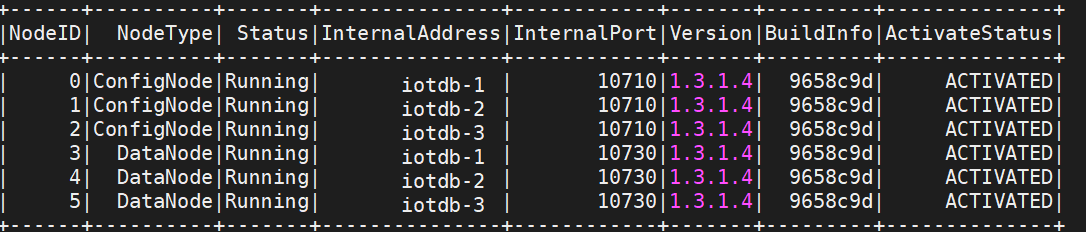
-> The appearance of `ACTIVATED (W)` indicates passive activation, which means
that this Configurable Node does not have a license file (or has not issued the
latest license file with a timestamp), and its activation depends on other
Activated Configurable Nodes in the cluster. At this point, it is recommended
to check if the license file has been placed in the license folder. If not,
please place the license file. If a license file already exists, it may be due
to inconsistency between t [...]
\ No newline at end of file
+> The appearance of `ACTIVATED (W)` indicates passive activation, which means
that this Configurable Node does not have a license file (or has not issued the
latest license file with a timestamp), and its activation depends on other
Activated Configurable Nodes in the cluster. At this point, it is recommended
to check if the license file has been placed in the license folder. If not,
please place the license file. If a license file already exists, it may be due
to inconsistency between t [...]
+
+
+## Node Maintenance Steps
+
+### ConfigNode Node Maintenance
+
+ConfigNode node maintenance is divided into two types of operations: adding
and removing ConfigNodes, with two common use cases:
+- Cluster expansion: For example, when there is only one ConfigNode in the
cluster, and you want to increase the high availability of ConfigNode nodes,
you can add two ConfigNodes, making a total of three ConfigNodes in the cluster.
+- Cluster failure recovery: When the machine where a ConfigNode is located
fails, making the ConfigNode unable to run normally, you can remove this
ConfigNode and then add a new ConfigNode to the cluster.
+
+> ❗️Note, after completing ConfigNode node maintenance, you need to ensure
that there are 1 or 3 ConfigNodes running normally in the cluster. Two
ConfigNodes do not have high availability, and more than three ConfigNodes will
lead to performance loss.
+
+#### Adding ConfigNode Nodes
+
+Script command:
+```shell
+# Linux / MacOS
+# First switch to the IoTDB root directory
+sbin/start-confignode.sh
+
+# Windows
+# First switch to the IoTDB root directory
+sbin/start-confignode.bat
+```
+
+Parameter introduction:
+
+| Parameter | Description | Is it
required |
+| :--- | :--------------------------------------------- | :----------- |
+| -v | Show version information | No
|
+| -f | Run the script in the foreground, do not put it in the background
| No |
+| -d | Start in daemon mode, i.e. run in the background | No
|
+| -p | Specify a file to store the process ID for process management
| No |
+| -c | Specify the path to the configuration file folder, the script will
load the configuration file from here | No |
+| -g | Print detailed garbage collection (GC) information
| No |
+| -H | Specify the path of the Java heap dump file, used when JVM memory
overflows | No |
+| -E | Specify the path of the JVM error log file | No
|
+| -D | Define system properties, in the format key=value |
No |
+| -X | Pass -XX parameters directly to the JVM | No
|
+| -h | Help instruction | No
|
+
+#### Removing ConfigNode Nodes
+
+First connect to the cluster through the CLI and confirm the internal address
and port number of the ConfigNode you want to remove by using `show
confignodes`:
+
+```Bash
+IoTDB> show confignodes
++------+-------+---------------+------------+--------+
+|NodeID| Status|InternalAddress|InternalPort| Role|
++------+-------+---------------+------------+--------+
+| 0|Running| 127.0.0.1| 10710| Leader|
+| 1|Running| 127.0.0.1| 10711|Follower|
+| 2|Running| 127.0.0.1| 10712|Follower|
++------+-------+---------------+------------+--------+
+Total line number = 3
+It costs 0.030s
+```
+
+Then use the script to remove the DataNode. Script command:
+
+```Bash
+# Linux / MacOS
+sbin/remove-confignode.sh [confignode_id]
+or
+./sbin/remove-confignode.sh [cn_internal_address:cn_internal_port]
+
+#Windows
+sbin/remove-confignode.bat [confignode_id]
+or
+./sbin/remove-confignode.bat [cn_internal_address:cn_internal_port]
+```
+
+### DataNode Node Maintenance
+
+There are two common scenarios for DataNode node maintenance:
+
+- Cluster expansion: For the purpose of expanding cluster capabilities, add
new DataNodes to the cluster
+- Cluster failure recovery: When a machine where a DataNode is located fails,
making the DataNode unable to run normally, you can remove this DataNode and
add a new DataNode to the cluster
+
+> ❗️Note, in order for the cluster to work normally, during the process of
DataNode node maintenance and after the maintenance is completed, the total
number of DataNodes running normally should not be less than the number of data
replicas (usually 2), nor less than the number of metadata replicas (usually 3).
+
+#### Adding DataNode Nodes
+
+Script command:
+
+```Bash
+# Linux / MacOS
+# First switch to the IoTDB root directory
+sbin/start-datanode.sh
+
+# Windows
+# First switch to the IoTDB root directory
+sbin/start-datanode.bat
+```
+
+Parameter introduction:
+
+| Abbreviation | Description | Is it
required |
+| :--- | :--------------------------------------------- | :----------- |
+| -v | Show version information | No
|
+| -f | Run the script in the foreground, do not put it in the background
| No |
+| -d | Start in daemon mode, i.e. run in the background | No
|
+| -p | Specify a file to store the process ID for process management
| No |
+| -c | Specify the path to the configuration file folder, the script will
load the configuration file from here | No |
+| -g | Print detailed garbage collection (GC) information
| No |
+| -H | Specify the path of the Java heap dump file, used when JVM memory
overflows | No |
+| -E | Specify the path of the JVM error log file | No
|
+| -D | Define system properties, in the format key=value |
No |
+| -X | Pass -XX parameters directly to the JVM | No
|
+| -h | Help instruction | No
|
+
+Note: After adding a DataNode, as new writes arrive (and old data expires, if
TTL is set), the cluster load will gradually balance towards the new DataNode,
eventually achieving a balance of storage and computation resources on all
nodes.
+
+#### Removing DataNode Nodes
+
+First connect to the cluster through the CLI and confirm the RPC address and
port number of the DataNode you want to remove with `show datanodes`:
+
+```Bash
+IoTDB> show datanodes
++------+-------+----------+-------+-------------+---------------+
+|NodeID| Status|RpcAddress|RpcPort|DataRegionNum|SchemaRegionNum|
++------+-------+----------+-------+-------------+---------------+
+| 1|Running| 0.0.0.0| 6667| 0| 0|
+| 2|Running| 0.0.0.0| 6668| 1| 1|
+| 3|Running| 0.0.0.0| 6669| 1| 0|
++------+-------+----------+-------+-------------+---------------+
+Total line number = 3
+It costs 0.110s
+```
+
+Then use the script to remove the DataNode. Script command:
+
+```Bash
+# Linux / MacOS
+sbin/remove-datanode.sh [dn_rpc_address:dn_rpc_port]
+
+#Windows
+sbin/remove-datanode.bat [dn_rpc_address:dn_rpc_port]
+```
\ No newline at end of file
diff --git
a/src/zh/UserGuide/Master/Deployment-and-Maintenance/Cluster-Deployment.md
b/src/zh/UserGuide/Master/Deployment-and-Maintenance/Cluster-Deployment.md
index bffb825..6441ddc 100644
--- a/src/zh/UserGuide/Master/Deployment-and-Maintenance/Cluster-Deployment.md
+++ b/src/zh/UserGuide/Master/Deployment-and-Maintenance/Cluster-Deployment.md
@@ -157,3 +157,140 @@ cd sbin
> 出现`ACTIVATED(W)`为被动激活,表示此ConfigNode没有license文件(或没有签发时间戳最新的license文件),其激活依赖于集群中其它Activate状态的ConfigNode。此时建议检查license文件是否已放入license文件夹,没有请放入license文件,若已存在license文件,可能是此节点license文件与其他节点信息不一致导致,请联系天谋工作人员重新申请.
+## 节点维护步骤
+
+### ConfigNode节点维护
+
+ConfigNode节点维护分为ConfigNode添加和移除两种操作,有两个常见使用场景:
+-
集群扩展:如集群中只有1个ConfigNode时,希望增加ConfigNode以提升ConfigNode节点高可用性,则可以添加2个ConfigNode,使得集群中有3个ConfigNode。
+-
集群故障恢复:1个ConfigNode所在机器发生故障,使得该ConfigNode无法正常运行,此时可以移除该ConfigNode,然后添加一个新的ConfigNode进入集群。
+
+>
❗️注意,在完成ConfigNode节点维护后,需要保证集群中有1或者3个正常运行的ConfigNode。2个ConfigNode不具备高可用性,超过3个ConfigNode会导致性能损失。
+
+#### 添加ConfigNode节点
+
+脚本命令:
+```shell
+# Linux / MacOS
+# 首先切换到IoTDB根目录
+sbin/start-confignode.sh
+
+# Windows
+# 首先切换到IoTDB根目录
+sbin/start-confignode.bat
+```
+
+参数介绍:
+
+| 参数 | 描述 | 是否为必填项 |
+| :--- | :--------------------------------------------- | :----------- |
+| -v | 显示版本信息 | 否 |
+| -f | 在前台运行脚本,不将其放到后台 | 否 |
+| -d | 以守护进程模式启动,即在后台运行 | 否 |
+| -p | 指定一个文件来存放进程ID,用于进程管理 | 否 |
+| -c | 指定配置文件夹的路径,脚本会从这里加载配置文件 | 否 |
+| -g | 打印垃圾回收(GC)的详细信息 | 否 |
+| -H | 指定Java堆转储文件的路径,当JVM内存溢出时使用 | 否 |
+| -E | 指定JVM错误日志文件的路径 | 否 |
+| -D | 定义系统属性,格式为 key=value | 否 |
+| -X | 直接传递 -XX 参数给 JVM | 否 |
+| -h | 帮助指令 | 否 |
+
+#### 移除ConfigNode节点
+
+首先通过CLI连接集群,通过`show confignodes`确认想要移除ConfigNode的内部地址与端口号:
+
+```Bash
+IoTDB> show confignodes
++------+-------+---------------+------------+--------+
+|NodeID| Status|InternalAddress|InternalPort| Role|
++------+-------+---------------+------------+--------+
+| 0|Running| 127.0.0.1| 10710| Leader|
+| 1|Running| 127.0.0.1| 10711|Follower|
+| 2|Running| 127.0.0.1| 10712|Follower|
++------+-------+---------------+------------+--------+
+Total line number = 3
+It costs 0.030s
+```
+
+然后使用脚本将DataNode移除。脚本命令:
+
+```Bash
+# Linux / MacOS
+sbin/remove-confignode.sh [confignode_id]
+或
+./sbin/remove-confignode.sh [cn_internal_address:cn_internal_port]
+
+#Windows
+sbin/remove-confignode.bat [confignode_id]
+或
+./sbin/remove-confignode.bat [cn_internal_address:cn_internal_port]
+```
+
+### DataNode节点维护
+
+DataNode节点维护有两个常见场景:
+
+- 集群扩容:出于集群能力扩容等目的,添加新的DataNode进入集群
+- 集群故障恢复:一个DataNode所在机器出现故障,使得该DataNode无法正常运行,此时可以移除该DataNode,并添加新的DataNode进入集群
+
+>
❗️注意,为了使集群能正常工作,在DataNode节点维护过程中以及维护完成后,正常运行的DataNode总数不得少于数据副本数(通常为2),也不得少于元数据副本数(通常为3)。
+
+#### 添加DataNode节点
+
+脚本命令:
+
+```Bash
+# Linux / MacOS
+# 首先切换到IoTDB根目录
+sbin/start-datanode.sh
+
+# Windows
+# 首先切换到IoTDB根目录
+sbin/start-datanode.bat
+```
+
+参数介绍:
+
+| 缩写 | 描述 | 是否为必填项 |
+| :--- | :--------------------------------------------- | :----------- |
+| -v | 显示版本信息 | 否 |
+| -f | 在前台运行脚本,不将其放到后台 | 否 |
+| -d | 以守护进程模式启动,即在后台运行 | 否 |
+| -p | 指定一个文件来存放进程ID,用于进程管理 | 否 |
+| -c | 指定配置文件夹的路径,脚本会从这里加载配置文件 | 否 |
+| -g | 打印垃圾回收(GC)的详细信息 | 否 |
+| -H | 指定Java堆转储文件的路径,当JVM内存溢出时使用 | 否 |
+| -E | 指定JVM错误日志文件的路径 | 否 |
+| -D | 定义系统属性,格式为 key=value | 否 |
+| -X | 直接传递 -XX 参数给 JVM | 否 |
+| -h | 帮助指令 | 否 |
+
+说明:在添加DataNode后,随着新的写入到来(以及旧数据过期,如果设置了TTL),集群负载会逐渐向新的DataNode均衡,最终在所有节点上达到存算资源的均衡。
+
+#### 移除DataNode节点
+
+首先通过CLI连接集群,通过`show datanodes`确认想要移除的DataNode的RPC地址与端口号:
+
+```Bash
+IoTDB> show datanodes
++------+-------+----------+-------+-------------+---------------+
+|NodeID| Status|RpcAddress|RpcPort|DataRegionNum|SchemaRegionNum|
++------+-------+----------+-------+-------------+---------------+
+| 1|Running| 0.0.0.0| 6667| 0| 0|
+| 2|Running| 0.0.0.0| 6668| 1| 1|
+| 3|Running| 0.0.0.0| 6669| 1| 0|
++------+-------+----------+-------+-------------+---------------+
+Total line number = 3
+It costs 0.110s
+```
+
+然后使用脚本将DataNode移除。脚本命令:
+
+```Bash
+# Linux / MacOS
+sbin/remove-datanode.sh [datanode_id]
+
+#Windows
+sbin/remove-datanode.bat [datanode_id]
+```
\ No newline at end of file
diff --git
a/src/zh/UserGuide/Master/Deployment-and-Maintenance/Cluster-Deployment_timecho.md
b/src/zh/UserGuide/Master/Deployment-and-Maintenance/Cluster-Deployment_timecho.md
index 8ac0b1c..433673c 100644
---
a/src/zh/UserGuide/Master/Deployment-and-Maintenance/Cluster-Deployment_timecho.md
+++
b/src/zh/UserGuide/Master/Deployment-and-Maintenance/Cluster-Deployment_timecho.md
@@ -194,3 +194,140 @@ cd sbin
> 出现`ACTIVATED(W)`为被动激活,表示此ConfigNode没有license文件(或没有签发时间戳最新的license文件),其激活依赖于集群中其它Activate状态的ConfigNode。此时建议检查license文件是否已放入license文件夹,没有请放入license文件,若已存在license文件,可能是此节点license文件与其他节点信息不一致导致,请联系天谋工作人员重新申请.
+## 节点维护步骤
+
+### ConfigNode节点维护
+
+ConfigNode节点维护分为ConfigNode添加和移除两种操作,有两个常见使用场景:
+-
集群扩展:如集群中只有1个ConfigNode时,希望增加ConfigNode以提升ConfigNode节点高可用性,则可以添加2个ConfigNode,使得集群中有3个ConfigNode。
+-
集群故障恢复:1个ConfigNode所在机器发生故障,使得该ConfigNode无法正常运行,此时可以移除该ConfigNode,然后添加一个新的ConfigNode进入集群。
+
+>
❗️注意,在完成ConfigNode节点维护后,需要保证集群中有1或者3个正常运行的ConfigNode。2个ConfigNode不具备高可用性,超过3个ConfigNode会导致性能损失。
+
+#### 添加ConfigNode节点
+
+脚本命令:
+```shell
+# Linux / MacOS
+# 首先切换到IoTDB根目录
+sbin/start-confignode.sh
+
+# Windows
+# 首先切换到IoTDB根目录
+sbin/start-confignode.bat
+```
+
+参数介绍:
+
+| 参数 | 描述 | 是否为必填项 |
+| :--- | :--------------------------------------------- | :----------- |
+| -v | 显示版本信息 | 否 |
+| -f | 在前台运行脚本,不将其放到后台 | 否 |
+| -d | 以守护进程模式启动,即在后台运行 | 否 |
+| -p | 指定一个文件来存放进程ID,用于进程管理 | 否 |
+| -c | 指定配置文件夹的路径,脚本会从这里加载配置文件 | 否 |
+| -g | 打印垃圾回收(GC)的详细信息 | 否 |
+| -H | 指定Java堆转储文件的路径,当JVM内存溢出时使用 | 否 |
+| -E | 指定JVM错误日志文件的路径 | 否 |
+| -D | 定义系统属性,格式为 key=value | 否 |
+| -X | 直接传递 -XX 参数给 JVM | 否 |
+| -h | 帮助指令 | 否 |
+
+#### 移除ConfigNode节点
+
+首先通过CLI连接集群,通过`show confignodes`确认想要移除ConfigNode的内部地址与端口号:
+
+```Bash
+IoTDB> show confignodes
++------+-------+---------------+------------+--------+
+|NodeID| Status|InternalAddress|InternalPort| Role|
++------+-------+---------------+------------+--------+
+| 0|Running| 127.0.0.1| 10710| Leader|
+| 1|Running| 127.0.0.1| 10711|Follower|
+| 2|Running| 127.0.0.1| 10712|Follower|
++------+-------+---------------+------------+--------+
+Total line number = 3
+It costs 0.030s
+```
+
+然后使用脚本将DataNode移除。脚本命令:
+
+```Bash
+# Linux / MacOS
+sbin/remove-confignode.sh [confignode_id]
+或
+./sbin/remove-confignode.sh [cn_internal_address:cn_internal_port]
+
+#Windows
+sbin/remove-confignode.bat [confignode_id]
+或
+./sbin/remove-confignode.bat [cn_internal_address:cn_internal_port]
+```
+
+### DataNode节点维护
+
+DataNode节点维护有两个常见场景:
+
+- 集群扩容:出于集群能力扩容等目的,添加新的DataNode进入集群
+- 集群故障恢复:一个DataNode所在机器出现故障,使得该DataNode无法正常运行,此时可以移除该DataNode,并添加新的DataNode进入集群
+
+>
❗️注意,为了使集群能正常工作,在DataNode节点维护过程中以及维护完成后,正常运行的DataNode总数不得少于数据副本数(通常为2),也不得少于元数据副本数(通常为3)。
+
+#### 添加DataNode节点
+
+脚本命令:
+
+```Bash
+# Linux / MacOS
+# 首先切换到IoTDB根目录
+sbin/start-datanode.sh
+
+# Windows
+# 首先切换到IoTDB根目录
+sbin/start-datanode.bat
+```
+
+参数介绍:
+
+| 缩写 | 描述 | 是否为必填项 |
+| :--- | :--------------------------------------------- | :----------- |
+| -v | 显示版本信息 | 否 |
+| -f | 在前台运行脚本,不将其放到后台 | 否 |
+| -d | 以守护进程模式启动,即在后台运行 | 否 |
+| -p | 指定一个文件来存放进程ID,用于进程管理 | 否 |
+| -c | 指定配置文件夹的路径,脚本会从这里加载配置文件 | 否 |
+| -g | 打印垃圾回收(GC)的详细信息 | 否 |
+| -H | 指定Java堆转储文件的路径,当JVM内存溢出时使用 | 否 |
+| -E | 指定JVM错误日志文件的路径 | 否 |
+| -D | 定义系统属性,格式为 key=value | 否 |
+| -X | 直接传递 -XX 参数给 JVM | 否 |
+| -h | 帮助指令 | 否 |
+
+说明:在添加DataNode后,随着新的写入到来(以及旧数据过期,如果设置了TTL),集群负载会逐渐向新的DataNode均衡,最终在所有节点上达到存算资源的均衡。
+
+#### 移除DataNode节点
+
+首先通过CLI连接集群,通过`show datanodes`确认想要移除的DataNode的RPC地址与端口号:
+
+```Bash
+IoTDB> show datanodes
++------+-------+----------+-------+-------------+---------------+
+|NodeID| Status|RpcAddress|RpcPort|DataRegionNum|SchemaRegionNum|
++------+-------+----------+-------+-------------+---------------+
+| 1|Running| 0.0.0.0| 6667| 0| 0|
+| 2|Running| 0.0.0.0| 6668| 1| 1|
+| 3|Running| 0.0.0.0| 6669| 1| 0|
++------+-------+----------+-------+-------------+---------------+
+Total line number = 3
+It costs 0.110s
+```
+
+然后使用脚本将DataNode移除。脚本命令:
+
+```Bash
+# Linux / MacOS
+sbin/remove-datanode.sh [datanode_id]
+
+#Windows
+sbin/remove-datanode.bat [datanode_id]
+```
\ No newline at end of file
diff --git
a/src/zh/UserGuide/latest/Deployment-and-Maintenance/Cluster-Deployment.md
b/src/zh/UserGuide/latest/Deployment-and-Maintenance/Cluster-Deployment.md
index 7e9bdd6..e0b487d 100644
--- a/src/zh/UserGuide/latest/Deployment-and-Maintenance/Cluster-Deployment.md
+++ b/src/zh/UserGuide/latest/Deployment-and-Maintenance/Cluster-Deployment.md
@@ -157,3 +157,140 @@ cd sbin
> 出现`ACTIVATED(W)`为被动激活,表示此ConfigNode没有license文件(或没有签发时间戳最新的license文件),其激活依赖于集群中其它Activate状态的ConfigNode。此时建议检查license文件是否已放入license文件夹,没有请放入license文件,若已存在license文件,可能是此节点license文件与其他节点信息不一致导致,请联系天谋工作人员重新申请.
+## 节点维护步骤
+
+### ConfigNode节点维护
+
+ConfigNode节点维护分为ConfigNode添加和移除两种操作,有两个常见使用场景:
+-
集群扩展:如集群中只有1个ConfigNode时,希望增加ConfigNode以提升ConfigNode节点高可用性,则可以添加2个ConfigNode,使得集群中有3个ConfigNode。
+-
集群故障恢复:1个ConfigNode所在机器发生故障,使得该ConfigNode无法正常运行,此时可以移除该ConfigNode,然后添加一个新的ConfigNode进入集群。
+
+>
❗️注意,在完成ConfigNode节点维护后,需要保证集群中有1或者3个正常运行的ConfigNode。2个ConfigNode不具备高可用性,超过3个ConfigNode会导致性能损失。
+
+#### 添加ConfigNode节点
+
+脚本命令:
+```shell
+# Linux / MacOS
+# 首先切换到IoTDB根目录
+sbin/start-confignode.sh
+
+# Windows
+# 首先切换到IoTDB根目录
+sbin/start-confignode.bat
+```
+
+参数介绍:
+
+| 参数 | 描述 | 是否为必填项 |
+| :--- | :--------------------------------------------- | :----------- |
+| -v | 显示版本信息 | 否 |
+| -f | 在前台运行脚本,不将其放到后台 | 否 |
+| -d | 以守护进程模式启动,即在后台运行 | 否 |
+| -p | 指定一个文件来存放进程ID,用于进程管理 | 否 |
+| -c | 指定配置文件夹的路径,脚本会从这里加载配置文件 | 否 |
+| -g | 打印垃圾回收(GC)的详细信息 | 否 |
+| -H | 指定Java堆转储文件的路径,当JVM内存溢出时使用 | 否 |
+| -E | 指定JVM错误日志文件的路径 | 否 |
+| -D | 定义系统属性,格式为 key=value | 否 |
+| -X | 直接传递 -XX 参数给 JVM | 否 |
+| -h | 帮助指令 | 否 |
+
+#### 移除ConfigNode节点
+
+首先通过CLI连接集群,通过`show confignodes`确认想要移除ConfigNode的内部地址与端口号:
+
+```Bash
+IoTDB> show confignodes
++------+-------+---------------+------------+--------+
+|NodeID| Status|InternalAddress|InternalPort| Role|
++------+-------+---------------+------------+--------+
+| 0|Running| 127.0.0.1| 10710| Leader|
+| 1|Running| 127.0.0.1| 10711|Follower|
+| 2|Running| 127.0.0.1| 10712|Follower|
++------+-------+---------------+------------+--------+
+Total line number = 3
+It costs 0.030s
+```
+
+然后使用脚本将DataNode移除。脚本命令:
+
+```Bash
+# Linux / MacOS
+sbin/remove-confignode.sh [confignode_id]
+或
+./sbin/remove-confignode.sh [cn_internal_address:cn_internal_port]
+
+#Windows
+sbin/remove-confignode.bat [confignode_id]
+或
+./sbin/remove-confignode.bat [cn_internal_address:cn_internal_port]
+```
+
+### DataNode节点维护
+
+DataNode节点维护有两个常见场景:
+
+- 集群扩容:出于集群能力扩容等目的,添加新的DataNode进入集群
+- 集群故障恢复:一个DataNode所在机器出现故障,使得该DataNode无法正常运行,此时可以移除该DataNode,并添加新的DataNode进入集群
+
+>
❗️注意,为了使集群能正常工作,在DataNode节点维护过程中以及维护完成后,正常运行的DataNode总数不得少于数据副本数(通常为2),也不得少于元数据副本数(通常为3)。
+
+#### 添加DataNode节点
+
+脚本命令:
+
+```Bash
+# Linux / MacOS
+# 首先切换到IoTDB根目录
+sbin/start-datanode.sh
+
+# Windows
+# 首先切换到IoTDB根目录
+sbin/start-datanode.bat
+```
+
+参数介绍:
+
+| 缩写 | 描述 | 是否为必填项 |
+| :--- | :--------------------------------------------- | :----------- |
+| -v | 显示版本信息 | 否 |
+| -f | 在前台运行脚本,不将其放到后台 | 否 |
+| -d | 以守护进程模式启动,即在后台运行 | 否 |
+| -p | 指定一个文件来存放进程ID,用于进程管理 | 否 |
+| -c | 指定配置文件夹的路径,脚本会从这里加载配置文件 | 否 |
+| -g | 打印垃圾回收(GC)的详细信息 | 否 |
+| -H | 指定Java堆转储文件的路径,当JVM内存溢出时使用 | 否 |
+| -E | 指定JVM错误日志文件的路径 | 否 |
+| -D | 定义系统属性,格式为 key=value | 否 |
+| -X | 直接传递 -XX 参数给 JVM | 否 |
+| -h | 帮助指令 | 否 |
+
+说明:在添加DataNode后,随着新的写入到来(以及旧数据过期,如果设置了TTL),集群负载会逐渐向新的DataNode均衡,最终在所有节点上达到存算资源的均衡。
+
+#### 移除DataNode节点
+
+首先通过CLI连接集群,通过`show datanodes`确认想要移除的DataNode的RPC地址与端口号:
+
+```Bash
+IoTDB> show datanodes
++------+-------+----------+-------+-------------+---------------+
+|NodeID| Status|RpcAddress|RpcPort|DataRegionNum|SchemaRegionNum|
++------+-------+----------+-------+-------------+---------------+
+| 1|Running| 0.0.0.0| 6667| 0| 0|
+| 2|Running| 0.0.0.0| 6668| 1| 1|
+| 3|Running| 0.0.0.0| 6669| 1| 0|
++------+-------+----------+-------+-------------+---------------+
+Total line number = 3
+It costs 0.110s
+```
+
+然后使用脚本将DataNode移除。脚本命令:
+
+```Bash
+# Linux / MacOS
+sbin/remove-datanode.sh [dn_rpc_address:dn_rpc_port]
+
+#Windows
+sbin/remove-datanode.bat [dn_rpc_address:dn_rpc_port]
+```
\ No newline at end of file
diff --git
a/src/zh/UserGuide/latest/Deployment-and-Maintenance/Cluster-Deployment_timecho.md
b/src/zh/UserGuide/latest/Deployment-and-Maintenance/Cluster-Deployment_timecho.md
index 95e5ef6..9023335 100644
---
a/src/zh/UserGuide/latest/Deployment-and-Maintenance/Cluster-Deployment_timecho.md
+++
b/src/zh/UserGuide/latest/Deployment-and-Maintenance/Cluster-Deployment_timecho.md
@@ -192,3 +192,142 @@ cd sbin

> 出现`ACTIVATED(W)`为被动激活,表示此ConfigNode没有license文件(或没有签发时间戳最新的license文件),其激活依赖于集群中其它Activate状态的ConfigNode。此时建议检查license文件是否已放入license文件夹,没有请放入license文件,若已存在license文件,可能是此节点license文件与其他节点信息不一致导致,请联系天谋工作人员重新申请.
+
+
+## 节点维护步骤
+
+### ConfigNode节点维护
+
+ConfigNode节点维护分为ConfigNode添加和移除两种操作,有两个常见使用场景:
+-
集群扩展:如集群中只有1个ConfigNode时,希望增加ConfigNode以提升ConfigNode节点高可用性,则可以添加2个ConfigNode,使得集群中有3个ConfigNode。
+-
集群故障恢复:1个ConfigNode所在机器发生故障,使得该ConfigNode无法正常运行,此时可以移除该ConfigNode,然后添加一个新的ConfigNode进入集群。
+
+>
❗️注意,在完成ConfigNode节点维护后,需要保证集群中有1或者3个正常运行的ConfigNode。2个ConfigNode不具备高可用性,超过3个ConfigNode会导致性能损失。
+
+#### 添加ConfigNode节点
+
+脚本命令:
+```shell
+# Linux / MacOS
+# 首先切换到IoTDB根目录
+sbin/start-confignode.sh
+
+# Windows
+# 首先切换到IoTDB根目录
+sbin/start-confignode.bat
+```
+
+参数介绍:
+
+| 参数 | 描述 | 是否为必填项 |
+| :--- | :--------------------------------------------- | :----------- |
+| -v | 显示版本信息 | 否 |
+| -f | 在前台运行脚本,不将其放到后台 | 否 |
+| -d | 以守护进程模式启动,即在后台运行 | 否 |
+| -p | 指定一个文件来存放进程ID,用于进程管理 | 否 |
+| -c | 指定配置文件夹的路径,脚本会从这里加载配置文件 | 否 |
+| -g | 打印垃圾回收(GC)的详细信息 | 否 |
+| -H | 指定Java堆转储文件的路径,当JVM内存溢出时使用 | 否 |
+| -E | 指定JVM错误日志文件的路径 | 否 |
+| -D | 定义系统属性,格式为 key=value | 否 |
+| -X | 直接传递 -XX 参数给 JVM | 否 |
+| -h | 帮助指令 | 否 |
+
+#### 移除ConfigNode节点
+
+首先通过CLI连接集群,通过`show confignodes`确认想要移除ConfigNode的内部地址与端口号:
+
+```Bash
+IoTDB> show confignodes
++------+-------+---------------+------------+--------+
+|NodeID| Status|InternalAddress|InternalPort| Role|
++------+-------+---------------+------------+--------+
+| 0|Running| 127.0.0.1| 10710| Leader|
+| 1|Running| 127.0.0.1| 10711|Follower|
+| 2|Running| 127.0.0.1| 10712|Follower|
++------+-------+---------------+------------+--------+
+Total line number = 3
+It costs 0.030s
+```
+
+然后使用脚本将DataNode移除。脚本命令:
+
+```Bash
+# Linux / MacOS
+sbin/remove-confignode.sh [confignode_id]
+或
+./sbin/remove-confignode.sh [cn_internal_address:cn_internal_port]
+
+#Windows
+sbin/remove-confignode.bat [confignode_id]
+或
+./sbin/remove-confignode.bat [cn_internal_address:cn_internal_port]
+```
+
+### DataNode节点维护
+
+DataNode节点维护有两个常见场景:
+
+- 集群扩容:出于集群能力扩容等目的,添加新的DataNode进入集群
+- 集群故障恢复:一个DataNode所在机器出现故障,使得该DataNode无法正常运行,此时可以移除该DataNode,并添加新的DataNode进入集群
+
+>
❗️注意,为了使集群能正常工作,在DataNode节点维护过程中以及维护完成后,正常运行的DataNode总数不得少于数据副本数(通常为2),也不得少于元数据副本数(通常为3)。
+
+#### 添加DataNode节点
+
+脚本命令:
+
+```Bash
+# Linux / MacOS
+# 首先切换到IoTDB根目录
+sbin/start-datanode.sh
+
+# Windows
+# 首先切换到IoTDB根目录
+sbin/start-datanode.bat
+```
+
+参数介绍:
+
+| 缩写 | 描述 | 是否为必填项 |
+| :--- | :--------------------------------------------- | :----------- |
+| -v | 显示版本信息 | 否 |
+| -f | 在前台运行脚本,不将其放到后台 | 否 |
+| -d | 以守护进程模式启动,即在后台运行 | 否 |
+| -p | 指定一个文件来存放进程ID,用于进程管理 | 否 |
+| -c | 指定配置文件夹的路径,脚本会从这里加载配置文件 | 否 |
+| -g | 打印垃圾回收(GC)的详细信息 | 否 |
+| -H | 指定Java堆转储文件的路径,当JVM内存溢出时使用 | 否 |
+| -E | 指定JVM错误日志文件的路径 | 否 |
+| -D | 定义系统属性,格式为 key=value | 否 |
+| -X | 直接传递 -XX 参数给 JVM | 否 |
+| -h | 帮助指令 | 否 |
+
+说明:在添加DataNode后,随着新的写入到来(以及旧数据过期,如果设置了TTL),集群负载会逐渐向新的DataNode均衡,最终在所有节点上达到存算资源的均衡。
+
+#### 移除DataNode节点
+
+首先通过CLI连接集群,通过`show datanodes`确认想要移除的DataNode的RPC地址与端口号:
+
+```Bash
+IoTDB> show datanodes
++------+-------+----------+-------+-------------+---------------+
+|NodeID| Status|RpcAddress|RpcPort|DataRegionNum|SchemaRegionNum|
++------+-------+----------+-------+-------------+---------------+
+| 1|Running| 0.0.0.0| 6667| 0| 0|
+| 2|Running| 0.0.0.0| 6668| 1| 1|
+| 3|Running| 0.0.0.0| 6669| 1| 0|
++------+-------+----------+-------+-------------+---------------+
+Total line number = 3
+It costs 0.110s
+```
+
+然后使用脚本将DataNode移除。脚本命令:
+
+```Bash
+# Linux / MacOS
+sbin/remove-datanode.sh [dn_rpc_address:dn_rpc_port]
+
+#Windows
+sbin/remove-datanode.bat [dn_rpc_address:dn_rpc_port]
+```
\ No newline at end of file


