This is an automated email from the ASF dual-hosted git repository.

caogaofei pushed a commit to branch main
in repository https://gitbox.apache.org/repos/asf/iotdb-docs.git
The following commit(s) were added to refs/heads/main by this push:
new 1c4b1c1 Document number modification
1c4b1c1 is described below
commit 1c4b1c1bbe7bf558cb8787744034e42a14878811
Author: majialin <[email protected]>
AuthorDate: Fri Aug 16 09:56:13 2024 +0800
Document number modification
---
.../Master/User-Manual/Database-Programming.md | 30 ++++----
.../latest/User-Manual/Database-Programming.md | 28 ++++----
src/zh/UserGuide/Master/SQL-Manual/SQL-Manual.md | 80 ++++++++++++----------
src/zh/UserGuide/latest/SQL-Manual/SQL-Manual.md | 56 +++++++--------
4 files changed, 98 insertions(+), 96 deletions(-)
diff --git a/src/UserGuide/Master/User-Manual/Database-Programming.md
b/src/UserGuide/Master/User-Manual/Database-Programming.md
index f501e29..64cfa87 100644
--- a/src/UserGuide/Master/User-Manual/Database-Programming.md
+++ b/src/UserGuide/Master/User-Manual/Database-Programming.md
@@ -23,7 +23,7 @@
## TRIGGER
-### 1. Instructions
+### Instructions
The trigger provides a mechanism for listening to changes in time series data.
With user-defined logic, tasks such as alerting and data forwarding can be
conducted.
@@ -49,7 +49,7 @@ There are currently two trigger events for the trigger, and
other trigger events
- BEFORE INSERT: Fires before the data is persisted. **Please note that
currently the trigger does not support data cleaning and will not change the
data to be persisted itself.**
- AFTER INSERT: Fires after the data is persisted.
-### 2. How to Implement a Trigger
+### How to Implement a Trigger
You need to implement the trigger by writing a Java class, where the
dependency shown below is required. If you use
[Maven](http://search.maven.org/), you can search for them directly from the
[Maven repository](http://search.maven.org/).
@@ -320,7 +320,7 @@ public class ClusterAlertingExample implements Trigger {
}
```
-### 3. Trigger Management
+### Trigger Management
You can create and drop a trigger through an SQL statement, and you can also
query all registered triggers through an SQL statement.
@@ -450,7 +450,7 @@ During the process of creating and dropping triggers in the
cluster, we maintain
| DROPPING | Intermediate state of executing `DROP TRIGGER`, the cluster
is in the process of dropping the trigger. | NO |
| TRANSFERRING | The cluster is migrating the location of this trigger
instance. | NO |
-### 4. Notes
+### Notes
- The trigger takes effect from the time of registration, and does not process
the existing historical data. **That is, only insertion requests that occur
after the trigger is successfully registered will be listened to by the
trigger. **
- The fire process of trigger is synchronous currently, so you need to ensure
the efficiency of the trigger, otherwise the writing performance may be greatly
affected. **You need to guarantee concurrency safety of triggers yourself**.
@@ -460,7 +460,7 @@ During the process of creating and dropping triggers in the
cluster, we maintain
- The trigger JAR package has a size limit, which must be less than
min(`config_node_ratis_log_appender_buffer_size_max`, 2G), where
`config_node_ratis_log_appender_buffer_size_max` is a configuration item. For
the specific meaning, please refer to the IOTDB configuration item description.
- **It is better not to have classes with the same full class name but
different function implementations in different JAR packages.** For example,
trigger1 and trigger2 correspond to resources trigger1.jar and trigger2.jar
respectively. If two JAR packages contain a
`org.apache.iotdb.trigger.example.AlertListener` class, when `CREATE TRIGGER`
uses this class, the system will randomly load the class in one of the JAR
packages, which will eventually leads the inconsistent behavior of trig [...]
-### 5. Configuration Parameters
+### Configuration Parameters
| Parameter | Meaning
|
| ------------------------------------------------- |
------------------------------------------------------------ |
@@ -469,13 +469,13 @@ During the process of creating and dropping triggers in
the cluster, we maintain
## CONTINUOUS QUERY (CQ)
-### 1. Introduction
+### Introduction
Continuous queries(CQ) are queries that run automatically and periodically on
realtime data and store query results in other specified time series.
Users can implement sliding window streaming computing through continuous
query, such as calculating the hourly average temperature of a sequence and
writing it into a new sequence. Users can customize the `RESAMPLE` clause to
create different sliding windows, which can achieve a certain degree of
tolerance for out-of-order data.
-### 2. Syntax
+### Syntax
```sql
CREATE (CONTINUOUS QUERY | CQ) <cq_id>
@@ -540,7 +540,7 @@ END
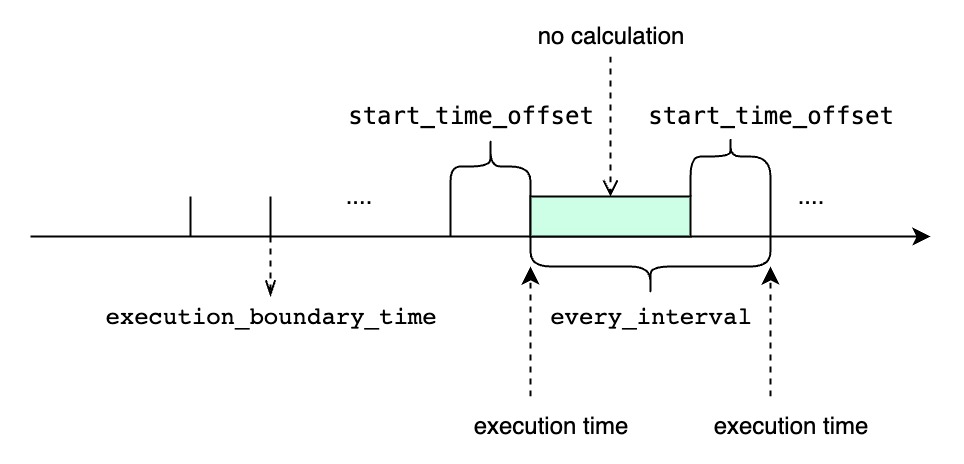
##### `<every_interval>` is not zero
-
+
- `TIMEOUT POLICY` specify how we deal with the cq task whose previous time
interval execution is not finished while the next execution time has reached.
The default value is `BLOCKED`.
@@ -548,7 +548,7 @@ END
- `DISCARD` means that we just discard the current cq execution task and
wait for the next execution time and do the next time interval cq task. If
using `DISCARD` policy, some time intervals won't be executed when the
execution time of one cq task is longer than the `<every_interval>`. However,
once a cq task is executed, it will use the latest time interval, so it can
catch up at the sacrifice of some time intervals being discarded.
-### 3. Examples of CQ
+### Examples of CQ
The examples below use the following sample data. It's a real time data stream
and we can assume that the data arrives on time.
@@ -931,7 +931,7 @@ At **2021-05-11T22:19:00.000+08:00**, `cq5` executes a
query within the time ran
+-----------------------------+-------------------------------+-----------+
````
-### 4. CQ Management
+### CQ Management
#### Listing continuous queries
@@ -979,7 +979,7 @@ DROP CONTINUOUS QUERY s1_count_cq;
CQs can't be altered once they're created. To change a CQ, you must `DROP` and
re`CREATE` it with the updated settings.
-### 5. CQ Use Cases
+### CQ Use Cases
#### Downsampling and Data Retention
@@ -1005,7 +1005,7 @@ SELECT avg(count_s1) from (select count(s1) as count_s1
from root.sg.d group by(
To get the same results:
-**1. Create a CQ**
+**Create a CQ**
This step performs the nested sub query in from clause of the query above. The
following CQ automatically calculates the number of non-null values of `s1` at
30 minute intervals and writes those counts into the new
`root.sg_count.d.count_s1` time series.
@@ -1019,7 +1019,7 @@ BEGIN
END
```
-**2. Query the CQ results**
+**Query the CQ results**
Next step performs the avg([...]) part of the outer query above.
@@ -1030,7 +1030,7 @@ SELECT avg(count_s1) from root.sg_count.d;
```
-### 6. System Parameter Configuration
+### System Parameter Configuration
| Name | Description
| Data Type | Default Value |
| :------------------------------------------ |
------------------------------------------------------------ | --------- |
------------- |
@@ -1662,8 +1662,6 @@ This method is called by the framework. For a UDF
instance, `beforeDestroy` will
-
-
### Maven Project Example
If you use Maven, you can build your own UDF project referring to our
**udf-example** module. You can find the project
[here](https://github.com/apache/iotdb/tree/master/example/udf).
diff --git a/src/UserGuide/latest/User-Manual/Database-Programming.md
b/src/UserGuide/latest/User-Manual/Database-Programming.md
index c2f6407..64cfa87 100644
--- a/src/UserGuide/latest/User-Manual/Database-Programming.md
+++ b/src/UserGuide/latest/User-Manual/Database-Programming.md
@@ -23,7 +23,7 @@
## TRIGGER
-### 1. Instructions
+### Instructions
The trigger provides a mechanism for listening to changes in time series data.
With user-defined logic, tasks such as alerting and data forwarding can be
conducted.
@@ -49,7 +49,7 @@ There are currently two trigger events for the trigger, and
other trigger events
- BEFORE INSERT: Fires before the data is persisted. **Please note that
currently the trigger does not support data cleaning and will not change the
data to be persisted itself.**
- AFTER INSERT: Fires after the data is persisted.
-### 2. How to Implement a Trigger
+### How to Implement a Trigger
You need to implement the trigger by writing a Java class, where the
dependency shown below is required. If you use
[Maven](http://search.maven.org/), you can search for them directly from the
[Maven repository](http://search.maven.org/).
@@ -320,7 +320,7 @@ public class ClusterAlertingExample implements Trigger {
}
```
-### 3. Trigger Management
+### Trigger Management
You can create and drop a trigger through an SQL statement, and you can also
query all registered triggers through an SQL statement.
@@ -450,7 +450,7 @@ During the process of creating and dropping triggers in the
cluster, we maintain
| DROPPING | Intermediate state of executing `DROP TRIGGER`, the cluster
is in the process of dropping the trigger. | NO |
| TRANSFERRING | The cluster is migrating the location of this trigger
instance. | NO |
-### 4. Notes
+### Notes
- The trigger takes effect from the time of registration, and does not process
the existing historical data. **That is, only insertion requests that occur
after the trigger is successfully registered will be listened to by the
trigger. **
- The fire process of trigger is synchronous currently, so you need to ensure
the efficiency of the trigger, otherwise the writing performance may be greatly
affected. **You need to guarantee concurrency safety of triggers yourself**.
@@ -460,7 +460,7 @@ During the process of creating and dropping triggers in the
cluster, we maintain
- The trigger JAR package has a size limit, which must be less than
min(`config_node_ratis_log_appender_buffer_size_max`, 2G), where
`config_node_ratis_log_appender_buffer_size_max` is a configuration item. For
the specific meaning, please refer to the IOTDB configuration item description.
- **It is better not to have classes with the same full class name but
different function implementations in different JAR packages.** For example,
trigger1 and trigger2 correspond to resources trigger1.jar and trigger2.jar
respectively. If two JAR packages contain a
`org.apache.iotdb.trigger.example.AlertListener` class, when `CREATE TRIGGER`
uses this class, the system will randomly load the class in one of the JAR
packages, which will eventually leads the inconsistent behavior of trig [...]
-### 5. Configuration Parameters
+### Configuration Parameters
| Parameter | Meaning
|
| ------------------------------------------------- |
------------------------------------------------------------ |
@@ -469,13 +469,13 @@ During the process of creating and dropping triggers in
the cluster, we maintain
## CONTINUOUS QUERY (CQ)
-### 1. Introduction
+### Introduction
Continuous queries(CQ) are queries that run automatically and periodically on
realtime data and store query results in other specified time series.
Users can implement sliding window streaming computing through continuous
query, such as calculating the hourly average temperature of a sequence and
writing it into a new sequence. Users can customize the `RESAMPLE` clause to
create different sliding windows, which can achieve a certain degree of
tolerance for out-of-order data.
-### 2. Syntax
+### Syntax
```sql
CREATE (CONTINUOUS QUERY | CQ) <cq_id>
@@ -540,7 +540,7 @@ END
##### `<every_interval>` is not zero
-
+
- `TIMEOUT POLICY` specify how we deal with the cq task whose previous time
interval execution is not finished while the next execution time has reached.
The default value is `BLOCKED`.
@@ -548,7 +548,7 @@ END
- `DISCARD` means that we just discard the current cq execution task and
wait for the next execution time and do the next time interval cq task. If
using `DISCARD` policy, some time intervals won't be executed when the
execution time of one cq task is longer than the `<every_interval>`. However,
once a cq task is executed, it will use the latest time interval, so it can
catch up at the sacrifice of some time intervals being discarded.
-### 3. Examples of CQ
+### Examples of CQ
The examples below use the following sample data. It's a real time data stream
and we can assume that the data arrives on time.
@@ -931,7 +931,7 @@ At **2021-05-11T22:19:00.000+08:00**, `cq5` executes a
query within the time ran
+-----------------------------+-------------------------------+-----------+
````
-### 4. CQ Management
+### CQ Management
#### Listing continuous queries
@@ -979,7 +979,7 @@ DROP CONTINUOUS QUERY s1_count_cq;
CQs can't be altered once they're created. To change a CQ, you must `DROP` and
re`CREATE` it with the updated settings.
-### 5. CQ Use Cases
+### CQ Use Cases
#### Downsampling and Data Retention
@@ -1005,7 +1005,7 @@ SELECT avg(count_s1) from (select count(s1) as count_s1
from root.sg.d group by(
To get the same results:
-**1. Create a CQ**
+**Create a CQ**
This step performs the nested sub query in from clause of the query above. The
following CQ automatically calculates the number of non-null values of `s1` at
30 minute intervals and writes those counts into the new
`root.sg_count.d.count_s1` time series.
@@ -1019,7 +1019,7 @@ BEGIN
END
```
-**2. Query the CQ results**
+**Query the CQ results**
Next step performs the avg([...]) part of the outer query above.
@@ -1030,7 +1030,7 @@ SELECT avg(count_s1) from root.sg_count.d;
```
-### 6. System Parameter Configuration
+### System Parameter Configuration
| Name | Description
| Data Type | Default Value |
| :------------------------------------------ |
------------------------------------------------------------ | --------- |
------------- |
diff --git a/src/zh/UserGuide/Master/SQL-Manual/SQL-Manual.md
b/src/zh/UserGuide/Master/SQL-Manual/SQL-Manual.md
index bcdd9a8..435daad 100644
--- a/src/zh/UserGuide/Master/SQL-Manual/SQL-Manual.md
+++ b/src/zh/UserGuide/Master/SQL-Manual/SQL-Manual.md
@@ -2,7 +2,7 @@
## 元数据操作
-### 1、数据库管理
+### 数据库管理
#### 创建数据库
@@ -35,7 +35,7 @@ count databases root.sgcc.*
count databases root.sgcc
```
-### 2、时间序列管理
+### 时间序列管理
#### 创建时间序列
@@ -86,11 +86,12 @@ drop timeseries root.ln.wf02.*
```sql
SHOW TIMESERIES
SHOW TIMESERIES <Path>
-show timeseries root.**
-show timeseries root.ln.**
-show timeseries root.ln.** limit 10 offset 10
-show timeseries root.ln.** where timeseries contains 'wf01.wt'
-show timeseries root.ln.** where dataType=FLOAT
+SHOW TIMESERIES root.**
+SHOW TIMESERIES root.ln.**
+SHOW TIMESERIES root.ln.** limit 10 offset 10
+SHOW TIMESERIES root.ln.** where timeseries contains 'wf01.wt'
+SHOW TIMESERIES root.ln.** where dataType=FLOAT
+SHOW TIMESERIES root.ln.** where time>=2017-01-01T00:00:00 and
time<=2017-11-01T16:26:00;
SHOW LATEST TIMESERIES
```
@@ -106,6 +107,7 @@ COUNT TIMESERIES root.** WHERE DATATYPE = INT64
COUNT TIMESERIES root.** WHERE TAGS(unit) contains 'c'
COUNT TIMESERIES root.** WHERE TAGS(unit) = 'c'
COUNT TIMESERIES root.** WHERE TIMESERIES contains 'sgcc' group by level = 1
+COUNT TIMESERIES root.** WHERE time>=2017-01-01T00:00:00 and
time<=2017-11-01T16:26:00;
COUNT TIMESERIES root.** GROUP BY LEVEL=1
COUNT TIMESERIES root.ln.** GROUP BY LEVEL=2
COUNT TIMESERIES root.ln.wf01.* GROUP BY LEVEL=2
@@ -195,7 +197,7 @@ create aligned timeseries root.sg1.d1(s1 INT32
tags(tag1=v1, tag2=v2) attributes
show timeseries where TAGS(tag1)='v1'
```
-### 3、时间序列路径管理
+### 时间序列路径管理
#### 查看路径的所有子路径
@@ -218,6 +220,8 @@ SHOW CHILD NODES pathPattern
IoTDB> show devices
IoTDB> show devices root.ln.**
+
+IoTDB> show devices where time>=2017-01-01T00:00:00 and
time<=2017-11-01T16:26:00;
```
##### 查看设备及其 database 信息
@@ -240,19 +244,21 @@ IoTDB > COUNT NODES root.**.temperature LEVEL=3
#### 统计设备数量
```sql
-IoTDB> show devices
IoTDB> count devices
IoTDB> count devices root.ln.**
+
+IoTDB> count devices where time>=2017-01-01T00:00:00 and
time<=2017-11-01T16:26:00;
```
-### 4、设备模板管理
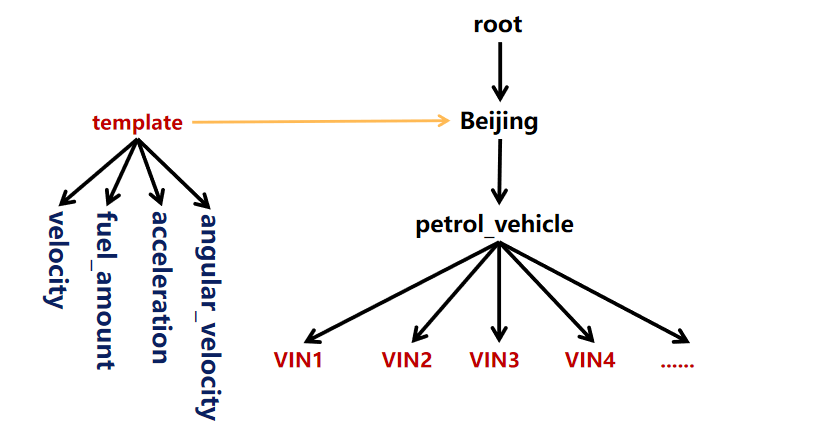
+### 设备模板管理
-
+
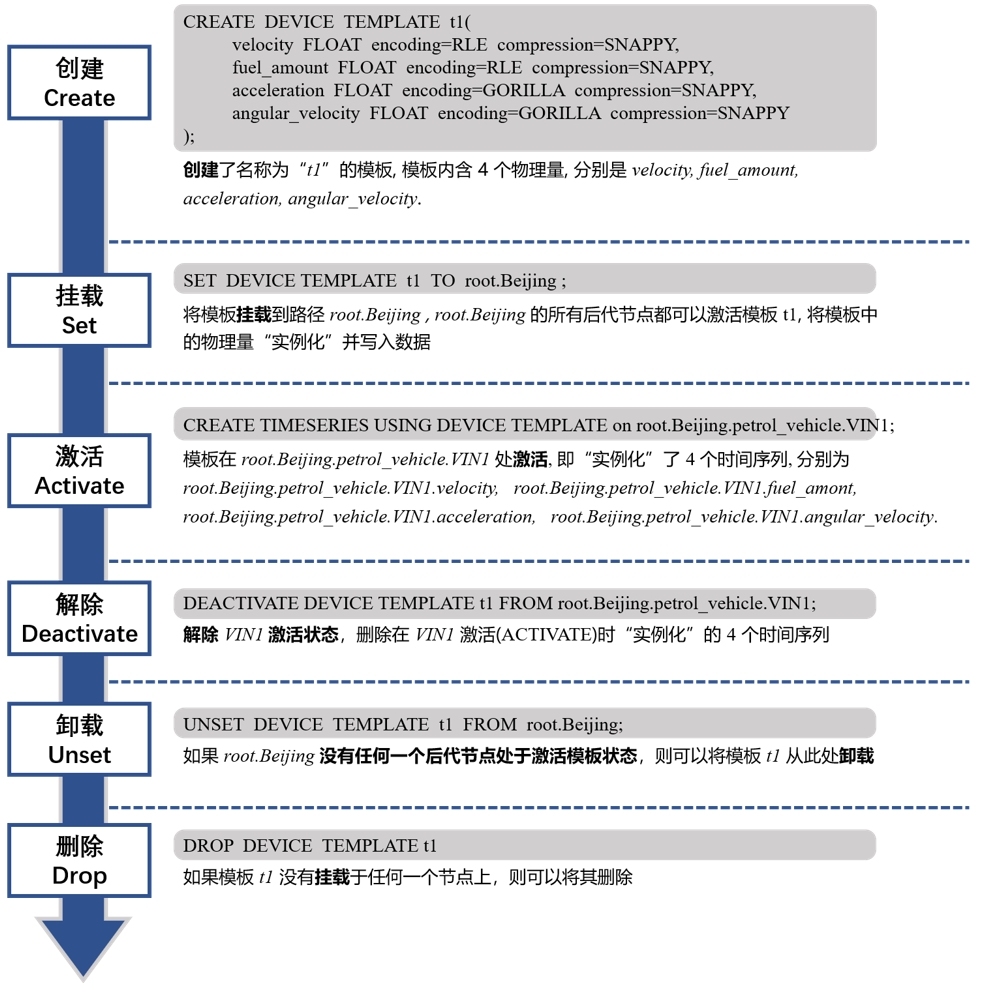
+
#### 创建设备模板
```Go
@@ -321,7 +327,7 @@ IoTDB> unset device template t1 from root.sg1.d1
```sql
IoTDB> drop device template t1
```
-### 5、数据存活时间管理
+### 数据存活时间管理
#### 设置 TTL
```sql
@@ -353,25 +359,25 @@ IoTDB> SHOW TTL ON StorageGroupNames
```
## 写入数据
-### 1、写入单列数据
+### 写入单列数据
```sql
IoTDB > insert into root.ln.wf02.wt02(timestamp,status) values(1,true)
```
```sql
IoTDB > insert into root.ln.wf02.wt02(timestamp,hardware) values(1, 'v1'),(2,
'v1')
```
-### 2、写入多列数据
+### 写入多列数据
```sql
IoTDB > insert into root.ln.wf02.wt02(timestamp, status, hardware) values (2,
false, 'v2')
```
```sql
IoTDB > insert into root.ln.wf02.wt02(timestamp, status, hardware) VALUES (3,
false, 'v3'),(4, true, 'v4')
```
-### 3、使用服务器时间戳
+### 使用服务器时间戳
```sql
IoTDB > insert into root.ln.wf02.wt02(status, hardware) values (false, 'v2')
```
-### 4、写入对齐时间序列数据
+### 写入对齐时间序列数据
```sql
IoTDB > create aligned timeseries root.sg1.d1(s1 INT32, s2 DOUBLE)
```
@@ -384,7 +390,7 @@ IoTDB > insert into root.sg1.d1(timestamp, s1, s2) aligned
values(2, 2, 2), (3,
```sql
IoTDB > select * from root.sg1.d1
```
-### 5、加载 TsFile 文件数据
+### 加载 TsFile 文件数据
load '<path/dir>' [sglevel=int][verify=true/false][onSuccess=delete/none]
@@ -410,7 +416,7 @@ load '<path/dir>'
[sglevel=int][verify=true/false][onSuccess=delete/none]
## 删除数据
-### 1、删除单列数据
+### 删除单列数据
```sql
delete from root.ln.wf02.wt02.status where time<=2017-11-01T16:26:00;
```
@@ -451,7 +457,7 @@ expressions like : time > XXX, time <= XXX, or two atomic
expressions connected
```sql
delete from root.ln.wf02.wt02.status
```
-### 2、删除多列数据
+### 删除多列数据
```sql
delete from root.ln.wf02.wt02.* where time <= 2017-11-01T16:26:00;
```
@@ -463,7 +469,7 @@ Msg: The statement is executed successfully.
```
## 数据查询
-### 1、基础查询
+### 基础查询
#### 时间过滤查询
```sql
@@ -485,7 +491,7 @@ select wf01.wt01.status, wf02.wt02.hardware from root.ln
where (time > 2017-11-0
```sql
select * from root.ln.** where time > 1 order by time desc limit 10;
```
-### 2、选择表达式
+### 选择表达式
#### 使用别名
```sql
@@ -591,7 +597,7 @@ IoTDB> select last status, temperature from
root.ln.wf01.wt01 where time >= 2017
```sql
IoTDB> select last * from root.ln.wf01.wt01 order by timeseries desc;
```
-### 3、查询过滤条件
+### 查询过滤条件
#### 时间过滤条件
@@ -660,7 +666,7 @@ IoTDB> select * from root.sg.d1 where value regexp
'^[A-Za-z]+$'
IoTDB> select * from root.sg.d1 where value regexp '^[a-z]+$' and time > 100
```
-### 4、分段分组聚合
+### 分段分组聚合
#### 未指定滑动步长的时间区间分组聚合查询
```sql
@@ -782,7 +788,7 @@ select count(charging_stauts), first_value(soc) from
root.sg group by count(char
```sql
select count(charging_stauts), first_value(soc) from root.sg group by
count(charging_status,5,ignoreNull=false)
```
-### 5、聚合结果过滤
+### 聚合结果过滤
不正确的:
```sql
@@ -800,7 +806,7 @@ SQL 示例:
select count(s1), count(s2) from root.** group by ([1,11),2ms) having
count(s2) > 1 align by device;
```
-### 6、结果集补空值
+### 结果集补空值
```sql
FILL '(' PREVIOUS | LINEAR | constant (, interval=DURATION_LITERAL)? ')'
```
@@ -824,7 +830,7 @@ select temperature, status from root.sgcc.wf03.wt01 where
time >= 2017-11-01T16:
```sql
select temperature, status from root.sgcc.wf03.wt01 where time >=
2017-11-01T16:37:00.000 and time <= 2017-11-01T16:40:00.000 fill(true);
```
-### 7、查询结果分页
+### 查询结果分页
#### 按行分页
@@ -862,7 +868,7 @@ select max_value(*) from root.ln.wf01.wt01 group by
([2017-11-01T00:00:00, 2017-
```sql
select * from root.ln.wf01.wt01 limit 10 offset 100 slimit 2 soffset 0
```
-### 8、排序
+### 排序
时间对齐模式下的排序
```sql
@@ -884,13 +890,13 @@ select * from root.ln.** where time <=
2017-11-01T00:01:00 align by device;
```sql
select count(*) from root.ln.** group by
((2017-11-01T00:00:00.000+08:00,2017-11-01T00:03:00.000+08:00],1m) order by
device asc,time asc align by device
```
-### 9、查询对齐模式
+### 查询对齐模式
#### 按设备对齐
```sql
select * from root.ln.** where time <= 2017-11-01T00:01:00 align by device;
```
-### 10、查询写回(SELECT INTO)
+### 查询写回(SELECT INTO)
#### 整体描述
```sql
@@ -944,7 +950,7 @@ IoTDB> select s1 + s2 into root.expr.add(d1s1_d1s2),
root.expr.add(d2s1_d2s2) fr
##### 按时间对齐(默认)
-###### (1)目标设备不使用变量占位符 & 目标物理量列表使用变量占位符
+###### 目标设备不使用变量占位符 & 目标物理量列表使用变量占位符
```
select s1, s2
@@ -964,7 +970,7 @@ into root.sg_copy.d1(s1), root.sg_copy.d2(s1),
root.sg_copy.d1(s2), root.sg_copy
from root.sg.d1, root.sg.d2;
```
-###### (2)目标设备使用变量占位符 & 目标物理量列表不使用变量占位符
+###### 目标设备使用变量占位符 & 目标物理量列表不使用变量占位符
```
select d1.s1, d1.s2, d2.s3, d3.s4
@@ -974,7 +980,7 @@ into ::(s1_1, s2_2), root.sg.d2_2(s3_3),
root.${2}_copy.::(s4)
from root.sg;
```
-###### (3)目标设备使用变量占位符 & 目标物理量列表使用变量占位符
+###### 目标设备使用变量占位符 & 目标物理量列表使用变量占位符
```
select * into root.sg_bk.::(::) from root.sg.**;
@@ -982,7 +988,7 @@ select * into root.sg_bk.::(::) from root.sg.**;
##### 按设备对齐(使用 `ALIGN BY DEVICE`)
-###### (1)目标设备不使用变量占位符 & 目标物理量列表使用变量占位符
+###### 目标设备不使用变量占位符 & 目标物理量列表使用变量占位符
```
select s1, s2, s3, s4
@@ -994,7 +1000,7 @@ from root.sg.d1, root.sg.d2, root.sg.d3
align by device;
```
-###### (2)目标设备使用变量占位符 & 目标物理量列表不使用变量占位符
+###### 目标设备使用变量占位符 & 目标物理量列表不使用变量占位符
```
select avg(s1), sum(s2) + sum(s3), count(s4)
@@ -1006,7 +1012,7 @@ from root.**
align by device;
```
-###### (3)目标设备使用变量占位符 & 目标物理量列表使用变量占位符
+###### 目标设备使用变量占位符 & 目标物理量列表使用变量占位符
```
select * into ::(backup_${4}) from root.sg.** align by device;
@@ -1026,7 +1032,6 @@ explain select s1,s2 from root.sg.d1
```
explain analyze select s1,s2 from root.sg.d1 order by s1
```
-
## 运算符
更多见文档[Operator-and-Expression](../Reference/Function-and-Expression.md#算数运算符和函数)
@@ -1189,8 +1194,7 @@ SELECT DIFF(s1, 'ignoreNull'='false'), DIFF(s2,
'ignoreNull'='false') from root.
更多见文档[Sample Functions](../Reference/Function-and-Expression.md#采样函数)。
### 时间序列处理函数
-| 函数名 | 输入序列类型 | 参数 | 输出序列类型 | 功能描述
|
-| ---)
+更多见文档[Sample Functions](../Reference/Function-and-Expression.md#时间序列处理函数)。
```sql
select equal_size_bucket_random_sample(temperature,'proportion'='0.1') as
random_sample from root.ln.wf01.wt01;
diff --git a/src/zh/UserGuide/latest/SQL-Manual/SQL-Manual.md
b/src/zh/UserGuide/latest/SQL-Manual/SQL-Manual.md
index c904b66..435daad 100644
--- a/src/zh/UserGuide/latest/SQL-Manual/SQL-Manual.md
+++ b/src/zh/UserGuide/latest/SQL-Manual/SQL-Manual.md
@@ -2,7 +2,7 @@
## 元数据操作
-### 1、数据库管理
+### 数据库管理
#### 创建数据库
@@ -35,7 +35,7 @@ count databases root.sgcc.*
count databases root.sgcc
```
-### 2、时间序列管理
+### 时间序列管理
#### 创建时间序列
@@ -197,7 +197,7 @@ create aligned timeseries root.sg1.d1(s1 INT32
tags(tag1=v1, tag2=v2) attributes
show timeseries where TAGS(tag1)='v1'
```
-### 3、时间序列路径管理
+### 时间序列路径管理
#### 查看路径的所有子路径
@@ -251,7 +251,7 @@ IoTDB> count devices root.ln.**
IoTDB> count devices where time>=2017-01-01T00:00:00 and
time<=2017-11-01T16:26:00;
```
-### 4、设备模板管理
+### 设备模板管理

@@ -327,7 +327,7 @@ IoTDB> unset device template t1 from root.sg1.d1
```sql
IoTDB> drop device template t1
```
-### 5、数据存活时间管理
+### 数据存活时间管理
#### 设置 TTL
```sql
@@ -359,25 +359,25 @@ IoTDB> SHOW TTL ON StorageGroupNames
```
## 写入数据
-### 1、写入单列数据
+### 写入单列数据
```sql
IoTDB > insert into root.ln.wf02.wt02(timestamp,status) values(1,true)
```
```sql
IoTDB > insert into root.ln.wf02.wt02(timestamp,hardware) values(1, 'v1'),(2,
'v1')
```
-### 2、写入多列数据
+### 写入多列数据
```sql
IoTDB > insert into root.ln.wf02.wt02(timestamp, status, hardware) values (2,
false, 'v2')
```
```sql
IoTDB > insert into root.ln.wf02.wt02(timestamp, status, hardware) VALUES (3,
false, 'v3'),(4, true, 'v4')
```
-### 3、使用服务器时间戳
+### 使用服务器时间戳
```sql
IoTDB > insert into root.ln.wf02.wt02(status, hardware) values (false, 'v2')
```
-### 4、写入对齐时间序列数据
+### 写入对齐时间序列数据
```sql
IoTDB > create aligned timeseries root.sg1.d1(s1 INT32, s2 DOUBLE)
```
@@ -390,7 +390,7 @@ IoTDB > insert into root.sg1.d1(timestamp, s1, s2) aligned
values(2, 2, 2), (3,
```sql
IoTDB > select * from root.sg1.d1
```
-### 5、加载 TsFile 文件数据
+### 加载 TsFile 文件数据
load '<path/dir>' [sglevel=int][verify=true/false][onSuccess=delete/none]
@@ -416,7 +416,7 @@ load '<path/dir>'
[sglevel=int][verify=true/false][onSuccess=delete/none]
## 删除数据
-### 1、删除单列数据
+### 删除单列数据
```sql
delete from root.ln.wf02.wt02.status where time<=2017-11-01T16:26:00;
```
@@ -457,7 +457,7 @@ expressions like : time > XXX, time <= XXX, or two atomic
expressions connected
```sql
delete from root.ln.wf02.wt02.status
```
-### 2、删除多列数据
+### 删除多列数据
```sql
delete from root.ln.wf02.wt02.* where time <= 2017-11-01T16:26:00;
```
@@ -469,7 +469,7 @@ Msg: The statement is executed successfully.
```
## 数据查询
-### 1、基础查询
+### 基础查询
#### 时间过滤查询
```sql
@@ -491,7 +491,7 @@ select wf01.wt01.status, wf02.wt02.hardware from root.ln
where (time > 2017-11-0
```sql
select * from root.ln.** where time > 1 order by time desc limit 10;
```
-### 2、选择表达式
+### 选择表达式
#### 使用别名
```sql
@@ -597,7 +597,7 @@ IoTDB> select last status, temperature from
root.ln.wf01.wt01 where time >= 2017
```sql
IoTDB> select last * from root.ln.wf01.wt01 order by timeseries desc;
```
-### 3、查询过滤条件
+### 查询过滤条件
#### 时间过滤条件
@@ -666,7 +666,7 @@ IoTDB> select * from root.sg.d1 where value regexp
'^[A-Za-z]+$'
IoTDB> select * from root.sg.d1 where value regexp '^[a-z]+$' and time > 100
```
-### 4、分段分组聚合
+### 分段分组聚合
#### 未指定滑动步长的时间区间分组聚合查询
```sql
@@ -788,7 +788,7 @@ select count(charging_stauts), first_value(soc) from
root.sg group by count(char
```sql
select count(charging_stauts), first_value(soc) from root.sg group by
count(charging_status,5,ignoreNull=false)
```
-### 5、聚合结果过滤
+### 聚合结果过滤
不正确的:
```sql
@@ -806,7 +806,7 @@ SQL 示例:
select count(s1), count(s2) from root.** group by ([1,11),2ms) having
count(s2) > 1 align by device;
```
-### 6、结果集补空值
+### 结果集补空值
```sql
FILL '(' PREVIOUS | LINEAR | constant (, interval=DURATION_LITERAL)? ')'
```
@@ -830,7 +830,7 @@ select temperature, status from root.sgcc.wf03.wt01 where
time >= 2017-11-01T16:
```sql
select temperature, status from root.sgcc.wf03.wt01 where time >=
2017-11-01T16:37:00.000 and time <= 2017-11-01T16:40:00.000 fill(true);
```
-### 7、查询结果分页
+### 查询结果分页
#### 按行分页
@@ -868,7 +868,7 @@ select max_value(*) from root.ln.wf01.wt01 group by
([2017-11-01T00:00:00, 2017-
```sql
select * from root.ln.wf01.wt01 limit 10 offset 100 slimit 2 soffset 0
```
-### 8、排序
+### 排序
时间对齐模式下的排序
```sql
@@ -890,13 +890,13 @@ select * from root.ln.** where time <=
2017-11-01T00:01:00 align by device;
```sql
select count(*) from root.ln.** group by
((2017-11-01T00:00:00.000+08:00,2017-11-01T00:03:00.000+08:00],1m) order by
device asc,time asc align by device
```
-### 9、查询对齐模式
+### 查询对齐模式
#### 按设备对齐
```sql
select * from root.ln.** where time <= 2017-11-01T00:01:00 align by device;
```
-### 10、查询写回(SELECT INTO)
+### 查询写回(SELECT INTO)
#### 整体描述
```sql
@@ -950,7 +950,7 @@ IoTDB> select s1 + s2 into root.expr.add(d1s1_d1s2),
root.expr.add(d2s1_d2s2) fr
##### 按时间对齐(默认)
-###### (1)目标设备不使用变量占位符 & 目标物理量列表使用变量占位符
+###### 目标设备不使用变量占位符 & 目标物理量列表使用变量占位符
```
select s1, s2
@@ -970,7 +970,7 @@ into root.sg_copy.d1(s1), root.sg_copy.d2(s1),
root.sg_copy.d1(s2), root.sg_copy
from root.sg.d1, root.sg.d2;
```
-###### (2)目标设备使用变量占位符 & 目标物理量列表不使用变量占位符
+###### 目标设备使用变量占位符 & 目标物理量列表不使用变量占位符
```
select d1.s1, d1.s2, d2.s3, d3.s4
@@ -980,7 +980,7 @@ into ::(s1_1, s2_2), root.sg.d2_2(s3_3),
root.${2}_copy.::(s4)
from root.sg;
```
-###### (3)目标设备使用变量占位符 & 目标物理量列表使用变量占位符
+###### 目标设备使用变量占位符 & 目标物理量列表使用变量占位符
```
select * into root.sg_bk.::(::) from root.sg.**;
@@ -988,7 +988,7 @@ select * into root.sg_bk.::(::) from root.sg.**;
##### 按设备对齐(使用 `ALIGN BY DEVICE`)
-###### (1)目标设备不使用变量占位符 & 目标物理量列表使用变量占位符
+###### 目标设备不使用变量占位符 & 目标物理量列表使用变量占位符
```
select s1, s2, s3, s4
@@ -1000,7 +1000,7 @@ from root.sg.d1, root.sg.d2, root.sg.d3
align by device;
```
-###### (2)目标设备使用变量占位符 & 目标物理量列表不使用变量占位符
+###### 目标设备使用变量占位符 & 目标物理量列表不使用变量占位符
```
select avg(s1), sum(s2) + sum(s3), count(s4)
@@ -1012,7 +1012,7 @@ from root.**
align by device;
```
-###### (3)目标设备使用变量占位符 & 目标物理量列表使用变量占位符
+###### 目标设备使用变量占位符 & 目标物理量列表使用变量占位符
```
select * into ::(backup_${4}) from root.sg.** align by device;



