This is an automated email from the ASF dual-hosted git repository.

caogaofei pushed a commit to branch main
in repository https://gitbox.apache.org/repos/asf/iotdb-docs.git
The following commit(s) were added to refs/heads/main by this push:
new 4c75dbe modify timecho english
4c75dbe is described below
commit 4c75dbe79bbac8af1c7757db3366e6a3d4d51a65
Author: W1y1r <[email protected]>
AuthorDate: Thu Sep 5 10:28:48 2024 +0800
modify timecho english
---
.../Deployment-and-Maintenance/AINode_Deployment_timecho.md | 8 ++++----
.../Deployment-and-Maintenance/Cluster-Deployment_apache.md | 2 +-
.../Deployment-and-Maintenance/Cluster-Deployment_timecho.md | 2 +-
.../Deployment-and-Maintenance/Stand-Alone-Deployment_apache.md | 2 +-
.../Deployment-and-Maintenance/Stand-Alone-Deployment_timecho.md | 2 +-
src/UserGuide/latest/API/Programming-MQTT.md | 8 ++++----
src/UserGuide/latest/API/RestServiceV1.md | 4 ++--
src/UserGuide/latest/API/RestServiceV2.md | 4 ++--
src/UserGuide/latest/Basic-Concept/Data-Type.md | 2 +-
.../Deployment-and-Maintenance/AINode_Deployment_timecho.md | 8 ++++----
.../Deployment-and-Maintenance/Cluster-Deployment_apache.md | 2 +-
.../Deployment-and-Maintenance/Cluster-Deployment_timecho.md | 2 +-
.../Deployment-and-Maintenance/Stand-Alone-Deployment_apache.md | 2 +-
.../Deployment-and-Maintenance/Stand-Alone-Deployment_timecho.md | 2 +-
src/UserGuide/latest/Ecosystem-Integration/Grafana-Plugin.md | 2 +-
src/UserGuide/latest/Reference/ConfigNode-Config-Manual.md | 4 ++--
src/UserGuide/latest/Reference/DataNode-Config-Manual.md | 6 +++---
src/UserGuide/latest/Tools-System/CLI.md | 2 +-
src/UserGuide/latest/User-Manual/Security-Management_timecho.md | 6 +++---
src/UserGuide/latest/User-Manual/Streaming_apache.md | 2 +-
src/UserGuide/latest/User-Manual/Streaming_timecho.md | 2 +-
src/zh/UserGuide/latest/API/Programming-MQTT.md | 8 ++++----
src/zh/UserGuide/latest/API/RestServiceV1.md | 4 ++--
src/zh/UserGuide/latest/API/RestServiceV2.md | 4 ++--
.../latest/Deployment-and-Maintenance/Slow-Query-Management.md | 2 +-
src/zh/UserGuide/latest/Reference/ConfigNode-Config-Manual.md | 4 ++--
src/zh/UserGuide/latest/Reference/DataNode-Config-Manual.md | 7 +++----
src/zh/UserGuide/latest/Tools-System/CLI.md | 2 +-
src/zh/UserGuide/latest/Tools-System/Maintenance-Tool_timecho.md | 4 ++--
src/zh/UserGuide/latest/Tools-System/TsFile-Import-Export-Tool.md | 6 +++---
src/zh/UserGuide/latest/User-Manual/Data-Sync_apache.md | 2 +-
src/zh/UserGuide/latest/User-Manual/Data-Sync_timecho.md | 2 +-
src/zh/UserGuide/latest/User-Manual/Database-Programming.md | 4 ++--
src/zh/UserGuide/latest/User-Manual/Operate-Metadata_apache.md | 2 +-
.../UserGuide/latest/User-Manual/Security-Management_timecho.md | 6 +++---
src/zh/UserGuide/latest/User-Manual/Streaming_apache.md | 2 +-
src/zh/UserGuide/latest/User-Manual/Streaming_timecho.md | 2 +-
37 files changed, 67 insertions(+), 68 deletions(-)
diff --git
a/src/UserGuide/Master/Deployment-and-Maintenance/AINode_Deployment_timecho.md
b/src/UserGuide/Master/Deployment-and-Maintenance/AINode_Deployment_timecho.md
index 9a6e8e0..60c91c7 100644
---
a/src/UserGuide/Master/Deployment-and-Maintenance/AINode_Deployment_timecho.md
+++
b/src/UserGuide/Master/Deployment-and-Maintenance/AINode_Deployment_timecho.md
@@ -27,7 +27,7 @@
AINode is the third type of endogenous node provided by IoTDB after the
Configurable Node and DataNode. This node extends its ability to perform
machine learning analysis on time series by interacting with the DataNode and
Configurable Node of the IoTDB cluster. It supports the introduction of
existing machine learning models from external sources for registration and the
use of registered models to complete time series analysis tasks on specified
time series data through simple SQL sta [...]
### Delivery Method
- It is an additional package outside the IoTDB cluster, with independent
installation and activation (if you need to try or use it, please contact
Tianmu Technology Business or Technical Support).
+ It is an additional package outside the IoTDB cluster, with independent
installation and activation (if you need to try or use it, please contact
Timecho Technology Business or Technical Support).
### Deployment mode
<div >
@@ -72,11 +72,11 @@
### AINode activation
-Require IoTDB to be in normal operation and have AINode module authorization
in the license (usually not in the license, please contact Tianmou Business or
technical support personnel to obtain AINode module authorization).
+Require IoTDB to be in normal operation and have AINode module authorization
in the license (usually not in the license, please contact Timecho Business or
technical support personnel to obtain AINode module authorization).
The authorization method for activating the AINode module is as follows:
- Method 1: Activate file copy activation
- - After restarting the confignode node, enter the activation folder, copy
the system_info file to the Tianmou staff, and inform them to apply for
independent authorization for AINode;
+ - After restarting the confignode node, enter the activation folder, copy
the system_info file to the Timecho staff, and inform them to apply for
independent authorization for AINode;
- Received the license file returned by the staff;
- Put the license file into the activation folder of the corresponding
node;
@@ -86,7 +86,7 @@ Require IoTDB to be in normal operation and have AINode
module authorization in
cd sbin
./start-activate.sh
```
- - The following information is displayed. Please copy the machine code (i.e.
this string of characters) to the Tianmou staff and inform them to apply for
independent authorization of AINode:
+ - The following information is displayed. Please copy the machine code (i.e.
this string of characters) to the Timecho staff and inform them to apply for
independent authorization of AINode:
```shell
Please copy the system_info's content and send it to Timecho:
01-KU5LDFFN-PNBEHDRH
diff --git
a/src/UserGuide/Master/Deployment-and-Maintenance/Cluster-Deployment_apache.md
b/src/UserGuide/Master/Deployment-and-Maintenance/Cluster-Deployment_apache.md
index 954aa3b..e10df50 100644
---
a/src/UserGuide/Master/Deployment-and-Maintenance/Cluster-Deployment_apache.md
+++
b/src/UserGuide/Master/Deployment-and-Maintenance/Cluster-Deployment_apache.md
@@ -159,7 +159,7 @@ You can use the `show cluster` command to view cluster
information:
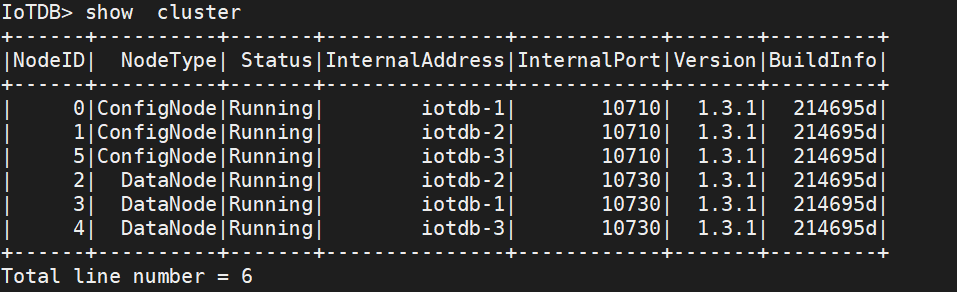
-> The appearance of `ACTIVATED (W)` indicates passive activation, which means
that this Configurable Node does not have a license file (or has not issued the
latest license file with a timestamp), and its activation depends on other
Activated Configurable Nodes in the cluster. At this point, it is recommended
to check if the license file has been placed in the license folder. If not,
please place the license file. If a license file already exists, it may be due
to inconsistency between t [...]
+> The appearance of `ACTIVATED (W)` indicates passive activation, which means
that this Configurable Node does not have a license file (or has not issued the
latest license file with a timestamp), and its activation depends on other
Activated Configurable Nodes in the cluster. At this point, it is recommended
to check if the license file has been placed in the license folder. If not,
please place the license file. If a license file already exists, it may be due
to inconsistency between t [...]
## Node Maintenance Steps
diff --git
a/src/UserGuide/Master/Deployment-and-Maintenance/Cluster-Deployment_timecho.md
b/src/UserGuide/Master/Deployment-and-Maintenance/Cluster-Deployment_timecho.md
index 2d119df..3bde0f2 100644
---
a/src/UserGuide/Master/Deployment-and-Maintenance/Cluster-Deployment_timecho.md
+++
b/src/UserGuide/Master/Deployment-and-Maintenance/Cluster-Deployment_timecho.md
@@ -196,7 +196,7 @@ When you see the display of `Activated` on the far right,
it indicates successfu
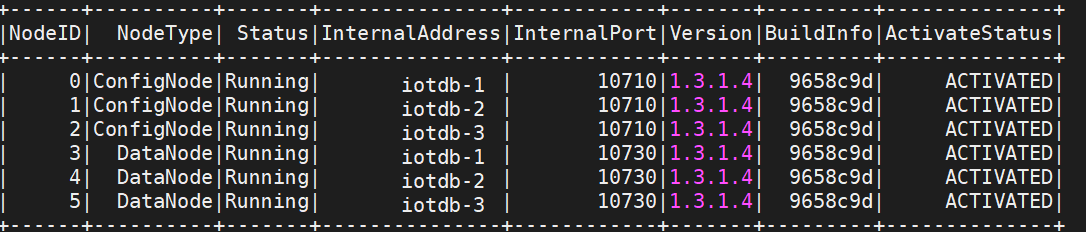
-> The appearance of `ACTIVATED (W)` indicates passive activation, which means
that this Configurable Node does not have a license file (or has not issued the
latest license file with a timestamp), and its activation depends on other
Activated Configurable Nodes in the cluster. At this point, it is recommended
to check if the license file has been placed in the license folder. If not,
please place the license file. If a license file already exists, it may be due
to inconsistency between t [...]
+> The appearance of `ACTIVATED (W)` indicates passive activation, which means
that this Configurable Node does not have a license file (or has not issued the
latest license file with a timestamp), and its activation depends on other
Activated Configurable Nodes in the cluster. At this point, it is recommended
to check if the license file has been placed in the license folder. If not,
please place the license file. If a license file already exists, it may be due
to inconsistency between t [...]
## Node Maintenance Steps
diff --git
a/src/UserGuide/Master/Deployment-and-Maintenance/Stand-Alone-Deployment_apache.md
b/src/UserGuide/Master/Deployment-and-Maintenance/Stand-Alone-Deployment_apache.md
index 4b10b80..7749d3f 100644
---
a/src/UserGuide/Master/Deployment-and-Maintenance/Stand-Alone-Deployment_apache.md
+++
b/src/UserGuide/Master/Deployment-and-Maintenance/Stand-Alone-Deployment_apache.md
@@ -130,4 +130,4 @@ When the status is all running, it indicates that the
service has started succes
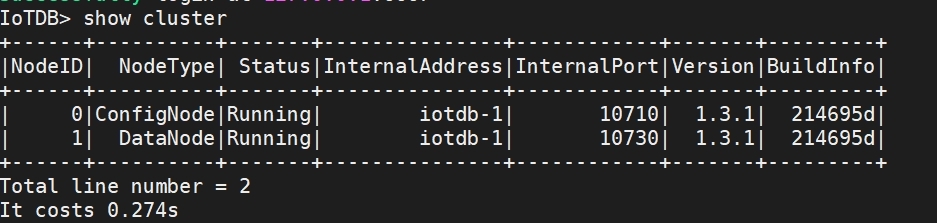
-> The appearance of 'Activated (W)' indicates passive activation, indicating
that this Config Node does not have a license file (or has not issued the
latest license file with a timestamp). At this point, it is recommended to
check if the license file has been placed in the license folder. If not, please
place the license file. If a license file already exists, it may be due to
inconsistency between the license file of this node and the information of
other nodes. Please contact Tianmu s [...]
\ No newline at end of file
+> The appearance of 'Activated (W)' indicates passive activation, indicating
that this Config Node does not have a license file (or has not issued the
latest license file with a timestamp). At this point, it is recommended to
check if the license file has been placed in the license folder. If not, please
place the license file. If a license file already exists, it may be due to
inconsistency between the license file of this node and the information of
other nodes. Please contact Timecho [...]
\ No newline at end of file
diff --git
a/src/UserGuide/Master/Deployment-and-Maintenance/Stand-Alone-Deployment_timecho.md
b/src/UserGuide/Master/Deployment-and-Maintenance/Stand-Alone-Deployment_timecho.md
index c0d86f3..6e4d7f8 100644
---
a/src/UserGuide/Master/Deployment-and-Maintenance/Stand-Alone-Deployment_timecho.md
+++
b/src/UserGuide/Master/Deployment-and-Maintenance/Stand-Alone-Deployment_timecho.md
@@ -169,4 +169,4 @@ When you see the display "Activated" on the far right, it
indicates successful a

-> The appearance of 'Activated (W)' indicates passive activation, indicating
that this Config Node does not have a license file (or has not issued the
latest license file with a timestamp). At this point, it is recommended to
check if the license file has been placed in the license folder. If not, please
place the license file. If a license file already exists, it may be due to
inconsistency between the license file of this node and the information of
other nodes. Please contact Tianmu s [...]
\ No newline at end of file
+> The appearance of 'Activated (W)' indicates passive activation, indicating
that this Config Node does not have a license file (or has not issued the
latest license file with a timestamp). At this point, it is recommended to
check if the license file has been placed in the license folder. If not, please
place the license file. If a license file already exists, it may be due to
inconsistency between the license file of this node and the information of
other nodes. Please contact Timecho [...]
\ No newline at end of file
diff --git a/src/UserGuide/latest/API/Programming-MQTT.md
b/src/UserGuide/latest/API/Programming-MQTT.md
index 5bbb610..9dbe314 100644
--- a/src/UserGuide/latest/API/Programming-MQTT.md
+++ b/src/UserGuide/latest/API/Programming-MQTT.md
@@ -59,7 +59,7 @@ or json array of the above two.
<img style="width:100%; max-width:800px; max-height:600px; margin-left:auto;
margin-right:auto; display:block;"
src="https://alioss.timecho.com/docs/img/github/78357469-1bf11880-75e4-11ea-978f-a53996667a0d.png";>
## MQTT Configurations
-The IoTDB MQTT service load configurations from
`${IOTDB_HOME}/${IOTDB_CONF}/iotdb-system.properties` by default.
+The IoTDB MQTT service load configurations from
`${IOTDB_HOME}/${IOTDB_CONF}/iotdb-common.properties` by default.
Configurations are as follows:
@@ -157,7 +157,7 @@ public class CustomizedJsonPayloadFormatter implements
PayloadFormatter {
@Override
public String getName() {
- // set the value of mqtt_payload_formatter in iotdb-system.properties
as the following string:
+ // set the value of mqtt_payload_formatter in iotdb-common.properties
as the following string:
return "CustomizedJson";
}
}
@@ -170,8 +170,8 @@ public class CustomizedJsonPayloadFormatter implements
PayloadFormatter {
Then, in your server:
1. Create ${IOTDB_HOME}/ext/mqtt/ folder, and put the jar into this folder.
-2. Update configuration to enable MQTT service. (`enable_mqtt_service=true` in
`conf/iotdb-system.properties`)
-3. Set the value of `mqtt_payload_formatter` in `conf/iotdb-system.properties`
as the value of getName() in your implementation
+2. Update configuration to enable MQTT service. (`enable_mqtt_service=true` in
`conf/iotdb-common.properties`)
+3. Set the value of `mqtt_payload_formatter` in `conf/iotdb-common.properties`
as the value of getName() in your implementation
, in this example, the value is `CustomizedJson`
4. Launch the IoTDB server.
5. Now IoTDB will use your implementation to parse the MQTT message.
diff --git a/src/UserGuide/latest/API/RestServiceV1.md
b/src/UserGuide/latest/API/RestServiceV1.md
index 5e656ab..ef767f6 100644
--- a/src/UserGuide/latest/API/RestServiceV1.md
+++ b/src/UserGuide/latest/API/RestServiceV1.md
@@ -32,7 +32,7 @@ RESTful services are disabled by default.
* User
- Find the `conf/conf/iotdb-system.properties` file under the IoTDB
installation directory and set `enable_rest_service` to `true` to enable the
module.
+ Find the `conf/conf/iotdb-datanode.properties` file under the IoTDB
installation directory and set `enable_rest_service` to `true` to enable the
module.
```properties
enable_rest_service=true
@@ -845,7 +845,7 @@ Sample response:
## Configuration
-The configuration is located in 'iotdb-system.properties'.
+The configuration is located in 'iotdb-datanode.properties'.
* Set 'enable_rest_service' to 'true' to enable the module, and 'false' to
disable the module. By default, this value is' false '.
diff --git a/src/UserGuide/latest/API/RestServiceV2.md
b/src/UserGuide/latest/API/RestServiceV2.md
index 978023d..0e8daaa 100644
--- a/src/UserGuide/latest/API/RestServiceV2.md
+++ b/src/UserGuide/latest/API/RestServiceV2.md
@@ -32,7 +32,7 @@ RESTful services are disabled by default.
* User
- Find the `conf/iotdb-system.properties` file under the IoTDB installation
directory and set `enable_rest_service` to `true` to enable the module.
+ Find the `conf/iotdb-datanode.properties` file under the IoTDB installation
directory and set `enable_rest_service` to `true` to enable the module.
```properties
enable_rest_service=true
@@ -885,7 +885,7 @@ Sample response:
## Configuration
-The configuration is located in 'iotdb-system.properties'.
+The configuration is located in 'iotdb-datanode.properties'.
* Set 'enable_rest_service' to 'true' to enable the module, and 'false' to
disable the module. By default, this value is' false '.
diff --git a/src/UserGuide/latest/Basic-Concept/Data-Type.md
b/src/UserGuide/latest/Basic-Concept/Data-Type.md
index 06fb9cf..1e5242c 100644
--- a/src/UserGuide/latest/Basic-Concept/Data-Type.md
+++ b/src/UserGuide/latest/Basic-Concept/Data-Type.md
@@ -36,7 +36,7 @@ IoTDB supports the following data types:
### Float Precision
-The time series of **FLOAT** and **DOUBLE** type can specify
(MAX\_POINT\_NUMBER, see [this page](../SQL-Manual/SQL-Manual.md) for more
information on how to specify), which is the number of digits after the decimal
point of the floating point number, if the encoding method is
[RLE](Encoding-and-Compression.md) or [TS\_2DIFF](Encoding-and-Compression.md).
If MAX\_POINT\_NUMBER is not specified, the system will use
[float\_precision](../Reference/DataNode-Config-Manual.md) in the configur [...]
+The time series of **FLOAT** and **DOUBLE** type can specify
(MAX\_POINT\_NUMBER, see [this page](../SQL-Manual/SQL-Manual.md) for more
information on how to specify), which is the number of digits after the decimal
point of the floating point number, if the encoding method is
[RLE](Encoding-and-Compression.md) or [TS\_2DIFF](Encoding-and-Compression.md).
If MAX\_POINT\_NUMBER is not specified, the system will use
[float\_precision](../Reference/DataNode-Config-Manual.md) in the configur [...]
```sql
CREATE TIMESERIES root.vehicle.d0.s0 WITH DATATYPE=FLOAT, ENCODING=RLE,
'MAX_POINT_NUMBER'='2';
diff --git
a/src/UserGuide/latest/Deployment-and-Maintenance/AINode_Deployment_timecho.md
b/src/UserGuide/latest/Deployment-and-Maintenance/AINode_Deployment_timecho.md
index 562537e..945b92a 100644
---
a/src/UserGuide/latest/Deployment-and-Maintenance/AINode_Deployment_timecho.md
+++
b/src/UserGuide/latest/Deployment-and-Maintenance/AINode_Deployment_timecho.md
@@ -27,7 +27,7 @@
AINode is the third type of endogenous node provided by IoTDB after the
Configurable Node and DataNode. This node extends its ability to perform
machine learning analysis on time series by interacting with the DataNode and
Configurable Node of the IoTDB cluster. It supports the introduction of
existing machine learning models from external sources for registration and the
use of registered models to complete time series analysis tasks on specified
time series data through simple SQL sta [...]
### Delivery Method
- It is an additional package outside the IoTDB cluster, with independent
installation and activation (if you need to try or use it, please contact
Tianmu Technology Business or Technical Support).
+ It is an additional package outside the IoTDB cluster, with independent
installation and activation (if you need to try or use it, please contact
Timecho Technology Business or Technical Support).
### Deployment mode
<div >
@@ -72,11 +72,11 @@
### AINode activation
-Require IoTDB to be in normal operation and have AINode module authorization
in the license (usually not in the license, please contact Tianmou Business or
technical support personnel to obtain AINode module authorization).
+Require IoTDB to be in normal operation and have AINode module authorization
in the license (usually not in the license, please contact T Business or
technical support personnel to obtain AINode module authorization).
The authorization method for activating the AINode module is as follows:
- Method 1: Activate file copy activation
- - After restarting the confignode node, enter the activation folder, copy
the system_info file to the Tianmou staff, and inform them to apply for
independent authorization for AINode;
+ - After restarting the confignode node, enter the activation folder, copy
the system_info file to the Timecho staff, and inform them to apply for
independent authorization for AINode;
- Received the license file returned by the staff;
- Put the license file into the activation folder of the corresponding
node;
@@ -86,7 +86,7 @@ Require IoTDB to be in normal operation and have AINode
module authorization in
cd sbin
./start-activate.sh
```
- - The following information is displayed. Please copy the machine code (i.e.
this string of characters) to the Tianmou staff and inform them to apply for
independent authorization of AINode:
+ - The following information is displayed. Please copy the machine code (i.e.
this string of characters) to the Timecho staff and inform them to apply for
independent authorization of AINode:
```shell
Please copy the system_info's content and send it to Timecho:
Y17hFA0xRCE1TmkVxILuCIEPc7uJcr5bzlXWiptw8uZTmTX5aThfypQdLUIhMljw075hNRSicyvyJR9JM7QaNm1gcFZPHVRWVXIiY5IlZkXdxCVc1erXMsbCqUYsR2R2Mw4PSpFJsUF5jHWSoFIIjQ2bmJFW5P52KCccFMVeHTc=
diff --git
a/src/UserGuide/latest/Deployment-and-Maintenance/Cluster-Deployment_apache.md
b/src/UserGuide/latest/Deployment-and-Maintenance/Cluster-Deployment_apache.md
index 5b736e4..74e2557 100644
---
a/src/UserGuide/latest/Deployment-and-Maintenance/Cluster-Deployment_apache.md
+++
b/src/UserGuide/latest/Deployment-and-Maintenance/Cluster-Deployment_apache.md
@@ -160,7 +160,7 @@ You can use the `show cluster` command to view cluster
information:

-> The appearance of `ACTIVATED (W)` indicates passive activation, which means
that this Configurable Node does not have a license file (or has not issued the
latest license file with a timestamp), and its activation depends on other
Activated Configurable Nodes in the cluster. At this point, it is recommended
to check if the license file has been placed in the license folder. If not,
please place the license file. If a license file already exists, it may be due
to inconsistency between t [...]
+> The appearance of `ACTIVATED (W)` indicates passive activation, which means
that this Configurable Node does not have a license file (or has not issued the
latest license file with a timestamp), and its activation depends on other
Activated Configurable Nodes in the cluster. At this point, it is recommended
to check if the license file has been placed in the license folder. If not,
please place the license file. If a license file already exists, it may be due
to inconsistency between t [...]
## Node Maintenance Steps
diff --git
a/src/UserGuide/latest/Deployment-and-Maintenance/Cluster-Deployment_timecho.md
b/src/UserGuide/latest/Deployment-and-Maintenance/Cluster-Deployment_timecho.md
index 7bbc1cc..99b92b9 100644
---
a/src/UserGuide/latest/Deployment-and-Maintenance/Cluster-Deployment_timecho.md
+++
b/src/UserGuide/latest/Deployment-and-Maintenance/Cluster-Deployment_timecho.md
@@ -198,7 +198,7 @@ When you see the display of `Activated` on the far right,
it indicates successfu

-> The appearance of `ACTIVATED (W)` indicates passive activation, which means
that this Configurable Node does not have a license file (or has not issued the
latest license file with a timestamp), and its activation depends on other
Activated Configurable Nodes in the cluster. At this point, it is recommended
to check if the license file has been placed in the license folder. If not,
please place the license file. If a license file already exists, it may be due
to inconsistency between t [...]
+> The appearance of `ACTIVATED (W)` indicates passive activation, which means
that this Configurable Node does not have a license file (or has not issued the
latest license file with a timestamp), and its activation depends on other
Activated Configurable Nodes in the cluster. At this point, it is recommended
to check if the license file has been placed in the license folder. If not,
please place the license file. If a license file already exists, it may be due
to inconsistency between t [...]
## Node Maintenance Steps
diff --git
a/src/UserGuide/latest/Deployment-and-Maintenance/Stand-Alone-Deployment_apache.md
b/src/UserGuide/latest/Deployment-and-Maintenance/Stand-Alone-Deployment_apache.md
index f1db2b5..62c3ac0 100644
---
a/src/UserGuide/latest/Deployment-and-Maintenance/Stand-Alone-Deployment_apache.md
+++
b/src/UserGuide/latest/Deployment-and-Maintenance/Stand-Alone-Deployment_apache.md
@@ -130,4 +130,4 @@ When the status is all running, it indicates that the
service has started succes

-> The appearance of 'Activated (W)' indicates passive activation, indicating
that this Config Node does not have a license file (or has not issued the
latest license file with a timestamp). At this point, it is recommended to
check if the license file has been placed in the license folder. If not, please
place the license file. If a license file already exists, it may be due to
inconsistency between the license file of this node and the information of
other nodes. Please contact Tianmu s [...]
\ No newline at end of file
+> The appearance of 'Activated (W)' indicates passive activation, indicating
that this Config Node does not have a license file (or has not issued the
latest license file with a timestamp). At this point, it is recommended to
check if the license file has been placed in the license folder. If not, please
place the license file. If a license file already exists, it may be due to
inconsistency between the license file of this node and the information of
other nodes. Please contact Timecho [...]
\ No newline at end of file
diff --git
a/src/UserGuide/latest/Deployment-and-Maintenance/Stand-Alone-Deployment_timecho.md
b/src/UserGuide/latest/Deployment-and-Maintenance/Stand-Alone-Deployment_timecho.md
index 5e2e9fc..905a7f4 100644
---
a/src/UserGuide/latest/Deployment-and-Maintenance/Stand-Alone-Deployment_timecho.md
+++
b/src/UserGuide/latest/Deployment-and-Maintenance/Stand-Alone-Deployment_timecho.md
@@ -168,4 +168,4 @@ When you see the display "Activated" on the far right, it
indicates successful a

-> The appearance of 'Activated (W)' indicates passive activation, indicating
that this Config Node does not have a license file (or has not issued the
latest license file with a timestamp). At this point, it is recommended to
check if the license file has been placed in the license folder. If not, please
place the license file. If a license file already exists, it may be due to
inconsistency between the license file of this node and the information of
other nodes. Please contact Tianmu s [...]
\ No newline at end of file
+> The appearance of 'Activated (W)' indicates passive activation, indicating
that this Config Node does not have a license file (or has not issued the
latest license file with a timestamp). At this point, it is recommended to
check if the license file has been placed in the license folder. If not, please
place the license file. If a license file already exists, it may be due to
inconsistency between the license file of this node and the information of
other nodes. Please contact Timecho [...]
\ No newline at end of file
diff --git a/src/UserGuide/latest/Ecosystem-Integration/Grafana-Plugin.md
b/src/UserGuide/latest/Ecosystem-Integration/Grafana-Plugin.md
index dc83704..712c400 100644
--- a/src/UserGuide/latest/Ecosystem-Integration/Grafana-Plugin.md
+++ b/src/UserGuide/latest/Ecosystem-Integration/Grafana-Plugin.md
@@ -91,7 +91,7 @@ For more details,please click
[here](https://grafana.com/docs/grafana/latest/i
### Configure IoTDB REST Service
-* Modify `{iotdb directory}/conf/iotdb-system.properties` as following:
+* Modify `{iotdb directory}/conf/iotdb-datanode.properties` as following:
```properties
# Is the REST service enabled
diff --git a/src/UserGuide/latest/Reference/ConfigNode-Config-Manual.md
b/src/UserGuide/latest/Reference/ConfigNode-Config-Manual.md
index 563efe2..fb0b3b3 100644
--- a/src/UserGuide/latest/Reference/ConfigNode-Config-Manual.md
+++ b/src/UserGuide/latest/Reference/ConfigNode-Config-Manual.md
@@ -25,7 +25,7 @@ IoTDB ConfigNode files are under `conf`.
* `confignode-env.sh/bat`:Environment configurations, in which we could set
the memory allocation of ConfigNode.
-* `iotdb-system.properties`:IoTDB system configurations.
+* `iotdb-confignode.properties`:IoTDB system configurations.
## Environment Configuration File(confignode-env.sh/bat)
@@ -61,7 +61,7 @@ The details of each parameter are as follows:
|Effective|After restarting system|
-## ConfigNode Configuration File (iotdb-system.properties)
+## ConfigNode Configuration File (iotdb-confignode.properties)
The global configuration of cluster is in ConfigNode.
diff --git a/src/UserGuide/latest/Reference/DataNode-Config-Manual.md
b/src/UserGuide/latest/Reference/DataNode-Config-Manual.md
index be0478d..be96619 100644
--- a/src/UserGuide/latest/Reference/DataNode-Config-Manual.md
+++ b/src/UserGuide/latest/Reference/DataNode-Config-Manual.md
@@ -25,11 +25,11 @@ We use the same configuration files for IoTDB DataNode and
Standalone version, a
* `datanode-env.sh/bat`:Environment configurations, in which we could set the
memory allocation of DataNode and Standalone.
-* `iotdb-system.properties`:IoTDB system configurations.
+* `iotdb-datanode.properties`:IoTDB system configurations.
## Hot Modification Configuration
-For the convenience of users, IoTDB provides users with hot modification
function, that is, modifying some configuration parameters in
`iotdb-system.properties` during the system operation and applying them to the
system immediately.
+For the convenience of users, IoTDB provides users with hot modification
function, that is, modifying some configuration parameters in
`iotdb-datanode.properties` during the system operation and applying them to
the system immediately.
In the parameters described below, these parameters whose way of `Effective`
is `hot-load` support hot modification.
Trigger way: The client sends the command(sql) `load configuration` or `set
configuration` to the IoTDB server.
@@ -102,7 +102,7 @@ The user and passwords are in
${IOTDB\_CONF}/conf/jmx.password.
The permission definitions are in ${IOTDB\_CONF}/conf/jmx.access.
-## DataNode/Standalone Configuration File (iotdb-system.properties)
+## DataNode/Standalone Configuration File (iotdb-datanode.properties)
### Data Node RPC Configuration
diff --git a/src/UserGuide/latest/Tools-System/CLI.md
b/src/UserGuide/latest/Tools-System/CLI.md
index 34803c3..ff3f4a1 100644
--- a/src/UserGuide/latest/Tools-System/CLI.md
+++ b/src/UserGuide/latest/Tools-System/CLI.md
@@ -132,7 +132,7 @@ Openid connect (oidc) uses keycloack as the authority
authentication service of
#### configuration
-The configuration is located in iotdb-system.properties , set the
author_provider_class is
org.apache.iotdb.commons.auth.authorizer.OpenIdAuthorizer Openid service is
enabled, and the default value is
org.apache.iotdb.db.auth.authorizer.LocalFileAuthorizer Indicates that the
openid service is not enabled.
+The configuration is located in iotdb-common.properties , set the
author_provider_class is
org.apache.iotdb.commons.auth.authorizer.OpenIdAuthorizer Openid service is
enabled, and the default value is
org.apache.iotdb.db.auth.authorizer.LocalFileAuthorizer Indicates that the
openid service is not enabled.
```
authorizer_provider_class=org.apache.iotdb.commons.auth.authorizer.OpenIdAuthorizer
diff --git a/src/UserGuide/latest/User-Manual/Security-Management_timecho.md
b/src/UserGuide/latest/User-Manual/Security-Management_timecho.md
index 607c21d..1c0d5b0 100644
--- a/src/UserGuide/latest/User-Manual/Security-Management_timecho.md
+++ b/src/UserGuide/latest/User-Manual/Security-Management_timecho.md
@@ -29,13 +29,13 @@ Allow which client addresses can connect to IoTDB
**configuration file**
-conf/iotdb-system.properties
+conf/iotdb-common.properties
conf/white.list
**configuration item**
-iotdb-system.properties:
+iotdb-common.properties:
Decide whether to enable white list
@@ -110,7 +110,7 @@ It is available through through configurations:
#### configuration item
-In iotdb-system.properties, change the following configurations:
+In iotdb-common.properties, change the following configurations:
```YAML
####################
diff --git a/src/UserGuide/latest/User-Manual/Streaming_apache.md
b/src/UserGuide/latest/User-Manual/Streaming_apache.md
index ea1766c..3617fed 100644
--- a/src/UserGuide/latest/User-Manual/Streaming_apache.md
+++ b/src/UserGuide/latest/User-Manual/Streaming_apache.md
@@ -735,7 +735,7 @@ The following diagram illustrates the different states and
their transitions:
## Configure Parameters
-In iotdb-system.properties :
+In iotdb-common.properties :
V1.3.0:
```Properties
diff --git a/src/UserGuide/latest/User-Manual/Streaming_timecho.md
b/src/UserGuide/latest/User-Manual/Streaming_timecho.md
index 9e8a494..4223846 100644
--- a/src/UserGuide/latest/User-Manual/Streaming_timecho.md
+++ b/src/UserGuide/latest/User-Manual/Streaming_timecho.md
@@ -779,7 +779,7 @@ The following diagram shows all states and state
transitions:
## Configuration parameters
-In iotdb-system.properties:
+In iotdb-common.properties:
V1.3.0+:
```Properties
diff --git a/src/zh/UserGuide/latest/API/Programming-MQTT.md
b/src/zh/UserGuide/latest/API/Programming-MQTT.md
index bb8dd1a..9c5b8f3 100644
--- a/src/zh/UserGuide/latest/API/Programming-MQTT.md
+++ b/src/zh/UserGuide/latest/API/Programming-MQTT.md
@@ -60,7 +60,7 @@ MQTT 主题与 IoTDB 时间序列相对应。
<img style="width:100%; max-width:800px; max-height:600px; margin-left:auto;
margin-right:auto; display:block;"
src="https://alioss.timecho.com/docs/img/github/78357469-1bf11880-75e4-11ea-978f-a53996667a0d.png";>
## MQTT 配置
-默认情况下,IoTDB MQTT 服务从`${IOTDB_HOME}/${IOTDB_CONF}/iotdb-system.properties`加载配置。
+默认情况下,IoTDB MQTT 服务从`${IOTDB_HOME}/${IOTDB_CONF}/iotdb-common.properties`加载配置。
配置如下:
@@ -156,7 +156,7 @@ public class CustomizedJsonPayloadFormatter implements
PayloadFormatter {
@Override
public String getName() {
- // set the value of mqtt_payload_formatter in iotdb-system.properties
as the following string:
+ // set the value of mqtt_payload_formatter in iotdb-common.properties
as the following string:
return "CustomizedJson";
}
}
@@ -169,8 +169,8 @@ public class CustomizedJsonPayloadFormatter implements
PayloadFormatter {
在 IoTDB 服务端:
1. 创建 ${IOTDB_HOME}/ext/mqtt/ 文件夹, 将刚才的 jar 包放入此文件夹。
-2. 打开 MQTT 服务参数. (`enable_mqtt_service=true` in `conf/iotdb-system.properties`)
-3. 用刚才的实现类中的 getName() 方法的返回值 设置为 `conf/iotdb-system.properties` 中
`mqtt_payload_formatter` 的值,
+2. 打开 MQTT 服务参数. (`enable_mqtt_service=true` in `conf/iotdb-common.properties`)
+3. 用刚才的实现类中的 getName() 方法的返回值 设置为 `conf/iotdb-common.properties` 中
`mqtt_payload_formatter` 的值,
, 在本例中,为 `CustomizedJson`
4. 启动 IoTDB
5. 搞定
diff --git a/src/zh/UserGuide/latest/API/RestServiceV1.md
b/src/zh/UserGuide/latest/API/RestServiceV1.md
index ee1ba7d..0988d04 100644
--- a/src/zh/UserGuide/latest/API/RestServiceV1.md
+++ b/src/zh/UserGuide/latest/API/RestServiceV1.md
@@ -30,7 +30,7 @@ RESTful 服务默认情况是关闭的
* 使用者
- 找到IoTDB安装目录下面的`conf/iotdb-system.properties`文件,将 `enable_rest_service` 设置为
`true` 以启用该模块。
+ 找到IoTDB安装目录下面的`conf/iotdb-datanode.properties`文件,将 `enable_rest_service`
设置为 `true` 以启用该模块。
```properties
enable_rest_service=true
@@ -860,7 +860,7 @@ curl -H "Content-Type:application/json" -H
"Authorization:Basic cm9vdDpyb290" -X
## 配置
-配置位于 `iotdb-system.properties` 中。
+配置位于 `iotdb-datanode.properties` 中。
diff --git a/src/zh/UserGuide/latest/API/RestServiceV2.md
b/src/zh/UserGuide/latest/API/RestServiceV2.md
index be7fe31..71646e0 100644
--- a/src/zh/UserGuide/latest/API/RestServiceV2.md
+++ b/src/zh/UserGuide/latest/API/RestServiceV2.md
@@ -30,7 +30,7 @@ RESTful 服务默认情况是关闭的
* 使用者
- 找到IoTDB安装目录下面的`conf/iotdb-system.properties`文件,将 `enable_rest_service` 设置为
`true` 以启用该模块。
+ 找到IoTDB安装目录下面的`conf/iotdb-datanode.properties`文件,将 `enable_rest_service`
设置为 `true` 以启用该模块。
```properties
enable_rest_service=true
@@ -899,7 +899,7 @@ curl -H "Content-Type:application/json" -H
"Authorization:Basic cm9vdDpyb290" -X
## 配置
-配置位于 `iotdb-system.properties` 中。
+配置位于 `iotdb-datanode.properties` 中。
diff --git
a/src/zh/UserGuide/latest/Deployment-and-Maintenance/Slow-Query-Management.md
b/src/zh/UserGuide/latest/Deployment-and-Maintenance/Slow-Query-Management.md
index 7b8cf60..f2348f2 100644
---
a/src/zh/UserGuide/latest/Deployment-and-Maintenance/Slow-Query-Management.md
+++
b/src/zh/UserGuide/latest/Deployment-and-Maintenance/Slow-Query-Management.md
@@ -25,7 +25,7 @@ IoTDB 会将慢查询输出到单独的日志文件 log_datanode_slow_sql.log
## 配置慢查询的阈值
-IoTDB 在 `iotdb-system.properties` 提供了 `slow_query_threshold`
配置项,单位是毫秒,默认是30秒,超过此参数指定的阈值,便会被判断为慢查询,待其查询执行结束后,将其记录在 log_datanode_slow_sql.log
中。
+IoTDB 在 `iotdb-common.properties` 提供了 `slow_query_threshold`
配置项,单位是毫秒,默认是30秒,超过此参数指定的阈值,便会被判断为慢查询,待其查询执行结束后,将其记录在 log_datanode_slow_sql.log
中。
## 慢查询日志示例
diff --git a/src/zh/UserGuide/latest/Reference/ConfigNode-Config-Manual.md
b/src/zh/UserGuide/latest/Reference/ConfigNode-Config-Manual.md
index b0d8c6f..1a22fbb 100644
--- a/src/zh/UserGuide/latest/Reference/ConfigNode-Config-Manual.md
+++ b/src/zh/UserGuide/latest/Reference/ConfigNode-Config-Manual.md
@@ -25,7 +25,7 @@ IoTDB ConfigNode 配置文件均位于 IoTDB 安装目录:`conf`文件夹下
* `confignode-env.sh/bat`:环境配置项的配置文件,可以配置 ConfigNode 的内存大小。
-* `iotdb-system.properties`:IoTDB 的配置文件。
+* `iotdb-confignode.properties`:IoTDB 的配置文件。
## 环境配置项(confignode-env.sh/bat)
@@ -58,7 +58,7 @@ IoTDB ConfigNode 配置文件均位于 IoTDB 安装目录:`conf`文件夹下
|默认值|取决于MEMORY\_SIZE的配置。|
|改后生效方式|重启服务生效|
-## 系统配置项(iotdb-system.properties)
+## 系统配置项(iotdb-confignode.properties)
IoTDB 集群的全局配置通过 ConfigNode 配置。
diff --git a/src/zh/UserGuide/latest/Reference/DataNode-Config-Manual.md
b/src/zh/UserGuide/latest/Reference/DataNode-Config-Manual.md
index 8de80c7..899805c 100644
--- a/src/zh/UserGuide/latest/Reference/DataNode-Config-Manual.md
+++ b/src/zh/UserGuide/latest/Reference/DataNode-Config-Manual.md
@@ -25,12 +25,11 @@ IoTDB DataNode 与 Standalone 模式共用一套配置文件,均位于 IoTDB
* `datanode-env.sh/bat`:环境配置项的配置文件,可以配置 DataNode 的内存大小。
-* `iotdb-system.properties`:IoTDB 配置文件。
+* `iotdb-datanode.properties`:IoTDB 配置文件。
## 热修改配置项
-为方便用户使用,IoTDB 为用户提供了热修改功能,即在系统运行过程中修改 `iotdb-system.properties`
中部分配置参数并即时应用到系统中。下面介绍的参数中,改后 生效方式为`热加载`
-的均为支持热修改的配置参数。
+为方便用户使用,IoTDB 为用户提供了热修改功能,即在系统运行过程中修改 `iotdb-datanode.properties`
中部分配置参数并即时应用到系统中。下面介绍的参数中,改后 生效方式为`热加载`的均为支持热修改的配置参数。
通过 Session 或 Cli 发送 ```load configuration``` 或 `set configuration` 命令(SQL)至
IoTDB 可触发配置热加载。
@@ -83,7 +82,7 @@ IoTDB DataNode 与 Standalone 模式共用一套配置文件,均位于 IoTDB
|默认值|31999|
|改后生效方式|重启服务生效|
-## 系统配置项(iotdb-system.properties)
+## 系统配置项(iotdb-datanode.properties)
系统配置项是 IoTDB DataNode/Standalone 运行的核心配置,它主要用于设置 DataNode/Standalone 数据库引擎的参数。
diff --git a/src/zh/UserGuide/latest/Tools-System/CLI.md
b/src/zh/UserGuide/latest/Tools-System/CLI.md
index 8072825..2ef4bb3 100644
--- a/src/zh/UserGuide/latest/Tools-System/CLI.md
+++ b/src/zh/UserGuide/latest/Tools-System/CLI.md
@@ -112,7 +112,7 @@ Shell > sbin\start-cli.bat -h 10.129.187.21 -p 6667 -u root
-pw root -disableISO
OpenID Connect (OIDC) 使用 keycloack 作为 OIDC 服务权限认证服务。
#### 配置
-配置位于 iotdb-system.properties,设定 authorizer_provider_class 为
org.apache.iotdb.commons.auth.authorizer.OpenIdAuthorizer 则开启了 openID
服务,默认情况下值为 org.apache.iotdb.commons.auth.authorizer.LocalFileAuthorizer 表示没有开启
openID 服务。
+配置位于 iotdb-common.properties,设定 authorizer_provider_class 为
org.apache.iotdb.commons.auth.authorizer.OpenIdAuthorizer 则开启了 openID
服务,默认情况下值为 org.apache.iotdb.commons.auth.authorizer.LocalFileAuthorizer 表示没有开启
openID 服务。
```
authorizer_provider_class=org.apache.iotdb.commons.auth.authorizer.OpenIdAuthorizer
diff --git a/src/zh/UserGuide/latest/Tools-System/Maintenance-Tool_timecho.md
b/src/zh/UserGuide/latest/Tools-System/Maintenance-Tool_timecho.md
index 27d36a8..f41bea2 100644
--- a/src/zh/UserGuide/latest/Tools-System/Maintenance-Tool_timecho.md
+++ b/src/zh/UserGuide/latest/Tools-System/Maintenance-Tool_timecho.md
@@ -103,7 +103,7 @@ iotd cluster check example
| cn_internal_port |
内部通信端口,对应`iotdb/config/iotdb-confignode.properties`中的`cn_internal_port` | 必填
|
| cn_consensus_port |
对应`iotdb/config/iotdb-confignode.properties`中的`cn_consensus_port` | 非必填 |
| cn_data_dir |
对应`iotdb/config/iotdb-confignode.properties`中的`cn_data_dir` | 必填 |
-| iotdb-system.properties |
对应`iotdb/config/iotdb-confignode.properties`在`global`与`confignode_servers`同时配置值优先使用confignode_servers中的值
| 非必填 |
+| iotdb-confignode.properties |
对应`iotdb/config/iotdb-confignode.properties`在`global`与`confignode_servers`同时配置值优先使用confignode_servers中的值
| 非必填 |
* datanode_servers 是部署IoTDB Datanodes配置,里面可以配置多个Datanode
@@ -117,7 +117,7 @@ iotd cluster check example
| dn_seed_config_node |
集群配置地址指向存活的ConfigNode,默认指向confignode_x,在`global`与`datanode_servers`同时配置值时优先使用`datanode_servers`中的值,对应`iotdb/config/iotdb-datanode.properties`中的`dn_seed_config_node`
| 必填 |
| dn_rpc_port | datanode
rpc端口地址,对应`iotdb/config/iotdb-datanode.properties`中的`dn_rpc_port` | 必填 |
| dn_internal_port |
内部通信端口,对应`iotdb/config/iotdb-datanode.properties`中的`dn_internal_port` | 必填 |
-| iotdb-system.properties |
对应`iotdb/config/iotdb-datanode.properties`在`global`与`datanode_servers`同时配置值优先使用`datanode_servers`中的值
| 非必填 |
+| iotdb-datanode.properties |
对应`iotdb/config/iotdb-datanode.properties`在`global`与`datanode_servers`同时配置值优先使用`datanode_servers`中的值
| 非必填 |
* grafana_servers 是部署Grafana 相关配置
该模块暂不支持
diff --git a/src/zh/UserGuide/latest/Tools-System/TsFile-Import-Export-Tool.md
b/src/zh/UserGuide/latest/Tools-System/TsFile-Import-Export-Tool.md
index 4aad4b3..8d249d6 100644
--- a/src/zh/UserGuide/latest/Tools-System/TsFile-Import-Export-Tool.md
+++ b/src/zh/UserGuide/latest/Tools-System/TsFile-Import-Export-Tool.md
@@ -42,7 +42,7 @@ TsFile 是在 IoTDB 中使用的时间序列的文件格式,您可以通过CLI
第一个参数表示待加载的 tsfile 文件的路径。load 命令有三个可选项,分别是 sglevel,值域为整数,verify,值域为
true/false,onSuccess,值域为delete/none。不同选项之间用空格隔开,选项之间无顺序要求。
-SGLEVEL 选项,当 tsfile 对应的 database 不存在时,用户可以通过 sglevel 参数的值来制定 database
的级别,默认为`iotdb-system.properties`中设置的级别。例如当设置 level 参数为1时表明此 tsfile
中所有时间序列中层级为1的前缀路径是 database,即若存在设备 root.sg.d1.s1,此时 root.sg 被指定为 database。
+SGLEVEL 选项,当 tsfile 对应的 database 不存在时,用户可以通过 sglevel 参数的值来制定 database
的级别,默认为`iotdb-common.properties`中设置的级别。例如当设置 level 参数为1时表明此 tsfile
中所有时间序列中层级为1的前缀路径是 database,即若存在设备 root.sg.d1.s1,此时 root.sg 被指定为 database。
VERIFY 选项表示是否对载入的 tsfile 中的所有时间序列进行元数据检查,默认为 true。开启时,若载入的 tsfile 中的时间序列在当前
iotdb 中也存在,则会比较该时间序列的所有 Measurement 的数据类型是否一致,如果出现不一致将会导致载入失败,关闭该选项会跳过检查,载入更快。
@@ -75,7 +75,7 @@ ONSUCCESS选项表示对于成功载入的tsfile的处置方式,默认为delet
* `load '/Users/Desktop/data' verify=true sglevel=1`
* `load '/Users/Desktop/data' verify=false sglevel=1 onSuccess=delete`
-**注意**,如果`$IOTDB_HOME$/conf/iotdb-system.properties`中`enable_auto_create_schema=true`时会在加载tsfile的时候自动创建tsfile中的元数据,否则不会自动创建。
+**注意**,如果`$IOTDB_HOME$/conf/iotdb-common.properties`中`enable_auto_create_schema=true`时会在加载tsfile的时候自动创建tsfile中的元数据,否则不会自动创建。
### 使用脚本加载
@@ -88,7 +88,7 @@ ONSUCCESS选项表示对于成功载入的tsfile的处置方式,默认为delet
-p IoTDB的端口,可选,默认6667
-u IoTDb登录用户名,可选,默认root
-pw IoTDB登录密码,可选,默认root
---sgLevel 加载TsFile自动创建Database的路径层级,可选,默认值为iotdb-system.properties指定值
+--sgLevel 加载TsFile自动创建Database的路径层级,可选,默认值为iotdb-common.properties指定值
--verify 是否对加载TsFile进行元数据校验,可选,默认为True
--onSuccess 对成功加载的TsFile的处理方法,可选,默认为delete,成功加载之后删除源TsFile,设为none时会
保留源TsFile
```
diff --git a/src/zh/UserGuide/latest/User-Manual/Data-Sync_apache.md
b/src/zh/UserGuide/latest/User-Manual/Data-Sync_apache.md
index ca10db5..9b4eca6 100644
--- a/src/zh/UserGuide/latest/User-Manual/Data-Sync_apache.md
+++ b/src/zh/UserGuide/latest/User-Manual/Data-Sync_apache.md
@@ -234,7 +234,7 @@ with sink (
## 参考:注意事项
-可通过修改 IoTDB 配置文件(iotdb-system.properties)以调整数据同步的参数,如同步数据存储目录等。完整配置如下:
+可通过修改 IoTDB 配置文件(iotdb-common.properties)以调整数据同步的参数,如同步数据存储目录等。完整配置如下:
V1.3.0+:
```Properties
diff --git a/src/zh/UserGuide/latest/User-Manual/Data-Sync_timecho.md
b/src/zh/UserGuide/latest/User-Manual/Data-Sync_timecho.md
index 50dfdd0..809b35d 100644
--- a/src/zh/UserGuide/latest/User-Manual/Data-Sync_timecho.md
+++ b/src/zh/UserGuide/latest/User-Manual/Data-Sync_timecho.md
@@ -313,7 +313,7 @@ with sink (
## 参考:注意事项
-可通过修改 IoTDB 配置文件(iotdb-system.properties)以调整数据同步的参数,如同步数据存储目录等。完整配置如下:
+可通过修改 IoTDB 配置文件(iotdb-common.properties)以调整数据同步的参数,如同步数据存储目录等。完整配置如下:
V1.3.0+:
```Properties
diff --git a/src/zh/UserGuide/latest/User-Manual/Database-Programming.md
b/src/zh/UserGuide/latest/User-Manual/Database-Programming.md
index 509680f..78ecc74 100644
--- a/src/zh/UserGuide/latest/User-Manual/Database-Programming.md
+++ b/src/zh/UserGuide/latest/User-Manual/Database-Programming.md
@@ -503,7 +503,7 @@ END
#### 连续查询语法中参数含义的描述
- `<cq_id>` 为连续查询指定一个全局唯一的标识。
-- `<every_interval>` 指定了连续查询周期性执行的间隔。现在支持的时间单位有:ns, us, ms, s, m, h, d, w,
并且它的值不能小于用户在`iotdb-system.properties`配置文件中指定的`continuous_query_min_every_interval`。这是一个可选参数,默认等于group
by子句中的`group_by_interval`。
+- `<every_interval>` 指定了连续查询周期性执行的间隔。现在支持的时间单位有:ns, us, ms, s, m, h, d, w,
并且它的值不能小于用户在`iotdb-common.properties`配置文件中指定的`continuous_query_min_every_interval`。这是一个可选参数,默认等于group
by子句中的`group_by_interval`。
- `<start_time_offset>`
指定了每次查询执行窗口的开始时间,即`now()-<start_time_offset>`。现在支持的时间单位有:ns, us, ms, s, m, h,
d, w。这是一个可选参数,默认等于`EVERY`子句中的`every_interval`。
- `<end_time_offset>`
指定了每次查询执行窗口的结束时间,即`now()-<end_time_offset>`。现在支持的时间单位有:ns, us, ms, s, m, h, d,
w。这是一个可选参数,默认等于`0`.
- `<execution_boundary_time>`
表示用户期待的连续查询的首个周期任务的执行时间。(因为连续查询只会对当前实时的数据流做计算,所以该连续查询实际首个周期任务的执行时间并不一定等于用户指定的时间,具体计算逻辑如下所示)
@@ -1733,7 +1733,7 @@ SHOW FUNCTIONS
### 配置项
使用配置项 `udf_lib_dir` 来配置 udf 的存储目录.
-在 SQL
语句中使用自定义函数时,可能提示内存不足。这种情况下,您可以通过更改配置文件`iotdb-system.properties`中的`udf_initial_byte_array_length_for_memory_control`,`udf_memory_budget_in_mb`和`udf_reader_transformer_collector_memory_proportion`并重启服务来解决此问题。
+在 SQL
语句中使用自定义函数时,可能提示内存不足。这种情况下,您可以通过更改配置文件`iotdb-common.properties`中的`udf_initial_byte_array_length_for_memory_control`,`udf_memory_budget_in_mb`和`udf_reader_transformer_collector_memory_proportion`并重启服务来解决此问题。
### 贡献 UDF
diff --git a/src/zh/UserGuide/latest/User-Manual/Operate-Metadata_apache.md
b/src/zh/UserGuide/latest/User-Manual/Operate-Metadata_apache.md
index 7b9ef3b..6786203 100644
--- a/src/zh/UserGuide/latest/User-Manual/Operate-Metadata_apache.md
+++ b/src/zh/UserGuide/latest/User-Manual/Operate-Metadata_apache.md
@@ -225,7 +225,7 @@ IoTDB> show all ttl
用户在配置异构参数时需要注意以下三点:
+ TTL 和 TIME_PARTITION_INTERVAL 必须为正整数。
+ SCHEMA_REPLICATION_FACTOR 和 DATA_REPLICATION_FACTOR 必须小于等于已部署的 DataNode 数量。
-+ SCHEMA_REGION_GROUP_NUM 和 DATA_REGION_GROUP_NUM 的功能与 iotdb-system.properties
配置文件中的
++ SCHEMA_REGION_GROUP_NUM 和 DATA_REGION_GROUP_NUM 的功能与 iotdb-common.properties
配置文件中的
`schema_region_group_extension_policy` 和 `data_region_group_extension_policy`
参数相关,以 DATA_REGION_GROUP_NUM 为例:
若设置 `data_region_group_extension_policy=CUSTOM`,则 DATA_REGION_GROUP_NUM 将作为
Database 拥有的 DataRegionGroup 的数量;
若设置 `data_region_group_extension_policy=AUTO`,则 DATA_REGION_GROUP_NUM 将作为
Database 拥有的 DataRegionGroup 的配额下界,即当该 Database 开始写入数据时,将至少拥有此数量的
DataRegionGroup。
diff --git a/src/zh/UserGuide/latest/User-Manual/Security-Management_timecho.md
b/src/zh/UserGuide/latest/User-Manual/Security-Management_timecho.md
index 22ddae3..afc9341 100644
--- a/src/zh/UserGuide/latest/User-Manual/Security-Management_timecho.md
+++ b/src/zh/UserGuide/latest/User-Manual/Security-Management_timecho.md
@@ -29,13 +29,13 @@
**配置文件**
-conf/iotdb-system.properties
+conf/iotdb-common.properties
conf/white.list
**配置项**
-iotdb-system.properties:
+iotdb-common.properties:
决定是否开启白名单功能
@@ -124,7 +124,7 @@ white.list:
#### 配置项
- 在 iotdb-system.properties中修改以下几项配置
+ 在 iotdb-common.properties中修改以下几项配置
```YAML
####################
diff --git a/src/zh/UserGuide/latest/User-Manual/Streaming_apache.md
b/src/zh/UserGuide/latest/User-Manual/Streaming_apache.md
index 2ad028d..95b260d 100644
--- a/src/zh/UserGuide/latest/User-Manual/Streaming_apache.md
+++ b/src/zh/UserGuide/latest/User-Manual/Streaming_apache.md
@@ -748,7 +748,7 @@ WHERE SINK USED BY <PipeId>
## 配置参数
-在 iotdb-system.properties 中:
+在 iotdb-common.properties 中:
V1.3.0:
```Properties
diff --git a/src/zh/UserGuide/latest/User-Manual/Streaming_timecho.md
b/src/zh/UserGuide/latest/User-Manual/Streaming_timecho.md
index 9137bf8..2f137e0 100644
--- a/src/zh/UserGuide/latest/User-Manual/Streaming_timecho.md
+++ b/src/zh/UserGuide/latest/User-Manual/Streaming_timecho.md
@@ -783,7 +783,7 @@ WHERE SINK USED BY <PipeId>
## 配置参数
-在 iotdb-system.properties 中:
+在 iotdb-common.properties 中:
V1.3.0+:
```Properties





