This is an automated email from the ASF dual-hosted git repository.

haonan pushed a commit to branch main
in repository https://gitbox.apache.org/repos/asf/iotdb-docs.git
The following commit(s) were added to refs/heads/main by this push:
new 9617d6b Correction of Error Details (#342)
9617d6b is described below
commit 9617d6b43f3c6426933296cd22c7b7e57b7cd22d
Author: W1y1r <[email protected]>
AuthorDate: Fri Sep 6 14:43:31 2024 +0800
Correction of Error Details (#342)
---
.../AINode_Deployment_timecho.md | 2 +-
src/UserGuide/Master/User-Manual/AINode_timecho.md | 20 ++++++++++----------
.../Master/User-Manual/Data-Sync_apache.md | 3 ++-
.../Master/User-Manual/Data-Sync_timecho.md | 3 ++-
.../AINode_Deployment_timecho.md | 2 +-
src/UserGuide/latest/User-Manual/AINode_timecho.md | 20 ++++++++++----------
.../latest/User-Manual/Data-Sync_apache.md | 3 ++-
.../latest/User-Manual/Data-Sync_timecho.md | 3 ++-
.../UserGuide/Master/User-Manual/AINode_timecho.md | 22 +++++++++++-----------
.../Master/User-Manual/Data-Sync_apache.md | 5 +++--
.../Master/User-Manual/Data-Sync_timecho.md | 7 ++++---
.../V1.2.x/User-Manual/Data-Sync_timecho.md | 11 ++++++-----
.../UserGuide/latest/User-Manual/AINode_timecho.md | 21 ++++++++++-----------
.../latest/User-Manual/Data-Sync_apache.md | 5 +++--
.../latest/User-Manual/Data-Sync_timecho.md | 7 ++++---
15 files changed, 71 insertions(+), 63 deletions(-)
diff --git
a/src/UserGuide/Master/Deployment-and-Maintenance/AINode_Deployment_timecho.md
b/src/UserGuide/Master/Deployment-and-Maintenance/AINode_Deployment_timecho.md
index 60c91c7..9593dcd 100644
---
a/src/UserGuide/Master/Deployment-and-Maintenance/AINode_Deployment_timecho.md
+++
b/src/UserGuide/Master/Deployment-and-Maintenance/AINode_Deployment_timecho.md
@@ -59,7 +59,7 @@
- Runtime Environment
- Python>=3.8 is sufficient in a networked environment, and comes with pip
and venv tools; Python 3.8 version is required for non networked
environments,And from
[here](https://cloud.tsinghua.edu.cn/d/4c1342f6c272439aa96c/?p=%2Flibs&mode=list)
Download the zip file corresponding to the operating system (Note that when
downloading dependencies, you need to select the zip file in the libs folder,
as shown in the following figure),Copy all files in the folder to the `lib`
folder in the io [...]
- <img
src="https://alioss.timecho.com/docs/img/AINode%E9%83%A8%E7%BD%B23.png"; alt=""
style="width: 80%;"/>
+ <img
src="https://alioss.timecho.com/docs/img/AINode%E9%83%A8%E7%BD%B2%E7%8E%AF%E5%A2%83.png";
alt="" style="width: 80%;"/>
- There must be a Python interpreter in the environment variables that can
be directly called through the `python` instruction.
- It is recommended to create a Python interpreter venv virtual environment
in the `iotdb enterprise android -<version>` folder. If installing version
3.8.0 virtual environment, the statement is as follows:
diff --git a/src/UserGuide/Master/User-Manual/AINode_timecho.md
b/src/UserGuide/Master/User-Manual/AINode_timecho.md
index 89190c3..c5d3ab7 100644
--- a/src/UserGuide/Master/User-Manual/AINode_timecho.md
+++ b/src/UserGuide/Master/User-Manual/AINode_timecho.md
@@ -296,13 +296,13 @@ After completing the registration of the model, the
inference function can be us
- **sql**: sql query statement, the result of the query is used as input to
the model for model inference. The dimensions of the rows and columns in the
result of the query need to match the size specified in the specific model
config. (It is not recommended to use the `SELECT *` clause for the sql here
because in IoTDB, `*` does not sort the columns, so the order of the columns is
undefined, you can use `SELECT s0,s1` to ensure that the columns order matches
the expectations of the mode [...]
- **window_function**: Window functions that can be used in the inference
process, there are currently three types of window functions provided to assist
in model inference:
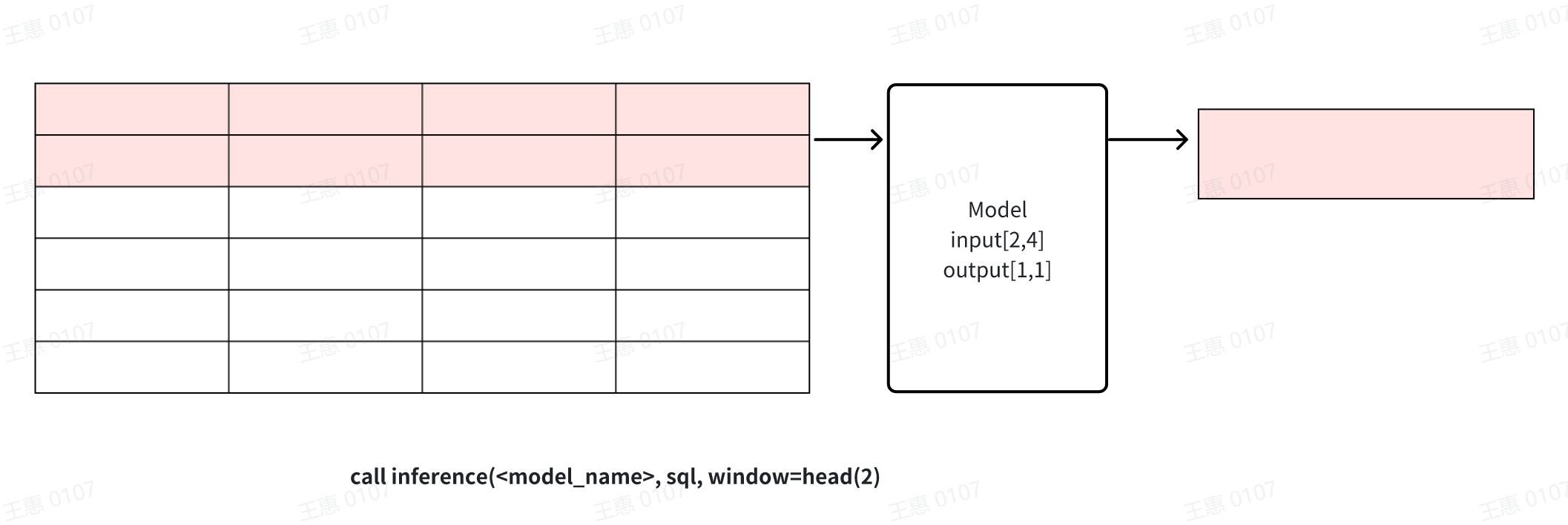
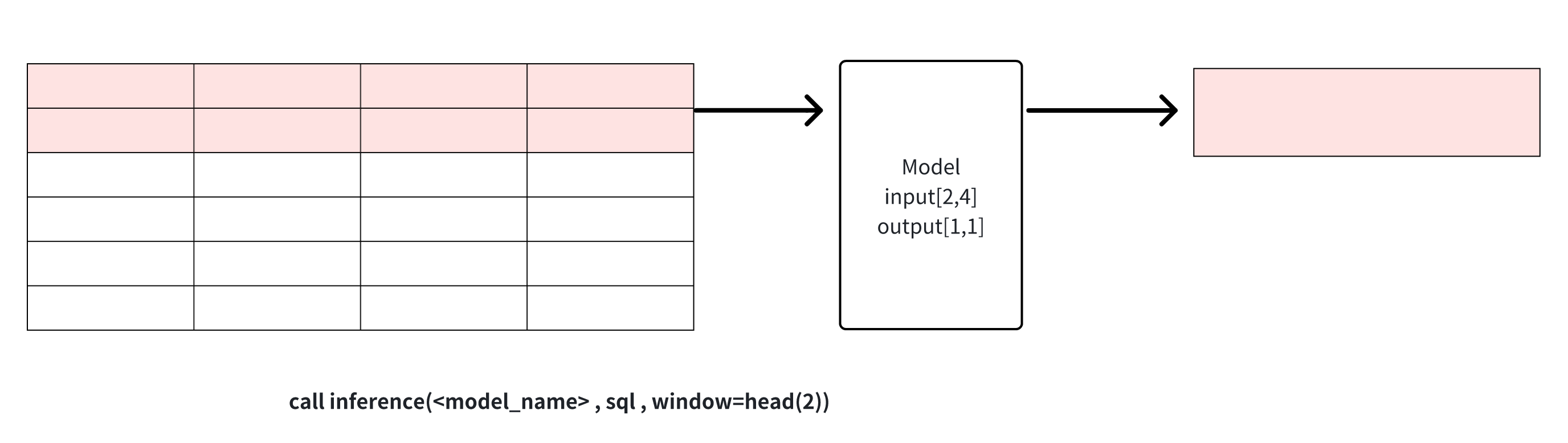
- **head(window_size)**: Get the top window_size points in the data for
model inference, this window can be used for data cropping.
- 
+ 
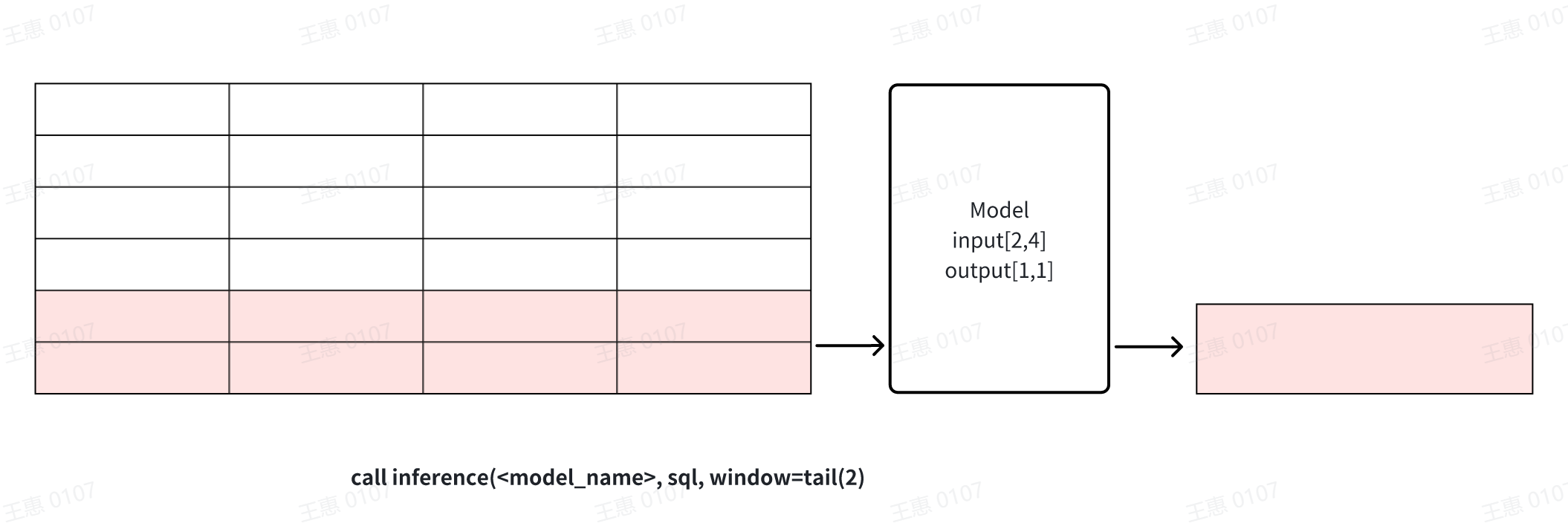
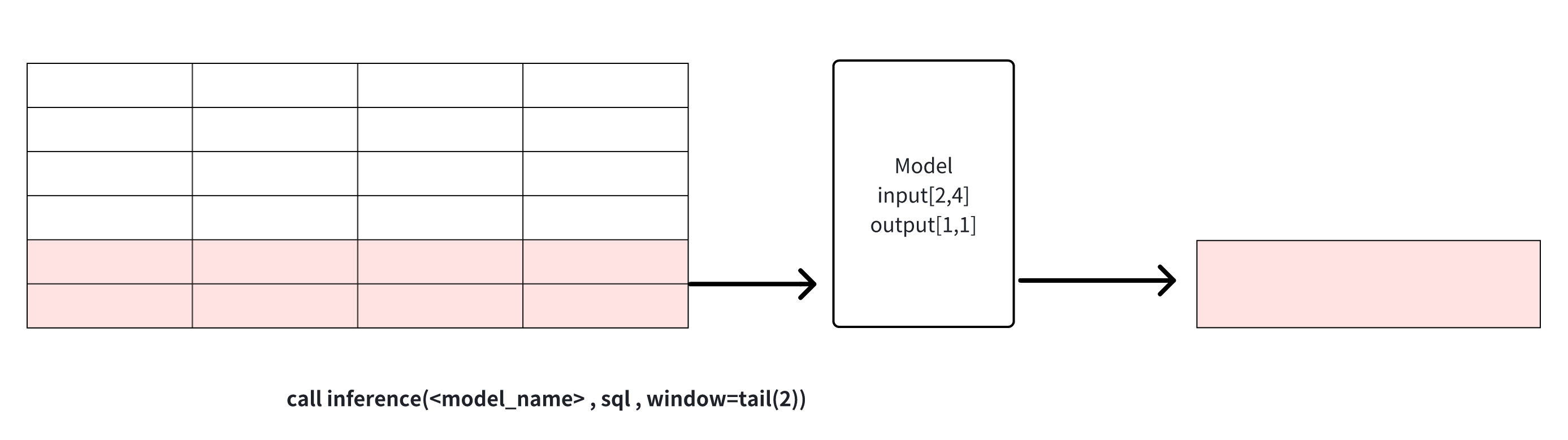
- **tail(window_size)**: get the last window_size point in the data for
model inference, this window can be used for data cropping.
- 
+ 
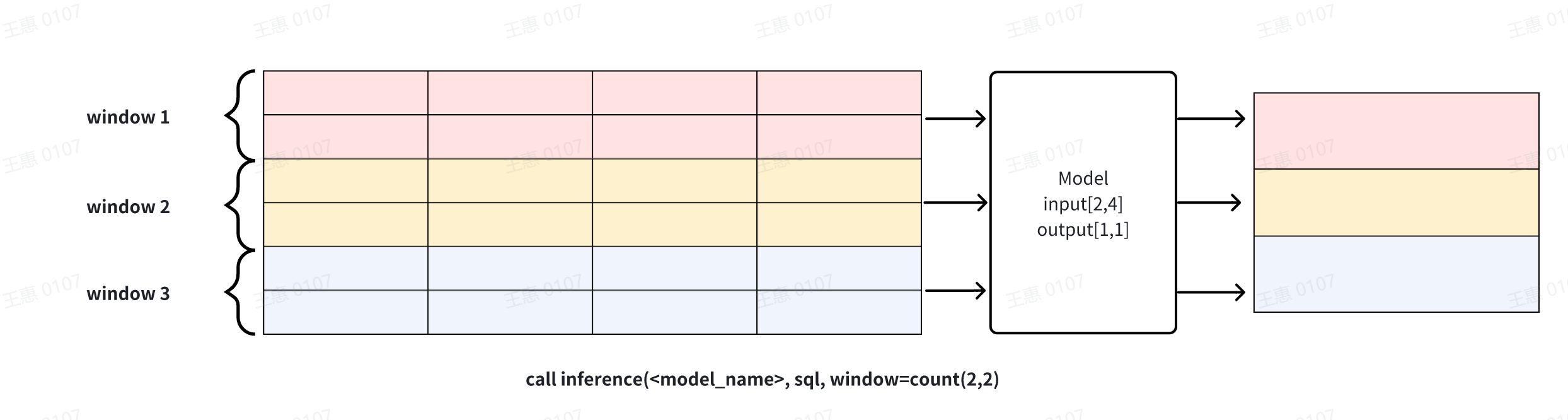
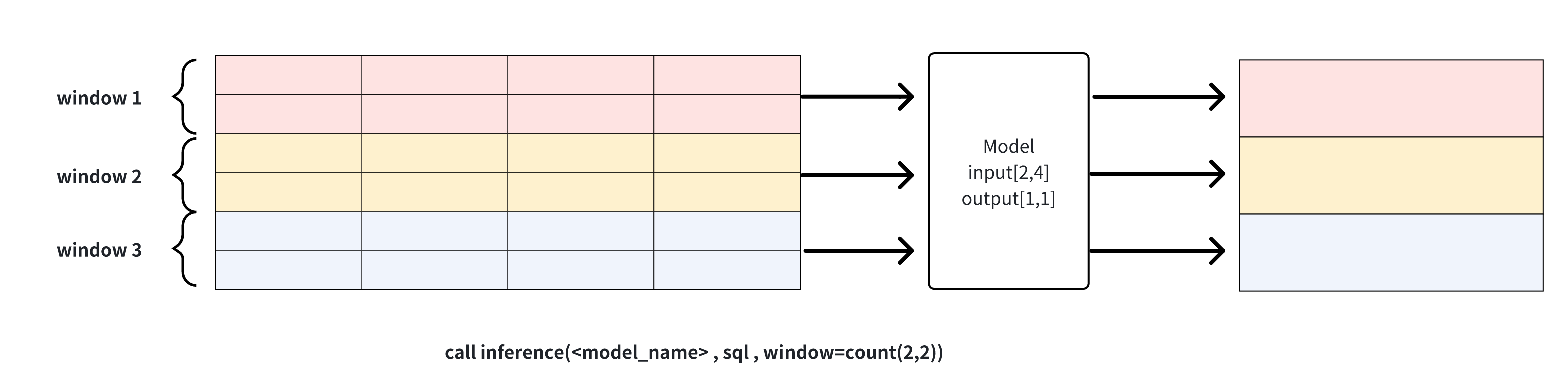
- **count(window_size, sliding_step)**: sliding window based on the number
of points, the data in each window will be reasoned through the model
respectively, as shown in the example below, window_size for 2 window function
will be divided into three windows of the input dataset, and each window will
perform reasoning operations to generate results respectively. The window can
be used for continuous inference
- 
+ 
**Explanation 1**: window can be used to solve the problem of cropping rows
when the results of the sql query and the input row requirements of the model
do not match. Note that when the number of columns does not match or the number
of rows is directly less than the model requirement, the inference cannot
proceed and an error message will be returned.
@@ -552,13 +552,13 @@ IoTDB> select * from root.eg.voltage limit 96
+-----------------------------+------------------+------------------+------------------+
|
Time|root.eg.voltage.s0|root.eg.voltage.s1|root.eg.voltage.s2|
+-----------------------------+------------------+------------------+------------------+
-|2023-02-14T20:38:32.000+08:00| 2038.0| 2028.0|
2041.0|
-|2023-02-14T20:38:38.000+08:00| 2014.0| 2005.0|
2018.0|
-|2023-02-14T20:38:44.000+08:00| 2014.0| 2005.0|
2018.0|
+|2024-03-15T20:35:31.000+08:00| 2037.0| 2017.0|
2032.0|
+|2024-03-15T20:35:37.000+08:00| 2015.0| 2014.0|
2019.0|
+|2024-03-15T20:35:44.000+08:00| 2014.0| 2007.0|
2019.0|
......
-|2023-02-14T20:47:52.000+08:00| 2024.0| 2016.0|
2027.0|
-|2023-02-14T20:47:57.000+08:00| 2024.0| 2016.0|
2027.0|
-|2023-02-14T20:48:03.000+08:00| 2024.0| 2016.0|
2027.0|
+|2024-03-15T20:43:51.000+08:00| 2024.0| 2012.0|
2022.0|
+|2024-03-15T20:43:56.000+08:00| 2023.0| 2016.0|
2022.0|
+|2024-03-15T20:44:03.000+08:00| 2024.0| 2016.0|
2022.0|
+-----------------------------+------------------+------------------+------------------+
Total line number = 96
@@ -580,7 +580,7 @@ Total line number = 48
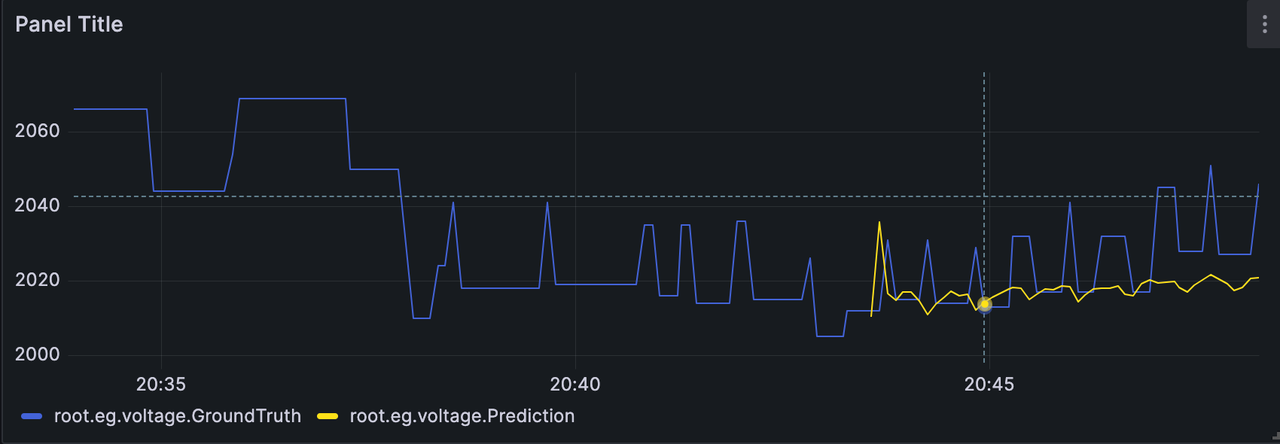
Comparing the predicted results of the C-phase voltage with the real results,
we can get the following image.
-The data before 01/25 14:33 is the past data input to the model, the yellow
line after 01/25 14:33 is the predicted C-phase voltage given by the model, and
the blue colour is the actual A-phase voltage data in the dataset (used for
comparison).
+The data before 02/14 20:44 is the past data input to the model, the yellow
line after 02/14 20:44 is the predicted C-phase voltage given by the model, and
the blue colour is the actual A-phase voltage data in the dataset (used for
comparison).
diff --git a/src/UserGuide/Master/User-Manual/Data-Sync_apache.md
b/src/UserGuide/Master/User-Manual/Data-Sync_apache.md
index 1799b33..f4ec48d 100644
--- a/src/UserGuide/Master/User-Manual/Data-Sync_apache.md
+++ b/src/UserGuide/Master/User-Manual/Data-Sync_apache.md
@@ -45,7 +45,8 @@ The SQL example is as follows:
CREATE PIPE <PipeId> -- PipeId is the name that uniquely identifies the task.
-- Data Extraction Plugin, Required Plugin
WITH SOURCE (
- [<parameter> = <value>,], [<value>,]
+ [<parameter> = <value>,],
+)
-- Data connection plugin, required
WITH SINK (
[<parameter> = <value>,], -- data connection plugin, required.
diff --git a/src/UserGuide/Master/User-Manual/Data-Sync_timecho.md
b/src/UserGuide/Master/User-Manual/Data-Sync_timecho.md
index c455310..1d78d8c 100644
--- a/src/UserGuide/Master/User-Manual/Data-Sync_timecho.md
+++ b/src/UserGuide/Master/User-Manual/Data-Sync_timecho.md
@@ -45,7 +45,8 @@ The SQL example is as follows:
CREATE PIPE <PipeId> -- PipeId is the name that uniquely identifies the task.
-- Data Extraction Plugin, Required Plugin
WITH SOURCE (
- [<parameter> = <value>,], [<value>,]
+ [<parameter> = <value>,],
+)
-- Data connection plugin, required
WITH SINK (
[<parameter> = <value>,], -- data connection plugin, required.
diff --git
a/src/UserGuide/latest/Deployment-and-Maintenance/AINode_Deployment_timecho.md
b/src/UserGuide/latest/Deployment-and-Maintenance/AINode_Deployment_timecho.md
index 945b92a..adcb843 100644
---
a/src/UserGuide/latest/Deployment-and-Maintenance/AINode_Deployment_timecho.md
+++
b/src/UserGuide/latest/Deployment-and-Maintenance/AINode_Deployment_timecho.md
@@ -59,7 +59,7 @@
- Runtime Environment
- Python>=3.8 is sufficient in a networked environment, and comes with pip
and venv tools; Python 3.8 version is required for non networked
environments,And from
[here](https://cloud.tsinghua.edu.cn/d/4c1342f6c272439aa96c/?p=%2Flibs&mode=list)
Download the zip file corresponding to the operating system (Note that when
downloading dependencies, you need to select the zip file in the libs folder,
as shown in the following figure),Copy all files in the folder to the `lib`
folder in the io [...]
- <img
src="https://alioss.timecho.com/docs/img/AINode%E9%83%A8%E7%BD%B23.png"; alt=""
style="width: 80%;"/>
+ <img
src="https://alioss.timecho.com/docs/img/AINode%E9%83%A8%E7%BD%B2%E7%8E%AF%E5%A2%83.png";
alt="" style="width: 80%;"/>
- There must be a Python interpreter in the environment variables that can
be directly called through the `python` instruction.
- It is recommended to create a Python interpreter venv virtual environment
in the `iotdb enterprise android -<version>` folder. If installing version
3.8.0 virtual environment, the statement is as follows:
diff --git a/src/UserGuide/latest/User-Manual/AINode_timecho.md
b/src/UserGuide/latest/User-Manual/AINode_timecho.md
index 29cbbda..4ee7df6 100644
--- a/src/UserGuide/latest/User-Manual/AINode_timecho.md
+++ b/src/UserGuide/latest/User-Manual/AINode_timecho.md
@@ -297,13 +297,13 @@ After completing the registration of the model, the
inference function can be us
- **sql**: sql query statement, the result of the query is used as input to
the model for model inference. The dimensions of the rows and columns in the
result of the query need to match the size specified in the specific model
config. (It is not recommended to use the `SELECT *` clause for the sql here
because in IoTDB, `*` does not sort the columns, so the order of the columns is
undefined, you can use `SELECT s0,s1` to ensure that the columns order matches
the expectations of the mode [...]
- **window_function**: Window functions that can be used in the inference
process, there are currently three types of window functions provided to assist
in model inference:
- **head(window_size)**: Get the top window_size points in the data for
model inference, this window can be used for data cropping.
- 
+ 
- **tail(window_size)**: get the last window_size point in the data for
model inference, this window can be used for data cropping.
- 
+ 
- **count(window_size, sliding_step)**: sliding window based on the number
of points, the data in each window will be reasoned through the model
respectively, as shown in the example below, window_size for 2 window function
will be divided into three windows of the input dataset, and each window will
perform reasoning operations to generate results respectively. The window can
be used for continuous inference
- 
+ 
**Explanation 1**: window can be used to solve the problem of cropping rows
when the results of the sql query and the input row requirements of the model
do not match. Note that when the number of columns does not match or the number
of rows is directly less than the model requirement, the inference cannot
proceed and an error message will be returned.
@@ -553,13 +553,13 @@ IoTDB> select * from root.eg.voltage limit 96
+-----------------------------+------------------+------------------+------------------+
|
Time|root.eg.voltage.s0|root.eg.voltage.s1|root.eg.voltage.s2|
+-----------------------------+------------------+------------------+------------------+
-|2023-02-14T20:38:32.000+08:00| 2038.0| 2028.0|
2041.0|
-|2023-02-14T20:38:38.000+08:00| 2014.0| 2005.0|
2018.0|
-|2023-02-14T20:38:44.000+08:00| 2014.0| 2005.0|
2018.0|
+|2024-03-15T20:35:31.000+08:00| 2037.0| 2017.0|
2032.0|
+|2024-03-15T20:35:37.000+08:00| 2015.0| 2014.0|
2019.0|
+|2024-03-15T20:35:44.000+08:00| 2014.0| 2007.0|
2019.0|
......
-|2023-02-14T20:47:52.000+08:00| 2024.0| 2016.0|
2027.0|
-|2023-02-14T20:47:57.000+08:00| 2024.0| 2016.0|
2027.0|
-|2023-02-14T20:48:03.000+08:00| 2024.0| 2016.0|
2027.0|
+|2024-03-15T20:43:51.000+08:00| 2024.0| 2012.0|
2022.0|
+|2024-03-15T20:43:56.000+08:00| 2023.0| 2016.0|
2022.0|
+|2024-03-15T20:44:03.000+08:00| 2024.0| 2016.0|
2022.0|
+-----------------------------+------------------+------------------+------------------+
Total line number = 96
@@ -581,7 +581,7 @@ Total line number = 48
Comparing the predicted results of the C-phase voltage with the real results,
we can get the following image.
-The data before 01/25 14:33 is the past data input to the model, the yellow
line after 01/25 14:33 is the predicted C-phase voltage given by the model, and
the blue colour is the actual A-phase voltage data in the dataset (used for
comparison).
+The data before 02/14 20:44 is the past data input to the model, the yellow
line after 02/14 20:44 is the predicted C-phase voltage given by the model, and
the blue colour is the actual A-phase voltage data in the dataset (used for
comparison).

diff --git a/src/UserGuide/latest/User-Manual/Data-Sync_apache.md
b/src/UserGuide/latest/User-Manual/Data-Sync_apache.md
index 4fcb760..b2cb420 100644
--- a/src/UserGuide/latest/User-Manual/Data-Sync_apache.md
+++ b/src/UserGuide/latest/User-Manual/Data-Sync_apache.md
@@ -45,7 +45,8 @@ The SQL example is as follows:
CREATE PIPE <PipeId> -- PipeId is the name that uniquely identifies the task.
-- Data Extraction Plugin, Required Plugin
WITH SOURCE (
- [<parameter> = <value>,], [<value>,]
+ [<parameter> = <value>,],
+)
-- Data connection plugin, required
WITH SINK (
[<parameter> = <value>,], -- data connection plugin, required.
diff --git a/src/UserGuide/latest/User-Manual/Data-Sync_timecho.md
b/src/UserGuide/latest/User-Manual/Data-Sync_timecho.md
index 3e9c69a..a68f3a4 100644
--- a/src/UserGuide/latest/User-Manual/Data-Sync_timecho.md
+++ b/src/UserGuide/latest/User-Manual/Data-Sync_timecho.md
@@ -45,7 +45,8 @@ The SQL example is as follows:
CREATE PIPE <PipeId> -- PipeId is the name that uniquely identifies the task.
-- Data Extraction Plugin, Required Plugin
WITH SOURCE (
- [<parameter> = <value>,], [<value>,]
+ [<parameter> = <value>,],
+)
-- Data connection plugin, required
WITH SINK (
[<parameter> = <value>,], -- data connection plugin, required.
diff --git a/src/zh/UserGuide/Master/User-Manual/AINode_timecho.md
b/src/zh/UserGuide/Master/User-Manual/AINode_timecho.md
index 7396456..004f074 100644
--- a/src/zh/UserGuide/Master/User-Manual/AINode_timecho.md
+++ b/src/zh/UserGuide/Master/User-Manual/AINode_timecho.md
@@ -293,13 +293,13 @@ window_function:
-
**sql**:sql查询语句,查询的结果作为模型的输入进行模型推理。查询的结果中行列的维度需要与具体模型config中指定的大小相匹配。(这里的sql不建议使用`SELECT
*`子句,因为在IoTDB中,`*`并不会对列进行排序,因此列的顺序是未定义的,可以使用`SELECT s0,s1`的方式确保列的顺序符合模型输入的预期)
- **window_function**: 推理过程中可以使用的窗口函数,目前提供三种类型的窗口函数用于辅助模型推理:
- **head(window_size)**: 获取数据中最前的window_size个点用于模型推理,该窗口可用于数据裁剪
- 
+ 
- **tail(window_size)**:获取数据中最后的window_size个点用于模型推,该窗口可用于数据裁剪
- 
+ 
- **count(window_size,
sliding_step)**:基于点数的滑动窗口,每个窗口的数据会分别通过模型进行推理,如下图示例所示,window_size为2的窗口函数将输入数据集分为三个窗口,每个窗口分别进行推理运算生成结果。该窗口可用于连续推理
- 
+ 
**说明1:
window可以用来解决sql查询结果和模型的输入行数要求不一致时的问题,对行进行裁剪。需要注意的是,当列数不匹配或是行数直接少于模型需求时,推理无法进行,会返回错误信息。**
@@ -545,18 +545,19 @@ create model patchtst using uri
'https://huggingface.co/hvlgo/patchtst/resolve/m
#### 步骤三:模型推理
+
```Shell
IoTDB> select * from root.eg.voltage limit 96
+-----------------------------+------------------+------------------+------------------+
|
Time|root.eg.voltage.s0|root.eg.voltage.s1|root.eg.voltage.s2|
+-----------------------------+------------------+------------------+------------------+
-|2023-02-14T20:38:32.000+08:00| 2038.0| 2028.0|
2041.0|
-|2023-02-14T20:38:38.000+08:00| 2014.0| 2005.0|
2018.0|
-|2023-02-14T20:38:44.000+08:00| 2014.0| 2005.0|
2018.0|
+|2024-03-15T20:35:31.000+08:00| 2037.0| 2017.0|
2032.0|
+|2024-03-15T20:35:37.000+08:00| 2015.0| 2014.0|
2019.0|
+|2024-03-15T20:35:44.000+08:00| 2014.0| 2007.0|
2019.0|
......
-|2023-02-14T20:47:52.000+08:00| 2024.0| 2016.0|
2027.0|
-|2023-02-14T20:47:57.000+08:00| 2024.0| 2016.0|
2027.0|
-|2023-02-14T20:48:03.000+08:00| 2024.0| 2016.0|
2027.0|
+|2024-03-15T20:43:51.000+08:00| 2024.0| 2012.0|
2022.0|
+|2024-03-15T20:43:56.000+08:00| 2023.0| 2016.0|
2022.0|
+|2024-03-15T20:44:03.000+08:00| 2024.0| 2016.0|
2022.0|
+-----------------------------+------------------+------------------+------------------+
Total line number = 96
@@ -575,10 +576,9 @@ IoTDB> call inference(patchtst, "select s0,s1,s2 from
root.eg.voltage", window=h
+---------+---------+---------+
Total line number = 48
```
-
我们将对C相电压的预测的结果和真实结果进行对比,可以得到以下的图像。
-图中 01/25 14:33 之前的数据为输入模型的过去数据, 01/25 14:33
后的黄色线条为模型给出的C相电压预测结果,而蓝色为数据集中实际的A相电压数据(用于进行对比)。
+图中 02/14 20:44 之前的数据为输入模型的过去数据, 02/14 20:44
后的黄色线条为模型给出的C相电压预测结果,而蓝色为数据集中实际的A相电压数据(用于进行对比)。

diff --git a/src/zh/UserGuide/Master/User-Manual/Data-Sync_apache.md
b/src/zh/UserGuide/Master/User-Manual/Data-Sync_apache.md
index 26c6705..3d81bcf 100644
--- a/src/zh/UserGuide/Master/User-Manual/Data-Sync_apache.md
+++ b/src/zh/UserGuide/Master/User-Manual/Data-Sync_apache.md
@@ -46,6 +46,7 @@ CREATE PIPE <PipeId> -- PipeId 是能够唯一标定任务任务的名字
-- 数据抽取插件,必填插件
WITH SOURCE (
[<parameter> = <value>,],
+)
-- 数据连接插件,必填插件
WITH SINK (
[<parameter> = <value>,],
@@ -160,7 +161,7 @@ IoTDB> show pipeplugins
本例子用来演示将一个 IoTDB 的所有数据同步至另一个 IoTDB,数据链路如下图所示:
-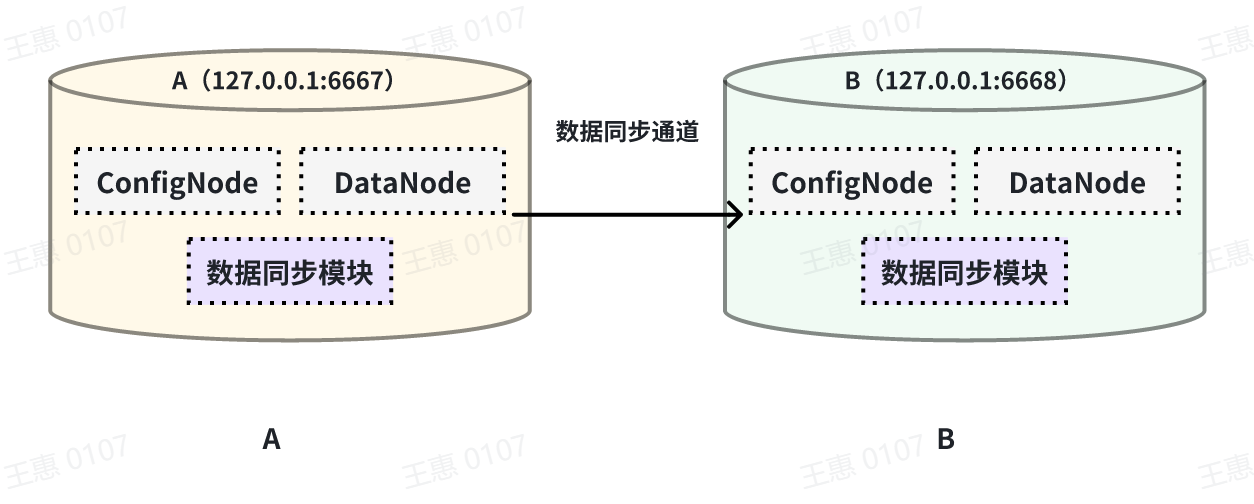
+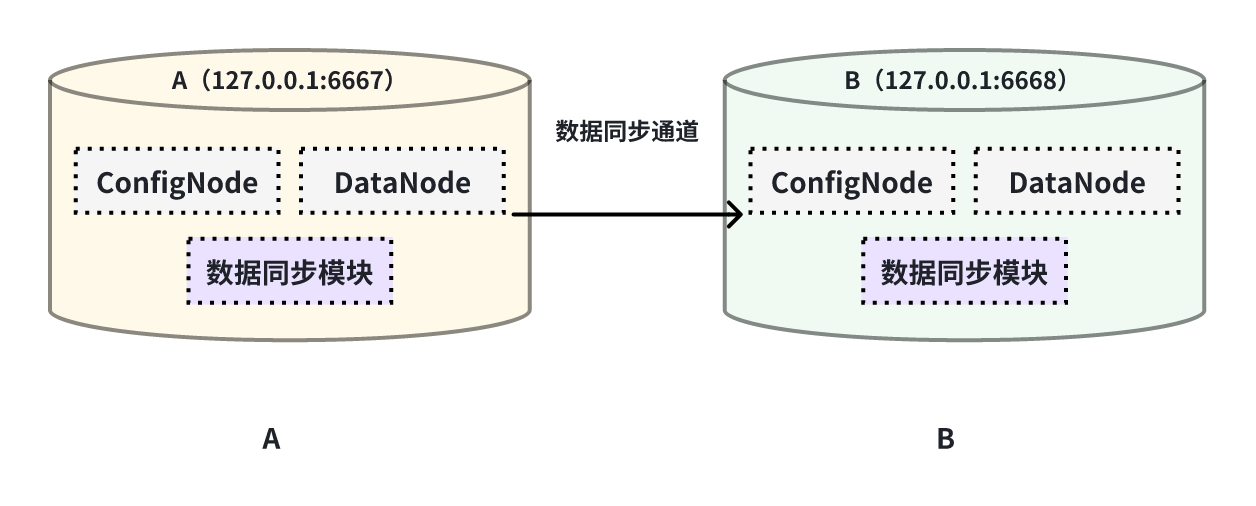
在这个例子中,我们可以创建一个名为 A2B 的同步任务,用来同步 A IoTDB 到 B IoTDB 间的全量数据,这里需要用到用到 sink 的
iotdb-thrift-sink
插件(内置插件),需指定接收端地址,这个例子中指定了'sink.ip'和'sink.port',也可指定'sink.node-urls',如下面的示例语句:
@@ -178,7 +179,7 @@ with sink (
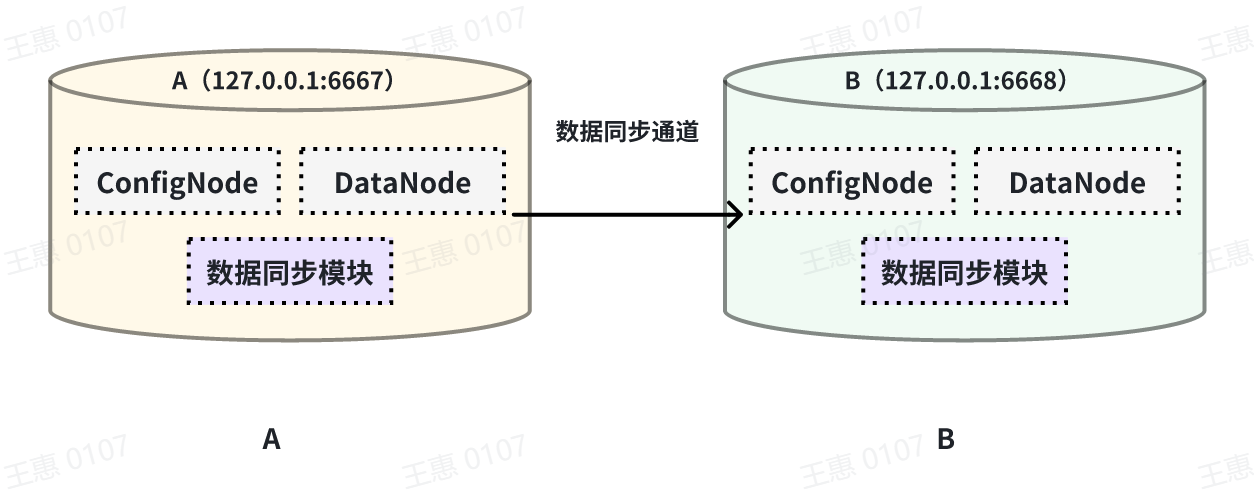
本例子用来演示同步某个历史时间范围( 2023 年 8 月 23 日 8 点到 2023 年 10 月 23 日 8 点)的数据至另一个
IoTDB,数据链路如下图所示:
-
+
在这个例子中,我们可以创建一个名为 A2B 的同步任务。首先我们需要在 source
中定义传输数据的范围,由于传输的是历史数据(历史数据是指同步任务创建之前存在的数据),所以需要将 source.realtime.enable 参数配置为
false;同时需要配置数据的起止时间 start-time 和 end-time 以及传输的模式 mode,此处推荐 mode 设置为 hybrid
模式(hybrid 模式为混合传输,在无数据积压时采用实时传输方式,有数据积压时采用批量传输方式,并根据系统内部情况自动切换)。
diff --git a/src/zh/UserGuide/Master/User-Manual/Data-Sync_timecho.md
b/src/zh/UserGuide/Master/User-Manual/Data-Sync_timecho.md
index 90b4b65..1fe27a6 100644
--- a/src/zh/UserGuide/Master/User-Manual/Data-Sync_timecho.md
+++ b/src/zh/UserGuide/Master/User-Manual/Data-Sync_timecho.md
@@ -46,6 +46,7 @@ CREATE PIPE <PipeId> -- PipeId 是能够唯一标定任务任务的名字
-- 数据抽取插件,必填插件
WITH SOURCE (
[<parameter> = <value>,],
+)
-- 数据连接插件,必填插件
WITH SINK (
[<parameter> = <value>,],
@@ -164,7 +165,7 @@ IoTDB> show pipeplugins
本例子用来演示将一个 IoTDB 的所有数据同步至另一个 IoTDB,数据链路如下图所示:
-
+
在这个例子中,我们可以创建一个名为 A2B 的同步任务,用来同步 A IoTDB 到 B IoTDB 间的全量数据,这里需要用到用到 sink 的
iotdb-thrift-sink
插件(内置插件),需指定接收端地址,这个例子中指定了'sink.ip'和'sink.port',也可指定'sink.node-urls',如下面的示例语句:
@@ -182,7 +183,7 @@ with sink (
本例子用来演示同步某个历史时间范围( 2023 年 8 月 23 日 8 点到 2023 年 10 月 23 日 8 点)的数据至另一个
IoTDB,数据链路如下图所示:
-
+
在这个例子中,我们可以创建一个名为 A2B 的同步任务。首先我们需要在 source
中定义传输数据的范围,由于传输的是历史数据(历史数据是指同步任务创建之前存在的数据),所以需要将 source.realtime.enable 参数配置为
false;同时需要配置数据的起止时间 start-time 和 end-time 以及传输的模式 mode,此处推荐 mode 设置为 hybrid
模式(hybrid 模式为混合传输,在无数据积压时采用实时传输方式,有数据积压时采用批量传输方式,并根据系统内部情况自动切换)。
@@ -280,7 +281,7 @@ with sink (
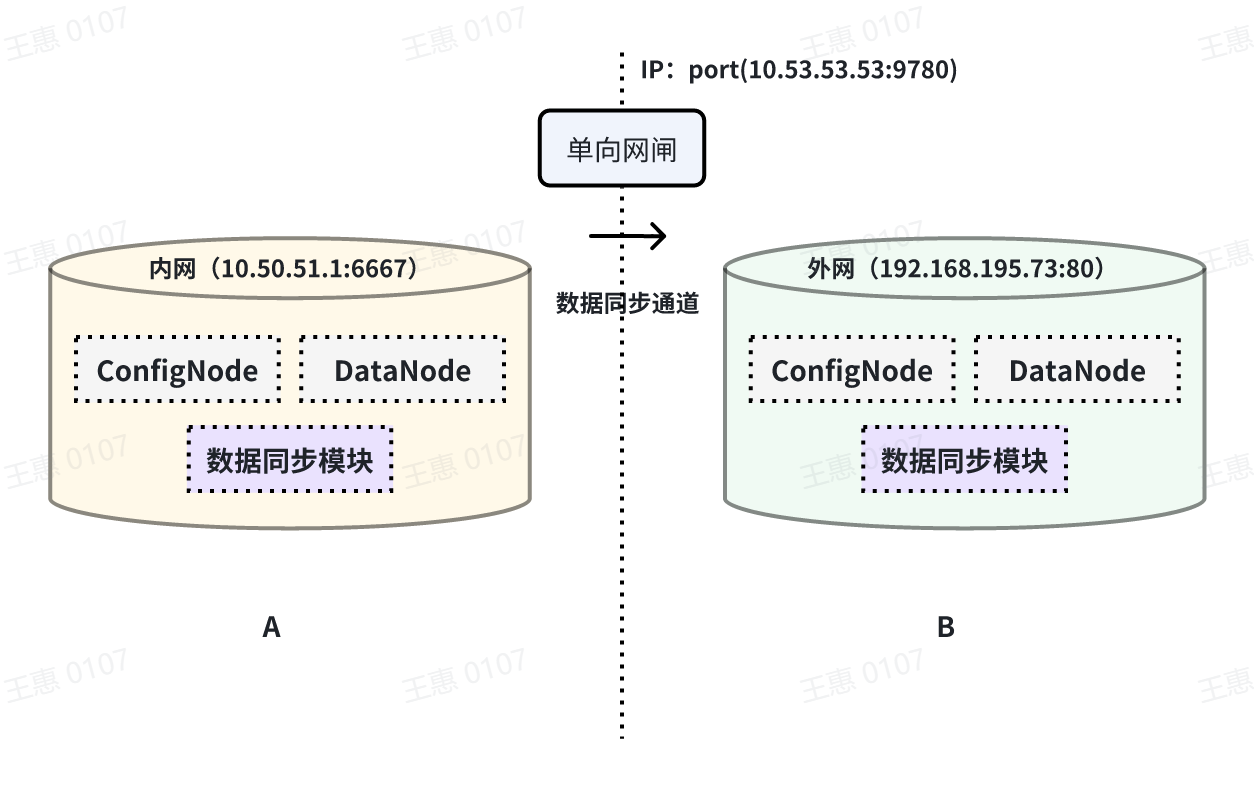
本例子用来演示将一个 IoTDB 的数据,经过单向网闸,同步至另一个 IoTDB 的场景,数据链路如下图所示:
-
+
在这个例子中,需要使用 sink 任务中的 iotdb-air-gap-sink
插件(目前支持部分型号网闸,具体型号请联系天谋科技工作人员确认),配置网闸后,在 A IoTDB 上执行下列语句,其中 ip 和 port 填写网闸配置的虚拟
ip 和相关 port,详细语句如下:
diff --git a/src/zh/UserGuide/V1.2.x/User-Manual/Data-Sync_timecho.md
b/src/zh/UserGuide/V1.2.x/User-Manual/Data-Sync_timecho.md
index 7acf914..fbd0c45 100644
--- a/src/zh/UserGuide/V1.2.x/User-Manual/Data-Sync_timecho.md
+++ b/src/zh/UserGuide/V1.2.x/User-Manual/Data-Sync_timecho.md
@@ -46,6 +46,7 @@ CREATE PIPE <PipeId> -- PipeId 是能够唯一标定任务任务的名字
-- 数据抽取插件,必填插件
WITH EXTRACTOR (
[<parameter> = <value>,],
+)
-- 数据连接插件,必填插件
WITH CONNECTOR (
[<parameter> = <value>,],
@@ -163,7 +164,7 @@ IoTDB> SHOW PIPEPLUGINS
本例子用来演示将一个 IoTDB 的所有数据同步至另一个IoTDB,数据链路如下图所示:
-
+
在这个例子中,我们可以创建一个名为 A2B 的同步任务,用来同步 A IoTDB 到 B IoTDB 间的全量数据,这里需要用到用到 connector 的
iotdb-thrift-connector
插件(内置插件),需指定接收端地址,这个例子中指定了'connector.ip'和'connector.port',也可指定'connector.node-urls',如下面的示例语句:
@@ -181,7 +182,7 @@ with connector (
本例子用来演示同步某个历史时间范围(2023年8月23日8点到2023年10月23日8点)的数据至另一个IoTDB,数据链路如下图所示:
-
+
在这个例子中,我们可以创建一个名为 A2B 的同步任务。首先我们需要在 extractor
中定义传输数据的范围,由于传输的是历史数据(历史数据是指同步任务创建之前存在的数据),所以需要将extractor.realtime.enable参数配置为false;同时需要配置数据的起止时间start-time和end-time以及传输的模式mode,此处推荐mode设置为
hybrid 模式(hybrid模式为混合传输,在无数据积压时采用实时传输方式,有数据积压时采用批量传输方式,并根据系统内部情况自动切换)。
@@ -206,7 +207,7 @@ with connector (
本例子用来演示两个 IoTDB 之间互为双活的场景,数据链路如下图所示:
-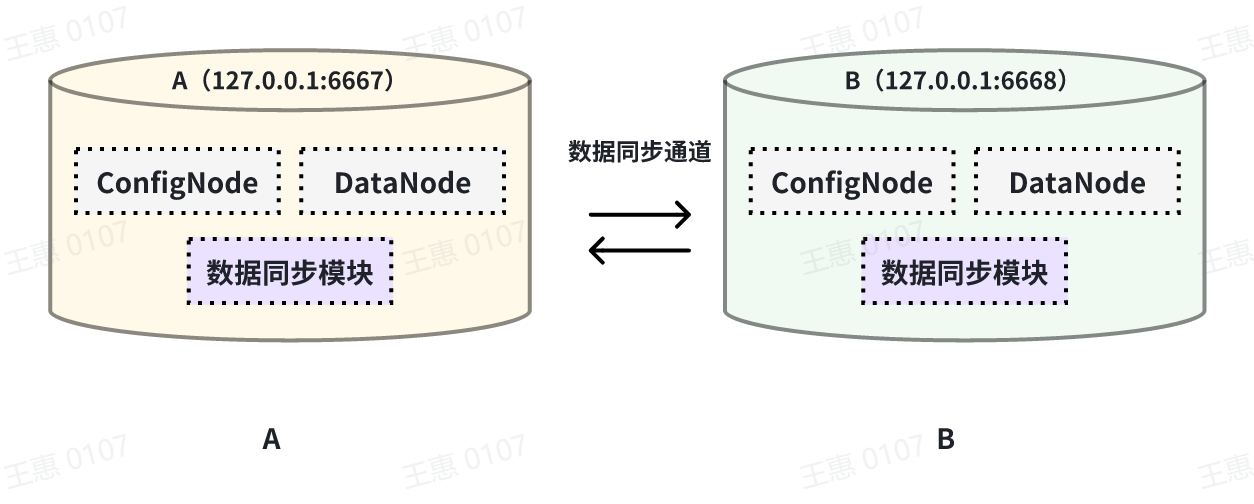
+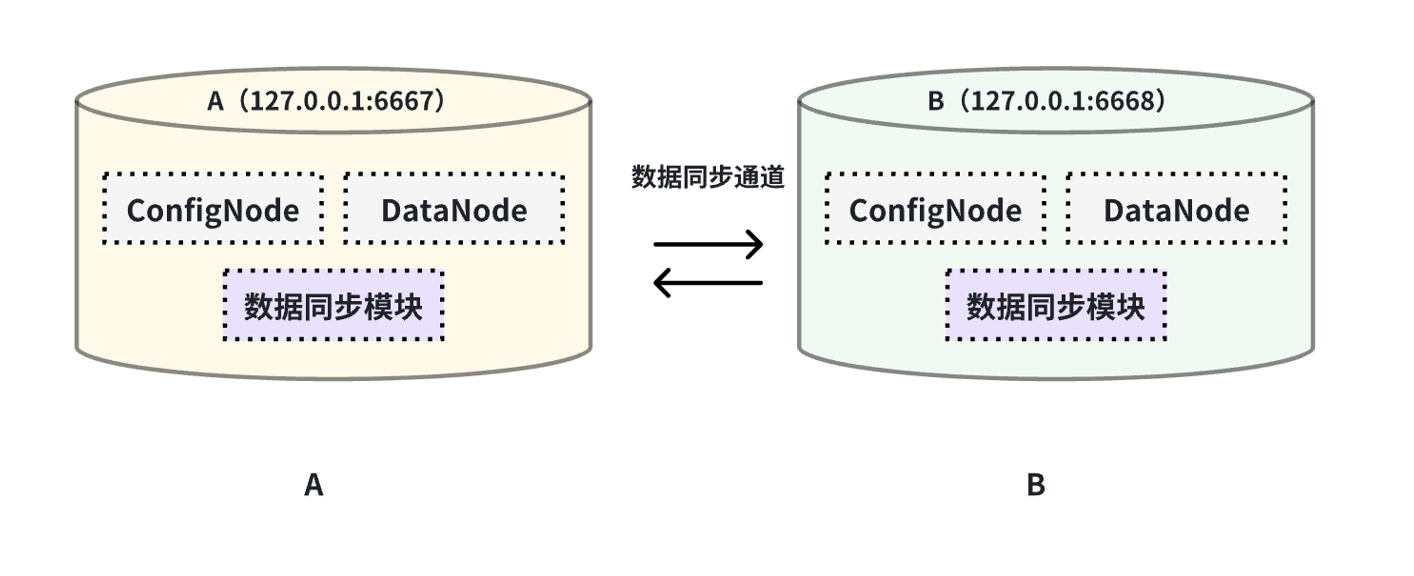
在这个例子中,为了避免数据无限循环,需要将A和B上的参数`extractor.forwarding-pipe-requests` 均设置为
`false`,表示不转发从另一pipe传输而来的数据。同时将`'extractor.history.enable'` 设置为
`false`,表示不传输历史数据,即不同步创建该任务前的数据。
@@ -246,7 +247,7 @@ with connector (
本例子用来演示多个 IoTDB 之间级联传输数据的场景,数据由A集群同步至B集群,再同步至C集群,数据链路如下图所示:
-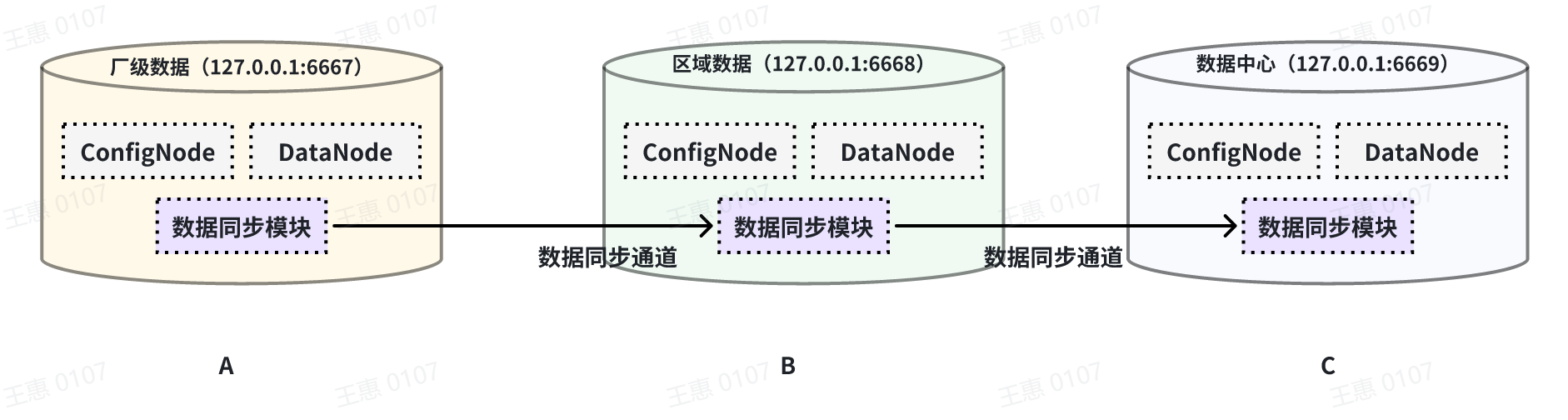
+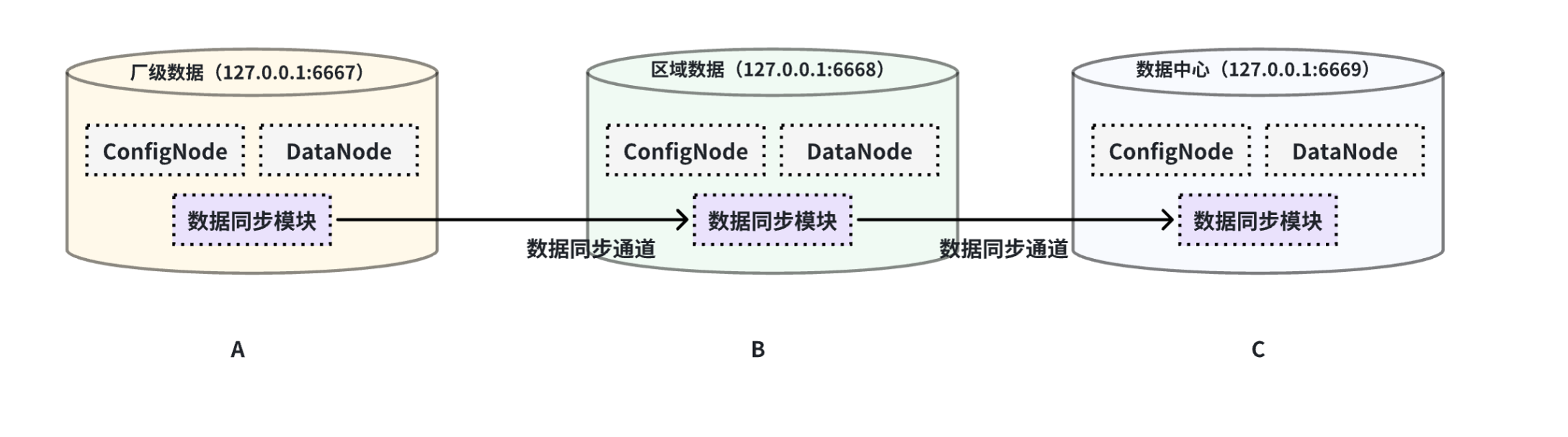
在这个例子中,为了将A集群的数据同步至C,在BC之间的pipe需要将 `extractor.forwarding-pipe-requests`
配置为`true`,详细语句如下:
@@ -278,7 +279,7 @@ with connector (
本例子用来演示将一个 IoTDB 的数据,经过单向网闸,同步至另一个IoTDB的场景,数据链路如下图所示:
-
+
在这个例子中,需要使用 connector 任务中的iotdb-air-gap-connector
插件(目前支持部分型号网闸,具体型号请联系天谋科技工作人员确认),配置网闸后,在 A IoTDB 上执行下列语句,其中ip和port填写网闸信息,详细语句如下:
diff --git a/src/zh/UserGuide/latest/User-Manual/AINode_timecho.md
b/src/zh/UserGuide/latest/User-Manual/AINode_timecho.md
index 7396456..8912255 100644
--- a/src/zh/UserGuide/latest/User-Manual/AINode_timecho.md
+++ b/src/zh/UserGuide/latest/User-Manual/AINode_timecho.md
@@ -293,13 +293,13 @@ window_function:
-
**sql**:sql查询语句,查询的结果作为模型的输入进行模型推理。查询的结果中行列的维度需要与具体模型config中指定的大小相匹配。(这里的sql不建议使用`SELECT
*`子句,因为在IoTDB中,`*`并不会对列进行排序,因此列的顺序是未定义的,可以使用`SELECT s0,s1`的方式确保列的顺序符合模型输入的预期)
- **window_function**: 推理过程中可以使用的窗口函数,目前提供三种类型的窗口函数用于辅助模型推理:
- **head(window_size)**: 获取数据中最前的window_size个点用于模型推理,该窗口可用于数据裁剪
- 
+ 
- **tail(window_size)**:获取数据中最后的window_size个点用于模型推,该窗口可用于数据裁剪
- 
+ 
- **count(window_size,
sliding_step)**:基于点数的滑动窗口,每个窗口的数据会分别通过模型进行推理,如下图示例所示,window_size为2的窗口函数将输入数据集分为三个窗口,每个窗口分别进行推理运算生成结果。该窗口可用于连续推理
- 
+ 
**说明1:
window可以用来解决sql查询结果和模型的输入行数要求不一致时的问题,对行进行裁剪。需要注意的是,当列数不匹配或是行数直接少于模型需求时,推理无法进行,会返回错误信息。**
@@ -550,13 +550,13 @@ IoTDB> select * from root.eg.voltage limit 96
+-----------------------------+------------------+------------------+------------------+
|
Time|root.eg.voltage.s0|root.eg.voltage.s1|root.eg.voltage.s2|
+-----------------------------+------------------+------------------+------------------+
-|2023-02-14T20:38:32.000+08:00| 2038.0| 2028.0|
2041.0|
-|2023-02-14T20:38:38.000+08:00| 2014.0| 2005.0|
2018.0|
-|2023-02-14T20:38:44.000+08:00| 2014.0| 2005.0|
2018.0|
+|2024-03-15T20:35:31.000+08:00| 2037.0| 2017.0|
2032.0|
+|2024-03-15T20:35:37.000+08:00| 2015.0| 2014.0|
2019.0|
+|2024-03-15T20:35:44.000+08:00| 2014.0| 2007.0|
2019.0|
......
-|2023-02-14T20:47:52.000+08:00| 2024.0| 2016.0|
2027.0|
-|2023-02-14T20:47:57.000+08:00| 2024.0| 2016.0|
2027.0|
-|2023-02-14T20:48:03.000+08:00| 2024.0| 2016.0|
2027.0|
+|2024-03-15T20:43:51.000+08:00| 2024.0| 2012.0|
2022.0|
+|2024-03-15T20:43:56.000+08:00| 2023.0| 2016.0|
2022.0|
+|2024-03-15T20:44:03.000+08:00| 2024.0| 2016.0|
2022.0|
+-----------------------------+------------------+------------------+------------------+
Total line number = 96
@@ -575,10 +575,9 @@ IoTDB> call inference(patchtst, "select s0,s1,s2 from
root.eg.voltage", window=h
+---------+---------+---------+
Total line number = 48
```
-
我们将对C相电压的预测的结果和真实结果进行对比,可以得到以下的图像。
-图中 01/25 14:33 之前的数据为输入模型的过去数据, 01/25 14:33
后的黄色线条为模型给出的C相电压预测结果,而蓝色为数据集中实际的A相电压数据(用于进行对比)。
+图中 02/14 20:44 之前的数据为输入模型的过去数据, 02/14 20:44
后的黄色线条为模型给出的C相电压预测结果,而蓝色为数据集中实际的A相电压数据(用于进行对比)。

diff --git a/src/zh/UserGuide/latest/User-Manual/Data-Sync_apache.md
b/src/zh/UserGuide/latest/User-Manual/Data-Sync_apache.md
index 9b4eca6..e7fd373 100644
--- a/src/zh/UserGuide/latest/User-Manual/Data-Sync_apache.md
+++ b/src/zh/UserGuide/latest/User-Manual/Data-Sync_apache.md
@@ -46,6 +46,7 @@ CREATE PIPE <PipeId> -- PipeId 是能够唯一标定任务任务的名字
-- 数据抽取插件,必填插件
WITH SOURCE (
[<parameter> = <value>,],
+)
-- 数据连接插件,必填插件
WITH SINK (
[<parameter> = <value>,],
@@ -160,7 +161,7 @@ IoTDB> show pipeplugins
本例子用来演示将一个 IoTDB 的所有数据同步至另一个 IoTDB,数据链路如下图所示:
-
+
在这个例子中,我们可以创建一个名为 A2B 的同步任务,用来同步 A IoTDB 到 B IoTDB 间的全量数据,这里需要用到用到 sink 的
iotdb-thrift-sink
插件(内置插件),需指定接收端地址,这个例子中指定了'sink.ip'和'sink.port',也可指定'sink.node-urls',如下面的示例语句:
@@ -178,7 +179,7 @@ with sink (
本例子用来演示同步某个历史时间范围( 2023 年 8 月 23 日 8 点到 2023 年 10 月 23 日 8 点)的数据至另一个
IoTDB,数据链路如下图所示:
-
+
在这个例子中,我们可以创建一个名为 A2B 的同步任务。首先我们需要在 source
中定义传输数据的范围,由于传输的是历史数据(历史数据是指同步任务创建之前存在的数据),所以需要将 source.realtime.enable 参数配置为
false;同时需要配置数据的起止时间 start-time 和 end-time 以及传输的模式 mode,此处推荐 mode 设置为 hybrid
模式(hybrid 模式为混合传输,在无数据积压时采用实时传输方式,有数据积压时采用批量传输方式,并根据系统内部情况自动切换)。
diff --git a/src/zh/UserGuide/latest/User-Manual/Data-Sync_timecho.md
b/src/zh/UserGuide/latest/User-Manual/Data-Sync_timecho.md
index 809b35d..2cfad91 100644
--- a/src/zh/UserGuide/latest/User-Manual/Data-Sync_timecho.md
+++ b/src/zh/UserGuide/latest/User-Manual/Data-Sync_timecho.md
@@ -46,6 +46,7 @@ CREATE PIPE <PipeId> -- PipeId 是能够唯一标定任务任务的名字
-- 数据抽取插件,必填插件
WITH SOURCE (
[<parameter> = <value>,],
+)
-- 数据连接插件,必填插件
WITH SINK (
[<parameter> = <value>,],
@@ -164,7 +165,7 @@ IoTDB> show pipeplugins
本例子用来演示将一个 IoTDB 的所有数据同步至另一个 IoTDB,数据链路如下图所示:
-
+
在这个例子中,我们可以创建一个名为 A2B 的同步任务,用来同步 A IoTDB 到 B IoTDB 间的全量数据,这里需要用到用到 sink 的
iotdb-thrift-sink
插件(内置插件),需指定接收端地址,这个例子中指定了'sink.ip'和'sink.port',也可指定'sink.node-urls',如下面的示例语句:
@@ -182,7 +183,7 @@ with sink (
本例子用来演示同步某个历史时间范围( 2023 年 8 月 23 日 8 点到 2023 年 10 月 23 日 8 点)的数据至另一个
IoTDB,数据链路如下图所示:
-
+
在这个例子中,我们可以创建一个名为 A2B 的同步任务。首先我们需要在 source
中定义传输数据的范围,由于传输的是历史数据(历史数据是指同步任务创建之前存在的数据),所以需要将 source.realtime.enable 参数配置为
false;同时需要配置数据的起止时间 start-time 和 end-time 以及传输的模式 mode,此处推荐 mode 设置为 hybrid
模式(hybrid 模式为混合传输,在无数据积压时采用实时传输方式,有数据积压时采用批量传输方式,并根据系统内部情况自动切换)。
@@ -280,7 +281,7 @@ with sink (
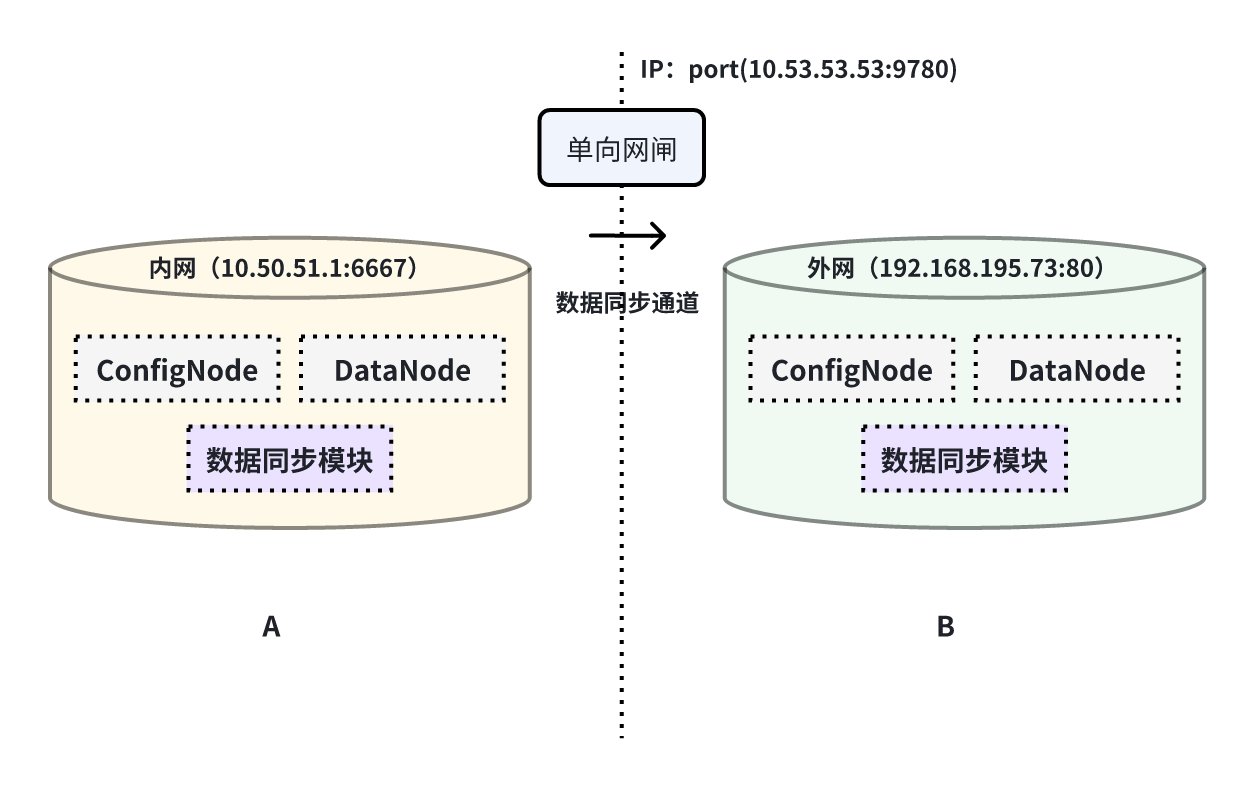
本例子用来演示将一个 IoTDB 的数据,经过单向网闸,同步至另一个 IoTDB 的场景,数据链路如下图所示:
-
+
在这个例子中,需要使用 sink 任务中的 iotdb-air-gap-sink
插件(目前支持部分型号网闸,具体型号请联系天谋科技工作人员确认),配置网闸后,在 A IoTDB 上执行下列语句,其中 ip 和 port 填写网闸配置的虚拟
ip 和相关 port,详细语句如下:


















