This is an automated email from the ASF dual-hosted git repository.

caogaofei pushed a commit to branch main
in repository https://gitbox.apache.org/repos/asf/iotdb-docs.git
The following commit(s) were added to refs/heads/main by this push:
new d04748d Edit Quick Start Document (#359)
d04748d is described below
commit d04748d6fee7507cc7c07f3e0ae265097ab39a9f
Author: majialin <[email protected]>
AuthorDate: Mon Sep 23 15:57:49 2024 +0800
Edit Quick Start Document (#359)
---
src/.vuepress/components/IoTDB.vue | 2 +-
src/.vuepress/components/IoTDBZH.vue | 2 +-
src/.vuepress/config.ts | 4 +-
src/.vuepress/navbar/en.ts | 4 +-
src/.vuepress/navbar/zh.ts | 4 +-
src/.vuepress/navbar_timecho/en.ts | 2 +-
src/.vuepress/navbar_timecho/zh.ts | 2 +-
src/.vuepress/sidebar/V1.3.x/en.ts | 11 +-
src/.vuepress/sidebar/V1.3.x/zh.ts | 11 +-
src/.vuepress/sidebar_timecho/V1.3.x/en.ts | 11 +-
src/.vuepress/sidebar_timecho/V1.3.x/zh.ts | 11 +-
src/Blog/Release0_93.md | 2 +-
src/Community/About-the-Community.md | 2 +-
src/Community/Development-Guide.md | 2 +-
src/Development/stage/ContributeGuide.md | 2 +-
src/Development/stage/HowToJoin.md | 2 +-
.../Master/QuickStart/QuickStart_apache.md | 80 ++
.../Master/QuickStart/QuickStart_timecho.md | 91 ++
.../Master/User-Manual/Operate-Metadata_timecho.md | 1286 ++++++++++++++++++++
src/UserGuide/Master/UserGuideReadme.md | 2 +-
.../{QuickStart => stage}/ClusterQuickStart.md | 0
.../General-SQL-Statements.md | 0
.../Master/{QuickStart => stage}/QuickStart.md | 0
...{Zeppelin-IoTDB.md => Zeppelin-IoTDB_apache.md} | 2 +-
...Zeppelin-IoTDB.md => Zeppelin-IoTDB_timecho.md} | 2 +-
.../latest/QuickStart/QuickStart_apache.md | 80 ++
.../latest/QuickStart/QuickStart_timecho.md | 91 ++
src/UserGuide/latest/UserGuideReadme.md | 6 +-
.../{QuickStart => stage}/ClusterQuickStart.md | 0
.../General-SQL-Statements.md | 0
.../latest/{QuickStart => stage}/QuickStart.md | 0
.../Zeppelin-IoTDB_apache.md} | 2 +-
...Zeppelin-IoTDB.md => Zeppelin-IoTDB_timecho.md} | 2 +-
.../Master/QuickStart/QuickStart_apache.md | 75 ++
.../Master/QuickStart/QuickStart_timecho.md | 78 ++
src/zh/UserGuide/Master/UserGuideReadme.md | 2 +-
.../{QuickStart => stage}/ClusterQuickStart.md | 0
.../General-SQL-Statements.md | 0
.../Master/{QuickStart => stage}/QuickStart.md | 0
...{Zeppelin-IoTDB.md => Zeppelin-IoTDB_apache.md} | 2 +-
...Zeppelin-IoTDB.md => Zeppelin-IoTDB_timecho.md} | 2 +-
.../latest/QuickStart/QuickStart_apache.md | 75 ++
.../latest/QuickStart/QuickStart_timecho.md | 78 ++
.../{QuickStart => stage}/ClusterQuickStart.md | 0
.../General-SQL-Statements.md | 0
.../latest/{QuickStart => stage}/QuickStart.md | 0
46 files changed, 1968 insertions(+), 62 deletions(-)
diff --git a/src/.vuepress/components/IoTDB.vue
b/src/.vuepress/components/IoTDB.vue
index 9e24151..9b8b847 100644
--- a/src/.vuepress/components/IoTDB.vue
+++ b/src/.vuepress/components/IoTDB.vue
@@ -189,7 +189,7 @@ export default {
window.location.href = '/Download/';
},
addRoutes2() {
- window.location.href = '/UserGuide/latest/QuickStart/QuickStart.html';
+ window.location.href =
'/UserGuide/latest/QuickStart/QuickStart_apache.html';
},
},
};
diff --git a/src/.vuepress/components/IoTDBZH.vue
b/src/.vuepress/components/IoTDBZH.vue
index 36a5603..dc061f0 100644
--- a/src/.vuepress/components/IoTDBZH.vue
+++ b/src/.vuepress/components/IoTDBZH.vue
@@ -187,7 +187,7 @@ export default {
window.location.href = '/zh/Download/';
},
addRoutes2() {
- window.location.href = '/zh/UserGuide/latest/QuickStart/QuickStart.html';
+ window.location.href =
'/zh/UserGuide/latest/QuickStart/QuickStart_apache.html';
},
},
};
diff --git a/src/.vuepress/config.ts b/src/.vuepress/config.ts
index fc29f25..c033fce 100644
--- a/src/.vuepress/config.ts
+++ b/src/.vuepress/config.ts
@@ -130,8 +130,8 @@ _paq.push(['enableLinkTracking']);
redirectPlugin({
// hostname: 'https://iotdb.apache.org/',
config: {
- '/UserGuide/Master/QuickStart/QuickStart.html':
'/UserGuide/latest/QuickStart/QuickStart.html',
- '/zh/UserGuide/Master/QuickStart/QuickStart.html':
'/zh/UserGuide/latest/QuickStart/QuickStart.html',
+ '/UserGuide/Master/QuickStart/QuickStart.html':
'/UserGuide/latest/QuickStart/QuickStart_apache.html',
+ '/zh/UserGuide/Master/QuickStart/QuickStart.html':
'/zh/UserGuide/latest/QuickStart/QuickStart_apache.html',
},
}),
],
diff --git a/src/.vuepress/navbar/en.ts b/src/.vuepress/navbar/en.ts
index 99d243a..2f77af9 100644
--- a/src/.vuepress/navbar/en.ts
+++ b/src/.vuepress/navbar/en.ts
@@ -23,8 +23,8 @@ export const enNavbar = navbar([
{
text: 'Documentation',
children: [
- // { text: 'latest', link: '/UserGuide/Master/QuickStart/QuickStart' },
- { text: 'v1.3.0/1/2', link: '/UserGuide/latest/QuickStart/QuickStart' },
+ // { text: 'latest', link:
'/UserGuide/Master/QuickStart/QuickStart_apache' },
+ { text: 'v1.3.0/1/2', link:
'/UserGuide/latest/QuickStart/QuickStart_apache' },
{ text: 'v1.2.x', link: '/UserGuide/V1.2.x/QuickStart/QuickStart' },
{ text: 'v1.1.x', link: '/UserGuide/V1.1.x/QuickStart/QuickStart' },
{ text: 'v1.0.x', link: '/UserGuide/V1.0.x/QuickStart/QuickStart' },
diff --git a/src/.vuepress/navbar/zh.ts b/src/.vuepress/navbar/zh.ts
index c3f2d3f..e47be22 100644
--- a/src/.vuepress/navbar/zh.ts
+++ b/src/.vuepress/navbar/zh.ts
@@ -23,8 +23,8 @@ export const zhNavbar = navbar([
{
text: '文档',
children: [
- // { text: 'latest', link: '/zh/UserGuide/Master/QuickStart/QuickStart'
},
- { text: 'v1.3.0/1/2', link: '/zh/UserGuide/latest/QuickStart/QuickStart'
},
+ // { text: 'latest', link:
'/zh/UserGuide/Master/QuickStart/QuickStart_apache' },
+ { text: 'v1.3.0/1/2', link:
'/zh/UserGuide/latest/QuickStart/QuickStart_apache' },
{ text: 'v1.2.x', link: '/zh/UserGuide/V1.2.x/QuickStart/QuickStart' },
{ text: 'v1.1.x', link: '/zh/UserGuide/V1.1.x/QuickStart/QuickStart' },
{ text: 'v1.0.x', link: '/zh/UserGuide/V1.0.x/QuickStart/QuickStart' },
diff --git a/src/.vuepress/navbar_timecho/en.ts
b/src/.vuepress/navbar_timecho/en.ts
index f115e5b..4a3b05f 100644
--- a/src/.vuepress/navbar_timecho/en.ts
+++ b/src/.vuepress/navbar_timecho/en.ts
@@ -31,7 +31,7 @@
{
text: 'Documentation',
children: [
- { text: 'latest', link: '/UserGuide/Master/QuickStart/QuickStart' },
+ { text: 'latest', link:
'/UserGuide/latest/QuickStart/QuickStart_timecho' },
{ text: 'v1.1.x', link: '/UserGuide/V1.1.x/QuickStart/QuickStart' },
{ text: 'v1.0.x', link: '/UserGuide/V1.0.x/QuickStart/QuickStart' },
{ text: 'v0.13.x', link: '/UserGuide/V0.13.x/QuickStart/QuickStart' },
diff --git a/src/.vuepress/navbar_timecho/zh.ts
b/src/.vuepress/navbar_timecho/zh.ts
index c7c8a1f..67ddd29 100644
--- a/src/.vuepress/navbar_timecho/zh.ts
+++ b/src/.vuepress/navbar_timecho/zh.ts
@@ -32,7 +32,7 @@
},
{
text: '文档',
- link:
'https://www.timecho.com/docs/zh/UserGuide/V1.2.x/QuickStart/QuickStart.html',
+ link:
'https://www.timecho.com/docs/zh/latest/QuickStart/QuickStart_timecho.html',
target: '_self',
// children: [
// { text: 'latest', link:
'/zh/UserGuide/Master/QuickStart/QuickStart' },
diff --git a/src/.vuepress/sidebar/V1.3.x/en.ts
b/src/.vuepress/sidebar/V1.3.x/en.ts
index e93cce3..da004de 100644
--- a/src/.vuepress/sidebar/V1.3.x/en.ts
+++ b/src/.vuepress/sidebar/V1.3.x/en.ts
@@ -39,14 +39,7 @@ export const enSidebar = {
},
{
text: 'Quick Start',
- collapsible: true,
- prefix: 'QuickStart/',
- // children: 'structure',
- children: [
- { text: 'Quick Start', link: 'QuickStart' },
- { text: 'Cluster Quick Start', link: 'ClusterQuickStart' },
- { text: 'General SQL Statements', link: 'General-SQL-Statements' },
- ],
+ link: 'QuickStart/QuickStart_apache',
},
{
text: 'Basic Concept',
@@ -140,7 +133,7 @@ export const enSidebar = {
{ text: 'Apache NiFi', link: 'NiFi-IoTDB' },
{ text: 'Apache Spark(TsFile)', link: 'Spark-TsFile' },
{ text: 'Apache Spark(IoTDB)', link: 'Spark-IoTDB' },
- { text: 'Apache Zeppelin', link: 'Zeppelin-IoTDB' },
+ { text: 'Apache Zeppelin', link: 'Zeppelin-IoTDB_apache' },
{ text: 'DBeaver', link: 'DBeaver' },
{ text: 'Grafana(IoTDB)', link: 'Grafana-Connector' },
{ text: 'Grafana Plugin', link: 'Grafana-Plugin' },
diff --git a/src/.vuepress/sidebar/V1.3.x/zh.ts
b/src/.vuepress/sidebar/V1.3.x/zh.ts
index d3567c7..aeb1a75 100644
--- a/src/.vuepress/sidebar/V1.3.x/zh.ts
+++ b/src/.vuepress/sidebar/V1.3.x/zh.ts
@@ -39,14 +39,7 @@ export const zhSidebar = {
},
{
text: '快速上手',
- collapsible: true,
- prefix: 'QuickStart/',
- // children: 'structure',
- children: [
- { text: '单机版', link: 'QuickStart' },
- { text: '集群版', link: 'ClusterQuickStart' },
- { text: '常用SQL语句', link: 'General-SQL-Statements' },
- ],
+ link: 'QuickStart/QuickStart_apache',
},
{
text: '基础概念',
@@ -140,7 +133,7 @@ export const zhSidebar = {
{ text: 'Apache NiFi', link: 'NiFi-IoTDB' },
{ text: 'Apache Spark(TsFile)', link: 'Spark-TsFile' },
{ text: 'Apache Spark(IoTDB)', link: 'Spark-IoTDB' },
- { text: 'Apache Zeppelin', link: 'Zeppelin-IoTDB' },
+ { text: 'Apache Zeppelin', link: 'Zeppelin-IoTDB_apache' },
{ text: 'DBeaver', link: 'DBeaver' },
{ text: 'Grafana(IoTDB)', link: 'Grafana-Connector' },
{ text: 'Grafana插件', link: 'Grafana-Plugin' },
diff --git a/src/.vuepress/sidebar_timecho/V1.3.x/en.ts
b/src/.vuepress/sidebar_timecho/V1.3.x/en.ts
index 21d1be2..168646e 100644
--- a/src/.vuepress/sidebar_timecho/V1.3.x/en.ts
+++ b/src/.vuepress/sidebar_timecho/V1.3.x/en.ts
@@ -39,14 +39,7 @@ export const enSidebar = {
},
{
text: 'Quick Start',
- collapsible: true,
- prefix: 'QuickStart/',
- // children: 'structure',
- children: [
- { text: 'Quick Start', link: 'QuickStart' },
- { text: 'Cluster Quick Start', link: 'ClusterQuickStart' },
- { text: 'General SQL Statements', link: 'General-SQL-Statements' },
- ],
+ link: 'QuickStart/QuickStart_timecho',
},
{
text: 'Basic Concept',
@@ -149,7 +142,7 @@ export const enSidebar = {
{ text: 'Apache NiFi', link: 'NiFi-IoTDB' },
{ text: 'Apache Spark(TsFile)', link: 'Spark-TsFile' },
{ text: 'Apache Spark(IoTDB)', link: 'Spark-IoTDB' },
- { text: 'Apache Zeppelin', link: 'Zeppelin-IoTDB' },
+ { text: 'Apache Zeppelin', link: 'Zeppelin-IoTDB_timecho' },
{ text: 'DataEase', link: 'DataEase' },
{ text: 'DBeaver', link: 'DBeaver' },
{ text: 'Ignition', link: 'Ignition-IoTDB-plugin_timecho' },
diff --git a/src/.vuepress/sidebar_timecho/V1.3.x/zh.ts
b/src/.vuepress/sidebar_timecho/V1.3.x/zh.ts
index 79966da..220c0e1 100644
--- a/src/.vuepress/sidebar_timecho/V1.3.x/zh.ts
+++ b/src/.vuepress/sidebar_timecho/V1.3.x/zh.ts
@@ -39,14 +39,7 @@ export const zhSidebar = {
},
{
text: '快速上手',
- collapsible: true,
- prefix: 'QuickStart/',
- // children: 'structure',
- children: [
- { text: '单机版', link: 'QuickStart' },
- { text: '集群版', link: 'ClusterQuickStart' },
- { text: '常用SQL语句', link: 'General-SQL-Statements' },
- ],
+ link: 'QuickStart/QuickStart_timecho',
},
{
text: '基础概念',
@@ -149,7 +142,7 @@ export const zhSidebar = {
{ text: 'Apache NiFi', link: 'NiFi-IoTDB' },
{ text: 'Apache Spark(TsFile)', link: 'Spark-TsFile' },
{ text: 'Apache Spark(IoTDB)', link: 'Spark-IoTDB' },
- { text: 'Apache Zeppelin', link: 'Zeppelin-IoTDB' },
+ { text: 'Apache Zeppelin', link: 'Zeppelin-IoTDB_timecho' },
{ text: 'DataEase', link: 'DataEase' },
{ text: 'DBeaver', link: 'DBeaver' },
{ text: 'Ignition', link: 'Ignition-IoTDB-plugin_timecho' },
diff --git a/src/Blog/Release0_93.md b/src/Blog/Release0_93.md
index f2bc5ff..ce0b87e 100644
--- a/src/Blog/Release0_93.md
+++ b/src/Blog/Release0_93.md
@@ -59,7 +59,7 @@ The [issue module](https://github.com/apache/iotdb/issues) is
open on Github, so
To download and use the new Version of IoTDB go to:
https://downloads.apache.org/incubator/iotdb/0.9.3-incubating/apache-iotdb-0.9.3-incubating-bin.zip
-User documentation for this release can be found under:
http://iotdb.apache.org/UserGuide/Master/0-Get%20Started/1-QuickStart.html
+User documentation for this release can be found under:
http://iotdb.apache.org/UserGuide/Master/0-Get%20Started/1-QuickStart_apache.html
The github repository has a well-established example module that contains
sample code for each of the other modules.
diff --git a/src/Community/About-the-Community.md
b/src/Community/About-the-Community.md
index 5c68f43..46b029d 100644
--- a/src/Community/About-the-Community.md
+++ b/src/Community/About-the-Community.md
@@ -107,7 +107,7 @@ Referring to the Apache Software Foundation's community
philosophy, our communit
- [How to debug IoTDB
server](https://my.oschina.net/u/3664598/blog/4500279)
- Understand the basics of using IoTDB
- [IoTDB download and
installation](../UserGuide/latest/Deployment-and-Maintenance/IoTDB-Package_apache.md)
- - [IoTDB Quick Start
Guide](https://iotdb.apache.org/UserGuide/latest/QuickStart/QuickStart.html)
+ - [IoTDB Quick Start
Guide](https://iotdb.apache.org/UserGuide/latest/QuickStart/QuickStart_apache.html)
- [Data Schema and
Concepts](https://iotdb.apache.org/UserGuide/latest/Basic-Concept/Data-Model-and-Terminology.html)
- [API
Interface](https://iotdb.apache.org/UserGuide/latest/API/Programming-Java-Native-API.html)
- Understand IoTDB's Internal Design
diff --git a/src/Community/Development-Guide.md
b/src/Community/Development-Guide.md
index 65d1d5b..41ead42 100644
--- a/src/Community/Development-Guide.md
+++ b/src/Community/Development-Guide.md
@@ -530,7 +530,7 @@ Please conduct discussions in English:
- Resource Repository (project's documents, compiler, etc):
https://github.com/apache/iotdb-bin-resources
-- Quick Start
Guide:http://iotdb.apache.org/UserGuide/Master/QuickStart/QuickStart.html
+- Quick Start
Guide:http://iotdb.apache.org/UserGuide/Master/QuickStart/QuickStart_apache.html
- JIRA Task Management:https://issues.apache.org/jira/projects/IOTDB/issues
diff --git a/src/Development/stage/ContributeGuide.md
b/src/Development/stage/ContributeGuide.md
index 16b9a6f..34bc186 100644
--- a/src/Development/stage/ContributeGuide.md
+++ b/src/Development/stage/ContributeGuide.md
@@ -33,7 +33,7 @@ Docs library:https://github.com/apache/iotdb-docs
Library for resources (project's documents, compiler, etc):
https://github.com/apache/iotdb-bin-resources
-Get started
quickly:http://iotdb.apache.org/UserGuide/Master/QuickStart/QuickStart.html
+Get started
quickly:http://iotdb.apache.org/UserGuide/Master/QuickStart/QuickStart_apache.html
Jira Task Management:https://issues.apache.org/jira/projects/IOTDB/issues
diff --git a/src/Development/stage/HowToJoin.md
b/src/Development/stage/HowToJoin.md
index 3ef4e7f..156548a 100644
--- a/src/Development/stage/HowToJoin.md
+++ b/src/Development/stage/HowToJoin.md
@@ -47,7 +47,7 @@ Scan the QR code to subscribe official public account: Apache
IoTDB
### Learn the basic use of IoTDB
- [Download and
Setup](https://iotdb.apache.org/UserGuide/Master/QuickStart/WayToGetIoTDB.html)
- - [IoTDB Quick
Start](https://iotdb.apache.org/UserGuide/Master/QuickStart/QuickStart.html)
+ - [IoTDB Quick
Start](https://iotdb.apache.org/UserGuide/Master/QuickStart/QuickStart_apache.html)
- [Data
Concept](https://iotdb.apache.org/UserGuide/Master/Data-Concept/Data-Model-and-Terminology.html)
-
[API](https://iotdb.apache.org/UserGuide/Master/API/Programming-Java-Native-API.html)
diff --git a/src/UserGuide/Master/QuickStart/QuickStart_apache.md
b/src/UserGuide/Master/QuickStart/QuickStart_apache.md
new file mode 100644
index 0000000..b8b1a76
--- /dev/null
+++ b/src/UserGuide/Master/QuickStart/QuickStart_apache.md
@@ -0,0 +1,80 @@
+<!--
+
+ Licensed to the Apache Software Foundation (ASF) under one
+ or more contributor license agreements. See the NOTICE file
+ distributed with this work for additional information
+ regarding copyright ownership. The ASF licenses this file
+ to you under the Apache License, Version 2.0 (the
+ "License"); you may not use this file except in compliance
+ with the License. You may obtain a copy of the License at
+
+ http://www.apache.org/licenses/LICENSE-2.0
+
+ Unless required by applicable law or agreed to in writing,
+ software distributed under the License is distributed on an
+ "AS IS" BASIS, WITHOUT WARRANTIES OR CONDITIONS OF ANY
+ KIND, either express or implied. See the License for the
+ specific language governing permissions and limitations
+ under the License.
+
+-->
+# Quick Start
+
+This document will help you understand how to quickly get started with IoTDB.
+
+## How to install and deploy?
+
+This document will help you quickly install and deploy IoTDB. You can quickly
locate the content you need to view through the following document links:
+
+1. Prepare the necessary machine resources:The deployment and operation of
IoTDB require consideration of multiple aspects of machine resource
configuration. Specific resource allocation can be viewed [Database
Resources](../Deployment-and-Maintenance/Database-Resources.md)
+
+2. Complete system configuration preparation:The system configuration of IoTDB
involves multiple aspects, and the key system configuration introductions can
be viewed [System
Requirements](../Deployment-and-Maintenance/Environment-Requirements.md)
+
+3. Get installation package:You can visit [Apache IoTDB official
website](https://iotdb.apache.org/zh/Download/ ) Get the IoTDB installation
package.The specific installation package structure can be viewed: [Obtain
IoTDB](../Deployment-and-Maintenance/IoTDB-Package_apache.md)
+
+4. Install database:You can choose the following tutorials for installation
and deployment based on the actual deployment architecture:
+
+ - Stand-Alone Deployment:[Stand-Alone
Deployment](../Deployment-and-Maintenance/Stand-Alone-Deployment_apache.md)
+
+ - Cluster Deployment:[Cluster
Deployment](../Deployment-and-Maintenance/Cluster-Deployment_apache.md)
+
+> ❗️Attention: Currently, we still recommend installing and deploying directly
on physical/virtual machines. If Docker deployment is required, please refer
to: [Docker
Deployment](../Deployment-and-Maintenance/Docker-Deployment_apache.md)
+
+## How to use it?
+
+1. Database modeling design: Database modeling is an important step in
creating a database system, which involves designing the structure and
relationships of data to ensure that the organization of data meets the
specific application requirements. The following document will help you quickly
understand the modeling design of IoTDB:
+
+ - Introduction to the concept of timeseries:[Navigating Time Series
Data](../Basic-Concept/Navigating_Time_Series_Data.md)
+
+ - Introduction to Modeling Design::[Data
Model](../Basic-Concept/Data-Model-and-Terminology.md)
+
+ - SQL syntax introduction: [Operate
Metadata](../User-Manual/Operate-Metadata_apache.md)
+
+2. Write Data: In terms of data writing, IoTDB provides multiple ways to
insert real-time data. Please refer to the basic data writing operations for
details [Write Data](../User-Manual/Write-Delete-Data.md)
+
+3. Query Data: IoTDB provides rich data query functions. Please refer to the
basic introduction of data query [Query Data](../User-Manual/Query-Data.md)
+
+4. Other advanced features: In addition to common functions such as writing
and querying in databases, IoTDB also supports "Data Synchronisation、Stream
Framework、Database Administration " and other functions, specific usage methods
can be found in the specific document:
+
+ - Data Synchronisation: [Data
Synchronisation](../User-Manual/Data-Sync_apache.md)
+
+ - Stream Framework: [Stream Framework](../User-Manual/Streaming_apache.md)
+
+ - Database Administration: [Database
Administration](../User-Manual/Authority-Management.md)
+
+5. API: IoTDB provides multiple application programming interfaces (API) for
developers to interact with IoTDB in their applications, and currently supports
[Java Native API](../API/Programming-Java-Native-API.md)、[Python Native
API](../API/Programming-Python-Native-API.md)、[C++ Native
API](../API/Programming-Cpp-Native-API.md) ,For more API, please refer to the
official website 【API】 and other chapters
+
+## What other convenient peripheral tools are available?
+
+In addition to its rich features, IoTDB also has a comprehensive range of
tools in its surrounding system. This document will help you quickly use the
peripheral tool system :
+
+- Benchmark Tool: IoT benchmark is a time series database benchmark testing
tool developed based on Java and big data environments, developed and open
sourced by the School of Software at Tsinghua University. It supports multiple
writing and querying methods, can store test information and results for
further query or analysis, and supports integration with Tableau to visualize
test results. For specific usage instructions, please refer to:[Benchmark
Tool](../Tools-System/Benchmark.md)
+
+- Data Import Export Script: Used to achieve the interaction between internal
data and external files in IoTDB, suitable for batch operations of individual
files or directory files. For specific usage instructions, please refer to:
[Data Import Export Script](../Tools-System/Data-Import-Export-Tool.md)
+
+- TsFile Import Export Script: For different scenarios, IoTDB provides users
with multiple ways to batch import data. For specific usage instructions,
please refer to: [TsFile Import Export
Script](../Tools-System/TsFile-Import-Export-Tool.md)
+
+## Encountering problems during use?
+
+If you encounter difficulties during installation or use, you can move to
[Frequently Asked Questions](../FAQ/Frequently-asked-questions.md) View in the
middle
+
diff --git a/src/UserGuide/Master/QuickStart/QuickStart_timecho.md
b/src/UserGuide/Master/QuickStart/QuickStart_timecho.md
new file mode 100644
index 0000000..72574c3
--- /dev/null
+++ b/src/UserGuide/Master/QuickStart/QuickStart_timecho.md
@@ -0,0 +1,91 @@
+<!--
+
+ Licensed to the Apache Software Foundation (ASF) under one
+ or more contributor license agreements. See the NOTICE file
+ distributed with this work for additional information
+ regarding copyright ownership. The ASF licenses this file
+ to you under the Apache License, Version 2.0 (the
+ "License"); you may not use this file except in compliance
+ with the License. You may obtain a copy of the License at
+
+ http://www.apache.org/licenses/LICENSE-2.0
+
+ Unless required by applicable law or agreed to in writing,
+ software distributed under the License is distributed on an
+ "AS IS" BASIS, WITHOUT WARRANTIES OR CONDITIONS OF ANY
+ KIND, either express or implied. See the License for the
+ specific language governing permissions and limitations
+ under the License.
+
+-->
+# Quick Start
+
+This document will help you understand how to quickly get started with IoTDB.
+
+## How to install and deploy?
+
+This document will help you quickly install and deploy IoTDB. You can quickly
locate the content you need to view through the following document links:
+
+1. Prepare the necessary machine resources: The deployment and operation of
IoTDB require consideration of multiple aspects of machine resource
configuration. Specific resource allocation can be viewed [Database
Resources](../Deployment-and-Maintenance/Database-Resources.md)
+
+2. Complete system configuration preparation: The system configuration of
IoTDB involves multiple aspects, and the key system configuration introductions
can be viewed [System
Requirements](../Deployment-and-Maintenance/Environment-Requirements.md)
+
+3. Get installation package: You can contact Timecho Business to obtain the
IoTDB installation package to ensure that the downloaded version is the latest
and stable. The specific installation package structure can be viewed: [Obtain
TimechoDB](../Deployment-and-Maintenance/IoTDB-Package_timecho.md)
+
+4. Install database and activate: You can choose the following tutorials for
installation and deployment based on the actual deployment architecture:
+
+ - Stand-Alone Deployment: [Stand-Alone
Deployment](../Deployment-and-Maintenance/Stand-Alone-Deployment_timecho.md)
+
+ - Cluster Deployment: [Cluster
Deployment](../Deployment-and-Maintenance/Cluster-Deployment_timecho.md)
+
+ - Dual Active Deployment: [Dual Active
Deployment](../Deployment-and-Maintenance/Dual-Active-Deployment_timecho.md)
+
+> ❗️Attention: Currently, we still recommend installing and deploying directly
on physical/virtual machines. If Docker deployment is required, please refer
to: [Docker
Deployment](../Deployment-and-Maintenance/Docker-Deployment_timecho.md)
+
+5. Install database supporting tools: The enterprise version database provides
a monitoring panel 、Workbench Supporting tools, etc,It is recommended to
install IoTDB when deploying the enterprise version, which can help you use
IoTDB more conveniently:
+
+ - Monitoring panel:Provides over a hundred database monitoring metrics for
detailed monitoring of IoTDB and its operating system, enabling system
optimization, performance optimization, bottleneck discovery, and more. The
installation steps can be viewed [Monitoring
panel](../Deployment-and-Maintenance/Monitoring-panel-deployment.md)
+
+ - Workbench: It is the visual interface of IoTDB,Support providing through
interface interaction Operate Metadata、Query Data、Data Visualization and other
functions, help users use the database easily and efficiently, and the
installation steps can be viewed [Workbench
Deployment](../Deployment-and-Maintenance/workbench-deployment.md)
+
+## How to use it?
+
+1. Database modeling design: Database modeling is an important step in
creating a database system, which involves designing the structure and
relationships of data to ensure that the organization of data meets the
specific application requirements. The following document will help you quickly
understand the modeling design of IoTDB:
+
+ - Introduction to the concept of timeseries:[Navigating Time Series
Data](../Basic-Concept/Navigating_Time_Series_Data.md)
+
+ - Introduction to Modeling Design: [Data
Model](../Basic-Concept/Data-Model-and-Terminology.md)
+
+ - SQL syntax introduction:[Operate
Metadata](../User-Manual/Operate-Metadata_timecho.md)
+
+2. Write Data: In terms of data writing, IoTDB provides multiple ways to
insert real-time data. Please refer to the basic data writing operations for
details [Write Data](../User-Manual/Write-Delete-Data.md)
+
+3. Query Data: IoTDB provides rich data query functions. Please refer to the
basic introduction of data query [Query Data](../User-Manual/Query-Data.md)
+
+4. Other advanced features: In addition to common functions such as writing
and querying in databases, IoTDB also supports "Data Synchronisation、Stream
Framework、Security Management、Database Administration、AI Capability"and other
functions, specific usage methods can be found in the specific document:
+
+ - Data Synchronisation: [Data
Synchronisation](../User-Manual/Data-Sync_timecho.md)
+
+ - Stream Framework: [Stream Framework](../User-Manual/Streaming_timecho.md)
+
+ - Security Management: [Security
Management](../User-Manual/Security-Management_timecho.md)
+
+ - Database Administration: [Database
Administration](../User-Manual/Authority-Management.md)
+
+ - AI Capability :[AI Capability](../User-Manual/AINode_timecho.md)
+
+5. API: IoTDB provides multiple application programming interfaces (API) for
developers to interact with IoTDB in their applications, and currently
supports[ Java Native API](../API/Programming-Java-Native-API.md)、[Python
Native API](../API/Programming-Python-Native-API.md)、[C++ Native
API](../API/Programming-Cpp-Native-API.md)、[Go Native
API](../API/Programming-Go-Native-API.md), For more API, please refer to the
official website 【API】 and other chapters
+
+## What other convenient peripheral tools are available?
+
+In addition to its rich features, IoTDB also has a comprehensive range of
tools in its surrounding system. This document will help you quickly use the
peripheral tool system :
+
+- Benchmark Tool: IoT benchmark is a time series database benchmark testing
tool developed based on Java and big data environments, developed and open
sourced by the School of Software at Tsinghua University. It supports multiple
writing and querying methods, can store test information and results for
further query or analysis, and supports integration with Tableau to visualize
test results. For specific usage instructions, please refer to: [Benchmark
Tool](../Tools-System/Benchmark.md)
+
+- Data Import Export Script: Used to achieve the interaction between internal
data and external files in IoTDB, suitable for batch operations of individual
files or directory files. For specific usage instructions, please refer to:
[Data Import Export Script](../Tools-System/Data-Import-Export-Tool.md)
+
+- TsFile Import Export Script: For different scenarios, IoTDB provides users
with multiple ways to batch import data. For specific usage instructions,
please refer to: [TsFile Import Export
Script](../Tools-System/TsFile-Import-Export-Tool.md)
+
+## Encountering problems during use?
+
+If you encounter difficulties during installation or use, you can move to
[Frequently Asked Questions](../FAQ/Frequently-asked-questions.md) View in the
middle
\ No newline at end of file
diff --git a/src/UserGuide/Master/User-Manual/Operate-Metadata_timecho.md
b/src/UserGuide/Master/User-Manual/Operate-Metadata_timecho.md
new file mode 100644
index 0000000..0991b09
--- /dev/null
+++ b/src/UserGuide/Master/User-Manual/Operate-Metadata_timecho.md
@@ -0,0 +1,1286 @@
+<!--
+
+ Licensed to the Apache Software Foundation (ASF) under one
+ or more contributor license agreements. See the NOTICE file
+ distributed with this work for additional information
+ regarding copyright ownership. The ASF licenses this file
+ to you under the Apache License, Version 2.0 (the
+ "License"); you may not use this file except in compliance
+ with the License. You may obtain a copy of the License at
+
+ http://www.apache.org/licenses/LICENSE-2.0
+
+ Unless required by applicable law or agreed to in writing,
+ software distributed under the License is distributed on an
+ "AS IS" BASIS, WITHOUT WARRANTIES OR CONDITIONS OF ANY
+ KIND, either express or implied. See the License for the
+ specific language governing permissions and limitations
+ under the License.
+
+-->
+
+# Operate Metadata
+
+## Database Management
+
+### Create Database
+
+According to the storage model we can set up the corresponding database. Two
SQL statements are supported for creating databases, as follows:
+
+```
+IoTDB > create database root.ln
+IoTDB > create database root.sgcc
+```
+
+We can thus create two databases using the above two SQL statements.
+
+It is worth noting that 1 database is recommended.
+
+When the path itself or the parent/child layer of the path is already created
as database, the path is then not allowed to be created as database. For
example, it is not feasible to create `root.ln.wf01` as database when two
databases `root.ln` and `root.sgcc` exist. The system gives the corresponding
error prompt as shown below:
+
+```
+IoTDB> CREATE DATABASE root.ln.wf01
+Msg: 300: root.ln has already been created as database.
+IoTDB> create database root.ln.wf01
+Msg: 300: root.ln has already been created as database.
+```
+
+The LayerName of database can only be characters, numbers, underscores. If you
want to set it to pure numbers or contain other characters, you need to enclose
the database name with backticks (``).
+
+Besides, if deploy on Windows system, the LayerName is case-insensitive, which
means it's not allowed to create databases `root.ln` and `root.LN` at the same
time.
+
+### Show Databases
+
+After creating the database, we can use the [SHOW
DATABASES](../SQL-Manual/SQL-Manual.md) statement and [SHOW DATABASES
\<PathPattern>](../SQL-Manual/SQL-Manual.md) to view the databases. The SQL
statements are as follows:
+
+```
+IoTDB> SHOW DATABASES
+IoTDB> SHOW DATABASES root.**
+```
+
+The result is as follows:
+
+```
++-------------+----+-------------------------+-----------------------+-----------------------+
+|database|
ttl|schema_replication_factor|data_replication_factor|time_partition_interval|
++-------------+----+-------------------------+-----------------------+-----------------------+
+| root.sgcc|null| 2| 2|
604800|
+| root.ln|null| 2| 2|
604800|
++-------------+----+-------------------------+-----------------------+-----------------------+
+Total line number = 2
+It costs 0.060s
+```
+
+### Delete Database
+
+User can use the `DELETE DATABASE <PathPattern>` statement to delete all
databases matching the pathPattern. Please note the data in the database will
also be deleted.
+
+```
+IoTDB > DELETE DATABASE root.ln
+IoTDB > DELETE DATABASE root.sgcc
+// delete all data, all timeseries and all databases
+IoTDB > DELETE DATABASE root.**
+```
+
+### Count Databases
+
+User can use the `COUNT DATABASE <PathPattern>` statement to count the number
of databases. It is allowed to specify `PathPattern` to count the number of
databases matching the `PathPattern`.
+
+SQL statement is as follows:
+
+```
+IoTDB> count databases
+IoTDB> count databases root.*
+IoTDB> count databases root.sgcc.*
+IoTDB> count databases root.sgcc
+```
+
+The result is as follows:
+
+```
++-------------+
+| database|
++-------------+
+| root.sgcc|
+| root.turbine|
+| root.ln|
++-------------+
+Total line number = 3
+It costs 0.003s
+
++-------------+
+| database|
++-------------+
+| 3|
++-------------+
+Total line number = 1
+It costs 0.003s
+
++-------------+
+| database|
++-------------+
+| 3|
++-------------+
+Total line number = 1
+It costs 0.002s
+
++-------------+
+| database|
++-------------+
+| 0|
++-------------+
+Total line number = 1
+It costs 0.002s
+
++-------------+
+| database|
++-------------+
+| 1|
++-------------+
+Total line number = 1
+It costs 0.002s
+```
+
+### Setting up heterogeneous databases (Advanced operations)
+
+Under the premise of familiar with IoTDB metadata modeling,
+users can set up heterogeneous databases in IoTDB to cope with different
production needs.
+
+Currently, the following database heterogeneous parameters are supported:
+
+| Parameter | Type | Description
|
+| ------------------------- | ------- |
--------------------------------------------- |
+| TTL | Long | TTL of the Database
|
+| SCHEMA_REPLICATION_FACTOR | Integer | The schema replication number of the
Database |
+| DATA_REPLICATION_FACTOR | Integer | The data replication number of the
Database |
+| SCHEMA_REGION_GROUP_NUM | Integer | The SchemaRegionGroup number of the
Database |
+| DATA_REGION_GROUP_NUM | Integer | The DataRegionGroup number of the
Database |
+
+Note the following when configuring heterogeneous parameters:
+
++ TTL and TIME_PARTITION_INTERVAL must be positive integers.
++ SCHEMA_REPLICATION_FACTOR and DATA_REPLICATION_FACTOR must be smaller than
or equal to the number of deployed DataNodes.
++ The function of SCHEMA_REGION_GROUP_NUM and DATA_REGION_GROUP_NUM are
related to the parameter `schema_region_group_extension_policy` and
`data_region_group_extension_policy` in iotdb-common.properties configuration
file. Take DATA_REGION_GROUP_NUM as an example:
+ If `data_region_group_extension_policy=CUSTOM` is set,
DATA_REGION_GROUP_NUM serves as the number of DataRegionGroups owned by the
Database.
+ If `data_region_group_extension_policy=AUTO`, DATA_REGION_GROUP_NUM is
used as the lower bound of the DataRegionGroup quota owned by the Database.
That is, when the Database starts writing data, it will have at least this
number of DataRegionGroups.
+
+Users can set any heterogeneous parameters when creating a Database, or adjust
some heterogeneous parameters during a stand-alone/distributed IoTDB run.
+
+#### Set heterogeneous parameters when creating a Database
+
+The user can set any of the above heterogeneous parameters when creating a
Database. The SQL statement is as follows:
+
+```
+CREATE DATABASE prefixPath (WITH databaseAttributeClause (COMMA?
databaseAttributeClause)*)?
+```
+
+For example:
+
+```
+CREATE DATABASE root.db WITH SCHEMA_REPLICATION_FACTOR=1,
DATA_REPLICATION_FACTOR=3, SCHEMA_REGION_GROUP_NUM=1, DATA_REGION_GROUP_NUM=2;
+```
+
+#### Adjust heterogeneous parameters at run time
+
+Users can adjust some heterogeneous parameters during the IoTDB runtime, as
shown in the following SQL statement:
+
+```
+ALTER DATABASE prefixPath WITH databaseAttributeClause (COMMA?
databaseAttributeClause)*
+```
+
+For example:
+
+```
+ALTER DATABASE root.db WITH SCHEMA_REGION_GROUP_NUM=1, DATA_REGION_GROUP_NUM=2;
+```
+
+Note that only the following heterogeneous parameters can be adjusted at
runtime:
+
++ SCHEMA_REGION_GROUP_NUM
++ DATA_REGION_GROUP_NUM
+
+#### Show heterogeneous databases
+
+The user can query the specific heterogeneous configuration of each Database,
and the SQL statement is as follows:
+
+```
+SHOW DATABASES DETAILS prefixPath?
+```
+
+For example:
+
+```
+IoTDB> SHOW DATABASES DETAILS
++--------+--------+-----------------------+---------------------+---------------------+--------------------+-----------------------+-----------------------+------------------+---------------------+---------------------+
+|Database|
TTL|SchemaReplicationFactor|DataReplicationFactor|TimePartitionInterval|SchemaRegionGroupNum|MinSchemaRegionGroupNum|MaxSchemaRegionGroupNum|DataRegionGroupNum|MinDataRegionGroupNum|MaxDataRegionGroupNum|
++--------+--------+-----------------------+---------------------+---------------------+--------------------+-----------------------+-----------------------+------------------+---------------------+---------------------+
+|root.db1| null| 1| 3|
604800000| 0| 1| 1|
0| 2| 2|
+|root.db2|86400000| 1| 1|
604800000| 0| 1| 1|
0| 2| 2|
+|root.db3| null| 1| 1|
604800000| 0| 1| 1|
0| 2| 2|
++--------+--------+-----------------------+---------------------+---------------------+--------------------+-----------------------+-----------------------+------------------+---------------------+---------------------+
+Total line number = 3
+It costs 0.058s
+```
+
+The query results in each column are as follows:
+
++ The name of the Database
++ The TTL of the Database
++ The schema replication number of the Database
++ The data replication number of the Database
++ The time partition interval of the Database
++ The current SchemaRegionGroup number of the Database
++ The required minimum SchemaRegionGroup number of the Database
++ The permitted maximum SchemaRegionGroup number of the Database
++ The current DataRegionGroup number of the Database
++ The required minimum DataRegionGroup number of the Database
++ The permitted maximum DataRegionGroup number of the Database
+
+### TTL
+
+IoTDB supports storage-level TTL settings, which means it is able to delete
old data automatically and periodically. The benefit of using TTL is that
hopefully you can control the total disk space usage and prevent the machine
from running out of disks. Moreover, the query performance may downgrade as the
total number of files goes up and the memory usage also increase as there are
more files. Timely removing such files helps to keep at a high query
performance level and reduce memory usage.
+
+The default unit of TTL is milliseconds. If the time precision in the
configuration file changes to another, the TTL is still set to milliseconds.
+
+#### Set TTL
+
+The SQL Statement for setting TTL is as follow:
+
+```
+IoTDB> set ttl to root.ln 3600000
+```
+
+This example means that for data in `root.ln`, only 3600000 ms, that is, the
latest 1 hour will remain, the older one is removed or made invisible.
+
+```
+IoTDB> set ttl to root.sgcc.** 3600000
+```
+
+It supports setting TTL for databases in a path. This example represents
setting TTL for all databases in the `root.sgcc` path.
+
+```
+IoTDB> set ttl to root.** 3600000
+```
+
+This example represents setting TTL for all databases.
+
+#### Unset TTL
+
+To unset TTL, we can use follwing SQL statement:
+
+```
+IoTDB> unset ttl to root.ln
+```
+
+After unset TTL, all data will be accepted in `root.ln`.
+
+```
+IoTDB> unset ttl to root.sgcc.**
+```
+
+Unset the TTL setting for all databases in the `root.sgcc` path.
+
+```
+IoTDB> unset ttl to root.**
+```
+
+Unset the TTL setting for all databases.
+
+#### Show TTL
+
+To Show TTL, we can use following SQL statement:
+
+```
+IoTDB> SHOW ALL TTL
+IoTDB> SHOW TTL ON DataBaseNames
+```
+
+The SHOW ALL TTL example gives the TTL for all databases.
+The SHOW TTL ON root.ln,root.sgcc,root.DB example shows the TTL for the three
storage
+groups specified.
+Note: the TTL for databases that do not have a TTL set will display as null.
+
+```
+IoTDB> show all ttl
++----------+-------+
+| database|ttl(ms)|
++---------+-------+
+| root.ln|3600000|
+|root.sgcc| null|
+| root.DB|3600000|
++----------+-------+
+```
+
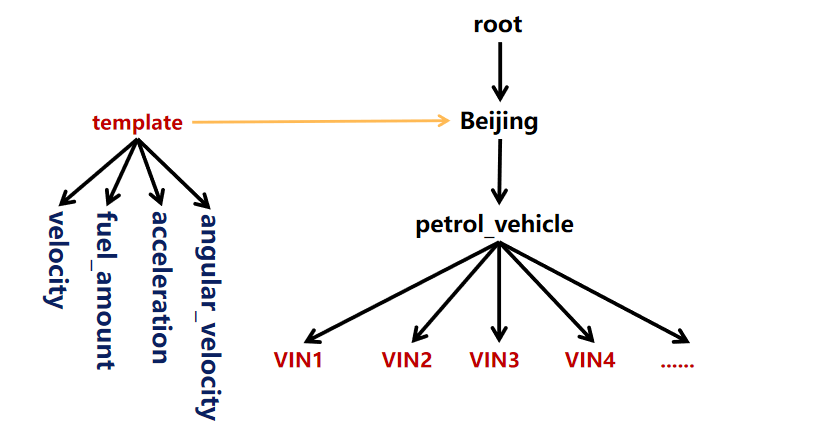
+## Device Template
+
+IoTDB supports the device template function, enabling different entities of
the same type to share metadata, reduce the memory usage of metadata, and
simplify the management of numerous entities and measurements.
+
+
+### Create Device Template
+
+The SQL syntax for creating a metadata template is as follows:
+
+```sql
+CREATE DEVICE TEMPLATE <templateName> ALIGNED? '(' <measurementId>
<attributeClauses> [',' <measurementId> <attributeClauses>]+ ')'
+```
+
+**Example 1:** Create a template containing two non-aligned timeseires
+
+```shell
+IoTDB> create device template t1 (temperature FLOAT encoding=RLE, status
BOOLEAN encoding=PLAIN compression=SNAPPY)
+```
+
+**Example 2:** Create a template containing a group of aligned timeseires
+
+```shell
+IoTDB> create device template t2 aligned (lat FLOAT encoding=Gorilla, lon
FLOAT encoding=Gorilla)
+```
+
+The` lat` and `lon` measurements are aligned.
+
+
+
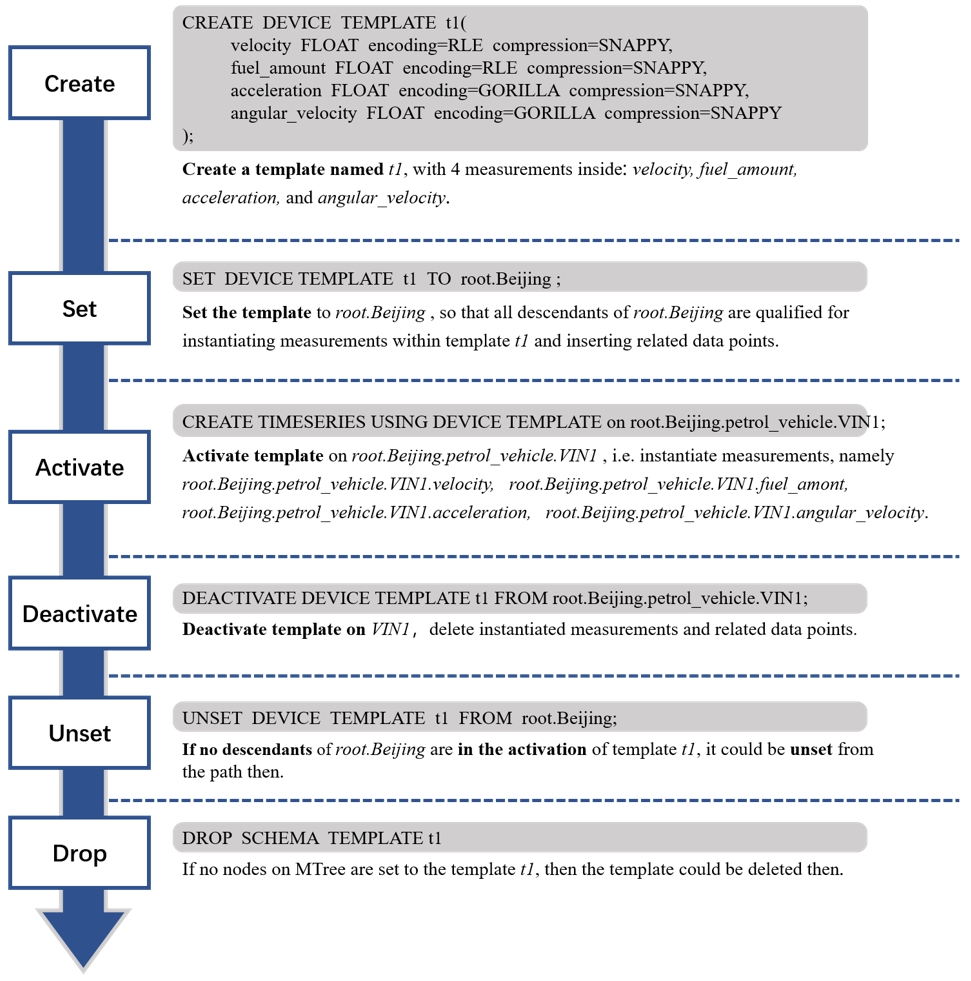
+
+
+### Set Device Template
+
+After a device template is created, it should be set to specific path before
creating related timeseries or insert data.
+
+**It should be ensured that the related database has been set before setting
template.**
+
+**It is recommended to set device template to database path. It is not
suggested to set device template to some path above database**
+
+**It is forbidden to create timeseries under a path setting s tedeviceplate.
Device template shall not be set on a prefix path of an existing timeseries.**
+
+The SQL Statement for setting device template is as follow:
+
+```shell
+IoTDB> set device template t1 to root.sg1.d1
+```
+
+### Activate Device Template
+
+After setting the device template, with the system enabled to auto create
schema, you can insert data into the timeseries. For example, suppose there's a
database root.sg1 and t1 has been set to root.sg1.d1, then timeseries like
root.sg1.d1.temperature and root.sg1.d1.status are available and data points
can be inserted.
+
+
+**Attention**: Before inserting data or the system not enabled to auto create
schema, timeseries defined by the device template will not be created. You can
use the following SQL statement to create the timeseries or activate the
templdeviceate, act before inserting data:
+
+```shell
+IoTDB> create timeseries using device template on root.sg1.d1
+```
+
+**Example:** Execute the following statement
+
+```shell
+IoTDB> set device template t1 to root.sg1.d1
+IoTDB> set device template t2 to root.sg1.d2
+IoTDB> create timeseries using device template on root.sg1.d1
+IoTDB> create timeseries using device template on root.sg1.d2
+```
+
+Show the time series:
+
+```sql
+show timeseries root.sg1.**
+````
+
+```shell
++-----------------------+-----+-------------+--------+--------+-----------+----+----------+--------+-------------------+
+| timeseries|alias|
database|dataType|encoding|compression|tags|attributes|deadband|deadband
parameters|
++-----------------------+-----+-------------+--------+--------+-----------+----+----------+--------+-------------------+
+|root.sg1.d1.temperature| null| root.sg1| FLOAT| RLE|
SNAPPY|null| null| null| null|
+| root.sg1.d1.status| null| root.sg1| BOOLEAN| PLAIN|
SNAPPY|null| null| null| null|
+| root.sg1.d2.lon| null| root.sg1| FLOAT| GORILLA|
SNAPPY|null| null| null| null|
+| root.sg1.d2.lat| null| root.sg1| FLOAT| GORILLA|
SNAPPY|null| null| null| null|
++-----------------------+-----+-------------+--------+--------+-----------+----+----------+--------+-------------------+
+```
+
+Show the devices:
+
+```sql
+show devices root.sg1.**
+````
+
+```shell
++---------------+---------+
+| devices|isAligned|
++---------------+---------+
+| root.sg1.d1| false|
+| root.sg1.d2| true|
++---------------+---------+
+````
+
+### Show Device Template
+
+- Show all device templates
+
+The SQL statement looks like this:
+
+```shell
+IoTDB> show device templates
+```
+
+The execution result is as follows:
+
+```shell
++-------------+
+|template name|
++-------------+
+| t2|
+| t1|
++-------------+
+```
+
+- Show nodes under in device template
+
+The SQL statement looks like this:
+
+```shell
+IoTDB> show nodes in device template t1
+```
+
+The execution result is as follows:
+
+```shell
++-----------+--------+--------+-----------+
+|child nodes|dataType|encoding|compression|
++-----------+--------+--------+-----------+
+|temperature| FLOAT| RLE| SNAPPY|
+| status| BOOLEAN| PLAIN| SNAPPY|
++-----------+--------+--------+-----------+
+```
+
+- Show the path prefix where a device template is set
+
+```shell
+IoTDB> show paths set device template t1
+```
+
+The execution result is as follows:
+
+```shell
++-----------+
+|child paths|
++-----------+
+|root.sg1.d1|
++-----------+
+```
+
+- Show the path prefix where a device template is used (i.e. the time series
has been created)
+
+```shell
+IoTDB> show paths using device template t1
+```
+
+The execution result is as follows:
+
+```shell
++-----------+
+|child paths|
++-----------+
+|root.sg1.d1|
++-----------+
+```
+
+### Deactivate device Template
+
+To delete a group of timeseries represented by device template, namely
deactivate the device template, use the following SQL statement:
+
+```shell
+IoTDB> delete timeseries of device template t1 from root.sg1.d1
+```
+
+or
+
+```shell
+IoTDB> deactivate device template t1 from root.sg1.d1
+```
+
+The deactivation supports batch process.
+
+```shell
+IoTDB> delete timeseries of device template t1 from root.sg1.*, root.sg2.*
+```
+
+or
+
+```shell
+IoTDB> deactivate device template t1 from root.sg1.*, root.sg2.*
+```
+
+If the template name is not provided in sql, all template activation on paths
matched by given path pattern will be removed.
+
+### Unset Device Template
+
+The SQL Statement for unsetting device template is as follow:
+
+```shell
+IoTDB> unset device template t1 from root.sg1.d1
+```
+
+**Attention**: It should be guaranteed that none of the timeseries represented
by the target device template exists, before unset it. It can be achieved by
deactivation operation.
+
+### Drop Device Template
+
+The SQL Statement for dropping device template is as follow:
+
+```shell
+IoTDB> drop device template t1
+```
+
+**Attention**: Dropping an already set template is not supported.
+
+### Alter Device Template
+
+In a scenario where measurements need to be added, you can modify the
template to add measurements to all devicesdevice using the device template.
+
+The SQL Statement for altering device template is as follow:
+
+```shell
+IoTDB> alter device template t1 add (speed FLOAT encoding=RLE, FLOAT TEXT
encoding=PLAIN compression=SNAPPY)
+```
+
+**When executing data insertion to devices with device template set on related
prefix path and there are measurements not present in this device template, the
measurements will be auto added to this device template.**
+
+## Timeseries Management
+
+### Create Timeseries
+
+According to the storage model selected before, we can create corresponding
timeseries in the two databases respectively. The SQL statements for creating
timeseries are as follows:
+
+```
+IoTDB > create timeseries root.ln.wf01.wt01.status with
datatype=BOOLEAN,encoding=PLAIN
+IoTDB > create timeseries root.ln.wf01.wt01.temperature with
datatype=FLOAT,encoding=RLE
+IoTDB > create timeseries root.ln.wf02.wt02.hardware with
datatype=TEXT,encoding=PLAIN
+IoTDB > create timeseries root.ln.wf02.wt02.status with
datatype=BOOLEAN,encoding=PLAIN
+IoTDB > create timeseries root.sgcc.wf03.wt01.status with
datatype=BOOLEAN,encoding=PLAIN
+IoTDB > create timeseries root.sgcc.wf03.wt01.temperature with
datatype=FLOAT,encoding=RLE
+```
+
+From v0.13, you can use a simplified version of the SQL statements to create
timeseries:
+
+```
+IoTDB > create timeseries root.ln.wf01.wt01.status BOOLEAN encoding=PLAIN
+IoTDB > create timeseries root.ln.wf01.wt01.temperature FLOAT encoding=RLE
+IoTDB > create timeseries root.ln.wf02.wt02.hardware TEXT encoding=PLAIN
+IoTDB > create timeseries root.ln.wf02.wt02.status BOOLEAN encoding=PLAIN
+IoTDB > create timeseries root.sgcc.wf03.wt01.status BOOLEAN encoding=PLAIN
+IoTDB > create timeseries root.sgcc.wf03.wt01.temperature FLOAT encoding=RLE
+```
+
+Notice that when in the CREATE TIMESERIES statement the encoding method
conflicts with the data type, the system gives the corresponding error prompt
as shown below:
+
+```
+IoTDB > create timeseries root.ln.wf02.wt02.status WITH DATATYPE=BOOLEAN,
ENCODING=TS_2DIFF
+error: encoding TS_2DIFF does not support BOOLEAN
+```
+
+Please refer to [Encoding](../Basic-Concept/Encoding-and-Compression.md) for
correspondence between data type and encoding.
+
+### Create Aligned Timeseries
+
+The SQL statement for creating a group of timeseries are as follows:
+
+```
+IoTDB> CREATE ALIGNED TIMESERIES root.ln.wf01.GPS(latitude FLOAT
encoding=PLAIN compressor=SNAPPY, longitude FLOAT encoding=PLAIN
compressor=SNAPPY)
+```
+
+You can set different datatype, encoding, and compression for the timeseries
in a group of aligned timeseries
+
+It is also supported to set an alias, tag, and attribute for aligned
timeseries.
+
+### Delete Timeseries
+
+To delete the timeseries we created before, we are able to use `(DELETE |
DROP) TimeSeries <PathPattern>` statement.
+
+The usage are as follows:
+
+```
+IoTDB> delete timeseries root.ln.wf01.wt01.status
+IoTDB> delete timeseries root.ln.wf01.wt01.temperature,
root.ln.wf02.wt02.hardware
+IoTDB> delete timeseries root.ln.wf02.*
+IoTDB> drop timeseries root.ln.wf02.*
+```
+
+### Show Timeseries
+
+* SHOW LATEST? TIMESERIES pathPattern? whereClause? limitClause?
+
+ There are four optional clauses added in SHOW TIMESERIES, return
information of time series
+
+Timeseries information includes: timeseries path, alias of measurement,
database it belongs to, data type, encoding type, compression type, tags and
attributes.
+
+Examples:
+
+* SHOW TIMESERIES
+
+ presents all timeseries information in JSON form
+
+* SHOW TIMESERIES <`PathPattern`>
+
+ returns all timeseries information matching the given <`PathPattern`>. SQL
statements are as follows:
+
+```
+IoTDB> show timeseries root.**
+IoTDB> show timeseries root.ln.**
+```
+
+The results are shown below respectively:
+
+```
++-------------------------------+--------+-------------+--------+--------+-----------+-------------------------------------------+--------------------------------------------------------+--------+-------------------+
+| timeseries| alias|
database|dataType|encoding|compression|
tags| attributes|deadband|deadband
parameters|
++-------------------------------+--------+-------------+--------+--------+-----------+-------------------------------------------+--------------------------------------------------------+--------+-------------------+
+|root.sgcc.wf03.wt01.temperature| null| root.sgcc| FLOAT| RLE|
SNAPPY| null|
null| null| null|
+| root.sgcc.wf03.wt01.status| null| root.sgcc| BOOLEAN| PLAIN|
SNAPPY| null|
null| null| null|
+| root.turbine.d1.s1|newAlias| root.turbine| FLOAT| RLE|
SNAPPY|{"newTag1":"newV1","tag4":"v4","tag3":"v3"}|{"attr2":"v2","attr1":"newV1","attr4":"v4","attr3":"v3"}|
null| null|
+| root.ln.wf02.wt02.hardware| null| root.ln| TEXT| PLAIN|
SNAPPY| null|
null| null| null|
+| root.ln.wf02.wt02.status| null| root.ln| BOOLEAN| PLAIN|
SNAPPY| null|
null| null| null|
+| root.ln.wf01.wt01.temperature| null| root.ln| FLOAT| RLE|
SNAPPY| null|
null| null| null|
+| root.ln.wf01.wt01.status| null| root.ln| BOOLEAN| PLAIN|
SNAPPY| null|
null| null| null|
++-------------------------------+--------+-------------+--------+--------+-----------+-------------------------------------------+--------------------------------------------------------+--------+-------------------+
+Total line number = 7
+It costs 0.016s
+
++-----------------------------+-----+-------------+--------+--------+-----------+----+----------+--------+-------------------+
+| timeseries|alias|
database|dataType|encoding|compression|tags|attributes|deadband|deadband
parameters|
++-----------------------------+-----+-------------+--------+--------+-----------+----+----------+--------+-------------------+
+| root.ln.wf02.wt02.hardware| null| root.ln| TEXT| PLAIN|
SNAPPY|null| null| null| null|
+| root.ln.wf02.wt02.status| null| root.ln| BOOLEAN| PLAIN|
SNAPPY|null| null| null| null|
+|root.ln.wf01.wt01.temperature| null| root.ln| FLOAT| RLE|
SNAPPY|null| null| null| null|
+| root.ln.wf01.wt01.status| null| root.ln| BOOLEAN| PLAIN|
SNAPPY|null| null| null| null|
++-----------------------------+-----+-------------+--------+--------+-----------+----+----------+--------+-------------------+
+Total line number = 4
+It costs 0.004s
+```
+
+* SHOW TIMESERIES LIMIT INT OFFSET INT
+
+ returns all the timeseries information start from the offset and limit the
number of series returned. For example,
+
+```
+show timeseries root.ln.** limit 10 offset 10
+```
+
+* SHOW TIMESERIES WHERE TIMESERIES contains 'containStr'
+
+ The query result set is filtered by string fuzzy matching based on the
names of the timeseries. For example:
+
+```
+show timeseries root.ln.** where timeseries contains 'wf01.wt'
+```
+
+The result is shown below:
+
+```
++-------------------------------+--------+-------------+--------+--------+-----------+-------------------------------------------+--------------------------------------------------------+--------+-------------------+
+| timeseries| alias|
database|dataType|encoding|compression|
tags| attributes|deadband|deadband
parameters|
++-------------------------------+--------+-------------+--------+--------+-----------+-------------------------------------------+--------------------------------------------------------+--------+-------------------+
+| root.ln.wf01.wt01.temperature| null| root.ln| FLOAT| RLE|
SNAPPY| null|
null| null| null|
+| root.ln.wf01.wt01.status| null| root.ln| BOOLEAN| PLAIN|
SNAPPY| null|
null| null| null|
++-------------------------------+--------+-------------+--------+--------+-----------+-------------------------------------------+--------------------------------------------------------+--------+-------------------+
+Total line number = 2
+It costs 0.016s
+```
+
+* SHOW TIMESERIES WHERE DataType=type
+
+ The query result set is filtered by data type. For example:
+
+```
+show timeseries root.ln.** where dataType=FLOAT
+```
+
+The result is shown below:
+
+```
++-------------------------------+--------+-------------+--------+--------+-----------+-------------------------------------------+--------------------------------------------------------+--------+-------------------+
+| timeseries| alias|
database|dataType|encoding|compression|
tags| attributes|deadband|deadband
parameters|
++-------------------------------+--------+-------------+--------+--------+-----------+-------------------------------------------+--------------------------------------------------------+--------+-------------------+
+|root.sgcc.wf03.wt01.temperature| null| root.sgcc| FLOAT| RLE|
SNAPPY| null|
null| null| null|
+| root.turbine.d1.s1|newAlias| root.turbine| FLOAT| RLE|
SNAPPY|{"newTag1":"newV1","tag4":"v4","tag3":"v3"}|{"attr2":"v2","attr1":"newV1","attr4":"v4","attr3":"v3"}|
null| null|
+| root.ln.wf01.wt01.temperature| null| root.ln| FLOAT| RLE|
SNAPPY| null|
null| null| null|
++-------------------------------+--------+-------------+--------+--------+-----------+-------------------------------------------+--------------------------------------------------------+--------+-------------------+
+Total line number = 3
+It costs 0.016s
+
+```
+
+
+* SHOW LATEST TIMESERIES
+
+ all the returned timeseries information should be sorted in descending
order of the last timestamp of timeseries
+
+It is worth noting that when the queried path does not exist, the system will
return no timeseries.
+
+
+### Count Timeseries
+
+IoTDB is able to use `COUNT TIMESERIES <Path>` to count the number of
timeseries matching the path. SQL statements are as follows:
+
+* `WHERE` condition could be used to fuzzy match a time series name with the
following syntax: `COUNT TIMESERIES <Path> WHERE TIMESERIES contains
'containStr'`.
+* `WHERE` condition could be used to filter result by data type with the
syntax: `COUNT TIMESERIES <Path> WHERE DataType=<DataType>'`.
+* `WHERE` condition could be used to filter result by tags with the syntax:
`COUNT TIMESERIES <Path> WHERE TAGS(key)='value'` or `COUNT TIMESERIES <Path>
WHERE TAGS(key) contains 'value'`.
+* `LEVEL` could be defined to show count the number of timeseries of each node
at the given level in current Metadata Tree. This could be used to query the
number of sensors under each device. The grammar is: `COUNT TIMESERIES <Path>
GROUP BY LEVEL=<INTEGER>`.
+
+
+```
+IoTDB > COUNT TIMESERIES root.**
+IoTDB > COUNT TIMESERIES root.ln.**
+IoTDB > COUNT TIMESERIES root.ln.*.*.status
+IoTDB > COUNT TIMESERIES root.ln.wf01.wt01.status
+IoTDB > COUNT TIMESERIES root.** WHERE TIMESERIES contains 'sgcc'
+IoTDB > COUNT TIMESERIES root.** WHERE DATATYPE = INT64
+IoTDB > COUNT TIMESERIES root.** WHERE TAGS(unit) contains 'c'
+IoTDB > COUNT TIMESERIES root.** WHERE TAGS(unit) = 'c'
+IoTDB > COUNT TIMESERIES root.** WHERE TIMESERIES contains 'sgcc' group by
level = 1
+```
+
+For example, if there are several timeseries (use `show timeseries` to show
all timeseries):
+
+```
++-------------------------------+--------+-------------+--------+--------+-----------+-------------------------------------------+--------------------------------------------------------+--------+-------------------+
+| timeseries| alias|
database|dataType|encoding|compression|
tags| attributes|deadband|deadband
parameters|
++-------------------------------+--------+-------------+--------+--------+-----------+-------------------------------------------+--------------------------------------------------------+--------+-------------------+
+|root.sgcc.wf03.wt01.temperature| null| root.sgcc| FLOAT| RLE|
SNAPPY| null|
null| null| null|
+| root.sgcc.wf03.wt01.status| null| root.sgcc| BOOLEAN| PLAIN|
SNAPPY| null|
null| null| null|
+| root.turbine.d1.s1|newAlias| root.turbine| FLOAT| RLE|
SNAPPY|{"newTag1":"newV1","tag4":"v4","tag3":"v3"}|{"attr2":"v2","attr1":"newV1","attr4":"v4","attr3":"v3"}|
null| null|
+| root.ln.wf02.wt02.hardware| null| root.ln| TEXT| PLAIN|
SNAPPY| {"unit":"c"}|
null| null| null|
+| root.ln.wf02.wt02.status| null| root.ln| BOOLEAN| PLAIN|
SNAPPY| {"description":"test1"}|
null| null| null|
+| root.ln.wf01.wt01.temperature| null| root.ln| FLOAT| RLE|
SNAPPY| null|
null| null| null|
+| root.ln.wf01.wt01.status| null| root.ln| BOOLEAN| PLAIN|
SNAPPY| null|
null| null| null|
++-------------------------------+--------+-------------+--------+--------+-----------+-------------------------------------------+--------------------------------------------------------+--------+-------------------+
+Total line number = 7
+It costs 0.004s
+```
+
+Then the Metadata Tree will be as below:
+
+<center><img style="width:100%; max-width:600px; margin-left:auto;
margin-right:auto; display:block;"
src="https://alioss.timecho.com/docs/img/github/69792176-1718f400-1201-11ea-861a-1a83c07ca144.jpg";></center>
+
+As can be seen, `root` is considered as `LEVEL=0`. So when you enter
statements such as:
+
+```
+IoTDB > COUNT TIMESERIES root.** GROUP BY LEVEL=1
+IoTDB > COUNT TIMESERIES root.ln.** GROUP BY LEVEL=2
+IoTDB > COUNT TIMESERIES root.ln.wf01.* GROUP BY LEVEL=2
+```
+
+You will get following results:
+
+```
++------------+-----------------+
+| column|count(timeseries)|
++------------+-----------------+
+| root.sgcc| 2|
+|root.turbine| 1|
+| root.ln| 4|
++------------+-----------------+
+Total line number = 3
+It costs 0.002s
+
++------------+-----------------+
+| column|count(timeseries)|
++------------+-----------------+
+|root.ln.wf02| 2|
+|root.ln.wf01| 2|
++------------+-----------------+
+Total line number = 2
+It costs 0.002s
+
++------------+-----------------+
+| column|count(timeseries)|
++------------+-----------------+
+|root.ln.wf01| 2|
++------------+-----------------+
+Total line number = 1
+It costs 0.002s
+```
+
+> Note: The path of timeseries is just a filter condition, which has no
relationship with the definition of level.
+
+### Active Timeseries Query
+By adding WHERE time filter conditions to the existing SHOW/COUNT TIMESERIES,
we can obtain time series with data within the specified time range.
+
+It is important to note that in metadata queries with time filters, views are
not considered; only the time series actually stored in the TsFile are taken
into account.
+
+An example usage is as follows:
+```
+IoTDB> insert into root.sg.data(timestamp, s1,s2) values(15000, 1, 2);
+IoTDB> insert into root.sg.data2(timestamp, s1,s2) values(15002, 1, 2);
+IoTDB> insert into root.sg.data3(timestamp, s1,s2) values(16000, 1, 2);
+IoTDB> show timeseries;
++----------------+-----+--------+--------+--------+-----------+----+----------+--------+------------------+--------+
+|
Timeseries|Alias|Database|DataType|Encoding|Compression|Tags|Attributes|Deadband|DeadbandParameters|ViewType|
++----------------+-----+--------+--------+--------+-----------+----+----------+--------+------------------+--------+
+| root.sg.data.s1| null| root.sg| FLOAT| GORILLA| LZ4|null|
null| null| null| BASE|
+| root.sg.data.s2| null| root.sg| FLOAT| GORILLA| LZ4|null|
null| null| null| BASE|
+|root.sg.data3.s1| null| root.sg| FLOAT| GORILLA| LZ4|null|
null| null| null| BASE|
+|root.sg.data3.s2| null| root.sg| FLOAT| GORILLA| LZ4|null|
null| null| null| BASE|
+|root.sg.data2.s1| null| root.sg| FLOAT| GORILLA| LZ4|null|
null| null| null| BASE|
+|root.sg.data2.s2| null| root.sg| FLOAT| GORILLA| LZ4|null|
null| null| null| BASE|
++----------------+-----+--------+--------+--------+-----------+----+----------+--------+------------------+--------+
+
+IoTDB> show timeseries where time >= 15000 and time < 16000;
++----------------+-----+--------+--------+--------+-----------+----+----------+--------+------------------+--------+
+|
Timeseries|Alias|Database|DataType|Encoding|Compression|Tags|Attributes|Deadband|DeadbandParameters|ViewType|
++----------------+-----+--------+--------+--------+-----------+----+----------+--------+------------------+--------+
+| root.sg.data.s1| null| root.sg| FLOAT| GORILLA| LZ4|null|
null| null| null| BASE|
+| root.sg.data.s2| null| root.sg| FLOAT| GORILLA| LZ4|null|
null| null| null| BASE|
+|root.sg.data2.s1| null| root.sg| FLOAT| GORILLA| LZ4|null|
null| null| null| BASE|
+|root.sg.data2.s2| null| root.sg| FLOAT| GORILLA| LZ4|null|
null| null| null| BASE|
++----------------+-----+--------+--------+--------+-----------+----+----------+--------+------------------+--------+
+
+IoTDB> count timeseries where time >= 15000 and time < 16000;
++-----------------+
+|count(timeseries)|
++-----------------+
+| 4|
++-----------------+
+```
+Regarding the definition of active time series, data that can be queried
normally is considered active, meaning time series that have been inserted but
deleted are not included.
+### Tag and Attribute Management
+
+We can also add an alias, extra tag and attribute information while creating
one timeseries.
+
+The differences between tag and attribute are:
+
+* Tag could be used to query the path of timeseries, we will maintain an
inverted index in memory on the tag: Tag -> Timeseries
+* Attribute could only be queried by timeseries path : Timeseries -> Attribute
+
+The SQL statements for creating timeseries with extra tag and attribute
information are extended as follows:
+
+```
+create timeseries root.turbine.d1.s1(temprature) with datatype=FLOAT,
encoding=RLE, compression=SNAPPY tags(tag1=v1, tag2=v2) attributes(attr1=v1,
attr2=v2)
+```
+
+The `temprature` in the brackets is an alias for the sensor `s1`. So we can
use `temprature` to replace `s1` anywhere.
+
+> IoTDB also supports using AS function to set alias. The difference between
the two is: the alias set by the AS function is used to replace the whole time
series name, temporary and not bound with the time series; while the alias
mentioned above is only used as the alias of the sensor, which is bound with it
and can be used equivalent to the original sensor name.
+
+> Notice that the size of the extra tag and attribute information shouldn't
exceed the `tag_attribute_total_size`.
+
+We can update the tag information after creating it as following:
+
+* Rename the tag/attribute key
+
+```
+ALTER timeseries root.turbine.d1.s1 RENAME tag1 TO newTag1
+```
+
+* Reset the tag/attribute value
+
+```
+ALTER timeseries root.turbine.d1.s1 SET newTag1=newV1, attr1=newV1
+```
+
+* Delete the existing tag/attribute
+
+```
+ALTER timeseries root.turbine.d1.s1 DROP tag1, tag2
+```
+
+* Add new tags
+
+```
+ALTER timeseries root.turbine.d1.s1 ADD TAGS tag3=v3, tag4=v4
+```
+
+* Add new attributes
+
+```
+ALTER timeseries root.turbine.d1.s1 ADD ATTRIBUTES attr3=v3, attr4=v4
+```
+
+* Upsert alias, tags and attributes
+
+> add alias or a new key-value if the alias or key doesn't exist, otherwise,
update the old one with new value.
+
+```
+ALTER timeseries root.turbine.d1.s1 UPSERT ALIAS=newAlias TAGS(tag3=v3,
tag4=v4) ATTRIBUTES(attr3=v3, attr4=v4)
+```
+
+* Show timeseries using tags. Use TAGS(tagKey) to identify the tags used as
filter key
+
+```
+SHOW TIMESERIES (<`PathPattern`>)? timeseriesWhereClause
+```
+
+returns all the timeseries information that satisfy the where condition and
match the pathPattern. SQL statements are as follows:
+
+```
+ALTER timeseries root.ln.wf02.wt02.hardware ADD TAGS unit=c
+ALTER timeseries root.ln.wf02.wt02.status ADD TAGS description=test1
+show timeseries root.ln.** where TAGS(unit)='c'
+show timeseries root.ln.** where TAGS(description) contains 'test1'
+```
+
+The results are shown below respectly:
+
+```
++--------------------------+-----+-------------+--------+--------+-----------+------------+----------+--------+-------------------+
+| timeseries|alias| database|dataType|encoding|compression|
tags|attributes|deadband|deadband parameters|
++--------------------------+-----+-------------+--------+--------+-----------+------------+----------+--------+-------------------+
+|root.ln.wf02.wt02.hardware| null| root.ln| TEXT| PLAIN|
SNAPPY|{"unit":"c"}| null| null| null|
++--------------------------+-----+-------------+--------+--------+-----------+------------+----------+--------+-------------------+
+Total line number = 1
+It costs 0.005s
+
++------------------------+-----+-------------+--------+--------+-----------+-----------------------+----------+--------+-------------------+
+| timeseries|alias| database|dataType|encoding|compression|
tags|attributes|deadband|deadband parameters|
++------------------------+-----+-------------+--------+--------+-----------+-----------------------+----------+--------+-------------------+
+|root.ln.wf02.wt02.status| null| root.ln| BOOLEAN| PLAIN|
SNAPPY|{"description":"test1"}| null| null| null|
++------------------------+-----+-------------+--------+--------+-----------+-----------------------+----------+--------+-------------------+
+Total line number = 1
+It costs 0.004s
+```
+
+- count timeseries using tags
+
+```
+COUNT TIMESERIES (<`PathPattern`>)? timeseriesWhereClause
+COUNT TIMESERIES (<`PathPattern`>)? timeseriesWhereClause GROUP BY
LEVEL=<INTEGER>
+```
+
+returns all the number of timeseries that satisfy the where condition and
match the pathPattern. SQL statements are as follows:
+
+```
+count timeseries
+count timeseries root.** where TAGS(unit)='c'
+count timeseries root.** where TAGS(unit)='c' group by level = 2
+```
+
+The results are shown below respectly :
+
+```
+IoTDB> count timeseries
++-----------------+
+|count(timeseries)|
++-----------------+
+| 6|
++-----------------+
+Total line number = 1
+It costs 0.019s
+IoTDB> count timeseries root.** where TAGS(unit)='c'
++-----------------+
+|count(timeseries)|
++-----------------+
+| 2|
++-----------------+
+Total line number = 1
+It costs 0.020s
+IoTDB> count timeseries root.** where TAGS(unit)='c' group by level = 2
++--------------+-----------------+
+| column|count(timeseries)|
++--------------+-----------------+
+| root.ln.wf02| 2|
+| root.ln.wf01| 0|
+|root.sgcc.wf03| 0|
++--------------+-----------------+
+Total line number = 3
+It costs 0.011s
+```
+
+> Notice that, we only support one condition in the where clause. Either it's
an equal filter or it is an `contains` filter. In both case, the property in
the where condition must be a tag.
+
+create aligned timeseries
+
+```
+create aligned timeseries root.sg1.d1(s1 INT32 tags(tag1=v1, tag2=v2)
attributes(attr1=v1, attr2=v2), s2 DOUBLE tags(tag3=v3, tag4=v4)
attributes(attr3=v3, attr4=v4))
+```
+
+The execution result is as follows:
+
+```
+IoTDB> show timeseries
++--------------+-----+-------------+--------+--------+-----------+-------------------------+---------------------------+--------+-------------------+
+| timeseries|alias| database|dataType|encoding|compression|
tags| attributes|deadband|deadband parameters|
++--------------+-----+-------------+--------+--------+-----------+-------------------------+---------------------------+--------+-------------------+
+|root.sg1.d1.s1| null| root.sg1| INT32| RLE|
SNAPPY|{"tag1":"v1","tag2":"v2"}|{"attr2":"v2","attr1":"v1"}| null|
null|
+|root.sg1.d1.s2| null| root.sg1| DOUBLE| GORILLA|
SNAPPY|{"tag4":"v4","tag3":"v3"}|{"attr4":"v4","attr3":"v3"}| null|
null|
++--------------+-----+-------------+--------+--------+-----------+-------------------------+---------------------------+--------+-------------------+
+```
+
+Support query:
+
+```
+IoTDB> show timeseries where TAGS(tag1)='v1'
++--------------+-----+-------------+--------+--------+-----------+-------------------------+---------------------------+--------+-------------------+
+| timeseries|alias| database|dataType|encoding|compression|
tags| attributes|deadband|deadband parameters|
++--------------+-----+-------------+--------+--------+-----------+-------------------------+---------------------------+--------+-------------------+
+|root.sg1.d1.s1| null| root.sg1| INT32| RLE|
SNAPPY|{"tag1":"v1","tag2":"v2"}|{"attr2":"v2","attr1":"v1"}| null|
null|
++--------------+-----+-------------+--------+--------+-----------+-------------------------+---------------------------+--------+-------------------+
+```
+
+The above operations are supported for timeseries tag, attribute updates, etc.
+
+## Node Management
+
+### Show Child Paths
+
+```
+SHOW CHILD PATHS pathPattern
+```
+
+Return all child paths and their node types of all the paths matching
pathPattern.
+
+node types: ROOT -> DB INTERNAL -> DATABASE -> INTERNAL -> DEVICE -> TIMESERIES
+
+
+Example:
+
+* return the child paths of root.ln:show child paths root.ln
+
+```
++------------+----------+
+| child paths|node types|
++------------+----------+
+|root.ln.wf01| INTERNAL|
+|root.ln.wf02| INTERNAL|
++------------+----------+
+Total line number = 2
+It costs 0.002s
+```
+
+> get all paths in form of root.xx.xx.xx:show child paths root.xx.xx
+
+### Show Child Nodes
+
+```
+SHOW CHILD NODES pathPattern
+```
+
+Return all child nodes of the pathPattern.
+
+Example:
+
+* return the child nodes of root:show child nodes root
+
+```
++------------+
+| child nodes|
++------------+
+| ln|
++------------+
+```
+
+* return the child nodes of root.ln:show child nodes root.ln
+
+```
++------------+
+| child nodes|
++------------+
+| wf01|
+| wf02|
++------------+
+```
+
+### Count Nodes
+
+IoTDB is able to use `COUNT NODES <PathPattern> LEVEL=<INTEGER>` to count the
number of nodes at
+ the given level in current Metadata Tree considering a given pattern. IoTDB
will find paths that
+ match the pattern and counts distinct nodes at the specified level among the
matched paths.
+ This could be used to query the number of devices with specified
measurements. The usage are as
+ follows:
+
+```
+IoTDB > COUNT NODES root.** LEVEL=2
+IoTDB > COUNT NODES root.ln.** LEVEL=2
+IoTDB > COUNT NODES root.ln.wf01.** LEVEL=3
+IoTDB > COUNT NODES root.**.temperature LEVEL=3
+```
+
+As for the above mentioned example and Metadata tree, you can get following
results:
+
+```
++------------+
+|count(nodes)|
++------------+
+| 4|
++------------+
+Total line number = 1
+It costs 0.003s
+
++------------+
+|count(nodes)|
++------------+
+| 2|
++------------+
+Total line number = 1
+It costs 0.002s
+
++------------+
+|count(nodes)|
++------------+
+| 1|
++------------+
+Total line number = 1
+It costs 0.002s
+
++------------+
+|count(nodes)|
++------------+
+| 2|
++------------+
+Total line number = 1
+It costs 0.002s
+```
+
+> Note: The path of timeseries is just a filter condition, which has no
relationship with the definition of level.
+
+### Show Devices
+
+* SHOW DEVICES pathPattern? (WITH DATABASE)? devicesWhereClause? limitClause?
+
+Similar to `Show Timeseries`, IoTDB also supports two ways of viewing devices:
+
+* `SHOW DEVICES` statement presents all devices' information, which is equal
to `SHOW DEVICES root.**`.
+* `SHOW DEVICES <PathPattern>` statement specifies the `PathPattern` and
returns the devices information matching the pathPattern and under the given
level.
+* `WHERE` condition supports `DEVICE contains 'xxx'` to do a fuzzy query
based on the device name.
+
+SQL statement is as follows:
+
+```
+IoTDB> show devices
+IoTDB> show devices root.ln.**
+IoTDB> show devices root.ln.** where device contains 't'
+```
+
+You can get results below:
+
+```
++-------------------+---------+
+| devices|isAligned|
++-------------------+---------+
+| root.ln.wf01.wt01| false|
+| root.ln.wf02.wt02| false|
+|root.sgcc.wf03.wt01| false|
+| root.turbine.d1| false|
++-------------------+---------+
+Total line number = 4
+It costs 0.002s
+
++-----------------+---------+
+| devices|isAligned|
++-----------------+---------+
+|root.ln.wf01.wt01| false|
+|root.ln.wf02.wt02| false|
++-----------------+---------+
+Total line number = 2
+It costs 0.001s
+```
+
+`isAligned` indicates whether the timeseries under the device are aligned.
+
+To view devices' information with database, we can use `SHOW DEVICES WITH
DATABASE` statement.
+
+* `SHOW DEVICES WITH DATABASE` statement presents all devices' information
with their database.
+* `SHOW DEVICES <PathPattern> WITH DATABASE` statement specifies the
`PathPattern` and returns the
+ devices' information under the given level with their database information.
+
+SQL statement is as follows:
+
+```
+IoTDB> show devices with database
+IoTDB> show devices root.ln.** with database
+```
+
+You can get results below:
+
+```
++-------------------+-------------+---------+
+| devices| database|isAligned|
++-------------------+-------------+---------+
+| root.ln.wf01.wt01| root.ln| false|
+| root.ln.wf02.wt02| root.ln| false|
+|root.sgcc.wf03.wt01| root.sgcc| false|
+| root.turbine.d1| root.turbine| false|
++-------------------+-------------+---------+
+Total line number = 4
+It costs 0.003s
+
++-----------------+-------------+---------+
+| devices| database|isAligned|
++-----------------+-------------+---------+
+|root.ln.wf01.wt01| root.ln| false|
+|root.ln.wf02.wt02| root.ln| false|
++-----------------+-------------+---------+
+Total line number = 2
+It costs 0.001s
+```
+
+### Count Devices
+
+* COUNT DEVICES /<PathPattern/>
+
+The above statement is used to count the number of devices. At the same time,
it is allowed to specify `PathPattern` to count the number of devices matching
the `PathPattern`.
+
+SQL statement is as follows:
+
+```
+IoTDB> show devices
+IoTDB> count devices
+IoTDB> count devices root.ln.**
+```
+
+You can get results below:
+
+```
++-------------------+---------+
+| devices|isAligned|
++-------------------+---------+
+|root.sgcc.wf03.wt03| false|
+| root.turbine.d1| false|
+| root.ln.wf02.wt02| false|
+| root.ln.wf01.wt01| false|
++-------------------+---------+
+Total line number = 4
+It costs 0.024s
+
++--------------+
+|count(devices)|
++--------------+
+| 4|
++--------------+
+Total line number = 1
+It costs 0.004s
+
++--------------+
+|count(devices)|
++--------------+
+| 2|
++--------------+
+Total line number = 1
+It costs 0.004s
+```
+
+### Active Device Query
+Similar to active timeseries query, we can add time filter conditions to
device viewing and statistics to query active devices that have data within a
certain time range. The definition of active here is the same as for active
time series. An example usage is as follows:
+```
+IoTDB> insert into root.sg.data(timestamp, s1,s2) values(15000, 1, 2);
+IoTDB> insert into root.sg.data2(timestamp, s1,s2) values(15002, 1, 2);
+IoTDB> insert into root.sg.data3(timestamp, s1,s2) values(16000, 1, 2);
+IoTDB> show devices;
++-------------------+---------+
+| devices|isAligned|
++-------------------+---------+
+| root.sg.data| false|
+| root.sg.data2| false|
+| root.sg.data3| false|
++-------------------+---------+
+
+IoTDB> show devices where time >= 15000 and time < 16000;
++-------------------+---------+
+| devices|isAligned|
++-------------------+---------+
+| root.sg.data| false|
+| root.sg.data2| false|
++-------------------+---------+
+
+IoTDB> count devices where time >= 15000 and time < 16000;
++--------------+
+|count(devices)|
++--------------+
+| 2|
++--------------+
+```
\ No newline at end of file
diff --git a/src/UserGuide/Master/UserGuideReadme.md
b/src/UserGuide/Master/UserGuideReadme.md
index e5201f0..a661bfd 100644
--- a/src/UserGuide/Master/UserGuideReadme.md
+++ b/src/UserGuide/Master/UserGuideReadme.md
@@ -25,7 +25,7 @@ We keep introducing more features into IoTDB. Therefore,
different released vers
The "In Progress Version" is for matching the master branch of IOTDB's source
code Repository.
Other documents are for IoTDB previous released versions.
-- [In progress
version](https://iotdb.apache.org/UserGuide/Master/QuickStart/QuickStart.html)
+- [In progress
version](https://iotdb.apache.org/UserGuide/Master/QuickStart/QuickStart_apache.html)
- [Version
1.0.x](https://iotdb.apache.org/UserGuide/V1.0.x/QuickStart/QuickStart.html)
- [Version
0.13.x](https://iotdb.apache.org/UserGuide/V0.13.x/QuickStart/QuickStart.html)
diff --git a/src/UserGuide/Master/QuickStart/ClusterQuickStart.md
b/src/UserGuide/Master/stage/ClusterQuickStart.md
similarity index 100%
rename from src/UserGuide/Master/QuickStart/ClusterQuickStart.md
rename to src/UserGuide/Master/stage/ClusterQuickStart.md
diff --git a/src/UserGuide/Master/QuickStart/General-SQL-Statements.md
b/src/UserGuide/Master/stage/General-SQL-Statements.md
similarity index 100%
rename from src/UserGuide/Master/QuickStart/General-SQL-Statements.md
rename to src/UserGuide/Master/stage/General-SQL-Statements.md
diff --git a/src/UserGuide/Master/QuickStart/QuickStart.md
b/src/UserGuide/Master/stage/QuickStart.md
similarity index 100%
rename from src/UserGuide/Master/QuickStart/QuickStart.md
rename to src/UserGuide/Master/stage/QuickStart.md
diff --git a/src/UserGuide/latest/Ecosystem-Integration/Zeppelin-IoTDB.md
b/src/UserGuide/latest/Ecosystem-Integration/Zeppelin-IoTDB_apache.md
similarity index 97%
copy from src/UserGuide/latest/Ecosystem-Integration/Zeppelin-IoTDB.md
copy to src/UserGuide/latest/Ecosystem-Integration/Zeppelin-IoTDB_apache.md
index b1e13e0..c1221e3 100644
--- a/src/UserGuide/latest/Ecosystem-Integration/Zeppelin-IoTDB.md
+++ b/src/UserGuide/latest/Ecosystem-Integration/Zeppelin-IoTDB_apache.md
@@ -37,7 +37,7 @@ Zeppelin is a web-based notebook that enables interactive
data analytics. You ca
| :-----------: | :-----------: | :--------------: |
| >=`0.12.0` | >=`1.8.0_271` | `>=0.9.0` |
-Install IoTDB: Reference to [IoTDB Quick
Start](../QuickStart/QuickStart.html). Suppose IoTDB is placed at `$IoTDB_HOME`.
+Install IoTDB: Reference to [IoTDB Quick
Start](../Deployment-and-Maintenance/Stand-Alone-Deployment_apache.md). Suppose
IoTDB is placed at `$IoTDB_HOME`.
Install Zeppelin:
> Method A. Download directly: You can download
> [Zeppelin](https://zeppelin.apache.org/download.html#) and unpack the binary
> package.
> [netinst](http://www.apache.org/dyn/closer.cgi/zeppelin/zeppelin-0.9.0/zeppelin-0.9.0-bin-netinst.tgz)
> binary package is recommended since it's relatively small by excluding
> irrelevant interpreters.
diff --git a/src/UserGuide/latest/Ecosystem-Integration/Zeppelin-IoTDB.md
b/src/UserGuide/latest/Ecosystem-Integration/Zeppelin-IoTDB_timecho.md
similarity index 97%
rename from src/UserGuide/latest/Ecosystem-Integration/Zeppelin-IoTDB.md
rename to src/UserGuide/latest/Ecosystem-Integration/Zeppelin-IoTDB_timecho.md
index b1e13e0..2f44a8e 100644
--- a/src/UserGuide/latest/Ecosystem-Integration/Zeppelin-IoTDB.md
+++ b/src/UserGuide/latest/Ecosystem-Integration/Zeppelin-IoTDB_timecho.md
@@ -37,7 +37,7 @@ Zeppelin is a web-based notebook that enables interactive
data analytics. You ca
| :-----------: | :-----------: | :--------------: |
| >=`0.12.0` | >=`1.8.0_271` | `>=0.9.0` |
-Install IoTDB: Reference to [IoTDB Quick
Start](../QuickStart/QuickStart.html). Suppose IoTDB is placed at `$IoTDB_HOME`.
+Install IoTDB: Reference to [IoTDB Quick
Start](../Deployment-and-Maintenance/Stand-Alone-Deployment_timecho.md).
Suppose IoTDB is placed at `$IoTDB_HOME`.
Install Zeppelin:
> Method A. Download directly: You can download
> [Zeppelin](https://zeppelin.apache.org/download.html#) and unpack the binary
> package.
> [netinst](http://www.apache.org/dyn/closer.cgi/zeppelin/zeppelin-0.9.0/zeppelin-0.9.0-bin-netinst.tgz)
> binary package is recommended since it's relatively small by excluding
> irrelevant interpreters.
diff --git a/src/UserGuide/latest/QuickStart/QuickStart_apache.md
b/src/UserGuide/latest/QuickStart/QuickStart_apache.md
new file mode 100644
index 0000000..b8b1a76
--- /dev/null
+++ b/src/UserGuide/latest/QuickStart/QuickStart_apache.md
@@ -0,0 +1,80 @@
+<!--
+
+ Licensed to the Apache Software Foundation (ASF) under one
+ or more contributor license agreements. See the NOTICE file
+ distributed with this work for additional information
+ regarding copyright ownership. The ASF licenses this file
+ to you under the Apache License, Version 2.0 (the
+ "License"); you may not use this file except in compliance
+ with the License. You may obtain a copy of the License at
+
+ http://www.apache.org/licenses/LICENSE-2.0
+
+ Unless required by applicable law or agreed to in writing,
+ software distributed under the License is distributed on an
+ "AS IS" BASIS, WITHOUT WARRANTIES OR CONDITIONS OF ANY
+ KIND, either express or implied. See the License for the
+ specific language governing permissions and limitations
+ under the License.
+
+-->
+# Quick Start
+
+This document will help you understand how to quickly get started with IoTDB.
+
+## How to install and deploy?
+
+This document will help you quickly install and deploy IoTDB. You can quickly
locate the content you need to view through the following document links:
+
+1. Prepare the necessary machine resources:The deployment and operation of
IoTDB require consideration of multiple aspects of machine resource
configuration. Specific resource allocation can be viewed [Database
Resources](../Deployment-and-Maintenance/Database-Resources.md)
+
+2. Complete system configuration preparation:The system configuration of IoTDB
involves multiple aspects, and the key system configuration introductions can
be viewed [System
Requirements](../Deployment-and-Maintenance/Environment-Requirements.md)
+
+3. Get installation package:You can visit [Apache IoTDB official
website](https://iotdb.apache.org/zh/Download/ ) Get the IoTDB installation
package.The specific installation package structure can be viewed: [Obtain
IoTDB](../Deployment-and-Maintenance/IoTDB-Package_apache.md)
+
+4. Install database:You can choose the following tutorials for installation
and deployment based on the actual deployment architecture:
+
+ - Stand-Alone Deployment:[Stand-Alone
Deployment](../Deployment-and-Maintenance/Stand-Alone-Deployment_apache.md)
+
+ - Cluster Deployment:[Cluster
Deployment](../Deployment-and-Maintenance/Cluster-Deployment_apache.md)
+
+> ❗️Attention: Currently, we still recommend installing and deploying directly
on physical/virtual machines. If Docker deployment is required, please refer
to: [Docker
Deployment](../Deployment-and-Maintenance/Docker-Deployment_apache.md)
+
+## How to use it?
+
+1. Database modeling design: Database modeling is an important step in
creating a database system, which involves designing the structure and
relationships of data to ensure that the organization of data meets the
specific application requirements. The following document will help you quickly
understand the modeling design of IoTDB:
+
+ - Introduction to the concept of timeseries:[Navigating Time Series
Data](../Basic-Concept/Navigating_Time_Series_Data.md)
+
+ - Introduction to Modeling Design::[Data
Model](../Basic-Concept/Data-Model-and-Terminology.md)
+
+ - SQL syntax introduction: [Operate
Metadata](../User-Manual/Operate-Metadata_apache.md)
+
+2. Write Data: In terms of data writing, IoTDB provides multiple ways to
insert real-time data. Please refer to the basic data writing operations for
details [Write Data](../User-Manual/Write-Delete-Data.md)
+
+3. Query Data: IoTDB provides rich data query functions. Please refer to the
basic introduction of data query [Query Data](../User-Manual/Query-Data.md)
+
+4. Other advanced features: In addition to common functions such as writing
and querying in databases, IoTDB also supports "Data Synchronisation、Stream
Framework、Database Administration " and other functions, specific usage methods
can be found in the specific document:
+
+ - Data Synchronisation: [Data
Synchronisation](../User-Manual/Data-Sync_apache.md)
+
+ - Stream Framework: [Stream Framework](../User-Manual/Streaming_apache.md)
+
+ - Database Administration: [Database
Administration](../User-Manual/Authority-Management.md)
+
+5. API: IoTDB provides multiple application programming interfaces (API) for
developers to interact with IoTDB in their applications, and currently supports
[Java Native API](../API/Programming-Java-Native-API.md)、[Python Native
API](../API/Programming-Python-Native-API.md)、[C++ Native
API](../API/Programming-Cpp-Native-API.md) ,For more API, please refer to the
official website 【API】 and other chapters
+
+## What other convenient peripheral tools are available?
+
+In addition to its rich features, IoTDB also has a comprehensive range of
tools in its surrounding system. This document will help you quickly use the
peripheral tool system :
+
+- Benchmark Tool: IoT benchmark is a time series database benchmark testing
tool developed based on Java and big data environments, developed and open
sourced by the School of Software at Tsinghua University. It supports multiple
writing and querying methods, can store test information and results for
further query or analysis, and supports integration with Tableau to visualize
test results. For specific usage instructions, please refer to:[Benchmark
Tool](../Tools-System/Benchmark.md)
+
+- Data Import Export Script: Used to achieve the interaction between internal
data and external files in IoTDB, suitable for batch operations of individual
files or directory files. For specific usage instructions, please refer to:
[Data Import Export Script](../Tools-System/Data-Import-Export-Tool.md)
+
+- TsFile Import Export Script: For different scenarios, IoTDB provides users
with multiple ways to batch import data. For specific usage instructions,
please refer to: [TsFile Import Export
Script](../Tools-System/TsFile-Import-Export-Tool.md)
+
+## Encountering problems during use?
+
+If you encounter difficulties during installation or use, you can move to
[Frequently Asked Questions](../FAQ/Frequently-asked-questions.md) View in the
middle
+
diff --git a/src/UserGuide/latest/QuickStart/QuickStart_timecho.md
b/src/UserGuide/latest/QuickStart/QuickStart_timecho.md
new file mode 100644
index 0000000..72574c3
--- /dev/null
+++ b/src/UserGuide/latest/QuickStart/QuickStart_timecho.md
@@ -0,0 +1,91 @@
+<!--
+
+ Licensed to the Apache Software Foundation (ASF) under one
+ or more contributor license agreements. See the NOTICE file
+ distributed with this work for additional information
+ regarding copyright ownership. The ASF licenses this file
+ to you under the Apache License, Version 2.0 (the
+ "License"); you may not use this file except in compliance
+ with the License. You may obtain a copy of the License at
+
+ http://www.apache.org/licenses/LICENSE-2.0
+
+ Unless required by applicable law or agreed to in writing,
+ software distributed under the License is distributed on an
+ "AS IS" BASIS, WITHOUT WARRANTIES OR CONDITIONS OF ANY
+ KIND, either express or implied. See the License for the
+ specific language governing permissions and limitations
+ under the License.
+
+-->
+# Quick Start
+
+This document will help you understand how to quickly get started with IoTDB.
+
+## How to install and deploy?
+
+This document will help you quickly install and deploy IoTDB. You can quickly
locate the content you need to view through the following document links:
+
+1. Prepare the necessary machine resources: The deployment and operation of
IoTDB require consideration of multiple aspects of machine resource
configuration. Specific resource allocation can be viewed [Database
Resources](../Deployment-and-Maintenance/Database-Resources.md)
+
+2. Complete system configuration preparation: The system configuration of
IoTDB involves multiple aspects, and the key system configuration introductions
can be viewed [System
Requirements](../Deployment-and-Maintenance/Environment-Requirements.md)
+
+3. Get installation package: You can contact Timecho Business to obtain the
IoTDB installation package to ensure that the downloaded version is the latest
and stable. The specific installation package structure can be viewed: [Obtain
TimechoDB](../Deployment-and-Maintenance/IoTDB-Package_timecho.md)
+
+4. Install database and activate: You can choose the following tutorials for
installation and deployment based on the actual deployment architecture:
+
+ - Stand-Alone Deployment: [Stand-Alone
Deployment](../Deployment-and-Maintenance/Stand-Alone-Deployment_timecho.md)
+
+ - Cluster Deployment: [Cluster
Deployment](../Deployment-and-Maintenance/Cluster-Deployment_timecho.md)
+
+ - Dual Active Deployment: [Dual Active
Deployment](../Deployment-and-Maintenance/Dual-Active-Deployment_timecho.md)
+
+> ❗️Attention: Currently, we still recommend installing and deploying directly
on physical/virtual machines. If Docker deployment is required, please refer
to: [Docker
Deployment](../Deployment-and-Maintenance/Docker-Deployment_timecho.md)
+
+5. Install database supporting tools: The enterprise version database provides
a monitoring panel 、Workbench Supporting tools, etc,It is recommended to
install IoTDB when deploying the enterprise version, which can help you use
IoTDB more conveniently:
+
+ - Monitoring panel:Provides over a hundred database monitoring metrics for
detailed monitoring of IoTDB and its operating system, enabling system
optimization, performance optimization, bottleneck discovery, and more. The
installation steps can be viewed [Monitoring
panel](../Deployment-and-Maintenance/Monitoring-panel-deployment.md)
+
+ - Workbench: It is the visual interface of IoTDB,Support providing through
interface interaction Operate Metadata、Query Data、Data Visualization and other
functions, help users use the database easily and efficiently, and the
installation steps can be viewed [Workbench
Deployment](../Deployment-and-Maintenance/workbench-deployment.md)
+
+## How to use it?
+
+1. Database modeling design: Database modeling is an important step in
creating a database system, which involves designing the structure and
relationships of data to ensure that the organization of data meets the
specific application requirements. The following document will help you quickly
understand the modeling design of IoTDB:
+
+ - Introduction to the concept of timeseries:[Navigating Time Series
Data](../Basic-Concept/Navigating_Time_Series_Data.md)
+
+ - Introduction to Modeling Design: [Data
Model](../Basic-Concept/Data-Model-and-Terminology.md)
+
+ - SQL syntax introduction:[Operate
Metadata](../User-Manual/Operate-Metadata_timecho.md)
+
+2. Write Data: In terms of data writing, IoTDB provides multiple ways to
insert real-time data. Please refer to the basic data writing operations for
details [Write Data](../User-Manual/Write-Delete-Data.md)
+
+3. Query Data: IoTDB provides rich data query functions. Please refer to the
basic introduction of data query [Query Data](../User-Manual/Query-Data.md)
+
+4. Other advanced features: In addition to common functions such as writing
and querying in databases, IoTDB also supports "Data Synchronisation、Stream
Framework、Security Management、Database Administration、AI Capability"and other
functions, specific usage methods can be found in the specific document:
+
+ - Data Synchronisation: [Data
Synchronisation](../User-Manual/Data-Sync_timecho.md)
+
+ - Stream Framework: [Stream Framework](../User-Manual/Streaming_timecho.md)
+
+ - Security Management: [Security
Management](../User-Manual/Security-Management_timecho.md)
+
+ - Database Administration: [Database
Administration](../User-Manual/Authority-Management.md)
+
+ - AI Capability :[AI Capability](../User-Manual/AINode_timecho.md)
+
+5. API: IoTDB provides multiple application programming interfaces (API) for
developers to interact with IoTDB in their applications, and currently
supports[ Java Native API](../API/Programming-Java-Native-API.md)、[Python
Native API](../API/Programming-Python-Native-API.md)、[C++ Native
API](../API/Programming-Cpp-Native-API.md)、[Go Native
API](../API/Programming-Go-Native-API.md), For more API, please refer to the
official website 【API】 and other chapters
+
+## What other convenient peripheral tools are available?
+
+In addition to its rich features, IoTDB also has a comprehensive range of
tools in its surrounding system. This document will help you quickly use the
peripheral tool system :
+
+- Benchmark Tool: IoT benchmark is a time series database benchmark testing
tool developed based on Java and big data environments, developed and open
sourced by the School of Software at Tsinghua University. It supports multiple
writing and querying methods, can store test information and results for
further query or analysis, and supports integration with Tableau to visualize
test results. For specific usage instructions, please refer to: [Benchmark
Tool](../Tools-System/Benchmark.md)
+
+- Data Import Export Script: Used to achieve the interaction between internal
data and external files in IoTDB, suitable for batch operations of individual
files or directory files. For specific usage instructions, please refer to:
[Data Import Export Script](../Tools-System/Data-Import-Export-Tool.md)
+
+- TsFile Import Export Script: For different scenarios, IoTDB provides users
with multiple ways to batch import data. For specific usage instructions,
please refer to: [TsFile Import Export
Script](../Tools-System/TsFile-Import-Export-Tool.md)
+
+## Encountering problems during use?
+
+If you encounter difficulties during installation or use, you can move to
[Frequently Asked Questions](../FAQ/Frequently-asked-questions.md) View in the
middle
\ No newline at end of file
diff --git a/src/UserGuide/latest/UserGuideReadme.md
b/src/UserGuide/latest/UserGuideReadme.md
index e5201f0..5ab5a56 100644
--- a/src/UserGuide/latest/UserGuideReadme.md
+++ b/src/UserGuide/latest/UserGuideReadme.md
@@ -25,7 +25,7 @@ We keep introducing more features into IoTDB. Therefore,
different released vers
The "In Progress Version" is for matching the master branch of IOTDB's source
code Repository.
Other documents are for IoTDB previous released versions.
-- [In progress
version](https://iotdb.apache.org/UserGuide/Master/QuickStart/QuickStart.html)
-- [Version
1.0.x](https://iotdb.apache.org/UserGuide/V1.0.x/QuickStart/QuickStart.html)
-- [Version
0.13.x](https://iotdb.apache.org/UserGuide/V0.13.x/QuickStart/QuickStart.html)
+- [In progress
version](https://iotdb.apache.org/UserGuide/Master/QuickStart/QuickStart_apache.html)
+- [Version
1.0.x](https://iotdb.apache.org/UserGuide/V1.0.x/QuickStart/QuickStart_apache.html)
+- [Version
0.13.x](https://iotdb.apache.org/UserGuide/V0.13.x/QuickStart/QuickStart_apache.html)
diff --git a/src/UserGuide/latest/QuickStart/ClusterQuickStart.md
b/src/UserGuide/latest/stage/ClusterQuickStart.md
similarity index 100%
rename from src/UserGuide/latest/QuickStart/ClusterQuickStart.md
rename to src/UserGuide/latest/stage/ClusterQuickStart.md
diff --git a/src/UserGuide/latest/QuickStart/General-SQL-Statements.md
b/src/UserGuide/latest/stage/General-SQL-Statements.md
similarity index 100%
rename from src/UserGuide/latest/QuickStart/General-SQL-Statements.md
rename to src/UserGuide/latest/stage/General-SQL-Statements.md
diff --git a/src/UserGuide/latest/QuickStart/QuickStart.md
b/src/UserGuide/latest/stage/QuickStart.md
similarity index 100%
rename from src/UserGuide/latest/QuickStart/QuickStart.md
rename to src/UserGuide/latest/stage/QuickStart.md
diff --git a/src/zh/UserGuide/latest/Ecosystem-Integration/Zeppelin-IoTDB.md
b/src/zh/UserGuide/Master/Ecosystem-Integration/Zeppelin-IoTDB_apache.md
similarity index 97%
copy from src/zh/UserGuide/latest/Ecosystem-Integration/Zeppelin-IoTDB.md
copy to src/zh/UserGuide/Master/Ecosystem-Integration/Zeppelin-IoTDB_apache.md
index ae7738b..9773004 100644
--- a/src/zh/UserGuide/latest/Ecosystem-Integration/Zeppelin-IoTDB.md
+++ b/src/zh/UserGuide/Master/Ecosystem-Integration/Zeppelin-IoTDB_apache.md
@@ -35,7 +35,7 @@ Apache Zeppelin 是一个基于网页的交互式数据分析系统。用户可
| :--------: | :-----------: | :-----------: |
| >=`0.12.0` | >=`1.8.0_271` | `>=0.9.0` |
-安装 IoTDB:参考
[快速上手](https://iotdb.apache.org/zh/UserGuide/Master/QuickStart/QuickStart.html).
假设 IoTDB 安装在 `$IoTDB_HOME`.
+安装 IoTDB:参考
[快速上手](../Deployment-and-Maintenance/Stand-Alone-Deployment_apache.md). 假设
IoTDB 安装在 `$IoTDB_HOME`.
安装 Zeppelin:
> 方法 1 直接下载:下载 [Zeppelin](https://zeppelin.apache.org/download.html#)
> 并解压二进制文件。推荐下载
> [netinst](http://www.apache.org/dyn/closer.cgi/zeppelin/zeppelin-0.9.0/zeppelin-0.9.0-bin-netinst.tgz)
> 二进制包,此包由于未编译不相关的 interpreter,因此大小相对较小。
diff --git a/src/zh/UserGuide/Master/Ecosystem-Integration/Zeppelin-IoTDB.md
b/src/zh/UserGuide/Master/Ecosystem-Integration/Zeppelin-IoTDB_timecho.md
similarity index 97%
rename from src/zh/UserGuide/Master/Ecosystem-Integration/Zeppelin-IoTDB.md
rename to
src/zh/UserGuide/Master/Ecosystem-Integration/Zeppelin-IoTDB_timecho.md
index ae7738b..555ed67 100644
--- a/src/zh/UserGuide/Master/Ecosystem-Integration/Zeppelin-IoTDB.md
+++ b/src/zh/UserGuide/Master/Ecosystem-Integration/Zeppelin-IoTDB_timecho.md
@@ -35,7 +35,7 @@ Apache Zeppelin 是一个基于网页的交互式数据分析系统。用户可
| :--------: | :-----------: | :-----------: |
| >=`0.12.0` | >=`1.8.0_271` | `>=0.9.0` |
-安装 IoTDB:参考
[快速上手](https://iotdb.apache.org/zh/UserGuide/Master/QuickStart/QuickStart.html).
假设 IoTDB 安装在 `$IoTDB_HOME`.
+安装 IoTDB:参考
[快速上手](../Deployment-and-Maintenance/Stand-Alone-Deployment_timecho.md). 假设
IoTDB 安装在 `$IoTDB_HOME`.
安装 Zeppelin:
> 方法 1 直接下载:下载 [Zeppelin](https://zeppelin.apache.org/download.html#)
> 并解压二进制文件。推荐下载
> [netinst](http://www.apache.org/dyn/closer.cgi/zeppelin/zeppelin-0.9.0/zeppelin-0.9.0-bin-netinst.tgz)
> 二进制包,此包由于未编译不相关的 interpreter,因此大小相对较小。
diff --git a/src/zh/UserGuide/Master/QuickStart/QuickStart_apache.md
b/src/zh/UserGuide/Master/QuickStart/QuickStart_apache.md
new file mode 100644
index 0000000..01caf5f
--- /dev/null
+++ b/src/zh/UserGuide/Master/QuickStart/QuickStart_apache.md
@@ -0,0 +1,75 @@
+<!--
+
+ Licensed to the Apache Software Foundation (ASF) under one
+ or more contributor license agreements. See the NOTICE file
+ distributed with this work for additional information
+ regarding copyright ownership. The ASF licenses this file
+ to you under the Apache License, Version 2.0 (the
+ "License"); you may not use this file except in compliance
+ with the License. You may obtain a copy of the License at
+
+ http://www.apache.org/licenses/LICENSE-2.0
+
+ Unless required by applicable law or agreed to in writing,
+ software distributed under the License is distributed on an
+ "AS IS" BASIS, WITHOUT WARRANTIES OR CONDITIONS OF ANY
+ KIND, either express or implied. See the License for the
+ specific language governing permissions and limitations
+ under the License.
+
+-->
+
+# 快速上手
+
+本篇文档将帮助您了解快速入门 IoTDB 的方法。
+
+## 如何安装部署?
+
+本篇文档将帮助您快速安装部署 IoTDB,您可以通过以下文档的链接快速定位到所需要查看的内容:
+
+1. 准备所需机器资源:IoTDB 的部署和运行需要考虑多个方面的机器资源配置。具体资源配置可查看
[资源规划](../Deployment-and-Maintenance/Database-Resources.md)
+2. 完成系统配置准备:IoTDB 的系统配置涉及多个方面,关键的系统配置介绍可查看
[系统配置](../Deployment-and-Maintenance/Environment-Requirements.md)
+3. 获取安装包:您可以在[ Apache IoTDB 官网](https://iotdb.apache.org/zh/Download/)获取获取
IoTDB
安装包。具体安装包结构可查看:[安装包获取](../Deployment-and-Maintenance/IoTDB-Package_apache.md)
+4. 安装数据库:您可以根据实际部署架构选择以下教程进行安装部署:
+ - 单机版:[单机版](../Deployment-and-Maintenance/Stand-Alone-Deployment_apache.md)
+ - 集群版:[集群版](../Deployment-and-Maintenance/Cluster-Deployment_apache.md)
+
+> ❗️注意:目前我们仍然推荐直接在物理机/虚拟机上安装部署,如需要 docker 部署,可参考:[Docker
部署](../Deployment-and-Maintenance/Docker-Deployment_apache.md)
+
+## 如何使用?
+
+1.
数据库建模设计:数据库建模是创建数据库系统的重要步骤,它涉及到设计数据的结构和关系,以确保数据的组织方式能够满足特定应用的需求,下面的文档将会帮助您快速了解
IoTDB 的建模设计:
+
+ - 时序概念介绍:[走进时序数据](../Basic-Concept/Navigating_Time_Series_Data.md)
+
+ - 建模设计介绍:[数据模型介绍](../Basic-Concept/Data-Model-and-Terminology.md)
+
+ - SQL 语法介绍:[SQL 语法介绍](../User-Manual/Operate-Metadata_apache.md)
+
+2. 数据写入:在数据写入方面,IoTDB 提供了多种方式来插入实时数据,基本的数据写入操作请查看
[数据写入](../User-Manual/Write-Delete-Data.md)
+
+3. 数据查询:IoTDB 提供了丰富的数据查询功能,数据查询的基本介绍请查看 [数据查询](../User-Manual/Query-Data.mdl)
+
+4. 其他进阶功能:除了数据库常见的写入、查询等功能外,IoTDB 还支持“数据同步、流处理框架、权限管理”等功能,具体使用方法可参见具体文档:
+
+ - 数据同步:[数据同步](../User-Manual/Data-Sync_apache.mdl)
+
+ - 流处理框架:[流处理框架](../User-Manual/Streaming_apache.md)
+
+ - 权限管理:[权限管理](../User-Manual/Authority-Management.md)
+
+5. 应用编程接口: IoTDB 提供了多种应用编程接口(API),以便于开发者在应用程序中与 IoTDB 进行交互,目前支持
[Java](../API/Programming-Java-Native-API.md)、[Python](../API/Programming-Python-Native-API.md)、[C++](../API/Programming-Cpp-Native-API.md)等,更多编程接口可参见官网【应用编程接口】其他章节
+
+## 还有哪些便捷的周边工具?
+
+IoTDB 除了自身拥有丰富的功能外,其周边的工具体系包含的种类十分齐全。本篇文档将帮助您快速使用周边工具体系:
+
+- 测试工具:IoT-benchmark 是一个基于 Java
和大数据环境开发的时序数据库基准测试工具,由清华大学软件学院研发并开源。它支持多种写入和查询方式,能够存储测试信息和结果供进一步查询或分析,并支持与
Tableau 集成以可视化测试结果。具体使用介绍请查看:[测试工具](../Tools-System/Benchmark.md)
+
+- 数据导入导出脚本:用于实现 IoTDB
内部数据与外部文件的交互,适用于单个文件或目录文件批量操作,具体使用介绍请查看:[数据导入导出脚本](../Tools-System/Data-Import-Export-Tool.md)
+
+- TsFile 导入导出脚本:针对于不同场景,IoTDB 为用户提供多种批量导入数据的操作方式,具体使用介绍请查看:[TsFile
导入导出脚本](../Tools-System/TsFile-Import-Export-Tool.md)
+
+## 使用过程中遇到问题?
+
+如果您在安装或使用过程中遇到困难,可以移步至 [常见问题](../FAQ/Frequently-asked-questions.md) 中进行查看
\ No newline at end of file
diff --git a/src/zh/UserGuide/Master/QuickStart/QuickStart_timecho.md
b/src/zh/UserGuide/Master/QuickStart/QuickStart_timecho.md
new file mode 100644
index 0000000..0289603
--- /dev/null
+++ b/src/zh/UserGuide/Master/QuickStart/QuickStart_timecho.md
@@ -0,0 +1,78 @@
+<!--
+
+ Licensed to the Apache Software Foundation (ASF) under one
+ or more contributor license agreements. See the NOTICE file
+ distributed with this work for additional information
+ regarding copyright ownership. The ASF licenses this file
+ to you under the Apache License, Version 2.0 (the
+ "License"); you may not use this file except in compliance
+ with the License. You may obtain a copy of the License at
+
+ http://www.apache.org/licenses/LICENSE-2.0
+
+ Unless required by applicable law or agreed to in writing,
+ software distributed under the License is distributed on an
+ "AS IS" BASIS, WITHOUT WARRANTIES OR CONDITIONS OF ANY
+ KIND, either express or implied. See the License for the
+ specific language governing permissions and limitations
+ under the License.
+
+-->
+
+# 快速上手
+
+本篇文档将帮助您了解快速入门 IoTDB 的方法。
+
+## 如何安装部署?
+
+本篇文档将帮助您快速安装部署 IoTDB,您可以通过以下文档的链接快速定位到所需要查看的内容:
+
+1. 准备所需机器资源:IoTDB 的部署和运行需要考虑多个方面的机器资源配置。具体资源配置可查看
[资源规划](../Deployment-and-Maintenance/Database-Resources.md)
+
+2. 完成系统配置准备:IoTDB 的系统配置涉及多个方面,关键的系统配置介绍可查看
[系统配置](../Deployment-and-Maintenance/Environment-Requirements.md)
+
+3. 获取安装包:您可以联系天谋商务获取 IoTDB
安装包,以确保下载的是最新且稳定的版本。具体安装包结构可查看:[安装包获取](../Deployment-and-Maintenance/IoTDB-Package_timecho.md)
+
+4. 安装数据库并激活:您可以根据实际部署架构选择以下教程进行安装部署:
+
+ - 单机版:[单机版](../Deployment-and-Maintenance/Stand-Alone-Deployment_timecho.md)
+
+ - 集群版:[集群版](../Deployment-and-Maintenance//Cluster-Deployment_timecho.md)
+
+ - 双活版:[双活版](../Deployment-and-Maintenance/Dual-Active-Deployment_timecho.md)
+
+> ❗️注意:目前我们仍然推荐直接在物理机/虚拟机上安装部署,如需要 docker 部署,可参考:[Docker
部署](../Deployment-and-Maintenance/Docker-Deployment_timecho.md)
+
+5. 安装数据库配套工具:企业版数据库提供监控面板、可视化控制台等配套工具,建议在部署企业版时安装,可以帮助您更加便捷的使用 IoTDB:
+
+ - 监控面板:提供了上百个数据库监控指标,用来对 IoTDB 及其所在操作系统进行细致监控,从而进行系统优化、性能优化、发现瓶颈等,安装步骤可查看
[监控面板部署](../Deployment-and-Maintenance/Monitoring-panel-deployment.md)
+
+ - 可视化控制台:是 IoTDB
的可视化界面,支持通过界面交互的形式提供元数据管理、数据查询、数据可视化等功能的操作,帮助用户简单、高效的使用数据库,安装步骤可查看
[可视化控制台部署](../Deployment-and-Maintenance/workbench-deployment.md)
+
+## 如何使用?
+
+1.
数据库建模设计:数据库建模是创建数据库系统的重要步骤,它涉及到设计数据的结构和关系,以确保数据的组织方式能够满足特定应用的需求,下面的文档将会帮助您快速了解
IoTDB 的建模设计:
+ - 时序概念介绍:[走进时序数据](../Basic-Concept/Navigating_Time_Series_Data.md)
+ - 建模设计介绍:[数据模型介绍](../Basic-Concept/Data-Model-and-Terminology.md)
+ - SQL 语法介绍:[SQL 语法介绍](../User-Manual/Operate-Metadata_timecho.md)
+2. 数据写入:在数据写入方面,IoTDB 提供了多种方式来插入实时数据,基本的数据写入操作请查看
[数据写入](../User-Manual/Write-Delete-Data.md)
+3. 数据查询:IoTDB 提供了丰富的数据查询功能,数据查询的基本介绍请查看 [数据查询](../User-Manual/Query-Data.md)
+4. 其他进阶功能:除了数据库常见的写入、查询等功能外,IoTDB 还支持“数据同步、流处理框架、安全控制、权限管理、AI
分析”等功能,具体使用方法可参见具体文档:
+ - 数据同步:[数据同步](../User-Manual/Data-Sync_timecho.md)
+ - 流处理框架:[流处理框架](../User-Manual/Streaming_timecho.md)
+ - 安全控制:[安全控制](../User-Manual/Security-Management_timecho.md)
+ - 权限管理:[权限管理](../User-Manual/Authority-Management.md)
+ - AI 分析:[AI 能力](../User-Manual/AINode_timecho.md)
+5. 应用编程接口: IoTDB 提供了多种应用编程接口(API),以便于开发者在应用程序中与 IoTDB 进行交互,目前支持[ Java
原生接口](../API/Programming-Java-Native-API.md)、[Python
原生接口](../API/Programming-Python-Native-API.mdl)、[C++原生接口](../API/Programming-Cpp-Native-API.md)、[Go
原生接口](../API/Programming-Go-Native-API.md)等,更多编程接口可参见官网【应用编程接口】其他章节
+
+## 还有哪些便捷的周边工具?
+
+IoTDB 除了自身拥有丰富的功能外,其周边的工具体系包含的种类十分齐全。本篇文档将帮助您快速使用周边工具体系:
+
+- 测试工具:IoT-benchmark 是一个基于 Java
和大数据环境开发的时序数据库基准测试工具,由清华大学软件学院研发并开源。它支持多种写入和查询方式,能够存储测试信息和结果供进一步查询或分析,并支持与
Tableau 集成以可视化测试结果。具体使用介绍请查看:[测试工具](../Tools-System/Benchmark.md)
+- 数据导入导出脚本:用于实现 IoTDB
内部数据与外部文件的交互,适用于单个文件或目录文件批量操作,具体使用介绍请查看:[数据导入导出脚本](../Tools-System/Data-Import-Export-Tool.md)
+- TsFile 导入导出脚本:针对于不同场景,IoTDB 为用户提供多种批量导入数据的操作方式,具体使用介绍请查看:[TsFile
导入导出脚本](../Tools-System/TsFile-Import-Export-Tool.md)
+
+## 使用过程中遇到问题?
+
+如果您在安装或使用过程中遇到困难,可以移步至 [常见问题](../FAQ/Frequently-asked-questions.md) 中进行查看
\ No newline at end of file
diff --git a/src/zh/UserGuide/Master/UserGuideReadme.md
b/src/zh/UserGuide/Master/UserGuideReadme.md
index 739e32a..d0bf223 100644
--- a/src/zh/UserGuide/Master/UserGuideReadme.md
+++ b/src/zh/UserGuide/Master/UserGuideReadme.md
@@ -25,6 +25,6 @@
"In Progress Version" 用于匹配 IOTDB 源代码存储库的 master 分支。
其他文档用于匹配 IoTDB 发布的版本。
-- [In progress
version](https://iotdb.apache.org/UserGuide/Master/QuickStart/QuickStart.html)
+- [In progress
version](https://iotdb.apache.org/UserGuide/Master/QuickStart/QuickStart_apache.html)
- [Version
1.0.x](https://iotdb.apache.org/UserGuide/V1.0.x/QuickStart/QuickStart.html)
- [Version
0.13.x](https://iotdb.apache.org/UserGuide/V0.13.x/QuickStart/QuickStart.html)
diff --git a/src/zh/UserGuide/Master/QuickStart/ClusterQuickStart.md
b/src/zh/UserGuide/Master/stage/ClusterQuickStart.md
similarity index 100%
rename from src/zh/UserGuide/Master/QuickStart/ClusterQuickStart.md
rename to src/zh/UserGuide/Master/stage/ClusterQuickStart.md
diff --git a/src/zh/UserGuide/Master/QuickStart/General-SQL-Statements.md
b/src/zh/UserGuide/Master/stage/General-SQL-Statements.md
similarity index 100%
rename from src/zh/UserGuide/Master/QuickStart/General-SQL-Statements.md
rename to src/zh/UserGuide/Master/stage/General-SQL-Statements.md
diff --git a/src/zh/UserGuide/Master/QuickStart/QuickStart.md
b/src/zh/UserGuide/Master/stage/QuickStart.md
similarity index 100%
rename from src/zh/UserGuide/Master/QuickStart/QuickStart.md
rename to src/zh/UserGuide/Master/stage/QuickStart.md
diff --git a/src/zh/UserGuide/latest/Ecosystem-Integration/Zeppelin-IoTDB.md
b/src/zh/UserGuide/latest/Ecosystem-Integration/Zeppelin-IoTDB_apache.md
similarity index 97%
copy from src/zh/UserGuide/latest/Ecosystem-Integration/Zeppelin-IoTDB.md
copy to src/zh/UserGuide/latest/Ecosystem-Integration/Zeppelin-IoTDB_apache.md
index ae7738b..9773004 100644
--- a/src/zh/UserGuide/latest/Ecosystem-Integration/Zeppelin-IoTDB.md
+++ b/src/zh/UserGuide/latest/Ecosystem-Integration/Zeppelin-IoTDB_apache.md
@@ -35,7 +35,7 @@ Apache Zeppelin 是一个基于网页的交互式数据分析系统。用户可
| :--------: | :-----------: | :-----------: |
| >=`0.12.0` | >=`1.8.0_271` | `>=0.9.0` |
-安装 IoTDB:参考
[快速上手](https://iotdb.apache.org/zh/UserGuide/Master/QuickStart/QuickStart.html).
假设 IoTDB 安装在 `$IoTDB_HOME`.
+安装 IoTDB:参考
[快速上手](../Deployment-and-Maintenance/Stand-Alone-Deployment_apache.md). 假设
IoTDB 安装在 `$IoTDB_HOME`.
安装 Zeppelin:
> 方法 1 直接下载:下载 [Zeppelin](https://zeppelin.apache.org/download.html#)
> 并解压二进制文件。推荐下载
> [netinst](http://www.apache.org/dyn/closer.cgi/zeppelin/zeppelin-0.9.0/zeppelin-0.9.0-bin-netinst.tgz)
> 二进制包,此包由于未编译不相关的 interpreter,因此大小相对较小。
diff --git a/src/zh/UserGuide/latest/Ecosystem-Integration/Zeppelin-IoTDB.md
b/src/zh/UserGuide/latest/Ecosystem-Integration/Zeppelin-IoTDB_timecho.md
similarity index 97%
rename from src/zh/UserGuide/latest/Ecosystem-Integration/Zeppelin-IoTDB.md
rename to
src/zh/UserGuide/latest/Ecosystem-Integration/Zeppelin-IoTDB_timecho.md
index ae7738b..555ed67 100644
--- a/src/zh/UserGuide/latest/Ecosystem-Integration/Zeppelin-IoTDB.md
+++ b/src/zh/UserGuide/latest/Ecosystem-Integration/Zeppelin-IoTDB_timecho.md
@@ -35,7 +35,7 @@ Apache Zeppelin 是一个基于网页的交互式数据分析系统。用户可
| :--------: | :-----------: | :-----------: |
| >=`0.12.0` | >=`1.8.0_271` | `>=0.9.0` |
-安装 IoTDB:参考
[快速上手](https://iotdb.apache.org/zh/UserGuide/Master/QuickStart/QuickStart.html).
假设 IoTDB 安装在 `$IoTDB_HOME`.
+安装 IoTDB:参考
[快速上手](../Deployment-and-Maintenance/Stand-Alone-Deployment_timecho.md). 假设
IoTDB 安装在 `$IoTDB_HOME`.
安装 Zeppelin:
> 方法 1 直接下载:下载 [Zeppelin](https://zeppelin.apache.org/download.html#)
> 并解压二进制文件。推荐下载
> [netinst](http://www.apache.org/dyn/closer.cgi/zeppelin/zeppelin-0.9.0/zeppelin-0.9.0-bin-netinst.tgz)
> 二进制包,此包由于未编译不相关的 interpreter,因此大小相对较小。
diff --git a/src/zh/UserGuide/latest/QuickStart/QuickStart_apache.md
b/src/zh/UserGuide/latest/QuickStart/QuickStart_apache.md
new file mode 100644
index 0000000..01caf5f
--- /dev/null
+++ b/src/zh/UserGuide/latest/QuickStart/QuickStart_apache.md
@@ -0,0 +1,75 @@
+<!--
+
+ Licensed to the Apache Software Foundation (ASF) under one
+ or more contributor license agreements. See the NOTICE file
+ distributed with this work for additional information
+ regarding copyright ownership. The ASF licenses this file
+ to you under the Apache License, Version 2.0 (the
+ "License"); you may not use this file except in compliance
+ with the License. You may obtain a copy of the License at
+
+ http://www.apache.org/licenses/LICENSE-2.0
+
+ Unless required by applicable law or agreed to in writing,
+ software distributed under the License is distributed on an
+ "AS IS" BASIS, WITHOUT WARRANTIES OR CONDITIONS OF ANY
+ KIND, either express or implied. See the License for the
+ specific language governing permissions and limitations
+ under the License.
+
+-->
+
+# 快速上手
+
+本篇文档将帮助您了解快速入门 IoTDB 的方法。
+
+## 如何安装部署?
+
+本篇文档将帮助您快速安装部署 IoTDB,您可以通过以下文档的链接快速定位到所需要查看的内容:
+
+1. 准备所需机器资源:IoTDB 的部署和运行需要考虑多个方面的机器资源配置。具体资源配置可查看
[资源规划](../Deployment-and-Maintenance/Database-Resources.md)
+2. 完成系统配置准备:IoTDB 的系统配置涉及多个方面,关键的系统配置介绍可查看
[系统配置](../Deployment-and-Maintenance/Environment-Requirements.md)
+3. 获取安装包:您可以在[ Apache IoTDB 官网](https://iotdb.apache.org/zh/Download/)获取获取
IoTDB
安装包。具体安装包结构可查看:[安装包获取](../Deployment-and-Maintenance/IoTDB-Package_apache.md)
+4. 安装数据库:您可以根据实际部署架构选择以下教程进行安装部署:
+ - 单机版:[单机版](../Deployment-and-Maintenance/Stand-Alone-Deployment_apache.md)
+ - 集群版:[集群版](../Deployment-and-Maintenance/Cluster-Deployment_apache.md)
+
+> ❗️注意:目前我们仍然推荐直接在物理机/虚拟机上安装部署,如需要 docker 部署,可参考:[Docker
部署](../Deployment-and-Maintenance/Docker-Deployment_apache.md)
+
+## 如何使用?
+
+1.
数据库建模设计:数据库建模是创建数据库系统的重要步骤,它涉及到设计数据的结构和关系,以确保数据的组织方式能够满足特定应用的需求,下面的文档将会帮助您快速了解
IoTDB 的建模设计:
+
+ - 时序概念介绍:[走进时序数据](../Basic-Concept/Navigating_Time_Series_Data.md)
+
+ - 建模设计介绍:[数据模型介绍](../Basic-Concept/Data-Model-and-Terminology.md)
+
+ - SQL 语法介绍:[SQL 语法介绍](../User-Manual/Operate-Metadata_apache.md)
+
+2. 数据写入:在数据写入方面,IoTDB 提供了多种方式来插入实时数据,基本的数据写入操作请查看
[数据写入](../User-Manual/Write-Delete-Data.md)
+
+3. 数据查询:IoTDB 提供了丰富的数据查询功能,数据查询的基本介绍请查看 [数据查询](../User-Manual/Query-Data.mdl)
+
+4. 其他进阶功能:除了数据库常见的写入、查询等功能外,IoTDB 还支持“数据同步、流处理框架、权限管理”等功能,具体使用方法可参见具体文档:
+
+ - 数据同步:[数据同步](../User-Manual/Data-Sync_apache.mdl)
+
+ - 流处理框架:[流处理框架](../User-Manual/Streaming_apache.md)
+
+ - 权限管理:[权限管理](../User-Manual/Authority-Management.md)
+
+5. 应用编程接口: IoTDB 提供了多种应用编程接口(API),以便于开发者在应用程序中与 IoTDB 进行交互,目前支持
[Java](../API/Programming-Java-Native-API.md)、[Python](../API/Programming-Python-Native-API.md)、[C++](../API/Programming-Cpp-Native-API.md)等,更多编程接口可参见官网【应用编程接口】其他章节
+
+## 还有哪些便捷的周边工具?
+
+IoTDB 除了自身拥有丰富的功能外,其周边的工具体系包含的种类十分齐全。本篇文档将帮助您快速使用周边工具体系:
+
+- 测试工具:IoT-benchmark 是一个基于 Java
和大数据环境开发的时序数据库基准测试工具,由清华大学软件学院研发并开源。它支持多种写入和查询方式,能够存储测试信息和结果供进一步查询或分析,并支持与
Tableau 集成以可视化测试结果。具体使用介绍请查看:[测试工具](../Tools-System/Benchmark.md)
+
+- 数据导入导出脚本:用于实现 IoTDB
内部数据与外部文件的交互,适用于单个文件或目录文件批量操作,具体使用介绍请查看:[数据导入导出脚本](../Tools-System/Data-Import-Export-Tool.md)
+
+- TsFile 导入导出脚本:针对于不同场景,IoTDB 为用户提供多种批量导入数据的操作方式,具体使用介绍请查看:[TsFile
导入导出脚本](../Tools-System/TsFile-Import-Export-Tool.md)
+
+## 使用过程中遇到问题?
+
+如果您在安装或使用过程中遇到困难,可以移步至 [常见问题](../FAQ/Frequently-asked-questions.md) 中进行查看
\ No newline at end of file
diff --git a/src/zh/UserGuide/latest/QuickStart/QuickStart_timecho.md
b/src/zh/UserGuide/latest/QuickStart/QuickStart_timecho.md
new file mode 100644
index 0000000..0289603
--- /dev/null
+++ b/src/zh/UserGuide/latest/QuickStart/QuickStart_timecho.md
@@ -0,0 +1,78 @@
+<!--
+
+ Licensed to the Apache Software Foundation (ASF) under one
+ or more contributor license agreements. See the NOTICE file
+ distributed with this work for additional information
+ regarding copyright ownership. The ASF licenses this file
+ to you under the Apache License, Version 2.0 (the
+ "License"); you may not use this file except in compliance
+ with the License. You may obtain a copy of the License at
+
+ http://www.apache.org/licenses/LICENSE-2.0
+
+ Unless required by applicable law or agreed to in writing,
+ software distributed under the License is distributed on an
+ "AS IS" BASIS, WITHOUT WARRANTIES OR CONDITIONS OF ANY
+ KIND, either express or implied. See the License for the
+ specific language governing permissions and limitations
+ under the License.
+
+-->
+
+# 快速上手
+
+本篇文档将帮助您了解快速入门 IoTDB 的方法。
+
+## 如何安装部署?
+
+本篇文档将帮助您快速安装部署 IoTDB,您可以通过以下文档的链接快速定位到所需要查看的内容:
+
+1. 准备所需机器资源:IoTDB 的部署和运行需要考虑多个方面的机器资源配置。具体资源配置可查看
[资源规划](../Deployment-and-Maintenance/Database-Resources.md)
+
+2. 完成系统配置准备:IoTDB 的系统配置涉及多个方面,关键的系统配置介绍可查看
[系统配置](../Deployment-and-Maintenance/Environment-Requirements.md)
+
+3. 获取安装包:您可以联系天谋商务获取 IoTDB
安装包,以确保下载的是最新且稳定的版本。具体安装包结构可查看:[安装包获取](../Deployment-and-Maintenance/IoTDB-Package_timecho.md)
+
+4. 安装数据库并激活:您可以根据实际部署架构选择以下教程进行安装部署:
+
+ - 单机版:[单机版](../Deployment-and-Maintenance/Stand-Alone-Deployment_timecho.md)
+
+ - 集群版:[集群版](../Deployment-and-Maintenance//Cluster-Deployment_timecho.md)
+
+ - 双活版:[双活版](../Deployment-and-Maintenance/Dual-Active-Deployment_timecho.md)
+
+> ❗️注意:目前我们仍然推荐直接在物理机/虚拟机上安装部署,如需要 docker 部署,可参考:[Docker
部署](../Deployment-and-Maintenance/Docker-Deployment_timecho.md)
+
+5. 安装数据库配套工具:企业版数据库提供监控面板、可视化控制台等配套工具,建议在部署企业版时安装,可以帮助您更加便捷的使用 IoTDB:
+
+ - 监控面板:提供了上百个数据库监控指标,用来对 IoTDB 及其所在操作系统进行细致监控,从而进行系统优化、性能优化、发现瓶颈等,安装步骤可查看
[监控面板部署](../Deployment-and-Maintenance/Monitoring-panel-deployment.md)
+
+ - 可视化控制台:是 IoTDB
的可视化界面,支持通过界面交互的形式提供元数据管理、数据查询、数据可视化等功能的操作,帮助用户简单、高效的使用数据库,安装步骤可查看
[可视化控制台部署](../Deployment-and-Maintenance/workbench-deployment.md)
+
+## 如何使用?
+
+1.
数据库建模设计:数据库建模是创建数据库系统的重要步骤,它涉及到设计数据的结构和关系,以确保数据的组织方式能够满足特定应用的需求,下面的文档将会帮助您快速了解
IoTDB 的建模设计:
+ - 时序概念介绍:[走进时序数据](../Basic-Concept/Navigating_Time_Series_Data.md)
+ - 建模设计介绍:[数据模型介绍](../Basic-Concept/Data-Model-and-Terminology.md)
+ - SQL 语法介绍:[SQL 语法介绍](../User-Manual/Operate-Metadata_timecho.md)
+2. 数据写入:在数据写入方面,IoTDB 提供了多种方式来插入实时数据,基本的数据写入操作请查看
[数据写入](../User-Manual/Write-Delete-Data.md)
+3. 数据查询:IoTDB 提供了丰富的数据查询功能,数据查询的基本介绍请查看 [数据查询](../User-Manual/Query-Data.md)
+4. 其他进阶功能:除了数据库常见的写入、查询等功能外,IoTDB 还支持“数据同步、流处理框架、安全控制、权限管理、AI
分析”等功能,具体使用方法可参见具体文档:
+ - 数据同步:[数据同步](../User-Manual/Data-Sync_timecho.md)
+ - 流处理框架:[流处理框架](../User-Manual/Streaming_timecho.md)
+ - 安全控制:[安全控制](../User-Manual/Security-Management_timecho.md)
+ - 权限管理:[权限管理](../User-Manual/Authority-Management.md)
+ - AI 分析:[AI 能力](../User-Manual/AINode_timecho.md)
+5. 应用编程接口: IoTDB 提供了多种应用编程接口(API),以便于开发者在应用程序中与 IoTDB 进行交互,目前支持[ Java
原生接口](../API/Programming-Java-Native-API.md)、[Python
原生接口](../API/Programming-Python-Native-API.mdl)、[C++原生接口](../API/Programming-Cpp-Native-API.md)、[Go
原生接口](../API/Programming-Go-Native-API.md)等,更多编程接口可参见官网【应用编程接口】其他章节
+
+## 还有哪些便捷的周边工具?
+
+IoTDB 除了自身拥有丰富的功能外,其周边的工具体系包含的种类十分齐全。本篇文档将帮助您快速使用周边工具体系:
+
+- 测试工具:IoT-benchmark 是一个基于 Java
和大数据环境开发的时序数据库基准测试工具,由清华大学软件学院研发并开源。它支持多种写入和查询方式,能够存储测试信息和结果供进一步查询或分析,并支持与
Tableau 集成以可视化测试结果。具体使用介绍请查看:[测试工具](../Tools-System/Benchmark.md)
+- 数据导入导出脚本:用于实现 IoTDB
内部数据与外部文件的交互,适用于单个文件或目录文件批量操作,具体使用介绍请查看:[数据导入导出脚本](../Tools-System/Data-Import-Export-Tool.md)
+- TsFile 导入导出脚本:针对于不同场景,IoTDB 为用户提供多种批量导入数据的操作方式,具体使用介绍请查看:[TsFile
导入导出脚本](../Tools-System/TsFile-Import-Export-Tool.md)
+
+## 使用过程中遇到问题?
+
+如果您在安装或使用过程中遇到困难,可以移步至 [常见问题](../FAQ/Frequently-asked-questions.md) 中进行查看
\ No newline at end of file
diff --git a/src/zh/UserGuide/latest/QuickStart/ClusterQuickStart.md
b/src/zh/UserGuide/latest/stage/ClusterQuickStart.md
similarity index 100%
rename from src/zh/UserGuide/latest/QuickStart/ClusterQuickStart.md
rename to src/zh/UserGuide/latest/stage/ClusterQuickStart.md
diff --git a/src/zh/UserGuide/latest/QuickStart/General-SQL-Statements.md
b/src/zh/UserGuide/latest/stage/General-SQL-Statements.md
similarity index 100%
rename from src/zh/UserGuide/latest/QuickStart/General-SQL-Statements.md
rename to src/zh/UserGuide/latest/stage/General-SQL-Statements.md
diff --git a/src/zh/UserGuide/latest/QuickStart/QuickStart.md
b/src/zh/UserGuide/latest/stage/QuickStart.md
similarity index 100%
rename from src/zh/UserGuide/latest/QuickStart/QuickStart.md
rename to src/zh/UserGuide/latest/stage/QuickStart.md



