This is an automated email from the ASF dual-hosted git repository.

qiaojialin pushed a commit to branch main
in repository https://gitbox.apache.org/repos/asf/iotdb-docs.git
The following commit(s) were added to refs/heads/main by this push:
new cf84563b Added ODBC docs using JDBC plugin (#230)
cf84563b is described below
commit cf84563b91566f68af1d404c129dfbee9241eb0e
Author: Caideyipi <[email protected]>
AuthorDate: Fri Nov 8 16:45:43 2024 +0800
Added ODBC docs using JDBC plugin (#230)
---
src/UserGuide/Master/API/Programming-ODBC.md | 146 +++++++++++++++++++++
.../Master/User-Manual/Streaming_apache.md | 26 ++--
src/UserGuide/latest/API/Programming-ODBC.md | 146 +++++++++++++++++++++
src/zh/UserGuide/Master/API/Programming-ODBC.md | 146 +++++++++++++++++++++
src/zh/UserGuide/latest/API/Programming-ODBC.md | 146 +++++++++++++++++++++
5 files changed, 597 insertions(+), 13 deletions(-)
diff --git a/src/UserGuide/Master/API/Programming-ODBC.md
b/src/UserGuide/Master/API/Programming-ODBC.md
new file mode 100644
index 00000000..8e0d7485
--- /dev/null
+++ b/src/UserGuide/Master/API/Programming-ODBC.md
@@ -0,0 +1,146 @@
+<!--
+
+ Licensed to the Apache Software Foundation (ASF) under one
+ or more contributor license agreements. See the NOTICE file
+ distributed with this work for additional information
+ regarding copyright ownership. The ASF licenses this file
+ to you under the Apache License, Version 2.0 (the
+ "License"); you may not use this file except in compliance
+ with the License. You may obtain a copy of the License at
+
+ http://www.apache.org/licenses/LICENSE-2.0
+
+ Unless required by applicable law or agreed to in writing,
+ software distributed under the License is distributed on an
+ "AS IS" BASIS, WITHOUT WARRANTIES OR CONDITIONS OF ANY
+ KIND, either express or implied. See the License for the
+ specific language governing permissions and limitations
+ under the License.
+
+-->
+
+# ODBC
+With IoTDB JDBC, IoTDB can be accessed using the ODBC-JDBC bridge.
+
+## Dependencies
+* IoTDB-JDBC's jar-with-dependency package
+* ODBC-JDBC bridge (e.g. ZappySys JDBC Bridge)
+
+## Deployment
+### Preparing JDBC package
+Download the source code of IoTDB, and execute the following command in root
directory:
+```shell
+mvn clean package -pl iotdb-client/jdbc -am -DskipTests -P
get-jar-with-dependencies
+```
+Then, you can see the output
`iotdb-jdbc-1.3.2-SNAPSHOT-jar-with-dependencies.jar` under
`iotdb-client/jdbc/target` directory.
+
+### Preparing ODBC-JDBC Bridge
+*Note: Here we only provide one kind of ODBC-JDBC bridge as the instance.
Readers can use other ODBC-JDBC bridges to access IoTDB with the IOTDB-JDBC.*
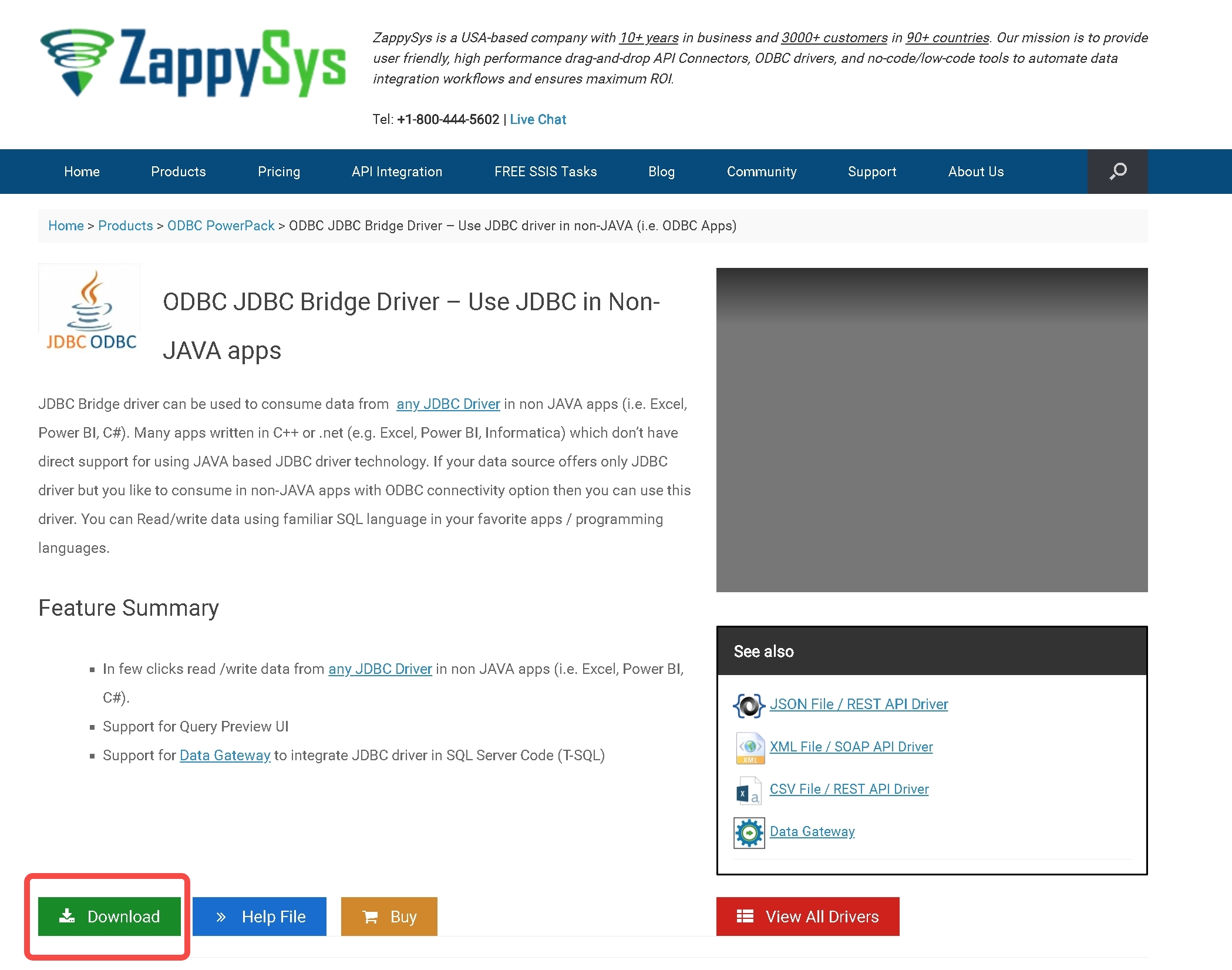
+1. **Download Zappy-Sys ODBC-JDBC Bridge**:
+ Enter the
https://zappysys.com/products/odbc-powerpack/odbc-jdbc-bridge-driver/ website,
and click "download".
+
+
+
+2. **Prepare IoTDB**: Set up IoTDB cluster, and write a row of data
arbitrarily.
+ ```sql
+ IoTDB > insert into root.ln.wf02.wt02(timestamp,status) values(1,true)
+ ```
+
+3. **Deploy and Test the Bridge**:
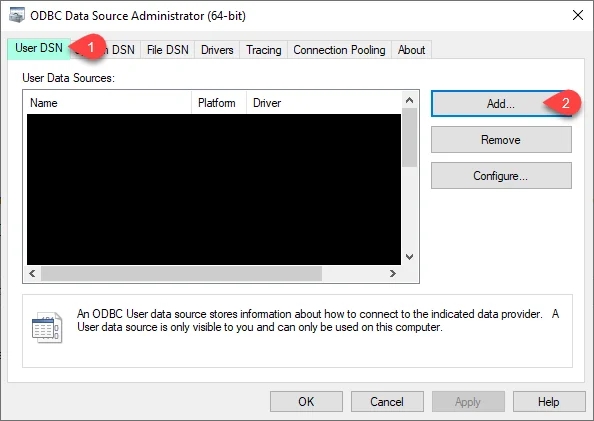
+ 1. Open ODBC Data Sources(32/64 bit), depending on the bits of Windows.
One possible position is `C:\ProgramData\Microsoft\Windows\Start
Menu\Programs\Administrative Tools`.
+
+ 
+
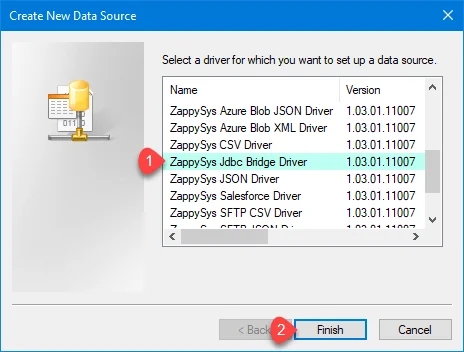
+ 2. Click on "add" and select ZappySys JDBC Bridge.
+
+
+
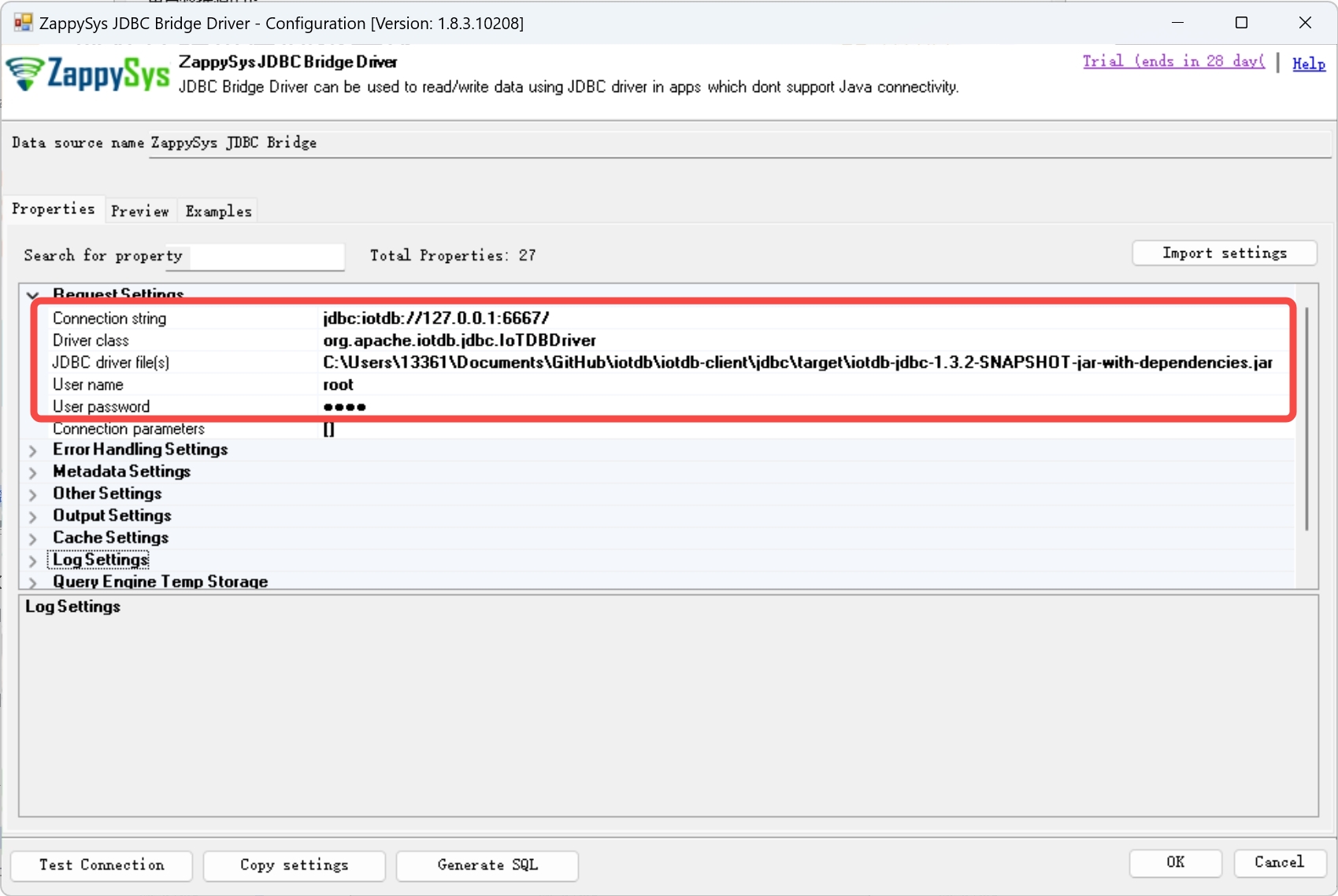
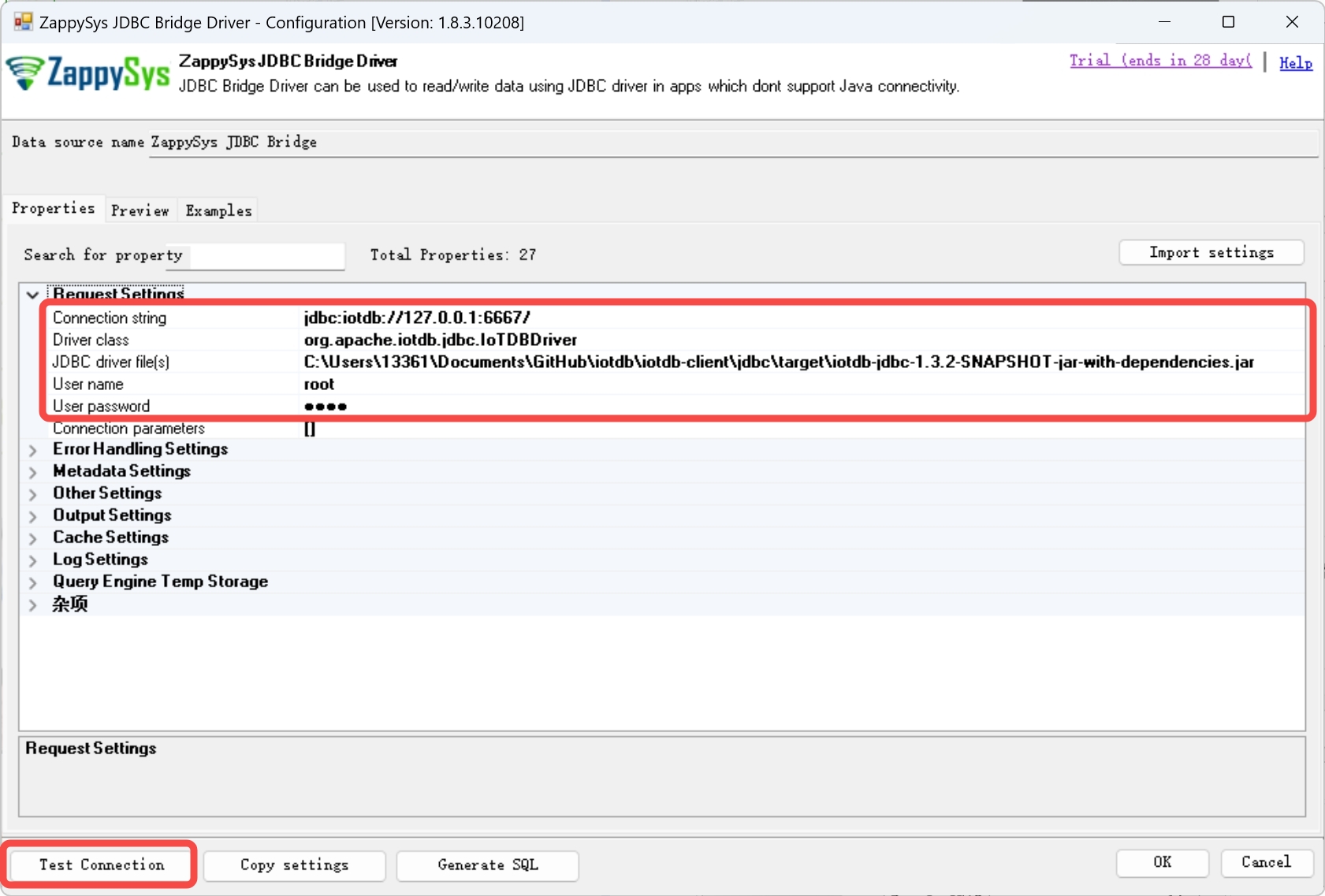
+ 3. Fill in the following settings:
+
+ | Property | Content
| Example
|
+
|---------------------|-----------------------------------------------------------|--------------------------------------------------------------------------------------------------------------------|
+ | Connection String | jdbc:iotdb://\<The IP of IoTDB>:\<The rpc port
of IoTDB>/ | jdbc:iotdb://127.0.0.1:6667/
|
+ | Driver Class | org.apache.iotdb.jdbc.IoTDBDriver
| org.apache.iotdb.jdbc.IoTDBDriver
|
+ | JDBC driver file(s) | The path of IoTDB JDBC jar-with-dependencies
|
C:\Users\13361\Documents\GitHub\iotdb\iotdb-client\jdbc\target\iotdb-jdbc-1.3.2-SNAPSHOT-jar-with-dependencies.jar
|
+ | User name | IoTDB's user name
| root
|
+ | User password | IoTDB's password
| root
|
+
+
+
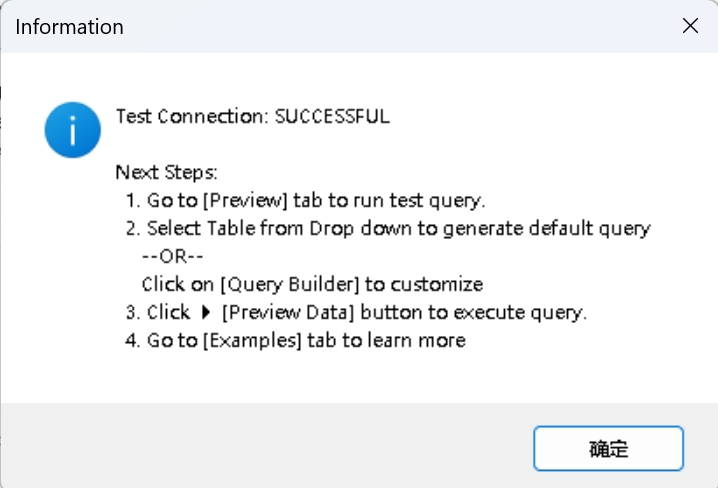
+ 4. Click on "Test Connection" button, and a "Test Connection: SUCCESSFUL"
should appear.
+
+
+
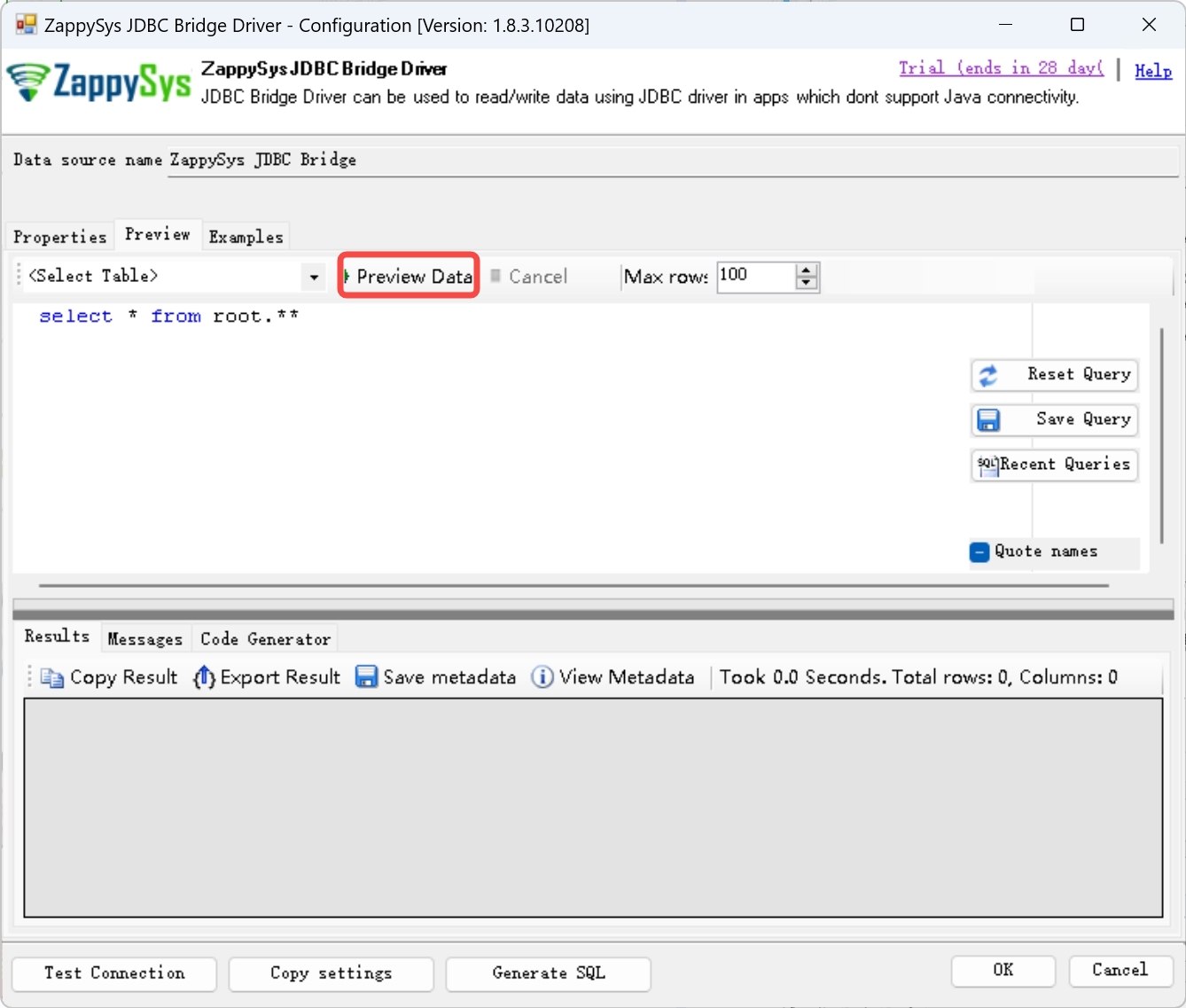
+ 5. Click the "Preview" button above, and replace the original query text
with `select * from root.**`, then click "Preview Data", and the query result
should correctly.
+
+ 
+
+4. **Operate IoTDB's data with ODBC**: After correct deployment, you can use
Microsoft's ODBC library to operate IoTDB's data. Here's an example written in
C#:
+ ```C#
+ using System.Data.Odbc;
+
+ // Get a connection
+ var dbConnection = new OdbcConnection("DSN=ZappySys JDBC Bridge");
+ dbConnection.Open();
+
+ // Execute the write commands to prepare data
+ var dbCommand = dbConnection.CreateCommand();
+ dbCommand.CommandText = "insert into
root.Keller.Flur.Energieversorgung(time, s1) values(1715670861634, 1)";
+ dbCommand.ExecuteNonQuery();
+ dbCommand.CommandText = "insert into
root.Keller.Flur.Energieversorgung(time, s2) values(1715670861634, true)";
+ dbCommand.ExecuteNonQuery();
+ dbCommand.CommandText = "insert into
root.Keller.Flur.Energieversorgung(time, s3) values(1715670861634, 3.1)";
+ dbCommand.ExecuteNonQuery();
+
+ // Execute the read command
+ dbCommand.CommandText = "SELECT * FROM root.Keller.Flur.Energieversorgung";
+ var dbReader = dbCommand.ExecuteReader();
+
+ // Write the output header
+ var fCount = dbReader.FieldCount;
+ Console.Write(":");
+ for(var i = 0; i < fCount; i++)
+ {
+ var fName = dbReader.GetName(i);
+ Console.Write(fName + ":");
+ }
+ Console.WriteLine();
+
+ // Output the content
+ while (dbReader.Read())
+ {
+ Console.Write(":");
+ for(var i = 0; i < fCount; i++)
+ {
+ var fieldType = dbReader.GetFieldType(i);
+ switch (fieldType.Name)
+ {
+ case "DateTime":
+ var dateTime = dbReader.GetInt64(i);
+ Console.Write(dateTime + ":");
+ break;
+ case "Double":
+ if (dbReader.IsDBNull(i))
+ {
+ Console.Write("null:");
+ }
+ else
+ {
+ var fValue = dbReader.GetDouble(i);
+ Console.Write(fValue + ":");
+ }
+ break;
+ default:
+ Console.Write(fieldType.Name + ":");
+ break;
+ }
+ }
+ Console.WriteLine();
+ }
+
+ // Shut down gracefully
+ dbReader.Close();
+ dbCommand.Dispose();
+ dbConnection.Close();
+ ```
+ This program can write data into IoTDB, and query the data we have just
written.
diff --git a/src/UserGuide/Master/User-Manual/Streaming_apache.md
b/src/UserGuide/Master/User-Manual/Streaming_apache.md
index fbbd13bb..35795720 100644
--- a/src/UserGuide/Master/User-Manual/Streaming_apache.md
+++ b/src/UserGuide/Master/User-Manual/Streaming_apache.md
@@ -7,9 +7,9 @@
to you under the Apache License, Version 2.0 (the
"License"); you may not use this file except in compliance
with the License. You may obtain a copy of the License at
-
+
http://www.apache.org/licenses/LICENSE-2.0
-
+
Unless required by applicable law or agreed to in writing,
software distributed under the License is distributed on an
"AS IS" BASIS, WITHOUT WARRANTIES OR CONDITIONS OF ANY
@@ -187,7 +187,7 @@ public interface PipeSource extends PipePlugin {
* @throws Exception the user can throw errors if necessary
*/
void customize(PipeParameters parameters, PipeSourceRuntimeConfiguration
configuration)
- throws Exception;
+ throws Exception;
/**
* Start the source. After this method is called, events should be ready to
be supplied by
@@ -272,7 +272,7 @@ public interface PipeProcessor extends PipePlugin {
* @throws Exception the user can throw errors if necessary
*/
void customize(PipeParameters parameters, PipeProcessorRuntimeConfiguration
configuration)
- throws Exception;
+ throws Exception;
/**
* This method is called to process the TabletInsertionEvent.
@@ -282,7 +282,7 @@ public interface PipeProcessor extends PipePlugin {
* @throws Exception the user can throw errors if necessary
*/
void process(TabletInsertionEvent tabletInsertionEvent, EventCollector
eventCollector)
- throws Exception;
+ throws Exception;
/**
* This method is called to process the TsFileInsertionEvent.
@@ -292,9 +292,9 @@ public interface PipeProcessor extends PipePlugin {
* @throws Exception the user can throw errors if necessary
*/
default void process(TsFileInsertionEvent tsFileInsertionEvent,
EventCollector eventCollector)
- throws Exception {
+ throws Exception {
for (final TabletInsertionEvent tabletInsertionEvent :
- tsFileInsertionEvent.toTabletInsertionEvents()) {
+ tsFileInsertionEvent.toTabletInsertionEvents()) {
process(tabletInsertionEvent, eventCollector);
}
}
@@ -377,7 +377,7 @@ public interface PipeSink extends PipePlugin {
* @throws Exception the user can throw errors if necessary
*/
void customize(PipeParameters parameters, PipeSinkRuntimeConfiguration
configuration)
- throws Exception;
+ throws Exception;
/**
* This method is used to create a connection with sink. This method will be
called after the
@@ -415,7 +415,7 @@ public interface PipeSink extends PipePlugin {
default void transfer(TsFileInsertionEvent tsFileInsertionEvent) throws
Exception {
try {
for (final TabletInsertionEvent tabletInsertionEvent :
- tsFileInsertionEvent.toTabletInsertionEvents()) {
+ tsFileInsertionEvent.toTabletInsertionEvents()) {
transfer(tabletInsertionEvent);
}
} finally {
@@ -702,11 +702,11 @@ WHERE SINK USED BY <PipeId>
A stream processing task status can transition through several states during
the lifecycle of a data synchronization pipe:
- **RUNNING:** The pipe is actively processing data
- - After the successful creation of a pipe, its initial state is set to
RUNNING (V1.3.1+)
+ - After the successful creation of a pipe, its initial state is set to
RUNNING (V1.3.1+)
- **STOPPED:** The pipe is in a stopped state. It can have the following
possibilities:
- - After the successful creation of a pipe, its initial state is set to
STOPPED (V1.3.0)
- - The user manually pauses a pipe that is in normal running state,
transitioning its status from RUNNING to STOPPED
- - If a pipe encounters an unrecoverable error during execution, its status
automatically changes from RUNNING to STOPPED.
+ - After the successful creation of a pipe, its initial state is set to
RUNNING (V1.3.0)
+ - The user manually pauses a pipe that is in normal running state,
transitioning its status from RUNNING to STOPPED
+ - If a pipe encounters an unrecoverable error during execution, its status
automatically changes from RUNNING to STOPPED.
- **DROPPED:** The pipe is permanently deleted
The following diagram illustrates the different states and their transitions:
diff --git a/src/UserGuide/latest/API/Programming-ODBC.md
b/src/UserGuide/latest/API/Programming-ODBC.md
new file mode 100644
index 00000000..12af3d81
--- /dev/null
+++ b/src/UserGuide/latest/API/Programming-ODBC.md
@@ -0,0 +1,146 @@
+<!--
+
+ Licensed to the Apache Software Foundation (ASF) under one
+ or more contributor license agreements. See the NOTICE file
+ distributed with this work for additional information
+ regarding copyright ownership. The ASF licenses this file
+ to you under the Apache License, Version 2.0 (the
+ "License"); you may not use this file except in compliance
+ with the License. You may obtain a copy of the License at
+
+ http://www.apache.org/licenses/LICENSE-2.0
+
+ Unless required by applicable law or agreed to in writing,
+ software distributed under the License is distributed on an
+ "AS IS" BASIS, WITHOUT WARRANTIES OR CONDITIONS OF ANY
+ KIND, either express or implied. See the License for the
+ specific language governing permissions and limitations
+ under the License.
+
+-->
+
+# ODBC
+With IoTDB JDBC, IoTDB can be accessed using the ODBC-JDBC bridge.
+
+## Dependencies
+* IoTDB-JDBC's jar-with-dependency package
+* ODBC-JDBC bridge (e.g. ZappySys JDBC Bridge)
+
+## Deployment
+### Preparing JDBC package
+Download the source code of IoTDB, and execute the following command in root
directory:
+```shell
+mvn clean package -pl iotdb-client/jdbc -am -DskipTests -P
get-jar-with-dependencies
+```
+Then, you can see the output
`iotdb-jdbc-1.3.2-SNAPSHOT-jar-with-dependencies.jar` under
`iotdb-client/jdbc/target` directory.
+
+### Preparing ODBC-JDBC Bridge
+*Note: Here we only provide one kind of ODBC-JDBC bridge as the instance.
Readers can use other ODBC-JDBC bridges to access IoTDB with the IOTDB-JDBC.*
+1. **Download Zappy-Sys ODBC-JDBC Bridge**:
+ Enter the
https://zappysys.com/products/odbc-powerpack/odbc-jdbc-bridge-driver/ website,
and click "download".
+
+

+
+2. **Prepare IoTDB**: Set up IoTDB cluster, and write a row of data
arbitrarily.
+ ```sql
+ IoTDB > insert into root.ln.wf02.wt02(timestamp,status) values(1,true)
+ ```
+
+3. **Deploy and Test the Bridge**:
+ 1. Open ODBC Data Sources(32/64 bit), depending on the bits of Windows.
One possible position is `C:\ProgramData\Microsoft\Windows\Start
Menu\Programs\Administrative Tools`.
+
+ 
+
+ 2. Click on "add" and select ZappySys JDBC Bridge.
+
+

+
+ 3. Fill in the following settings:
+
+ | Property | Content
| Example
|
+
|---------------------|-----------------------------------------------------------|--------------------------------------------------------------------------------------------------------------------|
+ | Connection String | jdbc:iotdb://\<The IP of IoTDB>:\<The rpc port
of IoTDB>/ | jdbc:iotdb://127.0.0.1:6667/
|
+ | Driver Class | org.apache.iotdb.jdbc.IoTDBDriver
| org.apache.iotdb.jdbc.IoTDBDriver
|
+ | JDBC driver file(s) | The path of IoTDB JDBC jar-with-dependencies
|
C:\Users\13361\Documents\GitHub\iotdb\iotdb-client\jdbc\target\iotdb-jdbc-1.3.2-SNAPSHOT-jar-with-dependencies.jar
|
+ | User name | IoTDB's user name
| root
|
+ | User password | IoTDB's password
| root
|
+
+

+
+ 4. Click on "Test Connection" button, and a "Test Connection: SUCCESSFUL"
should appear.
+
+

+
+ 5. Click the "Preview" button above, and replace the original query text
with `select * from root.**`, then click "Preview Data", and the query result
should correctly.
+
+ 
+
+4. **Operate IoTDB's data with ODBC**: After correct deployment, you can use
Microsoft's ODBC library to operate IoTDB's data. Here's an example written in
C#:
+ ```C#
+ using System.Data.Odbc;
+
+ // Get a connection
+ var dbConnection = new OdbcConnection("DSN=ZappySys JDBC Bridge");
+ dbConnection.Open();
+
+ // Execute the write commands to prepare data
+ var dbCommand = dbConnection.CreateCommand();
+ dbCommand.CommandText = "insert into
root.Keller.Flur.Energieversorgung(time, s1) values(1715670861634, 1)";
+ dbCommand.ExecuteNonQuery();
+ dbCommand.CommandText = "insert into
root.Keller.Flur.Energieversorgung(time, s2) values(1715670861634, true)";
+ dbCommand.ExecuteNonQuery();
+ dbCommand.CommandText = "insert into
root.Keller.Flur.Energieversorgung(time, s3) values(1715670861634, 3.1)";
+ dbCommand.ExecuteNonQuery();
+
+ // Execute the read command
+ dbCommand.CommandText = "SELECT * FROM root.Keller.Flur.Energieversorgung";
+ var dbReader = dbCommand.ExecuteReader();
+
+ // Write the output header
+ var fCount = dbReader.FieldCount;
+ Console.Write(":");
+ for(var i = 0; i < fCount; i++)
+ {
+ var fName = dbReader.GetName(i);
+ Console.Write(fName + ":");
+ }
+ Console.WriteLine();
+
+ // Output the content
+ while (dbReader.Read())
+ {
+ Console.Write(":");
+ for(var i = 0; i < fCount; i++)
+ {
+ var fieldType = dbReader.GetFieldType(i);
+ switch (fieldType.Name)
+ {
+ case "DateTime":
+ var dateTime = dbReader.GetInt64(i);
+ Console.Write(dateTime + ":");
+ break;
+ case "Double":
+ if (dbReader.IsDBNull(i))
+ {
+ Console.Write("null:");
+ }
+ else
+ {
+ var fValue = dbReader.GetDouble(i);
+ Console.Write(fValue + ":");
+ }
+ break;
+ default:
+ Console.Write(fieldType.Name + ":");
+ break;
+ }
+ }
+ Console.WriteLine();
+ }
+
+ // Shut down gracefully
+ dbReader.Close();
+ dbCommand.Dispose();
+ dbConnection.Close();
+ ```
+ This program can write data into IoTDB, and query the data we have just
written.
diff --git a/src/zh/UserGuide/Master/API/Programming-ODBC.md
b/src/zh/UserGuide/Master/API/Programming-ODBC.md
new file mode 100644
index 00000000..df78dd58
--- /dev/null
+++ b/src/zh/UserGuide/Master/API/Programming-ODBC.md
@@ -0,0 +1,146 @@
+<!--
+
+ Licensed to the Apache Software Foundation (ASF) under one
+ or more contributor license agreements. See the NOTICE file
+ distributed with this work for additional information
+ regarding copyright ownership. The ASF licenses this file
+ to you under the Apache License, Version 2.0 (the
+ "License"); you may not use this file except in compliance
+ with the License. You may obtain a copy of the License at
+
+ http://www.apache.org/licenses/LICENSE-2.0
+
+ Unless required by applicable law or agreed to in writing,
+ software distributed under the License is distributed on an
+ "AS IS" BASIS, WITHOUT WARRANTIES OR CONDITIONS OF ANY
+ KIND, either express or implied. See the License for the
+ specific language governing permissions and limitations
+ under the License.
+
+-->
+
+# ODBC
+在 JDBC 插件的基础上,IoTDB 可以通过 ODBC-JDBC 桥来支持通过 ODBC 对数据库的操作。
+
+## 依赖
+* 带依赖打包的 IoTDB JDBC 插件包
+* ODBC-JDBC 桥(如 Zappy-Sys)
+
+## 部署方法
+### 准备 JDBC 插件包
+下载 IoTDB 源码,在根目录下执行下面的命令:
+```shell
+mvn clean package -pl iotdb-client/jdbc -am -DskipTests -P
get-jar-with-dependencies
+```
+之后,就可以在`iotdb-client/jdbc/target`目录下看到`iotdb-jdbc-1.3.2-SNAPSHOT-jar-with-dependencies.jar`文件。
+
+### 准备 ODBC-JDBC 桥
+*注意: 这里给出的仅仅是一种 ODBC-JDBC 桥,仅作示例。读者可以自行寻找其他的 ODBC-JDBC 桥来对接 IoTDB 的 JDBC 插件。*
+1. **下载 Zappy-Sys ODBC-JDBC 桥插件**:
+ 进入 https://zappysys.com/products/odbc-powerpack/odbc-jdbc-bridge-driver/
网站,点击下载按钮并直接安装。
+
+

+
+2. **准备 IoTDB**:打开 IoTDB 集群,并任意写入一条数据。
+ ```sql
+ IoTDB > insert into root.ln.wf02.wt02(timestamp,status) values(1,true)
+ ```
+
+3. **部署及调试插件**:
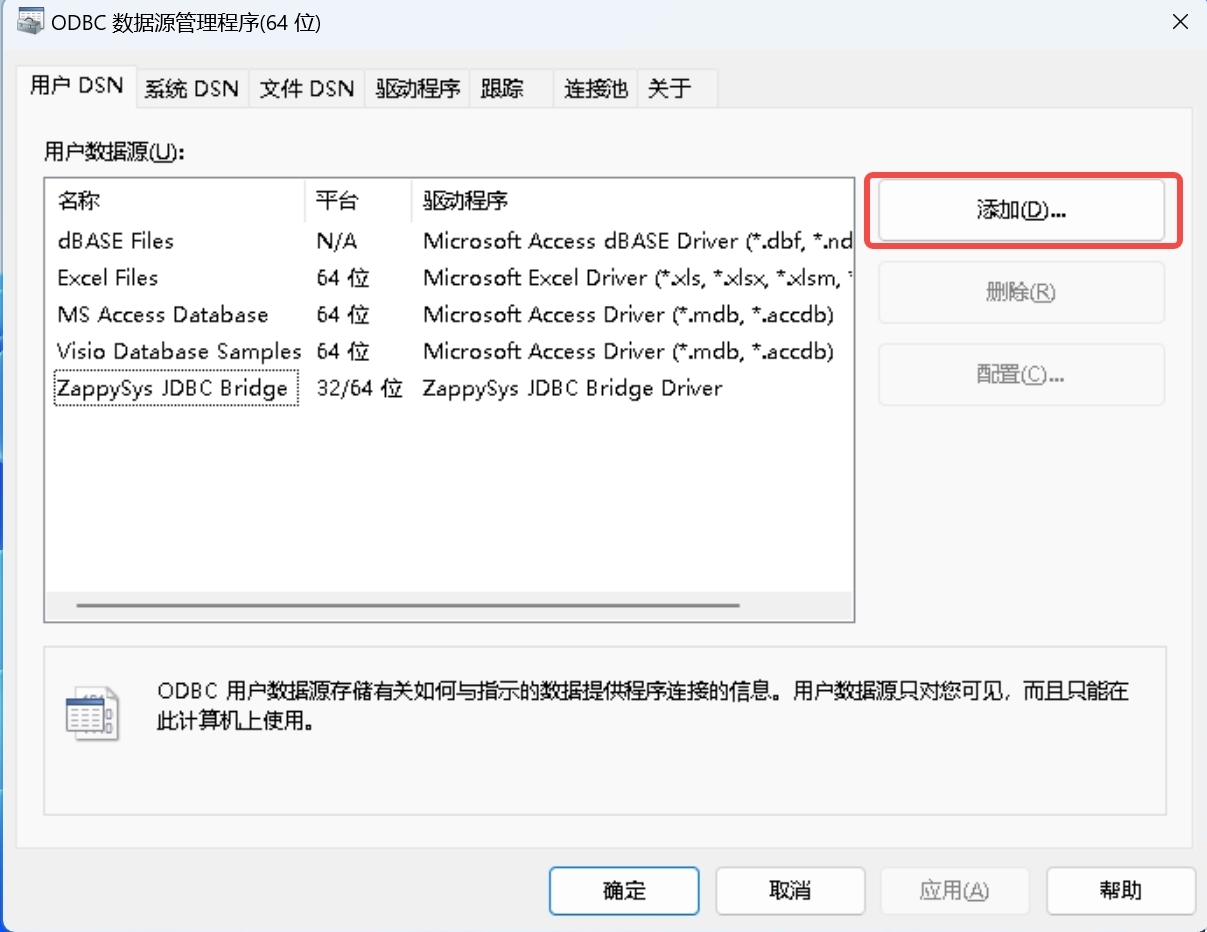
+ 1. 打开 ODBC 数据源 32/64 位,取决于 Windows 的位数,一个示例的位置是
`C:\ProgramData\Microsoft\Windows\Start Menu\Programs\Administrative Tools`。
+
+ 
+
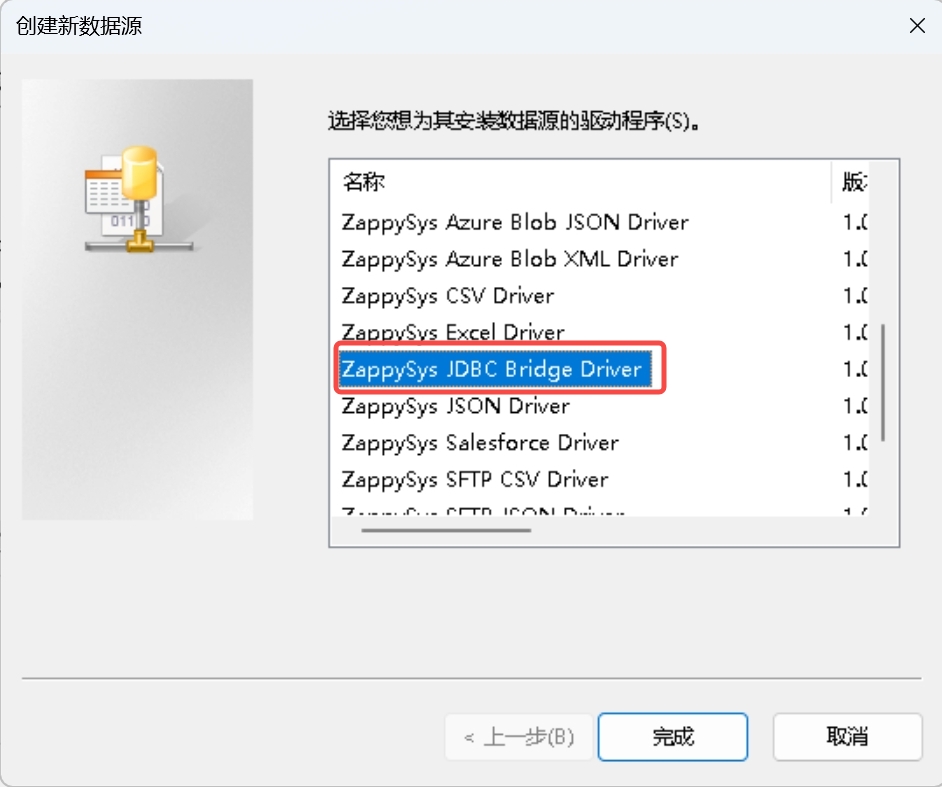
+ 2. 点击添加,选择 ZappySys JDBC Bridge。
+
+
+
+ 3. 填写如下配置:
+
+ | 配置项 | 填写内容 |
示例
|
+
|---------------------|-----------------------------------------------|--------------------------------------------------------------------------------------------------------------------|
+ | Connection String | jdbc:iotdb://<IoTDB 的 IP>:<IoTDB 的 rpc port>/ |
jdbc:iotdb://127.0.0.1:6667/
|
+ | Driver Class | org.apache.iotdb.jdbc.IoTDBDriver |
org.apache.iotdb.jdbc.IoTDBDriver
|
+ | JDBC driver file(s) | IoTDB JDBC jar-with-dependencies 插件路径 |
C:\Users\13361\Documents\GitHub\iotdb\iotdb-client\jdbc\target\iotdb-jdbc-1.3.2-SNAPSHOT-jar-with-dependencies.jar
|
+ | User name | IoTDB 的用户名 |
root
|
+ | User password | IoTDB 的密码 |
root
|
+
+

+
+ 4. 点击 Test Connection 按钮,应该显示连接成功。
+
+
+
+ 5. 点击上方的 Preview, 将查询文本换为 `select * from root.**`,点击 Preview
Data,应该正确显示查询结果。
+
+ 
+
+4. **使用 ODBC 操作数据**:正确部署后,就可以使用 Windows 的 ODBC 库,对 IoTDB 的数据进行操作。 这里给出 C#
语言的代码示例:
+ ```C#
+ using System.Data.Odbc;
+
+ // Get a connection
+ var dbConnection = new OdbcConnection("DSN=ZappySys JDBC Bridge");
+ dbConnection.Open();
+
+ // Execute the write commands to prepare data
+ var dbCommand = dbConnection.CreateCommand();
+ dbCommand.CommandText = "insert into
root.Keller.Flur.Energieversorgung(time, s1) values(1715670861634, 1)";
+ dbCommand.ExecuteNonQuery();
+ dbCommand.CommandText = "insert into
root.Keller.Flur.Energieversorgung(time, s2) values(1715670861634, true)";
+ dbCommand.ExecuteNonQuery();
+ dbCommand.CommandText = "insert into
root.Keller.Flur.Energieversorgung(time, s3) values(1715670861634, 3.1)";
+ dbCommand.ExecuteNonQuery();
+
+ // Execute the read command
+ dbCommand.CommandText = "SELECT * FROM root.Keller.Flur.Energieversorgung";
+ var dbReader = dbCommand.ExecuteReader();
+
+ // Write the output header
+ var fCount = dbReader.FieldCount;
+ Console.Write(":");
+ for(var i = 0; i < fCount; i++)
+ {
+ var fName = dbReader.GetName(i);
+ Console.Write(fName + ":");
+ }
+ Console.WriteLine();
+
+ // Output the content
+ while (dbReader.Read())
+ {
+ Console.Write(":");
+ for(var i = 0; i < fCount; i++)
+ {
+ var fieldType = dbReader.GetFieldType(i);
+ switch (fieldType.Name)
+ {
+ case "DateTime":
+ var dateTime = dbReader.GetInt64(i);
+ Console.Write(dateTime + ":");
+ break;
+ case "Double":
+ if (dbReader.IsDBNull(i))
+ {
+ Console.Write("null:");
+ }
+ else
+ {
+ var fValue = dbReader.GetDouble(i);
+ Console.Write(fValue + ":");
+ }
+ break;
+ default:
+ Console.Write(fieldType.Name + ":");
+ break;
+ }
+ }
+ Console.WriteLine();
+ }
+
+ // Shut down gracefully
+ dbReader.Close();
+ dbCommand.Dispose();
+ dbConnection.Close();
+ ```
+ 运行该程序可以向 IoTDB 内写入数据,并且查询并打印写入的数据。
diff --git a/src/zh/UserGuide/latest/API/Programming-ODBC.md
b/src/zh/UserGuide/latest/API/Programming-ODBC.md
new file mode 100644
index 00000000..df78dd58
--- /dev/null
+++ b/src/zh/UserGuide/latest/API/Programming-ODBC.md
@@ -0,0 +1,146 @@
+<!--
+
+ Licensed to the Apache Software Foundation (ASF) under one
+ or more contributor license agreements. See the NOTICE file
+ distributed with this work for additional information
+ regarding copyright ownership. The ASF licenses this file
+ to you under the Apache License, Version 2.0 (the
+ "License"); you may not use this file except in compliance
+ with the License. You may obtain a copy of the License at
+
+ http://www.apache.org/licenses/LICENSE-2.0
+
+ Unless required by applicable law or agreed to in writing,
+ software distributed under the License is distributed on an
+ "AS IS" BASIS, WITHOUT WARRANTIES OR CONDITIONS OF ANY
+ KIND, either express or implied. See the License for the
+ specific language governing permissions and limitations
+ under the License.
+
+-->
+
+# ODBC
+在 JDBC 插件的基础上,IoTDB 可以通过 ODBC-JDBC 桥来支持通过 ODBC 对数据库的操作。
+
+## 依赖
+* 带依赖打包的 IoTDB JDBC 插件包
+* ODBC-JDBC 桥(如 Zappy-Sys)
+
+## 部署方法
+### 准备 JDBC 插件包
+下载 IoTDB 源码,在根目录下执行下面的命令:
+```shell
+mvn clean package -pl iotdb-client/jdbc -am -DskipTests -P
get-jar-with-dependencies
+```
+之后,就可以在`iotdb-client/jdbc/target`目录下看到`iotdb-jdbc-1.3.2-SNAPSHOT-jar-with-dependencies.jar`文件。
+
+### 准备 ODBC-JDBC 桥
+*注意: 这里给出的仅仅是一种 ODBC-JDBC 桥,仅作示例。读者可以自行寻找其他的 ODBC-JDBC 桥来对接 IoTDB 的 JDBC 插件。*
+1. **下载 Zappy-Sys ODBC-JDBC 桥插件**:
+ 进入 https://zappysys.com/products/odbc-powerpack/odbc-jdbc-bridge-driver/
网站,点击下载按钮并直接安装。
+
+

+
+2. **准备 IoTDB**:打开 IoTDB 集群,并任意写入一条数据。
+ ```sql
+ IoTDB > insert into root.ln.wf02.wt02(timestamp,status) values(1,true)
+ ```
+
+3. **部署及调试插件**:
+ 1. 打开 ODBC 数据源 32/64 位,取决于 Windows 的位数,一个示例的位置是
`C:\ProgramData\Microsoft\Windows\Start Menu\Programs\Administrative Tools`。
+
+ 
+
+ 2. 点击添加,选择 ZappySys JDBC Bridge。
+
+

+
+ 3. 填写如下配置:
+
+ | 配置项 | 填写内容 |
示例
|
+
|---------------------|-----------------------------------------------|--------------------------------------------------------------------------------------------------------------------|
+ | Connection String | jdbc:iotdb://<IoTDB 的 IP>:<IoTDB 的 rpc port>/ |
jdbc:iotdb://127.0.0.1:6667/
|
+ | Driver Class | org.apache.iotdb.jdbc.IoTDBDriver |
org.apache.iotdb.jdbc.IoTDBDriver
|
+ | JDBC driver file(s) | IoTDB JDBC jar-with-dependencies 插件路径 |
C:\Users\13361\Documents\GitHub\iotdb\iotdb-client\jdbc\target\iotdb-jdbc-1.3.2-SNAPSHOT-jar-with-dependencies.jar
|
+ | User name | IoTDB 的用户名 |
root
|
+ | User password | IoTDB 的密码 |
root
|
+
+

+
+ 4. 点击 Test Connection 按钮,应该显示连接成功。
+
+

+
+ 5. 点击上方的 Preview, 将查询文本换为 `select * from root.**`,点击 Preview
Data,应该正确显示查询结果。
+
+ 
+
+4. **使用 ODBC 操作数据**:正确部署后,就可以使用 Windows 的 ODBC 库,对 IoTDB 的数据进行操作。 这里给出 C#
语言的代码示例:
+ ```C#
+ using System.Data.Odbc;
+
+ // Get a connection
+ var dbConnection = new OdbcConnection("DSN=ZappySys JDBC Bridge");
+ dbConnection.Open();
+
+ // Execute the write commands to prepare data
+ var dbCommand = dbConnection.CreateCommand();
+ dbCommand.CommandText = "insert into
root.Keller.Flur.Energieversorgung(time, s1) values(1715670861634, 1)";
+ dbCommand.ExecuteNonQuery();
+ dbCommand.CommandText = "insert into
root.Keller.Flur.Energieversorgung(time, s2) values(1715670861634, true)";
+ dbCommand.ExecuteNonQuery();
+ dbCommand.CommandText = "insert into
root.Keller.Flur.Energieversorgung(time, s3) values(1715670861634, 3.1)";
+ dbCommand.ExecuteNonQuery();
+
+ // Execute the read command
+ dbCommand.CommandText = "SELECT * FROM root.Keller.Flur.Energieversorgung";
+ var dbReader = dbCommand.ExecuteReader();
+
+ // Write the output header
+ var fCount = dbReader.FieldCount;
+ Console.Write(":");
+ for(var i = 0; i < fCount; i++)
+ {
+ var fName = dbReader.GetName(i);
+ Console.Write(fName + ":");
+ }
+ Console.WriteLine();
+
+ // Output the content
+ while (dbReader.Read())
+ {
+ Console.Write(":");
+ for(var i = 0; i < fCount; i++)
+ {
+ var fieldType = dbReader.GetFieldType(i);
+ switch (fieldType.Name)
+ {
+ case "DateTime":
+ var dateTime = dbReader.GetInt64(i);
+ Console.Write(dateTime + ":");
+ break;
+ case "Double":
+ if (dbReader.IsDBNull(i))
+ {
+ Console.Write("null:");
+ }
+ else
+ {
+ var fValue = dbReader.GetDouble(i);
+ Console.Write(fValue + ":");
+ }
+ break;
+ default:
+ Console.Write(fieldType.Name + ":");
+ break;
+ }
+ }
+ Console.WriteLine();
+ }
+
+ // Shut down gracefully
+ dbReader.Close();
+ dbCommand.Dispose();
+ dbConnection.Close();
+ ```
+ 运行该程序可以向 IoTDB 内写入数据,并且查询并打印写入的数据。









